Door Triggers 
Lesson 2
Lesson Goals 
 Understand importance of events in computer games 
 Know the triggers available within chosen software 
 Be able to use a range of appropriate door triggers 
#trigger 
#door
Marking 
Marks Learning Objective 
1 – 5 
Pass 
Limited range of basic interactions to aid game-play 
experience. The interactions have limited appropriateness 
to the client brief. 
6 – 9 
Merit 
Range of appropriate interactions with some advanced, to 
enhance game-play experience. The interactions are mostly 
appropriate to the client brief. 
10 – 12 
Distinction 
Wide range of appropriate interactions which effectively 
enhance game-play experience. The interactions are 
consistently appropriate to the client brief. 
#trigger 
#door
Triggers 
Know range of triggers available 
Be able to use door triggers 
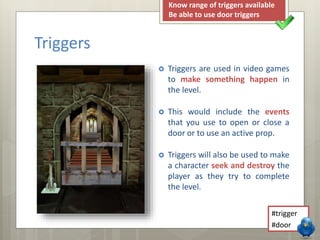
 Triggers are used in video games 
to make something happen in 
the level. 
 This would include the events 
that you use to open or close a 
door or to use an active prop. 
 Triggers will also be used to make 
a character seek and destroy the 
player as they try to complete 
the level. 
#trigger 
#door
Know range of triggers available 
Be able to use door triggers 
Trigger 
What triggers can be used in your software? 
#trigger 
#door
Triggers 
Know range of triggers available 
Be able to use door triggers 
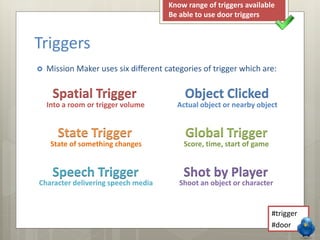
 Mission Maker uses six different categories of trigger which are: 
Spatial Trigger Object Clicked 
Into a room or trigger volume Actual object or nearby object 
State Trigger Global Trigger 
State of something changes Score, time, start of game 
Speech Trigger Shot by Player 
Character delivering speech media Shoot an object or character 
#trigger 
#door
Triggers 
Know range of triggers available 
Be able to use door triggers 
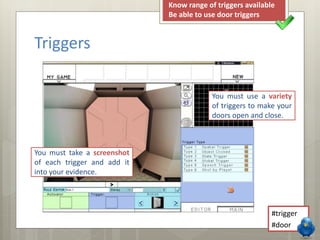
You must use a variety 
of triggers to make your 
doors open and close. 
#trigger 
#door 
You must take a screenshot 
of each trigger and add it 
into your evidence.
Your Task 
Know range of triggers available 
Be able to use door triggers 
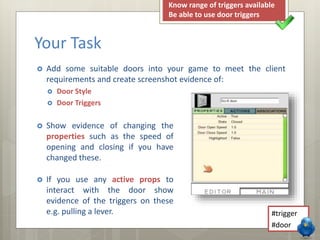
 Add some suitable doors into your game to meet the client 
requirements and create screenshot evidence of: 
 Door Style 
 Door Triggers 
 Show evidence of changing the 
properties such as the speed of 
opening and closing if you have 
changed these. 
 If you use any active props to 
interact with the door show 
evidence of the triggers on these 
e.g. pulling a lever. 
#trigger 
#door
Keywords 
 Door 
 Trigger 
Know range of triggers available 
Be able to use door triggers 
 Asset used between rooms which can 
have open or close rules applied 
 Something that causes an event to take 
place within a game. 
#trigger 
#door

LO3 - Lesson 2 - Door Triggers

  • 1.
  • 2.
    Lesson Goals Understand importance of events in computer games  Know the triggers available within chosen software  Be able to use a range of appropriate door triggers #trigger #door
  • 3.
    Marking Marks LearningObjective 1 – 5 Pass Limited range of basic interactions to aid game-play experience. The interactions have limited appropriateness to the client brief. 6 – 9 Merit Range of appropriate interactions with some advanced, to enhance game-play experience. The interactions are mostly appropriate to the client brief. 10 – 12 Distinction Wide range of appropriate interactions which effectively enhance game-play experience. The interactions are consistently appropriate to the client brief. #trigger #door
  • 4.
    Triggers Know rangeof triggers available Be able to use door triggers  Triggers are used in video games to make something happen in the level.  This would include the events that you use to open or close a door or to use an active prop.  Triggers will also be used to make a character seek and destroy the player as they try to complete the level. #trigger #door
  • 5.
    Know range oftriggers available Be able to use door triggers Trigger What triggers can be used in your software? #trigger #door
  • 6.
    Triggers Know rangeof triggers available Be able to use door triggers  Mission Maker uses six different categories of trigger which are: Spatial Trigger Object Clicked Into a room or trigger volume Actual object or nearby object State Trigger Global Trigger State of something changes Score, time, start of game Speech Trigger Shot by Player Character delivering speech media Shoot an object or character #trigger #door
  • 7.
    Triggers Know rangeof triggers available Be able to use door triggers You must use a variety of triggers to make your doors open and close. #trigger #door You must take a screenshot of each trigger and add it into your evidence.
  • 8.
    Your Task Knowrange of triggers available Be able to use door triggers  Add some suitable doors into your game to meet the client requirements and create screenshot evidence of:  Door Style  Door Triggers  Show evidence of changing the properties such as the speed of opening and closing if you have changed these.  If you use any active props to interact with the door show evidence of the triggers on these e.g. pulling a lever. #trigger #door
  • 9.
    Keywords  Door  Trigger Know range of triggers available Be able to use door triggers  Asset used between rooms which can have open or close rules applied  Something that causes an event to take place within a game. #trigger #door