Popups 
Lesson 5
Lesson Goals 
 Understand the use of media within video games 
 Know how to import digital media assets into a game 
 Be able to use appropriate media to enhance gameplay 
#popup 
#media
Marking 
Marks Learning Objective 
1 – 5 
Pass 
Import assets into the digital video game, some of which are 
not appropriate. 
6 – 9 
Merit 
Import assets and combine components into the game that 
are mostly appropriate throughout game. 
10 – 12 
Distinction 
Import assets and combine components which are 
consistently appropriate and used effectively throughout 
the game. 
#popup 
#media
Understand use of rules popups 
Be able to use appropriate media 
Instructing Your Player 
Why is it important to provide clear instructions for a player? 
#popup 
#media
Instructions 
Understand use of rules popups 
Be able to use appropriate media 
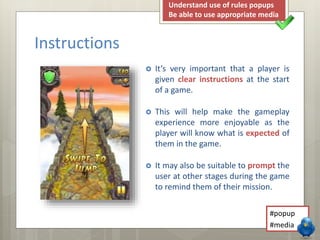
 It’s very important that a player is 
given clear instructions at the start 
of a game. 
 This will help make the gameplay 
experience more enjoyable as the 
player will know what is expected of 
them in the game. 
 It may also be suitable to prompt the 
user at other stages during the game 
to remind them of their mission. 
#popup 
#media
Instructions 
 When providing instructions you must comply with the following: 
 DO explain the key points 
 DO write clear instructions 
 DO check your spellings 
 DO display instructions clearly 
 DO NOT give too much instruction 
 DO NOT write too few instructions 
 DO NOT make your font too small 
 DO NOT make your font too big 
 DO NOT use shortened words 
 DO NOT write nonsense 
Understand use of rules popups 
Be able to use appropriate media 
#popup 
#media
Media Assets 
Understand use of rules popups 
Be able to use appropriate media 
 Various types of media can be used throughout your game: 
Text 
Standard text based popup screens 
Video 
Video instruction displayed on a device 
Audio 
Recording played back during game 
Speech 
Text to speech stored in game library 
#popup 
#media
Your Task 
Understand use of rules popups 
Be able to use appropriate media 
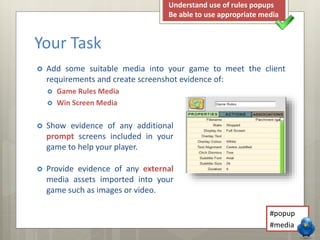
 Add some suitable media into your game to meet the client 
requirements and create screenshot evidence of: 
 Game Rules Media 
 Win Screen Media 
 Show evidence of any additional 
prompt screens included in your 
game to help your player. 
 Provide evidence of any external 
media assets imported into your 
game such as images or video. 
#popup 
#media
Keywords 
 Popup 
 Media 
Understand use of rules popups 
Be able to use appropriate media 
 Information that may appear on a device 
or full screen when playing a game. 
 An asset that can be imported into the 
game such as images, video, audio etc. 
#popup 
#media

LO3 - Lesson 5 - Popups

  • 1.
  • 2.
    Lesson Goals Understand the use of media within video games  Know how to import digital media assets into a game  Be able to use appropriate media to enhance gameplay #popup #media
  • 3.
    Marking Marks LearningObjective 1 – 5 Pass Import assets into the digital video game, some of which are not appropriate. 6 – 9 Merit Import assets and combine components into the game that are mostly appropriate throughout game. 10 – 12 Distinction Import assets and combine components which are consistently appropriate and used effectively throughout the game. #popup #media
  • 4.
    Understand use ofrules popups Be able to use appropriate media Instructing Your Player Why is it important to provide clear instructions for a player? #popup #media
  • 5.
    Instructions Understand useof rules popups Be able to use appropriate media  It’s very important that a player is given clear instructions at the start of a game.  This will help make the gameplay experience more enjoyable as the player will know what is expected of them in the game.  It may also be suitable to prompt the user at other stages during the game to remind them of their mission. #popup #media
  • 6.
    Instructions  Whenproviding instructions you must comply with the following:  DO explain the key points  DO write clear instructions  DO check your spellings  DO display instructions clearly  DO NOT give too much instruction  DO NOT write too few instructions  DO NOT make your font too small  DO NOT make your font too big  DO NOT use shortened words  DO NOT write nonsense Understand use of rules popups Be able to use appropriate media #popup #media
  • 7.
    Media Assets Understanduse of rules popups Be able to use appropriate media  Various types of media can be used throughout your game: Text Standard text based popup screens Video Video instruction displayed on a device Audio Recording played back during game Speech Text to speech stored in game library #popup #media
  • 8.
    Your Task Understanduse of rules popups Be able to use appropriate media  Add some suitable media into your game to meet the client requirements and create screenshot evidence of:  Game Rules Media  Win Screen Media  Show evidence of any additional prompt screens included in your game to help your player.  Provide evidence of any external media assets imported into your game such as images or video. #popup #media
  • 9.
    Keywords  Popup  Media Understand use of rules popups Be able to use appropriate media  Information that may appear on a device or full screen when playing a game.  An asset that can be imported into the game such as images, video, audio etc. #popup #media