Level Map
Lesson 1
 Understand links between planning and creation
 Know how to select appropriate assets for a game
 Be able to create the map for your own game
Lesson Goals
#location
#assets
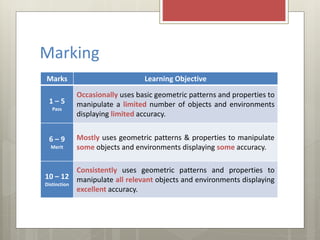
Marking
Marks Learning Objective
1 – 5
Pass
Occasionally uses basic geometric patterns and properties to
manipulate a limited number of objects and environments
displaying limited accuracy.
6 – 9
Merit
Mostly uses geometric patterns & properties to manipulate
some objects and environments displaying some accuracy.
10 – 12
Distinction
Consistently uses geometric patterns and properties to
manipulate all relevant objects and environments displaying
excellent accuracy.
Client Brief
What were the level requirements of your client?
#location
#assets
Know how to select main assets
Be able to create your game map
 The game must be suitable for 9 - 11
year olds, both male and female and
include map pieces and props that fit
into one or two key themes.
 The game must include these features:
 Single Level Map
 1 or 2 Large Rooms
 A few Small Rooms
 4 Doors (Minimum)
Client Brief
Game Spot
 Game Spot have asked you to make a PC game that can be used in
primary schools to encourage more children to create games.
#location
#assets
Know how to select main assets
Be able to create your game map
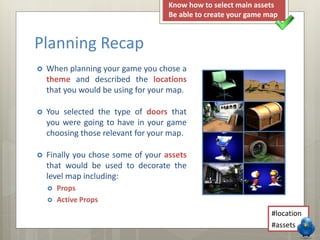
 When planning your game you chose a
theme and described the locations
that you would be using for your map.
 You selected the type of doors that
you were going to have in your game
choosing those relevant for your map.
 Finally you chose some of your assets
that would be used to decorate the
level map including:
 Props
 Active Props
Planning Recap
#location
#assets
Know how to select main assets
Be able to create your game map
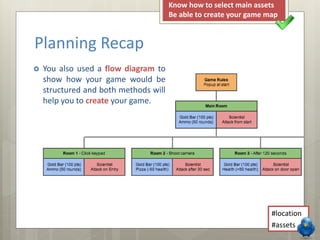
 You also used a flow diagram to
show how your game would be
structured and both methods will
help you to create your game.
Planning Recap
#location
#assets
Know how to select main assets
Be able to create your game map
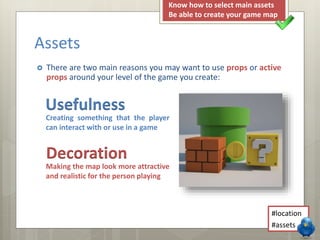
 There are two main reasons you may want to use props or active
props around your level of the game you create:
Assets
Usefulness
Decoration
Creating something that the player
can interact with or use in a game
Making the map look more attractive
and realistic for the person playing
#location
#assets
Know how to select main assets
Be able to create your game map
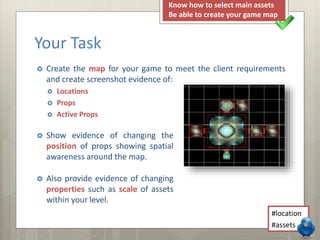
 Create the map for your game to meet the client requirements
and create screenshot evidence of:
 Locations
 Props
 Active Props
Your Task
 Show evidence of changing the
position of props showing spatial
awareness around the map.
 Also provide evidence of changing
properties such as scale of assets
within your level.
#location
#assets
Know how to select main assets
Be able to create your game map
Keywords
 Location
 Assets
 Rooms that are pieced together to create
the map for a computer game level.
 Anything that will be added into your
game e.g. props, characters, pickups etc.
#location
#assets
Know how to select main assets
Be able to create your game map

LO3 - Lesson 1 - Level Map

  • 1.
  • 2.
     Understand linksbetween planning and creation  Know how to select appropriate assets for a game  Be able to create the map for your own game Lesson Goals #location #assets
  • 3.
    Marking Marks Learning Objective 1– 5 Pass Occasionally uses basic geometric patterns and properties to manipulate a limited number of objects and environments displaying limited accuracy. 6 – 9 Merit Mostly uses geometric patterns & properties to manipulate some objects and environments displaying some accuracy. 10 – 12 Distinction Consistently uses geometric patterns and properties to manipulate all relevant objects and environments displaying excellent accuracy.
  • 4.
    Client Brief What werethe level requirements of your client? #location #assets Know how to select main assets Be able to create your game map
  • 5.
     The gamemust be suitable for 9 - 11 year olds, both male and female and include map pieces and props that fit into one or two key themes.  The game must include these features:  Single Level Map  1 or 2 Large Rooms  A few Small Rooms  4 Doors (Minimum) Client Brief Game Spot  Game Spot have asked you to make a PC game that can be used in primary schools to encourage more children to create games. #location #assets Know how to select main assets Be able to create your game map
  • 6.
     When planningyour game you chose a theme and described the locations that you would be using for your map.  You selected the type of doors that you were going to have in your game choosing those relevant for your map.  Finally you chose some of your assets that would be used to decorate the level map including:  Props  Active Props Planning Recap #location #assets Know how to select main assets Be able to create your game map
  • 7.
     You alsoused a flow diagram to show how your game would be structured and both methods will help you to create your game. Planning Recap #location #assets Know how to select main assets Be able to create your game map
  • 8.
     There aretwo main reasons you may want to use props or active props around your level of the game you create: Assets Usefulness Decoration Creating something that the player can interact with or use in a game Making the map look more attractive and realistic for the person playing #location #assets Know how to select main assets Be able to create your game map
  • 9.
     Create themap for your game to meet the client requirements and create screenshot evidence of:  Locations  Props  Active Props Your Task  Show evidence of changing the position of props showing spatial awareness around the map.  Also provide evidence of changing properties such as scale of assets within your level. #location #assets Know how to select main assets Be able to create your game map
  • 10.
    Keywords  Location  Assets Rooms that are pieced together to create the map for a computer game level.  Anything that will be added into your game e.g. props, characters, pickups etc. #location #assets Know how to select main assets Be able to create your game map