Planning – Layout
Lesson 11
Lesson Goals
 Know key features of the website layout
 Understand how to structure individual pages
 Be able to plan the internal pages of your website

#user #needs
#layout
Assessment Criteria
 The assessment criteria for this part of the unit is as follows:

Detailed planning for the design
and function of the website
considering how information flows
and pages link. Justify choices in
relation to target audience appeal
and usability. Relevant legal and
ethical issues considered.

D1

P2

Plan the development of a multi-page website:
• Purpose
• Target Audience
• Content
• Production Plan

M1

LO2 – Plan the development of a multipage website

Consider visitor needs and how
they will navigate the website. The
info provided on a budget, launch
date and timescale is realistic. Some
consideration to relevant revenue
potential.
What will a user expect?
Think about the whole website experience…
Technical Needs

Be able to plan website pages
Understand audience needs

 A typical user on any of these sites may be looking for the following:
 Navigation – Easy to get from page to page
 Flow – Obvious which bit comes next
 Loading – Relatively quick load times
 Access – Site accessible to disabled users

 Consistency – A clear style across all pages
 Browsers – Displays correctly in all browsers
 Colours – Effective contrasting colour scheme
 Form – Allowing user interaction e.g. Contact

 Planning website pages effectively can ensure

you adhere to each of these considerations.

#user #needs
#layout
Page Layout
Identify the similarities between all four web pages…
Site – Homepage
Site – Media Page
Site – Gallery Page
Site – Contact Page
Template
What webpage elements are included on a template?
Templates

Be able to plan website pages
Understand audience needs

 A template can help you to design

a consistent theme for all of your
web pages.
 The template should include all of

the elements of your website that
you want to appear in the same
position on every page.
 All other information will go into

editable regions which would be
different for every page depending
on each page’s content.
#user #needs
#layout
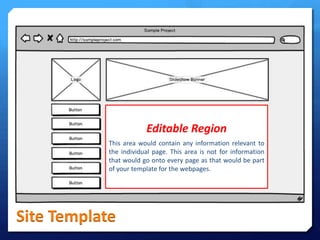
Editable Region
This area would contain any information relevant to
the individual page. This area is not for information
that would go onto every page as that would be part
of your template for the webpages.

Site Template
Your Task

Be able to plan website pages
Understand audience needs

 Use mybalsamiq to design the internal

pages of your website considering the
needs of your target audience.
 Your site should use a template and

include the following features:
 Navigation
 Information Flow
 Consistency
 Good Content

 Use the markup section to add notes

explaining your designs.

#user #needs
#layout

LO2 - Lesson 11 - Layout

  • 1.
  • 2.
    Lesson Goals  Knowkey features of the website layout  Understand how to structure individual pages  Be able to plan the internal pages of your website #user #needs #layout
  • 3.
    Assessment Criteria  Theassessment criteria for this part of the unit is as follows: Detailed planning for the design and function of the website considering how information flows and pages link. Justify choices in relation to target audience appeal and usability. Relevant legal and ethical issues considered. D1 P2 Plan the development of a multi-page website: • Purpose • Target Audience • Content • Production Plan M1 LO2 – Plan the development of a multipage website Consider visitor needs and how they will navigate the website. The info provided on a budget, launch date and timescale is realistic. Some consideration to relevant revenue potential.
  • 4.
    What will auser expect? Think about the whole website experience…
  • 5.
    Technical Needs Be ableto plan website pages Understand audience needs  A typical user on any of these sites may be looking for the following:  Navigation – Easy to get from page to page  Flow – Obvious which bit comes next  Loading – Relatively quick load times  Access – Site accessible to disabled users  Consistency – A clear style across all pages  Browsers – Displays correctly in all browsers  Colours – Effective contrasting colour scheme  Form – Allowing user interaction e.g. Contact  Planning website pages effectively can ensure you adhere to each of these considerations. #user #needs #layout
  • 6.
    Page Layout Identify thesimilarities between all four web pages…
  • 7.
  • 8.
  • 9.
  • 10.
  • 11.
    Template What webpage elementsare included on a template?
  • 12.
    Templates Be able toplan website pages Understand audience needs  A template can help you to design a consistent theme for all of your web pages.  The template should include all of the elements of your website that you want to appear in the same position on every page.  All other information will go into editable regions which would be different for every page depending on each page’s content. #user #needs #layout
  • 13.
    Editable Region This areawould contain any information relevant to the individual page. This area is not for information that would go onto every page as that would be part of your template for the webpages. Site Template
  • 14.
    Your Task Be ableto plan website pages Understand audience needs  Use mybalsamiq to design the internal pages of your website considering the needs of your target audience.  Your site should use a template and include the following features:  Navigation  Information Flow  Consistency  Good Content  Use the markup section to add notes explaining your designs. #user #needs #layout