Introduction and Problem Statement:
We have to design a realistic network based on the UIU network structure using only RIP and
DHCP.
We have to design our own topology which should reflect the UIU network structure using
protocols and methods we have learnt in our labs. We are avoiding NAT and virtual LAN. We
have to show the connections between main UIU router and lab’s pcs, faculty pcs and also
student’s laptops through wifi.
Network Diagram:
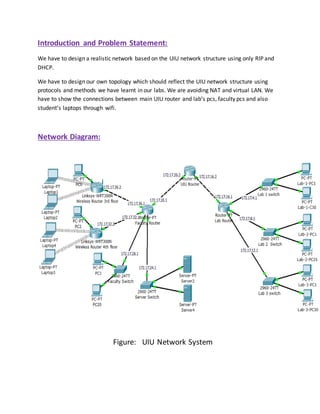
Figure: UIU Network System
To establish the network we have used three generic routers and two wireless routers.
To provide connections between main UIU router and labs pcs we have used a LAB Router.
Three labs containing 30pcs are connected to main UIU router through the LAB Router. And
there is a switch in every lab to connect 30 pcs. We have used two pcs in packet tracer to
represent the connection.
To provide connections between main UIU router and the faculty pcs, servers, wireless routers
we have used another router named Faculty router. Two wireless routers have been used to
provide connections to the student’s laptops in 3rd and 4th floor which will connect routers
through wifi.
As UIU uses class B IPs, we have used a class B network in our design. We left 6 bits for sub
netting and 10 bits for hosts. IPs of three labs are given from 3 subnets (172.17.4.0; 172.17.8.0;
172.17.12.0). Similarly another 4 subnets are given to the connections of Faculty router, they
are (172.17.24.0; 172.17.28.0; 172.17.32.0; 172.17.36.0) .Two IPs of subnet 172.17.20.0 are
given to the connection between main UIU router and Faculty router. Another two IPs of
subnet 172.17.16.0 are given to the connection between main UIU router and Lab router. All
these steps were taken to make a single network.
Implementation and Configuration:
We implemented the whole network systemin packet tracer. At first we selected the necessary
devices like routers, switches, pcs and laptops to represent the network system, and then we
connect those using straight-through and cross-over wires. Then we divided the hosts in groups
using sub netting system. According to the subnet no. we select the IP addresses for the group
of hosts. After that, we configure the routers and wifi and RIP them all.
The commands that are used in router configuration and RIP aregiven below:-
Lab Router:
Router>en
Router#configt
Enter configurationcommands,one perline. EndwithCNTL/Z.
Router(config)#intfa0/0
Router(config-if)#ipaddress172.17.4.1 255.255.252.0
Router(config-if)#noshutdown
%LINK-5-CHANGED:Interface FastEthernet0/0,changedstate toup
%LINEPROTO-5-UPDOWN:Line protocol onInterface FastEthernet0/0,changedstate toup
Router(config-if)#exit
Router(config)#intfa1/0
Router(config-if)#ipaddress172.17.8.1 255.255.252.0
Router(config-if)#noshutdown
%LINK-5-CHANGED:Interface FastEthernet1/0,changedstate toup
%LINEPROTO-5-UPDOWN:Line protocol onInterface FastEthernet1/0,changedstate toup
Router(config-if)#exit
Router(config)#intfa6/0
Router(config-if)#ipaddress172.17.12.1 255.255.252.0
Router(config-if)#noshutdown
%LINK-5-CHANGED:Interface FastEthernet6/0,changedstate toup
%LINEPROTO-5-UPDOWN:Line protocol onInterface FastEthernet6/0,changedstate toup
Router(config-if)#exit
Router(config)#hostname Lab
Lab(config)#end
Lab#configt
Enter configurationcommands,one perline. EndwithCNTL/Z.
Lab(config)#intfa7/0
Lab(config-if)#ipaddress172.17.16.1 255.255.252.0
Lab(config-if)#noshutdown
%LINK-5-CHANGED:Interface FastEthernet7/0,changedstate toup
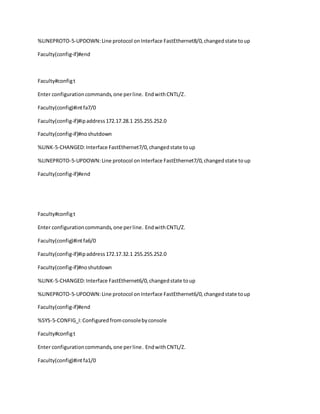
Lab(config-if)#end
%SYS-5-CONFIG_I:Configuredfromconsolebyconsole
Lab#copy run start
Destinationfilename [startup-config]?
Buildingconfiguration...
[OK]
UIU Router:
Router>en
Router#configt
Enter configuration commands,one perline. EndwithCNTL/Z.
Router(config)#hostname UIU
UIU(config)#intfa0/0
UIU(config-if)#ipaddress172.17.16.2 255.255.252.0
UIU(config-if)#noshutdown
%LINK-5-CHANGED:Interface FastEthernet0/0,changedstate toup
%LINEPROTO-5-UPDOWN:Line protocol onInterface FastEthernet0/0,changedstate toup
UIU(config-if)#end
%SYS-5-CONFIG_I:Configuredfromconsolebyconsole
UIU#config t
Enter configurationcommands,one perline. EndwithCNTL/Z.
UIU(config)#intfa1/0
UIU(config-if)#ipaddress172.17.20.2 255.255.252.0
UIU(config-if)#noshutdown
UIU(config-if)#
%LINK-5-CHANGED:Interface FastEthernet1/0,changedstate toup
UIU(config-if)#end
Faculty Router:
Router>en
Router#configt
Enter configurationcommands,one perline. Endwith CNTL/Z.
Router(config)#hostname Faculty
Faculty(config)#intfa0/0
Faculty(config-if)#ipaddress172.17.20.1 255.255.252.0
Faculty(config-if)#noshutdown
%LINK-5-CHANGED:Interface FastEthernet0/0,changedstate toup
%LINEPROTO-5-UPDOWN:Line protocol onInterface FastEthernet0/0,changedstate toup
Faculty(config-if)#end
Faculty#configt
Enter configurationcommands,one perline. EndwithCNTL/Z.
Faculty(config)#intfa8/0
Faculty(config-if)#ipaddress172.17.24.1 255.255.252.0
Faculty(config-if)#noshutdown
%LINK-5-CHANGED:Interface FastEthernet8/0,changedstate toup
%LINEPROTO-5-UPDOWN:Line protocol onInterface FastEthernet8/0,changedstate toup
Faculty(config-if)#end
Faculty#configt
Enter configurationcommands,one perline. EndwithCNTL/Z.
Faculty(config)#intfa7/0
Faculty(config-if)#ipaddress172.17.28.1 255.255.252.0
Faculty(config-if)#noshutdown
%LINK-5-CHANGED:Interface FastEthernet7/0,changedstate toup
%LINEPROTO-5-UPDOWN:Line protocol onInterface FastEthernet7/0,changedstate toup
Faculty(config-if)#end
Faculty#configt
Enter configurationcommands,one perline. EndwithCNTL/Z.
Faculty(config)#intfa6/0
Faculty(config-if)#ipaddress172.17.32.1 255.255.252.0
Faculty(config-if)#noshutdown
%LINK-5-CHANGED:Interface FastEthernet6/0,changedstate toup
%LINEPROTO-5-UPDOWN:Line protocol onInterface FastEthernet6/0,changedstate toup
Faculty(config-if)#end
%SYS-5-CONFIG_I:Configuredfromconsolebyconsole
Faculty#configt
Enter configurationcommands,one perline. EndwithCNTL/Z.
Faculty(config)#intfa1/0
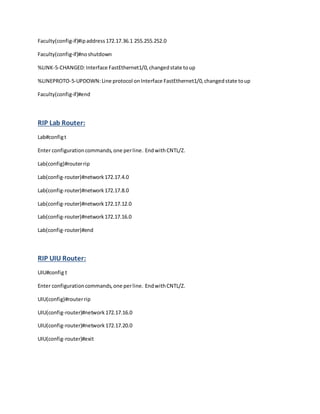
Faculty(config-if)#ipaddress172.17.36.1 255.255.252.0
Faculty(config-if)#noshutdown
%LINK-5-CHANGED:Interface FastEthernet1/0,changedstate toup
%LINEPROTO-5-UPDOWN:Line protocol onInterface FastEthernet1/0,changedstate toup
Faculty(config-if)#end
RIP Lab Router:
Lab#configt
Enter configurationcommands,one perline. EndwithCNTL/Z.
Lab(config)#routerrip
Lab(config-router)#network172.17.4.0
Lab(config-router)#network172.17.8.0
Lab(config-router)#network172.17.12.0
Lab(config-router)#network172.17.16.0
Lab(config-router)#end
RIP UIU Router:
UIU#config t
Enter configurationcommands,one perline. EndwithCNTL/Z.
UIU(config)#routerrip
UIU(config-router)#network172.17.16.0
UIU(config-router)#network172.17.20.0
UIU(config-router)#exit
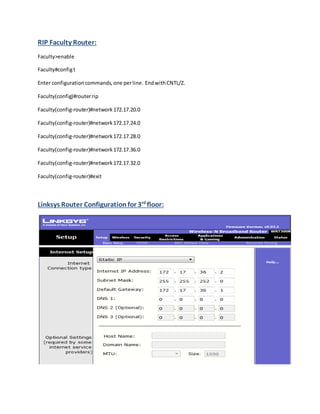
RIP Faculty Router:
Faculty>enable
Faculty#configt
Enter configurationcommands,one perline. EndwithCNTL/Z.
Faculty(config)#routerrip
Faculty(config-router)#network172.17.20.0
Faculty(config-router)#network172.17.24.0
Faculty(config-router)#network172.17.28.0
Faculty(config-router)#network172.17.36.0
Faculty(config-router)#network172.17.32.0
Faculty(config-router)#exit
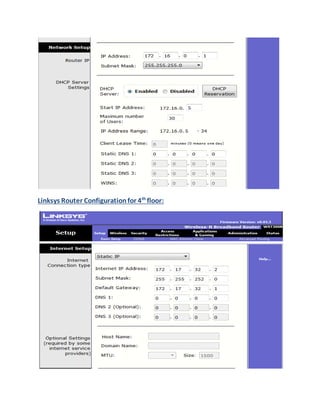
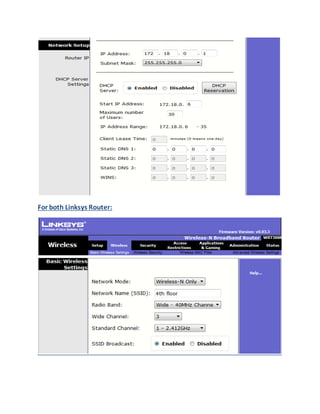
Linksys Router Configuration for 3rd
floor:
Linksys Router Configurationfor 4th
floor:
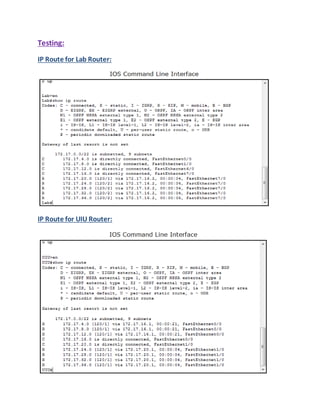
For both Linksys Router:
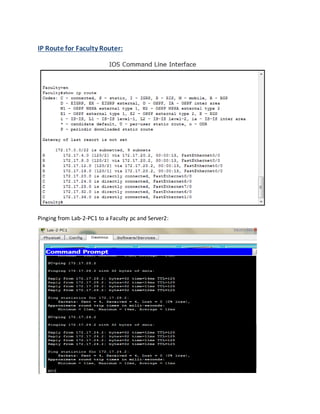
Testing:
IP Route for Lab Router:
IP Route for UIU Router:
IP Route for Faculty Router:
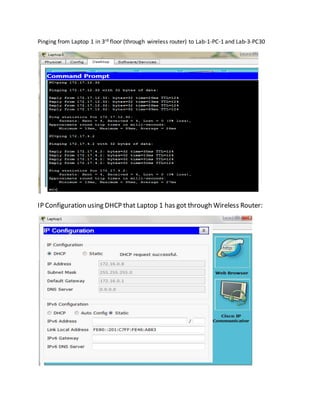
Pinging from Lab-2-PC1 to a Faculty pc and Server2:
Pinging from Laptop 1 in 3rd floor (through wireless router) to Lab-1-PC-1 and Lab-3-PC30
IP Configuration using DHCP that Laptop 1 has got through Wireless Router:
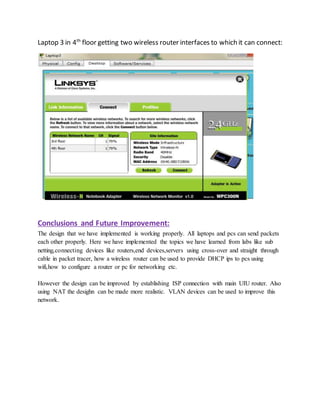
Laptop 3 in 4th
floor getting two wireless router interfaces to which it can connect:
Conclusions and Future Improvement:
The design that we have implemented is working properly. All laptops and pcs can send packets
each other properly. Here we have implemented the topics we have learned from labs like sub
netting,connecting devices like routers,end devices,servers using cross-over and straight through
cable in packet tracer, how a wireless router can be used to provide DHCP ips to pcs using
wifi,how to configure a router or pc for networking etc.
However the design can be improved by establishing ISP connection with main UIU router. Also
using NAT the desighn can be made more realistic. VLAN devices can be used to improve this
network.

UIU Network System(Cn project)

  • 1.
    Introduction and ProblemStatement: We have to design a realistic network based on the UIU network structure using only RIP and DHCP. We have to design our own topology which should reflect the UIU network structure using protocols and methods we have learnt in our labs. We are avoiding NAT and virtual LAN. We have to show the connections between main UIU router and lab’s pcs, faculty pcs and also student’s laptops through wifi. Network Diagram: Figure: UIU Network System
  • 2.
    To establish thenetwork we have used three generic routers and two wireless routers. To provide connections between main UIU router and labs pcs we have used a LAB Router. Three labs containing 30pcs are connected to main UIU router through the LAB Router. And there is a switch in every lab to connect 30 pcs. We have used two pcs in packet tracer to represent the connection. To provide connections between main UIU router and the faculty pcs, servers, wireless routers we have used another router named Faculty router. Two wireless routers have been used to provide connections to the student’s laptops in 3rd and 4th floor which will connect routers through wifi. As UIU uses class B IPs, we have used a class B network in our design. We left 6 bits for sub netting and 10 bits for hosts. IPs of three labs are given from 3 subnets (172.17.4.0; 172.17.8.0; 172.17.12.0). Similarly another 4 subnets are given to the connections of Faculty router, they are (172.17.24.0; 172.17.28.0; 172.17.32.0; 172.17.36.0) .Two IPs of subnet 172.17.20.0 are given to the connection between main UIU router and Faculty router. Another two IPs of subnet 172.17.16.0 are given to the connection between main UIU router and Lab router. All these steps were taken to make a single network. Implementation and Configuration: We implemented the whole network systemin packet tracer. At first we selected the necessary devices like routers, switches, pcs and laptops to represent the network system, and then we connect those using straight-through and cross-over wires. Then we divided the hosts in groups using sub netting system. According to the subnet no. we select the IP addresses for the group of hosts. After that, we configure the routers and wifi and RIP them all. The commands that are used in router configuration and RIP aregiven below:- Lab Router: Router>en Router#configt Enter configurationcommands,one perline. EndwithCNTL/Z. Router(config)#intfa0/0
  • 3.
    Router(config-if)#ipaddress172.17.4.1 255.255.252.0 Router(config-if)#noshutdown %LINK-5-CHANGED:Interface FastEthernet0/0,changedstatetoup %LINEPROTO-5-UPDOWN:Line protocol onInterface FastEthernet0/0,changedstate toup Router(config-if)#exit Router(config)#intfa1/0 Router(config-if)#ipaddress172.17.8.1 255.255.252.0 Router(config-if)#noshutdown %LINK-5-CHANGED:Interface FastEthernet1/0,changedstate toup %LINEPROTO-5-UPDOWN:Line protocol onInterface FastEthernet1/0,changedstate toup Router(config-if)#exit Router(config)#intfa6/0 Router(config-if)#ipaddress172.17.12.1 255.255.252.0 Router(config-if)#noshutdown %LINK-5-CHANGED:Interface FastEthernet6/0,changedstate toup %LINEPROTO-5-UPDOWN:Line protocol onInterface FastEthernet6/0,changedstate toup Router(config-if)#exit Router(config)#hostname Lab Lab(config)#end Lab#configt Enter configurationcommands,one perline. EndwithCNTL/Z. Lab(config)#intfa7/0
  • 4.
    Lab(config-if)#ipaddress172.17.16.1 255.255.252.0 Lab(config-if)#noshutdown %LINK-5-CHANGED:Interface FastEthernet7/0,changedstatetoup Lab(config-if)#end %SYS-5-CONFIG_I:Configuredfromconsolebyconsole Lab#copy run start Destinationfilename [startup-config]? Buildingconfiguration... [OK] UIU Router: Router>en Router#configt Enter configuration commands,one perline. EndwithCNTL/Z. Router(config)#hostname UIU UIU(config)#intfa0/0 UIU(config-if)#ipaddress172.17.16.2 255.255.252.0 UIU(config-if)#noshutdown %LINK-5-CHANGED:Interface FastEthernet0/0,changedstate toup %LINEPROTO-5-UPDOWN:Line protocol onInterface FastEthernet0/0,changedstate toup UIU(config-if)#end %SYS-5-CONFIG_I:Configuredfromconsolebyconsole UIU#config t Enter configurationcommands,one perline. EndwithCNTL/Z.
  • 5.
    UIU(config)#intfa1/0 UIU(config-if)#ipaddress172.17.20.2 255.255.252.0 UIU(config-if)#noshutdown UIU(config-if)# %LINK-5-CHANGED:Interface FastEthernet1/0,changedstatetoup UIU(config-if)#end Faculty Router: Router>en Router#configt Enter configurationcommands,one perline. Endwith CNTL/Z. Router(config)#hostname Faculty Faculty(config)#intfa0/0 Faculty(config-if)#ipaddress172.17.20.1 255.255.252.0 Faculty(config-if)#noshutdown %LINK-5-CHANGED:Interface FastEthernet0/0,changedstate toup %LINEPROTO-5-UPDOWN:Line protocol onInterface FastEthernet0/0,changedstate toup Faculty(config-if)#end Faculty#configt Enter configurationcommands,one perline. EndwithCNTL/Z. Faculty(config)#intfa8/0 Faculty(config-if)#ipaddress172.17.24.1 255.255.252.0 Faculty(config-if)#noshutdown %LINK-5-CHANGED:Interface FastEthernet8/0,changedstate toup
  • 6.
    %LINEPROTO-5-UPDOWN:Line protocol onInterfaceFastEthernet8/0,changedstate toup Faculty(config-if)#end Faculty#configt Enter configurationcommands,one perline. EndwithCNTL/Z. Faculty(config)#intfa7/0 Faculty(config-if)#ipaddress172.17.28.1 255.255.252.0 Faculty(config-if)#noshutdown %LINK-5-CHANGED:Interface FastEthernet7/0,changedstate toup %LINEPROTO-5-UPDOWN:Line protocol onInterface FastEthernet7/0,changedstate toup Faculty(config-if)#end Faculty#configt Enter configurationcommands,one perline. EndwithCNTL/Z. Faculty(config)#intfa6/0 Faculty(config-if)#ipaddress172.17.32.1 255.255.252.0 Faculty(config-if)#noshutdown %LINK-5-CHANGED:Interface FastEthernet6/0,changedstate toup %LINEPROTO-5-UPDOWN:Line protocol onInterface FastEthernet6/0,changedstate toup Faculty(config-if)#end %SYS-5-CONFIG_I:Configuredfromconsolebyconsole Faculty#configt Enter configurationcommands,one perline. EndwithCNTL/Z. Faculty(config)#intfa1/0
  • 7.
    Faculty(config-if)#ipaddress172.17.36.1 255.255.252.0 Faculty(config-if)#noshutdown %LINK-5-CHANGED:Interface FastEthernet1/0,changedstatetoup %LINEPROTO-5-UPDOWN:Line protocol onInterface FastEthernet1/0,changedstate toup Faculty(config-if)#end RIP Lab Router: Lab#configt Enter configurationcommands,one perline. EndwithCNTL/Z. Lab(config)#routerrip Lab(config-router)#network172.17.4.0 Lab(config-router)#network172.17.8.0 Lab(config-router)#network172.17.12.0 Lab(config-router)#network172.17.16.0 Lab(config-router)#end RIP UIU Router: UIU#config t Enter configurationcommands,one perline. EndwithCNTL/Z. UIU(config)#routerrip UIU(config-router)#network172.17.16.0 UIU(config-router)#network172.17.20.0 UIU(config-router)#exit
  • 8.
    RIP Faculty Router: Faculty>enable Faculty#configt Enterconfigurationcommands,one perline. EndwithCNTL/Z. Faculty(config)#routerrip Faculty(config-router)#network172.17.20.0 Faculty(config-router)#network172.17.24.0 Faculty(config-router)#network172.17.28.0 Faculty(config-router)#network172.17.36.0 Faculty(config-router)#network172.17.32.0 Faculty(config-router)#exit Linksys Router Configuration for 3rd floor:
  • 9.
  • 10.
  • 11.
    Testing: IP Route forLab Router: IP Route for UIU Router:
  • 12.
    IP Route forFaculty Router: Pinging from Lab-2-PC1 to a Faculty pc and Server2:
  • 13.
    Pinging from Laptop1 in 3rd floor (through wireless router) to Lab-1-PC-1 and Lab-3-PC30 IP Configuration using DHCP that Laptop 1 has got through Wireless Router:
  • 14.
    Laptop 3 in4th floor getting two wireless router interfaces to which it can connect: Conclusions and Future Improvement: The design that we have implemented is working properly. All laptops and pcs can send packets each other properly. Here we have implemented the topics we have learned from labs like sub netting,connecting devices like routers,end devices,servers using cross-over and straight through cable in packet tracer, how a wireless router can be used to provide DHCP ips to pcs using wifi,how to configure a router or pc for networking etc. However the design can be improved by establishing ISP connection with main UIU router. Also using NAT the desighn can be made more realistic. VLAN devices can be used to improve this network.