Advance Digital Forensic
Agenda What is Computer Forensic? Gathering evidence from windows memory Advance registry forensic. Analyzing network data to collect evidence
Computer Forensics – the laws First Law of Computer Forensics There is evidence of every action.   Harlan Carvey’s Corollary  : Once you understand what actions or conditions create or modify an artifact, then the absence of that artifact is itself an artifact.
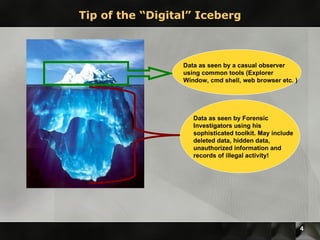
Tip of the “Digital” Iceberg Data as seen by a casual observer using common tools (Explorer Window, cmd shell, web browser etc. ) Data as seen by Forensic Investigators using his sophisticated toolkit. May include deleted data, hidden data, unauthorized information and records of illegal activity!
Windows Memory Forensic Extracting windows login credentials from RAM image. Extracting running processes. Extracting user assist keys from RAM Viewing registry keys for all open process.
Volatility modules used hivescan {python volatility hivescan -f <filename>} hivelist  {python volatility hivelist -f <filename> -o <offset value> Hashdump {volatility hashdump -f <filename> (-y System Hive Offset)(-s SAM Hive Offset)  Use of CAIN & Abel to crack the hashes obtained. Extracting windows login credentials from RAM image.
Extracting user assist keys from RAM Load the image in Encase and search for the keyword HRZR_EHACNGU {which is “UEME_RUNPATH”}. Keywords are HRZR_EHACNGU.*[\.]rkr HRZR_EHACNGU.*[\.]yax Decrypt the results using ROT13-decryptor.
Advance Registry Forensic
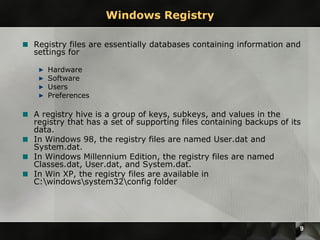
Windows Registry Registry files are essentially databases containing information and settings for Hardware Software Users Preferences A registry hive is a group of keys, subkeys, and values in the registry that has a set of supporting files containing backups of its data.  In Windows 98, the registry files are named User.dat and System.dat.  In Windows Millennium Edition, the registry files are named Classes.dat, User.dat, and System.dat.  In Win XP, the registry files are available in C:\windows\system32\config folder
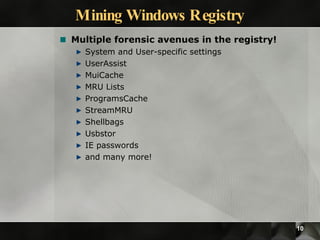
Mining Windows Registry Multiple forensic avenues in the registry! System and User-specific settings UserAssist MuiCache MRU Lists ProgramsCache StreamMRU Shellbags Usbstor IE passwords and many more!
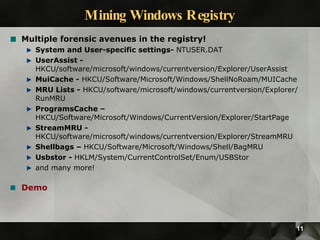
Mining Windows Registry Multiple forensic avenues in the registry! System and User-specific settings-  NTUSER.DAT UserAssist -  HKCU/software/microsoft/windows/currentversion/Explorer/UserAssist MuiCache -  HKCU/Software/Microsoft/Windows/ShellNoRoam/MUICache MRU Lists -  HKCU/software/microsoft/windows/currentversion/Explorer/RunMRU ProgramsCache – HKCU/Software/Microsoft/Windows/CurrentVersion/Explorer/StartPage StreamMRU -  HKCU/software/microsoft/windows/currentversion/Explorer/StreamMRU Shellbags –  HKCU/Software/Microsoft/Windows/Shell/BagMRU Usbstor -  HKLM/System/CurrentControlSet/Enum/USBStor and many more! Demo
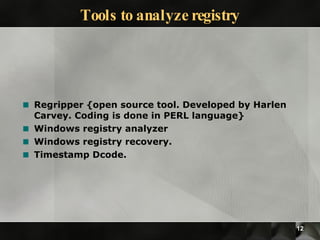
Tools to analyze registry Regripper {open source tool. Developed by Harlen Carvey. Coding is done in PERL language} Windows registry analyzer Windows registry recovery. Timestamp Dcode.
Network Forensic
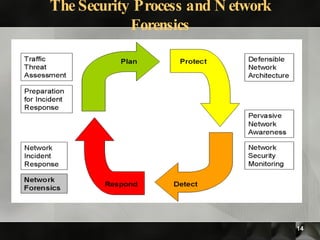
The Security Process and Network Forensics
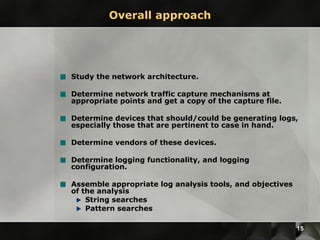
Overall approach Study the network architecture. Determine network traffic capture mechanisms at appropriate points and get a copy of the capture file. Determine devices that should/could be generating logs, especially those that are pertinent to case in hand. Determine vendors of these devices. Determine logging functionality, and logging configuration. Assemble appropriate log analysis tools, and objectives of the analysis String searches Pattern searches
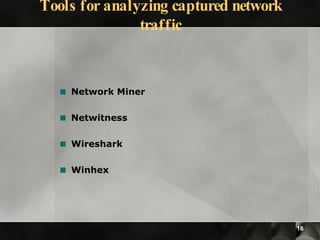
Tools for analyzing captured network traffic Network Miner Netwitness Wireshark Winhex
Case study of Network Forensic
 
Thank you! Questions and Answers!! Kush Wadhwa, EnCE, CEH, RHCE Contact Number : +919717188544 Email Address: - kushwadhwa@gmail.com

Kush wadhwa _mining_digital_evidence_in_windows - ClubHack2009

  • 1.
  • 2.
    Agenda What isComputer Forensic? Gathering evidence from windows memory Advance registry forensic. Analyzing network data to collect evidence
  • 3.
    Computer Forensics –the laws First Law of Computer Forensics There is evidence of every action. Harlan Carvey’s Corollary : Once you understand what actions or conditions create or modify an artifact, then the absence of that artifact is itself an artifact.
  • 4.
    Tip of the“Digital” Iceberg Data as seen by a casual observer using common tools (Explorer Window, cmd shell, web browser etc. ) Data as seen by Forensic Investigators using his sophisticated toolkit. May include deleted data, hidden data, unauthorized information and records of illegal activity!
  • 5.
    Windows Memory ForensicExtracting windows login credentials from RAM image. Extracting running processes. Extracting user assist keys from RAM Viewing registry keys for all open process.
  • 6.
    Volatility modules usedhivescan {python volatility hivescan -f <filename>} hivelist {python volatility hivelist -f <filename> -o <offset value> Hashdump {volatility hashdump -f <filename> (-y System Hive Offset)(-s SAM Hive Offset) Use of CAIN & Abel to crack the hashes obtained. Extracting windows login credentials from RAM image.
  • 7.
    Extracting user assistkeys from RAM Load the image in Encase and search for the keyword HRZR_EHACNGU {which is “UEME_RUNPATH”}. Keywords are HRZR_EHACNGU.*[\.]rkr HRZR_EHACNGU.*[\.]yax Decrypt the results using ROT13-decryptor.
  • 8.
  • 9.
    Windows Registry Registryfiles are essentially databases containing information and settings for Hardware Software Users Preferences A registry hive is a group of keys, subkeys, and values in the registry that has a set of supporting files containing backups of its data. In Windows 98, the registry files are named User.dat and System.dat. In Windows Millennium Edition, the registry files are named Classes.dat, User.dat, and System.dat. In Win XP, the registry files are available in C:\windows\system32\config folder
  • 10.
    Mining Windows RegistryMultiple forensic avenues in the registry! System and User-specific settings UserAssist MuiCache MRU Lists ProgramsCache StreamMRU Shellbags Usbstor IE passwords and many more!
  • 11.
    Mining Windows RegistryMultiple forensic avenues in the registry! System and User-specific settings- NTUSER.DAT UserAssist - HKCU/software/microsoft/windows/currentversion/Explorer/UserAssist MuiCache - HKCU/Software/Microsoft/Windows/ShellNoRoam/MUICache MRU Lists - HKCU/software/microsoft/windows/currentversion/Explorer/RunMRU ProgramsCache – HKCU/Software/Microsoft/Windows/CurrentVersion/Explorer/StartPage StreamMRU - HKCU/software/microsoft/windows/currentversion/Explorer/StreamMRU Shellbags – HKCU/Software/Microsoft/Windows/Shell/BagMRU Usbstor - HKLM/System/CurrentControlSet/Enum/USBStor and many more! Demo
  • 12.
    Tools to analyzeregistry Regripper {open source tool. Developed by Harlen Carvey. Coding is done in PERL language} Windows registry analyzer Windows registry recovery. Timestamp Dcode.
  • 13.
  • 14.
    The Security Processand Network Forensics
  • 15.
    Overall approach Studythe network architecture. Determine network traffic capture mechanisms at appropriate points and get a copy of the capture file. Determine devices that should/could be generating logs, especially those that are pertinent to case in hand. Determine vendors of these devices. Determine logging functionality, and logging configuration. Assemble appropriate log analysis tools, and objectives of the analysis String searches Pattern searches
  • 16.
    Tools for analyzingcaptured network traffic Network Miner Netwitness Wireshark Winhex
  • 17.
    Case study ofNetwork Forensic
  • 18.
  • 19.
    Thank you! Questionsand Answers!! Kush Wadhwa, EnCE, CEH, RHCE Contact Number : +919717188544 Email Address: - kushwadhwa@gmail.com