I
FINDING FORENSIC ARTIFACTS FROM WINDOW REGISTRY
Submitted by: Priyank Dixit 9911103511
Under the guidance of
Ms. Anuradha Gupta
June – 2015
Submitted in partial fulfillment of the Degree of
Bachelor of Technology
In
Computer Science Engineering
DEPARTMENT OF COMPUTER SCIENCE & ENGINEERING
JAYPEE INSTITUTE OF INFORMATION TECHNOLOGY, NOIDA
II
(I)
TABLE OF CONTENTS
Chapter No. Topics Page No.
Student Declaration II
Certificate from the Supervisor III
Acknowledgement IV
Summary (Not more than 250 words) V
Chapter-1 Introduction
1.1 General Introduction
1.2 List some relevant current/open problems.
1.3 Problem Statement
1.4 Overview of proposed solution approach and Novelty/benefits
Chapter-2 Background Study
2.1 Literature Survey
2.1.1 Summary of papers
2.1.2 Integrated summary of the literature studied
2.2 Details of Empirical Study (Field Survey, Existing Tool Survey,
Experimental Study)
Chapter 3: Analysis, Design and Modeling
3.1 Requirements Specifications
3.2 Design Documentation
3.2.1 Control Flow Diagrams
3.2.2 Sequence Diagram/Activity diagrams
Chapter-4 Implementation and Testing
4.1 Implementation details and issues
Chapter-5 Testing
5.1 Testing Plan
5.2 Limitations of the solution
Chapter-6 Findings & Conclusion
6.1 Findings
6.2 Conclusion
6.3 Future Work
References ACM Format (Listed alphabetically)
III
DECLARATION
I hereby declare that this submission is my own work and that, to the best of my knowledge and
belief, it contains no material previously published or written by another person nor material which
has been accepted for the award of any other degree or diploma of the university or other institute of
higher learning, except where due acknowledgment has been made in the text.
Place: Noida Name: Priyank Dixit
Date:02-06-2015 Enroll. No: 9911103511
Sign:
IV
CERTIFICATE
This is to certify that the work titled “Finding Forensic Artifacts From Windows Registry”
submitted by “Priyank Dixit” in partial fulfillment for the award of degree of B.Tech of Jaypee
Institute of Information Technology University, Noida has been carried out under my supervision.
This work has not been submitted partially or wholly to any other University or Institute for the
award of this or any other degree or diploma.
Signature of Supervisor ……………………..
Name of Supervisor Ms Anuradha Gupta
Designation Assistant Professor
Date 02-06-15
V
ACKNOWLEDGEMENT
I have taken efforts in this project. However, it would not have been possible without the kind
support and help of many individuals and the institute. I would like to extend my sincere thanks to
all of them.
I am highly indebted to Ms Anuradha Gupta for their guidance and constant supervision as well
as for providing necessary information regarding the project & also for their support in completing
the project.
I would like to express my gratitude towards my parents & faculty members of the institute for their
kind co-operation and encouragement which helped me in completion of this project.
My thanks and appreciations also go to my colleagues in developing the project and people who
have willingly helped me out with their abilities.
Signature of the Student:
Name of Student: Priyank dixit
Enrollment Number: 9911103511
Date: 02-06-2015
VI
SUMMARY
My research work is „Finding Forensic Artifacts From Window Registry‟. For the
accomplishment of my task, I studied various research paper thoroughly & did implementation of
various aspects of them, I physically visited all the registry hives & their respective registry keys.
Further we can see registry key contains registry values .Making changes to these values & keys
using Registry Editor will change the configuration that a particular value controls. Registry Editor
is the face of the registry & is the way to view & make changes to the registry .Technically, the
registry is the collective name for various database files located within the Windows installation
directory. The Windows Registry is accessed & configured using the Registry Editor program, a
free registry editing utility included with every version of Microsoft Windows .Basically, I work on
finding the artifacts(something observed in scientific investigation or experiment i.e. not naturally
present but occurs as a result of the investigative procedure) from the registry .I work on finding
artifacts of USB ,unauthorized access ,also see which files or video has been downloaded from my
system ,also extract information about the current user, machine‟s name ,Home Path ,user‟s E-mail
address etc. I also extract information about MRU (most recent user ) to the system ,also see the
Last Write Time of the particular USB ,& when it was installed for the first time into my system.
Actually registry contains ample amount of information ,which can be used for Digital Forensic
Investigation .
Signature of Student Signature of Supervisor
Name: Priyank Dixit Name: Ms. Anuradha Gupta
Date 02-06-15 Date 02-06-15
VII
INTRODUCTION
1.1 General Introduction
The Windows Registry is a hierarchical database that stores configuration settings and options on
Microsoft Windows operating systems. It contains settings for low-level operating system
components and for applications running on the platform that have opted to use the registry. The
kernel, device drivers, services, SAM, user interface and third party applications can all make use of
the registry. The registry also provides a means to access counters for profiling system performance.
It is a database in windows that contains important information about system hardware, installed
programs & settings,& profiles of each of the user accounts on your computer. We should not make
any manual changes to the Registry because programs & applications typically make all the
necessary changes automatically.
STRUCTURE:
The registry contains two basic elements: keys and values. Registry keys are container objects
similar to folders. Registry values are non-container objects similar to files. Keys may contain
values or further keys. Keys are referenced with a syntax similar to Windows' path names, using
backslashes to indicate levels of hierarchy. Keys must have a case insensitive name without
backslashes.
There are seven predefined root keys, traditionally named according to their constant handles
defined in the Win32 API, or by synonymous abbreviations (depending on applications):
 HKEY_LOCAL_MACHINE or HKLM
 HKEY_CURRENT_CONFIG or HKCC (only in Windows 9x and NT)
 HKEY_CLASSES_ROOT or HKCR
 HKEY_CURRENT_USER or HKCU
 HKEY_USERS or HKU
 HKEY_PERFORMANCE_DATA (only in Windows NT, but invisible in the Windows
Registry Editor)
 HKEY_DYN_DATA (only in Windows 9x, and visible in the Windows Registry Editor)
VIII
1.2 List some relevant current/open problems.
Major concerning problem is that whenever any storage devices are attached to USB port on the
system running Windows XP,in built drivers collect information from the device & then use that
information to create a profile of identifiers(artefacts).These identifiers end up in different locations
on the system & tend to be persistent after shutdown ,means these identifiers can give intruder a
lot of crucial information. USB ports as well as other ports that permits one to attach a removable
storage device can act as a promising means to steal a classified information & problem of
footprints left on the system & Registry when USB device is connected.Further studies reveal that if
we are not giving functional access of USB device in Kernel,then it can be easily bypassed by
malicious programs.Moreover,Registry contains ample amount of information & it has some
hotspot areas which can be used by forensic analyst or can be used by intruders to do something
unusual !!!!!!!!! These all scenarios are complete enough to explain how crucial is the study of USB
in today‟s cyber world crime .
.
1.3 Problem statement
When any storage devices are attached to USB ,port on the system running Windows XP, in built
drivers collect information from the device and then use that information to create a profile of
identifiers(artefacts). These identifiers end up in different location on the system & tend to be
persistent after shutdown also .Moreover if we are not giving functional access of USB device in
Kernel ,then it can be easily bypassed by malicious program .We also have problems regarding
various hot spots in Registry ,which can be the path way to Intrusions. Finally we have some Hot
spot areas ,which are very crucial regarding forensic analysis viz Timezone information ,Last Time
system was shut down etc.
1.4 Overview of proposed solution approach and Novelty/benefits
Prior research in this field only show that USB is an ample source of a lot of forensic information
,but by analyzing these papers I came to know about the concept of Vendor Code, Product Code &
Revision code ,these 3 altogether constitutes Device Instance ID ,which is unique to every user .I
plan to analyze USB with their perspective ,I physically access different location in Registry which
are crucial regarding USB .Prior research merely talks on USB installation & where it is being
installed ,but here I analyses not only installation location but also location of Device instance ID
,also know the concept of Vendor id ,Product Id in detail .Prior research also lacks about the
IX
concept of driver models regarding USB ,I also come to know about the concept of filter drivers &
know how functional access of USB can be done in Kernel ,which is very safer mode ,I come to
know about the timezone information, Last shut down time information which were lacking in prior
researches.
2. Background Study
2.1 Literature Survey
I studied various research papers thoroughly, visited various sites to get knowledge of registry,
studied about remote access technology, studied 2-3 books for getting good knowledge of the
research. Moreover I heard various videos regarding Registry. Read various research papers,
research related journals, explore different information from Internet & use them to find artifacts.
2.1.1 Summary of relevant papers with following details
Paper 1:Tracing USB device artefacts on Windows XP Operating System for forensic
purpose
Authors:
Victor Chileshe Cho
Year of publication
2007
Publishing details where this paper was published
Edith Cowan University
Summary
Windows system several identifiers are created when a USB device is plugged into a Universal
Serial Bus. Some of these artefacts or identifiers are unique to the device & consistent across
different Windows platform .Another key factor that makes these identifiers forensically important
is the fact that they are traceable even after the system has been shut down.This paper basically
deals with different artefacts of USB. Moreover, it also tells that Vendor Code, Product Code &
Revision Code altogether constitutes Device Instance ID. Paper also states that Registry store
information that ensures proper USB devices drivers are loaded ,services required by applications
are made available and also states about Windows Log files .
X
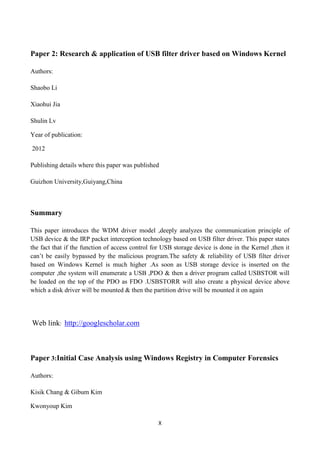
Paper 2: Research & application of USB filter driver based on Windows Kernel
Authors:
Shaobo Li
Xiaohui Jia
Shulin Lv
Year of publication:
2012
Publishing details where this paper was published
Guizhon University,Guiyang,China
Summary
This paper introduces the WDM driver model ,deeply analyzes the communication principle of
USB device & the IRP packet interception technology based on USB filter driver. This paper states
the fact that if the function of access control for USB storage device is done in the Kernel ,then it
can‟t be easily bypassed by the malicious program.The safety & reliability of USB filter driver
based on Windows Kernel is much higher .As soon as USB storage device is inserted on the
computer ,the system will enumerate a USB ,PDO & then a driver program called USBSTOR will
be loaded on the top of the PDO as FDO .USBSTORR will also create a physical device above
which a disk driver will be mounted & then the partition drive will be mounted it on again
Web link: http://googlescholar.com
Paper 3:Initial Case Analysis using Windows Registry in Computer Forensics
Authors:
Kisik Chang & Gibum Kim
Kwonyoup Kim
XI
Year of Publication:
2013
Publishing details where this paper was published
Korea University,Korea
Summary:
This paper tells us that, Registry has significant information which are valuable ,especially some
information such as the timezone information,the time when the OS was installed & the system was
turned off. Paper also tells us about the Hotspots of Registry ,which can be analysed by forensic
analyst .It is said that computer forensics consist of 4 phases:-Collection, Examination, Analysis &
Reporting. The collection phase involves the search for, collection of, & documentation of
electronic device. The Examination phase helps to make the evidence visible & explain its origin &
significance. Analysis process makes all parties discover the information that may be hidden or
obscured in the evidence .It is the process to observe the product of the examination for its
significance on probative values to the case
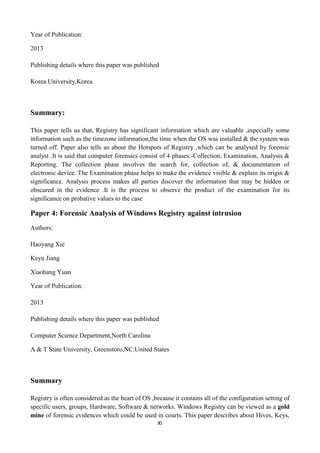
Paper 4: Forensic Analysis of Windows Registry against intrusion
Authors:
Haoyang Xie
Keyu Jiang
Xiaohang Yuan
Year of Publication:
2013
Publishing details where this paper was published
Computer Science Department,North Carolina
A & T State University, Greenstoro,NC,United States
Summary
Registry is often considered as the heart of OS ,because it contains all of the configuration setting of
specific users, groups, Hardware, Software & networks. Windows Registry can be viewed as a gold
mine of forensic evidences which could be used in courts. This paper describes about Hives, Keys,
XII
Subkeys that have forensic values .Finally it states that how these keys can be analysed for
intrusion study .
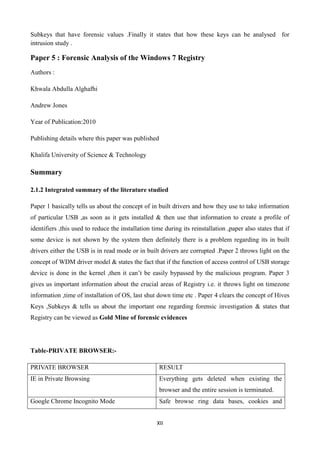
Paper 5 : Forensic Analysis of the Windows 7 Registry
Authors :
Khwala Abdulla Alghafhi
Andrew Jones
Year of Publication:2010
Publishing details where this paper was published
Khalifa University of Science & Technology
Summary
2.1.2 Integrated summary of the literature studied
Paper 1 basically tells us about the concept of in built drivers and how they use to take information
of particular USB ,as soon as it gets installed & then use that information to create a profile of
identifiers ,this used to reduce the installation time during its reinstallation ,paper also states that if
some device is not shown by the system then definitely there is a problem regarding its in built
drivers either the USB is in read mode or in built drivers are corrupted .Paper 2 throws light on the
concept of WDM driver model & states the fact that if the function of access control of USB storage
device is done in the kernel ,then it can‟t be easily bypassed by the malicious program. Paper 3
gives us important information about the crucial areas of Registry i.e. it throws light on timezone
information ,time of installation of OS, last shut down time etc . Paper 4 clears the concept of Hives
Keys ,Subkeys & tells us about the important one regarding forensic investigation & states that
Registry can be viewed as Gold Mine of forensic evidences
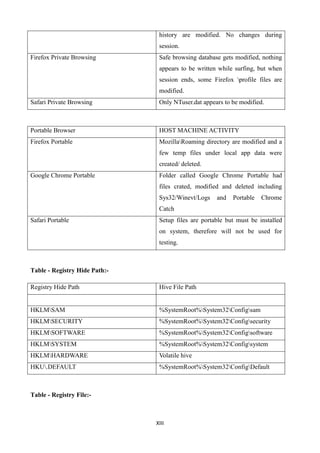
Table-PRIVATE BROWSER:-
PRIVATE BROWSER RESULT
IE in Private Browsing Everything gets deleted when existing the
browser and the entire session is terminated.
Google Chrome Incognito Mode Safe browse ring data bases, cookies and
XIII
history are modified. No changes during
session.
Firefox Private Browsing Safe browsing database gets modified, nothing
appears to be written while surfing, but when
session ends, some Firefox profile files are
modified.
Safari Private Browsing Only NTuser.dat appears to be modified.
Portable Browser HOST MACHINE ACTIVITY
Firefox Portable MozillaRoaming directory are modified and a
few temp files under local app data were
created/ deleted.
Google Chrome Portable Folder called Google Chrome Portable had
files crated, modified and deleted including
Sys32/Winevt/Logs and Portable Chrome
Catch
Safari Portable Setup files are portable but must be installed
on system, therefore will not be used for
testing.
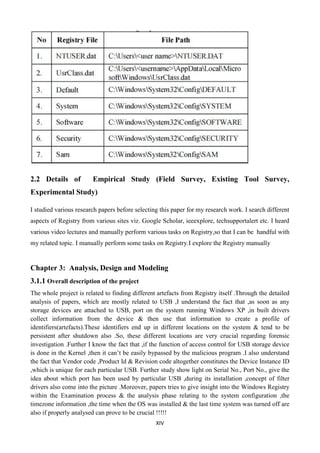
Table - Registry Hide Path:-
Registry Hide Path Hive File Path
HKLMSAM %SystemRoot%System32Configsam
HKLMSECURITY %SystemRoot%System32Configsecurity
HKLMSOFTWARE %SystemRoot%System32Configsoftware
HKLMSYSTEM %SystemRoot%System32Configsystem
HKLMHARDWARE Volatile hive
HKU.DEFAULT %SystemRoot%System32ConfigDefault
Table - Registry File:-
XIV
2.2 Details of Empirical Study (Field Survey, Existing Tool Survey,
Experimental Study)
I studied various research papers before selecting this paper for my research work. I search different
aspects of Registry from various sites viz. Google Scholar, ieeexplore, techsupportalert etc. I heard
various video lectures and manually perform various tasks on Registry,so that I can be handful with
my related topic. I manually perform some tasks on Registry.I explore the Registry manually
Chapter 3: Analysis, Design and Modeling
3.1.1 Overall description of the project
The whole project is related to finding different artefacts from Registry itself .Through the detailed
analysis of papers, which are mostly related to USB ,I understand the fact that ,as soon as any
storage devices are attached to USB, port on the system running Windows XP ,in built drivers
collect information from the device & then use that information to create a profile of
identifiers(artefacts).These identifiers end up in different locations on the system & tend to be
persistent after shutdown also .So, these different locations are very crucial regarding forensic
investigation .Further I know the fact that ,if the function of access control for USB storage device
is done in the Kernel ,then it can‟t be easily bypassed by the malicious program .I also understand
the fact that Vendor code ,Product Id & Revision code altogether constitutes the Device Instance ID
,which is unique for each particular USB. Further study show light on Serial No., Port No., give the
idea about which port has been used by particular USB ,during its installation ,concept of filter
drivers also come into the picture .Moreover, papers tries to give insight into the Windows Registry
within the Examination process & the analysis phase relating to the system configuration ,the
timezone information ,the time when the OS was installed & the last time system was turned off are
also if properly analysed can prove to be crucial !!!!!
XV
3.1.2 Requirements Specifications
A machine is required to perform different tasks regarding registry ,a USB to perform task related
to forensic investigation ,to see when it was first installed in the system, When it was last installed
etc.All ports must be in good conditions ,all the in-built drivers must work as soon as USB is
installed .
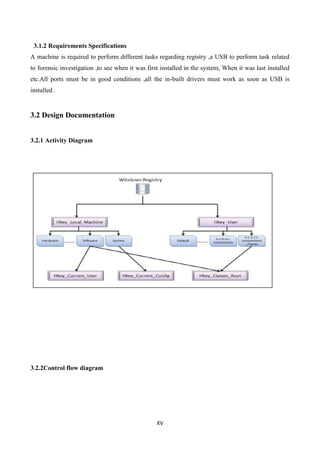
3.2 Design Documentation
3.2.1 Activity Diagram
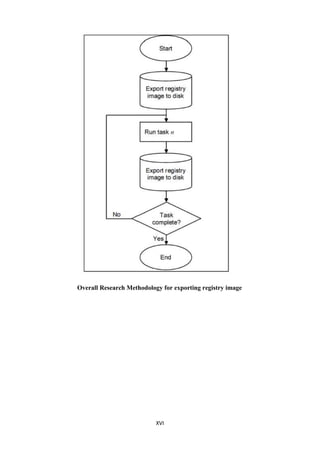
3.2.2Control flow diagram
XVI
Overall Research Methodology for exporting registry image
XVII
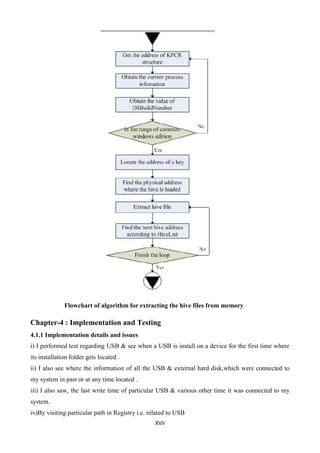
Flowchart of algorithm for extracting the hive files from memory
Chapter-4 : Implementation and Testing
4.1.1 Implementation details and issues
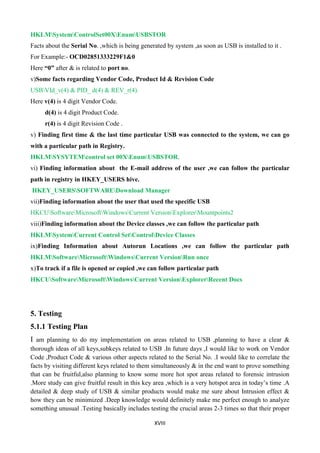
i) I performed test regarding USB & see when a USB is install on a device for the first time where
its installation folder gets located .
ii) I also see where the information of all the USB & external hard disk,which were connected to
my system in past or at any time located .
iii) I also saw, the last write time of particular USB & various other time it was connected to my
system.
iv)By visiting particular path in Registry i.e. related to USB
XVIII
HKLMSystemControlSet00XEnumUSBSTOR
Facts about the Serial No. ,which is being generated by system ,as soon as USB is installed to it .
For Example:- OCD02851333229F1&0
Here “0” after & is related to port no.
v)Some facts regarding Vendor Code, Product Id & Revision Code
USBVId_v(4) & PID_ d(4) & REV_r(4).
Here v(4) is 4 digit Vendor Code.
d(4) is 4 digit Product Code.
r(4) is 4 digit Revision Code .
v) Finding first time & the last time particular USB was connected to the system, we can go
with a particular path in Registry.
HKLMSYSYTEMcontrol set 00XEnumUSBSTOR.
vi) Finding information about the E-mail address of the user ,we can follow the particular
path in registry in HKEY_USERS hive.
HKEY_USERSSOFTWAREDownload Manager
vii)Finding information about the user that used the specific USB
HKCUSoftwareMicrosoftWindowsCurrent VersionExplorerMountpoints2
viii)Finding information about the Device classes ,we can follow the particular path
HKLMSystemCurrent Control SetControlDevice Classes
ix)Finding Information about Autorun Locations ,we can follow the particular path
HKLMSoftwareMicrosoftWindowsCurrent VersionRun once
x)To track if a file is opened or copied ,we can follow particular path
HKCUSoftwareMicrosoftWindowsCurrent VersionExplorerRecent Docs
5. Testing
5.1.1 Testing Plan
I am planning to do my implementation on areas related to USB ,planning to have a clear &
thorough ideas of all keys,subkeys related to USB .In future days ,I would like to work on Vendor
Code ,Product Code & various other aspects related to the Serial No. .I would like to correlate the
facts by visiting different keys related to them simultaneously & in the end want to prove something
that can be fruitful,also planning to know some more hot spot areas related to forensic intrusion
.More study can give fruitful result in this key area ,which is a very hotspot area in today‟s time .A
detailed & deep study of USB & similar products would make me sure about Intrusion effect &
how they can be minimized .Deep knowledge would definitely make me perfect enough to analyze
something unusual .Testing basically includes testing the crucial areas 2-3 times so that their proper
XIX
analysis can be done .What we see on day 1 ,it must be correlated to day 2 & day 3 ,this is proper
testing .
5.1.2 Limitations of the solution
Various limitations are: as windows registry is a central hierarchal database with thousands of file
,so to find a particular file for the digital forensic investigation is really a typical task to do.
Moreover, we have to check on a regular basis to find the artifacts regarding our investigation, as
registry keep changing itself daily & we also can not change any decimal or DWORD value as we
want if we do,then it can lead to whole system crash or interruption in normal working of machine
So, before making any changes to the registry through regedit.exe ,we have to first export that file
So, in the end I can say that working in the registry is not so easy task ,which anyone can do, it‟s a
complicated task which require a good knowledge to perform it .
Chapter-6 Findings & Conclusion
6.1.1 Findings
I have performed various findings as:-
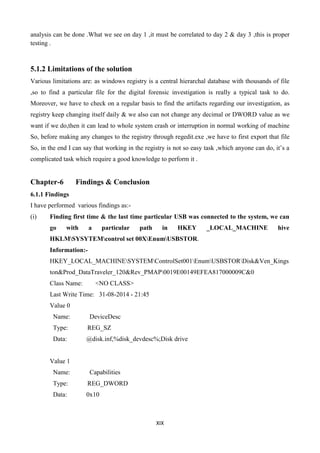
(i) Finding first time & the last time particular USB was connected to the system, we can
go with a particular path in HKEY _LOCAL_MACHINE hive
HKLMSYSYTEMcontrol set 00XEnumUSBSTOR.
Information:-
HKEY_LOCAL_MACHINESYSTEMControlSet001EnumUSBSTORDisk&Ven_Kings
ton&Prod_DataTraveler_120&Rev_PMAP0019E00149EFEA817000009C&0
Class Name: <NO CLASS>
Last Write Time: 31-08-2014 - 21:45
Value 0
Name: DeviceDesc
Type: REG_SZ
Data: @disk.inf,%disk_devdesc%;Disk drive
Value 1
Name: Capabilities
Type: REG_DWORD
Data: 0x10
XX
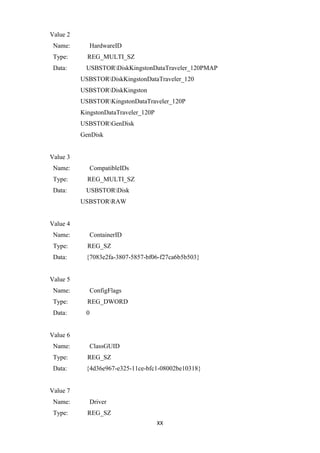
Value 2
Name: HardwareID
Type: REG_MULTI_SZ
Data: USBSTORDiskKingstonDataTraveler_120PMAP
USBSTORDiskKingstonDataTraveler_120
USBSTORDiskKingston
USBSTORKingstonDataTraveler_120P
KingstonDataTraveler_120P
USBSTORGenDisk
GenDisk
Value 3
Name: CompatibleIDs
Type: REG_MULTI_SZ
Data: USBSTORDisk
USBSTORRAW
Value 4
Name: ContainerID
Type: REG_SZ
Data: {7083e2fa-3807-5857-bf06-f27ca6b5b503}
Value 5
Name: ConfigFlags
Type: REG_DWORD
Data: 0
Value 6
Name: ClassGUID
Type: REG_SZ
Data: {4d36e967-e325-11ce-bfc1-08002be10318}
Value 7
Name: Driver
Type: REG_SZ
XXI
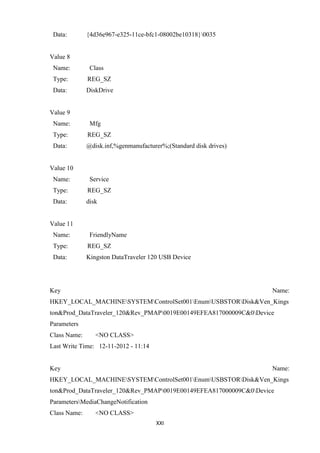
Data: {4d36e967-e325-11ce-bfc1-08002be10318}0035
Value 8
Name: Class
Type: REG_SZ
Data: DiskDrive
Value 9
Name: Mfg
Type: REG_SZ
Data: @disk.inf,%genmanufacturer%;(Standard disk drives)
Value 10
Name: Service
Type: REG_SZ
Data: disk
Value 11
Name: FriendlyName
Type: REG_SZ
Data: Kingston DataTraveler 120 USB Device
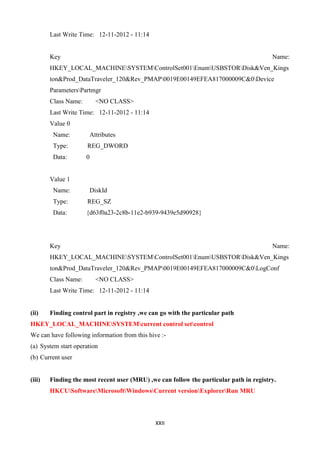
Key Name:
HKEY_LOCAL_MACHINESYSTEMControlSet001EnumUSBSTORDisk&Ven_Kings
ton&Prod_DataTraveler_120&Rev_PMAP0019E00149EFEA817000009C&0Device
Parameters
Class Name: <NO CLASS>
Last Write Time: 12-11-2012 - 11:14
Key Name:
HKEY_LOCAL_MACHINESYSTEMControlSet001EnumUSBSTORDisk&Ven_Kings
ton&Prod_DataTraveler_120&Rev_PMAP0019E00149EFEA817000009C&0Device
ParametersMediaChangeNotification
Class Name: <NO CLASS>
XXII
Last Write Time: 12-11-2012 - 11:14
Key Name:
HKEY_LOCAL_MACHINESYSTEMControlSet001EnumUSBSTORDisk&Ven_Kings
ton&Prod_DataTraveler_120&Rev_PMAP0019E00149EFEA817000009C&0Device
ParametersPartmgr
Class Name: <NO CLASS>
Last Write Time: 12-11-2012 - 11:14
Value 0
Name: Attributes
Type: REG_DWORD
Data: 0
Value 1
Name: DiskId
Type: REG_SZ
Data: {d63f0a23-2c8b-11e2-b939-9439e5d90928}
Key Name:
HKEY_LOCAL_MACHINESYSTEMControlSet001EnumUSBSTORDisk&Ven_Kings
ton&Prod_DataTraveler_120&Rev_PMAP0019E00149EFEA817000009C&0LogConf
Class Name: <NO CLASS>
Last Write Time: 12-11-2012 - 11:14
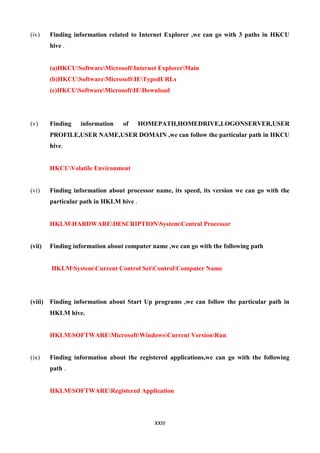
(ii) Finding control part in registry ,we can go with the particular path
HKEY_LOCAL_MACHINESYSTEMcurrent control setcontrol
We can have following information from this hive :-
(a) System start operation
(b) Current user
(iii) Finding the most recent user (MRU) ,we can follow the particular path in registry.
HKCUSoftwareMicrosoftWindowsCurrent versionExplorerRun MRU
XXIII
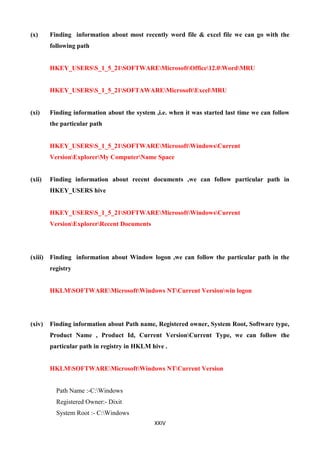
(iv) Finding information related to Internet Explorer ,we can go with 3 paths in HKCU
hive .
(a)HKCUSoftwareMicrosoftInternet ExplorerMain
(b)HKCUSoftwareMicrosoftIETypedURLs
(c)HKCUSoftwareMicrosoftIEDownload
(v) Finding information of HOMEPATH,HOMEDRIVE,LOGONSERVER,USER
PROFILE,USER NAME,USER DOMAIN ,we can follow the particular path in HKCU
hive.
HKCUVolatile Environment
(vi) Finding information about processor name, its speed, its version we can go with the
particular path in HKLM hive .
HKLMHARDWAREDESCRIPTIONSystemCentral Processor
(vii) Finding information about computer name ,we can go with the following path
HKLMSystemCurrent Control SetControlComputer Name
(viii) Finding information about Start Up programs ,we can follow the particular path in
HKLM hive.
HKLMSOFTWAREMicrosoftWindowsCurrent VersionRun
(ix) Finding information about the registered applications,we can go with the following
path .
HKLMSOFTWARERegistered Application
XXIV
(x) Finding information about most recently word file & excel file we can go with the
following path
HKEY_USERSS_1_5_21SOFTWAREMicrosoftOffice12.0WordMRU
HKEY_USERSS_1_5_21SOFTAWAREMicrosoftExcelMRU
(xi) Finding information about the system ,i.e. when it was started last time we can follow
the particular path
HKEY_USERSS_1_5_21SOFTWAREMicrosoftWindowsCurrent
VersionExplorerMy ComputerName Space
(xii) Finding information about recent documents ,we can follow particular path in
HKEY_USERS hive
HKEY_USERSS_1_5_21SOFTWAREMicrosoftWindowsCurrent
VersionExplorerRecent Documents
(xiii) Finding information about Window logon ,we can follow the particular path in the
registry
HKLMSOFTWAREMicrosoftWindows NTCurrent Versionwin logon
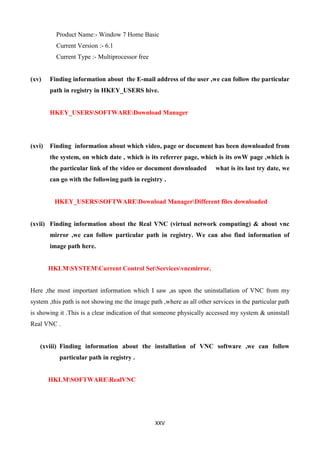
(xiv) Finding information about Path name, Registered owner, System Root, Software type,
Product Name , Product Id, Current VersionCurrent Type, we can follow the
particular path in registry in HKLM hive .
HKLMSOFTWAREMicrosoftWindows NTCurrent Version
Path Name :-C:Windows
Registered Owner:- Dixit
System Root :- C:Windows
XXV
Product Name:- Window 7 Home Basic
Current Version :- 6.1
Current Type :- Multiprocessor free
(xv) Finding information about the E-mail address of the user ,we can follow the particular
path in registry in HKEY_USERS hive.
HKEY_USERSSOFTWAREDownload Manager
(xvi) Finding information about which video, page or document has been downloaded from
the system, on which date , which is its referrer page, which is its owW page ,which is
the particular link of the video or document downloaded what is its last try date, we
can go with the following path in registry .
HKEY_USERSSOFTWAREDownload ManagerDifferent files downloaded
(xvii) Finding information about the Real VNC (virtual network computing) & about vnc
mirror ,we can follow particular path in registry. We can also find information of
image path here.
HKLMSYSTEMCurrent Control SetServicesvncmirror.
Here ,the most important information which I saw ,as upon the uninstallation of VNC from my
system ,this path is not showing me the image path ,where as all other services in the particular path
is showing it .This is a clear indication of that someone physically accessed my system & uninstall
Real VNC .
(xviii) Finding information about the installation of VNC software ,we can follow
particular path in registry .
HKLMSOFTWARERealVNC
XXVI
6.1.2 Conclusions
The majority of recovered artifacts were discovered in RAM, slack/free space, and FTK [Orphan]
directories. That being said, there was still enough information to provide useful information about
the user(s). Another commonality between the browsers is information contained within the System
Volume Information. For example, one study made the statement that it would be impossible to
trace residual information, other than USB identifiers, if a portable storage device was not
accessible to the investigator. Our research clearly shows that further data can still be recovered on
host machines without the portable storage device being present. Overall, our research is a valuable
resource pertaining to private and portable web browsing artifacts. Forensic investigations play a
significant role in today's working & legal environment, and thus it should be carefully considered.
The evidence provided in the registry is the most significant source of any investigation .The
actions performed on the computer gives the examiner an insight of the system. Thus, a careful
analysis of the Windows system Registry from a forensic point of view is the need of the hour & a
hot area of research in the present scenario. Study gathered and verified the existing knowledge
about the registry hive files .Study also revealed the importance of registry analysis by
demonstrating how it can help an investigator to progress in a case of tracking data transfer from a
system to a USB external device. Main aim to trace the registry artifacts left by the attacker on
Windows Registry .Further Study exhibits the importance of registry analysis by demonstrating the
computer artifacts left by VNC activities .Here, we expect this work could contribute in
understanding the characteristic of VNC & Windows 7 OS as a part of digital forensic investigation
. In further studies , a method of extracting windows registry information from physical memory
has been proposed, which is proved to be effective in extracting hive files from windows dumps
imaged from Window XP, Windows Vista and Windows 7.How to make use of the registry data in
memory is also given.Finally, we can say Windows registry is a database that has been
implemented in the Microsoft Windows OS to hold the settings & configurations of the system
hardware application & user profiles. It is generally accepted that the Windows Registry holds
several potentially significant elements of information that may be valuable to forensic investigators
. Unique identifications should be noted to be persistent across identified platforms .The findings
raises some interesting issues ,for e.g.,an administrator can determine information of good known
authorized devices that have been attached to the system,from this information an administrator can
determine if any unauthorized USB based storage device has been installed on the respective
machine. Study also reveal that driver layer model can meet the requirements of majority
enterprises units for the security control of USB devices .Furthermore ,the key functions of
monitoring USB storage devices are all implemented in the driver layer .It is located in the Kernel
level,so it can control the USB storage devices preferentially .In final words we can say analyst
XXVII
must train himself to have a knowledge of the Windows system & the windows registry for proving
the authenticity of his all activities .
.
6.1.3 Future Works:-
Future work may include further RAM experiments, and more efficient methods to extract
information over an extended period of time instead of one controlled browsing session. Through
the detailed analysis of the registry hive files, activities of a system user can be traced. Hence
registry analysis should be carried as an integral part of digital forensic investigation process. We
can extend future work on comparison of registry & log files Moreover, more detailed information
can be extracted from windows registry as forensic evidence, which need to be done in future.
Moreover, we can work on crucial areas where a lot of information resides. We can work on USB &
how to track data theft from them. In future we can also emphasise more on remote access
technology & how to get more & more information about the attacker and to trace particular
artifacts of physically accessing the machine from the registry.Studies can also be set in the
directions like why in-built drivers get failed ,when particular USB was installed .Study of different
identifiers their end up locations ,tracing particular identifiers which remain active even after the
system has been shut down .Studying the communication principal of USB devices through the
study of WDM driver model ,study of USB filter drivers ,studying the Kernel with respect to USB
Window registry can be viewed as a Gold Mine of forensic investigation which could be used in
courts .In final words we can say that correlating our artefacts(findings) with timezone information
is a need of hour & a proper correlation between the two can put many intruders behind bars !!!!!!
References :-
1.Carvey, H., The Windows registry as a forensic resource, DigitalInvestigation, vol. 2(3), pp. 201–205,
Elsevier 2005.
2. Chang, K., Kim, G., Kim, K. and Kim, W., Initial Case AnalysisUsing Windows Registry in Computer
Forensics, Future GenerationCommunication and Networking, Volume 1, 6-8 Dec. 2007Page(s):564 –569.
[Online] DOI: 10.1109/FGCN.2007.151
3. Dashora, K., Tomar, D. S. and Rana, J. L., A Practical Approach forEvidence Gathering in Windows
Environment, International Journalof Computer Applications, Volume 5(10), August 2010.
4. Farmer, D. J., A Forensic Analysis of Windows Registry, Availableonline from
http://forensicfocus.com/downloads/windows-registryquick-reference.pdf, 2007.
5. Farmer, D. J., A Windows Registry Quick Reference: for the Everyday Examiner, Available online
fromhttp://eptuners.com/forensics/contents/A_Forensic_Examination_of_the_Windows_Registry.pdf,
2009.
6. Kim, Y. and Hong, D., Windows Registry and Hiding Suspects’Secret in Registry, In the Proceedings of the
2008 International.
7. www.wikipedia.com
8. Harlan. C, “The Windows Registry as a forensic resource”. Digital Investigation, Vol 2, pp. 201-205, 2005.
9. Timothy D.Morgan, “Recovering Deleted Data From the Windows Registry”. Digital Investigation, pp.33-
41, 2008.
10. Dolan-Gavitt.B, “Forensic Analysis of the Windows Registry in Memory”. Digital Investigation.
5(Supplement 1), pp.26-32, 2008.
11.Winhelponline. (2007). Determining the "Last Write Time" of a registry key?
from http://www.winhelponline.com/articles/12/1/
XXVIII
12.Hao Jiang, Jingchun Hu."Arithmetic Analysis of Filter Driver Based on USB Device
Computer Technology and Development ,2009,19(9): 0054-04
https://www.google.co.in/?gfe_rd=cr&ei=E3qiVMD1OejA8geyu4G4BQ&gws_rd=ssl#q=window
%20registry%20tutorial
https://www.google.co.in/?gfe_rd=cr&ei=E3qiVMD1OejA8geyu4G4BQ&gws_rd=ssl#q=window+
registry+command
https://www.google.co.in/?gfe_rd=cr&ei=E3qiVMD1OejA8geyu4G4BQ&gws_rd=ssl#q=informati
on%20about%20registry%20of%20windows
http://en.wikipedia.org/wiki/Windows_Registry
https://www.google.co.in/?gfe_rd=cr&ei=E3qiVMD1OejA8geyu4G4BQ&gws_rd=ssl#q=registry+
editor

FINDING FORENSIC ARTIFACTS FROM WINDOW REGISTRY

  • 1.
    I FINDING FORENSIC ARTIFACTSFROM WINDOW REGISTRY Submitted by: Priyank Dixit 9911103511 Under the guidance of Ms. Anuradha Gupta June – 2015 Submitted in partial fulfillment of the Degree of Bachelor of Technology In Computer Science Engineering DEPARTMENT OF COMPUTER SCIENCE & ENGINEERING JAYPEE INSTITUTE OF INFORMATION TECHNOLOGY, NOIDA
  • 2.
    II (I) TABLE OF CONTENTS ChapterNo. Topics Page No. Student Declaration II Certificate from the Supervisor III Acknowledgement IV Summary (Not more than 250 words) V Chapter-1 Introduction 1.1 General Introduction 1.2 List some relevant current/open problems. 1.3 Problem Statement 1.4 Overview of proposed solution approach and Novelty/benefits Chapter-2 Background Study 2.1 Literature Survey 2.1.1 Summary of papers 2.1.2 Integrated summary of the literature studied 2.2 Details of Empirical Study (Field Survey, Existing Tool Survey, Experimental Study) Chapter 3: Analysis, Design and Modeling 3.1 Requirements Specifications 3.2 Design Documentation 3.2.1 Control Flow Diagrams 3.2.2 Sequence Diagram/Activity diagrams Chapter-4 Implementation and Testing 4.1 Implementation details and issues Chapter-5 Testing 5.1 Testing Plan 5.2 Limitations of the solution Chapter-6 Findings & Conclusion 6.1 Findings 6.2 Conclusion 6.3 Future Work References ACM Format (Listed alphabetically)
  • 3.
    III DECLARATION I hereby declarethat this submission is my own work and that, to the best of my knowledge and belief, it contains no material previously published or written by another person nor material which has been accepted for the award of any other degree or diploma of the university or other institute of higher learning, except where due acknowledgment has been made in the text. Place: Noida Name: Priyank Dixit Date:02-06-2015 Enroll. No: 9911103511 Sign:
  • 4.
    IV CERTIFICATE This is tocertify that the work titled “Finding Forensic Artifacts From Windows Registry” submitted by “Priyank Dixit” in partial fulfillment for the award of degree of B.Tech of Jaypee Institute of Information Technology University, Noida has been carried out under my supervision. This work has not been submitted partially or wholly to any other University or Institute for the award of this or any other degree or diploma. Signature of Supervisor …………………….. Name of Supervisor Ms Anuradha Gupta Designation Assistant Professor Date 02-06-15
  • 5.
    V ACKNOWLEDGEMENT I have takenefforts in this project. However, it would not have been possible without the kind support and help of many individuals and the institute. I would like to extend my sincere thanks to all of them. I am highly indebted to Ms Anuradha Gupta for their guidance and constant supervision as well as for providing necessary information regarding the project & also for their support in completing the project. I would like to express my gratitude towards my parents & faculty members of the institute for their kind co-operation and encouragement which helped me in completion of this project. My thanks and appreciations also go to my colleagues in developing the project and people who have willingly helped me out with their abilities. Signature of the Student: Name of Student: Priyank dixit Enrollment Number: 9911103511 Date: 02-06-2015
  • 6.
    VI SUMMARY My research workis „Finding Forensic Artifacts From Window Registry‟. For the accomplishment of my task, I studied various research paper thoroughly & did implementation of various aspects of them, I physically visited all the registry hives & their respective registry keys. Further we can see registry key contains registry values .Making changes to these values & keys using Registry Editor will change the configuration that a particular value controls. Registry Editor is the face of the registry & is the way to view & make changes to the registry .Technically, the registry is the collective name for various database files located within the Windows installation directory. The Windows Registry is accessed & configured using the Registry Editor program, a free registry editing utility included with every version of Microsoft Windows .Basically, I work on finding the artifacts(something observed in scientific investigation or experiment i.e. not naturally present but occurs as a result of the investigative procedure) from the registry .I work on finding artifacts of USB ,unauthorized access ,also see which files or video has been downloaded from my system ,also extract information about the current user, machine‟s name ,Home Path ,user‟s E-mail address etc. I also extract information about MRU (most recent user ) to the system ,also see the Last Write Time of the particular USB ,& when it was installed for the first time into my system. Actually registry contains ample amount of information ,which can be used for Digital Forensic Investigation . Signature of Student Signature of Supervisor Name: Priyank Dixit Name: Ms. Anuradha Gupta Date 02-06-15 Date 02-06-15
  • 7.
    VII INTRODUCTION 1.1 General Introduction TheWindows Registry is a hierarchical database that stores configuration settings and options on Microsoft Windows operating systems. It contains settings for low-level operating system components and for applications running on the platform that have opted to use the registry. The kernel, device drivers, services, SAM, user interface and third party applications can all make use of the registry. The registry also provides a means to access counters for profiling system performance. It is a database in windows that contains important information about system hardware, installed programs & settings,& profiles of each of the user accounts on your computer. We should not make any manual changes to the Registry because programs & applications typically make all the necessary changes automatically. STRUCTURE: The registry contains two basic elements: keys and values. Registry keys are container objects similar to folders. Registry values are non-container objects similar to files. Keys may contain values or further keys. Keys are referenced with a syntax similar to Windows' path names, using backslashes to indicate levels of hierarchy. Keys must have a case insensitive name without backslashes. There are seven predefined root keys, traditionally named according to their constant handles defined in the Win32 API, or by synonymous abbreviations (depending on applications):  HKEY_LOCAL_MACHINE or HKLM  HKEY_CURRENT_CONFIG or HKCC (only in Windows 9x and NT)  HKEY_CLASSES_ROOT or HKCR  HKEY_CURRENT_USER or HKCU  HKEY_USERS or HKU  HKEY_PERFORMANCE_DATA (only in Windows NT, but invisible in the Windows Registry Editor)  HKEY_DYN_DATA (only in Windows 9x, and visible in the Windows Registry Editor)
  • 8.
    VIII 1.2 List somerelevant current/open problems. Major concerning problem is that whenever any storage devices are attached to USB port on the system running Windows XP,in built drivers collect information from the device & then use that information to create a profile of identifiers(artefacts).These identifiers end up in different locations on the system & tend to be persistent after shutdown ,means these identifiers can give intruder a lot of crucial information. USB ports as well as other ports that permits one to attach a removable storage device can act as a promising means to steal a classified information & problem of footprints left on the system & Registry when USB device is connected.Further studies reveal that if we are not giving functional access of USB device in Kernel,then it can be easily bypassed by malicious programs.Moreover,Registry contains ample amount of information & it has some hotspot areas which can be used by forensic analyst or can be used by intruders to do something unusual !!!!!!!!! These all scenarios are complete enough to explain how crucial is the study of USB in today‟s cyber world crime . . 1.3 Problem statement When any storage devices are attached to USB ,port on the system running Windows XP, in built drivers collect information from the device and then use that information to create a profile of identifiers(artefacts). These identifiers end up in different location on the system & tend to be persistent after shutdown also .Moreover if we are not giving functional access of USB device in Kernel ,then it can be easily bypassed by malicious program .We also have problems regarding various hot spots in Registry ,which can be the path way to Intrusions. Finally we have some Hot spot areas ,which are very crucial regarding forensic analysis viz Timezone information ,Last Time system was shut down etc. 1.4 Overview of proposed solution approach and Novelty/benefits Prior research in this field only show that USB is an ample source of a lot of forensic information ,but by analyzing these papers I came to know about the concept of Vendor Code, Product Code & Revision code ,these 3 altogether constitutes Device Instance ID ,which is unique to every user .I plan to analyze USB with their perspective ,I physically access different location in Registry which are crucial regarding USB .Prior research merely talks on USB installation & where it is being installed ,but here I analyses not only installation location but also location of Device instance ID ,also know the concept of Vendor id ,Product Id in detail .Prior research also lacks about the
  • 9.
    IX concept of drivermodels regarding USB ,I also come to know about the concept of filter drivers & know how functional access of USB can be done in Kernel ,which is very safer mode ,I come to know about the timezone information, Last shut down time information which were lacking in prior researches. 2. Background Study 2.1 Literature Survey I studied various research papers thoroughly, visited various sites to get knowledge of registry, studied about remote access technology, studied 2-3 books for getting good knowledge of the research. Moreover I heard various videos regarding Registry. Read various research papers, research related journals, explore different information from Internet & use them to find artifacts. 2.1.1 Summary of relevant papers with following details Paper 1:Tracing USB device artefacts on Windows XP Operating System for forensic purpose Authors: Victor Chileshe Cho Year of publication 2007 Publishing details where this paper was published Edith Cowan University Summary Windows system several identifiers are created when a USB device is plugged into a Universal Serial Bus. Some of these artefacts or identifiers are unique to the device & consistent across different Windows platform .Another key factor that makes these identifiers forensically important is the fact that they are traceable even after the system has been shut down.This paper basically deals with different artefacts of USB. Moreover, it also tells that Vendor Code, Product Code & Revision Code altogether constitutes Device Instance ID. Paper also states that Registry store information that ensures proper USB devices drivers are loaded ,services required by applications are made available and also states about Windows Log files .
  • 10.
    X Paper 2: Research& application of USB filter driver based on Windows Kernel Authors: Shaobo Li Xiaohui Jia Shulin Lv Year of publication: 2012 Publishing details where this paper was published Guizhon University,Guiyang,China Summary This paper introduces the WDM driver model ,deeply analyzes the communication principle of USB device & the IRP packet interception technology based on USB filter driver. This paper states the fact that if the function of access control for USB storage device is done in the Kernel ,then it can‟t be easily bypassed by the malicious program.The safety & reliability of USB filter driver based on Windows Kernel is much higher .As soon as USB storage device is inserted on the computer ,the system will enumerate a USB ,PDO & then a driver program called USBSTOR will be loaded on the top of the PDO as FDO .USBSTORR will also create a physical device above which a disk driver will be mounted & then the partition drive will be mounted it on again Web link: http://googlescholar.com Paper 3:Initial Case Analysis using Windows Registry in Computer Forensics Authors: Kisik Chang & Gibum Kim Kwonyoup Kim
  • 11.
    XI Year of Publication: 2013 Publishingdetails where this paper was published Korea University,Korea Summary: This paper tells us that, Registry has significant information which are valuable ,especially some information such as the timezone information,the time when the OS was installed & the system was turned off. Paper also tells us about the Hotspots of Registry ,which can be analysed by forensic analyst .It is said that computer forensics consist of 4 phases:-Collection, Examination, Analysis & Reporting. The collection phase involves the search for, collection of, & documentation of electronic device. The Examination phase helps to make the evidence visible & explain its origin & significance. Analysis process makes all parties discover the information that may be hidden or obscured in the evidence .It is the process to observe the product of the examination for its significance on probative values to the case Paper 4: Forensic Analysis of Windows Registry against intrusion Authors: Haoyang Xie Keyu Jiang Xiaohang Yuan Year of Publication: 2013 Publishing details where this paper was published Computer Science Department,North Carolina A & T State University, Greenstoro,NC,United States Summary Registry is often considered as the heart of OS ,because it contains all of the configuration setting of specific users, groups, Hardware, Software & networks. Windows Registry can be viewed as a gold mine of forensic evidences which could be used in courts. This paper describes about Hives, Keys,
  • 12.
    XII Subkeys that haveforensic values .Finally it states that how these keys can be analysed for intrusion study . Paper 5 : Forensic Analysis of the Windows 7 Registry Authors : Khwala Abdulla Alghafhi Andrew Jones Year of Publication:2010 Publishing details where this paper was published Khalifa University of Science & Technology Summary 2.1.2 Integrated summary of the literature studied Paper 1 basically tells us about the concept of in built drivers and how they use to take information of particular USB ,as soon as it gets installed & then use that information to create a profile of identifiers ,this used to reduce the installation time during its reinstallation ,paper also states that if some device is not shown by the system then definitely there is a problem regarding its in built drivers either the USB is in read mode or in built drivers are corrupted .Paper 2 throws light on the concept of WDM driver model & states the fact that if the function of access control of USB storage device is done in the kernel ,then it can‟t be easily bypassed by the malicious program. Paper 3 gives us important information about the crucial areas of Registry i.e. it throws light on timezone information ,time of installation of OS, last shut down time etc . Paper 4 clears the concept of Hives Keys ,Subkeys & tells us about the important one regarding forensic investigation & states that Registry can be viewed as Gold Mine of forensic evidences Table-PRIVATE BROWSER:- PRIVATE BROWSER RESULT IE in Private Browsing Everything gets deleted when existing the browser and the entire session is terminated. Google Chrome Incognito Mode Safe browse ring data bases, cookies and
  • 13.
    XIII history are modified.No changes during session. Firefox Private Browsing Safe browsing database gets modified, nothing appears to be written while surfing, but when session ends, some Firefox profile files are modified. Safari Private Browsing Only NTuser.dat appears to be modified. Portable Browser HOST MACHINE ACTIVITY Firefox Portable MozillaRoaming directory are modified and a few temp files under local app data were created/ deleted. Google Chrome Portable Folder called Google Chrome Portable had files crated, modified and deleted including Sys32/Winevt/Logs and Portable Chrome Catch Safari Portable Setup files are portable but must be installed on system, therefore will not be used for testing. Table - Registry Hide Path:- Registry Hide Path Hive File Path HKLMSAM %SystemRoot%System32Configsam HKLMSECURITY %SystemRoot%System32Configsecurity HKLMSOFTWARE %SystemRoot%System32Configsoftware HKLMSYSTEM %SystemRoot%System32Configsystem HKLMHARDWARE Volatile hive HKU.DEFAULT %SystemRoot%System32ConfigDefault Table - Registry File:-
  • 14.
    XIV 2.2 Details ofEmpirical Study (Field Survey, Existing Tool Survey, Experimental Study) I studied various research papers before selecting this paper for my research work. I search different aspects of Registry from various sites viz. Google Scholar, ieeexplore, techsupportalert etc. I heard various video lectures and manually perform various tasks on Registry,so that I can be handful with my related topic. I manually perform some tasks on Registry.I explore the Registry manually Chapter 3: Analysis, Design and Modeling 3.1.1 Overall description of the project The whole project is related to finding different artefacts from Registry itself .Through the detailed analysis of papers, which are mostly related to USB ,I understand the fact that ,as soon as any storage devices are attached to USB, port on the system running Windows XP ,in built drivers collect information from the device & then use that information to create a profile of identifiers(artefacts).These identifiers end up in different locations on the system & tend to be persistent after shutdown also .So, these different locations are very crucial regarding forensic investigation .Further I know the fact that ,if the function of access control for USB storage device is done in the Kernel ,then it can‟t be easily bypassed by the malicious program .I also understand the fact that Vendor code ,Product Id & Revision code altogether constitutes the Device Instance ID ,which is unique for each particular USB. Further study show light on Serial No., Port No., give the idea about which port has been used by particular USB ,during its installation ,concept of filter drivers also come into the picture .Moreover, papers tries to give insight into the Windows Registry within the Examination process & the analysis phase relating to the system configuration ,the timezone information ,the time when the OS was installed & the last time system was turned off are also if properly analysed can prove to be crucial !!!!!
  • 15.
    XV 3.1.2 Requirements Specifications Amachine is required to perform different tasks regarding registry ,a USB to perform task related to forensic investigation ,to see when it was first installed in the system, When it was last installed etc.All ports must be in good conditions ,all the in-built drivers must work as soon as USB is installed . 3.2 Design Documentation 3.2.1 Activity Diagram 3.2.2Control flow diagram
  • 16.
    XVI Overall Research Methodologyfor exporting registry image
  • 17.
    XVII Flowchart of algorithmfor extracting the hive files from memory Chapter-4 : Implementation and Testing 4.1.1 Implementation details and issues i) I performed test regarding USB & see when a USB is install on a device for the first time where its installation folder gets located . ii) I also see where the information of all the USB & external hard disk,which were connected to my system in past or at any time located . iii) I also saw, the last write time of particular USB & various other time it was connected to my system. iv)By visiting particular path in Registry i.e. related to USB
  • 18.
    XVIII HKLMSystemControlSet00XEnumUSBSTOR Facts about theSerial No. ,which is being generated by system ,as soon as USB is installed to it . For Example:- OCD02851333229F1&0 Here “0” after & is related to port no. v)Some facts regarding Vendor Code, Product Id & Revision Code USBVId_v(4) & PID_ d(4) & REV_r(4). Here v(4) is 4 digit Vendor Code. d(4) is 4 digit Product Code. r(4) is 4 digit Revision Code . v) Finding first time & the last time particular USB was connected to the system, we can go with a particular path in Registry. HKLMSYSYTEMcontrol set 00XEnumUSBSTOR. vi) Finding information about the E-mail address of the user ,we can follow the particular path in registry in HKEY_USERS hive. HKEY_USERSSOFTWAREDownload Manager vii)Finding information about the user that used the specific USB HKCUSoftwareMicrosoftWindowsCurrent VersionExplorerMountpoints2 viii)Finding information about the Device classes ,we can follow the particular path HKLMSystemCurrent Control SetControlDevice Classes ix)Finding Information about Autorun Locations ,we can follow the particular path HKLMSoftwareMicrosoftWindowsCurrent VersionRun once x)To track if a file is opened or copied ,we can follow particular path HKCUSoftwareMicrosoftWindowsCurrent VersionExplorerRecent Docs 5. Testing 5.1.1 Testing Plan I am planning to do my implementation on areas related to USB ,planning to have a clear & thorough ideas of all keys,subkeys related to USB .In future days ,I would like to work on Vendor Code ,Product Code & various other aspects related to the Serial No. .I would like to correlate the facts by visiting different keys related to them simultaneously & in the end want to prove something that can be fruitful,also planning to know some more hot spot areas related to forensic intrusion .More study can give fruitful result in this key area ,which is a very hotspot area in today‟s time .A detailed & deep study of USB & similar products would make me sure about Intrusion effect & how they can be minimized .Deep knowledge would definitely make me perfect enough to analyze something unusual .Testing basically includes testing the crucial areas 2-3 times so that their proper
  • 19.
    XIX analysis can bedone .What we see on day 1 ,it must be correlated to day 2 & day 3 ,this is proper testing . 5.1.2 Limitations of the solution Various limitations are: as windows registry is a central hierarchal database with thousands of file ,so to find a particular file for the digital forensic investigation is really a typical task to do. Moreover, we have to check on a regular basis to find the artifacts regarding our investigation, as registry keep changing itself daily & we also can not change any decimal or DWORD value as we want if we do,then it can lead to whole system crash or interruption in normal working of machine So, before making any changes to the registry through regedit.exe ,we have to first export that file So, in the end I can say that working in the registry is not so easy task ,which anyone can do, it‟s a complicated task which require a good knowledge to perform it . Chapter-6 Findings & Conclusion 6.1.1 Findings I have performed various findings as:- (i) Finding first time & the last time particular USB was connected to the system, we can go with a particular path in HKEY _LOCAL_MACHINE hive HKLMSYSYTEMcontrol set 00XEnumUSBSTOR. Information:- HKEY_LOCAL_MACHINESYSTEMControlSet001EnumUSBSTORDisk&Ven_Kings ton&Prod_DataTraveler_120&Rev_PMAP0019E00149EFEA817000009C&0 Class Name: <NO CLASS> Last Write Time: 31-08-2014 - 21:45 Value 0 Name: DeviceDesc Type: REG_SZ Data: @disk.inf,%disk_devdesc%;Disk drive Value 1 Name: Capabilities Type: REG_DWORD Data: 0x10
  • 20.
    XX Value 2 Name: HardwareID Type:REG_MULTI_SZ Data: USBSTORDiskKingstonDataTraveler_120PMAP USBSTORDiskKingstonDataTraveler_120 USBSTORDiskKingston USBSTORKingstonDataTraveler_120P KingstonDataTraveler_120P USBSTORGenDisk GenDisk Value 3 Name: CompatibleIDs Type: REG_MULTI_SZ Data: USBSTORDisk USBSTORRAW Value 4 Name: ContainerID Type: REG_SZ Data: {7083e2fa-3807-5857-bf06-f27ca6b5b503} Value 5 Name: ConfigFlags Type: REG_DWORD Data: 0 Value 6 Name: ClassGUID Type: REG_SZ Data: {4d36e967-e325-11ce-bfc1-08002be10318} Value 7 Name: Driver Type: REG_SZ
  • 21.
    XXI Data: {4d36e967-e325-11ce-bfc1-08002be10318}0035 Value 8 Name:Class Type: REG_SZ Data: DiskDrive Value 9 Name: Mfg Type: REG_SZ Data: @disk.inf,%genmanufacturer%;(Standard disk drives) Value 10 Name: Service Type: REG_SZ Data: disk Value 11 Name: FriendlyName Type: REG_SZ Data: Kingston DataTraveler 120 USB Device Key Name: HKEY_LOCAL_MACHINESYSTEMControlSet001EnumUSBSTORDisk&Ven_Kings ton&Prod_DataTraveler_120&Rev_PMAP0019E00149EFEA817000009C&0Device Parameters Class Name: <NO CLASS> Last Write Time: 12-11-2012 - 11:14 Key Name: HKEY_LOCAL_MACHINESYSTEMControlSet001EnumUSBSTORDisk&Ven_Kings ton&Prod_DataTraveler_120&Rev_PMAP0019E00149EFEA817000009C&0Device ParametersMediaChangeNotification Class Name: <NO CLASS>
  • 22.
    XXII Last Write Time:12-11-2012 - 11:14 Key Name: HKEY_LOCAL_MACHINESYSTEMControlSet001EnumUSBSTORDisk&Ven_Kings ton&Prod_DataTraveler_120&Rev_PMAP0019E00149EFEA817000009C&0Device ParametersPartmgr Class Name: <NO CLASS> Last Write Time: 12-11-2012 - 11:14 Value 0 Name: Attributes Type: REG_DWORD Data: 0 Value 1 Name: DiskId Type: REG_SZ Data: {d63f0a23-2c8b-11e2-b939-9439e5d90928} Key Name: HKEY_LOCAL_MACHINESYSTEMControlSet001EnumUSBSTORDisk&Ven_Kings ton&Prod_DataTraveler_120&Rev_PMAP0019E00149EFEA817000009C&0LogConf Class Name: <NO CLASS> Last Write Time: 12-11-2012 - 11:14 (ii) Finding control part in registry ,we can go with the particular path HKEY_LOCAL_MACHINESYSTEMcurrent control setcontrol We can have following information from this hive :- (a) System start operation (b) Current user (iii) Finding the most recent user (MRU) ,we can follow the particular path in registry. HKCUSoftwareMicrosoftWindowsCurrent versionExplorerRun MRU
  • 23.
    XXIII (iv) Finding informationrelated to Internet Explorer ,we can go with 3 paths in HKCU hive . (a)HKCUSoftwareMicrosoftInternet ExplorerMain (b)HKCUSoftwareMicrosoftIETypedURLs (c)HKCUSoftwareMicrosoftIEDownload (v) Finding information of HOMEPATH,HOMEDRIVE,LOGONSERVER,USER PROFILE,USER NAME,USER DOMAIN ,we can follow the particular path in HKCU hive. HKCUVolatile Environment (vi) Finding information about processor name, its speed, its version we can go with the particular path in HKLM hive . HKLMHARDWAREDESCRIPTIONSystemCentral Processor (vii) Finding information about computer name ,we can go with the following path HKLMSystemCurrent Control SetControlComputer Name (viii) Finding information about Start Up programs ,we can follow the particular path in HKLM hive. HKLMSOFTWAREMicrosoftWindowsCurrent VersionRun (ix) Finding information about the registered applications,we can go with the following path . HKLMSOFTWARERegistered Application
  • 24.
    XXIV (x) Finding informationabout most recently word file & excel file we can go with the following path HKEY_USERSS_1_5_21SOFTWAREMicrosoftOffice12.0WordMRU HKEY_USERSS_1_5_21SOFTAWAREMicrosoftExcelMRU (xi) Finding information about the system ,i.e. when it was started last time we can follow the particular path HKEY_USERSS_1_5_21SOFTWAREMicrosoftWindowsCurrent VersionExplorerMy ComputerName Space (xii) Finding information about recent documents ,we can follow particular path in HKEY_USERS hive HKEY_USERSS_1_5_21SOFTWAREMicrosoftWindowsCurrent VersionExplorerRecent Documents (xiii) Finding information about Window logon ,we can follow the particular path in the registry HKLMSOFTWAREMicrosoftWindows NTCurrent Versionwin logon (xiv) Finding information about Path name, Registered owner, System Root, Software type, Product Name , Product Id, Current VersionCurrent Type, we can follow the particular path in registry in HKLM hive . HKLMSOFTWAREMicrosoftWindows NTCurrent Version Path Name :-C:Windows Registered Owner:- Dixit System Root :- C:Windows
  • 25.
    XXV Product Name:- Window7 Home Basic Current Version :- 6.1 Current Type :- Multiprocessor free (xv) Finding information about the E-mail address of the user ,we can follow the particular path in registry in HKEY_USERS hive. HKEY_USERSSOFTWAREDownload Manager (xvi) Finding information about which video, page or document has been downloaded from the system, on which date , which is its referrer page, which is its owW page ,which is the particular link of the video or document downloaded what is its last try date, we can go with the following path in registry . HKEY_USERSSOFTWAREDownload ManagerDifferent files downloaded (xvii) Finding information about the Real VNC (virtual network computing) & about vnc mirror ,we can follow particular path in registry. We can also find information of image path here. HKLMSYSTEMCurrent Control SetServicesvncmirror. Here ,the most important information which I saw ,as upon the uninstallation of VNC from my system ,this path is not showing me the image path ,where as all other services in the particular path is showing it .This is a clear indication of that someone physically accessed my system & uninstall Real VNC . (xviii) Finding information about the installation of VNC software ,we can follow particular path in registry . HKLMSOFTWARERealVNC
  • 26.
    XXVI 6.1.2 Conclusions The majorityof recovered artifacts were discovered in RAM, slack/free space, and FTK [Orphan] directories. That being said, there was still enough information to provide useful information about the user(s). Another commonality between the browsers is information contained within the System Volume Information. For example, one study made the statement that it would be impossible to trace residual information, other than USB identifiers, if a portable storage device was not accessible to the investigator. Our research clearly shows that further data can still be recovered on host machines without the portable storage device being present. Overall, our research is a valuable resource pertaining to private and portable web browsing artifacts. Forensic investigations play a significant role in today's working & legal environment, and thus it should be carefully considered. The evidence provided in the registry is the most significant source of any investigation .The actions performed on the computer gives the examiner an insight of the system. Thus, a careful analysis of the Windows system Registry from a forensic point of view is the need of the hour & a hot area of research in the present scenario. Study gathered and verified the existing knowledge about the registry hive files .Study also revealed the importance of registry analysis by demonstrating how it can help an investigator to progress in a case of tracking data transfer from a system to a USB external device. Main aim to trace the registry artifacts left by the attacker on Windows Registry .Further Study exhibits the importance of registry analysis by demonstrating the computer artifacts left by VNC activities .Here, we expect this work could contribute in understanding the characteristic of VNC & Windows 7 OS as a part of digital forensic investigation . In further studies , a method of extracting windows registry information from physical memory has been proposed, which is proved to be effective in extracting hive files from windows dumps imaged from Window XP, Windows Vista and Windows 7.How to make use of the registry data in memory is also given.Finally, we can say Windows registry is a database that has been implemented in the Microsoft Windows OS to hold the settings & configurations of the system hardware application & user profiles. It is generally accepted that the Windows Registry holds several potentially significant elements of information that may be valuable to forensic investigators . Unique identifications should be noted to be persistent across identified platforms .The findings raises some interesting issues ,for e.g.,an administrator can determine information of good known authorized devices that have been attached to the system,from this information an administrator can determine if any unauthorized USB based storage device has been installed on the respective machine. Study also reveal that driver layer model can meet the requirements of majority enterprises units for the security control of USB devices .Furthermore ,the key functions of monitoring USB storage devices are all implemented in the driver layer .It is located in the Kernel level,so it can control the USB storage devices preferentially .In final words we can say analyst
  • 27.
    XXVII must train himselfto have a knowledge of the Windows system & the windows registry for proving the authenticity of his all activities . . 6.1.3 Future Works:- Future work may include further RAM experiments, and more efficient methods to extract information over an extended period of time instead of one controlled browsing session. Through the detailed analysis of the registry hive files, activities of a system user can be traced. Hence registry analysis should be carried as an integral part of digital forensic investigation process. We can extend future work on comparison of registry & log files Moreover, more detailed information can be extracted from windows registry as forensic evidence, which need to be done in future. Moreover, we can work on crucial areas where a lot of information resides. We can work on USB & how to track data theft from them. In future we can also emphasise more on remote access technology & how to get more & more information about the attacker and to trace particular artifacts of physically accessing the machine from the registry.Studies can also be set in the directions like why in-built drivers get failed ,when particular USB was installed .Study of different identifiers their end up locations ,tracing particular identifiers which remain active even after the system has been shut down .Studying the communication principal of USB devices through the study of WDM driver model ,study of USB filter drivers ,studying the Kernel with respect to USB Window registry can be viewed as a Gold Mine of forensic investigation which could be used in courts .In final words we can say that correlating our artefacts(findings) with timezone information is a need of hour & a proper correlation between the two can put many intruders behind bars !!!!!! References :- 1.Carvey, H., The Windows registry as a forensic resource, DigitalInvestigation, vol. 2(3), pp. 201–205, Elsevier 2005. 2. Chang, K., Kim, G., Kim, K. and Kim, W., Initial Case AnalysisUsing Windows Registry in Computer Forensics, Future GenerationCommunication and Networking, Volume 1, 6-8 Dec. 2007Page(s):564 –569. [Online] DOI: 10.1109/FGCN.2007.151 3. Dashora, K., Tomar, D. S. and Rana, J. L., A Practical Approach forEvidence Gathering in Windows Environment, International Journalof Computer Applications, Volume 5(10), August 2010. 4. Farmer, D. J., A Forensic Analysis of Windows Registry, Availableonline from http://forensicfocus.com/downloads/windows-registryquick-reference.pdf, 2007. 5. Farmer, D. J., A Windows Registry Quick Reference: for the Everyday Examiner, Available online fromhttp://eptuners.com/forensics/contents/A_Forensic_Examination_of_the_Windows_Registry.pdf, 2009. 6. Kim, Y. and Hong, D., Windows Registry and Hiding Suspects’Secret in Registry, In the Proceedings of the 2008 International. 7. www.wikipedia.com 8. Harlan. C, “The Windows Registry as a forensic resource”. Digital Investigation, Vol 2, pp. 201-205, 2005. 9. Timothy D.Morgan, “Recovering Deleted Data From the Windows Registry”. Digital Investigation, pp.33- 41, 2008. 10. Dolan-Gavitt.B, “Forensic Analysis of the Windows Registry in Memory”. Digital Investigation. 5(Supplement 1), pp.26-32, 2008. 11.Winhelponline. (2007). Determining the "Last Write Time" of a registry key? from http://www.winhelponline.com/articles/12/1/
  • 28.
    XXVIII 12.Hao Jiang, JingchunHu."Arithmetic Analysis of Filter Driver Based on USB Device Computer Technology and Development ,2009,19(9): 0054-04 https://www.google.co.in/?gfe_rd=cr&ei=E3qiVMD1OejA8geyu4G4BQ&gws_rd=ssl#q=window %20registry%20tutorial https://www.google.co.in/?gfe_rd=cr&ei=E3qiVMD1OejA8geyu4G4BQ&gws_rd=ssl#q=window+ registry+command https://www.google.co.in/?gfe_rd=cr&ei=E3qiVMD1OejA8geyu4G4BQ&gws_rd=ssl#q=informati on%20about%20registry%20of%20windows http://en.wikipedia.org/wiki/Windows_Registry https://www.google.co.in/?gfe_rd=cr&ei=E3qiVMD1OejA8geyu4G4BQ&gws_rd=ssl#q=registry+ editor