HACKING AND SECURING
   IOS APPLICATIONS


                  -Satish B
Agenda
   iOS Security Concepts
   Loopholes in iOS
   Hacking & Securing iOS Applications
     How does loophole in iOS affects the apps
     How easy it’s to steal data from the apps

     How to protect these apps
Who Am I?

    <1            • Framework for functional testing tools
Development


5+ Information
                  • Web & Mobile application security
   Security


                  • iOS Forensics & hacking
Other Interests   • Tool development & Knowledge Sharing
iOS Basics
   iOS is the Operating System that run on Apple devices like iPhone,
    iPod, iPad & Apple TV
   Stripped down Mac OS X + XNU kernel
   Provides multi tasking
   Only allows to run Apple signed applications
   New features & Bug fixes with every release
       Current version is iOS 6.0.1
iOS Security Features
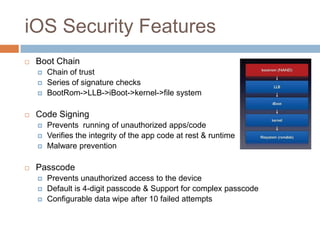
   Boot Chain
       Chain of trust
       Series of signature checks
       BootRom->LLB->iBoot->kernel->file system

   Code Signing
       Prevents running of unauthorized apps/code
       Verifies the integrity of the app code at rest & runtime
       Malware prevention

   Passcode
       Prevents unauthorized access to the device
       Default is 4-digit passcode & Support for complex passcode
       Configurable data wipe after 10 failed attempts
Access data without passcode
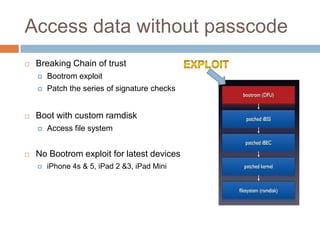
   Breaking Chain of trust
       Bootrom exploit
       Patch the series of signature checks


   Boot with custom ramdisk
       Access file system


   No Bootrom exploit for latest devices
       iPhone 4s & 5, iPad 2 &3, iPad Mini
iOS Security Features
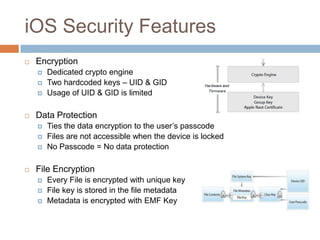
   Encryption
       Dedicated crypto engine
       Two hardcoded keys – UID & GID
       Usage of UID & GID is limited

   Data Protection
       Ties the data encryption to the user’s passcode
       Files are not accessible when the device is locked
       No Passcode = No data protection

   File Encryption
       Every File is encrypted with unique key
       File key is stored in the file metadata
       Metadata is encrypted with EMF Key
Bypassing the iPhone passcode
   Custom ram disk gives access to the file system
   Passcode is required to access those protected files
   Passcode is not stored on the device in any format
   Brute force is the only option


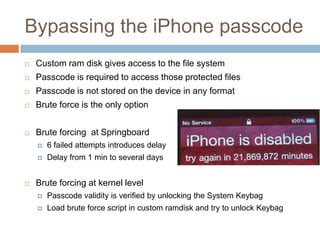
   Brute forcing at Springboard
       6 failed attempts introduces delay
       Delay from 1 min to several days


   Brute forcing at kernel level
       Passcode validity is verified by unlocking the System Keybag
       Load brute force script in custom ramdisk and try to unlock Keybag
Bypassing the iPhone passcode
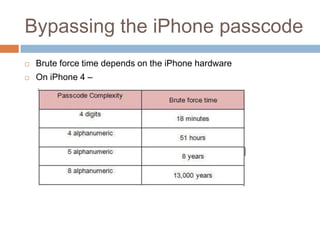
   Brute force time depends on the iPhone hardware
   On iPhone 4 –
iOS Security Features
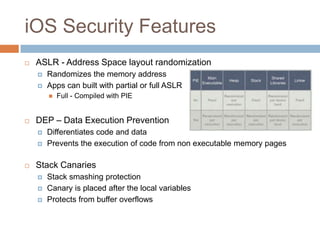
   ASLR - Address Space layout randomization
       Randomizes the memory address
       Apps can built with partial or full ASLR
           Full - Compiled with PIE


   DEP – Data Execution Prevention
       Differentiates code and data
       Prevents the execution of code from non executable memory pages

   Stack Canaries
       Stack smashing protection
       Canary is placed after the local variables
       Protects from buffer overflows
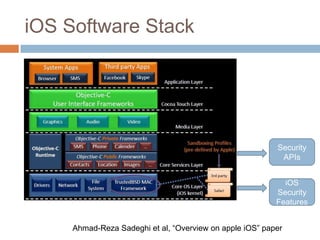
iOS Software Stack


                                                          Security
                                                           APIs


                                                            iOS
                                                          Security
                                                          Features


     Ahmad-Reza Sadeghi et al, “Overview on apple iOS” paper
Types of iOS Applications
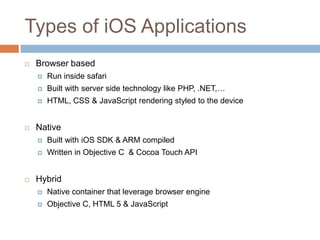
   Browser based
       Run inside safari
       Built with server side technology like PHP, .NET,…
       HTML, CSS & JavaScript rendering styled to the device


   Native
       Built with iOS SDK & ARM compiled
       Written in Objective C & Cocoa Touch API


   Hybrid
       Native container that leverage browser engine
       Objective C, HTML 5 & JavaScript
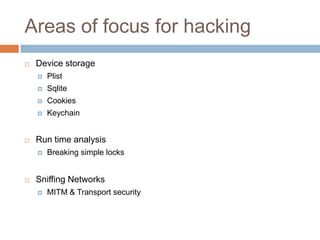
Areas of focus for hacking
   Device storage
       Plist
       Sqlite
       Cookies
       Keychain


   Run time analysis
       Breaking simple locks


   Sniffing Networks
       MITM & Transport security
Local Storage
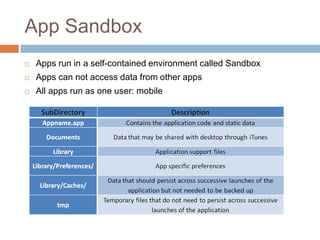
App Sandbox
   Apps run in a self-contained environment called Sandbox
   Apps can not access data from other apps
   All apps run as one user: mobile
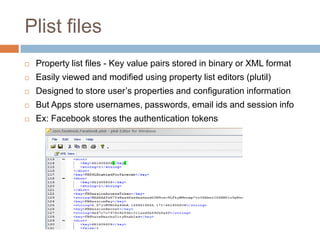
Plist files
   Property list files - Key value pairs stored in binary or XML format
   Easily viewed and modified using property list editors (plutil)
   Designed to store user’s properties and configuration information
   But Apps store usernames, passwords, email ids and session info
   Ex: Facebook stores the authentication tokens
Plist files
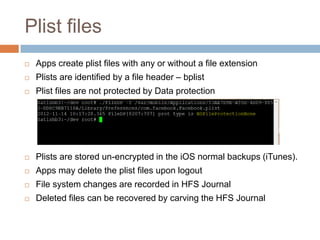
   Apps create plist files with any or without a file extension
   Plists are identified by a file header – bplist
   Plist files are not protected by Data protection


   Plists are stored un-encrypted in the iOS normal backups (iTunes).
   Apps may delete the plist files upon logout
   File system changes are recorded in HFS Journal
   Deleted files can be recovered by carving the HFS Journal
Facebook Session Hijacking
   Facebook stores authentication tokens in plist file
   Gaining access to the plist allows to log into the app
   Plist files can be stolen
       Upon physical access to the device
       From backups : Metasploit post exploitation script to read iOS backup
   In addition to that, Tokens never expired even on Logout
Plist files
   Do not store sensitive data in Plist files
   If required, use custom encryption
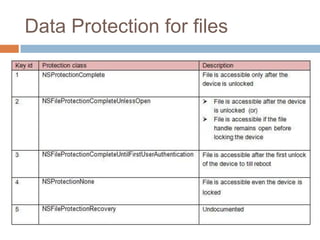
   Protect plist files with data protection API
   Create plist files Library/Caches folder
       iTunes does not backup caches directory
   For better security, Implement classes for secure file wipe
       Before deleting the file overwrite the file bytes with junk values
Data Protection for files
Sqlite files
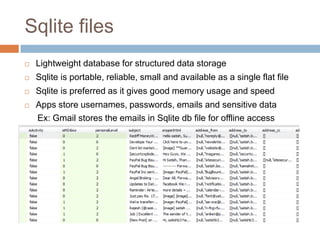
   Lightweight database for structured data storage
   Sqlite is portable, reliable, small and available as a single flat file
   Sqlite is preferred as it gives good memory usage and speed
   Apps store usernames, passwords, emails and sensitive data
    Ex: Gmail stores the emails in Sqlite db file for offline access
Sqlite files
   Sqlite can be created with any or without a file extension
   Sqlite files can be viewed using Sqlite Spy or sqlite3
   Data stored in the Sqlite is un-encrypted
   Sqlite files are stored un-encrypted in the iOS backups (iTunes)
   Apps may delete Sqlite files upon logout
   Delete files can be recovered by carving the HFS Journal
Sqlite files
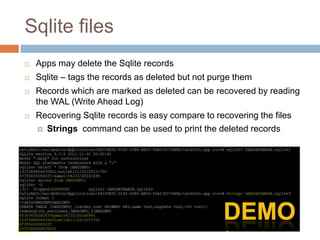
   Apps may delete the Sqlite records
   Sqlite – tags the records as deleted but not purge them
   Records which are marked as deleted can be recovered by reading
    the WAL (Write Ahead Log)
   Recovering Sqlite records is easy compare to recovering the files
     Strings command can be used to print the deleted records
Sqlite files
   Do not store sensitive data in clear text
   Use custom encryption
   Protect Sqlite files with data protection API
   Implement classes for secure file wipe
   Purge the data upon deletion with VACUUM SQL command.
       VACUUM rebuilds the database
       Doing it for every delete consumes time
   Before deleting the Sqlite record, replace the data with junk values
       Data and Junk value length has to be same
Keychain
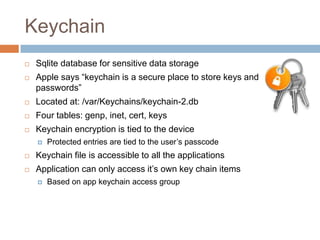
   Sqlite database for sensitive data storage
   Apple says “keychain is a secure place to store keys and
    passwords”
   Located at: /var/Keychains/keychain-2.db
   Four tables: genp, inet, cert, keys
   Keychain encryption is tied to the device
       Protected entries are tied to the user’s passcode
   Keychain file is accessible to all the applications
   Application can only access it’s own key chain items
       Based on app keychain access group
Keychain
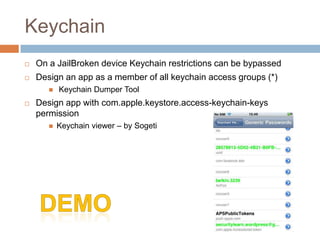
   On a JailBroken device Keychain restrictions can be bypassed
   Design an app as a member of all keychain access groups (*)
          Keychain Dumper Tool
   Design app with com.apple.keystore.access-keychain-keys
    permission
          Keychain viewer – by Sogeti
Keychain
   Keychain is also not secure. Do not store sensitive data in clear
    text.
   Encrypt the data using custom encryption (CCCrypt)
   Use data protection API while storing data in keychain
   BY default entries are created with
    kSecAttrAccessibleWhenUnlocked data protection
   Apple may change the default protection any time
   Do not store the encryption keys in the binary
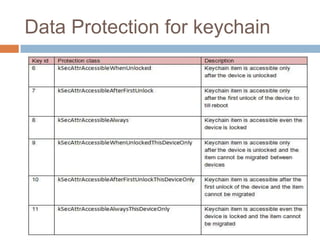
Data Protection for keychain
Error Logs
   Apps may write sensitive data in logs
     Debugging (NSLog calls)

     Trouble shooting

     Requests & Responses

   Located at - /private/var/log/syslog
   To view iPhone logs
     Console App (from AppStore)

     iTunes Sync (CrashReporter folder)

     iPhone configuration utility - Console
Error Logs
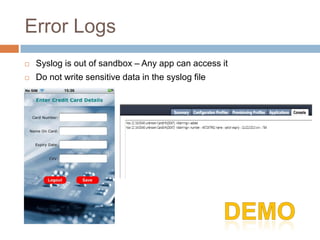
   Syslog is out of sandbox – Any app can access it
   Do not write sensitive data in the syslog file
Screenshot
   Home button shrinks your application with a nice effect
   iOS takes screen shots of the application to create that effect
   Sensitive data may get cached
       App directory/Library/Caches/Snapshots


   Remove sensitive data or change the screen before the
    applicationDidEnterBackground() function returns
   Instead of hiding or removing sensitive data you can also prevent
    back- grounding altogether by setting the "Application does not run
    in background" property in the application's Info.plist file
Screenshot
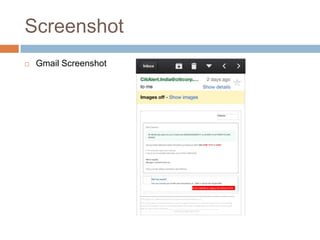
   Gmail Screenshot
Keyboard cache
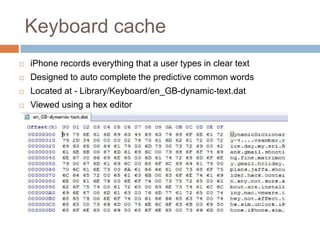
   iPhone records everything that a user types in clear text
   Designed to auto complete the predictive common words
   Located at - Library/Keyboard/en_GB-dynamic-text.dat
   Viewed using a hex editor
Keyboard cache
   Secure fields are not stored
       Passwords are safe
   Strings with all digits are not stored
       Pins and credit card numbers are safe
   Data typed into text fields are cached
       Usernames and security question answers…


   To disable auto complete of a text field
       Mark it as a secure field
        mytextField.secureTextEntry = YES
       Disable auto correction
        mytextField.autocorrectionType = UITextAutocorrectionTypeNo;
Cookies.binarycookies
   Binary file to store the cookies
   Persistent cookies are stored along with the flags
    (Secure, HTTPOnly)
   Most iOS apps does not prompt the user for login every time and
    creates persistent cookies
   Apps store the session cookies locally
   Grabbing cookies allows to log into the user’s account
Cookies.binarycookies
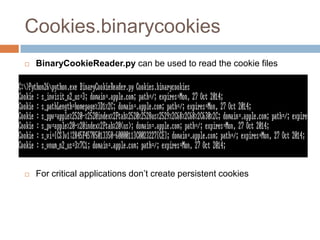
   BinaryCookieReader.py can be used to read the cookie files


   For critical applications don’t create persistent cookies
Run Time Analysis
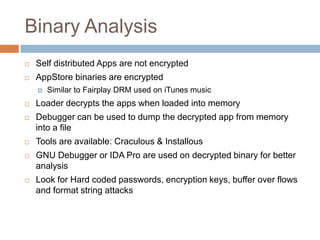
Binary Analysis
   Self distributed Apps are not encrypted
   AppStore binaries are encrypted
       Similar to Fairplay DRM used on iTunes music
   Loader decrypts the apps when loaded into memory
   Debugger can be used to dump the decrypted app from memory
    into a file
   Tools are available: Craculous & Installous
   GNU Debugger or IDA Pro are used on decrypted binary for better
    analysis
   Look for Hard coded passwords, encryption keys, buffer over flows
    and format string attacks
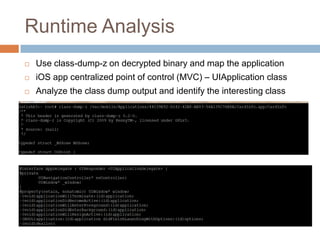
Runtime Analysis
   Use class-dump-z on decrypted binary and map the application
   iOS app centralized point of control (MVC) – UIApplication class
   Analyze the class dump output and identify the interesting class
Runtime Analysis
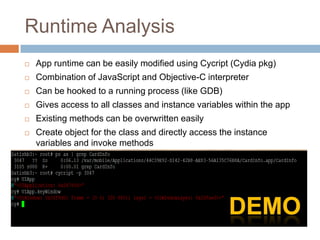
   App runtime can be easily modified using Cycript (Cydia pkg)
   Combination of JavaScript and Objective-C interpreter
   Can be hooked to a running process (like GDB)
   Gives access to all classes and instance variables within the app
   Existing methods can be overwritten easily
   Create object for the class and directly access the instance
    variables and invoke methods
Runtime Analysis
   Possible attacks with Cycript
       Authentication bypass
       Breaking simple locks
       Bypassing restrictions that stops apps from running on Jailbroken device
       Extract hardcode encryption keys
       Extract app passcodes
       Malicious code injection


   Do not store encryption keys / passcode in memory
   Implement code that restricts debugger attachment
Transport Security
Transport Security
   iOS apps use SSL/https to do secure transactions
   NSURLRequest / NSURLConnection are commonly used
   CFNetwork – Alternate low level framework to implement SSL
   Frameworks by default rejects the self signed certificates to prevent
    MITM attacks
   Provides API to accept any un-trusted certificate
   NSURLRequest
       setAllowsAnyHTTPSCertificate
   NSURLConnection delegate
       continueWithoutCredentialForAuthenticationChallenge
   CFNetwork
       kCFStreamSSLAllowsExpiredCertificates …
Transport Security
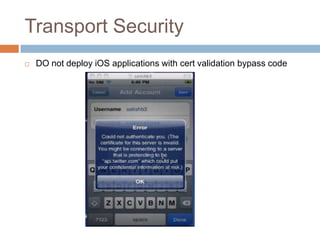
   DO not deploy iOS applications with cert validation bypass code
Transport Security
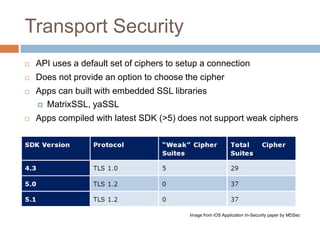
   API uses a default set of ciphers to setup a connection
   Does not provide an option to choose the cipher
   Apps can built with embedded SSL libraries
     MatrixSSL, yaSSL

   Apps compiled with latest SDK (>5) does not support weak ciphers


                                           Image from iOS Application In-Security paper by MDSec
Thank You


Email: Satish.bommisetty@gmail.com
Twitter: @Satishb3

Hacking and Securing iOS Applications by Satish Bomisstty

  • 1.
    HACKING AND SECURING IOS APPLICATIONS -Satish B
  • 2.
    Agenda  iOS Security Concepts  Loopholes in iOS  Hacking & Securing iOS Applications  How does loophole in iOS affects the apps  How easy it’s to steal data from the apps  How to protect these apps
  • 3.
    Who Am I? <1 • Framework for functional testing tools Development 5+ Information • Web & Mobile application security Security • iOS Forensics & hacking Other Interests • Tool development & Knowledge Sharing
  • 4.
    iOS Basics  iOS is the Operating System that run on Apple devices like iPhone, iPod, iPad & Apple TV  Stripped down Mac OS X + XNU kernel  Provides multi tasking  Only allows to run Apple signed applications  New features & Bug fixes with every release  Current version is iOS 6.0.1
  • 5.
    iOS Security Features  Boot Chain  Chain of trust  Series of signature checks  BootRom->LLB->iBoot->kernel->file system  Code Signing  Prevents running of unauthorized apps/code  Verifies the integrity of the app code at rest & runtime  Malware prevention  Passcode  Prevents unauthorized access to the device  Default is 4-digit passcode & Support for complex passcode  Configurable data wipe after 10 failed attempts
  • 6.
    Access data withoutpasscode  Breaking Chain of trust  Bootrom exploit  Patch the series of signature checks  Boot with custom ramdisk  Access file system  No Bootrom exploit for latest devices  iPhone 4s & 5, iPad 2 &3, iPad Mini
  • 7.
    iOS Security Features  Encryption  Dedicated crypto engine  Two hardcoded keys – UID & GID  Usage of UID & GID is limited  Data Protection  Ties the data encryption to the user’s passcode  Files are not accessible when the device is locked  No Passcode = No data protection  File Encryption  Every File is encrypted with unique key  File key is stored in the file metadata  Metadata is encrypted with EMF Key
  • 8.
    Bypassing the iPhonepasscode  Custom ram disk gives access to the file system  Passcode is required to access those protected files  Passcode is not stored on the device in any format  Brute force is the only option  Brute forcing at Springboard  6 failed attempts introduces delay  Delay from 1 min to several days  Brute forcing at kernel level  Passcode validity is verified by unlocking the System Keybag  Load brute force script in custom ramdisk and try to unlock Keybag
  • 9.
    Bypassing the iPhonepasscode  Brute force time depends on the iPhone hardware  On iPhone 4 –
  • 10.
    iOS Security Features  ASLR - Address Space layout randomization  Randomizes the memory address  Apps can built with partial or full ASLR  Full - Compiled with PIE  DEP – Data Execution Prevention  Differentiates code and data  Prevents the execution of code from non executable memory pages  Stack Canaries  Stack smashing protection  Canary is placed after the local variables  Protects from buffer overflows
  • 11.
    iOS Software Stack Security APIs iOS Security Features Ahmad-Reza Sadeghi et al, “Overview on apple iOS” paper
  • 12.
    Types of iOSApplications  Browser based  Run inside safari  Built with server side technology like PHP, .NET,…  HTML, CSS & JavaScript rendering styled to the device  Native  Built with iOS SDK & ARM compiled  Written in Objective C & Cocoa Touch API  Hybrid  Native container that leverage browser engine  Objective C, HTML 5 & JavaScript
  • 13.
    Areas of focusfor hacking  Device storage  Plist  Sqlite  Cookies  Keychain  Run time analysis  Breaking simple locks  Sniffing Networks  MITM & Transport security
  • 14.
  • 15.
    App Sandbox  Apps run in a self-contained environment called Sandbox  Apps can not access data from other apps  All apps run as one user: mobile
  • 16.
    Plist files  Property list files - Key value pairs stored in binary or XML format  Easily viewed and modified using property list editors (plutil)  Designed to store user’s properties and configuration information  But Apps store usernames, passwords, email ids and session info  Ex: Facebook stores the authentication tokens
  • 17.
    Plist files  Apps create plist files with any or without a file extension  Plists are identified by a file header – bplist  Plist files are not protected by Data protection  Plists are stored un-encrypted in the iOS normal backups (iTunes).  Apps may delete the plist files upon logout  File system changes are recorded in HFS Journal  Deleted files can be recovered by carving the HFS Journal
  • 18.
    Facebook Session Hijacking  Facebook stores authentication tokens in plist file  Gaining access to the plist allows to log into the app  Plist files can be stolen  Upon physical access to the device  From backups : Metasploit post exploitation script to read iOS backup  In addition to that, Tokens never expired even on Logout
  • 19.
    Plist files  Do not store sensitive data in Plist files  If required, use custom encryption  Protect plist files with data protection API  Create plist files Library/Caches folder  iTunes does not backup caches directory  For better security, Implement classes for secure file wipe  Before deleting the file overwrite the file bytes with junk values
  • 20.
  • 21.
    Sqlite files  Lightweight database for structured data storage  Sqlite is portable, reliable, small and available as a single flat file  Sqlite is preferred as it gives good memory usage and speed  Apps store usernames, passwords, emails and sensitive data Ex: Gmail stores the emails in Sqlite db file for offline access
  • 22.
    Sqlite files  Sqlite can be created with any or without a file extension  Sqlite files can be viewed using Sqlite Spy or sqlite3  Data stored in the Sqlite is un-encrypted  Sqlite files are stored un-encrypted in the iOS backups (iTunes)  Apps may delete Sqlite files upon logout  Delete files can be recovered by carving the HFS Journal
  • 23.
    Sqlite files  Apps may delete the Sqlite records  Sqlite – tags the records as deleted but not purge them  Records which are marked as deleted can be recovered by reading the WAL (Write Ahead Log)  Recovering Sqlite records is easy compare to recovering the files  Strings command can be used to print the deleted records
  • 24.
    Sqlite files  Do not store sensitive data in clear text  Use custom encryption  Protect Sqlite files with data protection API  Implement classes for secure file wipe  Purge the data upon deletion with VACUUM SQL command.  VACUUM rebuilds the database  Doing it for every delete consumes time  Before deleting the Sqlite record, replace the data with junk values  Data and Junk value length has to be same
  • 25.
    Keychain  Sqlite database for sensitive data storage  Apple says “keychain is a secure place to store keys and passwords”  Located at: /var/Keychains/keychain-2.db  Four tables: genp, inet, cert, keys  Keychain encryption is tied to the device  Protected entries are tied to the user’s passcode  Keychain file is accessible to all the applications  Application can only access it’s own key chain items  Based on app keychain access group
  • 26.
    Keychain  On a JailBroken device Keychain restrictions can be bypassed  Design an app as a member of all keychain access groups (*)  Keychain Dumper Tool  Design app with com.apple.keystore.access-keychain-keys permission  Keychain viewer – by Sogeti
  • 27.
    Keychain  Keychain is also not secure. Do not store sensitive data in clear text.  Encrypt the data using custom encryption (CCCrypt)  Use data protection API while storing data in keychain  BY default entries are created with kSecAttrAccessibleWhenUnlocked data protection  Apple may change the default protection any time  Do not store the encryption keys in the binary
  • 28.
  • 29.
    Error Logs  Apps may write sensitive data in logs  Debugging (NSLog calls)  Trouble shooting  Requests & Responses  Located at - /private/var/log/syslog  To view iPhone logs  Console App (from AppStore)  iTunes Sync (CrashReporter folder)  iPhone configuration utility - Console
  • 30.
    Error Logs  Syslog is out of sandbox – Any app can access it  Do not write sensitive data in the syslog file
  • 31.
    Screenshot  Home button shrinks your application with a nice effect  iOS takes screen shots of the application to create that effect  Sensitive data may get cached  App directory/Library/Caches/Snapshots  Remove sensitive data or change the screen before the applicationDidEnterBackground() function returns  Instead of hiding or removing sensitive data you can also prevent back- grounding altogether by setting the "Application does not run in background" property in the application's Info.plist file
  • 32.
    Screenshot  Gmail Screenshot
  • 33.
    Keyboard cache  iPhone records everything that a user types in clear text  Designed to auto complete the predictive common words  Located at - Library/Keyboard/en_GB-dynamic-text.dat  Viewed using a hex editor
  • 34.
    Keyboard cache  Secure fields are not stored  Passwords are safe  Strings with all digits are not stored  Pins and credit card numbers are safe  Data typed into text fields are cached  Usernames and security question answers…  To disable auto complete of a text field  Mark it as a secure field mytextField.secureTextEntry = YES  Disable auto correction mytextField.autocorrectionType = UITextAutocorrectionTypeNo;
  • 35.
    Cookies.binarycookies  Binary file to store the cookies  Persistent cookies are stored along with the flags (Secure, HTTPOnly)  Most iOS apps does not prompt the user for login every time and creates persistent cookies  Apps store the session cookies locally  Grabbing cookies allows to log into the user’s account
  • 36.
    Cookies.binarycookies  BinaryCookieReader.py can be used to read the cookie files  For critical applications don’t create persistent cookies
  • 37.
  • 38.
    Binary Analysis  Self distributed Apps are not encrypted  AppStore binaries are encrypted  Similar to Fairplay DRM used on iTunes music  Loader decrypts the apps when loaded into memory  Debugger can be used to dump the decrypted app from memory into a file  Tools are available: Craculous & Installous  GNU Debugger or IDA Pro are used on decrypted binary for better analysis  Look for Hard coded passwords, encryption keys, buffer over flows and format string attacks
  • 39.
    Runtime Analysis  Use class-dump-z on decrypted binary and map the application  iOS app centralized point of control (MVC) – UIApplication class  Analyze the class dump output and identify the interesting class
  • 40.
    Runtime Analysis  App runtime can be easily modified using Cycript (Cydia pkg)  Combination of JavaScript and Objective-C interpreter  Can be hooked to a running process (like GDB)  Gives access to all classes and instance variables within the app  Existing methods can be overwritten easily  Create object for the class and directly access the instance variables and invoke methods
  • 41.
    Runtime Analysis  Possible attacks with Cycript  Authentication bypass  Breaking simple locks  Bypassing restrictions that stops apps from running on Jailbroken device  Extract hardcode encryption keys  Extract app passcodes  Malicious code injection  Do not store encryption keys / passcode in memory  Implement code that restricts debugger attachment
  • 42.
  • 43.
    Transport Security  iOS apps use SSL/https to do secure transactions  NSURLRequest / NSURLConnection are commonly used  CFNetwork – Alternate low level framework to implement SSL  Frameworks by default rejects the self signed certificates to prevent MITM attacks  Provides API to accept any un-trusted certificate  NSURLRequest  setAllowsAnyHTTPSCertificate  NSURLConnection delegate  continueWithoutCredentialForAuthenticationChallenge  CFNetwork  kCFStreamSSLAllowsExpiredCertificates …
  • 44.
    Transport Security  DO not deploy iOS applications with cert validation bypass code
  • 45.
    Transport Security  API uses a default set of ciphers to setup a connection  Does not provide an option to choose the cipher  Apps can built with embedded SSL libraries  MatrixSSL, yaSSL  Apps compiled with latest SDK (>5) does not support weak ciphers Image from iOS Application In-Security paper by MDSec
  • 46.