Keep your website relevantChristin Boyd, TrainerPatrick Tewson, Web Consultant
NPower NorthwestVision A thriving community with high performing nonprofits.MissionTo strengthen the nonprofit sector by catalyzing innovation and driving adoption of technology solutions.
Future Brown Bags & WebcastsPlease visit our website and blog, or “like” us on Facebook, for more information regarding upcoming brown bags and trainings.
ContentsWeb Site Goals & Audience Identification Site Map Web Content Life Cycle Content PlanWriteMaintainArchive
Your goals todayYou don’t want a rigid process or too much technology getting between you and your clientsYou want the site to convey the values and energy of the people at your organizationYou are one of many people contributing to the web site and communicating with constituentsManaging the web site is one of many tasks you perform, so it needs to be done efficiently
Web Site GoalsYour organization has a mission statement and a set of goals, perhaps for the year or overall.Clear goals will help your team scope your workguide your prioritiesclarify communications with constituents.Goals should describe the result rather than the implementation details.
Target AudienceWho is your audience?Who does your organization serve?Who helps you serve them by volunteering, partnering, contracting, donating?Are there subgroups who you want to reach out to with a distinct message or toneE.g. volunteers 55+, families with preschoolers
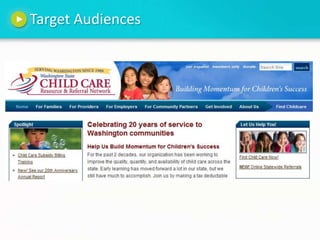
Target Audiences
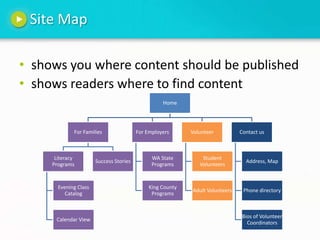
Site Mapshows you where content should be publishedshows readers where to find content
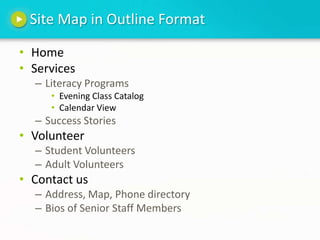
Site Map in Outline FormatHomeServicesLiteracy ProgramsEvening Class CatalogCalendar ViewSuccess StoriesVolunteerStudent VolunteersAdult VolunteersContact usAddress, Map, Phone directoryBios of Senior Staff Members
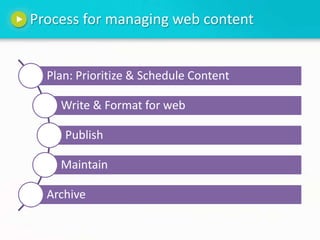
Process for managing web content
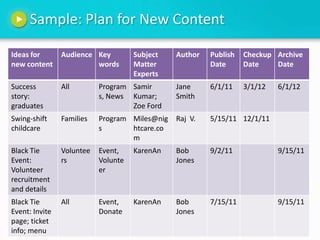
Planning New ContentPlan for content maintenance tasks from the start.  Make a Content Plan spreadsheetPeople & RolesDatesCategories / keywords / tags
Sample: Plan for New Content
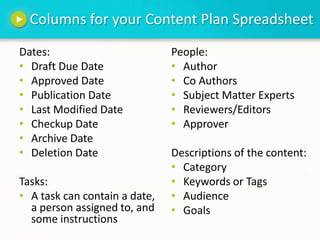
Columns for your Content Plan SpreadsheetDates:Draft Due DateApproved DatePublication DateLast Modified DateCheckup DateArchive DateDeletion DateTasks:A task can contain a date, a person assigned to, and some instructions People:AuthorCo AuthorsSubject Matter ExpertsReviewers/EditorsApproverDescriptions of the content:Category Keywords or TagsAudienceGoals
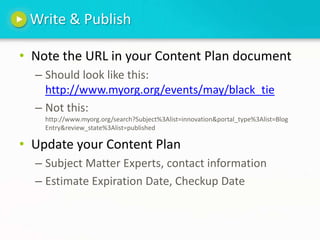
Write & PublishNote the URL in your Content Plan documentShould look like this: http://www.myorg.org/events/may/black_tieNot this: http://www.myorg.org/search?Subject%3Alist=innovation&portal_type%3Alist=Blog Entry&review_state%3Alist=publishedUpdate your Content PlanSubject Matter Experts, contact informationEstimate Expiration Date, Checkup Date
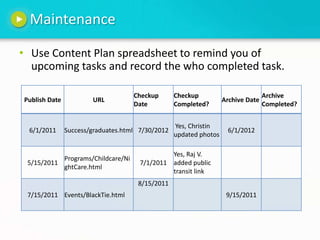
MaintenanceUse Content Plan spreadsheet to remind you of upcoming tasksand record the who completed task.
ArchiveOld news makes your organization seem stagnantArchive AggressivelyNo need to break linksCommit to Archive Dates in your Content Plan Give staff the authority to archive You can archive articles, pages and photos in two ways:Visible to the publicNot visible to the public, but saved for use by staff
Your Archive StrategyWork with your technical staff to create a process for archiving your content without changing the URL.If someone wants to find older info, how will you help them navigate the archives?Simple searchSearch form with fields, categoriesList of links to old newsletters“May Newsletter” not very useful“May: Book Drive; Graduation Event” article keywords or titles
Thank YouChristin Boyd, training@npowernw.orgPatrick Tewson, PatrickT@npowernw.orgNPower NorthwestWebsite: www.npowernw.orgFacebook: www.facebook.com/npowernwTwitter: @npowernw

Keep Your Website Relevant - Brown Bag Presentation

  • 1.
    Keep your websiterelevantChristin Boyd, TrainerPatrick Tewson, Web Consultant
  • 2.
    NPower NorthwestVision Athriving community with high performing nonprofits.MissionTo strengthen the nonprofit sector by catalyzing innovation and driving adoption of technology solutions.
  • 3.
    Future Brown Bags& WebcastsPlease visit our website and blog, or “like” us on Facebook, for more information regarding upcoming brown bags and trainings.
  • 4.
    ContentsWeb Site Goals& Audience Identification Site Map Web Content Life Cycle Content PlanWriteMaintainArchive
  • 5.
    Your goals todayYoudon’t want a rigid process or too much technology getting between you and your clientsYou want the site to convey the values and energy of the people at your organizationYou are one of many people contributing to the web site and communicating with constituentsManaging the web site is one of many tasks you perform, so it needs to be done efficiently
  • 6.
    Web Site GoalsYourorganization has a mission statement and a set of goals, perhaps for the year or overall.Clear goals will help your team scope your workguide your prioritiesclarify communications with constituents.Goals should describe the result rather than the implementation details.
  • 7.
    Target AudienceWho isyour audience?Who does your organization serve?Who helps you serve them by volunteering, partnering, contracting, donating?Are there subgroups who you want to reach out to with a distinct message or toneE.g. volunteers 55+, families with preschoolers
  • 8.
  • 9.
    Site Mapshows youwhere content should be publishedshows readers where to find content
  • 10.
    Site Map inOutline FormatHomeServicesLiteracy ProgramsEvening Class CatalogCalendar ViewSuccess StoriesVolunteerStudent VolunteersAdult VolunteersContact usAddress, Map, Phone directoryBios of Senior Staff Members
  • 11.
  • 12.
    Planning New ContentPlanfor content maintenance tasks from the start. Make a Content Plan spreadsheetPeople & RolesDatesCategories / keywords / tags
  • 13.
    Sample: Plan forNew Content
  • 14.
    Columns for yourContent Plan SpreadsheetDates:Draft Due DateApproved DatePublication DateLast Modified DateCheckup DateArchive DateDeletion DateTasks:A task can contain a date, a person assigned to, and some instructions People:AuthorCo AuthorsSubject Matter ExpertsReviewers/EditorsApproverDescriptions of the content:Category Keywords or TagsAudienceGoals
  • 15.
    Write & PublishNotethe URL in your Content Plan documentShould look like this: http://www.myorg.org/events/may/black_tieNot this: http://www.myorg.org/search?Subject%3Alist=innovation&portal_type%3Alist=Blog Entry&review_state%3Alist=publishedUpdate your Content PlanSubject Matter Experts, contact informationEstimate Expiration Date, Checkup Date
  • 16.
    MaintenanceUse Content Planspreadsheet to remind you of upcoming tasksand record the who completed task.
  • 17.
    ArchiveOld news makesyour organization seem stagnantArchive AggressivelyNo need to break linksCommit to Archive Dates in your Content Plan Give staff the authority to archive You can archive articles, pages and photos in two ways:Visible to the publicNot visible to the public, but saved for use by staff
  • 18.
    Your Archive StrategyWorkwith your technical staff to create a process for archiving your content without changing the URL.If someone wants to find older info, how will you help them navigate the archives?Simple searchSearch form with fields, categoriesList of links to old newsletters“May Newsletter” not very useful“May: Book Drive; Graduation Event” article keywords or titles
  • 19.
    Thank YouChristin Boyd,training@npowernw.orgPatrick Tewson, PatrickT@npowernw.orgNPower NorthwestWebsite: www.npowernw.orgFacebook: www.facebook.com/npowernwTwitter: @npowernw

Editor's Notes

  • #3 NPower Northwest is where savvy nonprofits turn for technology. At NPower, we’re guided by the belief that technology can transform the nonprofit sector and play a pivotal role in creating greater good.  When you work with us, you understand all your options and can move forward with an approach that you are confident makes most sense for your organization, in terms of both impact and cost. Check out our website at www.npowernw.org to learn more about what we do and how we work.
  • #7 Motivation: we’re going to start by clarifying our goals because every decision we make later on in the process of maintaining the web site should move us closer to the goals of the organization. Each time you are faced with a decision, a task, a need to prioritize tasks, you should return to the goals and ask “does this move us closer to the goals, or is this not a priority right now?” “Is this nice to have or must have?”
  • #9 Here is an organization with a wide variety of constituents. including people they serve, people who provide child care, people who need their dependent children cared for, Employers, volunteers, donors.A person visiting this site will identify with one or more of the phrases, I am a Grandmother and legal guardian, so I will click “For Families”I am work in HR for a company, so I will click “For Employers”I just want to find someone to look after my kids, so I will click “Find Childcare” on the right.
  • #10 If you don’t have a site map diagramed for employees, then please make one. It will help you determine where new content will go, which content needs revising, and where to put archives. Npower consultants can help you diagram your site, or help you reorganize your site. They generally start with a Mind Map brainstorming meeting. Then determine the most important topics to become the subsites, which are usually also the top row navigation links or tabs.
  • #11 Just show this slide for 10 seconds and remind people they don’t have to use fancy diagrams in order to convey the structure of the site to their team and to their web site readers.
  • #12 Plan: Plan your content for the readers, and also plan your categories, subcatagories and schedule for the content lifecycleDiscussPrioritizeDelegateWrite the content for your readers, and write the metadata to help you manage the content lifecycleWriting checklist:HeadlineScopeGrammarFact checkPrivacy of any people you mention or photograph ApproveFormat for webIntroduce CSS to format the fonts, colorsHyperlinksCopyrights of any photos or referenced contentNavigationPublishTimingTestingMaintain your content using the metadata to help you keep track of relevant dates, categories, and fill in new information as it becomes available (e.g. an event announcement would be updated with ticket availability)Archive some of your old content or delete it, depending on relevance. Delete the part of a page where you buy tickets or email volunteer coordinators for a past event, but leave the “event was successful” story in the archive section.
  • #14 A spreadsheet is one way to keep track of metadata for each piece of content on your site. You could also keep a page of a document for each piece of content similar to the “Exercise: Content Plan” on page 11 in your workbook.Checkup Date: In this context, checkup means that a person on your staff will review the content and decide if it needs to be updated or archived. You may use a different word to describe this date, perhaps “Audit Date” or “Assessment Date” makes more sense to you. The Checkup date is used for two things, first if you want to leave the Archive Date blank, then you really need a date when someone will review the content and decide if and when it should be archived or deleted. You can think of this as a self-Audit, but the word audit can be an anxiety provoking word. Your table column headings will evolve as you learn how much structure your team needs in order to share ideas, work efficiently.Your group might want more structure or less structure to help you progress from brainstorming content ideas to assigning the ideas to writers.Here is a sample of columns that might make sense for your organization. If your organization uses SalesForce software to manage donors and constituents, you might want to use the same Campaign labels in your Content Plan that you use in SalesForce.For big events or campaigns, you may want to make a special spreadsheet to coordinate communications across multiple forms of media including direct mail, web, Facebook, newsletter. Campaign lead or a delegate should test to verify that the same basic facts (date, time, location, contact information) are consistent across all media. When will the content go live on the web?Do we coordinate launch date with newsletter, direct mail, or event?How long will this content remain current?Estimate an archive dateWhen this piece of content expires, will it be replaced with a follow-up article, a success story, or the next major initiative?
  • #15 Here are some examples of metadata that you might want to use in your content management process.Review for Modification Date means that on this date a person should review the content and decide when and how to make changes to the content or perhaps archive it.Tasks:e.g. "6/15/11 SallyR, Remove text and image about Spring Fund Drive from Home page and Donations page."
  • #16 Go both directions with twitter and fb.
  • #17 Examples:Recurring Tasks: Monthly refresh of the list of needed donation items. Often seasonal. Mittens in summer?A week prior to an event, create a task to remind you to send mail to the event coordinator and ask if anything should be updated on the event page. Maybe parking details?
  • #19 Who reads archives? Grant writers, press, students writing papers, Newsletter Example: I collect National Geographic magazines. The spine shows date and keywords of the top 4 articles.