P R E S E N T E D B Y
Google for Nonprofits
Introductions
 Alex Green, Aimy Enriquez, Jessica Fraser
 HandsOn Tech AmeriCorps VISTA
 Serving at 501 Commons
© 501 Commons
About
HandsOn Tech
HandsOn Tech is a
national AmeriCorps
program funded in
partnership with:
- Google
- Points of Light
Foundation
- The Corporation of
National Community
service
About 501 Commons
 One Stop Shop for Nonprofits
 Technology Services
 Financial Services
 Human Resources Services
 Management Consulting Services
 For more info: 501Commons.org
© 501 Commons
Presentation Overview
 Introduction
 Google Apps Basics
 Drive, Docs, and Forms
 Google Analytics
 Google for Nonprofits Exclusive
 Google Grants (Adwords)
 YouTube for Nonprofits
 Google Earth Outreach
 Eligibility
© 501 Commons
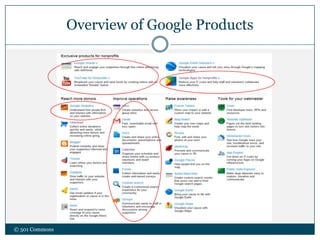
Overview of Google Products
© 501 Commons
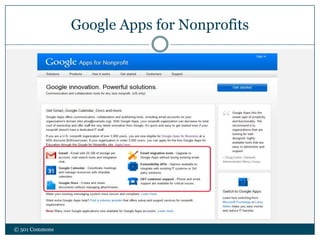
Google Apps for Nonprofits
© 501 Commons
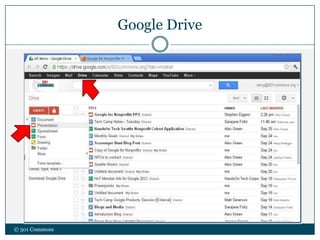
Google Drive
© 501 Commons
© 501 Commons
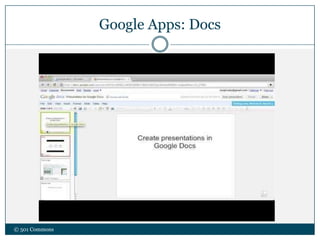
Google Apps: Docs
Google Apps: Forms
© 501 Commons
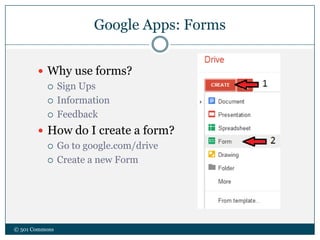
 Why use forms?
 Sign Ups
 Information
 Feedback
 How do I create a form?
 Go to google.com/drive
 Create a new Form
Benefits of Google Apps
© 501 Commons
 Custom email allows for professional look
 name@nonprofit.org
 Organize info and documents on a shared drive
 Real time editing for
documents, spreadsheets, and presentations
Google Analytics
© 501 Commons
Benefits of Google Analytics
© 501 Commons
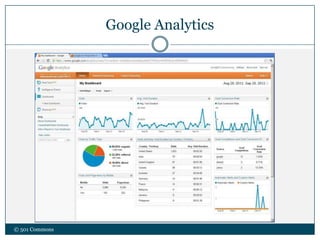
 Anyone with administrative access can view site
statistics
 Use data to make critical decisions website
 Improve efficiency of site for audience usage
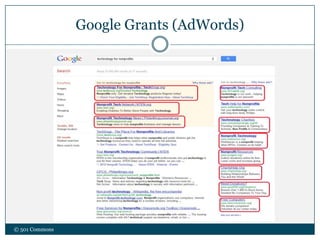
Google Grants (AdWords)
© 501 Commons
Google Grants (Adwords)
© 501 Commons
 Budget for free advertisement on Google.com
 $329 dollars a day = $10,000 per month
 The more time you spend on it, the better you
can fine-tune and get better results
 At the very least, set it up! It’s easy!
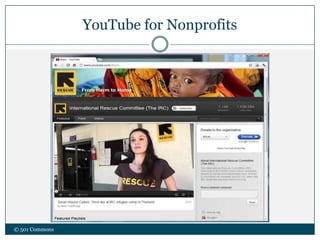
YouTube for Nonprofits
© 501 Commons
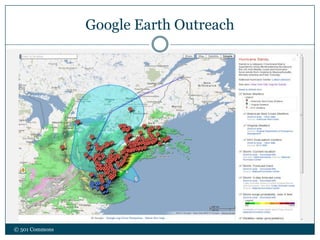
Google Earth Outreach
© 501 Commons
Eligibility for Google for Nonprofits
© 501 Commons
 Organizations must:
 Hold current 501(c)(3) status, as determined by the US Internal
Revenue Service
 Acknowledge and agree to the application’s required
certifications regarding nondiscrimination and donation
receipt and use
 These organizations are NOT eligible:
 Governmental entities and organizations
 Hospitals and health care organizations
 Schools, childcare center s, academic institutions, and universities
(philanthropic arms of educational organizations are eligible). To learn
more about Google’s programs for educational institutions, visit Google
in Education
 Description of the Application Process
We can help you further!
© 501 Commons
 For info on:
 Future workshops on technological applications, social media
methods, and other topics
 Participating in a free tech assessment of your nonprofit
 Contact us: vistatech@501Commons.org
About our
Deep Dive
Planning program
offered to small poverty
fighting nonprofits
Deep Dive is modeled
after several 501
Commons’ cohort
programs
Organizations are
paired with a skilled
consulting team
 Each participating nonprofit will
receive:
 An assessment of their current
technology infrastructure and usage
 A key issues report and plan for more
effective use of technology
 Opportunities for implementation
projects through 501 Commons
© 501 Commons

Google for Nonprofits

  • 1.
    P R ES E N T E D B Y Google for Nonprofits
  • 2.
    Introductions  Alex Green,Aimy Enriquez, Jessica Fraser  HandsOn Tech AmeriCorps VISTA  Serving at 501 Commons © 501 Commons
  • 3.
    About HandsOn Tech HandsOn Techis a national AmeriCorps program funded in partnership with: - Google - Points of Light Foundation - The Corporation of National Community service About 501 Commons  One Stop Shop for Nonprofits  Technology Services  Financial Services  Human Resources Services  Management Consulting Services  For more info: 501Commons.org © 501 Commons
  • 4.
    Presentation Overview  Introduction Google Apps Basics  Drive, Docs, and Forms  Google Analytics  Google for Nonprofits Exclusive  Google Grants (Adwords)  YouTube for Nonprofits  Google Earth Outreach  Eligibility © 501 Commons
  • 5.
    Overview of GoogleProducts © 501 Commons
  • 6.
    Google Apps forNonprofits © 501 Commons
  • 7.
  • 8.
  • 9.
    Google Apps: Forms ©501 Commons  Why use forms?  Sign Ups  Information  Feedback  How do I create a form?  Go to google.com/drive  Create a new Form
  • 10.
    Benefits of GoogleApps © 501 Commons  Custom email allows for professional look  name@nonprofit.org  Organize info and documents on a shared drive  Real time editing for documents, spreadsheets, and presentations
  • 11.
  • 12.
    Benefits of GoogleAnalytics © 501 Commons  Anyone with administrative access can view site statistics  Use data to make critical decisions website  Improve efficiency of site for audience usage
  • 13.
  • 14.
    Google Grants (Adwords) ©501 Commons  Budget for free advertisement on Google.com  $329 dollars a day = $10,000 per month  The more time you spend on it, the better you can fine-tune and get better results  At the very least, set it up! It’s easy!
  • 15.
  • 16.
  • 17.
    Eligibility for Googlefor Nonprofits © 501 Commons  Organizations must:  Hold current 501(c)(3) status, as determined by the US Internal Revenue Service  Acknowledge and agree to the application’s required certifications regarding nondiscrimination and donation receipt and use  These organizations are NOT eligible:  Governmental entities and organizations  Hospitals and health care organizations  Schools, childcare center s, academic institutions, and universities (philanthropic arms of educational organizations are eligible). To learn more about Google’s programs for educational institutions, visit Google in Education  Description of the Application Process
  • 18.
    We can helpyou further! © 501 Commons  For info on:  Future workshops on technological applications, social media methods, and other topics  Participating in a free tech assessment of your nonprofit  Contact us: vistatech@501Commons.org
  • 19.
    About our Deep Dive Planningprogram offered to small poverty fighting nonprofits Deep Dive is modeled after several 501 Commons’ cohort programs Organizations are paired with a skilled consulting team  Each participating nonprofit will receive:  An assessment of their current technology infrastructure and usage  A key issues report and plan for more effective use of technology  Opportunities for implementation projects through 501 Commons © 501 Commons