
Presents
Introductions
Alex Green, Aimy Enriquez, and Jessica Fraser
HandsOn Tech AmeriCorp VISTA
Serving at 501commons
www.501commons.org
Overview
• Introduction
• Google Apps basics
   o Google Drive and Docs
• Google Analytics
    Google for Nonprofits Exclusive
     o Google Grants (AdWords)
     o YouTube for Nonprofits
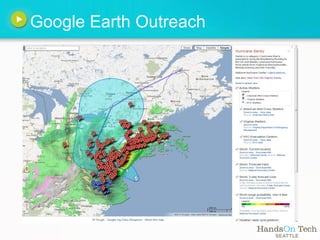
     o Google Earth Outreach
•   Eligibility
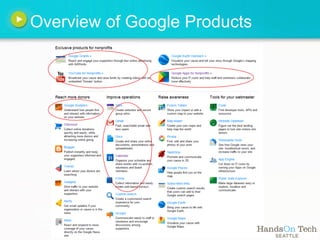
Overview of Google Products
Google Apps: Docs

Open the document "Questions" on your Google Drive

Write down any topics you
would like us to cover and any
questions you may have
during the presentation.
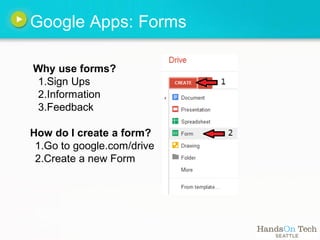
Google Apps: Forms

Why use forms?
 1.Sign Ups
 2.Information
 3.Feedback

How do I create a form?
 1.Go to google.com/drive
 2.Create a new Form
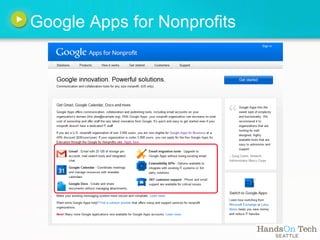
Google Apps for Nonprofits
Benefits of Google Apps

•Custom email allows for professional look
  oex: name@nonprofit.org

•Organize info and documents on a shared drive
•Real time editing for documents. spreadsheets, and
 presentations
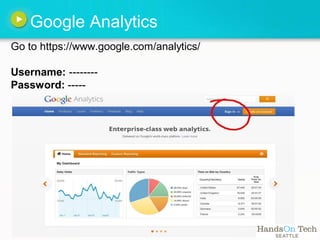
Google Analytics
Go to https://www.google.com/analytics/

Username: --------
Password: -----
Google Analytics

Let's try to learn some information through Analytics!

Change the date range from January 2012 - June 2012

 1.Which 3 states visited the site the most?
 2.What is the second most viewed page?
 3.What percent of visitors were new visitors
  from       May 1 - May 10?
Benefits of Google Analytics


•Anyone with administrative or user access can view
 site statistics

•Improve efficiency of site for audience usage
• Can answer "real-life" questions about what your
 website is doing for your organization
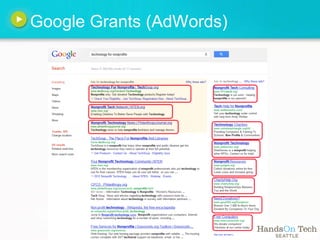
Google Grants (AdWords)

What is the daily campaign budget for NPower?

What is the difference between a campaign, ad group,
and an individual ad?

How many active ads are under the 'Donate/Volunteer'
Ad Group?

How much time do you get to create an effective ad once
your organization is approved?
Google Grants (AdWords)


•Budget for free advertisement on Google.com:
     $329 dollars a day = $10,000 per month

•The more time you spend on it, the better you
 can fine-tune and get better results

•At the very least, set it up! It's easy!
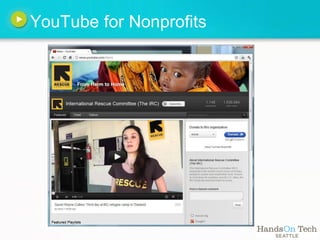
YouTube for Nonprofits
Google Earth Outreach
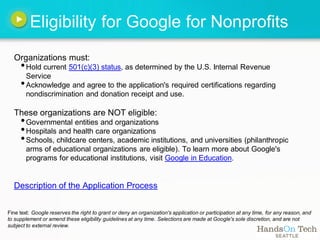
Eligibility for Google for Nonprofits
  Organizations must:
     • Hold current 501(c)(3) status, as determined by the U.S. Internal Revenue
       Service
     • Acknowledge and agree to the application's required certifications regarding
        nondiscrimination and donation receipt and use.

  These organizations are NOT eligible:
     • Governmental entities and organizations
     • Hospitals and health care organizations
     • Schools, childcare centers, academic institutions, and universities (philanthropic
        arms of educational organizations are eligible). To learn more about Google's
        programs for educational institutions, visit Google in Education.


  Description of the Application Process


Fine text: Google reserves the right to grant or deny an organization's application or participation at any time, for any reason, and
to supplement or amend these eligibility guidelines at any time. Selections are made at Google's sole discretion, and are not
subject to external review.
We can help you further!
 For info on:

  •Future workshops on technological
   applications, social media methods,
   and other topics

  •Participating in a free tech assessment   of
   your nonprofit

 Email us:   vistatech@501Commons.org
Any questions?


                                                                    Is that it?!


 photo by http://www.flickr.com/photos/plasticrevolver/164351244/
Resources
• Google for Nonprofits
     o how to apply, application process
     o exclusive Google products for nonprofits
•   YouTube for Good - Step by step guide specific to nonprofits
•   NTEN's Reports
•   NPower Northwest's Knowledge Center

Google for nonprofits

  • 1.
  • 2.
    Introductions Alex Green, AimyEnriquez, and Jessica Fraser HandsOn Tech AmeriCorp VISTA Serving at 501commons www.501commons.org
  • 3.
    Overview • Introduction • GoogleApps basics o Google Drive and Docs • Google Analytics Google for Nonprofits Exclusive o Google Grants (AdWords) o YouTube for Nonprofits o Google Earth Outreach • Eligibility
  • 4.
  • 5.
    Google Apps: Docs Openthe document "Questions" on your Google Drive Write down any topics you would like us to cover and any questions you may have during the presentation.
  • 6.
    Google Apps: Forms Whyuse forms? 1.Sign Ups 2.Information 3.Feedback How do I create a form? 1.Go to google.com/drive 2.Create a new Form
  • 7.
    Google Apps forNonprofits
  • 8.
    Benefits of GoogleApps •Custom email allows for professional look oex: name@nonprofit.org •Organize info and documents on a shared drive •Real time editing for documents. spreadsheets, and presentations
  • 9.
    Google Analytics Go tohttps://www.google.com/analytics/ Username: -------- Password: -----
  • 10.
    Google Analytics Let's tryto learn some information through Analytics! Change the date range from January 2012 - June 2012 1.Which 3 states visited the site the most? 2.What is the second most viewed page? 3.What percent of visitors were new visitors from May 1 - May 10?
  • 11.
    Benefits of GoogleAnalytics •Anyone with administrative or user access can view site statistics •Improve efficiency of site for audience usage • Can answer "real-life" questions about what your website is doing for your organization
  • 12.
  • 13.
    Google Grants (AdWords) Whatis the daily campaign budget for NPower? What is the difference between a campaign, ad group, and an individual ad? How many active ads are under the 'Donate/Volunteer' Ad Group? How much time do you get to create an effective ad once your organization is approved?
  • 14.
    Google Grants (AdWords) •Budgetfor free advertisement on Google.com: $329 dollars a day = $10,000 per month •The more time you spend on it, the better you can fine-tune and get better results •At the very least, set it up! It's easy!
  • 15.
  • 16.
  • 17.
    Eligibility for Googlefor Nonprofits Organizations must: • Hold current 501(c)(3) status, as determined by the U.S. Internal Revenue Service • Acknowledge and agree to the application's required certifications regarding nondiscrimination and donation receipt and use. These organizations are NOT eligible: • Governmental entities and organizations • Hospitals and health care organizations • Schools, childcare centers, academic institutions, and universities (philanthropic arms of educational organizations are eligible). To learn more about Google's programs for educational institutions, visit Google in Education. Description of the Application Process Fine text: Google reserves the right to grant or deny an organization's application or participation at any time, for any reason, and to supplement or amend these eligibility guidelines at any time. Selections are made at Google's sole discretion, and are not subject to external review.
  • 18.
    We can helpyou further! For info on: •Future workshops on technological applications, social media methods, and other topics •Participating in a free tech assessment of your nonprofit Email us: vistatech@501Commons.org
  • 19.
    Any questions? Is that it?! photo by http://www.flickr.com/photos/plasticrevolver/164351244/
  • 20.
    Resources • Google forNonprofits o how to apply, application process o exclusive Google products for nonprofits • YouTube for Good - Step by step guide specific to nonprofits • NTEN's Reports • NPower Northwest's Knowledge Center