Y O U R M I S S I O N I S T O B U I L D A B E T T E R W O R L D .
O U R S I S T O H E L P Y O U S U C C E E D .
Effective Data Management
for Nonprofits
About Us
Our mission is to boost the capacity of nonprofit
organizations to thrive over the long term and effectively
serve the community.
Programs & Services include:
© 501 Commons
 Management Consulting
 Technology Services
 Financial Services
 Human Resource Services
 Leadership development
 Volunteer Management &
Planning Programs
 Resource Directory
www.501Commons.org
Agenda
 Data Management
 Choosing a System
– The Paradox of Choice
 Assess & Identify
 Prioritize & Map
 Decide
 Takeaways
© 501 Commons
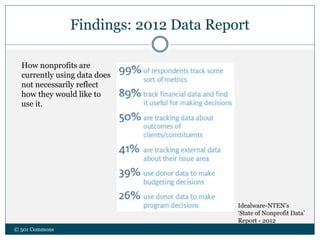
Findings: 2012 Data Report
© 501 Commons
Idealware-NTEN’s
‘State of Nonprofit Data’
Report - 2012
How nonprofits are
currently using data does
not necessarily reflect
how they would like to
use it.
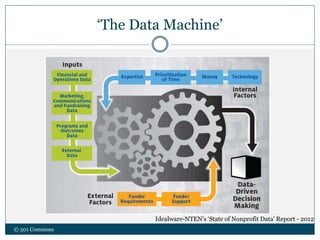
‘The Data Machine’
© 501 Commons
Idealware-NTEN’s ‘State of Nonprofit Data’ Report - 2012
So many terms
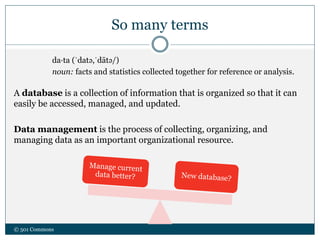
da·ta (ˈdatə,ˈdātə/)
noun: facts and statistics collected together for reference or analysis.
A database is a collection of information that is organized so that it can
easily be accessed, managed, and updated.
Data management is the process of collecting, organizing, and
managing data as an important organizational resource.
© 501 Commons
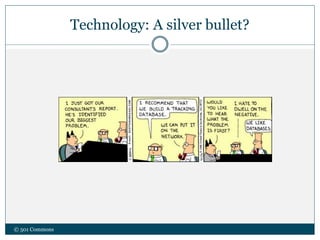
Technology: A silver bullet?
© 501 Commons
Database Selection vs. Data Management
 What is your end goal?
 Increase Capacity
 Track Outcomes
 Access to better information
 Consistency
 Basic infrastructure
© 501 Commons
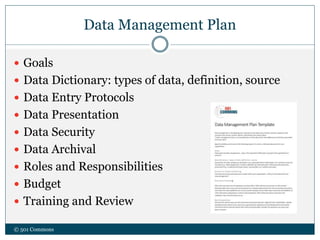
Data Management Plan
 Goals
 Data Dictionary: types of data, definition, source
 Data Entry Protocols
 Data Presentation
 Data Security
 Data Archival
 Roles and Responsibilities
 Budget
 Training and Review
© 501 Commons
Choosing a System:
Paradox of choice
© 501 Commons
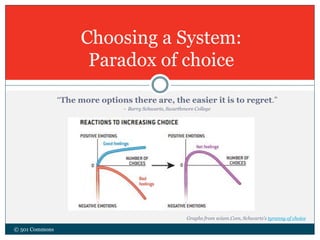
“The more options there are, the easier it is to regret.”
- Barry Schwartz, Swarthmore College
Graphs from sciam.Com, Schwartz’s tyranny of choice
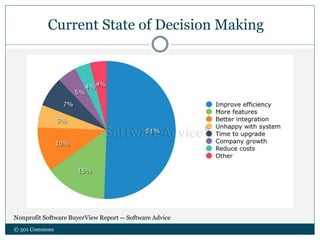
Current State of Decision Making
Nonprofit Software BuyerView Report -- Software Advice
© 501 Commons
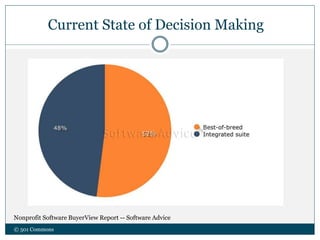
Current State of Decision Making
Nonprofit Software BuyerView Report -- Software Advice
© 501 Commons
Making Choices
© 501 Commons
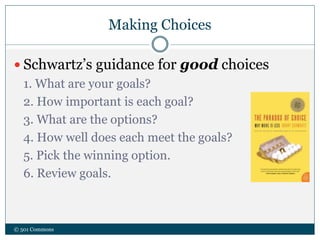
 Schwartz’s guidance for good choices
1. What are your goals?
2. How important is each goal?
3. What are the options?
4. How well does each meet the goals?
5. Pick the winning option.
6. Review goals.
Making Choices
© 501 Commons
 How to make happier choices
Choose when to choose.
Accept “good enough” sometimes.
Don’t worry about what you’re missing.
Control expectations.
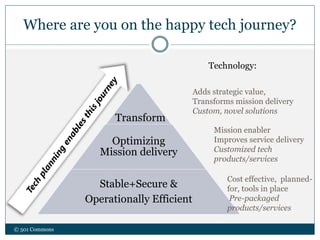
Where are you on the happy tech journey?
© 501 Commons
Optimizing
Mission delivery
Stable+Secure &
Operationally Efficient
Technology:
Adds strategic value,
Transforms mission delivery
Custom, novel solutions
Mission enabler
Improves service delivery
Customized tech
products/services
Cost effective, planned-
for, tools in place
Pre-packaged
products/services
Transform
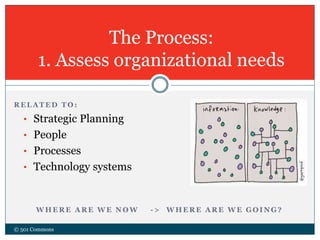
The Process:
1. Assess organizational needs
© 501 Commons
R E L A T E D T O :
• Strategic Planning
• People
• Processes
• Technology systems
W H E R E A R E W E N O W - > W H E R E A R E W E G O I N G ?
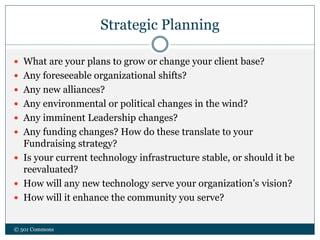
Strategic Planning
 What are your plans to grow or change your client base?
 Any foreseeable organizational shifts?
 Any new alliances?
 Any environmental or political changes in the wind?
 Any imminent Leadership changes?
 Any funding changes? How do these translate to your
Fundraising strategy?
 Is your current technology infrastructure stable, or should it be
reevaluated?
 How will any new technology serve your organization’s vision?
 How will it enhance the community you serve?
© 501 Commons
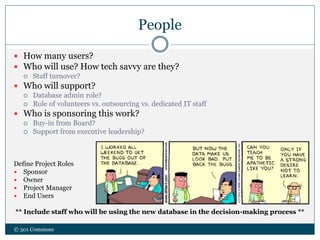
People
 How many users?
 Who will use? How tech savvy are they?
 Staff turnover?
 Who will support?
 Database admin role?
 Role of volunteers vs. outsourcing vs. dedicated IT staff
 Who is sponsoring this work?
 Buy-in from Board?
 Support from executive leadership?
Define Project Roles
 Sponsor
 Owner
 Project Manager
 End Users
** Include staff who will be using the new database in the decision-making process **
© 501 Commons
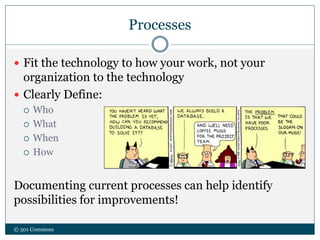
Processes
 Fit the technology to how your work, not your
organization to the technology
 Clearly Define:
 Who
 What
 When
 How
Documenting current processes can help identify
possibilities for improvements!
© 501 Commons
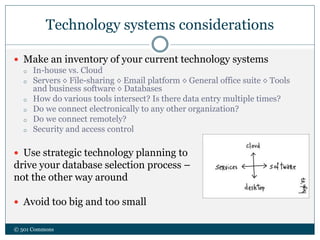
Technology systems considerations
 Make an inventory of your current technology systems
o In-house vs. Cloud
o Servers ◊ File-sharing ◊ Email platform ◊ General office suite ◊ Tools
and business software ◊ Databases
o How do various tools intersect? Is there data entry multiple times?
o Do we connect electronically to any other organization?
o Do we connect remotely?
o Security and access control
 Use strategic technology planning to
drive your database selection process –
not the other way around
 Avoid too big and too small
© 501 Commons
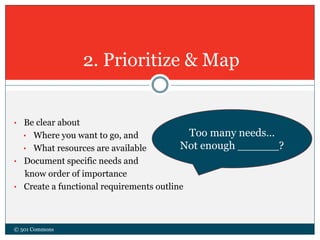
• Be clear about
• Where you want to go, and
• What resources are available
• Document specific needs and
know order of importance
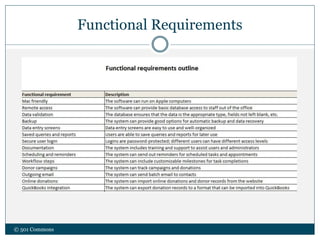
• Create a functional requirements outline
2. Prioritize & Map
© 501 Commons
Too many needs…
Not enough ______?
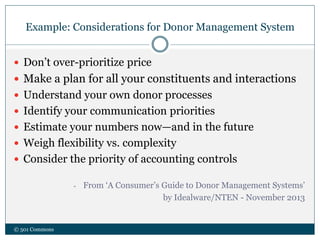
Example: Considerations for Donor Management System
© 501 Commons
 Don’t over-prioritize price
 Make a plan for all your constituents and interactions
 Understand your own donor processes
 Identify your communication priorities
 Estimate your numbers now—and in the future
 Weigh flexibility vs. complexity
 Consider the priority of accounting controls
- From ‘A Consumer’s Guide to Donor Management Systems’
by Idealware/NTEN - November 2013
Functional Requirements
© 501 Commons
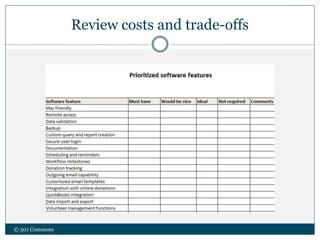
Review costs and trade-offs
© 501 Commons
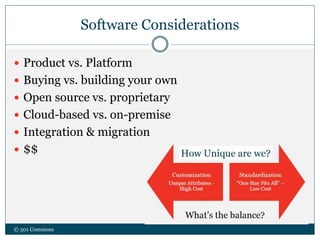
Software Considerations
 Product vs. Platform
 Buying vs. building your own
 Open source vs. proprietary
 Cloud-based vs. on-premise
 Integration & migration
 $$
© 501 Commons
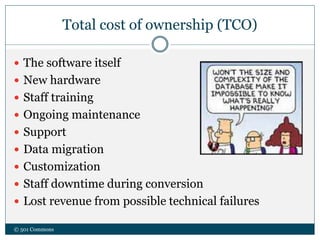
Total cost of ownership (TCO)
 The software itself
 New hardware
 Staff training
 Ongoing maintenance
 Support
 Data migration
 Customization
 Staff downtime during conversion
 Lost revenue from possible technical failures
© 501 Commons
Research
• Talk to other nonprofits
• Do online research at vendors website
• Read reviews
• Read discussion forum posts
• What do your IT people think?
• What do your internal stakeholders think?
• Engage a consultant
© 501 Commons
Resources
 IdealWare: www.idealware.org
 NTEN: www.nten.org
 TechSoup: www.techsoup.org
 501 Commons: www.501commons.org
© 501 Commons
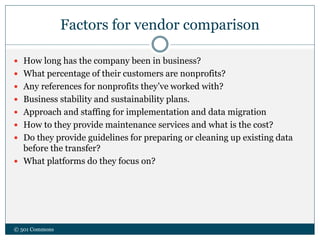
• Narrow down the list -- which choices
emerge as winners? Losers?
• Identify your top contenders
• Contact vendors
• Requests for information vs. RFP
3. Decide
© 501 Commons
Factors for vendor comparison
 How long has the company been in business?
 What percentage of their customers are nonprofits?
 Any references for nonprofits they’ve worked with?
 Business stability and sustainability plans.
 Approach and staffing for implementation and data migration
 How to they provide maintenance services and what is the cost?
 Do they provide guidelines for preparing or cleaning up existing data
before the transfer?
 What platforms do they focus on?
© 501 Commons
Final steps
 Compare responses from vendors
 Ask the reps for software demonstrations
 Take advantage of free demo versions and
trial accounts
 Pilot the software
© 501 Commons
Some database options*
© 501 Commons
 Free – “like kittens!”
 Salesforce (10 licenses)
 CiviCRM
 Access**
 SQL**
 Subscription based
 Blackbaud – Raisers Edge, eTapestry, Luminate
 SugarCRM
 Microsoft Dynamics
 Donor Perfect
 Donor Pro
 Little Green Light
 Batchbook
…and many more
* Focused on nonprofits
**Available to NPOs for reduced fees
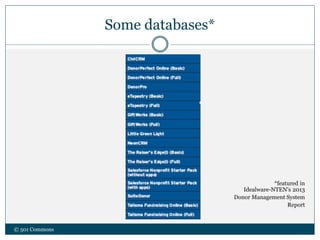
Some databases*
*featured in
Idealware-NTEN’s 2013
Donor Management System
Report
© 501 Commons
© 501 Commons
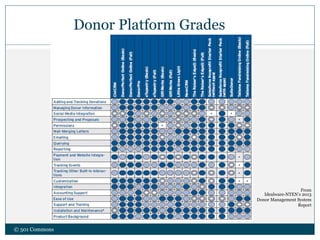
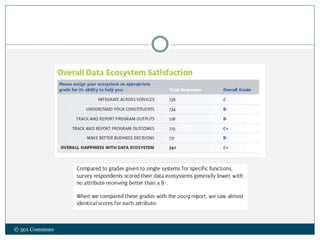
Donor Platform Grades
From
Idealware-NTEN’s 2013
Donor Management System
Report
Take Aways
Define the Objective:
To create a Data Management Plan or choose a Database?
While choosing a Database -
 Assess the scope of organizational needs
 Identify technology goals
 Prioritize requirements
 Map out the needed software features
 Identify resources, both $$ and people
 Decide which solution is the best fit
In the end, it is always about people!
© 501 Commons
© 501 Commons
Questions?
Resources
 IdealWare: www.idealware.org
 NTEN: www.nten.org
 TechSoup: www.techsoup.org
 501 Commons: www.501commons.org
© 501 Commons
© 501 Commons

Data managementfornonprofits 2014-06-19

  • 1.
    Y O UR M I S S I O N I S T O B U I L D A B E T T E R W O R L D . O U R S I S T O H E L P Y O U S U C C E E D . Effective Data Management for Nonprofits
  • 2.
    About Us Our missionis to boost the capacity of nonprofit organizations to thrive over the long term and effectively serve the community. Programs & Services include: © 501 Commons  Management Consulting  Technology Services  Financial Services  Human Resource Services  Leadership development  Volunteer Management & Planning Programs  Resource Directory www.501Commons.org
  • 3.
    Agenda  Data Management Choosing a System – The Paradox of Choice  Assess & Identify  Prioritize & Map  Decide  Takeaways © 501 Commons
  • 4.
    Findings: 2012 DataReport © 501 Commons Idealware-NTEN’s ‘State of Nonprofit Data’ Report - 2012 How nonprofits are currently using data does not necessarily reflect how they would like to use it.
  • 5.
    ‘The Data Machine’ ©501 Commons Idealware-NTEN’s ‘State of Nonprofit Data’ Report - 2012
  • 6.
    So many terms da·ta(ˈdatə,ˈdātə/) noun: facts and statistics collected together for reference or analysis. A database is a collection of information that is organized so that it can easily be accessed, managed, and updated. Data management is the process of collecting, organizing, and managing data as an important organizational resource. © 501 Commons
  • 7.
    Technology: A silverbullet? © 501 Commons
  • 8.
    Database Selection vs.Data Management  What is your end goal?  Increase Capacity  Track Outcomes  Access to better information  Consistency  Basic infrastructure © 501 Commons
  • 9.
    Data Management Plan Goals  Data Dictionary: types of data, definition, source  Data Entry Protocols  Data Presentation  Data Security  Data Archival  Roles and Responsibilities  Budget  Training and Review © 501 Commons
  • 10.
    Choosing a System: Paradoxof choice © 501 Commons “The more options there are, the easier it is to regret.” - Barry Schwartz, Swarthmore College Graphs from sciam.Com, Schwartz’s tyranny of choice
  • 11.
    Current State ofDecision Making Nonprofit Software BuyerView Report -- Software Advice © 501 Commons
  • 12.
    Current State ofDecision Making Nonprofit Software BuyerView Report -- Software Advice © 501 Commons
  • 13.
    Making Choices © 501Commons  Schwartz’s guidance for good choices 1. What are your goals? 2. How important is each goal? 3. What are the options? 4. How well does each meet the goals? 5. Pick the winning option. 6. Review goals.
  • 14.
    Making Choices © 501Commons  How to make happier choices Choose when to choose. Accept “good enough” sometimes. Don’t worry about what you’re missing. Control expectations.
  • 15.
    Where are youon the happy tech journey? © 501 Commons Optimizing Mission delivery Stable+Secure & Operationally Efficient Technology: Adds strategic value, Transforms mission delivery Custom, novel solutions Mission enabler Improves service delivery Customized tech products/services Cost effective, planned- for, tools in place Pre-packaged products/services Transform
  • 16.
    The Process: 1. Assessorganizational needs © 501 Commons R E L A T E D T O : • Strategic Planning • People • Processes • Technology systems W H E R E A R E W E N O W - > W H E R E A R E W E G O I N G ?
  • 17.
    Strategic Planning  Whatare your plans to grow or change your client base?  Any foreseeable organizational shifts?  Any new alliances?  Any environmental or political changes in the wind?  Any imminent Leadership changes?  Any funding changes? How do these translate to your Fundraising strategy?  Is your current technology infrastructure stable, or should it be reevaluated?  How will any new technology serve your organization’s vision?  How will it enhance the community you serve? © 501 Commons
  • 18.
    People  How manyusers?  Who will use? How tech savvy are they?  Staff turnover?  Who will support?  Database admin role?  Role of volunteers vs. outsourcing vs. dedicated IT staff  Who is sponsoring this work?  Buy-in from Board?  Support from executive leadership? Define Project Roles  Sponsor  Owner  Project Manager  End Users ** Include staff who will be using the new database in the decision-making process ** © 501 Commons
  • 19.
    Processes  Fit thetechnology to how your work, not your organization to the technology  Clearly Define:  Who  What  When  How Documenting current processes can help identify possibilities for improvements! © 501 Commons
  • 20.
    Technology systems considerations Make an inventory of your current technology systems o In-house vs. Cloud o Servers ◊ File-sharing ◊ Email platform ◊ General office suite ◊ Tools and business software ◊ Databases o How do various tools intersect? Is there data entry multiple times? o Do we connect electronically to any other organization? o Do we connect remotely? o Security and access control  Use strategic technology planning to drive your database selection process – not the other way around  Avoid too big and too small © 501 Commons
  • 21.
    • Be clearabout • Where you want to go, and • What resources are available • Document specific needs and know order of importance • Create a functional requirements outline 2. Prioritize & Map © 501 Commons Too many needs… Not enough ______?
  • 22.
    Example: Considerations forDonor Management System © 501 Commons  Don’t over-prioritize price  Make a plan for all your constituents and interactions  Understand your own donor processes  Identify your communication priorities  Estimate your numbers now—and in the future  Weigh flexibility vs. complexity  Consider the priority of accounting controls - From ‘A Consumer’s Guide to Donor Management Systems’ by Idealware/NTEN - November 2013
  • 23.
  • 24.
    Review costs andtrade-offs © 501 Commons
  • 25.
    Software Considerations  Productvs. Platform  Buying vs. building your own  Open source vs. proprietary  Cloud-based vs. on-premise  Integration & migration  $$ © 501 Commons
  • 26.
    Total cost ofownership (TCO)  The software itself  New hardware  Staff training  Ongoing maintenance  Support  Data migration  Customization  Staff downtime during conversion  Lost revenue from possible technical failures © 501 Commons
  • 27.
    Research • Talk toother nonprofits • Do online research at vendors website • Read reviews • Read discussion forum posts • What do your IT people think? • What do your internal stakeholders think? • Engage a consultant © 501 Commons
  • 28.
    Resources  IdealWare: www.idealware.org NTEN: www.nten.org  TechSoup: www.techsoup.org  501 Commons: www.501commons.org © 501 Commons
  • 29.
    • Narrow downthe list -- which choices emerge as winners? Losers? • Identify your top contenders • Contact vendors • Requests for information vs. RFP 3. Decide © 501 Commons
  • 30.
    Factors for vendorcomparison  How long has the company been in business?  What percentage of their customers are nonprofits?  Any references for nonprofits they’ve worked with?  Business stability and sustainability plans.  Approach and staffing for implementation and data migration  How to they provide maintenance services and what is the cost?  Do they provide guidelines for preparing or cleaning up existing data before the transfer?  What platforms do they focus on? © 501 Commons
  • 31.
    Final steps  Compareresponses from vendors  Ask the reps for software demonstrations  Take advantage of free demo versions and trial accounts  Pilot the software © 501 Commons
  • 32.
    Some database options* ©501 Commons  Free – “like kittens!”  Salesforce (10 licenses)  CiviCRM  Access**  SQL**  Subscription based  Blackbaud – Raisers Edge, eTapestry, Luminate  SugarCRM  Microsoft Dynamics  Donor Perfect  Donor Pro  Little Green Light  Batchbook …and many more * Focused on nonprofits **Available to NPOs for reduced fees
  • 33.
    Some databases* *featured in Idealware-NTEN’s2013 Donor Management System Report © 501 Commons
  • 34.
    © 501 Commons DonorPlatform Grades From Idealware-NTEN’s 2013 Donor Management System Report
  • 35.
    Take Aways Define theObjective: To create a Data Management Plan or choose a Database? While choosing a Database -  Assess the scope of organizational needs  Identify technology goals  Prioritize requirements  Map out the needed software features  Identify resources, both $$ and people  Decide which solution is the best fit In the end, it is always about people! © 501 Commons
  • 36.
  • 37.
    Resources  IdealWare: www.idealware.org NTEN: www.nten.org  TechSoup: www.techsoup.org  501 Commons: www.501commons.org © 501 Commons
  • 38.

Editor's Notes

  • #3 Mention specific tech service lines
  • #4  No silver bullet! Responses ranged from How to manage data effectively to database options and solutions Data collection -> information Fears around SF sales presentation! Moving from existing older platforms to more current, more integrated solutions How to choose
  • #6 Folks use lots of ways to manage data – sticky notes to Excel sheets to sophisticated CRMs and everything in between. Assess where people are: How many currently use a database already? Looking for options that would be a good fit for their org? Are looking to switch from what they have currently? What are some reasons?
  • #7 To manage data effectively is to bridge the gap between inputs – hard data sets – and outputs – information or analysis – that an organization can use to make decisions and demonstrate a measurable community impact.
  • #8 Don’t expect change overnight, panaceas, or silver bullets Change is hard, and any DB project = big change throughout the org. As a client told us – “it is certainly not for the faint of heart!” New technology adoption rarely saves an organization a game-changing amount of money. Tech can save the organization time so people can do more things or other things. Tech can help make the organization more effective. Tech can improve quality of work.
  • #9 To manage data effectively is to bridge the gap between inputs – hard data sets – and outputs – information or analysis – that an organization can use to make decisions and demonstrate a measurable community impact.
  • #10 Goals: Why is this important? What does it prepare the organization to achieve? Go over tips & tricks in hand-out
  • #11 Barry Schwartz, a psychologist who published a book called the Paradox of Choice a few years ago. Some of the conclusions have been challenged by subsequent research, but it is a bit murky where the point is where choice becomes too much choice. I think if you stop and think about it, you probably have some anecdotal experience yourself with this. Schwartz claims that the research has shown that people feel sorrow about the opportunities they have forgone, they may also suffer regret about the option they settle on.
  • #12 Here is why they are looking to make a purchase.
  • #13 Coin toss on whether most people want integrated solutions or best of breed. The pendulum swings on that. The On-premises vs. cloud folks could be interpreted a couple of ways.
  • #14 1. Figure out your goals. 2. Evaluate the importance of each goal. 3. Array the options. 4. Evaluate how likely each of the options is to meet your goals. 5. Pick the winning option. 6. Goals may have changed
  • #15 This is going to sound like a message of complacency or anti-intellectual. It is not meant to be. The idea is to moderate the behaviors that cause distress. On choosing when to choose – restrict your options when the decision isn’t crucial. Only demo two or three products when the outcome isn’t mission-critical. On Accepting good enough – settle on a choice fits your core requirements instead of conforming to what someone else says is “best.” There is always going to be someone out there thinks theirs is “better” or “best” don’t worry about it. Those are subjective terms and are inoculating themselves against a fear that they have chosen poorly. More socks to choose among doesn’t mean that one of them is going to be sufficiently better than any other sock to rock your world. Don’t worry about what you are missing. Focus on the positive aspects of the choice you have made. Don’t ponder too much what it would be like to have gone with the other solutions. Don’t expect magic and moonbeams. Life isn’t usual like a young adult novel or a movie. Sure, sometimes you will get magic and moonbeams, but if you expect it every time, you will be disappointed.
  • #16 Most orgs are at the bottom or middle. Example – transformation is exciting and gets lots of press, but the work your orgs do is vitally important. Salmon story Able to do things you weren’t able to do feasibly. Khan Academy, Walkscore, Kiva, WWF exploring how Google Glass can help protect rhinos Transforming mission work through tech innovation Technology is adding strategic value Technology is directly involved in and transforming the way the org serves mission Often means building novel tech solutions Optimizing mission delivery through use of integrated applications Technology is a mission enabler Technology is improving service delivery Often means customizing tech products/services Getting stable and secure and operationally efficient Technology is cost effective and planned-for Basic tools are in place and break/fix is minimized Often means using simpler, pre-packaged technology products/services
  • #20 Change is hard. The more people are involved in this discussion, the better the longer term adoption tends to be! ****Avoid going directly to the computer to map processes!
  • #22 $, time, people
  • #29 Database report coming next month from Idealware