Keep it Short & Simple:  Writing for the Web Lindsey Patten Synthesis Communications
About Me Graduated from the University of Windsor for Communications and Humber College in the Fundraising and Volunteer Management Program Owner of Synthesis Communications, a company that helps nonprofits improve their communication tools Runs a blog, Notes for Nonprofits, that offers communications and marketing advice to nonprofits
Presentation Objectives Old websites versus new Biggest mistakes in web writing First steps Four key components of great web writing Tips for every page of your site Formatting for the web The Web Composition Triangle Do’s and Don’ts
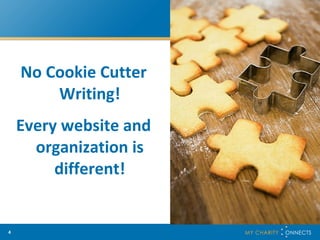
No Cookie Cutter Writing! Every website and organization is different!
Old Websites Versus New Old Website Brochure Purely Informational Basic pages include Our Programs, About Us, etc.
Old Websites Versus New New Website Engaging Interactive Still Informational
Web Statistics So why is it important to be engaging? Because on the web: 79% of users only scan the page Whereas 16% read word by word And on the average web page, users: Read at most 28% of the text, however 20% is more likely
What Are The Biggest Mistakes in Web Writing? Copying a brochure/fact sheet to the web Hiding bad content with good design Boring copy No clear message No voice Overdone Mission/Vision statements
First Steps How Do You Know Your Content Needs to Be Redone?
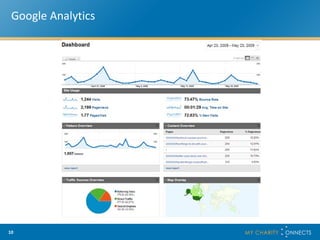
Google Analytics
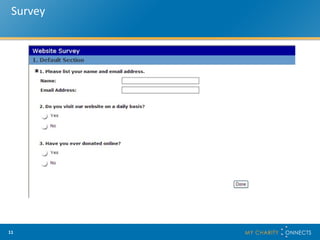
Survey
First Steps Put that pen down!  First….
First Steps What Are Your Goals?
What Are Your Goals? Receiving more donations Getting volunteers Getting a petition signed Raising awareness
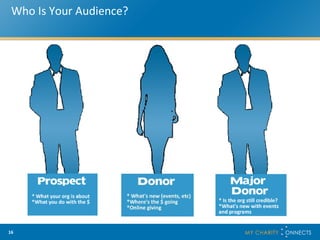
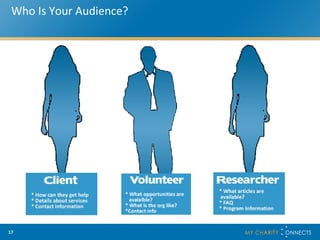
First Steps Who is Your Audience?
Who Is Your Audience?
First Steps What Are You Trying to Achieve? Only 43% of nonprofit sites studied answered this question on their homepage.
First Steps What Are You Doing With the Money? Only 4% of nonprofit sites studied answered this question on their homepage.
Improving Web Writing Engage Inform Call to Action Donor-Centric
Engage Your content must be engaging. You need to involve your reader, encourage them to learn more and help them become connected with the organization.  So How Do We Engage?
Engage Passion Client Stories Real Experiences Human Touch Remember, people give to people, not to organizations or websites.
Inform People visit a website for information. As an organization you want to provide the best information possible so the user is fully versed in what your organization is about. Good information sparks their interest and involvement.  What’s The Best Way To Inform?
Inform Clear and Concise No Jargon Highlight Successes Fresh and Interesting
Call to Action Your call to action is extremely important.  This is what you want your audience to do whether it’s sign a petition, become a volunteer or make a donation. Your web content needs to be guided towards this end and your call to action should be strong and interesting. What Makes A Good Call to Action?
Call to Action Compelling Active Voice Clear and Concise Meaningful
Donor-Centric Your website isn’t all about you.  In order to be fully engaged, your donors/prospects need more than your program information. They need to understand what their role is in your organization.  How do you make your website donor-centric?
Donor-Centric Provide concrete examples about where their donations go  Language: You versus we  Showcase the rewards from donating/volunteering, etc Say thank you
Tips-Home Page Share news Share purpose Say what you are doing with the money Tell people where you want them to go
Tips-Programs Don’t mention every detail about your programs List the top three points Each program should be on a separate page List statistics separately Take a heart approach Include client stories
Tips-About Us Don’t share a long history Staff and Board Info, make it unique Explain what you are doing with the money Clear and concise mission and vision statements
Tips-Donate Note what they are donating to Why should they donate Engaging Not passive Easy to read
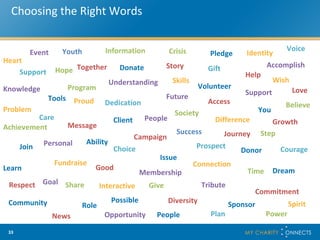
Choosing the Right Words Heart Give Care   Choice Dedication Donor Success Ability Issue Identity Campaign Access Donate Crisis Event Help Client Growth Future Fundraise Diversity Interactive Role Opportunity Message Learn Knowledge Plan Power People Community News Step Society Skills Program Problem Tools Connection Support Volunteer Understanding Difference Membership Pledge Hope Gift Courage Accomplish Support Information You Prospect Dream Goal Good Achievement Join People Personal Proud Possible Respect Share Sponsor Spirit Story Time Tribute Youth Voice Wish Believe Love Journey Commitment Together
Formatting Create great headlines Use bullet points Avoid long paragraphs Have lots of white space Bold important info Pull quotes out of text and display Use sub-headings Use links
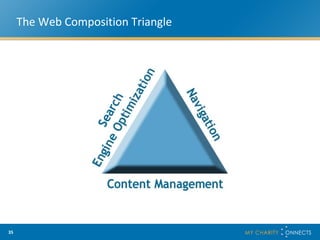
The Web Composition Triangle
Search Engine Optimization What Is Search Engine Optimization?
Search Engine Optimization Search engine optimization (SEO) is the process of improving the volume or quality of traffic to a website  from search engines. Uses keywords and links to drive traffic to your site.
Search Engine Optimization Why Do We Need It?
Search Engine Optimization Keywords help your audience find you when they search It’s important to use keywords not only on the main page but on every page
Search Engine Optimization How Do You Use It?
Search Engine Optimization Know your audience Brainstorm possible keywords Do a Google search for your issue/field Check out your competitors Update frequently
Content Management What is Content Management?
Content Management Content management allows for dynamic content to be added in similar fashion to using a word processor or blogging software to quickly and easily add content.
Content Management Why Do We Need It?
Content Management Content becomes stale Content is outdated People want to learn new things about your organization Fresh content means  means fresh updates by search engines to enhance visibility
Navigation What is Navigation?
Navigation Navigation is how one travels through your website. Good navigation allows a visitor to receive the content they are looking for as quickly as possible.
Navigation How Does Good Navigation Improve Content?
Navigation Makes your content more streamlined and accessible Allows audience to determine quickly and easily what information they are interested in Provides a direction for your audience to travel
Tips for Sitting Down and Getting Started Gather your content Assemble your statistics and ensure they are right Have a brainstorming session Write out your goals, message and voice Assign one person to write the content
Do’s and Don’ts Do tell the truth Do be passionate and engaging Do know your limitations Do have a good editor Don’t tell the whole story Don’t be passive Don’t get frustrated DO DON’T
Thank You Thank You! http://notesfornonprofits.blogspot.com www.synthesiscommunications.net www.twitter.com/lindseypatten

Lindsey Patten - Keep It Short & Simple Writing For The Web

  • 1.
    Keep it Short& Simple: Writing for the Web Lindsey Patten Synthesis Communications
  • 2.
    About Me Graduatedfrom the University of Windsor for Communications and Humber College in the Fundraising and Volunteer Management Program Owner of Synthesis Communications, a company that helps nonprofits improve their communication tools Runs a blog, Notes for Nonprofits, that offers communications and marketing advice to nonprofits
  • 3.
    Presentation Objectives Oldwebsites versus new Biggest mistakes in web writing First steps Four key components of great web writing Tips for every page of your site Formatting for the web The Web Composition Triangle Do’s and Don’ts
  • 4.
    No Cookie CutterWriting! Every website and organization is different!
  • 5.
    Old Websites VersusNew Old Website Brochure Purely Informational Basic pages include Our Programs, About Us, etc.
  • 6.
    Old Websites VersusNew New Website Engaging Interactive Still Informational
  • 7.
    Web Statistics Sowhy is it important to be engaging? Because on the web: 79% of users only scan the page Whereas 16% read word by word And on the average web page, users: Read at most 28% of the text, however 20% is more likely
  • 8.
    What Are TheBiggest Mistakes in Web Writing? Copying a brochure/fact sheet to the web Hiding bad content with good design Boring copy No clear message No voice Overdone Mission/Vision statements
  • 9.
    First Steps HowDo You Know Your Content Needs to Be Redone?
  • 10.
  • 11.
  • 12.
    First Steps Putthat pen down! First….
  • 13.
    First Steps WhatAre Your Goals?
  • 14.
    What Are YourGoals? Receiving more donations Getting volunteers Getting a petition signed Raising awareness
  • 15.
    First Steps Whois Your Audience?
  • 16.
    Who Is YourAudience?
  • 17.
    Who Is YourAudience?
  • 18.
    First Steps WhatAre You Trying to Achieve? Only 43% of nonprofit sites studied answered this question on their homepage.
  • 19.
    First Steps WhatAre You Doing With the Money? Only 4% of nonprofit sites studied answered this question on their homepage.
  • 20.
    Improving Web WritingEngage Inform Call to Action Donor-Centric
  • 21.
    Engage Your contentmust be engaging. You need to involve your reader, encourage them to learn more and help them become connected with the organization. So How Do We Engage?
  • 22.
    Engage Passion ClientStories Real Experiences Human Touch Remember, people give to people, not to organizations or websites.
  • 23.
    Inform People visita website for information. As an organization you want to provide the best information possible so the user is fully versed in what your organization is about. Good information sparks their interest and involvement. What’s The Best Way To Inform?
  • 24.
    Inform Clear andConcise No Jargon Highlight Successes Fresh and Interesting
  • 25.
    Call to ActionYour call to action is extremely important. This is what you want your audience to do whether it’s sign a petition, become a volunteer or make a donation. Your web content needs to be guided towards this end and your call to action should be strong and interesting. What Makes A Good Call to Action?
  • 26.
    Call to ActionCompelling Active Voice Clear and Concise Meaningful
  • 27.
    Donor-Centric Your websiteisn’t all about you. In order to be fully engaged, your donors/prospects need more than your program information. They need to understand what their role is in your organization. How do you make your website donor-centric?
  • 28.
    Donor-Centric Provide concreteexamples about where their donations go Language: You versus we Showcase the rewards from donating/volunteering, etc Say thank you
  • 29.
    Tips-Home Page Sharenews Share purpose Say what you are doing with the money Tell people where you want them to go
  • 30.
    Tips-Programs Don’t mentionevery detail about your programs List the top three points Each program should be on a separate page List statistics separately Take a heart approach Include client stories
  • 31.
    Tips-About Us Don’tshare a long history Staff and Board Info, make it unique Explain what you are doing with the money Clear and concise mission and vision statements
  • 32.
    Tips-Donate Note whatthey are donating to Why should they donate Engaging Not passive Easy to read
  • 33.
    Choosing the RightWords Heart Give Care Choice Dedication Donor Success Ability Issue Identity Campaign Access Donate Crisis Event Help Client Growth Future Fundraise Diversity Interactive Role Opportunity Message Learn Knowledge Plan Power People Community News Step Society Skills Program Problem Tools Connection Support Volunteer Understanding Difference Membership Pledge Hope Gift Courage Accomplish Support Information You Prospect Dream Goal Good Achievement Join People Personal Proud Possible Respect Share Sponsor Spirit Story Time Tribute Youth Voice Wish Believe Love Journey Commitment Together
  • 34.
    Formatting Create greatheadlines Use bullet points Avoid long paragraphs Have lots of white space Bold important info Pull quotes out of text and display Use sub-headings Use links
  • 35.
  • 36.
    Search Engine OptimizationWhat Is Search Engine Optimization?
  • 37.
    Search Engine OptimizationSearch engine optimization (SEO) is the process of improving the volume or quality of traffic to a website from search engines. Uses keywords and links to drive traffic to your site.
  • 38.
    Search Engine OptimizationWhy Do We Need It?
  • 39.
    Search Engine OptimizationKeywords help your audience find you when they search It’s important to use keywords not only on the main page but on every page
  • 40.
    Search Engine OptimizationHow Do You Use It?
  • 41.
    Search Engine OptimizationKnow your audience Brainstorm possible keywords Do a Google search for your issue/field Check out your competitors Update frequently
  • 42.
    Content Management Whatis Content Management?
  • 43.
    Content Management Contentmanagement allows for dynamic content to be added in similar fashion to using a word processor or blogging software to quickly and easily add content.
  • 44.
    Content Management WhyDo We Need It?
  • 45.
    Content Management Contentbecomes stale Content is outdated People want to learn new things about your organization Fresh content means means fresh updates by search engines to enhance visibility
  • 46.
    Navigation What isNavigation?
  • 47.
    Navigation Navigation ishow one travels through your website. Good navigation allows a visitor to receive the content they are looking for as quickly as possible.
  • 48.
    Navigation How DoesGood Navigation Improve Content?
  • 49.
    Navigation Makes yourcontent more streamlined and accessible Allows audience to determine quickly and easily what information they are interested in Provides a direction for your audience to travel
  • 50.
    Tips for SittingDown and Getting Started Gather your content Assemble your statistics and ensure they are right Have a brainstorming session Write out your goals, message and voice Assign one person to write the content
  • 51.
    Do’s and Don’tsDo tell the truth Do be passionate and engaging Do know your limitations Do have a good editor Don’t tell the whole story Don’t be passive Don’t get frustrated DO DON’T
  • 52.
    Thank You ThankYou! http://notesfornonprofits.blogspot.com www.synthesiscommunications.net www.twitter.com/lindseypatten