Chapter 13 Graphics


Liang, Introduction to Java Programming, Ninth Edition, (c) 2013 Pearson Education, Inc. All
                                     rights reserved.
                                                                                               1
Motivations
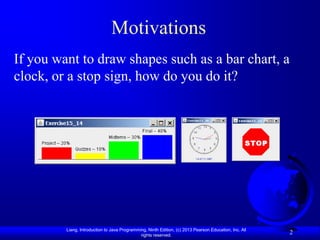
If you want to draw shapes such as a bar chart, a
clock, or a stop sign, how do you do it?


         Liang, Introduction to Java Programming, Ninth Edition, (c) 2013 Pearson Education, Inc. All
                                              rights reserved.
                                                                                                        2
Objectives
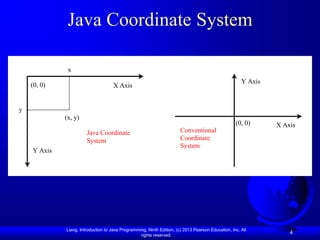
   To describe Java coordinate systems in a GUI component (§13.2).
   To draw things using the methods in the Graphics class (§13.3).
   To override the paintComponent method to draw things on a GUI
    component (§13.3).
   To use a panel as a canvas to draw things (§13.3).
   To draw strings, lines, rectangles, ovals, arcs, and polygons
    (§§13.4, 13.6-13.7).
   To obtain font properties using FontMetrics and know how to
    center a message (§13.8).
   To display an image in a GUI component (§13.11).
   To develop reusable GUI components FigurePanel, MessagePanel,
    StillClock, and ImageViewer (§§13.5, 13.9, 13.10, 13.12).


              Liang, Introduction to Java Programming, Ninth Edition, (c) 2013 Pearson Education, Inc. All
                                                   rights reserved.
                                                                                                             3
Java Coordinate System

              x
                                                                                                      Y Axis
    (0, 0)                          X Axis


y
             (x, y)
                                                                                                   (0, 0)      X Axis
                       Java Coordinate                                 Conventional
                       System                                          Coordinate
                                                                       System
    Y Axis


             Liang, Introduction to Java Programming, Ninth Edition, (c) 2013 Pearson Education, Inc. All
                                                  rights reserved.
                                                                                                                   4
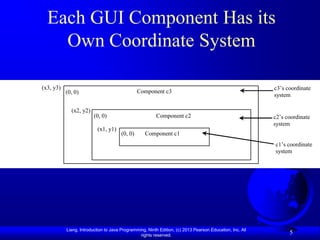
Each GUI Component Has its
    Own Coordinate System

(x3, y3)                                                                                                  c3’s coordinate
           (0, 0)                               Component c3
                                                                                                          system

             (x2, y2)
                         (0, 0)                         Component c2                                      c2’s coordinate
                                                                                                          system
                          (x1, y1)
                                       (0, 0)      Component c1
                                                                                                          c1’s coordinate
                                                                                                          system


           Liang, Introduction to Java Programming, Ninth Edition, (c) 2013 Pearson Education, Inc. All
                                                rights reserved.
                                                                                                                5
The Graphics Class
                                                        java.awt.Graphics

You can draw strings,                   +setColor(color: Color): void
                                        +setFont(font: Font): void
                                                                                            Sets a new color for subsequent drawings.
                                                                                            Sets a new font for subsequent drwings.
lines, rectangles, ovals,               +drawString(s: String, x: int, y: int): void         Draws a string starting at point (x, y).
                                        +drawLine(x1: int, y1: int, x2: int, y2: int): void Draws a line from (x1, y1) to (x2, y2).
arcs, polygons, and                     +drawRect(x: int, y: int, w: int, h: int): void      Draws a rectangle with specified upper-left corner point at (x,
                                                                                                y) and width w and height h.
polylines, using the                    +fillRect(x: int, y: int, w: int, h: int): void      Draws a filled rectangle with specified upper-left corner point
                                                                                                at (x, y) and width w and height h.
methods in the Graphics                 +drawRoundRect(x: int, y: int, w: int, h: int, aw: Draws a round-cornered rectangle with specified arc width aw
                                            int, ah: int): void                                 and arc height ah.

class.                                  +fillRoundRect(x: int, y: int, w: int, h: int, aw:
                                            int, ah: int): void
                                                                                             Draws a filled round-cornered rectangle with specified arc
                                                                                                width aw and arc height ah.
                                        +draw3DRect(x: int, y: int, w: int, h: int, raised: Draws a 3-D rectangle raised above the surface or sunk into the
                                            boolean): void                                      surface.
                                        +fill3DRect(x: int, y: int, w: int, h: int, raised:  Draws a filled 3-D rectangle raised above the surface or sunk
                                            boolean): void                                      into the surface.
                                        +drawOval(x: int, y: int, w: int, h: int): void      Draws an oval bounded by the rectangle specified by the
                                                                                                parameters x, y, w, and h.
                                        +fillOval(x: int, y: int, w: int, h: int): void      Draws a filled oval bounded by the rectangle specified by the
                                                                                                parameters x, y, w, and h.
                                        +drawArc(x: int, y: int, w: int, h: int, startAngle: Draws an arc conceived as part of an oval bounded by the
                                            int, arcAngle: int): void                           rectangle specified by the parameters x, y, w, and h.
                                        +fillArc(x: int, y: int, w: int, h: int, startAngle: Draws a filled arc conceived as part of an oval bounded by the
                                            int, arcAngle: int): void                           rectangle specified by the parameters x, y, w, and h.
                                        +drawPolygon(xPoints: int[], yPoints: int[],         Draws a closed polygon defined by arrays of x and y
                                            nPoints: int): void                                 coordinates. Each pair of (x[i], y[i]) coordinates is a point.
                                        +fillPolygon(xPoints: int[], yPoints: int[],         Draws a filled polygon defined by arrays of x and y
                                            nPoints: int): void                                 coordinates. Each pair of (x[i], y[i]) coordinates is a point.
                                        +drawPolygon(g: Polygon): void                       Draws a closed polygon defined by a Polygon object.
                                        +fillPolygon(g: Polygon): void                      Draws a filled polygon defined by a Polygon object.
                                        +drawPolyline(xPoints: int[], yPoints: int[],       Draws a polyline defined by arrays of x and y coordinates.
                                           nPoints: int): void                                 Each pair of (x[i], y[i]) coordinates is a point.

             Liang, Introduction to Java Programming, Ninth Edition, (c) 2013 Pearson Education, Inc. All
                                                  rights reserved.
                                                                                                                                                    6
paintComponent Example
In order to draw things on a component, you need
to define a class that extends JPanel and overrides
its paintComponent method to specify what to
draw. The first program in this chapter can be
rewritten using paintComponent.


                             TestPaintComponent                                                         Run
         Liang, Introduction to Java Programming, Ninth Edition, (c) 2013 Pearson Education, Inc. All
                                              rights reserved.
                                                                                                              7
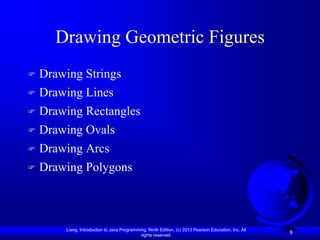
Drawing Geometric Figures
   Drawing Strings
   Drawing Lines
   Drawing Rectangles
   Drawing Ovals
   Drawing Arcs
   Drawing Polygons


        Liang, Introduction to Java Programming, Ninth Edition, (c) 2013 Pearson Education, Inc. All
                                             rights reserved.
                                                                                                       8
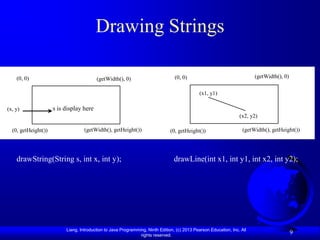
Drawing Strings

    (0, 0)                               (getWidth(), 0)                         (0, 0)                                  (getWidth(), 0)

                                                                                              (x1, y1)

(x, y)               s is display here
                                                                                                                  (x2, y2)

  (0, getHeight())                 (getWidth(), getHeight())                   (0, getHeight())                     (getWidth(), getHeight())


    drawString(String s, int x, int y);                                          drawLine(int x1, int y1, int x2, int y2);


                          Liang, Introduction to Java Programming, Ninth Edition, (c) 2013 Pearson Education, Inc. All
                                                               rights reserved.
                                                                                                                                           9
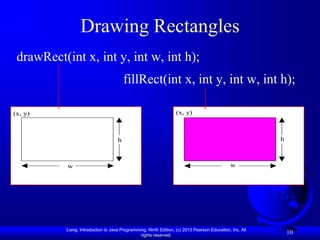
Drawing Rectangles
 drawRect(int x, int y, int w, int h);
                                         fillRect(int x, int y, int w, int h);

(x, y)                                                             (x, y)


                                     h                                                                    h


           w                                                                                  w


           Liang, Introduction to Java Programming, Ninth Edition, (c) 2013 Pearson Education, Inc. All
                                                rights reserved.
                                                                                                              10
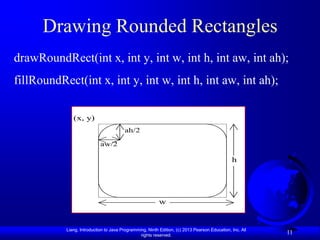
Drawing Rounded Rectangles
drawRoundRect(int x, int y, int w, int h, int aw, int ah);
fillRoundRect(int x, int y, int w, int h, int aw, int ah);

              (x, y)
                                        ah/2

                            aw/2

                                                                                               h


                                                          w


           Liang, Introduction to Java Programming, Ninth Edition, (c) 2013 Pearson Education, Inc. All
                                                rights reserved.
                                                                                                          11
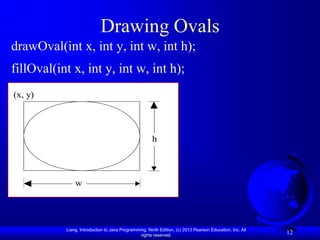
Drawing Ovals
drawOval(int x, int y, int w, int h);
fillOval(int x, int y, int w, int h);
(x, y)


                                                      h


               w


           Liang, Introduction to Java Programming, Ninth Edition, (c) 2013 Pearson Education, Inc. All
                                                rights reserved.
                                                                                                          12
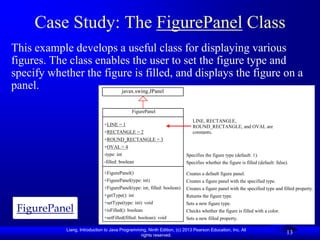
Case Study: The FigurePanel Class
This example develops a useful class for displaying various
figures. The class enables the user to set the figure type and
specify whether the figure is filled, and displays the figure on a
panel.                  javax.swing.JPanel
                              -char token

                              +getToken      FigurePanel
                              +setToken
                              +paintComponet                                 LINE, RECTANGLE,
                               +LINE = 1
                              +mouseClicked                                  ROUND_RECTANGLE, and OVAL are
                               +RECTANGLE = 2                                constants.
                               +ROUND_RECTANGLE = 3
                               +OVAL = 4
                               -type: int                                 Specifies the figure type (default: 1).
                               -filled: boolean                           Specifies whether the figure is filled (default: false).

                               +FigurePanel()                             Creates a default figure panel.
                               +FigurePanel(type: int)                    Creates a figure panel with the specified type.
                               +FigurePanel(type: int, filled: boolean)   Creates a figure panel with the specified type and filled property.
                               +getType(): int                            Returns the figure type.
                               +setType(type: int): void                  Sets a new figure type.
 FigurePanel                   +isFilled(): boolean                       Checks whether the figure is filled with a color.
                               +setFilled(filled: boolean): void          Sets a new filled property.

            Liang, Introduction to Java Programming, Ninth Edition, (c) 2013 Pearson Education, Inc. All
                                                 rights reserved.
                                                                                                                                 13
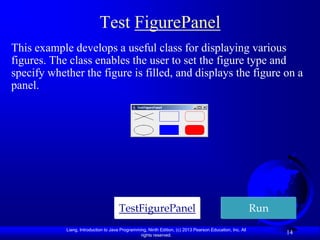
Test FigurePanel
This example develops a useful class for displaying various
figures. The class enables the user to set the figure type and
specify whether the figure is filled, and displays the figure on a
panel.


                                      TestFigurePanel                                                      Run
            Liang, Introduction to Java Programming, Ninth Edition, (c) 2013 Pearson Education, Inc. All
                                                 rights reserved.
                                                                                                                 14
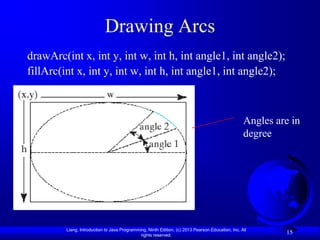
Drawing Arcs
drawArc(int x, int y, int w, int h, int angle1, int angle2);
fillArc(int x, int y, int w, int h, int angle1, int angle2);


                                                                                                   Angles are in
                                                                                                   degree


         Liang, Introduction to Java Programming, Ninth Edition, (c) 2013 Pearson Education, Inc. All
                                              rights reserved.
                                                                                                            15
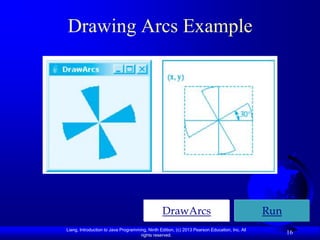
Drawing Arcs Example


                                                 DrawArcs                                      Run
Liang, Introduction to Java Programming, Ninth Edition, (c) 2013 Pearson Education, Inc. All
                                     rights reserved.
                                                                                                     16
Drawing Polygons and Polylines
int[] x = {40, 70, 60, 45, 20};
int[] y = {20, 40, 80, 45, 60};                                         g.drawPolyline(x, y, x.length);
g.drawPolygon(x, y, x.length);


  (x[0], y[0])                                                                (x[0], y[0])
                                            (x[1], y[1])                                                                  (x[1], y[1])
                 (x[3], y[3])                                                                 (x[3], y[3])


(x[4], y[4])                                                               (x[4], y[4])
                                  (x[2], y[2])                                                                   (x[2], y[2])


                       Liang, Introduction to Java Programming, Ninth Edition, (c) 2013 Pearson Education, Inc. All
                                                            rights reserved.
                                                                                                                                    17
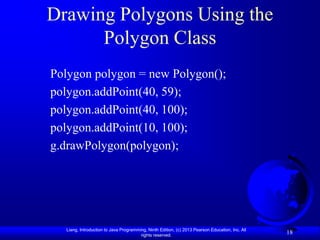
Drawing Polygons Using the
      Polygon Class
Polygon polygon = new Polygon();
polygon.addPoint(40, 59);
polygon.addPoint(40, 100);
polygon.addPoint(10, 100);
g.drawPolygon(polygon);


  Liang, Introduction to Java Programming, Ninth Edition, (c) 2013 Pearson Education, Inc. All
                                       rights reserved.
                                                                                                 18
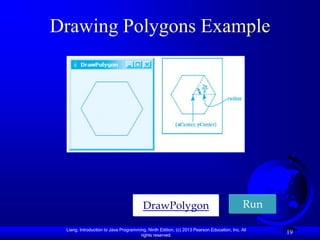
Drawing Polygons Example


                                        DrawPolygon                                        Run

 Liang, Introduction to Java Programming, Ninth Edition, (c) 2013 Pearson Education, Inc. All
                                      rights reserved.
                                                                                                 19
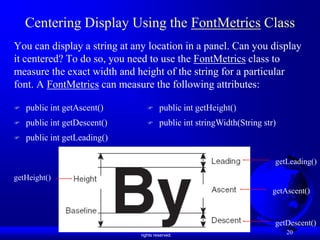
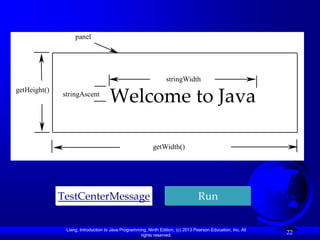
Centering Display Using the FontMetrics Class
You can display a string at any location in a panel. Can you display
it centered? To do so, you need to use the FontMetrics class to
measure the exact width and height of the string for a particular
font. A FontMetrics can measure the following attributes:

   public int getAscent()                                   public int getHeight()
   public int getDescent()                                  public int stringWidth(String str)
   public int getLeading()

                                                                                                              getLeading()

getHeight()
                                                                                                              getAscent()


                                                                                                              getDescent()
               Liang, Introduction to Java Programming, Ninth Edition, (c) 2013 Pearson Education, Inc. All
                                                    rights reserved.
                                                                                                                  20
The FontMetrics Class

FontMetrics is an abstract class. To get a FontMetrics
object for a specific font, use the following
getFontMetrics methods defined in the Graphics class:

   · public FontMetrics getFontMetrics(Font f)
Returns the font metrics of the specified font.

   · public FontMetrics getFontMetrics()
Returns the font metrics of the current font.

          Liang, Introduction to Java Programming, Ninth Edition, (c) 2013 Pearson Education, Inc. All
                                               rights reserved.
                                                                                                         21
panel


                                                                 stringWidth
getHeight()
              stringAscent
                                     Welcome to Java

                                                           getWidth()


              TestCenterMessage                                                   Run

               Liang, Introduction to Java Programming, Ninth Edition, (c) 2013 Pearson Education, Inc. All
                                                    rights reserved.
                                                                                                              22
Case Study: MessagePanel
       javax.swing.JPanel
                                           The get and set methods for these data                   This case study
                                           fields are provided in the class, but
-char token
                                           omitted in the UML diagram                               develops a useful class
+getToken MessagePanel
+setToken
                                                                                                    that displays a message
+paintComponet
+mouseClicked int
-xCoordinate:                     The x-Coordinate for the message (default 20).                    in a panel. The class
-yCoordinate: int
-centered: boolean
                                  The y-Coordinate for the message (default 20).
                                  Specifies whether the message is displayed centered.
                                                                                                    enables the user to set
-message: String                  The message to be displayed.                                      the location of the
-interval: int                    The interval to move the message in the panel.
                                                                                                    message, center the
+MessagePanel()
+MessagePanel(message: String)
                                  Constructs a default message panel.
                                  Constructs a message panel with a specified string.
                                                                                                    message, and move the
+moveLeft(): void                 Moves the message to the left.                                    message with the
+moveRight(): void                Moves the message to the right.
+moveUp(): void                   Moves the message up.                                             specified interval.
+moveDown(): void                 Moves the message down.


              MessagePanel                           TestMessagePanel                                                   Run
                         Liang, Introduction to Java Programming, Ninth Edition, (c) 2013 Pearson Education, Inc. All
                                                              rights reserved.
                                                                                                                              23
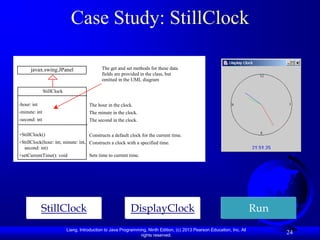
Case Study: StillClock

       javax.swing.JPanel                 The get and set methods for these data
                                          fields are provided in the class, but
-char token                               omitted in the UML diagram

+getToken StillClock
+setToken
+paintComponet
-hour: int
+mouseClicked                      The hour in the clock.
-minute: int                       The minute in the clock.
-second: int                       The second in the clock.

+StillClock()                      Constructs a default clock for the current time.
+StillClock(hour: int, minute: int, Constructs a clock with a specified time.
  second: int)
+setCurrentTime(): void             Sets time to current time.


              StillClock                                 DisplayClock                                                  Run
                        Liang, Introduction to Java Programming, Ninth Edition, (c) 2013 Pearson Education, Inc. All
                                                             rights reserved.
                                                                                                                             24
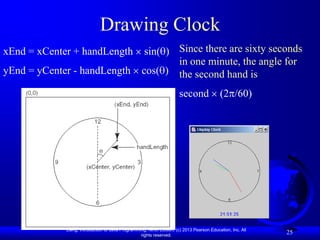
Drawing Clock
xEnd = xCenter + handLength                         sin( ) Since there are sixty seconds
                                                           in one minute, the angle for
yEnd = yCenter - handLength                        cos( ) the second hand is

                                                                      second               (2 /60)


             Liang, Introduction to Java Programming, Ninth Edition, (c) 2013 Pearson Education, Inc. All
                                                  rights reserved.
                                                                                                            25
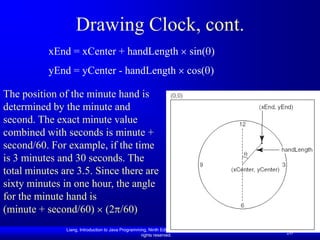
Drawing Clock, cont.
           xEnd = xCenter + handLength                                       sin( )
           yEnd = yCenter - handLength                                      cos( )

The position of the minute hand is
determined by the minute and
second. The exact minute value
combined with seconds is minute +
second/60. For example, if the time
is 3 minutes and 30 seconds. The
total minutes are 3.5. Since there are
sixty minutes in one hour, the angle
for the minute hand is
(minute + second/60) (2 /60)
               Liang, Introduction to Java Programming, Ninth Edition, (c) 2013 Pearson Education, Inc. All
                                                    rights reserved.
                                                                                                              26
Drawing Clock, cont.
xEnd = xCenter + handLength                            sin( )
yEnd = yCenter - handLength                           cos( )

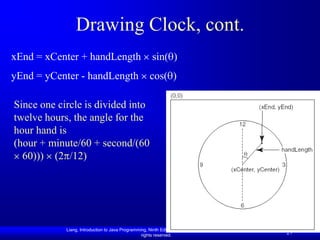
Since one circle is divided into
twelve hours, the angle for the
hour hand is
(hour + minute/60 + second/(60
  60))) (2 /12)


            Liang, Introduction to Java Programming, Ninth Edition, (c) 2013 Pearson Education, Inc. All
                                                 rights reserved.
                                                                                                           27
Displaying Image Icons
You learned how to create image icons and display image icons in
labels and buttons. For example, the following statements create an
image icon and display it in a label:

ImageIcon icon = new ImageIcon("image/us.gif");
JLabel jlblImage = new JLabel(imageIcon);

An image icon displays a fixed-size image. To display an image in a
flexible size, you need to use the java.awt.Image class. An image can
be created from an image icon using the getImage() method as
follows:

Image image = imageIcon.getImage();

            Liang, Introduction to Java Programming, Ninth Edition, (c) 2013 Pearson Education, Inc. All
                                                 rights reserved.
                                                                                                           28
Displaying Images
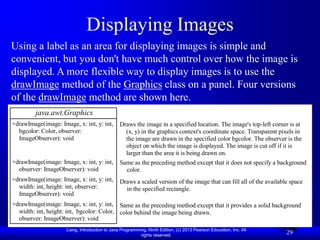
Using a label as an area for displaying images is simple and
convenient, but you don't have much control over how the image is
displayed. A more flexible way to display images is to use the
drawImage method of the Graphics class on a panel. Four versions
of the drawImage method are shown here.
         java.awt.Graphics
+drawImage(image: Image, x: int, y: int,        Draws the image in a specified location. The image's top-left corner is at
  bgcolor: Color, observer:                       (x, y) in the graphics context's coordinate space. Transparent pixels in
  ImageObserver): void                            the image are drawn in the specified color bgcolor. The observer is the
                                                  object on which the image is displayed. The image is cut off if it is
                                                  larger than the area it is being drawn on.
+drawImage(image: Image, x: int, y: int,        Same as the preceding method except that it does not specify a background
  observer: ImageObserver): void                  color.
+drawImage(image: Image, x: int, y: int,        Draws a scaled version of the image that can fill all of the available space
  width: int, height: int, observer:              in the specified rectangle.
  ImageObserver): void
+drawImage(image: Image, x: int, y: int, Same as the preceding method except that it provides a solid background
  width: int, height: int, bgcolor: Color, color behind the image being drawn.
  observer: ImageObserver): void
                     Liang, Introduction to Java Programming, Ninth Edition, (c) 2013 Pearson Education, Inc. All
                                                          rights reserved.
                                                                                                                     29
Displaying Images Example
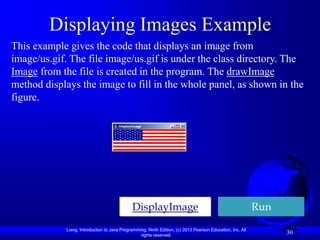
This example gives the code that displays an image from
image/us.gif. The file image/us.gif is under the class directory. The
Image from the file is created in the program. The drawImage
method displays the image to fill in the whole panel, as shown in the
figure.


                                              DisplayImage                                                  Run
             Liang, Introduction to Java Programming, Ninth Edition, (c) 2013 Pearson Education, Inc. All
                                                  rights reserved.
                                                                                                                  30
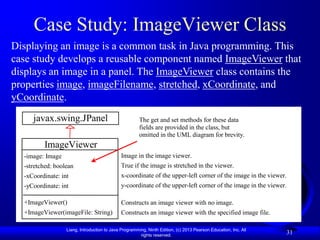
Case Study: ImageViewer Class
Displaying an image is a common task in Java programming. This
case study develops a reusable component named ImageViewer that
displays an image in a panel. The ImageViewer class contains the
properties image, imageFilename, stretched, xCoordinate, and
yCoordinate.
     javax.swing.JPanel                                The get and set methods for these data
                                                       fields are provided in the class, but
                                                       omitted in the UML diagram for brevity.
         ImageViewer
  -image: Image                              Image in the image viewer.
  -stretched: boolean                        True if the image is stretched in the viewer.
  -xCoordinate: int                          x-coordinate of the upper-left corner of the image in the viewer.
  -yCoordinate: int                          y-coordinate of the upper-left corner of the image in the viewer.

  +ImageViewer()                             Constructs an image viewer with no image.
  +ImageViewer(imageFile: String)            Constructs an image viewer with the specified image file.

                  Liang, Introduction to Java Programming, Ninth Edition, (c) 2013 Pearson Education, Inc. All
                                                       rights reserved.
                                                                                                                 31
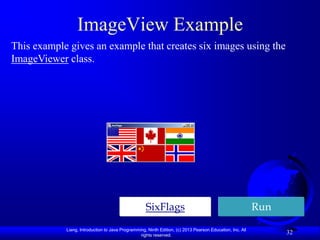
ImageView Example
This example gives an example that creates six images using the
ImageViewer class.


                                                    SixFlags                                               Run
            Liang, Introduction to Java Programming, Ninth Edition, (c) 2013 Pearson Education, Inc. All
                                                 rights reserved.
                                                                                                                 32

JavaYDL13

  • 1.
    Chapter 13 Graphics Liang,Introduction to Java Programming, Ninth Edition, (c) 2013 Pearson Education, Inc. All rights reserved. 1
  • 2.
    Motivations If you wantto draw shapes such as a bar chart, a clock, or a stop sign, how do you do it? Liang, Introduction to Java Programming, Ninth Edition, (c) 2013 Pearson Education, Inc. All rights reserved. 2
  • 3.
    Objectives  To describe Java coordinate systems in a GUI component (§13.2).  To draw things using the methods in the Graphics class (§13.3).  To override the paintComponent method to draw things on a GUI component (§13.3).  To use a panel as a canvas to draw things (§13.3).  To draw strings, lines, rectangles, ovals, arcs, and polygons (§§13.4, 13.6-13.7).  To obtain font properties using FontMetrics and know how to center a message (§13.8).  To display an image in a GUI component (§13.11).  To develop reusable GUI components FigurePanel, MessagePanel, StillClock, and ImageViewer (§§13.5, 13.9, 13.10, 13.12). Liang, Introduction to Java Programming, Ninth Edition, (c) 2013 Pearson Education, Inc. All rights reserved. 3
  • 4.
    Java Coordinate System x Y Axis (0, 0) X Axis y (x, y) (0, 0) X Axis Java Coordinate Conventional System Coordinate System Y Axis Liang, Introduction to Java Programming, Ninth Edition, (c) 2013 Pearson Education, Inc. All rights reserved. 4
  • 5.
    Each GUI ComponentHas its Own Coordinate System (x3, y3) c3’s coordinate (0, 0) Component c3 system (x2, y2) (0, 0) Component c2 c2’s coordinate system (x1, y1) (0, 0) Component c1 c1’s coordinate system Liang, Introduction to Java Programming, Ninth Edition, (c) 2013 Pearson Education, Inc. All rights reserved. 5
  • 6.
    The Graphics Class java.awt.Graphics You can draw strings, +setColor(color: Color): void +setFont(font: Font): void Sets a new color for subsequent drawings. Sets a new font for subsequent drwings. lines, rectangles, ovals, +drawString(s: String, x: int, y: int): void Draws a string starting at point (x, y). +drawLine(x1: int, y1: int, x2: int, y2: int): void Draws a line from (x1, y1) to (x2, y2). arcs, polygons, and +drawRect(x: int, y: int, w: int, h: int): void Draws a rectangle with specified upper-left corner point at (x, y) and width w and height h. polylines, using the +fillRect(x: int, y: int, w: int, h: int): void Draws a filled rectangle with specified upper-left corner point at (x, y) and width w and height h. methods in the Graphics +drawRoundRect(x: int, y: int, w: int, h: int, aw: Draws a round-cornered rectangle with specified arc width aw int, ah: int): void and arc height ah. class. +fillRoundRect(x: int, y: int, w: int, h: int, aw: int, ah: int): void Draws a filled round-cornered rectangle with specified arc width aw and arc height ah. +draw3DRect(x: int, y: int, w: int, h: int, raised: Draws a 3-D rectangle raised above the surface or sunk into the boolean): void surface. +fill3DRect(x: int, y: int, w: int, h: int, raised: Draws a filled 3-D rectangle raised above the surface or sunk boolean): void into the surface. +drawOval(x: int, y: int, w: int, h: int): void Draws an oval bounded by the rectangle specified by the parameters x, y, w, and h. +fillOval(x: int, y: int, w: int, h: int): void Draws a filled oval bounded by the rectangle specified by the parameters x, y, w, and h. +drawArc(x: int, y: int, w: int, h: int, startAngle: Draws an arc conceived as part of an oval bounded by the int, arcAngle: int): void rectangle specified by the parameters x, y, w, and h. +fillArc(x: int, y: int, w: int, h: int, startAngle: Draws a filled arc conceived as part of an oval bounded by the int, arcAngle: int): void rectangle specified by the parameters x, y, w, and h. +drawPolygon(xPoints: int[], yPoints: int[], Draws a closed polygon defined by arrays of x and y nPoints: int): void coordinates. Each pair of (x[i], y[i]) coordinates is a point. +fillPolygon(xPoints: int[], yPoints: int[], Draws a filled polygon defined by arrays of x and y nPoints: int): void coordinates. Each pair of (x[i], y[i]) coordinates is a point. +drawPolygon(g: Polygon): void Draws a closed polygon defined by a Polygon object. +fillPolygon(g: Polygon): void Draws a filled polygon defined by a Polygon object. +drawPolyline(xPoints: int[], yPoints: int[], Draws a polyline defined by arrays of x and y coordinates. nPoints: int): void Each pair of (x[i], y[i]) coordinates is a point. Liang, Introduction to Java Programming, Ninth Edition, (c) 2013 Pearson Education, Inc. All rights reserved. 6
  • 7.
    paintComponent Example In orderto draw things on a component, you need to define a class that extends JPanel and overrides its paintComponent method to specify what to draw. The first program in this chapter can be rewritten using paintComponent. TestPaintComponent Run Liang, Introduction to Java Programming, Ninth Edition, (c) 2013 Pearson Education, Inc. All rights reserved. 7
  • 8.
    Drawing Geometric Figures  Drawing Strings  Drawing Lines  Drawing Rectangles  Drawing Ovals  Drawing Arcs  Drawing Polygons Liang, Introduction to Java Programming, Ninth Edition, (c) 2013 Pearson Education, Inc. All rights reserved. 8
  • 9.
    Drawing Strings (0, 0) (getWidth(), 0) (0, 0) (getWidth(), 0) (x1, y1) (x, y) s is display here (x2, y2) (0, getHeight()) (getWidth(), getHeight()) (0, getHeight()) (getWidth(), getHeight()) drawString(String s, int x, int y); drawLine(int x1, int y1, int x2, int y2); Liang, Introduction to Java Programming, Ninth Edition, (c) 2013 Pearson Education, Inc. All rights reserved. 9
  • 10.
    Drawing Rectangles drawRect(intx, int y, int w, int h); fillRect(int x, int y, int w, int h); (x, y) (x, y) h h w w Liang, Introduction to Java Programming, Ninth Edition, (c) 2013 Pearson Education, Inc. All rights reserved. 10
  • 11.
    Drawing Rounded Rectangles drawRoundRect(intx, int y, int w, int h, int aw, int ah); fillRoundRect(int x, int y, int w, int h, int aw, int ah); (x, y) ah/2 aw/2 h w Liang, Introduction to Java Programming, Ninth Edition, (c) 2013 Pearson Education, Inc. All rights reserved. 11
  • 12.
    Drawing Ovals drawOval(int x,int y, int w, int h); fillOval(int x, int y, int w, int h); (x, y) h w Liang, Introduction to Java Programming, Ninth Edition, (c) 2013 Pearson Education, Inc. All rights reserved. 12
  • 13.
    Case Study: TheFigurePanel Class This example develops a useful class for displaying various figures. The class enables the user to set the figure type and specify whether the figure is filled, and displays the figure on a panel. javax.swing.JPanel -char token +getToken FigurePanel +setToken +paintComponet LINE, RECTANGLE, +LINE = 1 +mouseClicked ROUND_RECTANGLE, and OVAL are +RECTANGLE = 2 constants. +ROUND_RECTANGLE = 3 +OVAL = 4 -type: int Specifies the figure type (default: 1). -filled: boolean Specifies whether the figure is filled (default: false). +FigurePanel() Creates a default figure panel. +FigurePanel(type: int) Creates a figure panel with the specified type. +FigurePanel(type: int, filled: boolean) Creates a figure panel with the specified type and filled property. +getType(): int Returns the figure type. +setType(type: int): void Sets a new figure type. FigurePanel +isFilled(): boolean Checks whether the figure is filled with a color. +setFilled(filled: boolean): void Sets a new filled property. Liang, Introduction to Java Programming, Ninth Edition, (c) 2013 Pearson Education, Inc. All rights reserved. 13
  • 14.
    Test FigurePanel This exampledevelops a useful class for displaying various figures. The class enables the user to set the figure type and specify whether the figure is filled, and displays the figure on a panel. TestFigurePanel Run Liang, Introduction to Java Programming, Ninth Edition, (c) 2013 Pearson Education, Inc. All rights reserved. 14
  • 15.
    Drawing Arcs drawArc(int x,int y, int w, int h, int angle1, int angle2); fillArc(int x, int y, int w, int h, int angle1, int angle2); Angles are in degree Liang, Introduction to Java Programming, Ninth Edition, (c) 2013 Pearson Education, Inc. All rights reserved. 15
  • 16.
    Drawing Arcs Example DrawArcs Run Liang, Introduction to Java Programming, Ninth Edition, (c) 2013 Pearson Education, Inc. All rights reserved. 16
  • 17.
    Drawing Polygons andPolylines int[] x = {40, 70, 60, 45, 20}; int[] y = {20, 40, 80, 45, 60}; g.drawPolyline(x, y, x.length); g.drawPolygon(x, y, x.length); (x[0], y[0]) (x[0], y[0]) (x[1], y[1]) (x[1], y[1]) (x[3], y[3]) (x[3], y[3]) (x[4], y[4]) (x[4], y[4]) (x[2], y[2]) (x[2], y[2]) Liang, Introduction to Java Programming, Ninth Edition, (c) 2013 Pearson Education, Inc. All rights reserved. 17
  • 18.
    Drawing Polygons Usingthe Polygon Class Polygon polygon = new Polygon(); polygon.addPoint(40, 59); polygon.addPoint(40, 100); polygon.addPoint(10, 100); g.drawPolygon(polygon); Liang, Introduction to Java Programming, Ninth Edition, (c) 2013 Pearson Education, Inc. All rights reserved. 18
  • 19.
    Drawing Polygons Example DrawPolygon Run Liang, Introduction to Java Programming, Ninth Edition, (c) 2013 Pearson Education, Inc. All rights reserved. 19
  • 20.
    Centering Display Usingthe FontMetrics Class You can display a string at any location in a panel. Can you display it centered? To do so, you need to use the FontMetrics class to measure the exact width and height of the string for a particular font. A FontMetrics can measure the following attributes:  public int getAscent()  public int getHeight()  public int getDescent()  public int stringWidth(String str)  public int getLeading() getLeading() getHeight() getAscent() getDescent() Liang, Introduction to Java Programming, Ninth Edition, (c) 2013 Pearson Education, Inc. All rights reserved. 20
  • 21.
    The FontMetrics Class FontMetricsis an abstract class. To get a FontMetrics object for a specific font, use the following getFontMetrics methods defined in the Graphics class: · public FontMetrics getFontMetrics(Font f) Returns the font metrics of the specified font. · public FontMetrics getFontMetrics() Returns the font metrics of the current font. Liang, Introduction to Java Programming, Ninth Edition, (c) 2013 Pearson Education, Inc. All rights reserved. 21
  • 22.
    panel stringWidth getHeight() stringAscent Welcome to Java getWidth() TestCenterMessage Run Liang, Introduction to Java Programming, Ninth Edition, (c) 2013 Pearson Education, Inc. All rights reserved. 22
  • 23.
    Case Study: MessagePanel javax.swing.JPanel The get and set methods for these data This case study fields are provided in the class, but -char token omitted in the UML diagram develops a useful class +getToken MessagePanel +setToken that displays a message +paintComponet +mouseClicked int -xCoordinate: The x-Coordinate for the message (default 20). in a panel. The class -yCoordinate: int -centered: boolean The y-Coordinate for the message (default 20). Specifies whether the message is displayed centered. enables the user to set -message: String The message to be displayed. the location of the -interval: int The interval to move the message in the panel. message, center the +MessagePanel() +MessagePanel(message: String) Constructs a default message panel. Constructs a message panel with a specified string. message, and move the +moveLeft(): void Moves the message to the left. message with the +moveRight(): void Moves the message to the right. +moveUp(): void Moves the message up. specified interval. +moveDown(): void Moves the message down. MessagePanel TestMessagePanel Run Liang, Introduction to Java Programming, Ninth Edition, (c) 2013 Pearson Education, Inc. All rights reserved. 23
  • 24.
    Case Study: StillClock javax.swing.JPanel The get and set methods for these data fields are provided in the class, but -char token omitted in the UML diagram +getToken StillClock +setToken +paintComponet -hour: int +mouseClicked The hour in the clock. -minute: int The minute in the clock. -second: int The second in the clock. +StillClock() Constructs a default clock for the current time. +StillClock(hour: int, minute: int, Constructs a clock with a specified time. second: int) +setCurrentTime(): void Sets time to current time. StillClock DisplayClock Run Liang, Introduction to Java Programming, Ninth Edition, (c) 2013 Pearson Education, Inc. All rights reserved. 24
  • 25.
    Drawing Clock xEnd =xCenter + handLength sin( ) Since there are sixty seconds in one minute, the angle for yEnd = yCenter - handLength cos( ) the second hand is second (2 /60) Liang, Introduction to Java Programming, Ninth Edition, (c) 2013 Pearson Education, Inc. All rights reserved. 25
  • 26.
    Drawing Clock, cont. xEnd = xCenter + handLength sin( ) yEnd = yCenter - handLength cos( ) The position of the minute hand is determined by the minute and second. The exact minute value combined with seconds is minute + second/60. For example, if the time is 3 minutes and 30 seconds. The total minutes are 3.5. Since there are sixty minutes in one hour, the angle for the minute hand is (minute + second/60) (2 /60) Liang, Introduction to Java Programming, Ninth Edition, (c) 2013 Pearson Education, Inc. All rights reserved. 26
  • 27.
    Drawing Clock, cont. xEnd= xCenter + handLength sin( ) yEnd = yCenter - handLength cos( ) Since one circle is divided into twelve hours, the angle for the hour hand is (hour + minute/60 + second/(60 60))) (2 /12) Liang, Introduction to Java Programming, Ninth Edition, (c) 2013 Pearson Education, Inc. All rights reserved. 27
  • 28.
    Displaying Image Icons Youlearned how to create image icons and display image icons in labels and buttons. For example, the following statements create an image icon and display it in a label: ImageIcon icon = new ImageIcon("image/us.gif"); JLabel jlblImage = new JLabel(imageIcon); An image icon displays a fixed-size image. To display an image in a flexible size, you need to use the java.awt.Image class. An image can be created from an image icon using the getImage() method as follows: Image image = imageIcon.getImage(); Liang, Introduction to Java Programming, Ninth Edition, (c) 2013 Pearson Education, Inc. All rights reserved. 28
  • 29.
    Displaying Images Using alabel as an area for displaying images is simple and convenient, but you don't have much control over how the image is displayed. A more flexible way to display images is to use the drawImage method of the Graphics class on a panel. Four versions of the drawImage method are shown here. java.awt.Graphics +drawImage(image: Image, x: int, y: int, Draws the image in a specified location. The image's top-left corner is at bgcolor: Color, observer: (x, y) in the graphics context's coordinate space. Transparent pixels in ImageObserver): void the image are drawn in the specified color bgcolor. The observer is the object on which the image is displayed. The image is cut off if it is larger than the area it is being drawn on. +drawImage(image: Image, x: int, y: int, Same as the preceding method except that it does not specify a background observer: ImageObserver): void color. +drawImage(image: Image, x: int, y: int, Draws a scaled version of the image that can fill all of the available space width: int, height: int, observer: in the specified rectangle. ImageObserver): void +drawImage(image: Image, x: int, y: int, Same as the preceding method except that it provides a solid background width: int, height: int, bgcolor: Color, color behind the image being drawn. observer: ImageObserver): void Liang, Introduction to Java Programming, Ninth Edition, (c) 2013 Pearson Education, Inc. All rights reserved. 29
  • 30.
    Displaying Images Example Thisexample gives the code that displays an image from image/us.gif. The file image/us.gif is under the class directory. The Image from the file is created in the program. The drawImage method displays the image to fill in the whole panel, as shown in the figure. DisplayImage Run Liang, Introduction to Java Programming, Ninth Edition, (c) 2013 Pearson Education, Inc. All rights reserved. 30
  • 31.
    Case Study: ImageViewerClass Displaying an image is a common task in Java programming. This case study develops a reusable component named ImageViewer that displays an image in a panel. The ImageViewer class contains the properties image, imageFilename, stretched, xCoordinate, and yCoordinate. javax.swing.JPanel The get and set methods for these data fields are provided in the class, but omitted in the UML diagram for brevity. ImageViewer -image: Image Image in the image viewer. -stretched: boolean True if the image is stretched in the viewer. -xCoordinate: int x-coordinate of the upper-left corner of the image in the viewer. -yCoordinate: int y-coordinate of the upper-left corner of the image in the viewer. +ImageViewer() Constructs an image viewer with no image. +ImageViewer(imageFile: String) Constructs an image viewer with the specified image file. Liang, Introduction to Java Programming, Ninth Edition, (c) 2013 Pearson Education, Inc. All rights reserved. 31
  • 32.
    ImageView Example This examplegives an example that creates six images using the ImageViewer class. SixFlags Run Liang, Introduction to Java Programming, Ninth Edition, (c) 2013 Pearson Education, Inc. All rights reserved. 32