JavaScript, Sixth Edition
Chapter 10
Programming for Touchscreens and
Mobile Devices
JavaScript, Sixth Edition 2
Objectives
When you complete this chapter, you will be able to:
• Integrate mouse, touch, and pointer events into a
web app
• Obtain and work with a user's geolocation
information
• Optimize a mobile web app to accommodate the
common constraints experienced by mobile users
JavaScript, Sixth Edition 3
Using Touch Events and Pointer
Events
• On touchscreen device without a moust
– browsers fire click event when user touches screen
• Other events don't translate neatly for touchscreens
JavaScript, Sixth Edition 4
Creating a Drag-and Drop Application
with Mouse Events
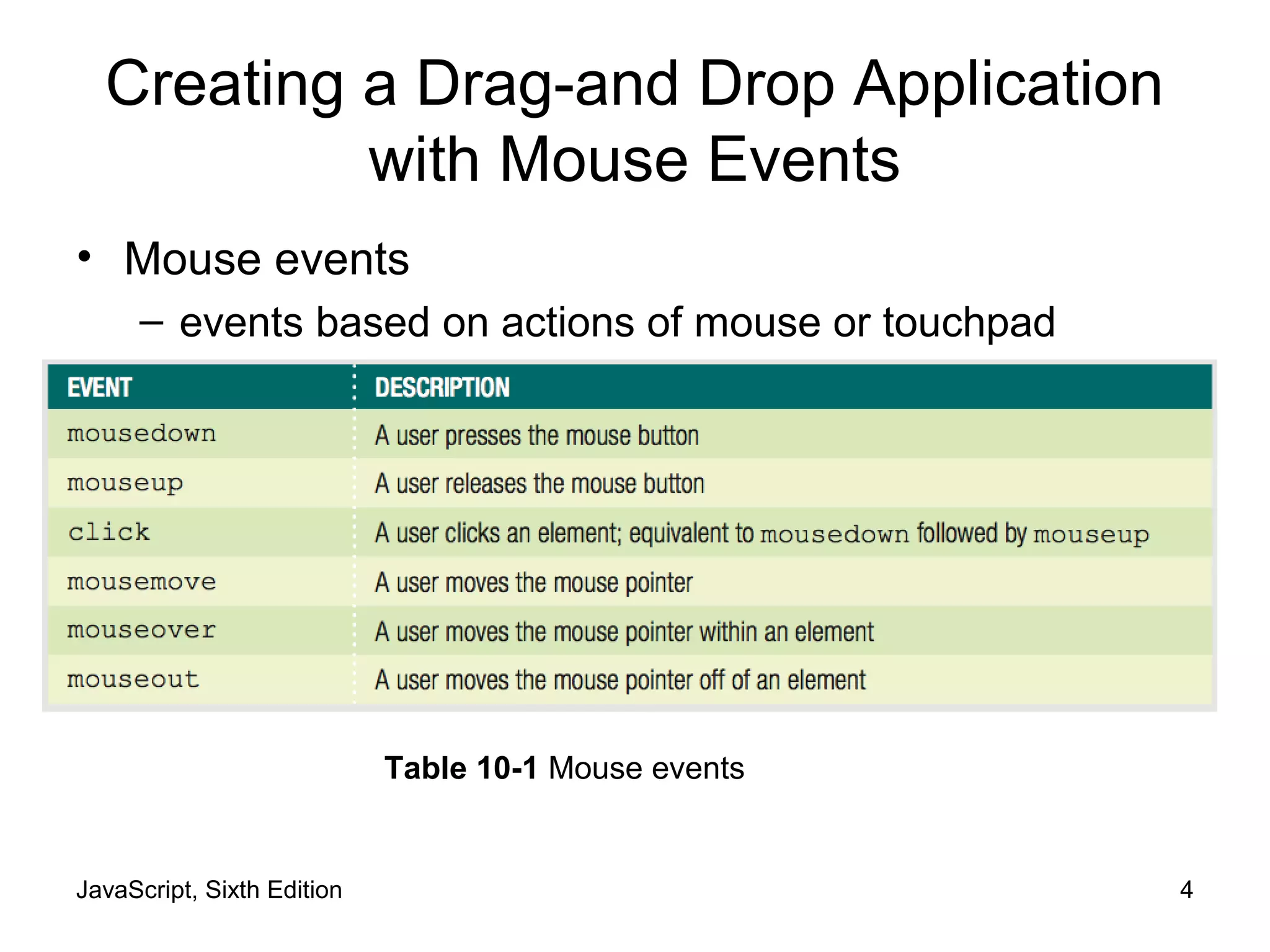
• Mouse events
– events based on actions of mouse or touchpad
Table 10-1 Mouse events
JavaScript, Sixth Edition 5
Understanding Mouse Events on a
Touchscreen Device
• On a touchscreen device
– Some web page elements respond to mouse events
– div element not considered clickable
• doesn't fire mouse events on touchscreen
– links and form elements are clickable
• browsers respond to touch
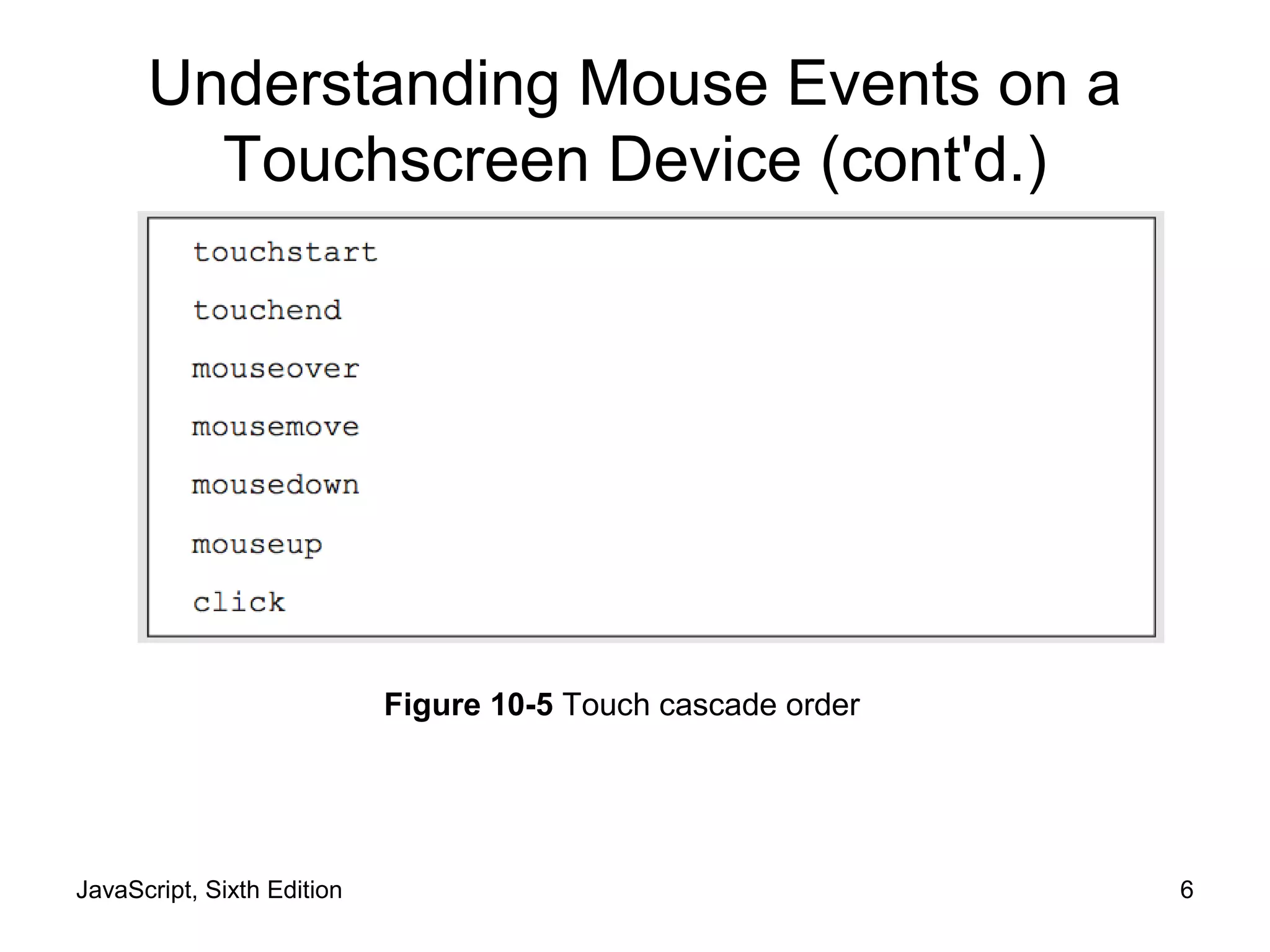
• Touch cascade
– Browser checks a touched element for an event
handler for multiple events
• Including some mouse events
JavaScript, Sixth Edition 6
Understanding Mouse Events on a
Touchscreen Device (cont'd.)
Figure 10-5 Touch cascade order
JavaScript, Sixth Edition 7
Understanding Mouse Events on a
Touchscreen Device (cont'd.)
• Touchscreen devices fire touchscreen-specific
events for some elements
– Touch events created by Apple
• Used on Apple iOS and Google Android
– Pointer events created by Microsoft
• Used on Windows Phone and Windows 8 and higher
JavaScript, Sixth Edition 8
Implementing Touch Events
• Respond to user's finger touches on a touchscreen
Table 10-2 Touch events
JavaScript, Sixth Edition 9
Implementing Touch Events (cont'd.)
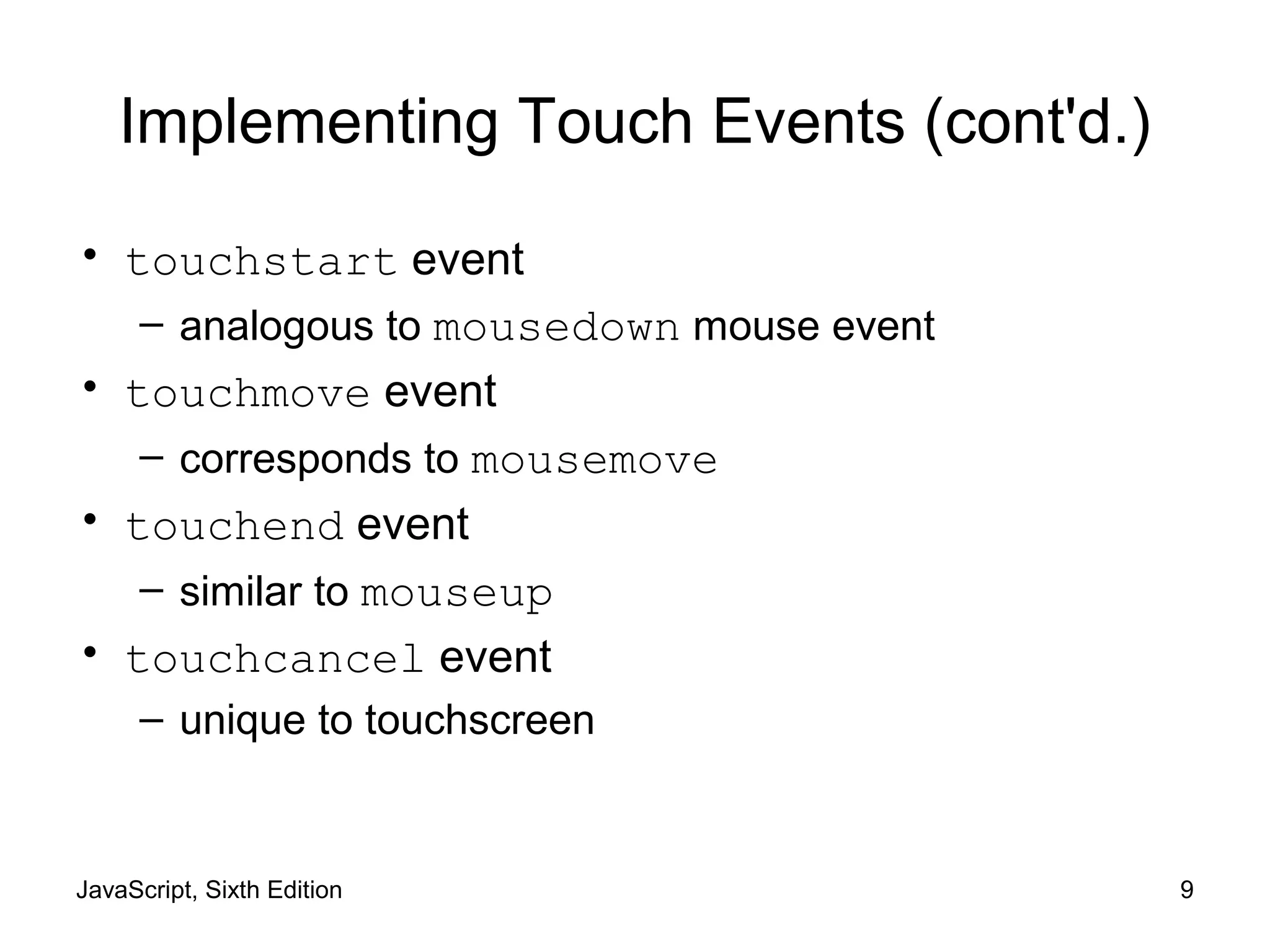
• touchstart event
– analogous to mousedown mouse event
• touchmove event
– corresponds to mousemove
• touchend event
– similar to mouseup
• touchcancel event
– unique to touchscreen
JavaScript, Sixth Edition 10
Implementing Touch Events (cont'd.)
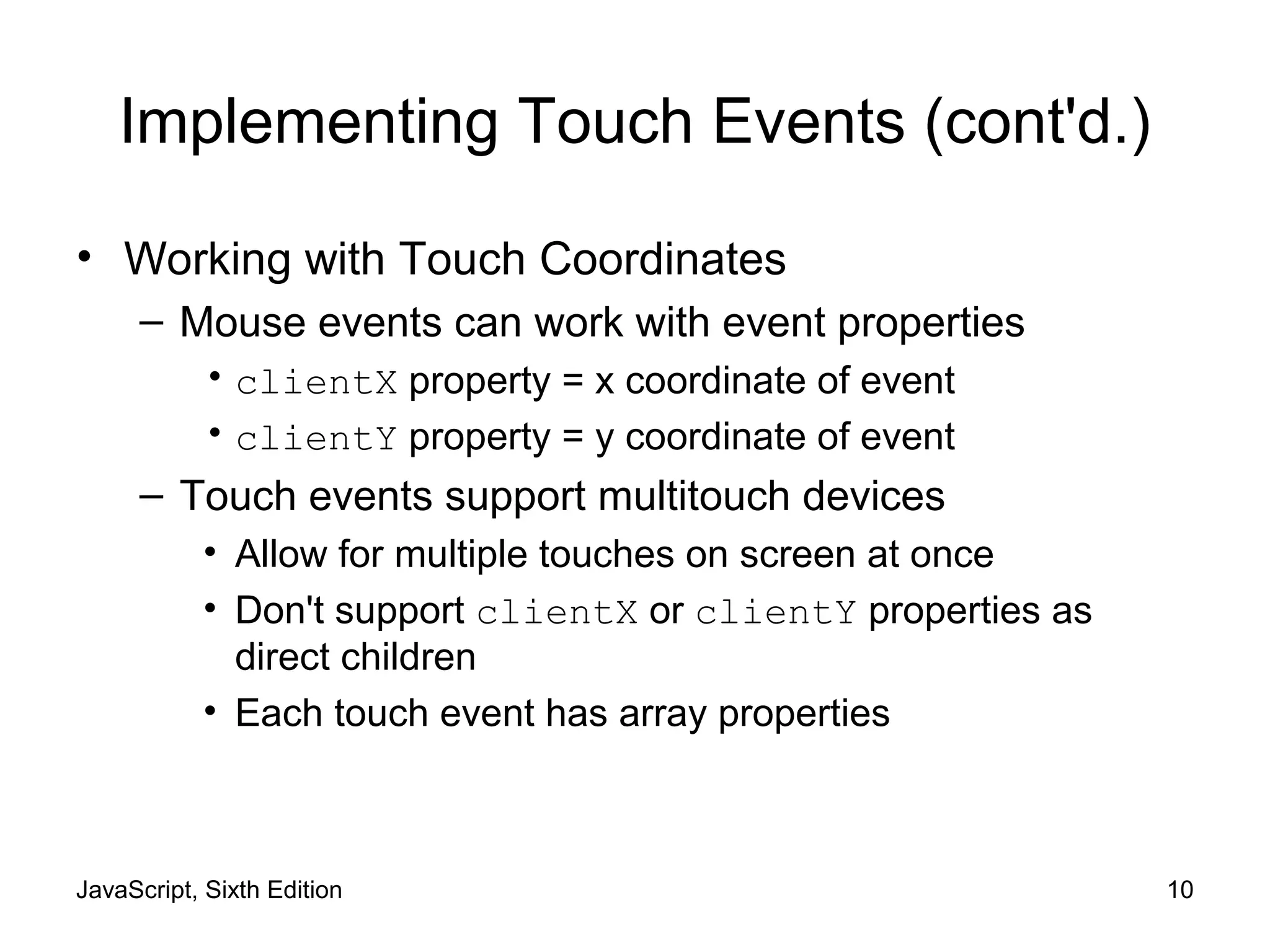
• Working with Touch Coordinates
– Mouse events can work with event properties
• clientX property = x coordinate of event
• clientY property = y coordinate of event
– Touch events support multitouch devices
• Allow for multiple touches on screen at once
• Don't support clientX or clientY properties as
direct children
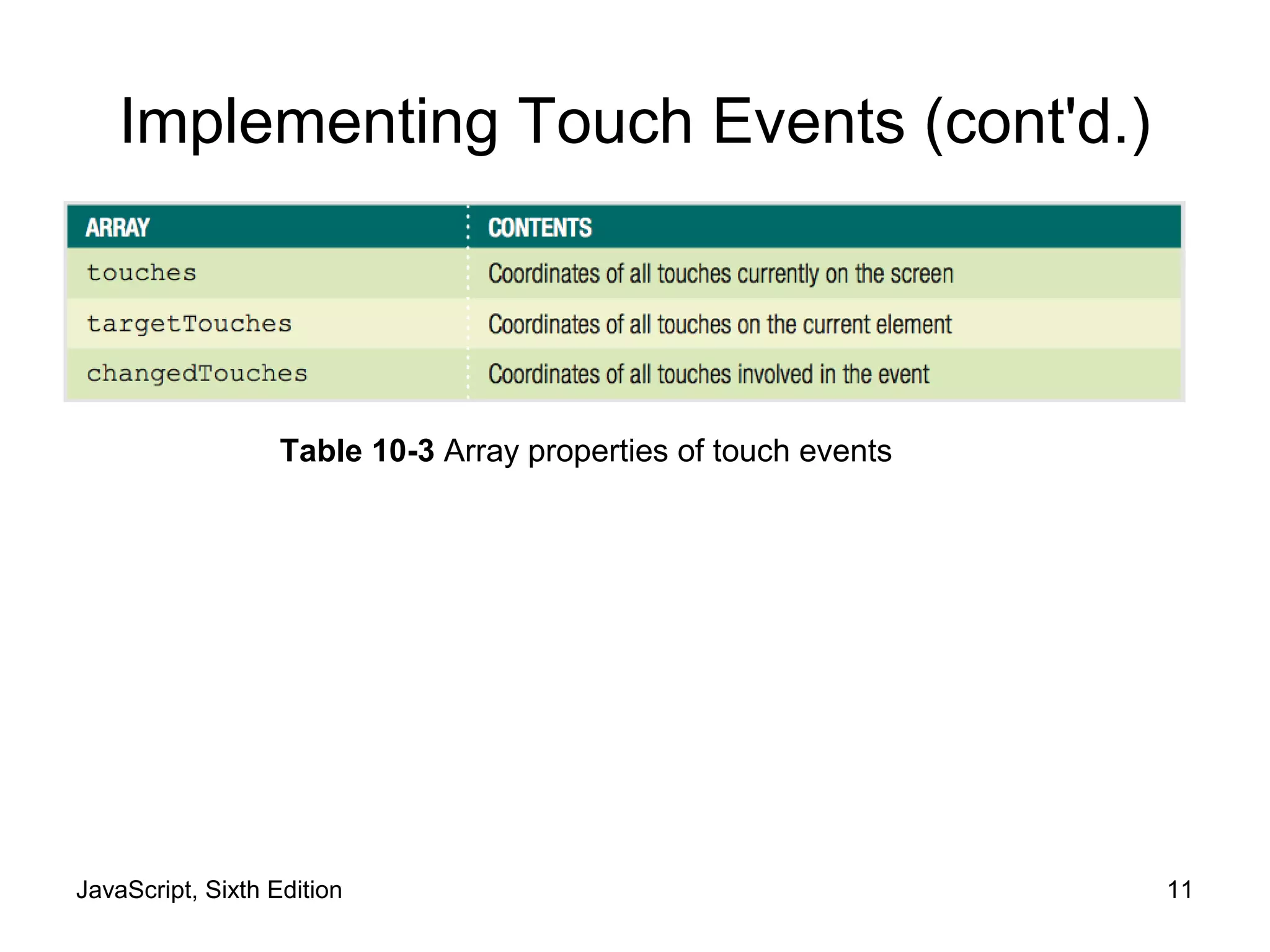
• Each touch event has array properties
JavaScript, Sixth Edition 11
Implementing Touch Events (cont'd.)
Table 10-3 Array properties of touch events
JavaScript, Sixth Edition 12
Implementing Touch Events (cont'd.)
• Distinguishing Between App and Device Interaction
– Touchscreen devices use touch events for more than
one purpose
• Can interact via touch with an app
• Use touch to perform gestures
– Browser and device interactions like scrolling
– Use preventDefault() method
• Ensures that OS interface doesn't respond to events
when users interact with your app
JavaScript, Sixth Edition 13
Implementing Touch Events (cont'd.)
Figure 10-7 Multiple uses of a single touch event
JavaScript, Sixth Edition 14
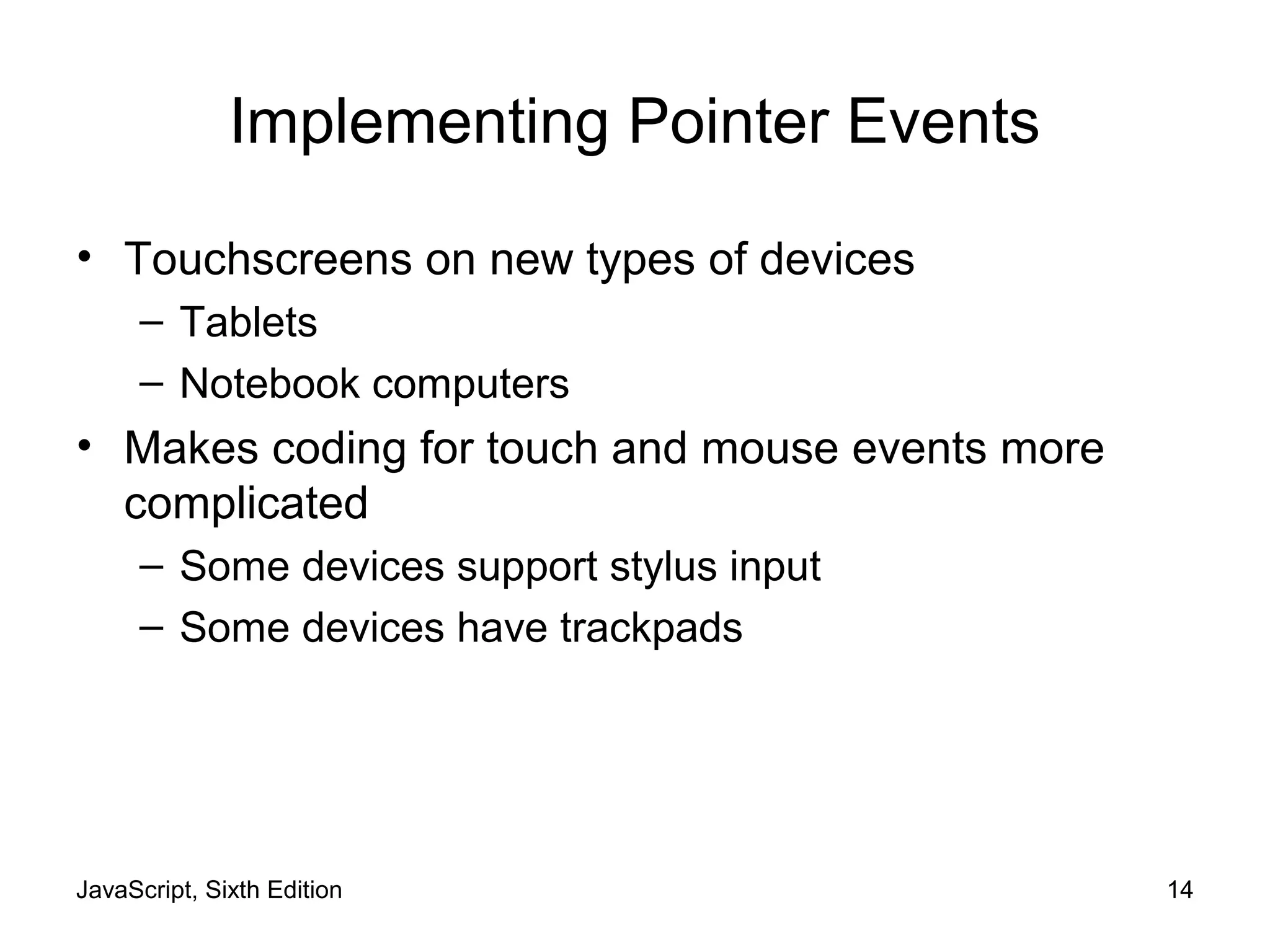
Implementing Pointer Events
• Touchscreens on new types of devices
– Tablets
– Notebook computers
• Makes coding for touch and mouse events more
complicated
– Some devices support stylus input
– Some devices have trackpads
JavaScript, Sixth Edition 15
Implementing Pointer Events (cont'd.)
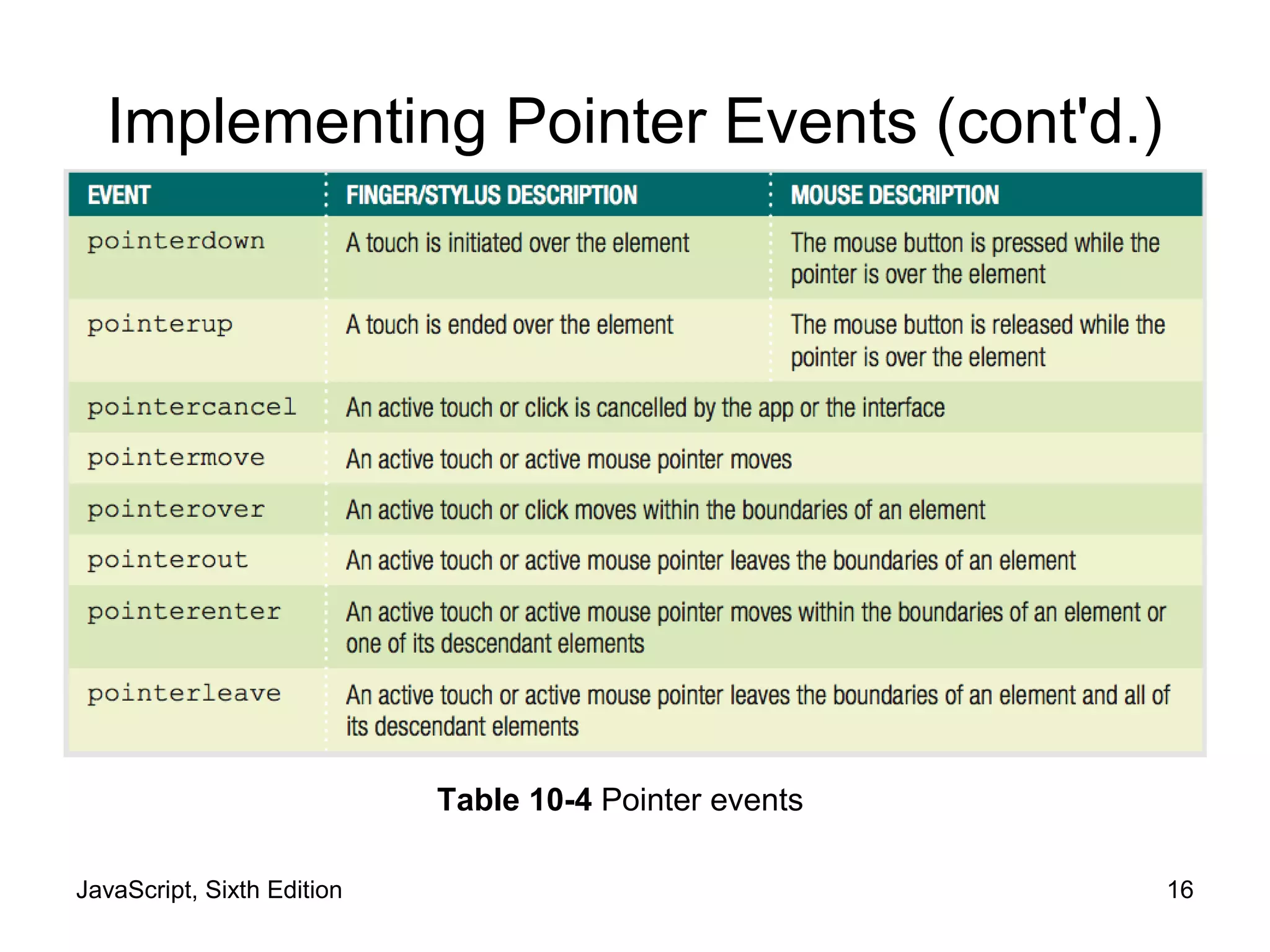
• Microsoft pointer events
– Aim to handle input from mouse, finger, or stylus with
each event
– Incorporate other event properties
• Pressure on screen
• Angle of stylus
• Only IE Mobile and IE 10 and later support pointer
events
• Some versions of IE do not recognize touch events
– Use mouse+touch+pointer for max. compatibility
JavaScript, Sixth Edition 16
Implementing Pointer Events (cont'd.)
Table 10-4 Pointer events
JavaScript, Sixth Edition 17
Implementing Pointer Events (cont'd.)
• Identifying pointer screen coordinates
– clientX and clientY properties like mouse events
• Stopping OS gestures
– Requires setting msTouchAction CSS property
• Set value to none
JavaScript, Sixth Edition 18
Using Programming Interfaces for
Mobile Devices
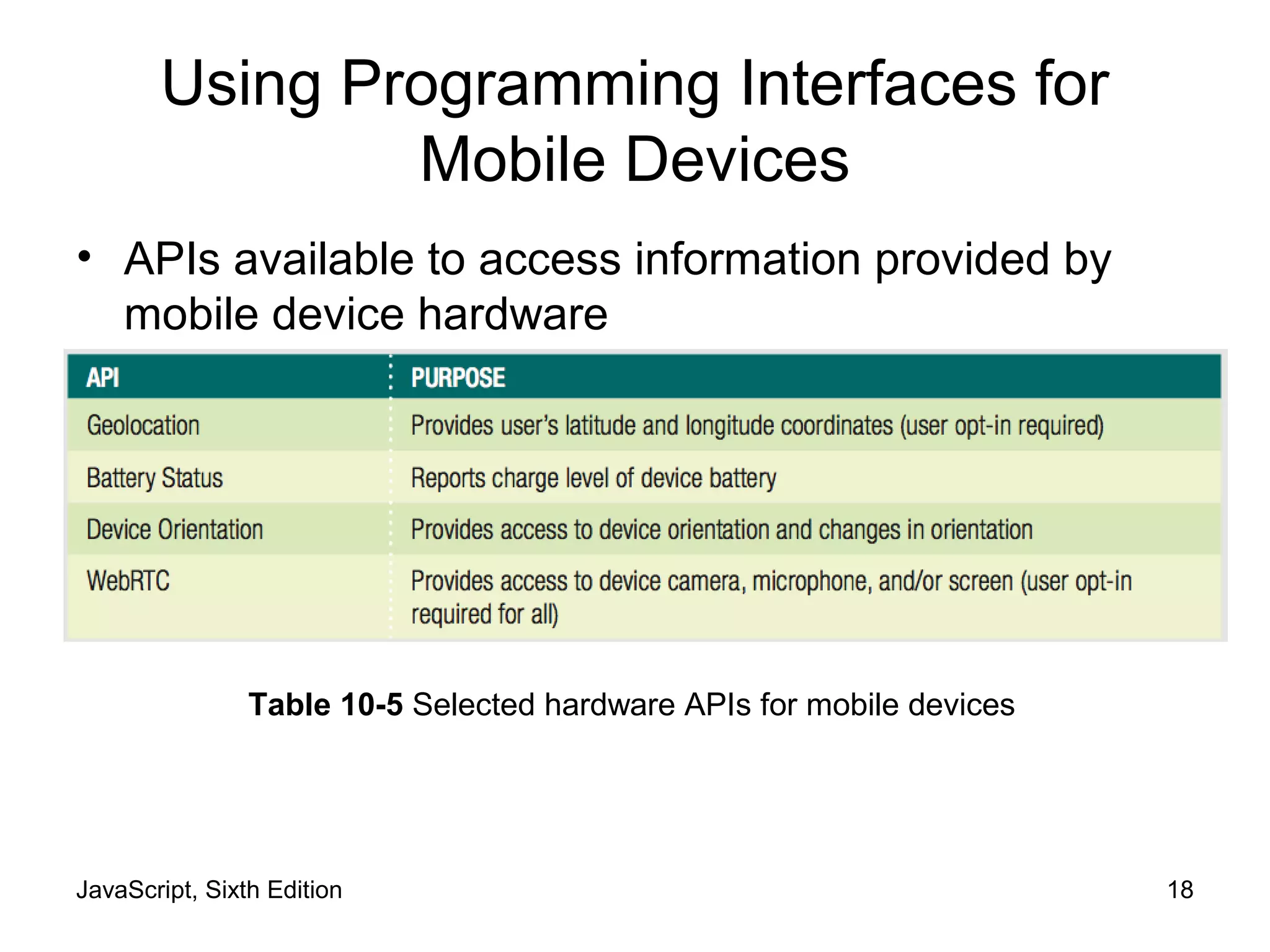
• APIs available to access information provided by
mobile device hardware
Table 10-5 Selected hardware APIs for mobile devices
JavaScript, Sixth Edition 19
Using the Geolocation API
• Provides access to user's latitude & longitude
• Accessed using geolocation property of
Navigator object
Table 10-5 Selected hardware APIs for mobile devices
JavaScript, Sixth Edition 20
Using the Geolocation API (cont'd.)
• Callbacks
– Arguments that contain/reference executable code
• getCurrentPosition() method
– Request user's position a single time
JavaScript, Sixth Edition 21
Using the Geolocation API (cont'd.)
Table 10-7 Properties passed on a successful geolocation request
JavaScript, Sixth Edition 22
Using the Geolocation API (cont'd.)
• Basic example:
navigator.geolocation.getCurrentPosition(showLocation);
function showLocation(position) {
console.log("Longitude: " + position.coords.longitude);
console.log("Latitude: " + position.coords.latitude);
}
JavaScript, Sixth Edition 23
Using the Geolocation API (cont'd.)
• Enhanced example
– Handle failed request, set 10-second timeout:
navigator.geolocation.getCurrentPosition(showLocation, fail,↵
{timeout: 10000});
function showLocation(position) {
console.log("Longitude: " + position.coords.longitude);
console.log("Latitude: " + position.coords.latitude);
}
function fail() {
var content = document.getElementById("mainParagraph");
content.innerHTML = "<p>Geolocation information not↵
available or not authorized.</p>";
JavaScript, Sixth Edition 24
Using the Geolocation API (cont'd.)
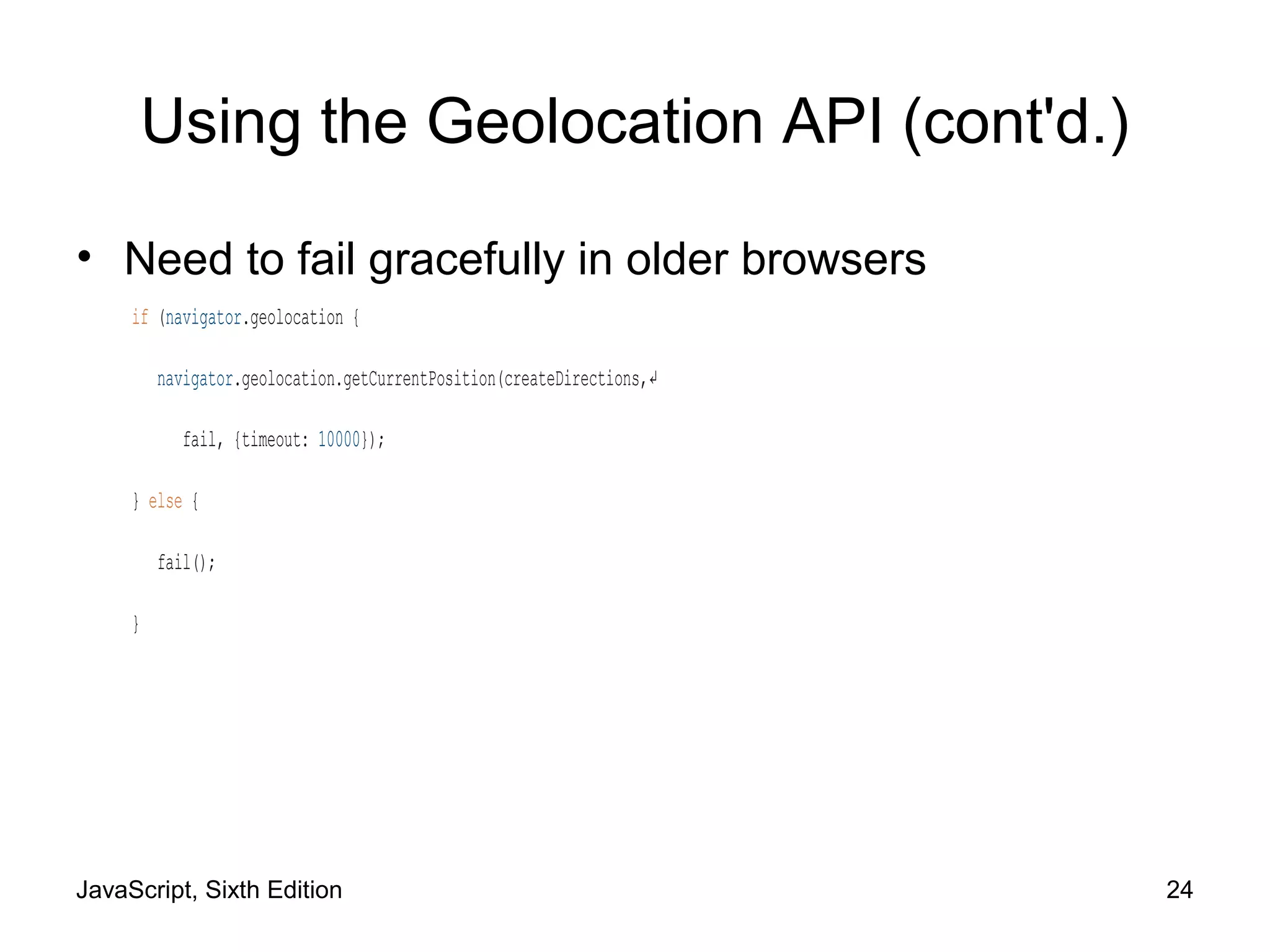
• Need to fail gracefully in older browsers
if (navigator.geolocation {
navigator.geolocation.getCurrentPosition(createDirections,↵
fail, {timeout: 10000});
} else {
fail();
}
JavaScript, Sixth Edition 25
Using the Geolocation API (cont'd.)
• Need to clear geolocation history for testing
Table 10-9 Steps to clear saved geolocation history
JavaScript, Sixth Edition 26
Using the Geolocation API (cont'd.)
• Sometimes users don't notice or ignore geolocation
request
– Request neither fails or succeeds
– Any dependent code not executed
JavaScript, Sixth Edition 27
Using the Geolocation API (cont'd.)
Figure 10-10 Flowchart illustrating flow of current geolocation code
JavaScript, Sixth Edition 28
Using the Geolocation API (cont'd.)
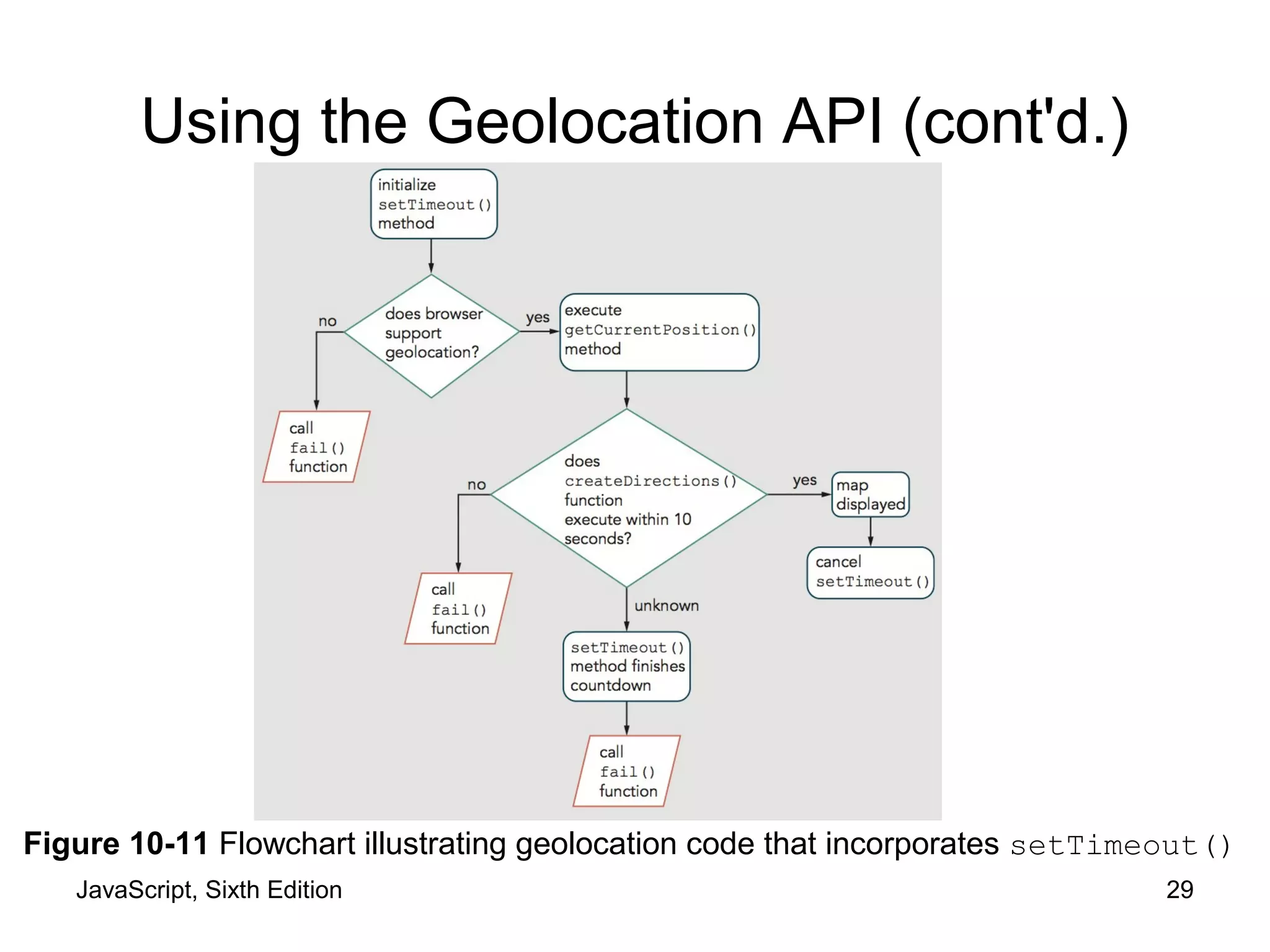
• Can handle lack of yes/no response from user
– setTimeout() method
– Start countdown before request
• If timeout expires, stop waiting and trigger failure code
• If user responds, cancel timeout
JavaScript, Sixth Edition 29
Using the Geolocation API (cont'd.)
Figure 10-11 Flowchart illustrating geolocation code that incorporates setTimeout()
JavaScript, Sixth Edition 30
Using the Geolocation API (cont'd.)
• Code complete to acquire geolocation information
– Then you can integrate with databases
• Using the Google Maps API
– Can display a map centered on user's location
– Can show route/directions between two locations
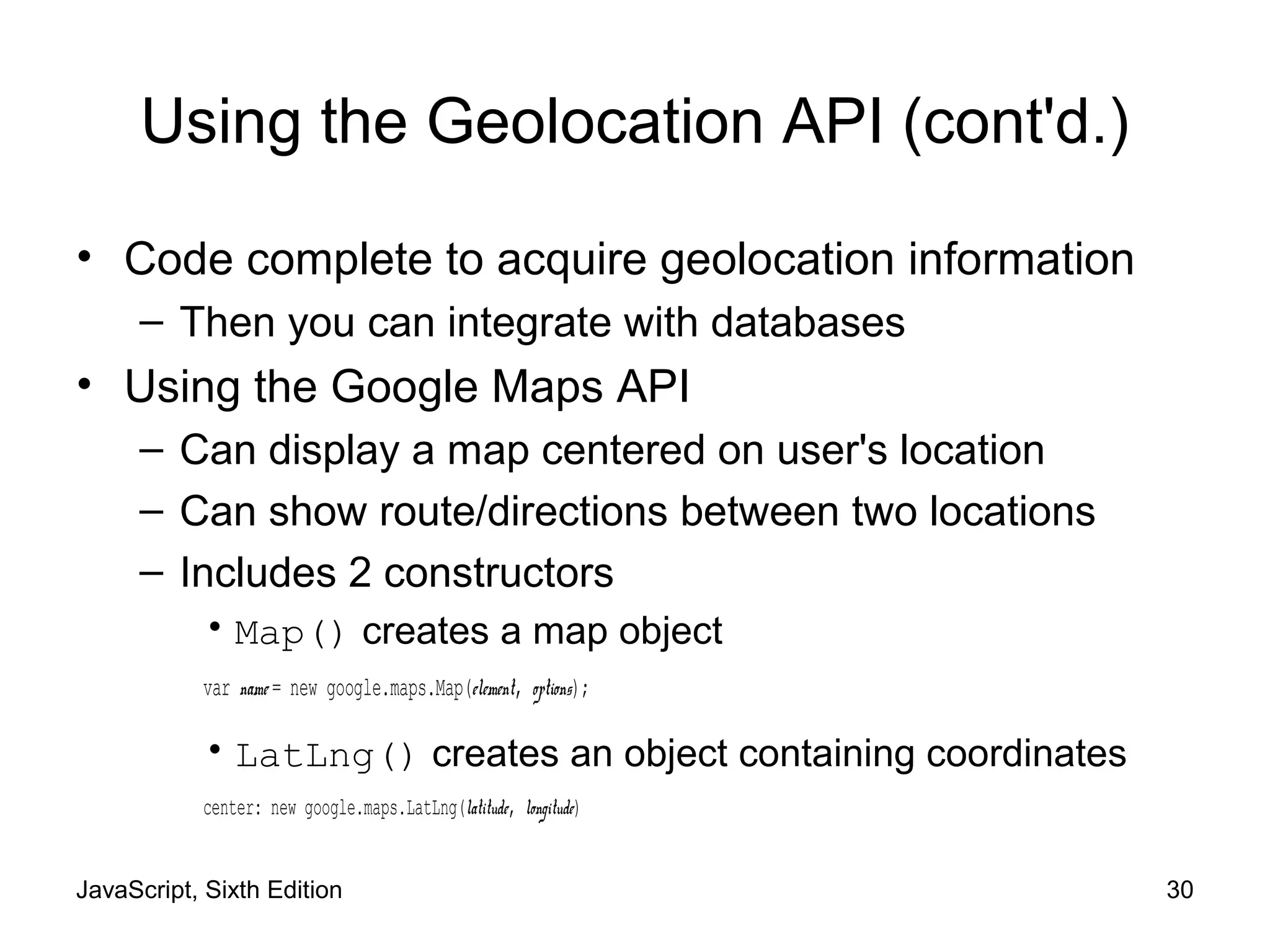
– Includes 2 constructors
• Map() creates a map object
var name = new google.maps.Map(element, options);
• LatLng() creates an object containing coordinates
center: new google.maps.LatLng(latitude, longitude)
JavaScript, Sixth Edition 31
Using the Geolocation API (cont'd.)
• Using the Google Maps API (cont'd.)
– Example—create new map centered on current
position with zoom of 11:
var currPosLat = position.coords.latitude;
var currPosLng = position.coords.longitude;
var mapOptions = {
center: new google.maps.LatLng(currPosLat, currPosLng),
zoom: 11
};
var map = new google.maps.Map(document.getElementById("map"),↵
mapOptions);
JavaScript, Sixth Edition 32
Using the Geolocation API (cont'd.)
• Using the Google Maps API (cont'd.)
– Can also create map centered on specified point
– Geocoding
• Converting physical address to latitude/longitude
coordinates
JavaScript, Sixth Edition 33
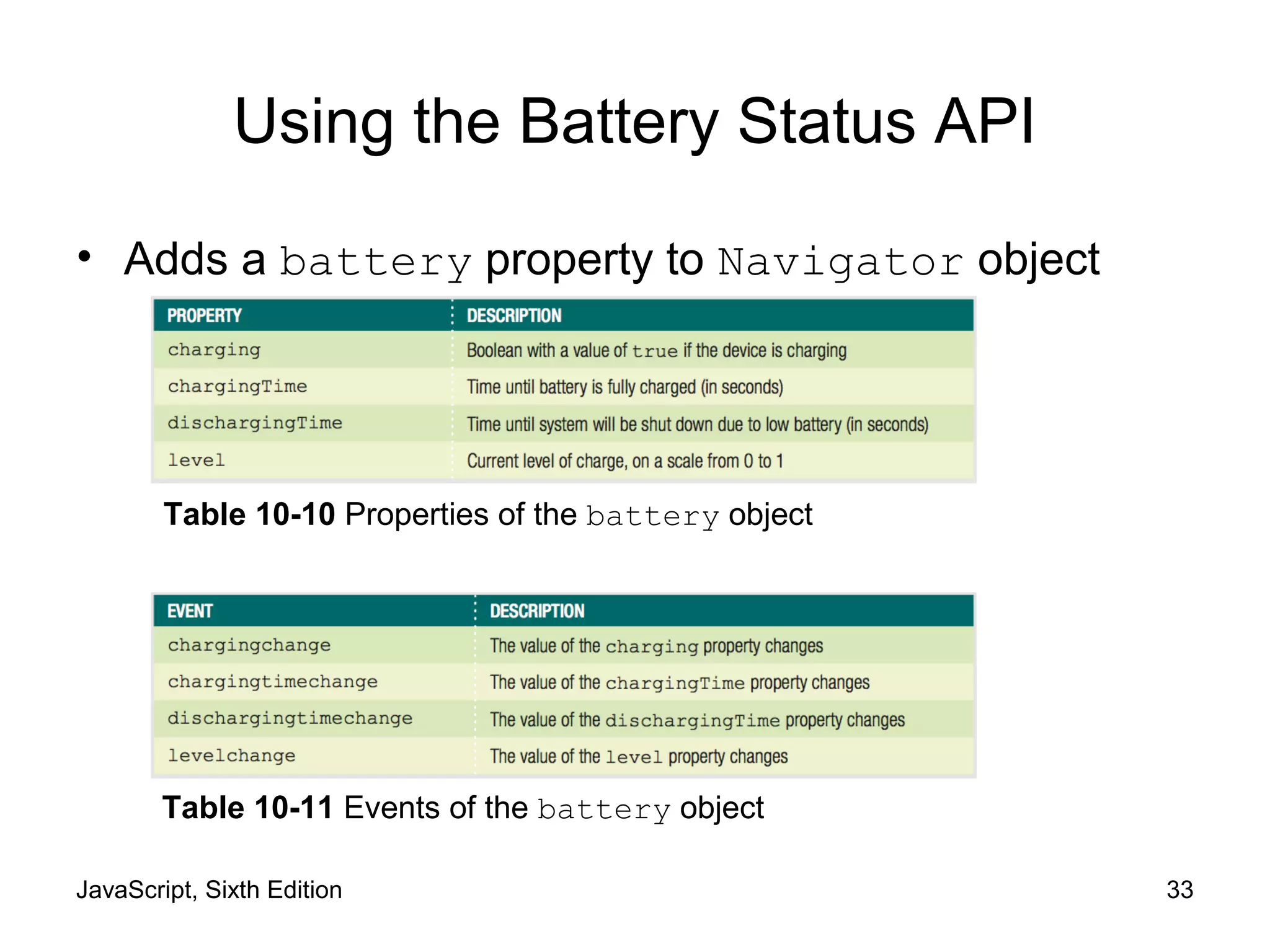
Using the Battery Status API
• Adds a battery property to Navigator object
Table 10-11 Events of the battery object
Table 10-10 Properties of the battery object
JavaScript, Sixth Edition 34
Using the Device Orientation API
• Provides access to changes in position and speed
– Gyroscope
• Device hardware that detects orientation in space
• deviceorientation event
– alpha, beta, and gamma coordinate properties
– Accelerometer
• Device hardware that detects changes in speed
• devicemotion event
– reports values for acceleration and rotation
JavaScript, Sixth Edition 35
Using the WebRTC API
• Short for web real-time communication
• Enables apps to
– receive data from device camera and microphone
– send and receive audio/video/data in real time
• Should eventually allow text/video chat using only
HTML and JavaScript
JavaScript, Sixth Edition 36
Enhancing Mobile Web Apps
• Testing tools
– Often impractical to collect many mobile devices
– Online services available for testing
– Free testing apps from mobile OS makers:
Table 10-12 Software used to simulate mobile devices
JavaScript, Sixth Edition 37
Enhancing Mobile Web Apps (cont'd.)
• Minimizing Download Size
– Mobile speeds usually slower
– Mobile users often have data caps
JavaScript, Sixth Edition 38
Enhancing Mobile Web Apps (cont'd.)
• Minimizing Download Size (cont'd.)
– Loading Scripts Responsively
Figure 10-14 Implementing responsive script loading for oaktop.htm
JavaScript, Sixth Edition 39
Enhancing Mobile Web Apps (cont'd.)
• Minifying Files
– Removes comments, indents, and line breaks
– Tweaks code in other ways to make it smaller
– Online minifying services available
JavaScript, Sixth Edition 40
Summary
• Touch events focus on responding to a user's finger
touches on a touchscreen
• To ensure OS interface doesn't respond to gestures
– Use the preventDefault() method
• Pointer events are different than touch events
– Aim to handle input from mouse, finger, or stylus
• Geolocation API provides access to a user's latitude
and longitude coordinates
• A number of tools exist for testing mobile web apps
virtually
JavaScript, Sixth Edition 41
Summary (cont'd.)
• Important to minimize download size of mobile web
app
– Load scripts responsively
– Minify files

9781305078444 ppt ch10

  • 1.
    JavaScript, Sixth Edition Chapter10 Programming for Touchscreens and Mobile Devices
  • 2.
    JavaScript, Sixth Edition2 Objectives When you complete this chapter, you will be able to: • Integrate mouse, touch, and pointer events into a web app • Obtain and work with a user's geolocation information • Optimize a mobile web app to accommodate the common constraints experienced by mobile users
  • 3.
    JavaScript, Sixth Edition3 Using Touch Events and Pointer Events • On touchscreen device without a moust – browsers fire click event when user touches screen • Other events don't translate neatly for touchscreens
  • 4.
    JavaScript, Sixth Edition4 Creating a Drag-and Drop Application with Mouse Events • Mouse events – events based on actions of mouse or touchpad Table 10-1 Mouse events
  • 5.
    JavaScript, Sixth Edition5 Understanding Mouse Events on a Touchscreen Device • On a touchscreen device – Some web page elements respond to mouse events – div element not considered clickable • doesn't fire mouse events on touchscreen – links and form elements are clickable • browsers respond to touch • Touch cascade – Browser checks a touched element for an event handler for multiple events • Including some mouse events
  • 6.
    JavaScript, Sixth Edition6 Understanding Mouse Events on a Touchscreen Device (cont'd.) Figure 10-5 Touch cascade order
  • 7.
    JavaScript, Sixth Edition7 Understanding Mouse Events on a Touchscreen Device (cont'd.) • Touchscreen devices fire touchscreen-specific events for some elements – Touch events created by Apple • Used on Apple iOS and Google Android – Pointer events created by Microsoft • Used on Windows Phone and Windows 8 and higher
  • 8.
    JavaScript, Sixth Edition8 Implementing Touch Events • Respond to user's finger touches on a touchscreen Table 10-2 Touch events
  • 9.
    JavaScript, Sixth Edition9 Implementing Touch Events (cont'd.) • touchstart event – analogous to mousedown mouse event • touchmove event – corresponds to mousemove • touchend event – similar to mouseup • touchcancel event – unique to touchscreen
  • 10.
    JavaScript, Sixth Edition10 Implementing Touch Events (cont'd.) • Working with Touch Coordinates – Mouse events can work with event properties • clientX property = x coordinate of event • clientY property = y coordinate of event – Touch events support multitouch devices • Allow for multiple touches on screen at once • Don't support clientX or clientY properties as direct children • Each touch event has array properties
  • 11.
    JavaScript, Sixth Edition11 Implementing Touch Events (cont'd.) Table 10-3 Array properties of touch events
  • 12.
    JavaScript, Sixth Edition12 Implementing Touch Events (cont'd.) • Distinguishing Between App and Device Interaction – Touchscreen devices use touch events for more than one purpose • Can interact via touch with an app • Use touch to perform gestures – Browser and device interactions like scrolling – Use preventDefault() method • Ensures that OS interface doesn't respond to events when users interact with your app
  • 13.
    JavaScript, Sixth Edition13 Implementing Touch Events (cont'd.) Figure 10-7 Multiple uses of a single touch event
  • 14.
    JavaScript, Sixth Edition14 Implementing Pointer Events • Touchscreens on new types of devices – Tablets – Notebook computers • Makes coding for touch and mouse events more complicated – Some devices support stylus input – Some devices have trackpads
  • 15.
    JavaScript, Sixth Edition15 Implementing Pointer Events (cont'd.) • Microsoft pointer events – Aim to handle input from mouse, finger, or stylus with each event – Incorporate other event properties • Pressure on screen • Angle of stylus • Only IE Mobile and IE 10 and later support pointer events • Some versions of IE do not recognize touch events – Use mouse+touch+pointer for max. compatibility
  • 16.
    JavaScript, Sixth Edition16 Implementing Pointer Events (cont'd.) Table 10-4 Pointer events
  • 17.
    JavaScript, Sixth Edition17 Implementing Pointer Events (cont'd.) • Identifying pointer screen coordinates – clientX and clientY properties like mouse events • Stopping OS gestures – Requires setting msTouchAction CSS property • Set value to none
  • 18.
    JavaScript, Sixth Edition18 Using Programming Interfaces for Mobile Devices • APIs available to access information provided by mobile device hardware Table 10-5 Selected hardware APIs for mobile devices
  • 19.
    JavaScript, Sixth Edition19 Using the Geolocation API • Provides access to user's latitude & longitude • Accessed using geolocation property of Navigator object Table 10-5 Selected hardware APIs for mobile devices
  • 20.
    JavaScript, Sixth Edition20 Using the Geolocation API (cont'd.) • Callbacks – Arguments that contain/reference executable code • getCurrentPosition() method – Request user's position a single time
  • 21.
    JavaScript, Sixth Edition21 Using the Geolocation API (cont'd.) Table 10-7 Properties passed on a successful geolocation request
  • 22.
    JavaScript, Sixth Edition22 Using the Geolocation API (cont'd.) • Basic example: navigator.geolocation.getCurrentPosition(showLocation); function showLocation(position) { console.log("Longitude: " + position.coords.longitude); console.log("Latitude: " + position.coords.latitude); }
  • 23.
    JavaScript, Sixth Edition23 Using the Geolocation API (cont'd.) • Enhanced example – Handle failed request, set 10-second timeout: navigator.geolocation.getCurrentPosition(showLocation, fail,↵ {timeout: 10000}); function showLocation(position) { console.log("Longitude: " + position.coords.longitude); console.log("Latitude: " + position.coords.latitude); } function fail() { var content = document.getElementById("mainParagraph"); content.innerHTML = "<p>Geolocation information not↵ available or not authorized.</p>";
  • 24.
    JavaScript, Sixth Edition24 Using the Geolocation API (cont'd.) • Need to fail gracefully in older browsers if (navigator.geolocation { navigator.geolocation.getCurrentPosition(createDirections,↵ fail, {timeout: 10000}); } else { fail(); }
  • 25.
    JavaScript, Sixth Edition25 Using the Geolocation API (cont'd.) • Need to clear geolocation history for testing Table 10-9 Steps to clear saved geolocation history
  • 26.
    JavaScript, Sixth Edition26 Using the Geolocation API (cont'd.) • Sometimes users don't notice or ignore geolocation request – Request neither fails or succeeds – Any dependent code not executed
  • 27.
    JavaScript, Sixth Edition27 Using the Geolocation API (cont'd.) Figure 10-10 Flowchart illustrating flow of current geolocation code
  • 28.
    JavaScript, Sixth Edition28 Using the Geolocation API (cont'd.) • Can handle lack of yes/no response from user – setTimeout() method – Start countdown before request • If timeout expires, stop waiting and trigger failure code • If user responds, cancel timeout
  • 29.
    JavaScript, Sixth Edition29 Using the Geolocation API (cont'd.) Figure 10-11 Flowchart illustrating geolocation code that incorporates setTimeout()
  • 30.
    JavaScript, Sixth Edition30 Using the Geolocation API (cont'd.) • Code complete to acquire geolocation information – Then you can integrate with databases • Using the Google Maps API – Can display a map centered on user's location – Can show route/directions between two locations – Includes 2 constructors • Map() creates a map object var name = new google.maps.Map(element, options); • LatLng() creates an object containing coordinates center: new google.maps.LatLng(latitude, longitude)
  • 31.
    JavaScript, Sixth Edition31 Using the Geolocation API (cont'd.) • Using the Google Maps API (cont'd.) – Example—create new map centered on current position with zoom of 11: var currPosLat = position.coords.latitude; var currPosLng = position.coords.longitude; var mapOptions = { center: new google.maps.LatLng(currPosLat, currPosLng), zoom: 11 }; var map = new google.maps.Map(document.getElementById("map"),↵ mapOptions);
  • 32.
    JavaScript, Sixth Edition32 Using the Geolocation API (cont'd.) • Using the Google Maps API (cont'd.) – Can also create map centered on specified point – Geocoding • Converting physical address to latitude/longitude coordinates
  • 33.
    JavaScript, Sixth Edition33 Using the Battery Status API • Adds a battery property to Navigator object Table 10-11 Events of the battery object Table 10-10 Properties of the battery object
  • 34.
    JavaScript, Sixth Edition34 Using the Device Orientation API • Provides access to changes in position and speed – Gyroscope • Device hardware that detects orientation in space • deviceorientation event – alpha, beta, and gamma coordinate properties – Accelerometer • Device hardware that detects changes in speed • devicemotion event – reports values for acceleration and rotation
  • 35.
    JavaScript, Sixth Edition35 Using the WebRTC API • Short for web real-time communication • Enables apps to – receive data from device camera and microphone – send and receive audio/video/data in real time • Should eventually allow text/video chat using only HTML and JavaScript
  • 36.
    JavaScript, Sixth Edition36 Enhancing Mobile Web Apps • Testing tools – Often impractical to collect many mobile devices – Online services available for testing – Free testing apps from mobile OS makers: Table 10-12 Software used to simulate mobile devices
  • 37.
    JavaScript, Sixth Edition37 Enhancing Mobile Web Apps (cont'd.) • Minimizing Download Size – Mobile speeds usually slower – Mobile users often have data caps
  • 38.
    JavaScript, Sixth Edition38 Enhancing Mobile Web Apps (cont'd.) • Minimizing Download Size (cont'd.) – Loading Scripts Responsively Figure 10-14 Implementing responsive script loading for oaktop.htm
  • 39.
    JavaScript, Sixth Edition39 Enhancing Mobile Web Apps (cont'd.) • Minifying Files – Removes comments, indents, and line breaks – Tweaks code in other ways to make it smaller – Online minifying services available
  • 40.
    JavaScript, Sixth Edition40 Summary • Touch events focus on responding to a user's finger touches on a touchscreen • To ensure OS interface doesn't respond to gestures – Use the preventDefault() method • Pointer events are different than touch events – Aim to handle input from mouse, finger, or stylus • Geolocation API provides access to a user's latitude and longitude coordinates • A number of tools exist for testing mobile web apps virtually
  • 41.
    JavaScript, Sixth Edition41 Summary (cont'd.) • Important to minimize download size of mobile web app – Load scripts responsively – Minify files