JavaScript, Sixth Edition
Chapter 12
Introduction to jQuery
JavaScript, Sixth Edition 2
Objectives
When you complete this chapter, you will be able to:
• Select elements using jQuery syntax
• Use built-in jQuery functions
JavaScript, Sixth Edition 3
Introduction to jQuery
• jQuery
– Commonly used library
– Enables developers to implement common JavaScript
tasks with minimal code
JavaScript, Sixth Edition 4
Implementing jQuery
• Cross-browser library
– jQuery 1.x supports IE 6, 7, and 8
– jQuery 2.x supports only IE 9 and later
• Requires less extra code, so smaller file
JavaScript, Sixth Edition 5
Including the Library
• Link .js file containing library to HTML document
– Can download from jquery.com
– Can specify public location on CDN
JavaScript, Sixth Edition 6
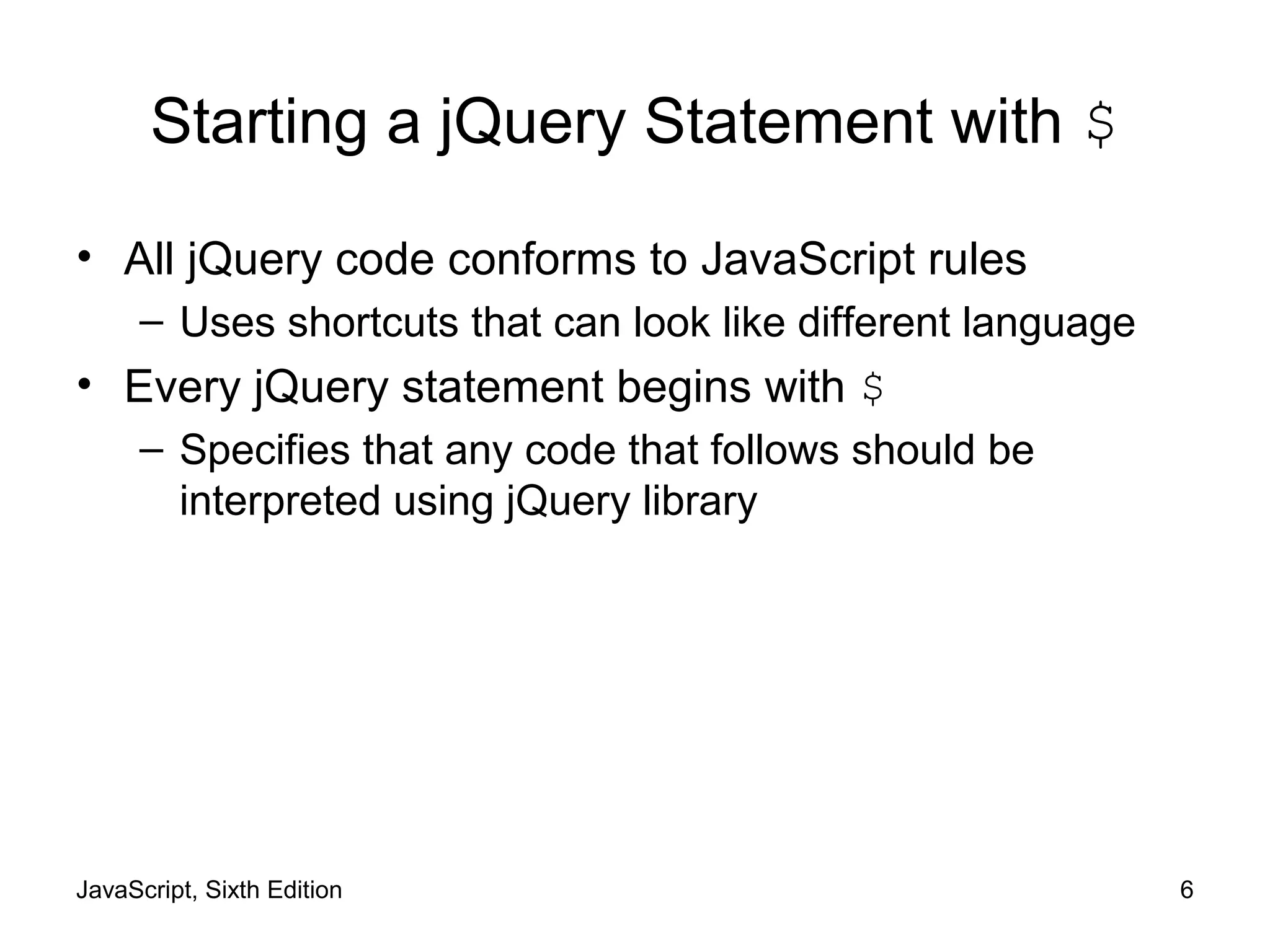
Starting a jQuery Statement with $
• All jQuery code conforms to JavaScript rules
– Uses shortcuts that can look like different language
• Every jQuery statement begins with $
– Specifies that any code that follows should be
interpreted using jQuery library
JavaScript, Sixth Edition 7
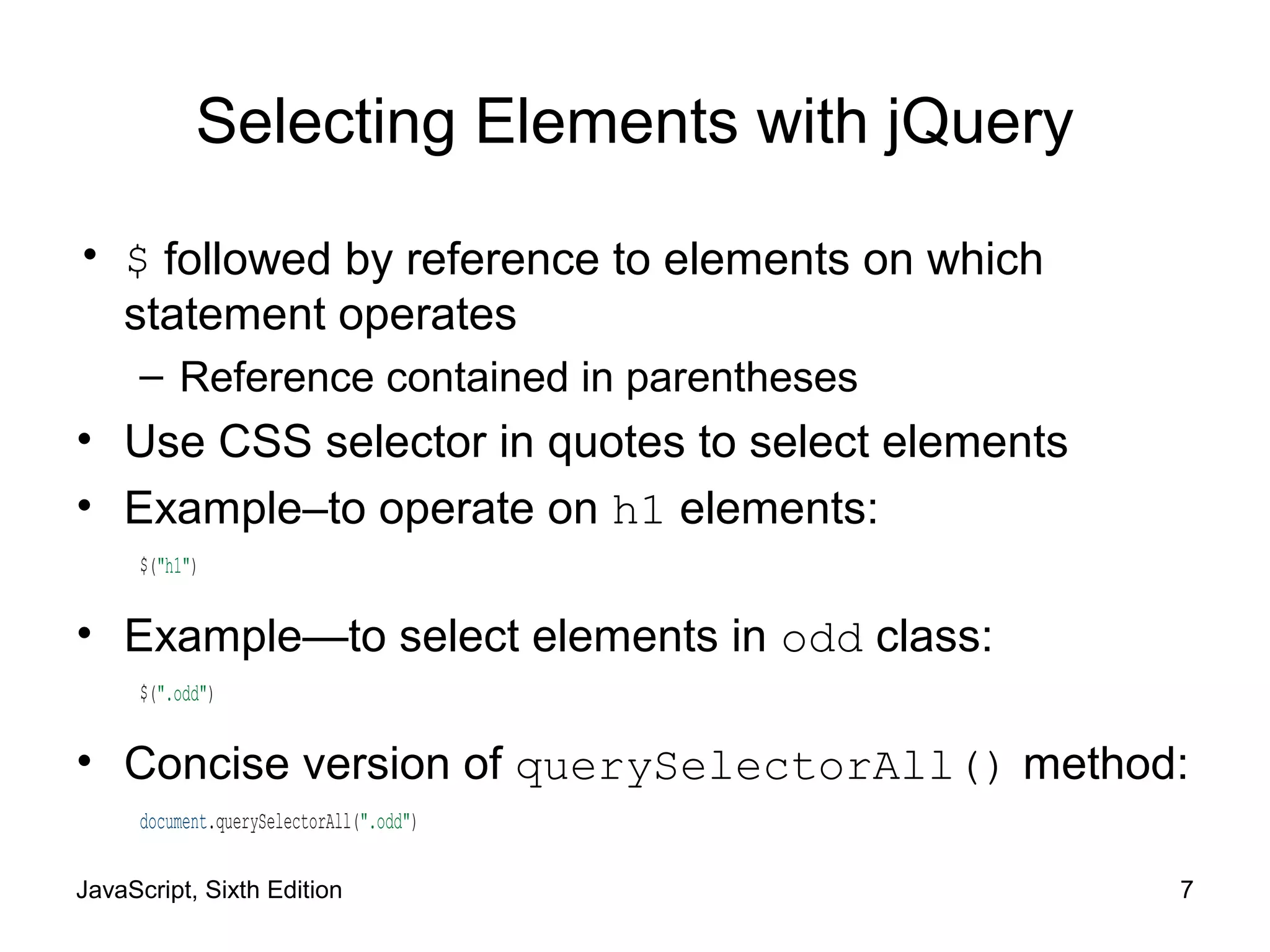
Selecting Elements with jQuery
• $ followed by reference to elements on which
statement operates
– Reference contained in parentheses
• Use CSS selector in quotes to select elements
• Example–to operate on h1 elements:
$("h1")
• Example—to select elements in odd class:
$(".odd")
• Concise version of querySelectorAll() method:
document.querySelectorAll(".odd")
JavaScript, Sixth Edition 8
Traversing the DOM with jQuery
Methods
• Can select other elements in relation to selection
– Use jQuery DOM traversal methods
Table 12-1 jQuery methods for DOM traversal
JavaScript, Sixth Edition 9
Traversing the DOM with jQuery
Methods (cont'd.)
• Select children of original selection:
$("ul.mainmenu li").children()
• Narrow selected items with selector in method's
parentheses:
$("ul.mainmenu li").children("ul")
JavaScript, Sixth Edition 10
Manipulating the DOM with jQuery
Methods
• Plain JavaScript
– JavaScript without jQuery
• jQuery API includes methods for performing actions
on selected elements
JavaScript, Sixth Edition 11
Manipulating the DOM with jQuery
Methods (cont'd.)
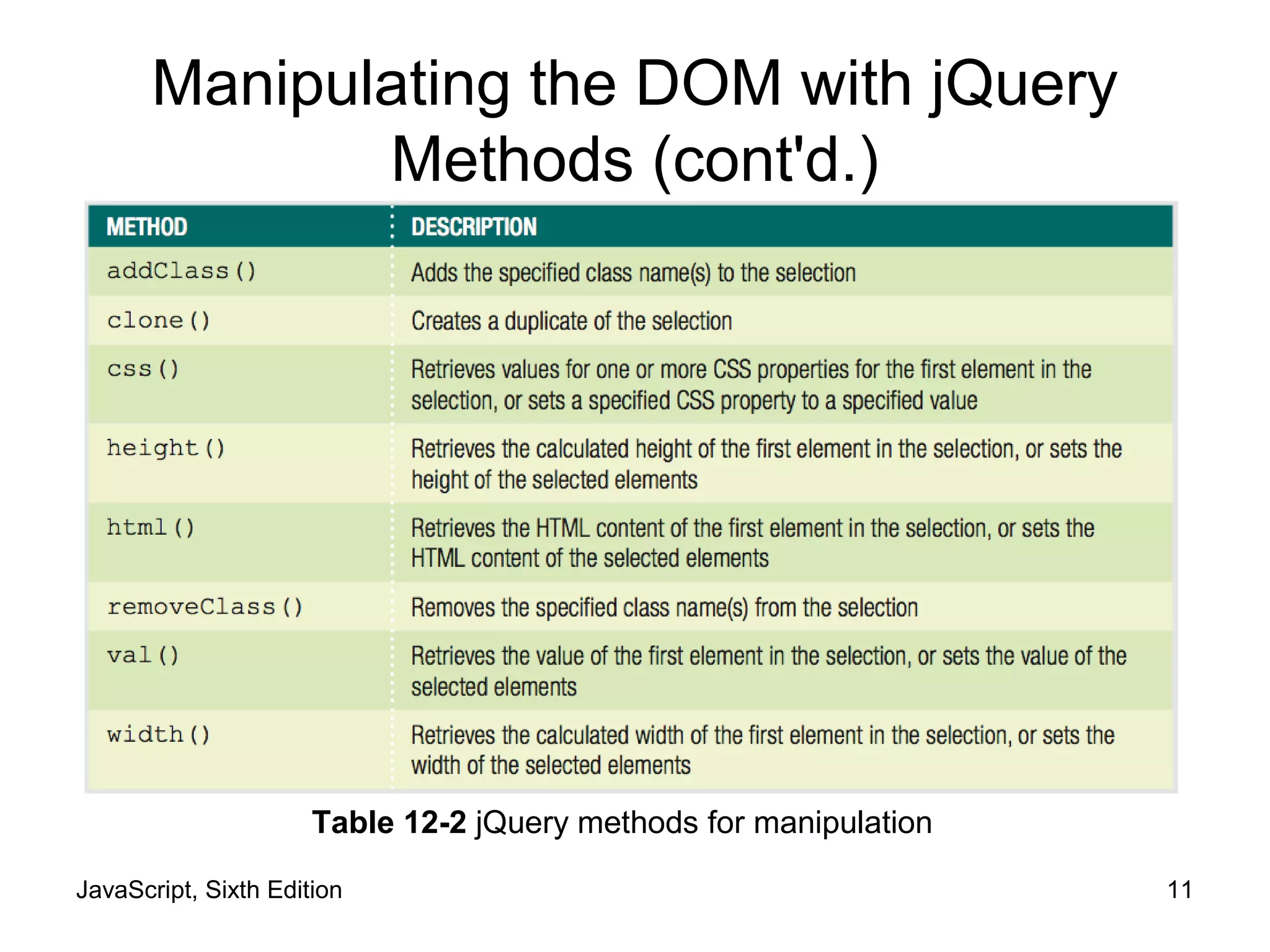
Table 12-2 jQuery methods for manipulation
JavaScript, Sixth Edition 12
Manipulating the DOM with jQuery
Methods (cont'd.)
• Many jQuery methods serve dual function
– Look up a value
– Set that value
1 $(".odd").width();
2 /* returns the computed width value for the first
3 element with the class name "odd" */
4 $(".odd").width("5em");
5 /* sets the width of all elements with the class name 6 "odd" to 5em */
JavaScript, Sixth Edition 13
Specifying an Event Handler
• Can group jQuery statements into functions
– Standard JavaScript syntax
function display() {
$("ul.mainmenu li").children("ul").addClass("show");
}
JavaScript, Sixth Edition 14
Specifying an Event Handler (cont'd.)
• Backward-compatible event listener easier in jQuery
– Start with $
– Specify selector for element(s) associated with event
– Finish with method that specifies event and action(s)
• Performs as described with function in ()
• Empty () instead fires indicated event
JavaScript, Sixth Edition 15
Specifying an Event Handler (cont'd.)
Table 12-3 jQuery methods for common events
1 $("form.order").submit(validateForm);
2 /* specifies validateForm() as event handler when form 3 is
submitted */
4 $("form.order").submit();
5 /* fires submit event on form */
JavaScript, Sixth Edition 16
Specifying an Event Handler (cont'd.)
JavaScript, Sixth Edition 17
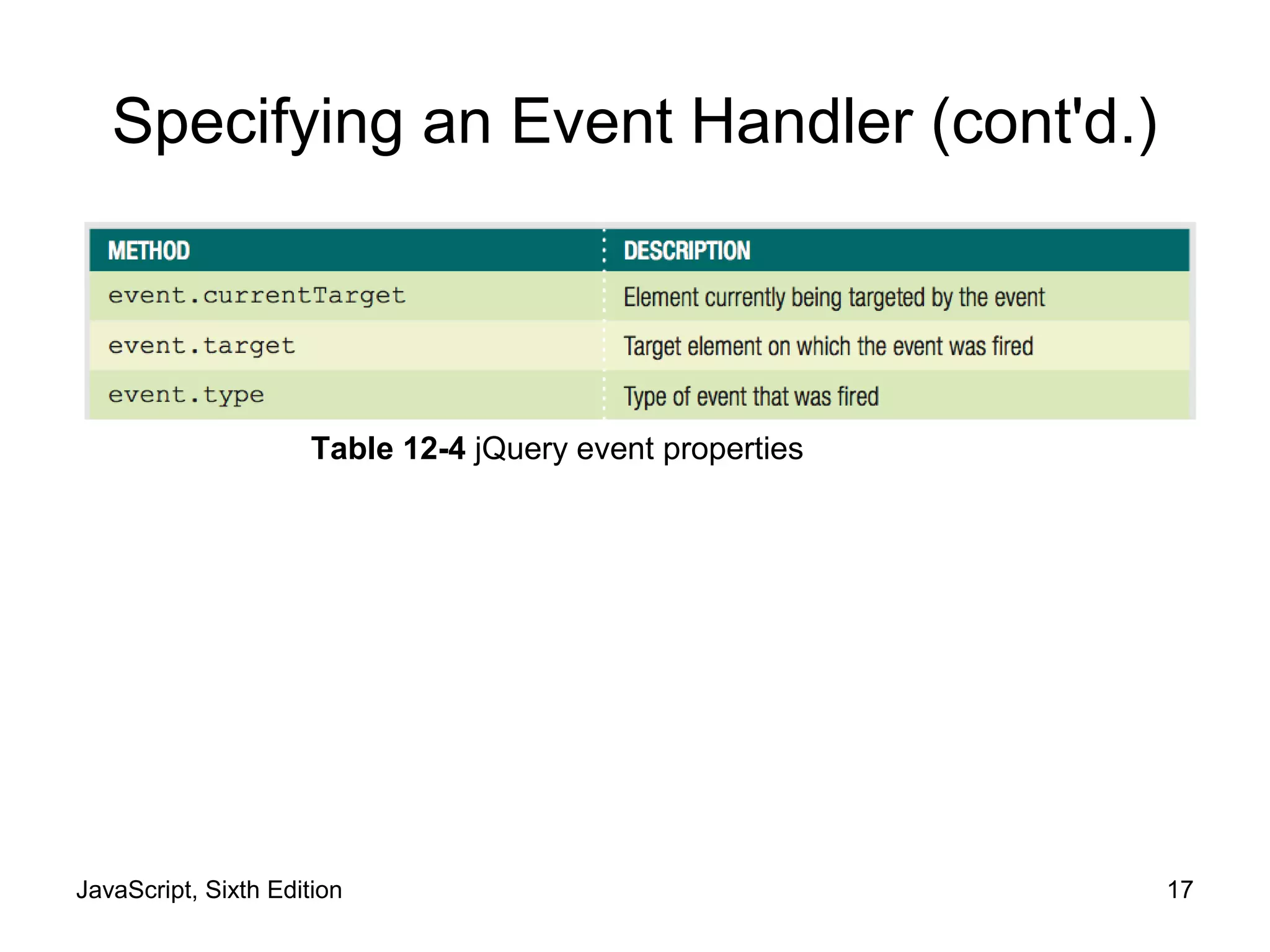
Specifying an Event Handler (cont'd.)
Table 12-4 jQuery event properties
JavaScript, Sixth Edition 18
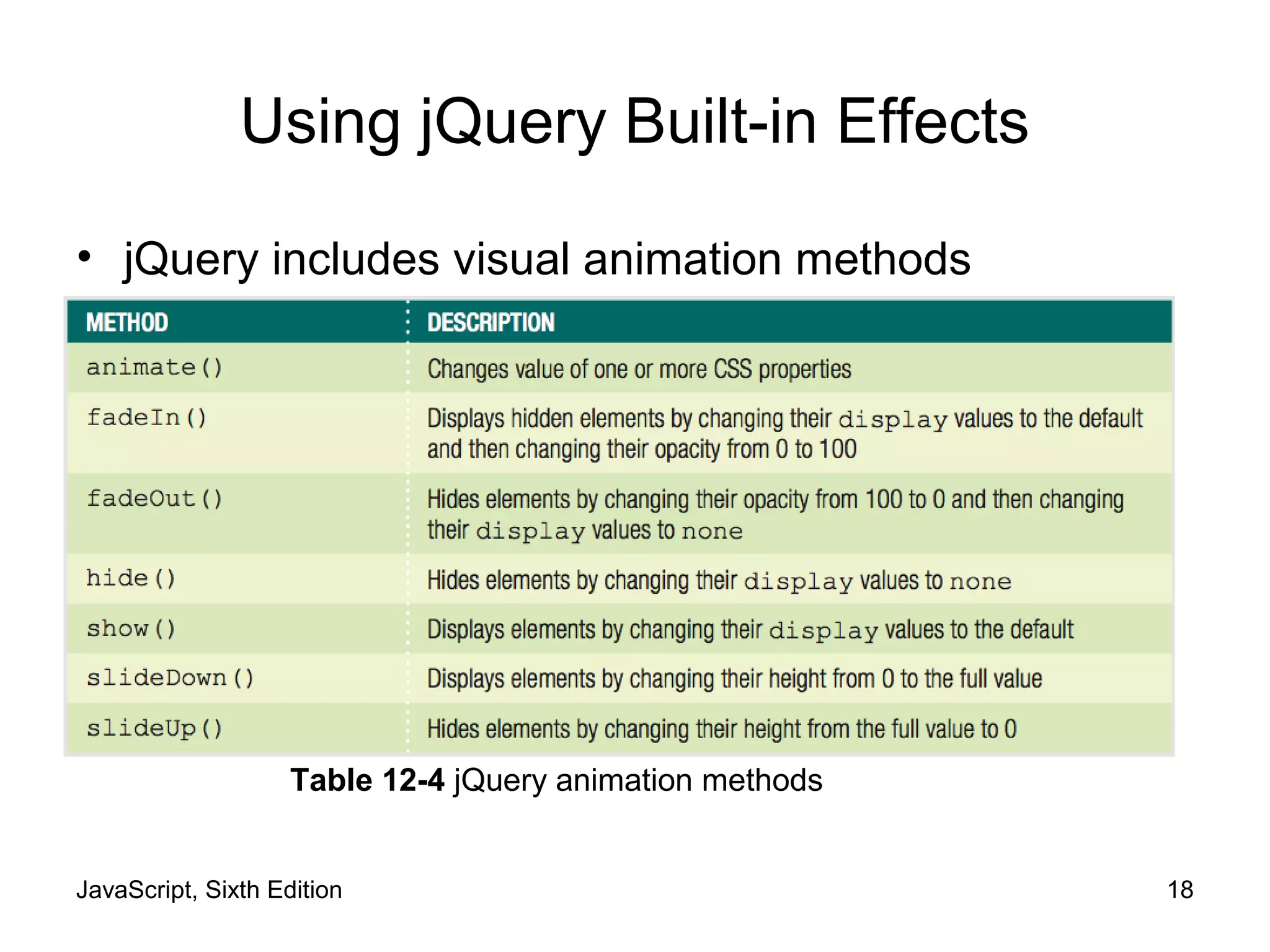
Using jQuery Built-in Effects
• jQuery includes visual animation methods
Table 12-4 jQuery animation methods
JavaScript, Sixth Edition 19
Using jQuery Built-in Effects (cont'd.)
• All methods take value in milliseconds as argument
– Animation occurs in specified time frame
• Some also support slow and fast keywords
JavaScript, Sixth Edition 20
Summary
• jQuery enables developers to implement common
tasks with minimal code
• Must link .js file containing library to HTML
document
• Every jQuery statement starts with $
• Select elements in jQuery with CSS selector in
quotes
• Can modify a selection
– Append DOM traversal method to selection code
JavaScript, Sixth Edition 21
Summary (cont'd.)
• jQuery API includes methods for performing actions
on elements
• Many methods allow you to look up or set value
• Event listener consists of
– $
– selector
– method
• jQuery includes visual animation methods

9781305078444 ppt ch12

  • 1.
    JavaScript, Sixth Edition Chapter12 Introduction to jQuery
  • 2.
    JavaScript, Sixth Edition2 Objectives When you complete this chapter, you will be able to: • Select elements using jQuery syntax • Use built-in jQuery functions
  • 3.
    JavaScript, Sixth Edition3 Introduction to jQuery • jQuery – Commonly used library – Enables developers to implement common JavaScript tasks with minimal code
  • 4.
    JavaScript, Sixth Edition4 Implementing jQuery • Cross-browser library – jQuery 1.x supports IE 6, 7, and 8 – jQuery 2.x supports only IE 9 and later • Requires less extra code, so smaller file
  • 5.
    JavaScript, Sixth Edition5 Including the Library • Link .js file containing library to HTML document – Can download from jquery.com – Can specify public location on CDN
  • 6.
    JavaScript, Sixth Edition6 Starting a jQuery Statement with $ • All jQuery code conforms to JavaScript rules – Uses shortcuts that can look like different language • Every jQuery statement begins with $ – Specifies that any code that follows should be interpreted using jQuery library
  • 7.
    JavaScript, Sixth Edition7 Selecting Elements with jQuery • $ followed by reference to elements on which statement operates – Reference contained in parentheses • Use CSS selector in quotes to select elements • Example–to operate on h1 elements: $("h1") • Example—to select elements in odd class: $(".odd") • Concise version of querySelectorAll() method: document.querySelectorAll(".odd")
  • 8.
    JavaScript, Sixth Edition8 Traversing the DOM with jQuery Methods • Can select other elements in relation to selection – Use jQuery DOM traversal methods Table 12-1 jQuery methods for DOM traversal
  • 9.
    JavaScript, Sixth Edition9 Traversing the DOM with jQuery Methods (cont'd.) • Select children of original selection: $("ul.mainmenu li").children() • Narrow selected items with selector in method's parentheses: $("ul.mainmenu li").children("ul")
  • 10.
    JavaScript, Sixth Edition10 Manipulating the DOM with jQuery Methods • Plain JavaScript – JavaScript without jQuery • jQuery API includes methods for performing actions on selected elements
  • 11.
    JavaScript, Sixth Edition11 Manipulating the DOM with jQuery Methods (cont'd.) Table 12-2 jQuery methods for manipulation
  • 12.
    JavaScript, Sixth Edition12 Manipulating the DOM with jQuery Methods (cont'd.) • Many jQuery methods serve dual function – Look up a value – Set that value 1 $(".odd").width(); 2 /* returns the computed width value for the first 3 element with the class name "odd" */ 4 $(".odd").width("5em"); 5 /* sets the width of all elements with the class name 6 "odd" to 5em */
  • 13.
    JavaScript, Sixth Edition13 Specifying an Event Handler • Can group jQuery statements into functions – Standard JavaScript syntax function display() { $("ul.mainmenu li").children("ul").addClass("show"); }
  • 14.
    JavaScript, Sixth Edition14 Specifying an Event Handler (cont'd.) • Backward-compatible event listener easier in jQuery – Start with $ – Specify selector for element(s) associated with event – Finish with method that specifies event and action(s)
  • 15.
    • Performs asdescribed with function in () • Empty () instead fires indicated event JavaScript, Sixth Edition 15 Specifying an Event Handler (cont'd.) Table 12-3 jQuery methods for common events
  • 16.
    1 $("form.order").submit(validateForm); 2 /*specifies validateForm() as event handler when form 3 is submitted */ 4 $("form.order").submit(); 5 /* fires submit event on form */ JavaScript, Sixth Edition 16 Specifying an Event Handler (cont'd.)
  • 17.
    JavaScript, Sixth Edition17 Specifying an Event Handler (cont'd.) Table 12-4 jQuery event properties
  • 18.
    JavaScript, Sixth Edition18 Using jQuery Built-in Effects • jQuery includes visual animation methods Table 12-4 jQuery animation methods
  • 19.
    JavaScript, Sixth Edition19 Using jQuery Built-in Effects (cont'd.) • All methods take value in milliseconds as argument – Animation occurs in specified time frame • Some also support slow and fast keywords
  • 20.
    JavaScript, Sixth Edition20 Summary • jQuery enables developers to implement common tasks with minimal code • Must link .js file containing library to HTML document • Every jQuery statement starts with $ • Select elements in jQuery with CSS selector in quotes • Can modify a selection – Append DOM traversal method to selection code
  • 21.
    JavaScript, Sixth Edition21 Summary (cont'd.) • jQuery API includes methods for performing actions on elements • Many methods allow you to look up or set value • Event listener consists of – $ – selector – method • jQuery includes visual animation methods