1
C++ Programming: From Problem Analysis to Program Design, Eighth Edition
Chapter 17
Linked Lists
2
Objectives (1 of 2)
• In this chapter, you will:
• Learn about linked lists
• Become familiar with the basic properties of linked lists
• Explore the insertion and deletion operations on linked lists
• Discover how to build and manipulate a linked list
• Learn how to implement linked lists as ADTs
© 2018 Cengage Learning. All Rights Reserved. May not be copied, scanned, or duplicated, in whole or in part, except for use as permitted in a license distributed with a certain product or service
or otherwise on a password-protected website for classroom use.
3
Objectives (2 of 2)
• Learn how to create linked list iterators
• Learn how to implement the basic operations on a linked list
• Learn how to create unordered linked lists
• Learn how to create ordered linked lists
• Learn how to construct a
• Become familiar with circular linked lists doubly linked list
© 2018 Cengage Learning. All Rights Reserved. May not be copied, scanned, or duplicated, in whole or in part, except for use as permitted in a license distributed with a certain product or service
or otherwise on a password-protected website for classroom use.
4
Introduction
• Data can be organized and processed sequentially using an array, called a
sequential list
• Problems with an array
• Array size is fixed
• Unsorted array: searching for an item is slow
• Sorted array: insertion and deletion is slow because it requires data movement
© 2018 Cengage Learning. All Rights Reserved. May not be copied, scanned, or duplicated, in whole or in part, except for use as permitted in a license distributed with a certain product or service
or otherwise on a password-protected website for classroom use.
5
Linked Lists (1 of 3)
• Linked list: a collection of items (nodes) containing two components:
• Data
• Address (link) of the next node in the list
FIGURE 17-1 Structure of a node
© 2018 Cengage Learning. All Rights Reserved. May not be copied, scanned, or duplicated, in whole or in part, except for use as permitted in a license distributed with a certain product or service
or otherwise on a password-protected website for classroom use.
6
Linked Lists (2 of 3)
FIGURE 17-2 Linked list
© 2018 Cengage Learning. All Rights Reserved. May not be copied, scanned, or duplicated, in whole or in part, except for use as permitted in a license distributed with a certain product or service
or otherwise on a password-protected website for classroom use.
7
Linked Lists (3 of 3)
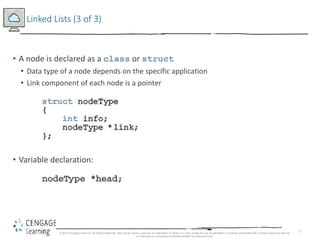
• A node is declared as a class or struct
• Data type of a node depends on the specific application
• Link component of each node is a pointer
• Variable declaration:
© 2018 Cengage Learning. All Rights Reserved. May not be copied, scanned, or duplicated, in whole or in part, except for use as permitted in a license distributed with a certain product or service
or otherwise on a password-protected website for classroom use.
8
Linked Lists: Some Properties (1 of 3)
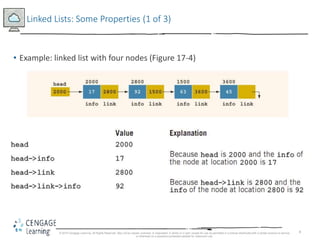
• Example: linked list with four nodes (Figure 17-4)
© 2018 Cengage Learning. All Rights Reserved. May not be copied, scanned, or duplicated, in whole or in part, except for use as permitted in a license distributed with a certain product or service
or otherwise on a password-protected website for classroom use.
9
Linked Lists: Some Properties (2 of 3)
• current = head;
- Copies value of head into current
FIGURE 17-5 Linked list after the statement current = head; executes
© 2018 Cengage Learning. All Rights Reserved. May not be copied, scanned, or duplicated, in whole or in part, except for use as permitted in a license distributed with a certain product or service
or otherwise on a password-protected website for classroom use.
10
Linked Lists: Some Properties (3 of 3)
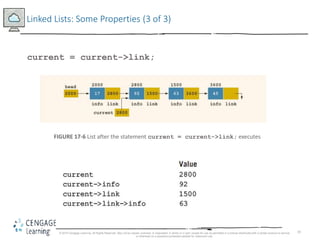
current = current->link;
FIGURE 17-6 List after the statement current = current->link; executes
© 2018 Cengage Learning. All Rights Reserved. May not be copied, scanned, or duplicated, in whole or in part, except for use as permitted in a license distributed with a certain product or service
or otherwise on a password-protected website for classroom use.
11
Traversing a Linked List (1 of 2)
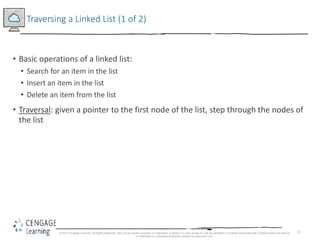
• Basic operations of a linked list:
• Search for an item in the list
• Insert an item in the list
• Delete an item from the list
• Traversal: given a pointer to the first node of the list, step through the nodes of
the list
© 2018 Cengage Learning. All Rights Reserved. May not be copied, scanned, or duplicated, in whole or in part, except for use as permitted in a license distributed with a certain product or service
or otherwise on a password-protected website for classroom use.
12
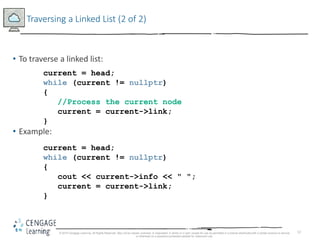
Traversing a Linked List (2 of 2)
• To traverse a linked list:
• Example:
© 2018 Cengage Learning. All Rights Reserved. May not be copied, scanned, or duplicated, in whole or in part, except for use as permitted in a license distributed with a certain product or service
or otherwise on a password-protected website for classroom use.
current = head;
while (current != nullptr)
{
//Process the current node
current = current->link;
}
current = head;
while (current != nullptr)
{
cout << current->info << " ";
current = current->link;
}
13
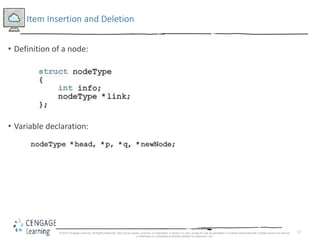
Item Insertion and Deletion
• Definition of a node:
• Variable declaration:
© 2018 Cengage Learning. All Rights Reserved. May not be copied, scanned, or duplicated, in whole or in part, except for use as permitted in a license distributed with a certain product or service
or otherwise on a password-protected website for classroom use.
14
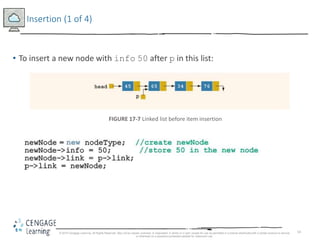
Insertion (1 of 4)
• To insert a new node with info 50 after p in this list:
FIGURE 17-7 Linked list before item insertion
© 2018 Cengage Learning. All Rights Reserved. May not be copied, scanned, or duplicated, in whole or in part, except for use as permitted in a license distributed with a certain product or service
or otherwise on a password-protected website for classroom use.
15
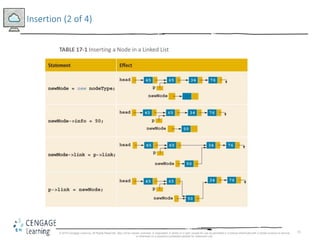
Insertion (2 of 4)
TABLE 17-1 Inserting a Node in a Linked List
© 2018 Cengage Learning. All Rights Reserved. May not be copied, scanned, or duplicated, in whole or in part, except for use as permitted in a license distributed with a certain product or service
or otherwise on a password-protected website for classroom use.
16
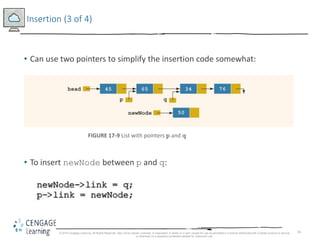
Insertion (3 of 4)
• Can use two pointers to simplify the insertion code somewhat:
FIGURE 17-9 List with pointers p and q
• To insert newNode between p and q:
© 2018 Cengage Learning. All Rights Reserved. May not be copied, scanned, or duplicated, in whole or in part, except for use as permitted in a license distributed with a certain product or service
or otherwise on a password-protected website for classroom use.
17
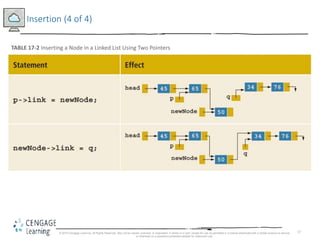
Insertion (4 of 4)
TABLE 17-2 Inserting a Node in a Linked List Using Two Pointers
© 2018 Cengage Learning. All Rights Reserved. May not be copied, scanned, or duplicated, in whole or in part, except for use as permitted in a license distributed with a certain product or service
or otherwise on a password-protected website for classroom use.
18
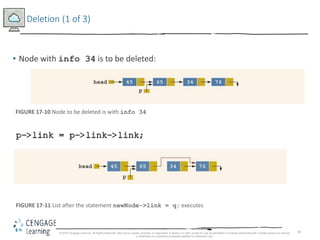
Deletion (1 of 3)
• Node with info 34 is to be deleted:
FIGURE 17-10 Node to be deleted is with info 34
FIGURE 17-11 List after the statement newNode->link = q; executes
© 2018 Cengage Learning. All Rights Reserved. May not be copied, scanned, or duplicated, in whole or in part, except for use as permitted in a license distributed with a certain product or service
or otherwise on a password-protected website for classroom use.
19
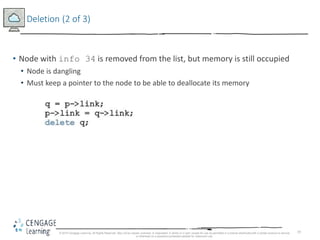
Deletion (2 of 3)
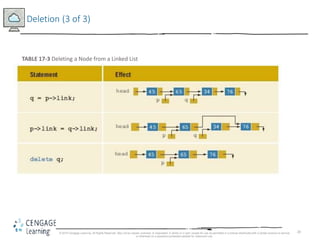
• Node with info 34 is removed from the list, but memory is still occupied
• Node is dangling
• Must keep a pointer to the node to be able to deallocate its memory
© 2018 Cengage Learning. All Rights Reserved. May not be copied, scanned, or duplicated, in whole or in part, except for use as permitted in a license distributed with a certain product or service
or otherwise on a password-protected website for classroom use.
20
Deletion (3 of 3)
TABLE 17-3 Deleting a Node from a Linked List
© 2018 Cengage Learning. All Rights Reserved. May not be copied, scanned, or duplicated, in whole or in part, except for use as permitted in a license distributed with a certain product or service
or otherwise on a password-protected website for classroom use.
21
Building a Linked List
• If data is unsorted, the list will be unsorted
• Can build a linked list forward or backward
• Forward: a new node is always inserted at the end of the linked list
• Backward: a new node is always inserted at the beginning of the list
© 2018 Cengage Learning. All Rights Reserved. May not be copied, scanned, or duplicated, in whole or in part, except for use as permitted in a license distributed with a certain product or service
or otherwise on a password-protected website for classroom use.
22
Building a Linked List Forward (1 of 4)
• Need three pointers to build the list:
• One to point to the first node in the list, which cannot be moved
• One to point to the last node in the list
• One to create the new node
• Example:
• Data: 2 15 8 24 34
© 2018 Cengage Learning. All Rights Reserved. May not be copied, scanned, or duplicated, in whole or in part, except for use as permitted in a license distributed with a certain product or service
or otherwise on a password-protected website for classroom use.
23
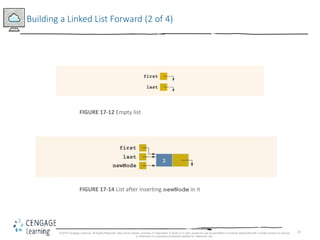
Building a Linked List Forward (2 of 4)
FIGURE 17-12 Empty list
FIGURE 17-14 List after inserting newNode in it
© 2018 Cengage Learning. All Rights Reserved. May not be copied, scanned, or duplicated, in whole or in part, except for use as permitted in a license distributed with a certain product or service
or otherwise on a password-protected website for classroom use.
24
Building a Linked List Forward (3 of 4)
FIGURE 17-15 List and newNode with info 15
FIGURE 17-16 List after inserting newNode at the end
© 2018 Cengage Learning. All Rights Reserved. May not be copied, scanned, or duplicated, in whole or in part, except for use as permitted in a license distributed with a certain product or service
or otherwise on a password-protected website for classroom use.
25
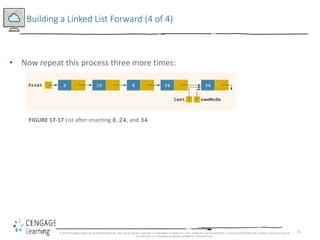
Building a Linked List Forward (4 of 4)
• Now repeat this process three more times:
FIGURE 17-17 List after inserting 8, 24, and 34
© 2018 Cengage Learning. All Rights Reserved. May not be copied, scanned, or duplicated, in whole or in part, except for use as permitted in a license distributed with a certain product or service
or otherwise on a password-protected website for classroom use.
26
Building a Linked List Backward
• Algorithm to build a linked list backward:
• Initialize first to nullptr
• For each item in the list
- Create the new node, newNode
- Store the data in newNode
- Insert newNode before first
- Update the value of the pointer first
© 2018 Cengage Learning. All Rights Reserved. May not be copied, scanned, or duplicated, in whole or in part, except for use as permitted in a license distributed with a certain product or service
or otherwise on a password-protected website for classroom use.
27
Linked List as an ADT (1 of 4)
• Basic operations on linked lists:
• Initialize the list
• Determine whether the list is empty
• Print the list
• Find the length of the list
• Destroy the list
• Retrieve info contained in the first or last node
• Search the list for a given item
© 2018 Cengage Learning. All Rights Reserved. May not be copied, scanned, or duplicated, in whole or in part, except for use as permitted in a license distributed with a certain product or service
or otherwise on a password-protected website for classroom use.
28
Linked List as an ADT (2 of 4)
• Basic operations on linked lists (cont’d.):
• Insert an item in the list
• Delete an item from the list
• Make a copy of the linked list
© 2018 Cengage Learning. All Rights Reserved. May not be copied, scanned, or duplicated, in whole or in part, except for use as permitted in a license distributed with a certain product or service
or otherwise on a password-protected website for classroom use.
29
Linked List as an ADT (3 of 4)
• Two general types of linked lists:
• Sorted and unsorted lists
• Algorithms to implement the operations search, insert, and remove differ
slightly for sorted and unsorted lists
• abstract class linkedListType will implement basic linked list
operations
• Derived classes: unorderedLinkedList and orderedLinkedList
© 2018 Cengage Learning. All Rights Reserved. May not be copied, scanned, or duplicated, in whole or in part, except for use as permitted in a license distributed with a certain product or service
or otherwise on a password-protected website for classroom use.
30
Linked List as an ADT (4 of 4)
• For an unordered linked list, can insert a new item at either the end or the
beginning
• buildListForward inserts item at the end
• buildListBackward inserts item at beginning
• Will need two functions:
• insertFirst and insertLast
• Will use two pointers in the list:
• first and last
© 2018 Cengage Learning. All Rights Reserved. May not be copied, scanned, or duplicated, in whole or in part, except for use as permitted in a license distributed with a certain product or service
or otherwise on a password-protected website for classroom use.
31
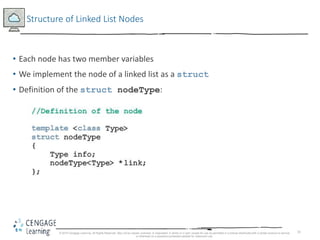
Structure of Linked List Nodes
• Each node has two member variables
• We implement the node of a linked list as a struct
• Definition of the struct nodeType:
© 2018 Cengage Learning. All Rights Reserved. May not be copied, scanned, or duplicated, in whole or in part, except for use as permitted in a license distributed with a certain product or service
or otherwise on a password-protected website for classroom use.
32
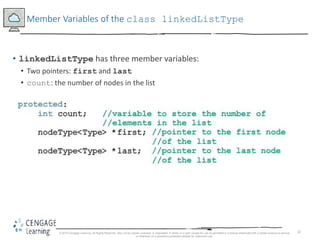
Member Variables of the class linkedListType
• linkedListType has three member variables:
• Two pointers: first and last
• count: the number of nodes in the list
© 2018 Cengage Learning. All Rights Reserved. May not be copied, scanned, or duplicated, in whole or in part, except for use as permitted in a license distributed with a certain product or service
or otherwise on a password-protected website for classroom use.
33
Linked List Iterators (1 of 4)
• To process each node of the list
• List must be traversed, starting at first node
• Iterator: object that produces each element of a container, one element at a
time
• The two most common iterator operations:
++ (the increment operator)
* (the dereferencing operator)
© 2018 Cengage Learning. All Rights Reserved. May not be copied, scanned, or duplicated, in whole or in part, except for use as permitted in a license distributed with a certain product or service
or otherwise on a password-protected website for classroom use.
34
Linked List Iterators (2 of 4)
• An iterator is an object
• Need to define a class (linkedListIterator) to create iterators to objects of the
class linkedListType
• Will have one member variable to refer to the current node
© 2018 Cengage Learning. All Rights Reserved. May not be copied, scanned, or duplicated, in whole or in part, except for use as permitted in a license distributed with a certain product or service
or otherwise on a password-protected website for classroom use.
35
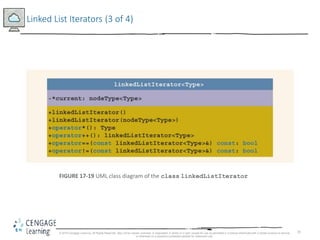
Linked List Iterators (3 of 4)
FIGURE 17-19 UML class diagram of the class linkedListIterator
© 2018 Cengage Learning. All Rights Reserved. May not be copied, scanned, or duplicated, in whole or in part, except for use as permitted in a license distributed with a certain product or service
or otherwise on a password-protected website for classroom use.
36
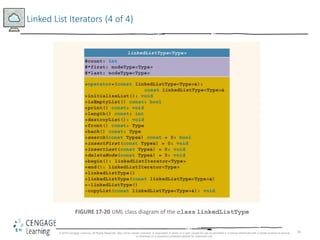
Linked List Iterators (4 of 4)
FIGURE 17-20 UML class diagram of the class linkedListType
© 2018 Cengage Learning. All Rights Reserved. May not be copied, scanned, or duplicated, in whole or in part, except for use as permitted in a license distributed with a certain product or service
or otherwise on a password-protected website for classroom use.
37
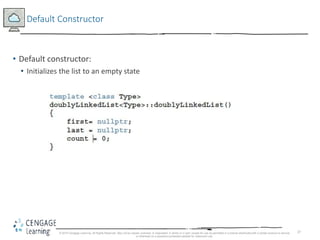
Default Constructor
• Default constructor:
• Initializes the list to an empty state
© 2018 Cengage Learning. All Rights Reserved. May not be copied, scanned, or duplicated, in whole or in part, except for use as permitted in a license distributed with a certain product or service
or otherwise on a password-protected website for classroom use.
38
Destroy the List
• Function destroyList:
• Traverses the list to deallocate memory occupied by each node
• Once list is destroyed, sets pointers first and last to nullptr and count to 0
© 2018 Cengage Learning. All Rights Reserved. May not be copied, scanned, or duplicated, in whole or in part, except for use as permitted in a license distributed with a certain product or service
or otherwise on a password-protected website for classroom use.
39
Initialize the List
• Function initializeList:
• Initializes list to an empty state
• Since constructor already did this, initializeList is used to reinitialize an
existing list
© 2018 Cengage Learning. All Rights Reserved. May not be copied, scanned, or duplicated, in whole or in part, except for use as permitted in a license distributed with a certain product or service
or otherwise on a password-protected website for classroom use.
40
Print the List
• Function print:
• Prints data contained in each node
• Traverses the list using another pointer
© 2018 Cengage Learning. All Rights Reserved. May not be copied, scanned, or duplicated, in whole or in part, except for use as permitted in a license distributed with a certain product or service
or otherwise on a password-protected website for classroom use.
41
Length of a List
• Function length:
• Returns the count of nodes in the list
• Uses the count variable
© 2018 Cengage Learning. All Rights Reserved. May not be copied, scanned, or duplicated, in whole or in part, except for use as permitted in a license distributed with a certain product or service
or otherwise on a password-protected website for classroom use.
42
Retrieve the Data of the First or Last Node
• Function front:
• Returns the info contained in the first node
• If list is empty, program will be terminated
• Function back:
• Returns the info contained in the last node
• If list is empty, program will be terminated
© 2018 Cengage Learning. All Rights Reserved. May not be copied, scanned, or duplicated, in whole or in part, except for use as permitted in a license distributed with a certain product or service
or otherwise on a password-protected website for classroom use.
43
Begin and End
• Function begin:
• Returns an iterator to the first node in the list
• Function end:
• Returns an iterator to one past the last node in the list
© 2018 Cengage Learning. All Rights Reserved. May not be copied, scanned, or duplicated, in whole or in part, except for use as permitted in a license distributed with a certain product or service
or otherwise on a password-protected website for classroom use.
44
Copy the List
• Function copyList:
• Makes an identical copy of a linked list
• Steps:
• Create a node called newNode
• Copy the info of the original node into newNode
• Insert newNode at the end of the list being created
© 2018 Cengage Learning. All Rights Reserved. May not be copied, scanned, or duplicated, in whole or in part, except for use as permitted in a license distributed with a certain product or service
or otherwise on a password-protected website for classroom use.
45
Destructor & Copy Constructor
• Destructor:
• Deallocates memory occupied by nodes when the class object goes out of scope
• Calls destroyList to traverse the list and delete each node
• Copy constructor:
• Makes an identical copy of the linked list
• Calls function copyList
© 2018 Cengage Learning. All Rights Reserved. May not be copied, scanned, or duplicated, in whole or in part, except for use as permitted in a license distributed with a certain product or service
or otherwise on a password-protected website for classroom use.
46
Overloading the Assignment Operator
• Definition of the function to overload the assignment operator
• Similar to the copy constructor
© 2018 Cengage Learning. All Rights Reserved. May not be copied, scanned, or duplicated, in whole or in part, except for use as permitted in a license distributed with a certain product or service
or otherwise on a password-protected website for classroom use.
47
Unordered Linked Lists (1 of 2)
• class unorderedLinkedList
• Derived from the abstract class linkedListType
• Implements the operations search, insertFirst, insertLast, and
deleteNode
© 2018 Cengage Learning. All Rights Reserved. May not be copied, scanned, or duplicated, in whole or in part, except for use as permitted in a license distributed with a certain product or service
or otherwise on a password-protected website for classroom use.
48
Unordered Linked Lists (2 of 2)
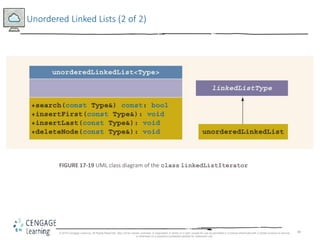
FIGURE 17-19 UML class diagram of the class linkedListIterator
© 2018 Cengage Learning. All Rights Reserved. May not be copied, scanned, or duplicated, in whole or in part, except for use as permitted in a license distributed with a certain product or service
or otherwise on a password-protected website for classroom use.
49
Unordered Linked List: Search the List
• Function search:
• Searches the list for a given item
• Steps:
• Compare search item with current node in the list
- If info of current node is the same as search item, stop the search
- Otherwise, make the next node the current node
• Repeat Step 1 until item is found or until no more data is left in the list
© 2018 Cengage Learning. All Rights Reserved. May not be copied, scanned, or duplicated, in whole or in part, except for use as permitted in a license distributed with a certain product or service
or otherwise on a password-protected website for classroom use.
50
Insert the First Node
• Function insertFirst:
• Inserts a new item at the beginning of the list
• Steps:
• Create a new node
• Store the new item in the new node
• Insert the node before first
• Increment count by 1
© 2018 Cengage Learning. All Rights Reserved. May not be copied, scanned, or duplicated, in whole or in part, except for use as permitted in a license distributed with a certain product or service
or otherwise on a password-protected website for classroom use.
51
Insert the Last Node
• Function insertLast:
• Inserts a new node after last
• Similar to insertFirst function
© 2018 Cengage Learning. All Rights Reserved. May not be copied, scanned, or duplicated, in whole or in part, except for use as permitted in a license distributed with a certain product or service
or otherwise on a password-protected website for classroom use.
52
Delete a Node (1 of 6)
• Function deleteNode:
• Deletes a node with given info from the list
• Several possible cases to manage
• Case 1: List is empty
• If the list is empty, output an error message
• Case 2: Node to be deleted is the first node
• Adjust the pointer first and count
• If no other nodes, set first and last to nullptr
© 2018 Cengage Learning. All Rights Reserved. May not be copied, scanned, or duplicated, in whole or in part, except for use as permitted in a license distributed with a certain product or service
or otherwise on a password-protected website for classroom use.
53
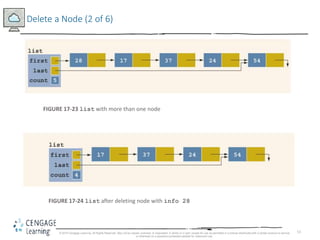
Delete a Node (2 of 6)
FIGURE 17-23 list with more than one node
FIGURE 17-24 list after deleting node with info 28
© 2018 Cengage Learning. All Rights Reserved. May not be copied, scanned, or duplicated, in whole or in part, except for use as permitted in a license distributed with a certain product or service
or otherwise on a password-protected website for classroom use.
54
Delete a Node (3 of 6)
• Case 3: Node to be deleted is not the first one
– Case 3a: Node to be deleted is not last one
–Update link field of the previous node
– Case 3b: Node to be deleted is the last node
– Update link field of the previous node to nullptr
– Update last pointer to point to previous node
© 2018 Cengage Learning. All Rights Reserved. May not be copied, scanned, or duplicated, in whole or in part, except for use as permitted in a license distributed with a certain product or service
or otherwise on a password-protected website for classroom use.
55
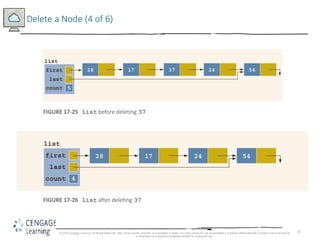
Delete a Node (4 of 6)
FIGURE 17-25 list before deleting 37
FIGURE 17-26 list after deleting 37
© 2018 Cengage Learning. All Rights Reserved. May not be copied, scanned, or duplicated, in whole or in part, except for use as permitted in a license distributed with a certain product or service
or otherwise on a password-protected website for classroom use.
56
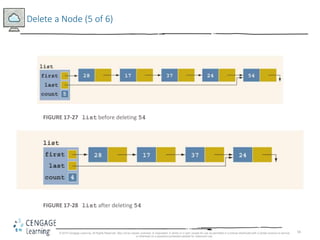
Delete a Node (5 of 6)
FIGURE 17-27 list before deleting 54
FIGURE 17-28 list after deleting 54
© 2018 Cengage Learning. All Rights Reserved. May not be copied, scanned, or duplicated, in whole or in part, except for use as permitted in a license distributed with a certain product or service
or otherwise on a password-protected website for classroom use.
57
Delete a Node (6 of 6)
• Case 4: Node to be deleted is not in the list
• List requires no adjustment
• Simply output an error message
© 2018 Cengage Learning. All Rights Reserved. May not be copied, scanned, or duplicated, in whole or in part, except for use as permitted in a license distributed with a certain product or service
or otherwise on a password-protected website for classroom use.
58
Ordered Linked Lists (1 of 2)
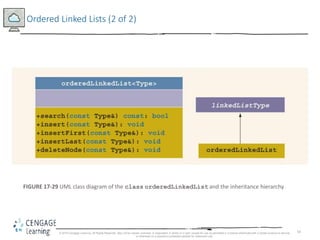
• orderedLinkedList: derived from class linkedListType
• Provides definitions of the abstract functions insertFirst, insertLast,
search, and deleteNode
• Assume that elements of an ordered linked list are arranged in ascending order
• Include the function insert to insert an element in an ordered list at its
proper place
© 2018 Cengage Learning. All Rights Reserved. May not be copied, scanned, or duplicated, in whole or in part, except for use as permitted in a license distributed with a certain product or service
or otherwise on a password-protected website for classroom use.
59
Ordered Linked Lists (2 of 2)
FIGURE 17-29 UML class diagram of the class orderedLinkedList and the inheritance hierarchy
© 2018 Cengage Learning. All Rights Reserved. May not be copied, scanned, or duplicated, in whole or in part, except for use as permitted in a license distributed with a certain product or service
or otherwise on a password-protected website for classroom use.
60
Ordered Linked Lists: Search the List
• Steps:
• Compare the search item with the current node in the list
- If info of current node is >= to search item, stop search
- Otherwise, make the next node the current node
• Repeat Step 1 until an item in the list >= to search item is found, or no more data is
left in the list
© 2018 Cengage Learning. All Rights Reserved. May not be copied, scanned, or duplicated, in whole or in part, except for use as permitted in a license distributed with a certain product or service
or otherwise on a password-protected website for classroom use.
61
Insert a Node (1 of 5)
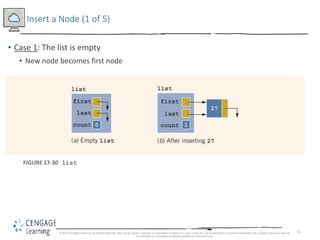
• Case 1: The list is empty
• New node becomes first node
FIGURE 17-30 list
© 2018 Cengage Learning. All Rights Reserved. May not be copied, scanned, or duplicated, in whole or in part, except for use as permitted in a license distributed with a certain product or service
or otherwise on a password-protected website for classroom use.
62
Insert a Node (2 of 5)
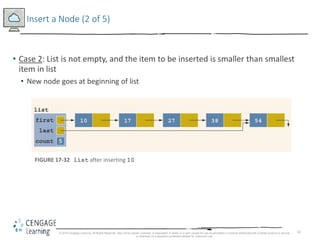
• Case 2: List is not empty, and the item to be inserted is smaller than smallest
item in list
• New node goes at beginning of list
FIGURE 17-32 list after inserting 10
© 2018 Cengage Learning. All Rights Reserved. May not be copied, scanned, or duplicated, in whole or in part, except for use as permitted in a license distributed with a certain product or service
or otherwise on a password-protected website for classroom use.
63
Insert a Node (3 of 5)
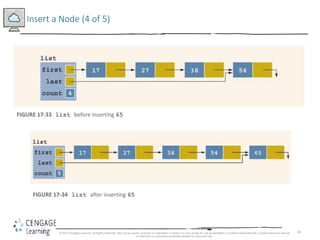
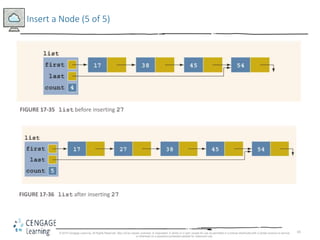
• Case 3: New item to be inserted somewhere in list
• Case 3a: New item is larger than largest item
- New item is inserted at end of list
• Case 3b: Item to be inserted goes somewhere in the middle of the list
© 2018 Cengage Learning. All Rights Reserved. May not be copied, scanned, or duplicated, in whole or in part, except for use as permitted in a license distributed with a certain product or service
or otherwise on a password-protected website for classroom use.
64
Insert a Node (4 of 5)
FIGURE 17-33 list before inserting 65
FIGURE 17-34 list after inserting 65
© 2018 Cengage Learning. All Rights Reserved. May not be copied, scanned, or duplicated, in whole or in part, except for use as permitted in a license distributed with a certain product or service
or otherwise on a password-protected website for classroom use.
65
Insert a Node (5 of 5)
FIGURE 17-35 list before inserting 27
FIGURE 17-36 list after inserting 27
© 2018 Cengage Learning. All Rights Reserved. May not be copied, scanned, or duplicated, in whole or in part, except for use as permitted in a license distributed with a certain product or service
or otherwise on a password-protected website for classroom use.
66
Insert First and Insert Last
• Functions insertFirst and insertLast
• Must insert new item at the proper place to ensure resulting list is still sorted
• These functions are not actually used
• Definitions must be provided because they are declared as abstract in the parent class
• Function insertNode is used to insert at the proper place
© 2018 Cengage Learning. All Rights Reserved. May not be copied, scanned, or duplicated, in whole or in part, except for use as permitted in a license distributed with a certain product or service
or otherwise on a password-protected website for classroom use.
67
Delete a Node
• Case 1: List is initially empty  error
• Case 2: Item to be deleted is first node in list
• Adjust the head (first) pointer
• Case 3: Item is somewhere in the list
• current points to node with item to delete
• trailCurrent points to node previous to the one pointed to by current
• Case 4: Item is not in the list error
© 2018 Cengage Learning. All Rights Reserved. May not be copied, scanned, or duplicated, in whole or in part, except for use as permitted in a license distributed with a certain product or service
or otherwise on a password-protected website for classroom use.
68
Print a Linked List in Reverse Order (Recursion Revisited)
• Links are only in forward direction
• Cannot traverse list backward using links
• Can use recursion
• List is printed only if pointer to the list is not nullptr
• Recursive call is on the tail of the list
• When tail is empty, recursion stops
© 2018 Cengage Learning. All Rights Reserved. May not be copied, scanned, or duplicated, in whole or in part, except for use as permitted in a license distributed with a certain product or service
or otherwise on a password-protected website for classroom use.
69
Doubly Linked Lists (1 of 2)
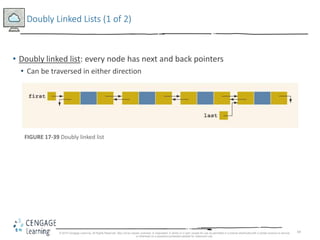
• Doubly linked list: every node has next and back pointers
• Can be traversed in either direction
FIGURE 17-39 Doubly linked list
© 2018 Cengage Learning. All Rights Reserved. May not be copied, scanned, or duplicated, in whole or in part, except for use as permitted in a license distributed with a certain product or service
or otherwise on a password-protected website for classroom use.
70
Doubly Linked Lists (2 of 2)
• Operations:
• Initialize or destroy the list
• Determine whether the list is empty
• Search the list for a given item
• Retrieve the first or last element of the list
• Insert or delete an item
• Find the length of the list
• Print the list
• Make a copy of the list
© 2018 Cengage Learning. All Rights Reserved. May not be copied, scanned, or duplicated, in whole or in part, except for use as permitted in a license distributed with a certain product or service
or otherwise on a password-protected website for classroom use.
71
Doubly Linked List: Default Constructor
• Default constructor:
• Initializes doubly-linked list to empty state
• Sets first and last to nullptr, and count to 0
• isEmptyList:
• Returns true if list is empty, false otherwise
© 2018 Cengage Learning. All Rights Reserved. May not be copied, scanned, or duplicated, in whole or in part, except for use as permitted in a license distributed with a certain product or service
or otherwise on a password-protected website for classroom use.
72
Destroy the List & Initialize the List
• Function destroy:
• Deletes all the nodes in the list, leaving list in an empty state
• Sets count to 0
• Function initializeList:
• Reinitializes doubly linked list to an empty state
• Uses the destroy operation
© 2018 Cengage Learning. All Rights Reserved. May not be copied, scanned, or duplicated, in whole or in part, except for use as permitted in a license distributed with a certain product or service
or otherwise on a password-protected website for classroom use.
73
Length of the List & Print the List
• Function length
• Returns the count of nodes in the list
• Function print
• Traverses the list
• Outputs the info contained in each node
• Function reversePrint
• Traverses list in reverse order using back links
• Outputs the info in each node
© 2018 Cengage Learning. All Rights Reserved. May not be copied, scanned, or duplicated, in whole or in part, except for use as permitted in a license distributed with a certain product or service
or otherwise on a password-protected website for classroom use.
74
Doubly Linked List: Search the List
• Function search:
• Returns true if search item is found, otherwise false
• Algorithm is same as that for an ordered linked list
© 2018 Cengage Learning. All Rights Reserved. May not be copied, scanned, or duplicated, in whole or in part, except for use as permitted in a license distributed with a certain product or service
or otherwise on a password-protected website for classroom use.
75
First and Last Elements
• Function front
• Returns first element of the list
• Function back
• Returns last element of the list
• If list is empty, both functions will terminate the program
© 2018 Cengage Learning. All Rights Reserved. May not be copied, scanned, or duplicated, in whole or in part, except for use as permitted in a license distributed with a certain product or service
or otherwise on a password-protected website for classroom use.
76
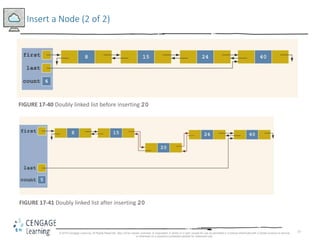
Insert a Node (1 of 2)
• Four insertion cases:
• Case 1: Insertion in an empty list
• Case 2: Insertion at beginning of a nonempty list
• Case 3: Insertion at end of a nonempty list
• Case 4: Insertion somewhere in nonempty list
• Cases 1 & 2 require update to pointer first
• Cases 3 & 4 are similar:
• After inserting item, increment count by 1
© 2018 Cengage Learning. All Rights Reserved. May not be copied, scanned, or duplicated, in whole or in part, except for use as permitted in a license distributed with a certain product or service
or otherwise on a password-protected website for classroom use.
77
Insert a Node (2 of 2)
FIGURE 17-40 Doubly linked list before inserting 20
FIGURE 17-41 Doubly linked list after inserting 20
© 2018 Cengage Learning. All Rights Reserved. May not be copied, scanned, or duplicated, in whole or in part, except for use as permitted in a license distributed with a certain product or service
or otherwise on a password-protected website for classroom use.
78
Delete a Node (1 of 3)
•Case 1: The list is empty
•Case 2: The item to be deleted is first node in list
• Must update the pointer first
•Case 3: Item to be deleted is somewhere in the list
•Case 4: Item to be deleted is not in the list
•After deleting a node, count is decremented by 1
© 2018 Cengage Learning. All Rights Reserved. May not be copied, scanned, or duplicated, in whole or in part, except for use as permitted in a license distributed with a certain product or service
or otherwise on a password-protected website for classroom use.
79
Delete a Node (2 of 3)
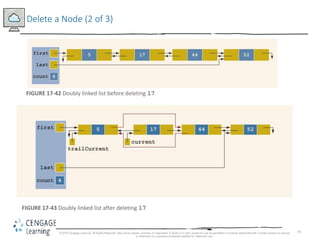
FIGURE 17-42 Doubly linked list before deleting 17
FIGURE 17-43 Doubly linked list after deleting 17
© 2018 Cengage Learning. All Rights Reserved. May not be copied, scanned, or duplicated, in whole or in part, except for use as permitted in a license distributed with a certain product or service
or otherwise on a password-protected website for classroom use.
80
Delete a Node (3 of 3)
FIGURE 17-44 List after deleting the node with info 17
© 2018 Cengage Learning. All Rights Reserved. May not be copied, scanned, or duplicated, in whole or in part, except for use as permitted in a license distributed with a certain product or service
or otherwise on a password-protected website for classroom use.
81
Circular Linked Lists (1 of 2)
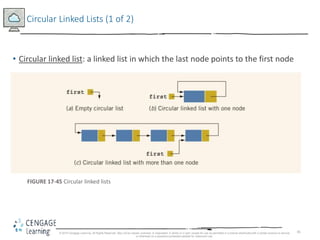
• Circular linked list: a linked list in which the last node points to the first node
FIGURE 17-45 Circular linked lists
© 2018 Cengage Learning. All Rights Reserved. May not be copied, scanned, or duplicated, in whole or in part, except for use as permitted in a license distributed with a certain product or service
or otherwise on a password-protected website for classroom use.
82
Circular Linked Lists (2 of 2)
• Operations on a circular list:
• Initialize the list (to an empty state)
• Determine if the list is empty
• Destroy the list
• Print the list
• Find the length of the list
• Search the list for a given item
• Insert or delete an item
• Copy the list
© 2018 Cengage Learning. All Rights Reserved. May not be copied, scanned, or duplicated, in whole or in part, except for use as permitted in a license distributed with a certain product or service
or otherwise on a password-protected website for classroom use.
83
Summary (1 of 3)
• A linked list is a list of items (nodes)
• Order of the nodes is determined by the address (link) stored in each node
• Pointer to a linked list is called head or first
• A linked list is a dynamic data structure
• The list length is the number of nodes
© 2018 Cengage Learning. All Rights Reserved. May not be copied, scanned, or duplicated, in whole or in part, except for use as permitted in a license distributed with a certain product or service
or otherwise on a password-protected website for classroom use.
84
Summary (2 of 3)
• Insertion and deletion does not require data movement
• Only the pointers are adjusted
• A (single) linked list is traversed in only one direction
• Search of a linked list is sequential
• The head pointer is fixed on first node
• Traverse: use a pointer other than head
© 2018 Cengage Learning. All Rights Reserved. May not be copied, scanned, or duplicated, in whole or in part, except for use as permitted in a license distributed with a certain product or service
or otherwise on a password-protected website for classroom use.
85
Summary (3 of 3)
• Doubly linked list
• Every node has two links: next and previous
• Can be traversed in either direction
• Item insertion and deletion require the adjustment of two pointers in a node
• A linked list in which the last node points to the first node is called a circular
linked list
© 2018 Cengage Learning. All Rights Reserved. May not be copied, scanned, or duplicated, in whole or in part, except for use as permitted in a license distributed with a certain product or service
or otherwise on a password-protected website for classroom use.

9781337102087 ppt ch17

  • 1.
    1 C++ Programming: FromProblem Analysis to Program Design, Eighth Edition Chapter 17 Linked Lists
  • 2.
    2 Objectives (1 of2) • In this chapter, you will: • Learn about linked lists • Become familiar with the basic properties of linked lists • Explore the insertion and deletion operations on linked lists • Discover how to build and manipulate a linked list • Learn how to implement linked lists as ADTs © 2018 Cengage Learning. All Rights Reserved. May not be copied, scanned, or duplicated, in whole or in part, except for use as permitted in a license distributed with a certain product or service or otherwise on a password-protected website for classroom use.
  • 3.
    3 Objectives (2 of2) • Learn how to create linked list iterators • Learn how to implement the basic operations on a linked list • Learn how to create unordered linked lists • Learn how to create ordered linked lists • Learn how to construct a • Become familiar with circular linked lists doubly linked list © 2018 Cengage Learning. All Rights Reserved. May not be copied, scanned, or duplicated, in whole or in part, except for use as permitted in a license distributed with a certain product or service or otherwise on a password-protected website for classroom use.
  • 4.
    4 Introduction • Data canbe organized and processed sequentially using an array, called a sequential list • Problems with an array • Array size is fixed • Unsorted array: searching for an item is slow • Sorted array: insertion and deletion is slow because it requires data movement © 2018 Cengage Learning. All Rights Reserved. May not be copied, scanned, or duplicated, in whole or in part, except for use as permitted in a license distributed with a certain product or service or otherwise on a password-protected website for classroom use.
  • 5.
    5 Linked Lists (1of 3) • Linked list: a collection of items (nodes) containing two components: • Data • Address (link) of the next node in the list FIGURE 17-1 Structure of a node © 2018 Cengage Learning. All Rights Reserved. May not be copied, scanned, or duplicated, in whole or in part, except for use as permitted in a license distributed with a certain product or service or otherwise on a password-protected website for classroom use.
  • 6.
    6 Linked Lists (2of 3) FIGURE 17-2 Linked list © 2018 Cengage Learning. All Rights Reserved. May not be copied, scanned, or duplicated, in whole or in part, except for use as permitted in a license distributed with a certain product or service or otherwise on a password-protected website for classroom use.
  • 7.
    7 Linked Lists (3of 3) • A node is declared as a class or struct • Data type of a node depends on the specific application • Link component of each node is a pointer • Variable declaration: © 2018 Cengage Learning. All Rights Reserved. May not be copied, scanned, or duplicated, in whole or in part, except for use as permitted in a license distributed with a certain product or service or otherwise on a password-protected website for classroom use.
  • 8.
    8 Linked Lists: SomeProperties (1 of 3) • Example: linked list with four nodes (Figure 17-4) © 2018 Cengage Learning. All Rights Reserved. May not be copied, scanned, or duplicated, in whole or in part, except for use as permitted in a license distributed with a certain product or service or otherwise on a password-protected website for classroom use.
  • 9.
    9 Linked Lists: SomeProperties (2 of 3) • current = head; - Copies value of head into current FIGURE 17-5 Linked list after the statement current = head; executes © 2018 Cengage Learning. All Rights Reserved. May not be copied, scanned, or duplicated, in whole or in part, except for use as permitted in a license distributed with a certain product or service or otherwise on a password-protected website for classroom use.
  • 10.
    10 Linked Lists: SomeProperties (3 of 3) current = current->link; FIGURE 17-6 List after the statement current = current->link; executes © 2018 Cengage Learning. All Rights Reserved. May not be copied, scanned, or duplicated, in whole or in part, except for use as permitted in a license distributed with a certain product or service or otherwise on a password-protected website for classroom use.
  • 11.
    11 Traversing a LinkedList (1 of 2) • Basic operations of a linked list: • Search for an item in the list • Insert an item in the list • Delete an item from the list • Traversal: given a pointer to the first node of the list, step through the nodes of the list © 2018 Cengage Learning. All Rights Reserved. May not be copied, scanned, or duplicated, in whole or in part, except for use as permitted in a license distributed with a certain product or service or otherwise on a password-protected website for classroom use.
  • 12.
    12 Traversing a LinkedList (2 of 2) • To traverse a linked list: • Example: © 2018 Cengage Learning. All Rights Reserved. May not be copied, scanned, or duplicated, in whole or in part, except for use as permitted in a license distributed with a certain product or service or otherwise on a password-protected website for classroom use. current = head; while (current != nullptr) { //Process the current node current = current->link; } current = head; while (current != nullptr) { cout << current->info << " "; current = current->link; }
  • 13.
    13 Item Insertion andDeletion • Definition of a node: • Variable declaration: © 2018 Cengage Learning. All Rights Reserved. May not be copied, scanned, or duplicated, in whole or in part, except for use as permitted in a license distributed with a certain product or service or otherwise on a password-protected website for classroom use.
  • 14.
    14 Insertion (1 of4) • To insert a new node with info 50 after p in this list: FIGURE 17-7 Linked list before item insertion © 2018 Cengage Learning. All Rights Reserved. May not be copied, scanned, or duplicated, in whole or in part, except for use as permitted in a license distributed with a certain product or service or otherwise on a password-protected website for classroom use.
  • 15.
    15 Insertion (2 of4) TABLE 17-1 Inserting a Node in a Linked List © 2018 Cengage Learning. All Rights Reserved. May not be copied, scanned, or duplicated, in whole or in part, except for use as permitted in a license distributed with a certain product or service or otherwise on a password-protected website for classroom use.
  • 16.
    16 Insertion (3 of4) • Can use two pointers to simplify the insertion code somewhat: FIGURE 17-9 List with pointers p and q • To insert newNode between p and q: © 2018 Cengage Learning. All Rights Reserved. May not be copied, scanned, or duplicated, in whole or in part, except for use as permitted in a license distributed with a certain product or service or otherwise on a password-protected website for classroom use.
  • 17.
    17 Insertion (4 of4) TABLE 17-2 Inserting a Node in a Linked List Using Two Pointers © 2018 Cengage Learning. All Rights Reserved. May not be copied, scanned, or duplicated, in whole or in part, except for use as permitted in a license distributed with a certain product or service or otherwise on a password-protected website for classroom use.
  • 18.
    18 Deletion (1 of3) • Node with info 34 is to be deleted: FIGURE 17-10 Node to be deleted is with info 34 FIGURE 17-11 List after the statement newNode->link = q; executes © 2018 Cengage Learning. All Rights Reserved. May not be copied, scanned, or duplicated, in whole or in part, except for use as permitted in a license distributed with a certain product or service or otherwise on a password-protected website for classroom use.
  • 19.
    19 Deletion (2 of3) • Node with info 34 is removed from the list, but memory is still occupied • Node is dangling • Must keep a pointer to the node to be able to deallocate its memory © 2018 Cengage Learning. All Rights Reserved. May not be copied, scanned, or duplicated, in whole or in part, except for use as permitted in a license distributed with a certain product or service or otherwise on a password-protected website for classroom use.
  • 20.
    20 Deletion (3 of3) TABLE 17-3 Deleting a Node from a Linked List © 2018 Cengage Learning. All Rights Reserved. May not be copied, scanned, or duplicated, in whole or in part, except for use as permitted in a license distributed with a certain product or service or otherwise on a password-protected website for classroom use.
  • 21.
    21 Building a LinkedList • If data is unsorted, the list will be unsorted • Can build a linked list forward or backward • Forward: a new node is always inserted at the end of the linked list • Backward: a new node is always inserted at the beginning of the list © 2018 Cengage Learning. All Rights Reserved. May not be copied, scanned, or duplicated, in whole or in part, except for use as permitted in a license distributed with a certain product or service or otherwise on a password-protected website for classroom use.
  • 22.
    22 Building a LinkedList Forward (1 of 4) • Need three pointers to build the list: • One to point to the first node in the list, which cannot be moved • One to point to the last node in the list • One to create the new node • Example: • Data: 2 15 8 24 34 © 2018 Cengage Learning. All Rights Reserved. May not be copied, scanned, or duplicated, in whole or in part, except for use as permitted in a license distributed with a certain product or service or otherwise on a password-protected website for classroom use.
  • 23.
    23 Building a LinkedList Forward (2 of 4) FIGURE 17-12 Empty list FIGURE 17-14 List after inserting newNode in it © 2018 Cengage Learning. All Rights Reserved. May not be copied, scanned, or duplicated, in whole or in part, except for use as permitted in a license distributed with a certain product or service or otherwise on a password-protected website for classroom use.
  • 24.
    24 Building a LinkedList Forward (3 of 4) FIGURE 17-15 List and newNode with info 15 FIGURE 17-16 List after inserting newNode at the end © 2018 Cengage Learning. All Rights Reserved. May not be copied, scanned, or duplicated, in whole or in part, except for use as permitted in a license distributed with a certain product or service or otherwise on a password-protected website for classroom use.
  • 25.
    25 Building a LinkedList Forward (4 of 4) • Now repeat this process three more times: FIGURE 17-17 List after inserting 8, 24, and 34 © 2018 Cengage Learning. All Rights Reserved. May not be copied, scanned, or duplicated, in whole or in part, except for use as permitted in a license distributed with a certain product or service or otherwise on a password-protected website for classroom use.
  • 26.
    26 Building a LinkedList Backward • Algorithm to build a linked list backward: • Initialize first to nullptr • For each item in the list - Create the new node, newNode - Store the data in newNode - Insert newNode before first - Update the value of the pointer first © 2018 Cengage Learning. All Rights Reserved. May not be copied, scanned, or duplicated, in whole or in part, except for use as permitted in a license distributed with a certain product or service or otherwise on a password-protected website for classroom use.
  • 27.
    27 Linked List asan ADT (1 of 4) • Basic operations on linked lists: • Initialize the list • Determine whether the list is empty • Print the list • Find the length of the list • Destroy the list • Retrieve info contained in the first or last node • Search the list for a given item © 2018 Cengage Learning. All Rights Reserved. May not be copied, scanned, or duplicated, in whole or in part, except for use as permitted in a license distributed with a certain product or service or otherwise on a password-protected website for classroom use.
  • 28.
    28 Linked List asan ADT (2 of 4) • Basic operations on linked lists (cont’d.): • Insert an item in the list • Delete an item from the list • Make a copy of the linked list © 2018 Cengage Learning. All Rights Reserved. May not be copied, scanned, or duplicated, in whole or in part, except for use as permitted in a license distributed with a certain product or service or otherwise on a password-protected website for classroom use.
  • 29.
    29 Linked List asan ADT (3 of 4) • Two general types of linked lists: • Sorted and unsorted lists • Algorithms to implement the operations search, insert, and remove differ slightly for sorted and unsorted lists • abstract class linkedListType will implement basic linked list operations • Derived classes: unorderedLinkedList and orderedLinkedList © 2018 Cengage Learning. All Rights Reserved. May not be copied, scanned, or duplicated, in whole or in part, except for use as permitted in a license distributed with a certain product or service or otherwise on a password-protected website for classroom use.
  • 30.
    30 Linked List asan ADT (4 of 4) • For an unordered linked list, can insert a new item at either the end or the beginning • buildListForward inserts item at the end • buildListBackward inserts item at beginning • Will need two functions: • insertFirst and insertLast • Will use two pointers in the list: • first and last © 2018 Cengage Learning. All Rights Reserved. May not be copied, scanned, or duplicated, in whole or in part, except for use as permitted in a license distributed with a certain product or service or otherwise on a password-protected website for classroom use.
  • 31.
    31 Structure of LinkedList Nodes • Each node has two member variables • We implement the node of a linked list as a struct • Definition of the struct nodeType: © 2018 Cengage Learning. All Rights Reserved. May not be copied, scanned, or duplicated, in whole or in part, except for use as permitted in a license distributed with a certain product or service or otherwise on a password-protected website for classroom use.
  • 32.
    32 Member Variables ofthe class linkedListType • linkedListType has three member variables: • Two pointers: first and last • count: the number of nodes in the list © 2018 Cengage Learning. All Rights Reserved. May not be copied, scanned, or duplicated, in whole or in part, except for use as permitted in a license distributed with a certain product or service or otherwise on a password-protected website for classroom use.
  • 33.
    33 Linked List Iterators(1 of 4) • To process each node of the list • List must be traversed, starting at first node • Iterator: object that produces each element of a container, one element at a time • The two most common iterator operations: ++ (the increment operator) * (the dereferencing operator) © 2018 Cengage Learning. All Rights Reserved. May not be copied, scanned, or duplicated, in whole or in part, except for use as permitted in a license distributed with a certain product or service or otherwise on a password-protected website for classroom use.
  • 34.
    34 Linked List Iterators(2 of 4) • An iterator is an object • Need to define a class (linkedListIterator) to create iterators to objects of the class linkedListType • Will have one member variable to refer to the current node © 2018 Cengage Learning. All Rights Reserved. May not be copied, scanned, or duplicated, in whole or in part, except for use as permitted in a license distributed with a certain product or service or otherwise on a password-protected website for classroom use.
  • 35.
    35 Linked List Iterators(3 of 4) FIGURE 17-19 UML class diagram of the class linkedListIterator © 2018 Cengage Learning. All Rights Reserved. May not be copied, scanned, or duplicated, in whole or in part, except for use as permitted in a license distributed with a certain product or service or otherwise on a password-protected website for classroom use.
  • 36.
    36 Linked List Iterators(4 of 4) FIGURE 17-20 UML class diagram of the class linkedListType © 2018 Cengage Learning. All Rights Reserved. May not be copied, scanned, or duplicated, in whole or in part, except for use as permitted in a license distributed with a certain product or service or otherwise on a password-protected website for classroom use.
  • 37.
    37 Default Constructor • Defaultconstructor: • Initializes the list to an empty state © 2018 Cengage Learning. All Rights Reserved. May not be copied, scanned, or duplicated, in whole or in part, except for use as permitted in a license distributed with a certain product or service or otherwise on a password-protected website for classroom use.
  • 38.
    38 Destroy the List •Function destroyList: • Traverses the list to deallocate memory occupied by each node • Once list is destroyed, sets pointers first and last to nullptr and count to 0 © 2018 Cengage Learning. All Rights Reserved. May not be copied, scanned, or duplicated, in whole or in part, except for use as permitted in a license distributed with a certain product or service or otherwise on a password-protected website for classroom use.
  • 39.
    39 Initialize the List •Function initializeList: • Initializes list to an empty state • Since constructor already did this, initializeList is used to reinitialize an existing list © 2018 Cengage Learning. All Rights Reserved. May not be copied, scanned, or duplicated, in whole or in part, except for use as permitted in a license distributed with a certain product or service or otherwise on a password-protected website for classroom use.
  • 40.
    40 Print the List •Function print: • Prints data contained in each node • Traverses the list using another pointer © 2018 Cengage Learning. All Rights Reserved. May not be copied, scanned, or duplicated, in whole or in part, except for use as permitted in a license distributed with a certain product or service or otherwise on a password-protected website for classroom use.
  • 41.
    41 Length of aList • Function length: • Returns the count of nodes in the list • Uses the count variable © 2018 Cengage Learning. All Rights Reserved. May not be copied, scanned, or duplicated, in whole or in part, except for use as permitted in a license distributed with a certain product or service or otherwise on a password-protected website for classroom use.
  • 42.
    42 Retrieve the Dataof the First or Last Node • Function front: • Returns the info contained in the first node • If list is empty, program will be terminated • Function back: • Returns the info contained in the last node • If list is empty, program will be terminated © 2018 Cengage Learning. All Rights Reserved. May not be copied, scanned, or duplicated, in whole or in part, except for use as permitted in a license distributed with a certain product or service or otherwise on a password-protected website for classroom use.
  • 43.
    43 Begin and End •Function begin: • Returns an iterator to the first node in the list • Function end: • Returns an iterator to one past the last node in the list © 2018 Cengage Learning. All Rights Reserved. May not be copied, scanned, or duplicated, in whole or in part, except for use as permitted in a license distributed with a certain product or service or otherwise on a password-protected website for classroom use.
  • 44.
    44 Copy the List •Function copyList: • Makes an identical copy of a linked list • Steps: • Create a node called newNode • Copy the info of the original node into newNode • Insert newNode at the end of the list being created © 2018 Cengage Learning. All Rights Reserved. May not be copied, scanned, or duplicated, in whole or in part, except for use as permitted in a license distributed with a certain product or service or otherwise on a password-protected website for classroom use.
  • 45.
    45 Destructor & CopyConstructor • Destructor: • Deallocates memory occupied by nodes when the class object goes out of scope • Calls destroyList to traverse the list and delete each node • Copy constructor: • Makes an identical copy of the linked list • Calls function copyList © 2018 Cengage Learning. All Rights Reserved. May not be copied, scanned, or duplicated, in whole or in part, except for use as permitted in a license distributed with a certain product or service or otherwise on a password-protected website for classroom use.
  • 46.
    46 Overloading the AssignmentOperator • Definition of the function to overload the assignment operator • Similar to the copy constructor © 2018 Cengage Learning. All Rights Reserved. May not be copied, scanned, or duplicated, in whole or in part, except for use as permitted in a license distributed with a certain product or service or otherwise on a password-protected website for classroom use.
  • 47.
    47 Unordered Linked Lists(1 of 2) • class unorderedLinkedList • Derived from the abstract class linkedListType • Implements the operations search, insertFirst, insertLast, and deleteNode © 2018 Cengage Learning. All Rights Reserved. May not be copied, scanned, or duplicated, in whole or in part, except for use as permitted in a license distributed with a certain product or service or otherwise on a password-protected website for classroom use.
  • 48.
    48 Unordered Linked Lists(2 of 2) FIGURE 17-19 UML class diagram of the class linkedListIterator © 2018 Cengage Learning. All Rights Reserved. May not be copied, scanned, or duplicated, in whole or in part, except for use as permitted in a license distributed with a certain product or service or otherwise on a password-protected website for classroom use.
  • 49.
    49 Unordered Linked List:Search the List • Function search: • Searches the list for a given item • Steps: • Compare search item with current node in the list - If info of current node is the same as search item, stop the search - Otherwise, make the next node the current node • Repeat Step 1 until item is found or until no more data is left in the list © 2018 Cengage Learning. All Rights Reserved. May not be copied, scanned, or duplicated, in whole or in part, except for use as permitted in a license distributed with a certain product or service or otherwise on a password-protected website for classroom use.
  • 50.
    50 Insert the FirstNode • Function insertFirst: • Inserts a new item at the beginning of the list • Steps: • Create a new node • Store the new item in the new node • Insert the node before first • Increment count by 1 © 2018 Cengage Learning. All Rights Reserved. May not be copied, scanned, or duplicated, in whole or in part, except for use as permitted in a license distributed with a certain product or service or otherwise on a password-protected website for classroom use.
  • 51.
    51 Insert the LastNode • Function insertLast: • Inserts a new node after last • Similar to insertFirst function © 2018 Cengage Learning. All Rights Reserved. May not be copied, scanned, or duplicated, in whole or in part, except for use as permitted in a license distributed with a certain product or service or otherwise on a password-protected website for classroom use.
  • 52.
    52 Delete a Node(1 of 6) • Function deleteNode: • Deletes a node with given info from the list • Several possible cases to manage • Case 1: List is empty • If the list is empty, output an error message • Case 2: Node to be deleted is the first node • Adjust the pointer first and count • If no other nodes, set first and last to nullptr © 2018 Cengage Learning. All Rights Reserved. May not be copied, scanned, or duplicated, in whole or in part, except for use as permitted in a license distributed with a certain product or service or otherwise on a password-protected website for classroom use.
  • 53.
    53 Delete a Node(2 of 6) FIGURE 17-23 list with more than one node FIGURE 17-24 list after deleting node with info 28 © 2018 Cengage Learning. All Rights Reserved. May not be copied, scanned, or duplicated, in whole or in part, except for use as permitted in a license distributed with a certain product or service or otherwise on a password-protected website for classroom use.
  • 54.
    54 Delete a Node(3 of 6) • Case 3: Node to be deleted is not the first one – Case 3a: Node to be deleted is not last one –Update link field of the previous node – Case 3b: Node to be deleted is the last node – Update link field of the previous node to nullptr – Update last pointer to point to previous node © 2018 Cengage Learning. All Rights Reserved. May not be copied, scanned, or duplicated, in whole or in part, except for use as permitted in a license distributed with a certain product or service or otherwise on a password-protected website for classroom use.
  • 55.
    55 Delete a Node(4 of 6) FIGURE 17-25 list before deleting 37 FIGURE 17-26 list after deleting 37 © 2018 Cengage Learning. All Rights Reserved. May not be copied, scanned, or duplicated, in whole or in part, except for use as permitted in a license distributed with a certain product or service or otherwise on a password-protected website for classroom use.
  • 56.
    56 Delete a Node(5 of 6) FIGURE 17-27 list before deleting 54 FIGURE 17-28 list after deleting 54 © 2018 Cengage Learning. All Rights Reserved. May not be copied, scanned, or duplicated, in whole or in part, except for use as permitted in a license distributed with a certain product or service or otherwise on a password-protected website for classroom use.
  • 57.
    57 Delete a Node(6 of 6) • Case 4: Node to be deleted is not in the list • List requires no adjustment • Simply output an error message © 2018 Cengage Learning. All Rights Reserved. May not be copied, scanned, or duplicated, in whole or in part, except for use as permitted in a license distributed with a certain product or service or otherwise on a password-protected website for classroom use.
  • 58.
    58 Ordered Linked Lists(1 of 2) • orderedLinkedList: derived from class linkedListType • Provides definitions of the abstract functions insertFirst, insertLast, search, and deleteNode • Assume that elements of an ordered linked list are arranged in ascending order • Include the function insert to insert an element in an ordered list at its proper place © 2018 Cengage Learning. All Rights Reserved. May not be copied, scanned, or duplicated, in whole or in part, except for use as permitted in a license distributed with a certain product or service or otherwise on a password-protected website for classroom use.
  • 59.
    59 Ordered Linked Lists(2 of 2) FIGURE 17-29 UML class diagram of the class orderedLinkedList and the inheritance hierarchy © 2018 Cengage Learning. All Rights Reserved. May not be copied, scanned, or duplicated, in whole or in part, except for use as permitted in a license distributed with a certain product or service or otherwise on a password-protected website for classroom use.
  • 60.
    60 Ordered Linked Lists:Search the List • Steps: • Compare the search item with the current node in the list - If info of current node is >= to search item, stop search - Otherwise, make the next node the current node • Repeat Step 1 until an item in the list >= to search item is found, or no more data is left in the list © 2018 Cengage Learning. All Rights Reserved. May not be copied, scanned, or duplicated, in whole or in part, except for use as permitted in a license distributed with a certain product or service or otherwise on a password-protected website for classroom use.
  • 61.
    61 Insert a Node(1 of 5) • Case 1: The list is empty • New node becomes first node FIGURE 17-30 list © 2018 Cengage Learning. All Rights Reserved. May not be copied, scanned, or duplicated, in whole or in part, except for use as permitted in a license distributed with a certain product or service or otherwise on a password-protected website for classroom use.
  • 62.
    62 Insert a Node(2 of 5) • Case 2: List is not empty, and the item to be inserted is smaller than smallest item in list • New node goes at beginning of list FIGURE 17-32 list after inserting 10 © 2018 Cengage Learning. All Rights Reserved. May not be copied, scanned, or duplicated, in whole or in part, except for use as permitted in a license distributed with a certain product or service or otherwise on a password-protected website for classroom use.
  • 63.
    63 Insert a Node(3 of 5) • Case 3: New item to be inserted somewhere in list • Case 3a: New item is larger than largest item - New item is inserted at end of list • Case 3b: Item to be inserted goes somewhere in the middle of the list © 2018 Cengage Learning. All Rights Reserved. May not be copied, scanned, or duplicated, in whole or in part, except for use as permitted in a license distributed with a certain product or service or otherwise on a password-protected website for classroom use.
  • 64.
    64 Insert a Node(4 of 5) FIGURE 17-33 list before inserting 65 FIGURE 17-34 list after inserting 65 © 2018 Cengage Learning. All Rights Reserved. May not be copied, scanned, or duplicated, in whole or in part, except for use as permitted in a license distributed with a certain product or service or otherwise on a password-protected website for classroom use.
  • 65.
    65 Insert a Node(5 of 5) FIGURE 17-35 list before inserting 27 FIGURE 17-36 list after inserting 27 © 2018 Cengage Learning. All Rights Reserved. May not be copied, scanned, or duplicated, in whole or in part, except for use as permitted in a license distributed with a certain product or service or otherwise on a password-protected website for classroom use.
  • 66.
    66 Insert First andInsert Last • Functions insertFirst and insertLast • Must insert new item at the proper place to ensure resulting list is still sorted • These functions are not actually used • Definitions must be provided because they are declared as abstract in the parent class • Function insertNode is used to insert at the proper place © 2018 Cengage Learning. All Rights Reserved. May not be copied, scanned, or duplicated, in whole or in part, except for use as permitted in a license distributed with a certain product or service or otherwise on a password-protected website for classroom use.
  • 67.
    67 Delete a Node •Case 1: List is initially empty  error • Case 2: Item to be deleted is first node in list • Adjust the head (first) pointer • Case 3: Item is somewhere in the list • current points to node with item to delete • trailCurrent points to node previous to the one pointed to by current • Case 4: Item is not in the list error © 2018 Cengage Learning. All Rights Reserved. May not be copied, scanned, or duplicated, in whole or in part, except for use as permitted in a license distributed with a certain product or service or otherwise on a password-protected website for classroom use.
  • 68.
    68 Print a LinkedList in Reverse Order (Recursion Revisited) • Links are only in forward direction • Cannot traverse list backward using links • Can use recursion • List is printed only if pointer to the list is not nullptr • Recursive call is on the tail of the list • When tail is empty, recursion stops © 2018 Cengage Learning. All Rights Reserved. May not be copied, scanned, or duplicated, in whole or in part, except for use as permitted in a license distributed with a certain product or service or otherwise on a password-protected website for classroom use.
  • 69.
    69 Doubly Linked Lists(1 of 2) • Doubly linked list: every node has next and back pointers • Can be traversed in either direction FIGURE 17-39 Doubly linked list © 2018 Cengage Learning. All Rights Reserved. May not be copied, scanned, or duplicated, in whole or in part, except for use as permitted in a license distributed with a certain product or service or otherwise on a password-protected website for classroom use.
  • 70.
    70 Doubly Linked Lists(2 of 2) • Operations: • Initialize or destroy the list • Determine whether the list is empty • Search the list for a given item • Retrieve the first or last element of the list • Insert or delete an item • Find the length of the list • Print the list • Make a copy of the list © 2018 Cengage Learning. All Rights Reserved. May not be copied, scanned, or duplicated, in whole or in part, except for use as permitted in a license distributed with a certain product or service or otherwise on a password-protected website for classroom use.
  • 71.
    71 Doubly Linked List:Default Constructor • Default constructor: • Initializes doubly-linked list to empty state • Sets first and last to nullptr, and count to 0 • isEmptyList: • Returns true if list is empty, false otherwise © 2018 Cengage Learning. All Rights Reserved. May not be copied, scanned, or duplicated, in whole or in part, except for use as permitted in a license distributed with a certain product or service or otherwise on a password-protected website for classroom use.
  • 72.
    72 Destroy the List& Initialize the List • Function destroy: • Deletes all the nodes in the list, leaving list in an empty state • Sets count to 0 • Function initializeList: • Reinitializes doubly linked list to an empty state • Uses the destroy operation © 2018 Cengage Learning. All Rights Reserved. May not be copied, scanned, or duplicated, in whole or in part, except for use as permitted in a license distributed with a certain product or service or otherwise on a password-protected website for classroom use.
  • 73.
    73 Length of theList & Print the List • Function length • Returns the count of nodes in the list • Function print • Traverses the list • Outputs the info contained in each node • Function reversePrint • Traverses list in reverse order using back links • Outputs the info in each node © 2018 Cengage Learning. All Rights Reserved. May not be copied, scanned, or duplicated, in whole or in part, except for use as permitted in a license distributed with a certain product or service or otherwise on a password-protected website for classroom use.
  • 74.
    74 Doubly Linked List:Search the List • Function search: • Returns true if search item is found, otherwise false • Algorithm is same as that for an ordered linked list © 2018 Cengage Learning. All Rights Reserved. May not be copied, scanned, or duplicated, in whole or in part, except for use as permitted in a license distributed with a certain product or service or otherwise on a password-protected website for classroom use.
  • 75.
    75 First and LastElements • Function front • Returns first element of the list • Function back • Returns last element of the list • If list is empty, both functions will terminate the program © 2018 Cengage Learning. All Rights Reserved. May not be copied, scanned, or duplicated, in whole or in part, except for use as permitted in a license distributed with a certain product or service or otherwise on a password-protected website for classroom use.
  • 76.
    76 Insert a Node(1 of 2) • Four insertion cases: • Case 1: Insertion in an empty list • Case 2: Insertion at beginning of a nonempty list • Case 3: Insertion at end of a nonempty list • Case 4: Insertion somewhere in nonempty list • Cases 1 & 2 require update to pointer first • Cases 3 & 4 are similar: • After inserting item, increment count by 1 © 2018 Cengage Learning. All Rights Reserved. May not be copied, scanned, or duplicated, in whole or in part, except for use as permitted in a license distributed with a certain product or service or otherwise on a password-protected website for classroom use.
  • 77.
    77 Insert a Node(2 of 2) FIGURE 17-40 Doubly linked list before inserting 20 FIGURE 17-41 Doubly linked list after inserting 20 © 2018 Cengage Learning. All Rights Reserved. May not be copied, scanned, or duplicated, in whole or in part, except for use as permitted in a license distributed with a certain product or service or otherwise on a password-protected website for classroom use.
  • 78.
    78 Delete a Node(1 of 3) •Case 1: The list is empty •Case 2: The item to be deleted is first node in list • Must update the pointer first •Case 3: Item to be deleted is somewhere in the list •Case 4: Item to be deleted is not in the list •After deleting a node, count is decremented by 1 © 2018 Cengage Learning. All Rights Reserved. May not be copied, scanned, or duplicated, in whole or in part, except for use as permitted in a license distributed with a certain product or service or otherwise on a password-protected website for classroom use.
  • 79.
    79 Delete a Node(2 of 3) FIGURE 17-42 Doubly linked list before deleting 17 FIGURE 17-43 Doubly linked list after deleting 17 © 2018 Cengage Learning. All Rights Reserved. May not be copied, scanned, or duplicated, in whole or in part, except for use as permitted in a license distributed with a certain product or service or otherwise on a password-protected website for classroom use.
  • 80.
    80 Delete a Node(3 of 3) FIGURE 17-44 List after deleting the node with info 17 © 2018 Cengage Learning. All Rights Reserved. May not be copied, scanned, or duplicated, in whole or in part, except for use as permitted in a license distributed with a certain product or service or otherwise on a password-protected website for classroom use.
  • 81.
    81 Circular Linked Lists(1 of 2) • Circular linked list: a linked list in which the last node points to the first node FIGURE 17-45 Circular linked lists © 2018 Cengage Learning. All Rights Reserved. May not be copied, scanned, or duplicated, in whole or in part, except for use as permitted in a license distributed with a certain product or service or otherwise on a password-protected website for classroom use.
  • 82.
    82 Circular Linked Lists(2 of 2) • Operations on a circular list: • Initialize the list (to an empty state) • Determine if the list is empty • Destroy the list • Print the list • Find the length of the list • Search the list for a given item • Insert or delete an item • Copy the list © 2018 Cengage Learning. All Rights Reserved. May not be copied, scanned, or duplicated, in whole or in part, except for use as permitted in a license distributed with a certain product or service or otherwise on a password-protected website for classroom use.
  • 83.
    83 Summary (1 of3) • A linked list is a list of items (nodes) • Order of the nodes is determined by the address (link) stored in each node • Pointer to a linked list is called head or first • A linked list is a dynamic data structure • The list length is the number of nodes © 2018 Cengage Learning. All Rights Reserved. May not be copied, scanned, or duplicated, in whole or in part, except for use as permitted in a license distributed with a certain product or service or otherwise on a password-protected website for classroom use.
  • 84.
    84 Summary (2 of3) • Insertion and deletion does not require data movement • Only the pointers are adjusted • A (single) linked list is traversed in only one direction • Search of a linked list is sequential • The head pointer is fixed on first node • Traverse: use a pointer other than head © 2018 Cengage Learning. All Rights Reserved. May not be copied, scanned, or duplicated, in whole or in part, except for use as permitted in a license distributed with a certain product or service or otherwise on a password-protected website for classroom use.
  • 85.
    85 Summary (3 of3) • Doubly linked list • Every node has two links: next and previous • Can be traversed in either direction • Item insertion and deletion require the adjustment of two pointers in a node • A linked list in which the last node points to the first node is called a circular linked list © 2018 Cengage Learning. All Rights Reserved. May not be copied, scanned, or duplicated, in whole or in part, except for use as permitted in a license distributed with a certain product or service or otherwise on a password-protected website for classroom use.