JavaScript, Sixth Edition
Chapter 8
Manipulating Data in Strings and Arrays
JavaScript, Sixth Edition 2
Objectives
When you complete this chapter, you will be able to:
• Manipulate strings with properties and methods of
the String object
• Create regular expressions and use them to validate
user input
• Manipulate arrays with properties and methods of
the Array object
• Convert between strings and arrays, and between
strings and JSON
JavaScript, Sixth Edition 3
Manipulating Strings
• String
– Text contained within double or single quotation
marks
– Literal values or assigned to a variable
– Begin and end with same type of quotation mark
• Example:
document.getElementById("mainHeading").innerHTML = "24-Hour↵
Forecast";
var highSurfAdvisory = "Watch out for high waves and strong↵
rip currents.";
JavaScript, Sixth Edition 4
Manipulating Strings (cont’d.)
• Parsing
– Extracting characters or substrings from a larger
string
• Use String class to parse text strings in scripts
– Represents all literal strings and string variables in
JavaScript
– Contains methods for manipulating text strings
JavaScript, Sixth Edition 5
Formatting Strings
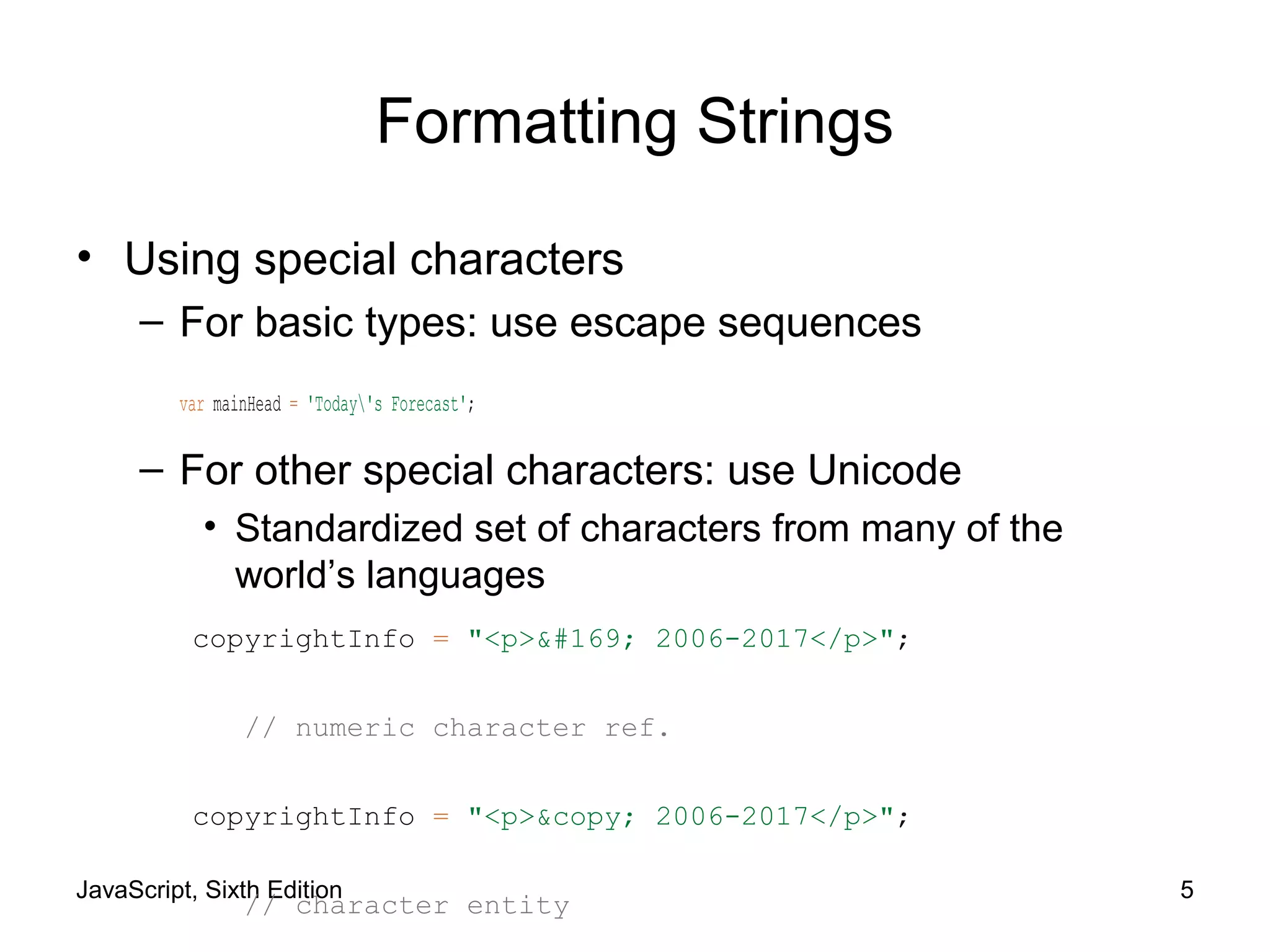
• Using special characters
– For basic types: use escape sequences
var mainHead = 'Today's Forecast';
– For other special characters: use Unicode
• Standardized set of characters from many of the
world’s languages
copyrightInfo = "<p>&#169; 2006-2017</p>";
// numeric character ref.
copyrightInfo = "<p>&copy; 2006-2017</p>";
// character entity
JavaScript, Sixth Edition 6
Formatting Strings (cont’d.)
• Using special characters (cont’d.)
– fromCharCode() method
• Constructs a text string from Unicode character codes
– Syntax:
String.fromCharCode(char1, char2, ...)
– Examples:
String.fromCharCode(74,97,118,97,83,99,114,105,112,116)
copyrightInfo = String.fromCharCode(169) + " 2017";
JavaScript, Sixth Edition 7
Formatting Strings (cont’d.)
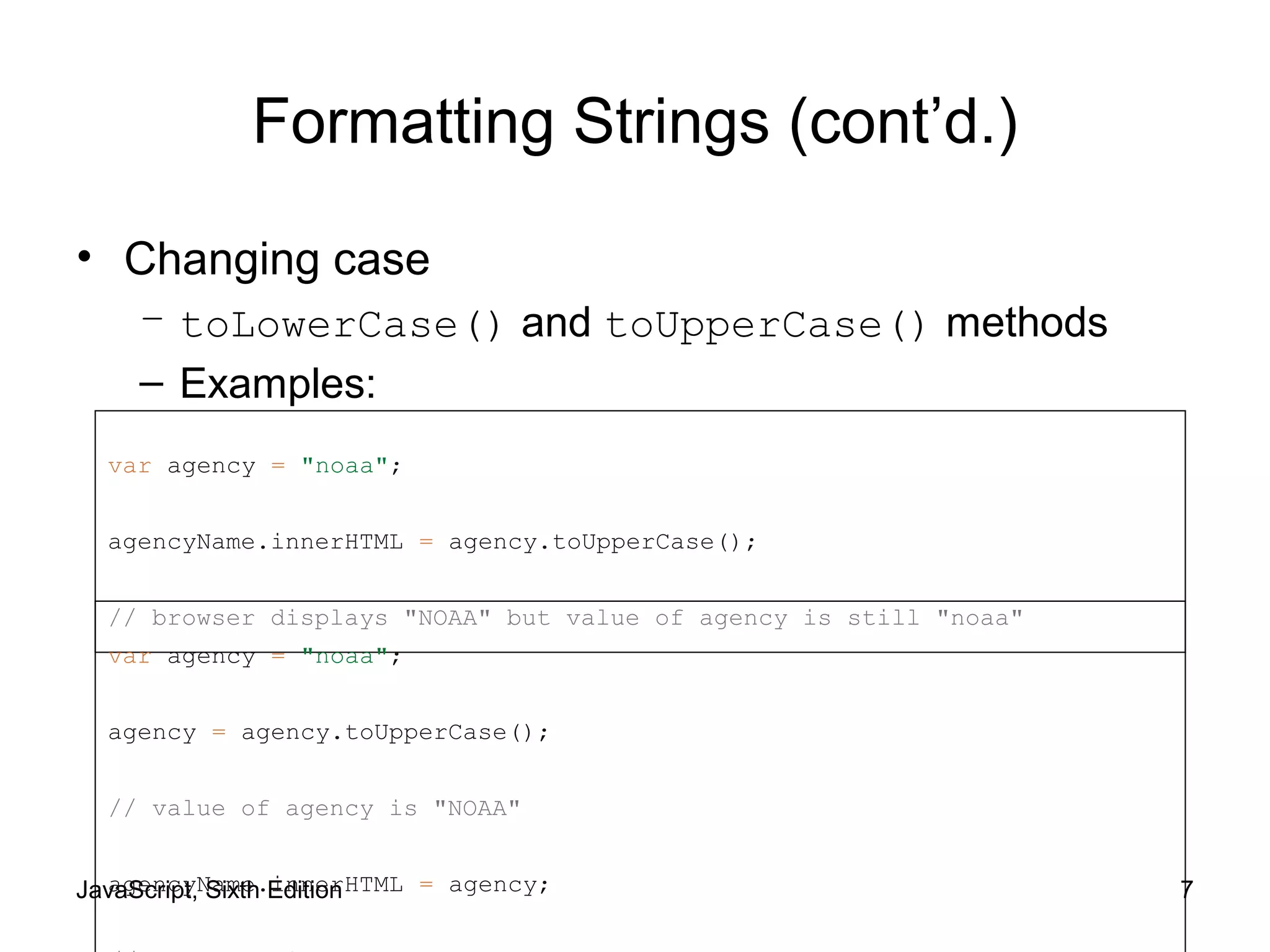
• Changing case
– toLowerCase() and toUpperCase() methods
– Examples:
var agency = "noaa";
agencyName.innerHTML = agency.toUpperCase();
// browser displays "NOAA" but value of agency is still "noaa"
var agency = "noaa";
agency = agency.toUpperCase();
// value of agency is "NOAA"
agencyName.innerHTML = agency;
JavaScript, Sixth Edition 8
Counting Characters in a String
• length property
– Returns the number of characters in a string
– Example:
var country = "Kingdom of Morocco";
var stringLength = country.length;
// value of stringLength is 18
JavaScript, Sixth Edition 9
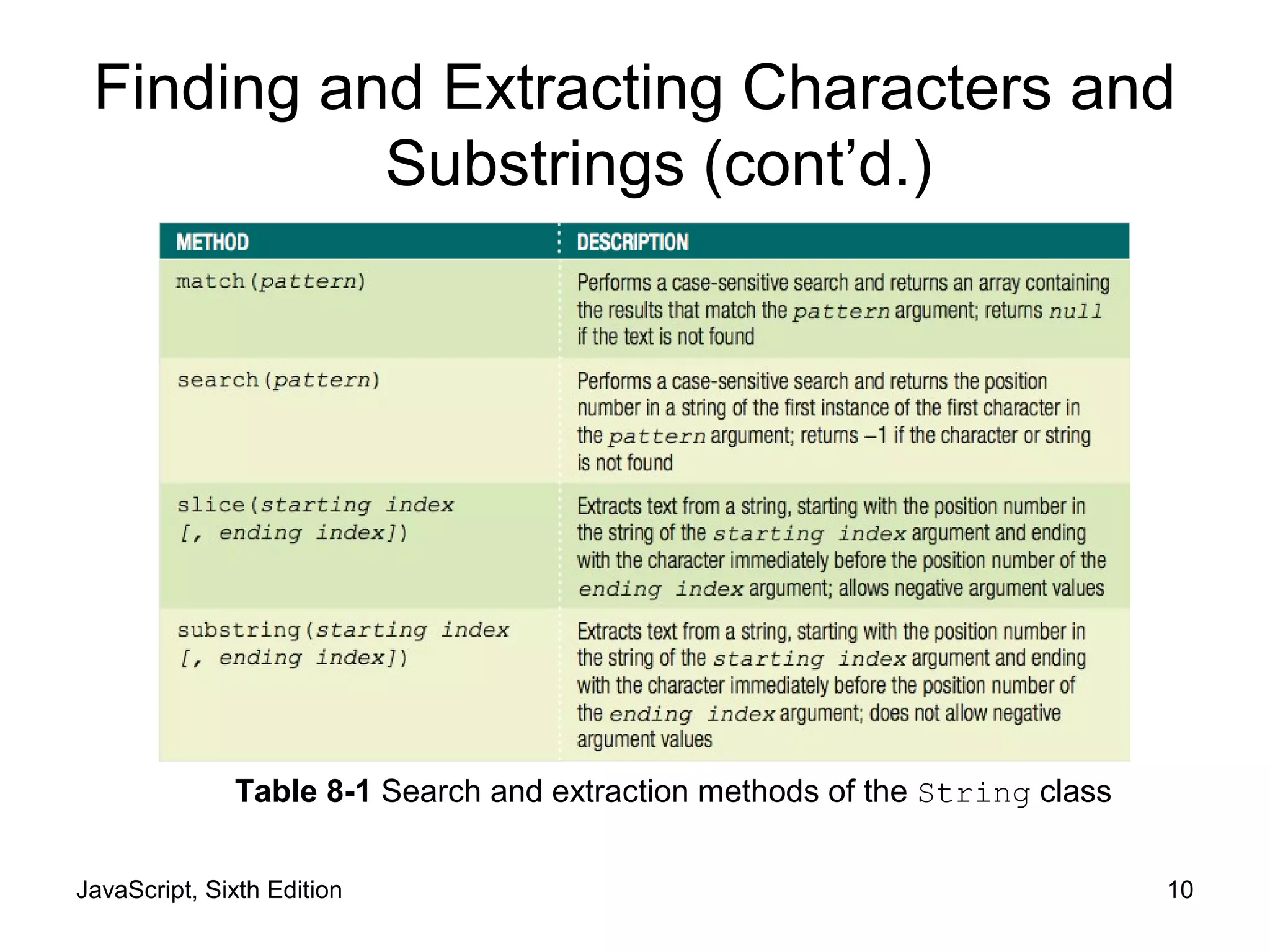
Finding and Extracting Characters and
Substrings
Table 8-1 Search and extraction methods of the String
class (continues)
JavaScript, Sixth Edition 10
Table 8-1 Search and extraction methods of the String class
Finding and Extracting Characters and
Substrings (cont’d.)
JavaScript, Sixth Edition 11
Figure 8-5 Example uses of String class methods
Finding and Extracting Characters and
Substrings (cont’d.)
JavaScript, Sixth Edition 12
Finding and Extracting Characters and
Substrings (cont’d.)
• Two types of string search methods
– Those that return a numeric position in a text string
• Character position in text string begins with a value of
zero
• Can pass a second optional argument specifying the
position in the string to start searching to the
indexOf() method
• Example: search() method
var email = "president@whitehouse.gov";
var atPosition = email.search("@"); // returns 9
JavaScript, Sixth Edition 13
Finding and Extracting Characters and
Substrings (cont’d.)
• Two types of string search methods (cont'd.)
– Those that return a numeric position in a text string
(cont'd.)
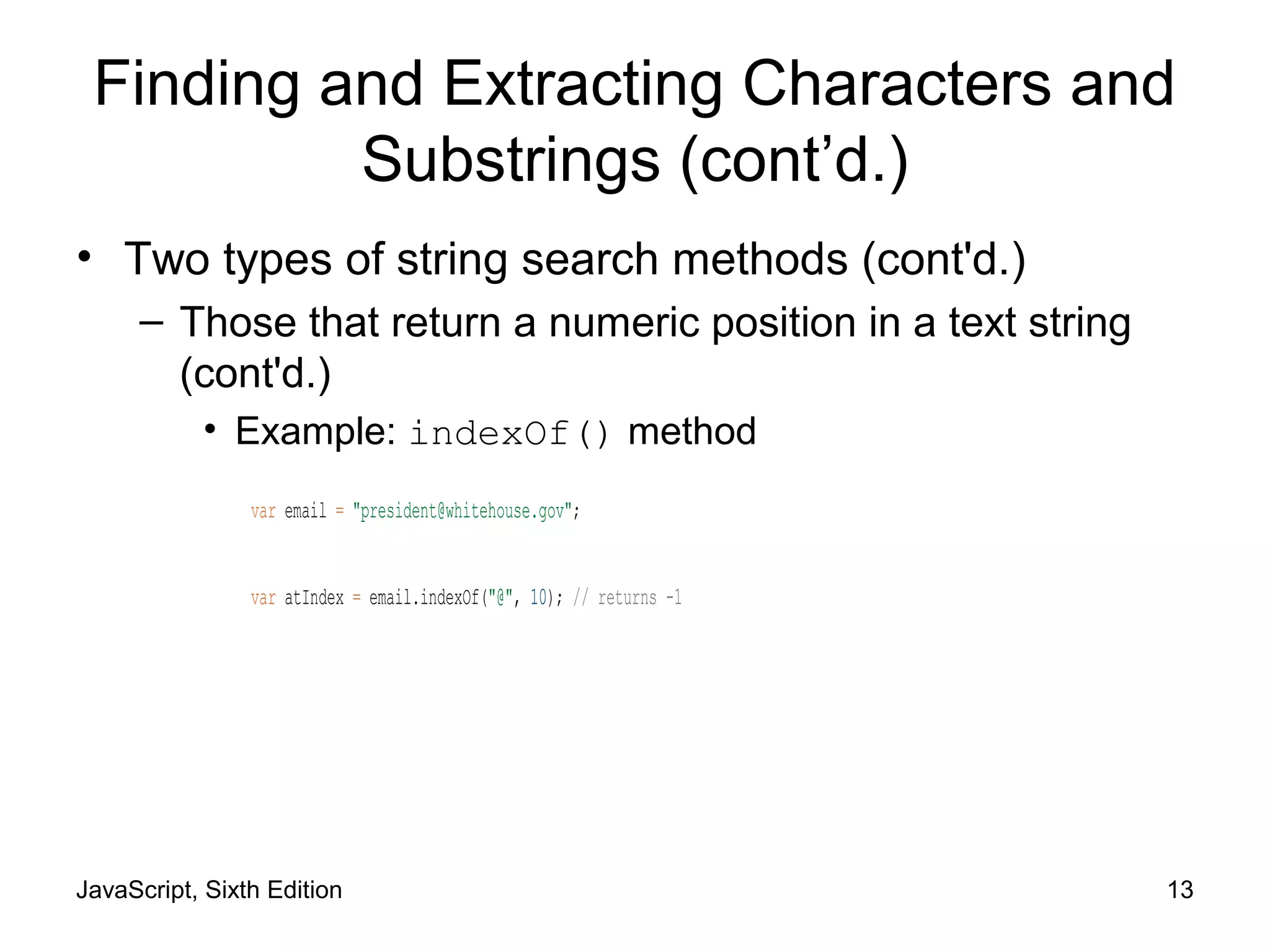
• Example: indexOf() method
var email = "president@whitehouse.gov";
var atIndex = email.indexOf("@", 10); // returns -1
JavaScript, Sixth Edition 14
Finding and Extracting Characters and
Substrings (cont’d.)
• Two types of string search methods (cont’d.)
– Those that return a character or substring
• substring() or slice() method
var email = "president@whitehouse.gov";
var nameEnd = email.search("@");
// value of nameEnd is 9
var nameText = email.substring(0, nameEnd);
// value of nameText is "president"
JavaScript, Sixth Edition 15
Finding and Extracting Characters and
Substrings (cont’d.)
• Extracting characters from the middle or end of a
string
– Use the search(), indexOf(), lastIndexOf()
methods
• lastIndexOf() method returns position of the last
occurrence of one string in another string
– Example:
var email = "president@whitehouse.gov";
var startDomainID = email.lastIndexOf(".");
// startDomainID value is 20
var domainID = email.substring(startDomainID + 1);
JavaScript, Sixth Edition 16
Finding and Extracting Characters and
Substrings (cont’d.)
• slice() method allows negative argument values
for the index arguments
– Specifying a negative value for the starting index
• slice() method starts at the end of the text string
– Specifying a negative value for the ending index
• Number of characters the slice() method extracts
also starts at the end of the text string
• slice() method does not return the character
represented by the ending index
– Returns the character immediately before the ending
index
JavaScript, Sixth Edition 17
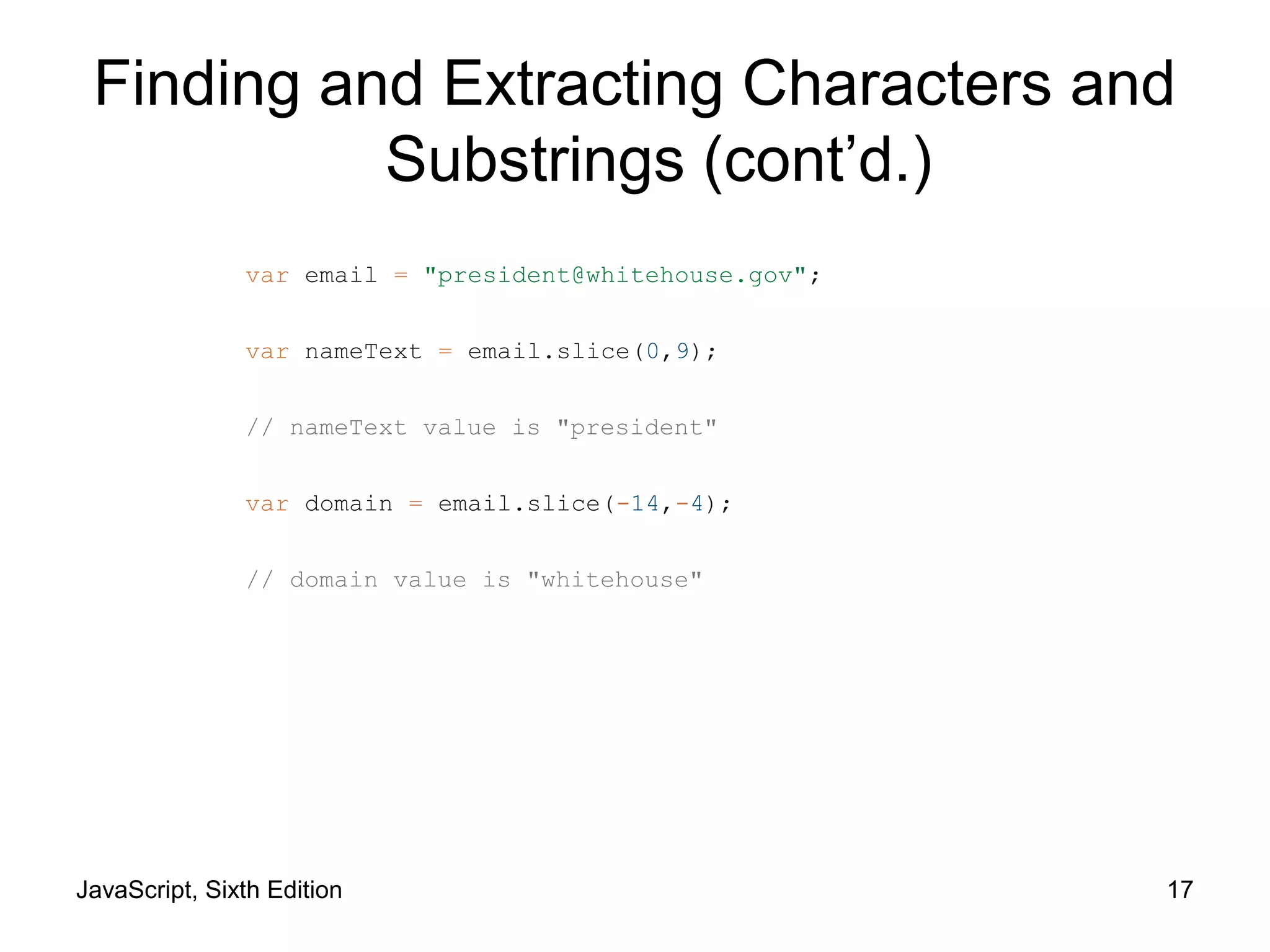
var email = "president@whitehouse.gov";
var nameText = email.slice(0,9);
// nameText value is "president"
var domain = email.slice(-14,-4);
// domain value is "whitehouse"
Finding and Extracting Characters and
Substrings (cont’d.)
JavaScript, Sixth Edition 18
Replacing Characters and Substrings
• replace() method
– Creates a new string with the first instance of a
specified pattern replaced with the value of the text
argument
– Syntax: string.replace(pattern, text)
– Example:
var email = "president@whitehouse.gov";
var newEmail = email.replace("president", "vice.president");
// value of newEmail is "vice.president@whitehouse.gov"
JavaScript, Sixth Edition 19
Combining Characters and Substrings
• Combining strings
– Use the concatenation operator (+) and compound
assignment operator (+=)
– Use the concat() method
• Creates a new string by combining strings passed as
arguments
• Syntax: string.concat(value1, value2, ...)
– To combine text strings
• Easier to use the concatenation operator and the
compound assignment operator
JavaScript, Sixth Edition 20
var name = "Theodor Seuss Geisel";
var penName = "Dr. Seuss";
var bio = penName.concat(" was the pen name of ", name);
// value of bio is
// "Dr. Seuss was the pen name of Theodor Seuss Geisel"
var name = "Theodor Seuss Geisel";
var penName = "Dr. Seuss";
var bio = penName + " was the pen name of " + name;
// value of bio is
// "Dr. Seuss was the pen name of Theodor Seuss Geisel"
Combining Characters and Substrings
(cont’d.)
JavaScript, Sixth Edition 21
Comparing Strings
• Comparison operator (===) can be used with strings
– Compare individual characters according to their
Unicode position
• localeCompare() method
– Compares strings according to the particular sort
order of a language or country
– Performs a case-sensitive comparison of two strings
JavaScript, Sixth Edition 22
Working with Regular Expressions
• Regular expressions
– Patterns used for matching and manipulating strings
according to specified rules
– With scripting languages, most commonly used for
validating submitted form data
JavaScript, Sixth Edition 23
Defining Regular Expressions in
JavaScript
• Regular expressions
– Must begin and end with forward slashes
– Example: var urlProtocol = /https/;
• Approaches to creating regular expressions
– Use regular expressions with several String class
methods
– Pass pattern directly to a method
– Use the RegExp() constructor
• Contains methods and properties for working with
regular expressions in JavaScript
JavaScript, Sixth Edition 24
Defining Regular Expressions in
JavaScript (cont’d.)
• Approaches to creating regular expressions (cont’d.)
– Syntax for creating a regular expression with the
RegExp() constructor
var regExpName = new RegExp("pattern"[, attributes]);
– Example:
var urlProtocol = new RegExp("https");
var url = "http://www.cengagebrain.com";
var searchResult = url.search(urlProtocol);
// returns -1
JavaScript, Sixth Edition 25
Using Regular Expression Methods
• RegExp object
– Includes two methods
• test() and exec()
• test() method: returns a value of true
– If a string contains text that matches a regular
expression
– Otherwise returns false value
– Syntax: var pattern = test(string);
• Real power of regular expressions
– Comes from the patterns written
JavaScript, Sixth Edition 26
Writing Regular Expression Patterns
• Hardest part of working with regular expressions
– Writing the patterns and rules
– Example:
var emailPattern = /^[_a-zA-Z0-9-]+(.[_a-zA-Z0-9-]+)*↵
@[a-zA-Z0-9-]+(.[a-zA-Z0-9-]+)*(.[a-z]{2,6})$/;
var email = "president@whitehouse.gov";
var result;
if (emailPattern.test(email)) {
result = true;
} else {
result = false;
JavaScript, Sixth Edition 27
Writing Regular Expression Patterns
(cont’d.)
• Regular expression patterns consist of literal
characters and metacharacters
– Metacharacters: special characters that define the
pattern matching rules in a regular expression
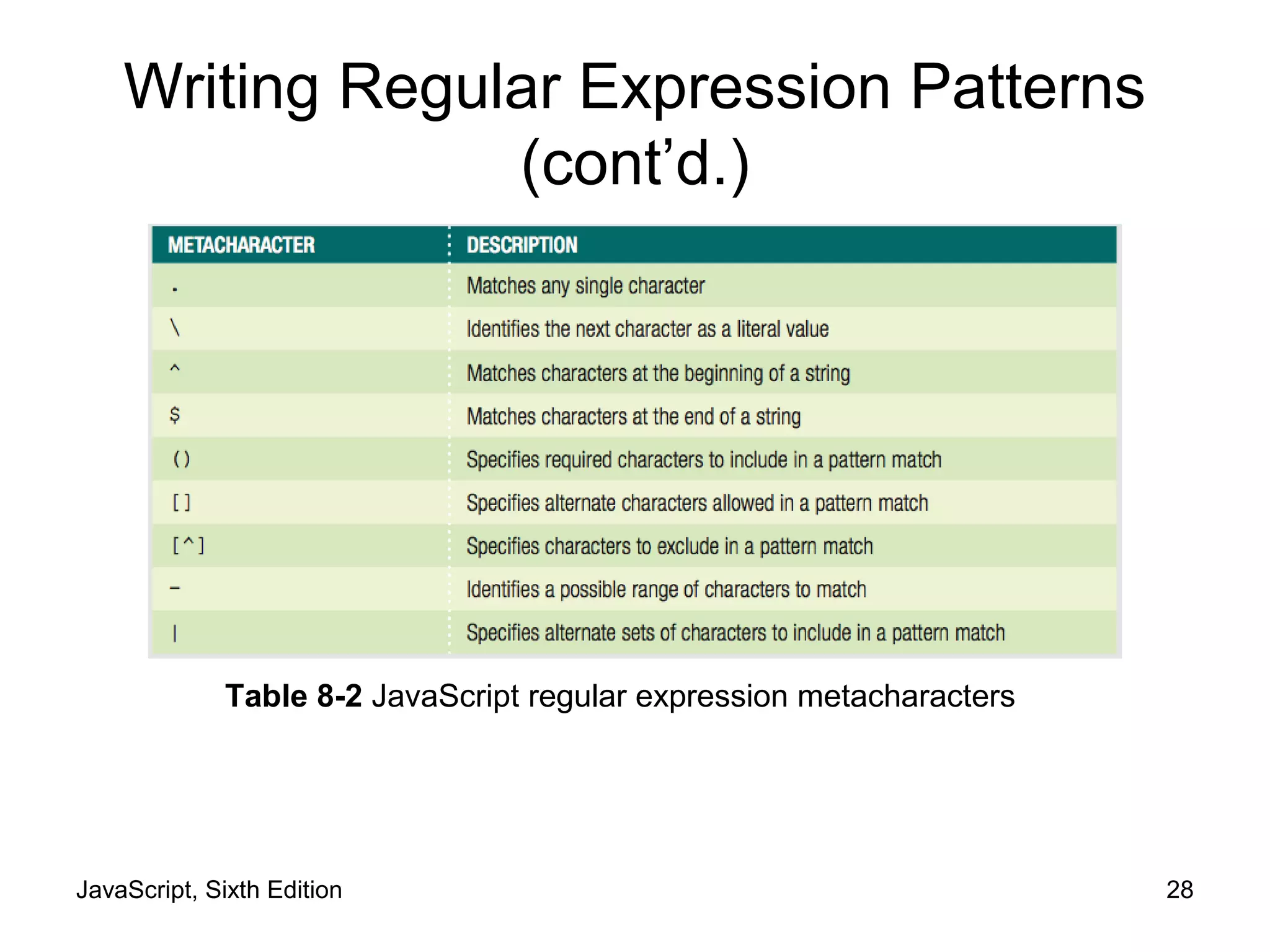
JavaScript, Sixth Edition 28
Table 8-2 JavaScript regular expression metacharacters
Writing Regular Expression Patterns
(cont’d.)
JavaScript, Sixth Edition 29
Writing Regular Expression Patterns
(cont’d.)
• Matching any character
– Period (.)
• Matches any single character in a pattern
• Specifies that the pattern must contain a value where
the period located
• Matching characters at the beginning or end of a
string
– ^ metacharacter
• Matches characters at the beginning of a string
– $ metacharacter
• Matches characters at the end of a string
JavaScript, Sixth Edition 30
Writing Regular Expression Patterns
(cont’d.)
• Matching characters at the beginning or end of a
String (cont’d.)
– Anchor
• Pattern that matches the beginning or end of a line
– Specifying an anchor at the beginning of a line
• Pattern must begin with the ^ metacharacter
• Matching special characters
– Precede the character with a backslash
JavaScript, Sixth Edition 31
Writing Regular Expression Patterns
(cont’d.)
• Specifying quantity
– Quantifiers
• Metacharacters that specify the quantity of a match
Table 8-3 JavaScript regular expression quantifiers
JavaScript, Sixth Edition 32
Writing Regular Expression Patterns
(cont’d.)
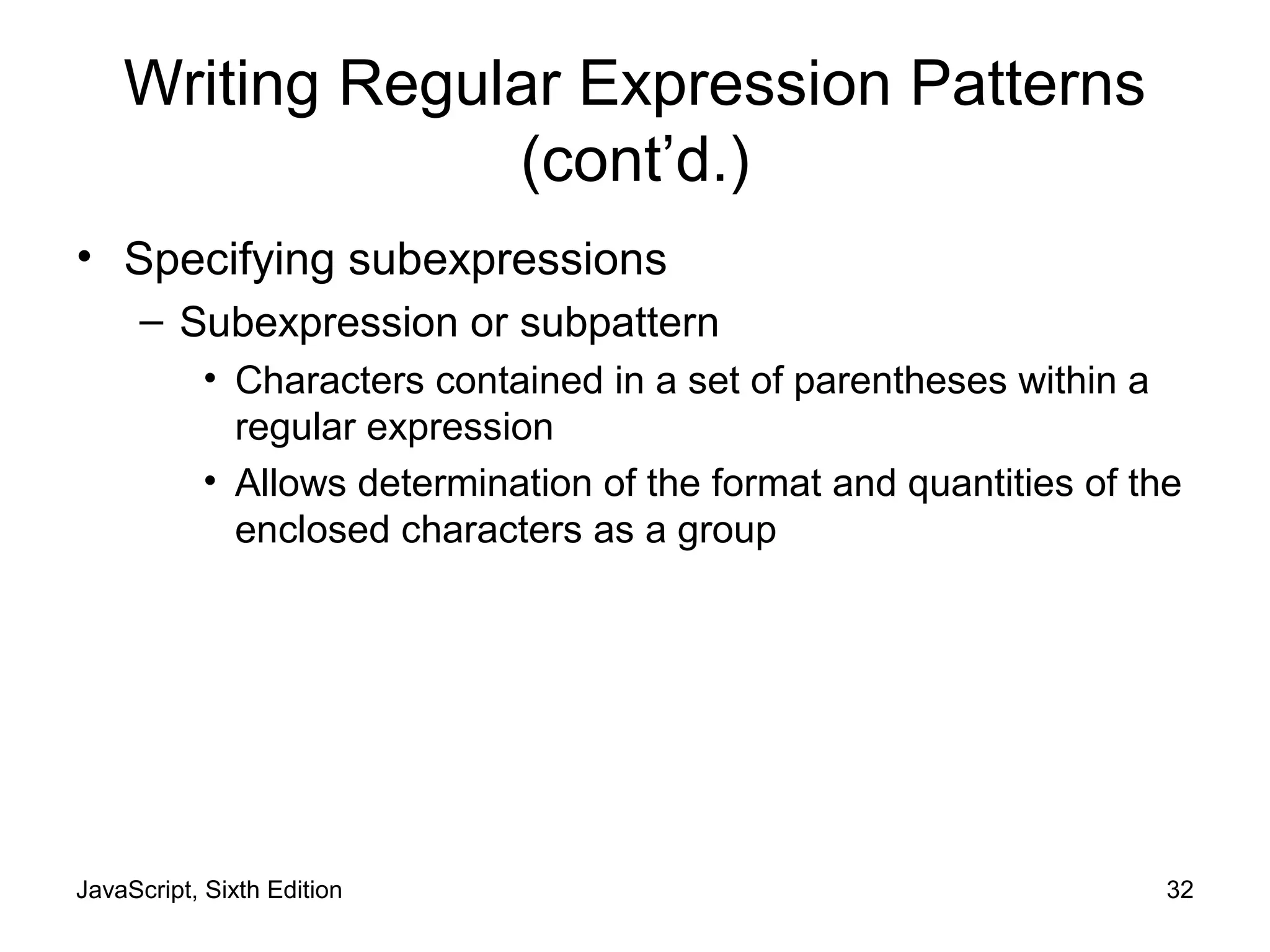
• Specifying subexpressions
– Subexpression or subpattern
• Characters contained in a set of parentheses within a
regular expression
• Allows determination of the format and quantities of the
enclosed characters as a group
JavaScript, Sixth Edition 33
Writing Regular Expression Patterns
(cont’d.)
• Defining character classes
– Character classes
• Used in regular expressions to treat multiple characters
as a single item
• Created by enclosing the characters that make up the
class with bracket [] metacharacters
– Use a hyphen metacharacter (-) to specify a range of
values in a character class
– To specify optional characters to exclude in a pattern
match
• Include the ^ metacharacter immediately before the
characters in a character class
JavaScript, Sixth Edition 34
Writing Regular Expression Patterns
(cont’d.)
• Defining character classes (cont’d.)
– Regular expressions include special escape
characters in character classes
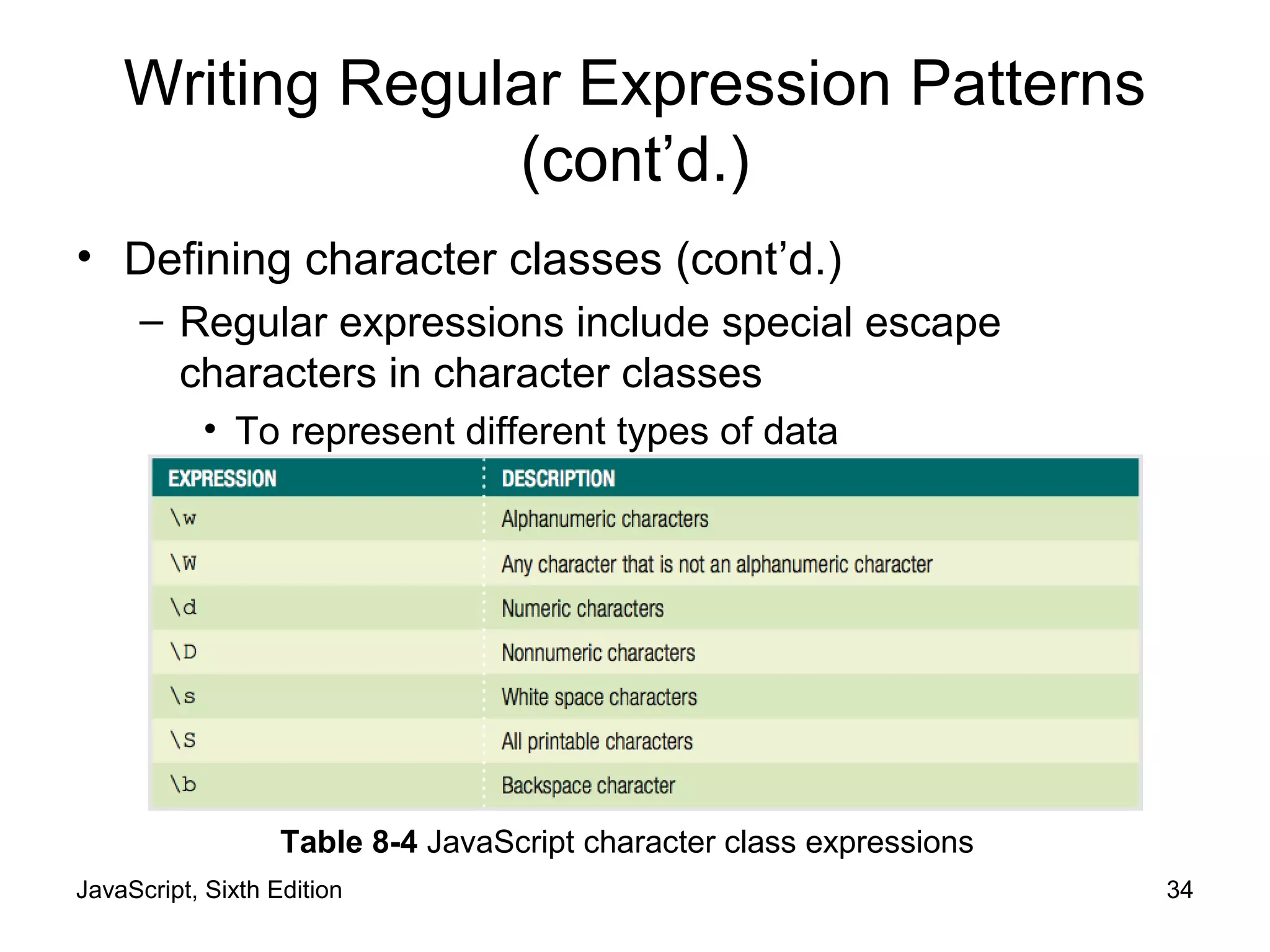
• To represent different types of data
Table 8-4 JavaScript character class expressions
JavaScript, Sixth Edition 35
Writing Regular Expression Patterns
(cont’d.)
• Defining character classes (cont’d.)
– Matching multiple pattern choices
– Allow a string to contain an alternate set of substrings
• Separate the strings in a regular expression pattern
with the | metacharacter
JavaScript, Sixth Edition 36
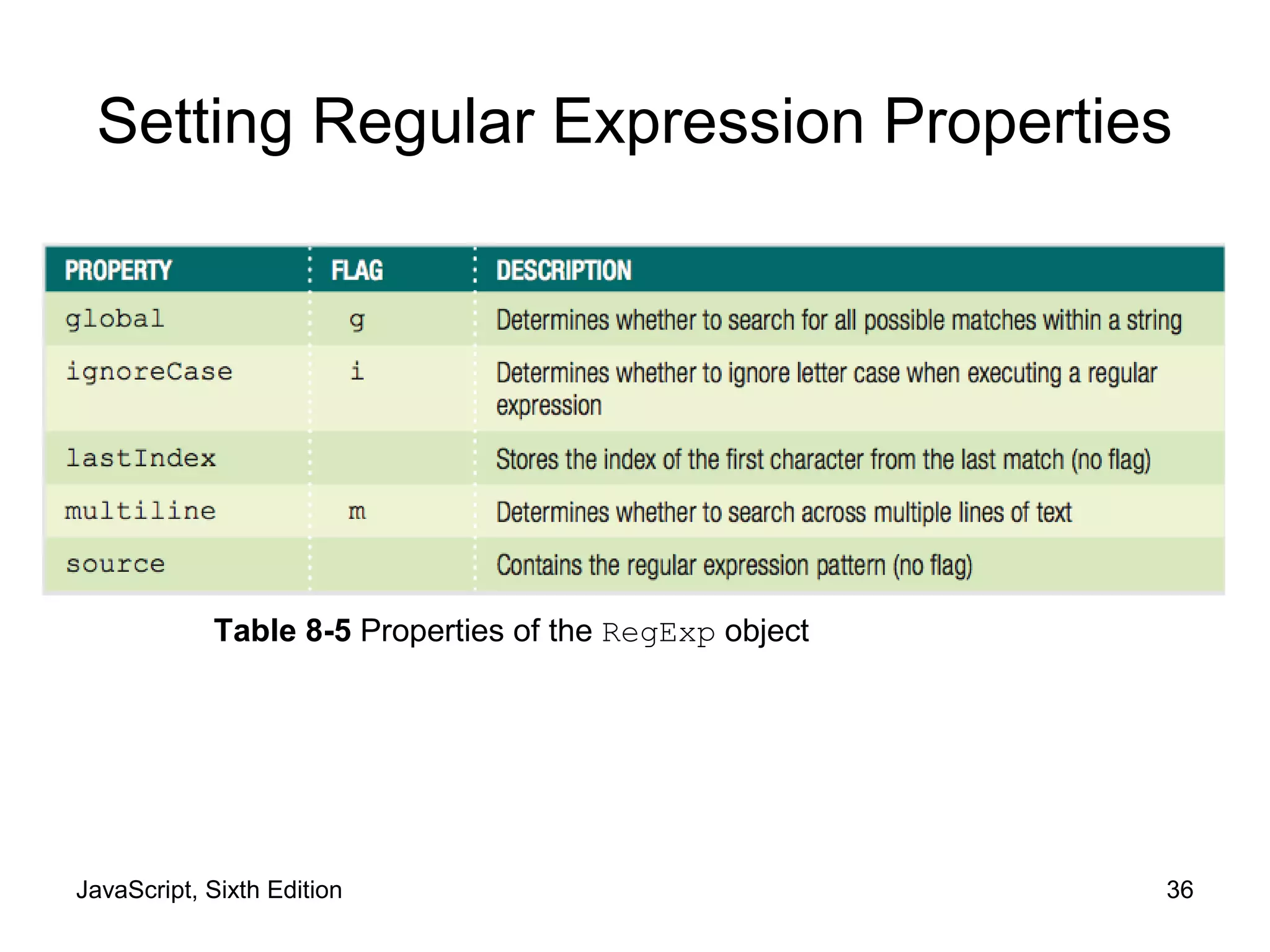
Setting Regular Expression Properties
Table 8-5 Properties of the RegExp object
JavaScript, Sixth Edition 37
Setting Regular Expression Properties
(cont’d.)
• Options for setting the values of these properties
– Assign a value of true or false to the property
• By creating a regular expression with the RegExp()
constructor
– Use the flags when assigning a regular expression to
a variable without using the RegExp() constructor
JavaScript, Sixth Edition 38
Manipulating Arrays
• Use the Array class length property and methods
• Creating an array
– Instantiates an object from the Array class
JavaScript, Sixth Edition 39
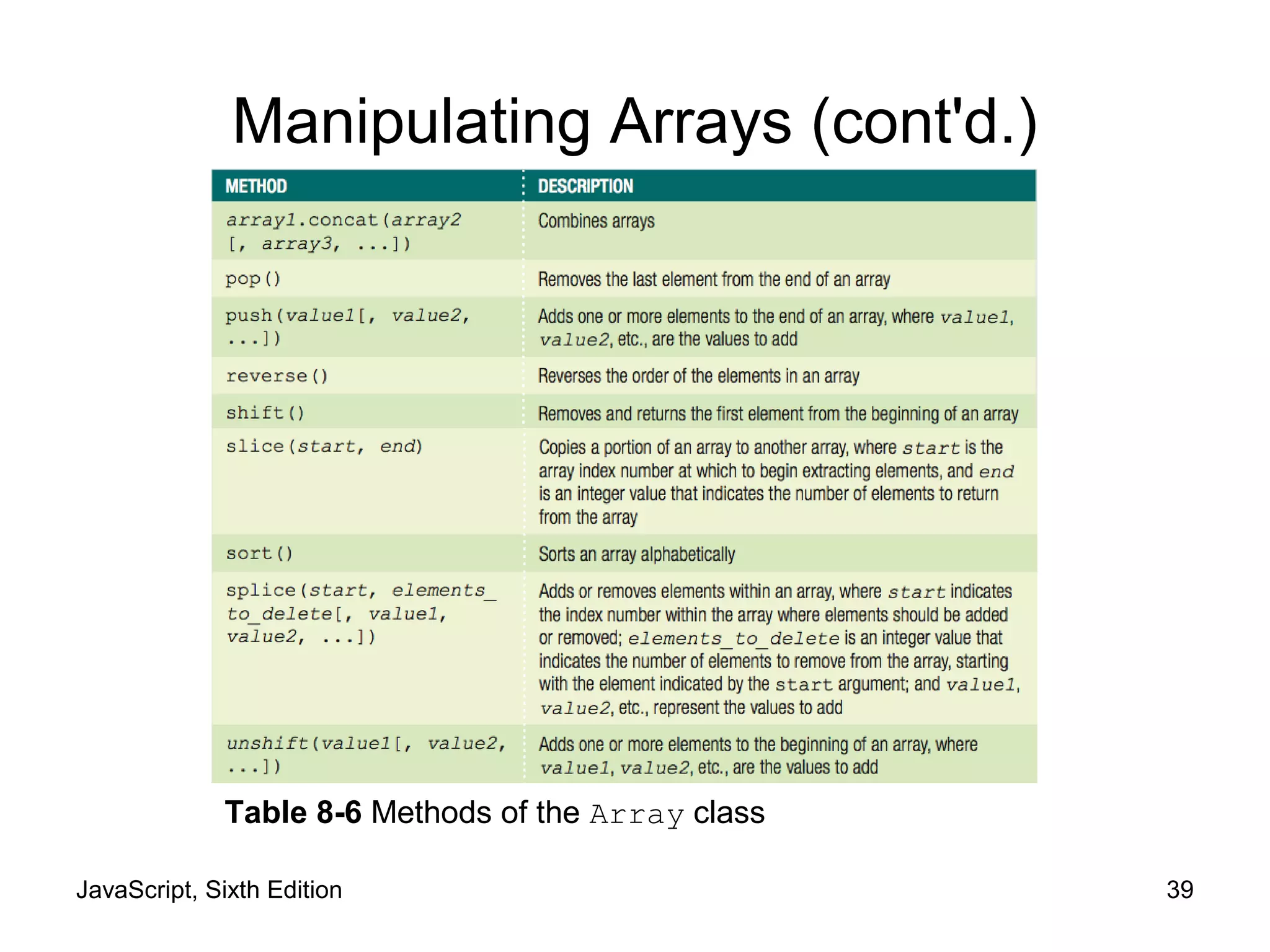
Manipulating Arrays (cont'd.)
Table 8-6 Methods of the Array class
JavaScript, Sixth Edition 40
Finding and Extracting Elements and
Values
• Primary method for finding a value in an array
– Use a looping statement to iterate through the array
until a particular value found
• Extract elements and values from an array
– Use the slice() method to return (copy) a portion of
an array and assign it to another array
• Syntax for the slice() method
array_name.slice(start, end);
JavaScript, Sixth Edition 41
Figure 8-11 List of states extracted using the slice() method
var largestStates = ["Alaska", "Texas", "California",↵
"Montana", "New Mexico", "Arizona", "Nevada",↵
"Colorado", "Oregon", "Wyoming"];
var fiveLargestStates = largestStates.slice(0, 5);
for (var i = 0; i < fiveLargestStates.length; i++) {
var newItem = document.createElement("p");
newItem.innerHTML = fiveLargestStates[i];
document.body.appendChild(newItem);
}
Finding and Extracting Elements and
Values (cont’d.)
JavaScript, Sixth Edition 42
Manipulating Elements
• Adding and removing elements to and from the
beginning of an array
– shift() method removes and returns the first
element from the beginning of an array
– unshift() method adds one or more elements to
the beginning of an array
JavaScript, Sixth Edition 43
var colors = ["mauve", "periwinkle", "silver", "cherry",↵
"lemon"];
colors.shift(); // colors value now
// ["periwinkle", "silver", "cherry", "lemon"]
colors.unshift("yellow-orange", "violet");
// colors value now ["yellow-orange", "violet",
// "mauve", "periwinkle", "silver", "cherry", "lemon"]
Manipulating Elements (cont’d.)
JavaScript, Sixth Edition 44
Manipulating Elements
• Adding and removing elements to and from the end
of an array
– Use array’s length property to determine the next
available index
var colors = ["mauve", "periwinkle", "silver", "cherry"];
colors[colors.length] = "lemon";
// colors value now ["mauve", "periwinkle", "silver",
// "cherry", "lemon"]
JavaScript, Sixth Edition 45
Manipulating Elements (cont’d.)
• Adding and removing elements to and from the end
of an array (cont’d.)
– pop() method removes the last element from the
end of an array
– push() method adds one or more elements to the
end of an array
var colors = ["mauve", "periwinkle", "silver", "cherry"];
colors.pop();
// colors value now ["mauve", "periwinkle", "silver"]
colors.push("yellow-orange", "violet");
// colors value now ["mauve", "periwinkle", "silver",
// "yellow-orange", "violet"]
JavaScript, Sixth Edition 46
Manipulating Elements (cont’d.)
• Adding and removing elements within an array
– Use the splice() method
• Also renumbers the indexes in the array
• To add an element, include 0 as second argument
var hospitalDepts = ["Anesthesia", "Molecular Biology",↵
"Neurology", "Pediatrics"];
hospitalDepts.splice(3, 0, "Ophthalmology");
// value now ["Anesthesia", "Molecular Biology",
// "Neurology", "Ophthalmology", "Pediatrics"]
JavaScript, Sixth Edition 47
Manipulating Elements (cont’d.)
• Adding and removing elements within an array
(cont'd.)
– Use the splice() method (cont'd.)
• To delete elements, omit third argument
• Indexes renumbered just like when elements added
var hospitalDepts = ["Anesthesia", "Molecular Biology",↵
"Neurology", "Pediatrics"];
hospitalDepts.splice(1, 2);
// value now ["Anesthesia", "Pediatrics"]
JavaScript, Sixth Edition 48
Sorting and Combining Arrays
• Sorting arrays
– Sort elements of an array alphabetically
• Use the sort() method
var scientificFishNames = ["Quadratus taiwanae",↵
"Macquaria australasica", "Jordania zonope",↵
"Abudefduf sparoides", "Dactylopterus volitans",↵
"Wattsia mossambica", "Bagrus urostigma"];
scientificFishNames.sort();
// scientificFishNames value now
// ["Abudefduf sparoides", "Bagrus urostigma",
// "Dactylopterus volitans", "Jordania zonope",
// "Macquaria australasica", "Quadratus taiwanae",
JavaScript, Sixth Edition 49
Sorting and Combining Arrays (cont'd.)
• Sorting arrays (cont'd.)
– reverse() method
• Transposes, or reverses, the order of the elements in
an array
scientificFishNames.reverse();
// scientificFishNames value now
// ["Wattsia mossambica", "Quadratus taiwanae",
// "Macquaria australasica", "Jordania zonope",
// "Dactylopterus volitans", "Bagrus urostigma",
// "Abudefduf sparoides"]
JavaScript, Sixth Edition 50
Sorting and Combining Arrays (cont'd.)
• Combining arrays
– Use the concat() method
– Syntax
array1.contact(array2, array3, ...);
JavaScript, Sixth Edition 51
Sorting and Combining Arrays (cont'd.)
var Provinces = ["Newfoundland and Labrador",↵
"Prince Edward Island", "Nova Scotia",↵
"New Brunswick", "Quebec", "Ontario",↵
"Manitoba", "Saskatchewan", "Alberta",↵
"British Columbia"];
var Territories = ["Nunavut", "Northwest Territories",↵
"Yukon"];
var Canada = [];
Canada = Provinces.concat(Territories);
// value of Canada now ["Newfoundland and Labrador",
// "Prince Edward Island", "Nova Scotia",
JavaScript, Sixth Edition 52
Converting Between Data Types
• Common task to convert strings and arrays to
different data types
– strings to arrays
– arrays to strings
– objects to strings
– strings to objects
JavaScript, Sixth Edition 53
Converting Between Strings and Arrays
• split() method of the String class
– Splits a string into an indexed array
• Syntax
array = string.split(separator[, limit]);
• To split individual characters in a string into an array
– Pass an empty string ("") as the separator argument
JavaScript, Sixth Edition 54
var OPEC = "Algeria, Angola, Ecuador, Iran, Iraq, Kuwait,↵
Libya, Nigeria, Qatar, Saudi Arabia,↵
United Arab Emirates, Venezuela";
// The value of OPEC is a string
var opecArray = OPEC.split(", ");
// The value of opecArray is the following array:
// ["Algeria", "Angola", "Ecuador", "Iran", "Iraq",
// "Kuwait", "Libya", "Nigeria", "Qatar", "Saudi Arabia",
// "United Arab Emirates", "Venezuela"]
Converting Between Strings and Arrays
(cont’d.)
JavaScript, Sixth Edition 55
Converting Between Strings and Arrays
(cont’d.)
• join() method of the Array class
– Combines array elements into a string, separated by
a comma or specified characters
• Syntax
array.join(["separator"]);
• To prevent elements from being separated by any
characters in the new string
– Pass an empty string ("") as the separator
argument
JavaScript, Sixth Edition 56
var OPEC = ["Algeria", "Angola", "Ecuador", "Iran",↵
"Iraq", "Kuwait", "Libya", "Nigeria", "Qatar",↵
"Saudi Arabia", "United Arab Emirates", "Venezuela"];
// value of OPEC is an array
var opecString = OPEC.join();
// value of opecString is the following string:
// "Algeria, Angola, Ecuador, Iran, Iraq, Kuwait, Libya,
// Nigeria, Qatar, Saudi Arabia, United Arab Emirates,
// Venezuela"
Converting Between Strings and Arrays
(cont’d.)
JavaScript, Sixth Edition 57
Converting Between Strings and Arrays
(cont’d.)
• join() method does not include a separator
argument
– Previous example OPEC nations automatically
separated by commas
• Can include a separator argument of ";"
var OPEC = ["Algeria", "Angola", "Ecuador", "Iran",↵
"Iraq", "Kuwait", "Libya", "Nigeria", "Qatar",↵
"Saudi Arabia", "United Arab Emirates", "Venezuela"];
// value of OPEC is an array
var opecString = OPEC.join(";");
// value of opecString is the following string:
// "Algeria;Angola;Ecuador;Iran;Iraq;Kuwait;Libya;
JavaScript, Sixth Edition 58
Converting Between Strings and Arrays
(cont’d.)
• Can also use the toString() and
toLocaleString() method
– Convert an array to a string
– array.toString();
– array.toLocaleString();
JavaScript, Sixth Edition 59
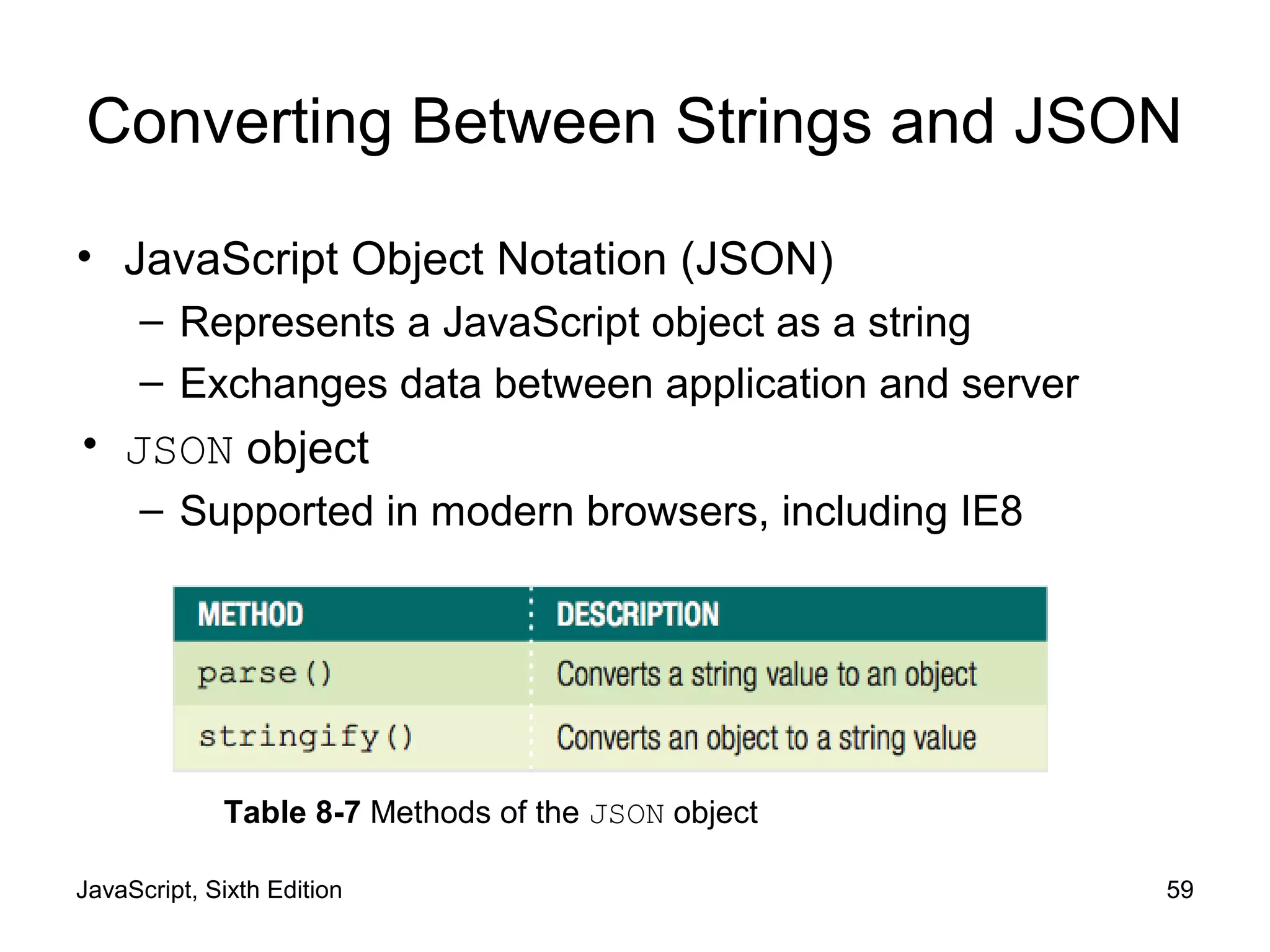
Converting Between Strings and JSON
• JavaScript Object Notation (JSON)
– Represents a JavaScript object as a string
– Exchanges data between application and server
• JSON object
– Supported in modern browsers, including IE8
Table 8-7 Methods of the JSON object
JavaScript, Sixth Edition 60
Converting Between Strings and JSON
(cont'd.)
• Converting an Object to a String
– stringify() method
– string = JSON.stringify(value [, replacer [, space]]);
– string is name of variable that will contain string
– value represents JavaScript object to be converted
JavaScript, Sixth Edition 61
Converting Between Strings and JSON
(cont'd.)
• Converting an Object to a String (cont'd.)
var newUser = {
fName: "Tony",
lName: "Chu"
},
newUserString = JSON.stringify(newUser);
// value of newUserString is
// '{"fName":"Tony","lName":"Chu"}'
JavaScript, Sixth Edition 62
Converting Between Strings and JSON
(cont'd.)
• Converting a String to an Object
– parse() method
– object = JSON.parse(string [, function]);
– object is namve of variable that will contain object
– string represents JSON string to be converted
JavaScript, Sixth Edition 63
Converting Between Strings and JSON
(cont'd.)
• Converting a String to an Object (cont'd.)
– JSON string definition:
• String because enclosed in quotes
– To convert string to JavaScript object:
var newUser = '{"fName":"Tony","lName":"Chu"}';
var newUserObject = JSON.parse(newUser);
// value of newUserObject is
// {
// fName: "Tony",
// lName: "Chu"
// };
JavaScript, Sixth Edition 64
Summary
• Parsing
– Act of extracting characters or substrings from a
larger string
• All literal strings and string variables in JavaScript
– Represented by the String class
• fromCharCode() method of the String class
– Constructs a text string from Unicode character codes
• toLowerCase() and toUpperCase() methods
– Change the case of letters in a string
JavaScript, Sixth Edition 65
Summary (cont’d.)
• String class
– length property
– Methods: replace(), concat(),
localeCompare()
• Regular expressions
– Patterns used for matching and manipulating strings
according to specified rules
• RegExp object
– Contains methods and properties for working with
regular expressions in JavaScript
JavaScript, Sixth Edition 66
Summary (cont’d.)
• Use the Array class methods and length property
to manipulate arrays in scripts
– Methods: slice(), shift() and unshift(),
pop() and push(), splice(), sort(),
reverse(), concat(), and join()
• split() method of the String class
– Splits a string into an indexed array
• join() method of the Array class
– Combines array elements into a string
JavaScript, Sixth Edition 67
Summary (cont’d.)
• Use the JSON class methods to convert between
string values and object values
• stringify() method of the JSON class
– Converts JavaScript object to JSON string
• parse() method of the JSON class
– Converts JSON string to JavaScript object

9781305078444 ppt ch08

  • 1.
    JavaScript, Sixth Edition Chapter8 Manipulating Data in Strings and Arrays
  • 2.
    JavaScript, Sixth Edition2 Objectives When you complete this chapter, you will be able to: • Manipulate strings with properties and methods of the String object • Create regular expressions and use them to validate user input • Manipulate arrays with properties and methods of the Array object • Convert between strings and arrays, and between strings and JSON
  • 3.
    JavaScript, Sixth Edition3 Manipulating Strings • String – Text contained within double or single quotation marks – Literal values or assigned to a variable – Begin and end with same type of quotation mark • Example: document.getElementById("mainHeading").innerHTML = "24-Hour↵ Forecast"; var highSurfAdvisory = "Watch out for high waves and strong↵ rip currents.";
  • 4.
    JavaScript, Sixth Edition4 Manipulating Strings (cont’d.) • Parsing – Extracting characters or substrings from a larger string • Use String class to parse text strings in scripts – Represents all literal strings and string variables in JavaScript – Contains methods for manipulating text strings
  • 5.
    JavaScript, Sixth Edition5 Formatting Strings • Using special characters – For basic types: use escape sequences var mainHead = 'Today's Forecast'; – For other special characters: use Unicode • Standardized set of characters from many of the world’s languages copyrightInfo = "<p>&#169; 2006-2017</p>"; // numeric character ref. copyrightInfo = "<p>&copy; 2006-2017</p>"; // character entity
  • 6.
    JavaScript, Sixth Edition6 Formatting Strings (cont’d.) • Using special characters (cont’d.) – fromCharCode() method • Constructs a text string from Unicode character codes – Syntax: String.fromCharCode(char1, char2, ...) – Examples: String.fromCharCode(74,97,118,97,83,99,114,105,112,116) copyrightInfo = String.fromCharCode(169) + " 2017";
  • 7.
    JavaScript, Sixth Edition7 Formatting Strings (cont’d.) • Changing case – toLowerCase() and toUpperCase() methods – Examples: var agency = "noaa"; agencyName.innerHTML = agency.toUpperCase(); // browser displays "NOAA" but value of agency is still "noaa" var agency = "noaa"; agency = agency.toUpperCase(); // value of agency is "NOAA" agencyName.innerHTML = agency;
  • 8.
    JavaScript, Sixth Edition8 Counting Characters in a String • length property – Returns the number of characters in a string – Example: var country = "Kingdom of Morocco"; var stringLength = country.length; // value of stringLength is 18
  • 9.
    JavaScript, Sixth Edition9 Finding and Extracting Characters and Substrings Table 8-1 Search and extraction methods of the String class (continues)
  • 10.
    JavaScript, Sixth Edition10 Table 8-1 Search and extraction methods of the String class Finding and Extracting Characters and Substrings (cont’d.)
  • 11.
    JavaScript, Sixth Edition11 Figure 8-5 Example uses of String class methods Finding and Extracting Characters and Substrings (cont’d.)
  • 12.
    JavaScript, Sixth Edition12 Finding and Extracting Characters and Substrings (cont’d.) • Two types of string search methods – Those that return a numeric position in a text string • Character position in text string begins with a value of zero • Can pass a second optional argument specifying the position in the string to start searching to the indexOf() method • Example: search() method var email = "president@whitehouse.gov"; var atPosition = email.search("@"); // returns 9
  • 13.
    JavaScript, Sixth Edition13 Finding and Extracting Characters and Substrings (cont’d.) • Two types of string search methods (cont'd.) – Those that return a numeric position in a text string (cont'd.) • Example: indexOf() method var email = "president@whitehouse.gov"; var atIndex = email.indexOf("@", 10); // returns -1
  • 14.
    JavaScript, Sixth Edition14 Finding and Extracting Characters and Substrings (cont’d.) • Two types of string search methods (cont’d.) – Those that return a character or substring • substring() or slice() method var email = "president@whitehouse.gov"; var nameEnd = email.search("@"); // value of nameEnd is 9 var nameText = email.substring(0, nameEnd); // value of nameText is "president"
  • 15.
    JavaScript, Sixth Edition15 Finding and Extracting Characters and Substrings (cont’d.) • Extracting characters from the middle or end of a string – Use the search(), indexOf(), lastIndexOf() methods • lastIndexOf() method returns position of the last occurrence of one string in another string – Example: var email = "president@whitehouse.gov"; var startDomainID = email.lastIndexOf("."); // startDomainID value is 20 var domainID = email.substring(startDomainID + 1);
  • 16.
    JavaScript, Sixth Edition16 Finding and Extracting Characters and Substrings (cont’d.) • slice() method allows negative argument values for the index arguments – Specifying a negative value for the starting index • slice() method starts at the end of the text string – Specifying a negative value for the ending index • Number of characters the slice() method extracts also starts at the end of the text string • slice() method does not return the character represented by the ending index – Returns the character immediately before the ending index
  • 17.
    JavaScript, Sixth Edition17 var email = "president@whitehouse.gov"; var nameText = email.slice(0,9); // nameText value is "president" var domain = email.slice(-14,-4); // domain value is "whitehouse" Finding and Extracting Characters and Substrings (cont’d.)
  • 18.
    JavaScript, Sixth Edition18 Replacing Characters and Substrings • replace() method – Creates a new string with the first instance of a specified pattern replaced with the value of the text argument – Syntax: string.replace(pattern, text) – Example: var email = "president@whitehouse.gov"; var newEmail = email.replace("president", "vice.president"); // value of newEmail is "vice.president@whitehouse.gov"
  • 19.
    JavaScript, Sixth Edition19 Combining Characters and Substrings • Combining strings – Use the concatenation operator (+) and compound assignment operator (+=) – Use the concat() method • Creates a new string by combining strings passed as arguments • Syntax: string.concat(value1, value2, ...) – To combine text strings • Easier to use the concatenation operator and the compound assignment operator
  • 20.
    JavaScript, Sixth Edition20 var name = "Theodor Seuss Geisel"; var penName = "Dr. Seuss"; var bio = penName.concat(" was the pen name of ", name); // value of bio is // "Dr. Seuss was the pen name of Theodor Seuss Geisel" var name = "Theodor Seuss Geisel"; var penName = "Dr. Seuss"; var bio = penName + " was the pen name of " + name; // value of bio is // "Dr. Seuss was the pen name of Theodor Seuss Geisel" Combining Characters and Substrings (cont’d.)
  • 21.
    JavaScript, Sixth Edition21 Comparing Strings • Comparison operator (===) can be used with strings – Compare individual characters according to their Unicode position • localeCompare() method – Compares strings according to the particular sort order of a language or country – Performs a case-sensitive comparison of two strings
  • 22.
    JavaScript, Sixth Edition22 Working with Regular Expressions • Regular expressions – Patterns used for matching and manipulating strings according to specified rules – With scripting languages, most commonly used for validating submitted form data
  • 23.
    JavaScript, Sixth Edition23 Defining Regular Expressions in JavaScript • Regular expressions – Must begin and end with forward slashes – Example: var urlProtocol = /https/; • Approaches to creating regular expressions – Use regular expressions with several String class methods – Pass pattern directly to a method – Use the RegExp() constructor • Contains methods and properties for working with regular expressions in JavaScript
  • 24.
    JavaScript, Sixth Edition24 Defining Regular Expressions in JavaScript (cont’d.) • Approaches to creating regular expressions (cont’d.) – Syntax for creating a regular expression with the RegExp() constructor var regExpName = new RegExp("pattern"[, attributes]); – Example: var urlProtocol = new RegExp("https"); var url = "http://www.cengagebrain.com"; var searchResult = url.search(urlProtocol); // returns -1
  • 25.
    JavaScript, Sixth Edition25 Using Regular Expression Methods • RegExp object – Includes two methods • test() and exec() • test() method: returns a value of true – If a string contains text that matches a regular expression – Otherwise returns false value – Syntax: var pattern = test(string); • Real power of regular expressions – Comes from the patterns written
  • 26.
    JavaScript, Sixth Edition26 Writing Regular Expression Patterns • Hardest part of working with regular expressions – Writing the patterns and rules – Example: var emailPattern = /^[_a-zA-Z0-9-]+(.[_a-zA-Z0-9-]+)*↵ @[a-zA-Z0-9-]+(.[a-zA-Z0-9-]+)*(.[a-z]{2,6})$/; var email = "president@whitehouse.gov"; var result; if (emailPattern.test(email)) { result = true; } else { result = false;
  • 27.
    JavaScript, Sixth Edition27 Writing Regular Expression Patterns (cont’d.) • Regular expression patterns consist of literal characters and metacharacters – Metacharacters: special characters that define the pattern matching rules in a regular expression
  • 28.
    JavaScript, Sixth Edition28 Table 8-2 JavaScript regular expression metacharacters Writing Regular Expression Patterns (cont’d.)
  • 29.
    JavaScript, Sixth Edition29 Writing Regular Expression Patterns (cont’d.) • Matching any character – Period (.) • Matches any single character in a pattern • Specifies that the pattern must contain a value where the period located • Matching characters at the beginning or end of a string – ^ metacharacter • Matches characters at the beginning of a string – $ metacharacter • Matches characters at the end of a string
  • 30.
    JavaScript, Sixth Edition30 Writing Regular Expression Patterns (cont’d.) • Matching characters at the beginning or end of a String (cont’d.) – Anchor • Pattern that matches the beginning or end of a line – Specifying an anchor at the beginning of a line • Pattern must begin with the ^ metacharacter • Matching special characters – Precede the character with a backslash
  • 31.
    JavaScript, Sixth Edition31 Writing Regular Expression Patterns (cont’d.) • Specifying quantity – Quantifiers • Metacharacters that specify the quantity of a match Table 8-3 JavaScript regular expression quantifiers
  • 32.
    JavaScript, Sixth Edition32 Writing Regular Expression Patterns (cont’d.) • Specifying subexpressions – Subexpression or subpattern • Characters contained in a set of parentheses within a regular expression • Allows determination of the format and quantities of the enclosed characters as a group
  • 33.
    JavaScript, Sixth Edition33 Writing Regular Expression Patterns (cont’d.) • Defining character classes – Character classes • Used in regular expressions to treat multiple characters as a single item • Created by enclosing the characters that make up the class with bracket [] metacharacters – Use a hyphen metacharacter (-) to specify a range of values in a character class – To specify optional characters to exclude in a pattern match • Include the ^ metacharacter immediately before the characters in a character class
  • 34.
    JavaScript, Sixth Edition34 Writing Regular Expression Patterns (cont’d.) • Defining character classes (cont’d.) – Regular expressions include special escape characters in character classes • To represent different types of data Table 8-4 JavaScript character class expressions
  • 35.
    JavaScript, Sixth Edition35 Writing Regular Expression Patterns (cont’d.) • Defining character classes (cont’d.) – Matching multiple pattern choices – Allow a string to contain an alternate set of substrings • Separate the strings in a regular expression pattern with the | metacharacter
  • 36.
    JavaScript, Sixth Edition36 Setting Regular Expression Properties Table 8-5 Properties of the RegExp object
  • 37.
    JavaScript, Sixth Edition37 Setting Regular Expression Properties (cont’d.) • Options for setting the values of these properties – Assign a value of true or false to the property • By creating a regular expression with the RegExp() constructor – Use the flags when assigning a regular expression to a variable without using the RegExp() constructor
  • 38.
    JavaScript, Sixth Edition38 Manipulating Arrays • Use the Array class length property and methods • Creating an array – Instantiates an object from the Array class
  • 39.
    JavaScript, Sixth Edition39 Manipulating Arrays (cont'd.) Table 8-6 Methods of the Array class
  • 40.
    JavaScript, Sixth Edition40 Finding and Extracting Elements and Values • Primary method for finding a value in an array – Use a looping statement to iterate through the array until a particular value found • Extract elements and values from an array – Use the slice() method to return (copy) a portion of an array and assign it to another array • Syntax for the slice() method array_name.slice(start, end);
  • 41.
    JavaScript, Sixth Edition41 Figure 8-11 List of states extracted using the slice() method var largestStates = ["Alaska", "Texas", "California",↵ "Montana", "New Mexico", "Arizona", "Nevada",↵ "Colorado", "Oregon", "Wyoming"]; var fiveLargestStates = largestStates.slice(0, 5); for (var i = 0; i < fiveLargestStates.length; i++) { var newItem = document.createElement("p"); newItem.innerHTML = fiveLargestStates[i]; document.body.appendChild(newItem); } Finding and Extracting Elements and Values (cont’d.)
  • 42.
    JavaScript, Sixth Edition42 Manipulating Elements • Adding and removing elements to and from the beginning of an array – shift() method removes and returns the first element from the beginning of an array – unshift() method adds one or more elements to the beginning of an array
  • 43.
    JavaScript, Sixth Edition43 var colors = ["mauve", "periwinkle", "silver", "cherry",↵ "lemon"]; colors.shift(); // colors value now // ["periwinkle", "silver", "cherry", "lemon"] colors.unshift("yellow-orange", "violet"); // colors value now ["yellow-orange", "violet", // "mauve", "periwinkle", "silver", "cherry", "lemon"] Manipulating Elements (cont’d.)
  • 44.
    JavaScript, Sixth Edition44 Manipulating Elements • Adding and removing elements to and from the end of an array – Use array’s length property to determine the next available index var colors = ["mauve", "periwinkle", "silver", "cherry"]; colors[colors.length] = "lemon"; // colors value now ["mauve", "periwinkle", "silver", // "cherry", "lemon"]
  • 45.
    JavaScript, Sixth Edition45 Manipulating Elements (cont’d.) • Adding and removing elements to and from the end of an array (cont’d.) – pop() method removes the last element from the end of an array – push() method adds one or more elements to the end of an array var colors = ["mauve", "periwinkle", "silver", "cherry"]; colors.pop(); // colors value now ["mauve", "periwinkle", "silver"] colors.push("yellow-orange", "violet"); // colors value now ["mauve", "periwinkle", "silver", // "yellow-orange", "violet"]
  • 46.
    JavaScript, Sixth Edition46 Manipulating Elements (cont’d.) • Adding and removing elements within an array – Use the splice() method • Also renumbers the indexes in the array • To add an element, include 0 as second argument var hospitalDepts = ["Anesthesia", "Molecular Biology",↵ "Neurology", "Pediatrics"]; hospitalDepts.splice(3, 0, "Ophthalmology"); // value now ["Anesthesia", "Molecular Biology", // "Neurology", "Ophthalmology", "Pediatrics"]
  • 47.
    JavaScript, Sixth Edition47 Manipulating Elements (cont’d.) • Adding and removing elements within an array (cont'd.) – Use the splice() method (cont'd.) • To delete elements, omit third argument • Indexes renumbered just like when elements added var hospitalDepts = ["Anesthesia", "Molecular Biology",↵ "Neurology", "Pediatrics"]; hospitalDepts.splice(1, 2); // value now ["Anesthesia", "Pediatrics"]
  • 48.
    JavaScript, Sixth Edition48 Sorting and Combining Arrays • Sorting arrays – Sort elements of an array alphabetically • Use the sort() method var scientificFishNames = ["Quadratus taiwanae",↵ "Macquaria australasica", "Jordania zonope",↵ "Abudefduf sparoides", "Dactylopterus volitans",↵ "Wattsia mossambica", "Bagrus urostigma"]; scientificFishNames.sort(); // scientificFishNames value now // ["Abudefduf sparoides", "Bagrus urostigma", // "Dactylopterus volitans", "Jordania zonope", // "Macquaria australasica", "Quadratus taiwanae",
  • 49.
    JavaScript, Sixth Edition49 Sorting and Combining Arrays (cont'd.) • Sorting arrays (cont'd.) – reverse() method • Transposes, or reverses, the order of the elements in an array scientificFishNames.reverse(); // scientificFishNames value now // ["Wattsia mossambica", "Quadratus taiwanae", // "Macquaria australasica", "Jordania zonope", // "Dactylopterus volitans", "Bagrus urostigma", // "Abudefduf sparoides"]
  • 50.
    JavaScript, Sixth Edition50 Sorting and Combining Arrays (cont'd.) • Combining arrays – Use the concat() method – Syntax array1.contact(array2, array3, ...);
  • 51.
    JavaScript, Sixth Edition51 Sorting and Combining Arrays (cont'd.) var Provinces = ["Newfoundland and Labrador",↵ "Prince Edward Island", "Nova Scotia",↵ "New Brunswick", "Quebec", "Ontario",↵ "Manitoba", "Saskatchewan", "Alberta",↵ "British Columbia"]; var Territories = ["Nunavut", "Northwest Territories",↵ "Yukon"]; var Canada = []; Canada = Provinces.concat(Territories); // value of Canada now ["Newfoundland and Labrador", // "Prince Edward Island", "Nova Scotia",
  • 52.
    JavaScript, Sixth Edition52 Converting Between Data Types • Common task to convert strings and arrays to different data types – strings to arrays – arrays to strings – objects to strings – strings to objects
  • 53.
    JavaScript, Sixth Edition53 Converting Between Strings and Arrays • split() method of the String class – Splits a string into an indexed array • Syntax array = string.split(separator[, limit]); • To split individual characters in a string into an array – Pass an empty string ("") as the separator argument
  • 54.
    JavaScript, Sixth Edition54 var OPEC = "Algeria, Angola, Ecuador, Iran, Iraq, Kuwait,↵ Libya, Nigeria, Qatar, Saudi Arabia,↵ United Arab Emirates, Venezuela"; // The value of OPEC is a string var opecArray = OPEC.split(", "); // The value of opecArray is the following array: // ["Algeria", "Angola", "Ecuador", "Iran", "Iraq", // "Kuwait", "Libya", "Nigeria", "Qatar", "Saudi Arabia", // "United Arab Emirates", "Venezuela"] Converting Between Strings and Arrays (cont’d.)
  • 55.
    JavaScript, Sixth Edition55 Converting Between Strings and Arrays (cont’d.) • join() method of the Array class – Combines array elements into a string, separated by a comma or specified characters • Syntax array.join(["separator"]); • To prevent elements from being separated by any characters in the new string – Pass an empty string ("") as the separator argument
  • 56.
    JavaScript, Sixth Edition56 var OPEC = ["Algeria", "Angola", "Ecuador", "Iran",↵ "Iraq", "Kuwait", "Libya", "Nigeria", "Qatar",↵ "Saudi Arabia", "United Arab Emirates", "Venezuela"]; // value of OPEC is an array var opecString = OPEC.join(); // value of opecString is the following string: // "Algeria, Angola, Ecuador, Iran, Iraq, Kuwait, Libya, // Nigeria, Qatar, Saudi Arabia, United Arab Emirates, // Venezuela" Converting Between Strings and Arrays (cont’d.)
  • 57.
    JavaScript, Sixth Edition57 Converting Between Strings and Arrays (cont’d.) • join() method does not include a separator argument – Previous example OPEC nations automatically separated by commas • Can include a separator argument of ";" var OPEC = ["Algeria", "Angola", "Ecuador", "Iran",↵ "Iraq", "Kuwait", "Libya", "Nigeria", "Qatar",↵ "Saudi Arabia", "United Arab Emirates", "Venezuela"]; // value of OPEC is an array var opecString = OPEC.join(";"); // value of opecString is the following string: // "Algeria;Angola;Ecuador;Iran;Iraq;Kuwait;Libya;
  • 58.
    JavaScript, Sixth Edition58 Converting Between Strings and Arrays (cont’d.) • Can also use the toString() and toLocaleString() method – Convert an array to a string – array.toString(); – array.toLocaleString();
  • 59.
    JavaScript, Sixth Edition59 Converting Between Strings and JSON • JavaScript Object Notation (JSON) – Represents a JavaScript object as a string – Exchanges data between application and server • JSON object – Supported in modern browsers, including IE8 Table 8-7 Methods of the JSON object
  • 60.
    JavaScript, Sixth Edition60 Converting Between Strings and JSON (cont'd.) • Converting an Object to a String – stringify() method – string = JSON.stringify(value [, replacer [, space]]); – string is name of variable that will contain string – value represents JavaScript object to be converted
  • 61.
    JavaScript, Sixth Edition61 Converting Between Strings and JSON (cont'd.) • Converting an Object to a String (cont'd.) var newUser = { fName: "Tony", lName: "Chu" }, newUserString = JSON.stringify(newUser); // value of newUserString is // '{"fName":"Tony","lName":"Chu"}'
  • 62.
    JavaScript, Sixth Edition62 Converting Between Strings and JSON (cont'd.) • Converting a String to an Object – parse() method – object = JSON.parse(string [, function]); – object is namve of variable that will contain object – string represents JSON string to be converted
  • 63.
    JavaScript, Sixth Edition63 Converting Between Strings and JSON (cont'd.) • Converting a String to an Object (cont'd.) – JSON string definition: • String because enclosed in quotes – To convert string to JavaScript object: var newUser = '{"fName":"Tony","lName":"Chu"}'; var newUserObject = JSON.parse(newUser); // value of newUserObject is // { // fName: "Tony", // lName: "Chu" // };
  • 64.
    JavaScript, Sixth Edition64 Summary • Parsing – Act of extracting characters or substrings from a larger string • All literal strings and string variables in JavaScript – Represented by the String class • fromCharCode() method of the String class – Constructs a text string from Unicode character codes • toLowerCase() and toUpperCase() methods – Change the case of letters in a string
  • 65.
    JavaScript, Sixth Edition65 Summary (cont’d.) • String class – length property – Methods: replace(), concat(), localeCompare() • Regular expressions – Patterns used for matching and manipulating strings according to specified rules • RegExp object – Contains methods and properties for working with regular expressions in JavaScript
  • 66.
    JavaScript, Sixth Edition66 Summary (cont’d.) • Use the Array class methods and length property to manipulate arrays in scripts – Methods: slice(), shift() and unshift(), pop() and push(), splice(), sort(), reverse(), concat(), and join() • split() method of the String class – Splits a string into an indexed array • join() method of the Array class – Combines array elements into a string
  • 67.
    JavaScript, Sixth Edition67 Summary (cont’d.) • Use the JSON class methods to convert between string values and object values • stringify() method of the JSON class – Converts JavaScript object to JSON string • parse() method of the JSON class – Converts JSON string to JavaScript object