ALGORITHMS, COMPUTER GRAPHICS, AND
MATHEMATICS FOR GAME DEVELOPERS &
COMPUTER SCIENTISTS
PREPARED AND PRESENTED BY
Dr.Saajid Abuluaih, PhD
9th of Jul 2021
Class[5]: Threejs Meshes, Geometries,
and Primitives
Algorithms, Computer Graphics, and Mathematics
for Game Developers and Computer Scientists
© 2021 arche1.co.jp | jaist.ac.jp
All rights reserved.
2
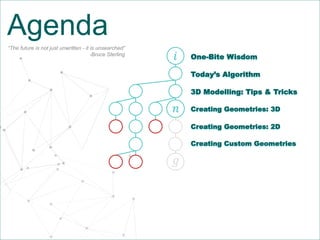
Agenda
One-Bite Wisdom
Creating Geometries: 3D
Creating Geometries: 2D
𝑖
3D Modelling: Tips & Tricks
Today’s Algorithm
𝑔
𝑛
“The future is not just unwritten - it is unsearched”
-Bruce Sterling
Creating Custom Geometries
© 2021 arche1.co.jp | jaist.ac.jp
All rights reserved.
P A G E 3
One-Bite Wisdom
The Error That is Undefined
4
THE ERROR THAT IS UNDEFINED
USS YORKTOWN INCIDENT IN 1998
USS Yorktown is a warship that costs a billion dollar, weighing 10,000 tones, and with 80,000 horsepower.
A software glitch leaves one smartest ships that serves the US Navy dead in the see. In 1997, the
propulsion system failed and brought to a halt because part of the software tried to divide by zero. the
whole system was crushed, and the ship was paralyzed for a couple of hours before the system could
restart again.
References:
Sunk by Windows NT
The Yorktown was paralyzed for 2 hours
Dividing by zero?
© 2021 arche1.co.jp | jaist.ac.jp
All rights reserved.
P A G E 5
Today’s Algorithms
Let’s Brush our Coding Skills
The selection sort algorithm sorts an array by repeatedly finding the
minimum element (considering ascending order) from unsorted part
and putting it at the beginning. The algorithm maintains two subarrays
in a given array.
6
TODAY’S ALGORITHM,
SELECTION SORT
function selectionSort(inputArr) {
let n = inputArr.length;
for(let i = 0; i < n; i++) {
// Finding the smallest number in the subarray
let min = i;
for(let j = i+1; j < n; j++){
if(inputArr[j] < inputArr[min]) {
min=j;
}
}
if (min != i) {
// Swapping the elements
let tmp = inputArr[i];
inputArr[i] = inputArr[min];
inputArr[min] = tmp;
}
}
return inputArr;
}
References:
Selection Sort in JavaScript - Mila Lukic
(Image Source)
© 2021 arche1.co.jp | jaist.ac.jp
All rights reserved.
P A G E 7
3Ds MAX
Let’s design something in 3D
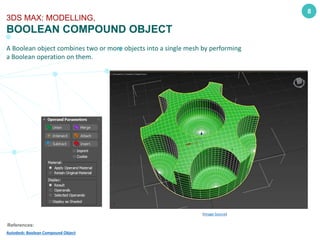
A Boolean object combines two or more objects into a single mesh by performing
a Boolean operation on them.
8
3DS MAX: MODELLING,
BOOLEAN COMPOUND OBJECT
References:
Autodesk: Boolean Compound Object
(Image Source)
© 2021 arche1.co.jp | jaist.ac.jp
All rights reserved.
P A G E 9
Coordinate Systems
Understanding 3D environments
10
COORDINATE SYSTEMS,
Dimensions and Cartesian Coordinate Systems
References:
Cartesian coordinate system
Three-dimensional space
Dimension
Geometry
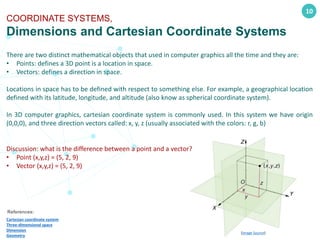
There are two distinct mathematical objects that used in computer graphics all the time and they are:
• Points: defines a 3D point is a location in space.
• Vectors: defines a direction in space.
Locations in space has to be defined with respect to something else. For example, a geographical location
defined with its latitude, longitude, and altitude (also know as spherical coordinate system).
In 3D computer graphics, cartesian coordinate system is commonly used. In this system we have origin
(0,0,0), and three direction vectors called: x, y, z (usually associated with the colors: r, g, b)
Discussion: what is the difference between a point and a vector?
• Point (x,y,z) = (5, 2, 9)
• Vector (x,y,z) = (5, 2, 9)
(Image Source)
11
COORDINATE SYSTEMS,
Left-Handed vs Right-Handed Coordinate Systems
References:
Right-hand rule
Left- vs. Right-handed coordinate systems
3D CG
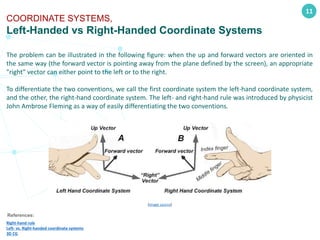
The problem can be illustrated in the following figure: when the up and forward vectors are oriented in
the same way (the forward vector is pointing away from the plane defined by the screen), an appropriate
"right" vector can either point to the left or to the right.
To differentiate the two conventions, we call the first coordinate system the left-hand coordinate system,
and the other, the right-hand coordinate system. The left- and right-hand rule was introduced by physicist
John Ambrose Fleming as a way of easily differentiating the two conventions.
(image source)
12
COORDINATE SYSTEMS,
Y-Up VS Z-Up
References:
Y-Up or Z-Up
3D CG
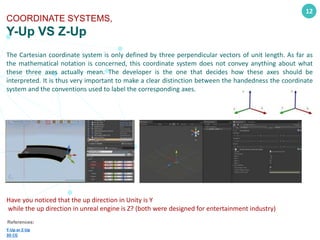
The Cartesian coordinate system is only defined by three perpendicular vectors of unit length. As far as
the mathematical notation is concerned, this coordinate system does not convey anything about what
these three axes actually mean. The developer is the one that decides how these axes should be
interpreted. It is thus very important to make a clear distinction between the handedness the coordinate
system and the conventions used to label the corresponding axes.
Have you noticed that the up direction in Unity is Y
while the up direction in unreal engine is Z? (both were designed for entertainment industry)
© 2021 arche1.co.jp | jaist.ac.jp
All rights reserved.
P A G E 13
Points, Lines, and
Triangles
Understanding the principles
14
BASIC COMPONENTS,
POINTS, LINES, AND TRIANGLES
References:
WebGL Points, Lines, and Triangles
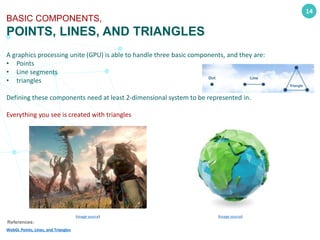
A graphics processing unite (GPU) is able to handle three basic components, and they are:
• Points
• Line segments
• triangles
Defining these components need at least 2-dimensional system to be represented in.
Everything you see is created with triangles
(image source)
(image source)
© 2021 arche1.co.jp | jaist.ac.jp
All rights reserved.
P A G E 15
Threejs3D Geometric
Primitives
Creating basic 3D objects
16
THREEJS 3D GEOMETRIC PRIMITIVES,
GEOMETRIES IN THREEJS
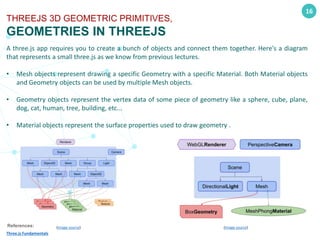
A three.js app requires you to create a bunch of objects and connect them together. Here's a diagram
that represents a small three.js as we know from previous lectures.
• Mesh objects represent drawing a specific Geometry with a specific Material. Both Material objects
and Geometry objects can be used by multiple Mesh objects.
• Geometry objects represent the vertex data of some piece of geometry like a sphere, cube, plane,
dog, cat, human, tree, building, etc...
• Material objects represent the surface properties used to draw geometry .
References:
Three.js Fundamentals
(Image source)
(Image source)
17
THREEJS 3D GEOMETRIC PRIMITIVES,
BOX GEOMETRY
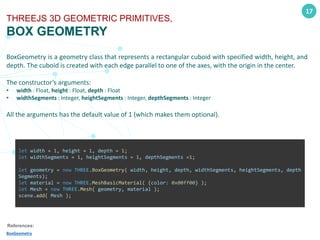
BoxGeometry is a geometry class that represents a rectangular cuboid with specified width, height, and
depth. The cuboid is created with each edge parallel to one of the axes, with the origin in the center.
The constructor’s arguments:
• width : Float, height : Float, depth : Float
• widthSegments : Integer, heightSegments : Integer, depthSegments : Integer
All the arguments has the default value of 1 (which makes them optional).
References:
BoxGeometry
let width = 1, height = 1, depth = 1;
let widthSegments = 1, heightSegments = 1, depthSegments =1;
let geometry = new THREE.BoxGeometry( width, height, depth, widthSegments, heightSegments, depth
Segments);
let material = new THREE.MeshBasicMaterial( {color: 0x00ff00} );
let Mesh = new THREE.Mesh( geometry, material );
scene.add( Mesh );
18
THREEJS 3D GEOMETRIC PRIMITIVES,
SPHERE GEOMETRY
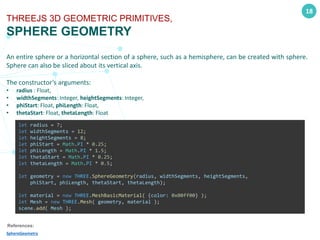
An entire sphere or a horizontal section of a sphere, such as a hemisphere, can be created with sphere.
Sphere can also be sliced about its vertical axis.
The constructor’s arguments:
• radius : Float,
• widthSegments: Integer, heightSegments: Integer,
• phiStart: Float, phiLength: Float,
• thetaStart: Float, thetaLength: Float
References:
SphereGeometry
let radius = 7;
let widthSegments = 12;
let heightSegments = 8;
let phiStart = Math.PI * 0.25;
let phiLength = Math.PI * 1.5;
let thetaStart = Math.PI * 0.25;
let thetaLength = Math.PI * 0.5;
let geometry = new THREE.SphereGeometry(radius, widthSegments, heightSegments,
phiStart, phiLength, thetaStart, thetaLength);
let material = new THREE.MeshBasicMaterial( {color: 0x00ff00} );
let Mesh = new THREE.Mesh( geometry, material );
scene.add( Mesh );
19
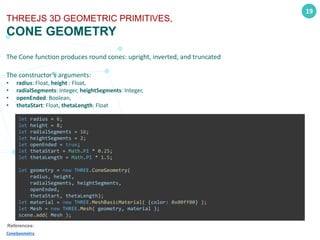
THREEJS 3D GEOMETRIC PRIMITIVES,
CONE GEOMETRY
The Cone function produces round cones: upright, inverted, and truncated
The constructor’s arguments:
• radius: Float, height : Float,
• radialSegments: Integer, heightSegments: Integer,
• openEnded: Boolean,
• thetaStart: Float, thetaLength: Float
References:
ConeGeometry
let radius = 6;
let height = 8;
let radialSegments = 16;
let heightSegments = 2;
let openEnded = true;
let thetaStart = Math.PI * 0.25;
let thetaLength = Math.PI * 1.5;
let geometry = new THREE.ConeGeometry(
radius, height,
radialSegments, heightSegments,
openEnded,
thetaStart, thetaLength);
let material = new THREE.MeshBasicMaterial( {color: 0x00ff00} );
let Mesh = new THREE.Mesh( geometry, material );
scene.add( Mesh );
20
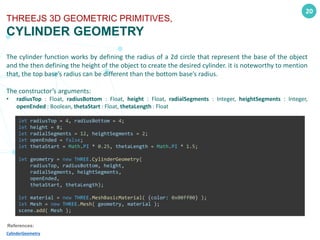
THREEJS 3D GEOMETRIC PRIMITIVES,
CYLINDER GEOMETRY
The cylinder function works by defining the radius of a 2d circle that represent the base of the object
and the then defining the height of the object to create the desired cylinder. it is noteworthy to mention
that, the top base’s radius can be different than the bottom base’s radius.
The constructor’s arguments:
• radiusTop : Float, radiusBottom : Float, height : Float, radialSegments : Integer, heightSegments : Integer,
openEnded : Boolean, thetaStart : Float, thetaLength : Float
References:
CylinderGeometry
let radiusTop = 4, radiusBottom = 4;
let height = 8;
let radialSegments = 12, heightSegments = 2;
let openEnded = false;
let thetaStart = Math.PI * 0.25, thetaLength = Math.PI * 1.5;
let geometry = new THREE.CylinderGeometry(
radiusTop, radiusBottom, height,
radialSegments, heightSegments,
openEnded,
thetaStart, thetaLength);
let material = new THREE.MeshBasicMaterial( {color: 0x00ff00} );
let Mesh = new THREE.Mesh( geometry, material );
scene.add( Mesh );
21
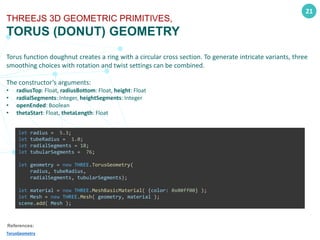
THREEJS 3D GEOMETRIC PRIMITIVES,
TORUS (DONUT) GEOMETRY
Torus function doughnut creates a ring with a circular cross section. To generate intricate variants, three
smoothing choices with rotation and twist settings can be combined.
The constructor’s arguments:
• radiusTop: Float, radiusBottom: Float, height: Float
• radialSegments: Integer, heightSegments: Integer
• openEnded: Boolean
• thetaStart: Float, thetaLength: Float
References:
TorusGeometry
let radius = 5.3;
let tubeRadius = 1.0;
let radialSegments = 18;
let tubularSegments = 76;
let geometry = new THREE.TorusGeometry(
radius, tubeRadius,
radialSegments, tubularSegments);
let material = new THREE.MeshBasicMaterial( {color: 0x00ff00} );
let Mesh = new THREE.Mesh( geometry, material );
scene.add( Mesh );
22
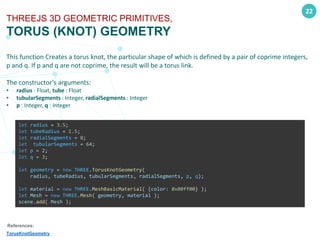
THREEJS 3D GEOMETRIC PRIMITIVES,
TORUS (KNOT) GEOMETRY
This function Creates a torus knot, the particular shape of which is defined by a pair of coprime integers,
p and q. If p and q are not coprime, the result will be a torus link.
The constructor’s arguments:
• radius : Float, tube : Float
• tubularSegments : Integer, radialSegments : Integer
• p : Integer, q : Integer
References:
TorusKnotGeometry
let radius = 3.5;
let tubeRadius = 1.5;
let radialSegments = 8;
let tubularSegments = 64;
let p = 2;
let q = 3;
let geometry = new THREE.TorusKnotGeometry(
radius, tubeRadius, tubularSegments, radialSegments, p, q);
let material = new THREE.MeshBasicMaterial( {color: 0x00ff00} );
let Mesh = new THREE.Mesh( geometry, material );
scene.add( Mesh );
23
THREEJS 3D GEOMETRIC PRIMITIVES,
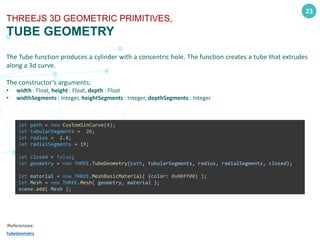
TUBE GEOMETRY
The Tube function produces a cylinder with a concentric hole. The function creates a tube that extrudes
along a 3d curve.
The constructor’s arguments:
• width : Float, height : Float, depth : Float
• widthSegments : Integer, heightSegments : Integer, depthSegments : Integer
References:
TubeGeometry
let path = new CustomSinCurve(4);
let tubularSegments = 26;
let radius = 2.4;
let radialSegments = 19;
let closed = false;
let geometry = new THREE.TubeGeometry(path, tubularSegments, radius, radialSegments, closed);
let material = new THREE.MeshBasicMaterial( {color: 0x00ff00} );
let Mesh = new THREE.Mesh( geometry, material );
scene.add( Mesh );
24
THREEJS 3D GEOMETRIC PRIMITIVES,
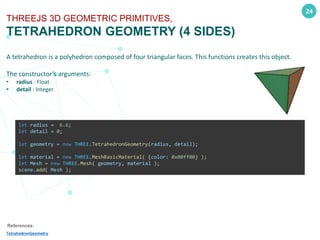
TETRAHEDRON GEOMETRY (4 SIDES)
A tetrahedron is a polyhedron composed of four triangular faces. This functions creates this object.
The constructor’s arguments:
• radius : Float
• detail : Integer
References:
TetrahedronGeometry
let radius = 6.6;
let detail = 0;
let geometry = new THREE.TetrahedronGeometry(radius, detail);
let material = new THREE.MeshBasicMaterial( {color: 0x00ff00} );
let Mesh = new THREE.Mesh( geometry, material );
scene.add( Mesh );
25
THREEJS 3D GEOMETRIC PRIMITIVES,
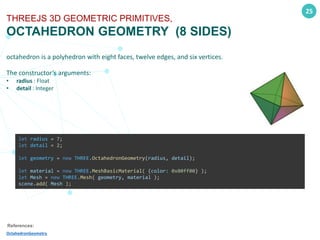
OCTAHEDRON GEOMETRY (8 SIDES)
octahedron is a polyhedron with eight faces, twelve edges, and six vertices.
The constructor’s arguments:
• radius : Float
• detail : Integer
References:
OctahedronGeometry
let radius = 7;
let detail = 2;
let geometry = new THREE.OctahedronGeometry(radius, detail);
let material = new THREE.MeshBasicMaterial( {color: 0x00ff00} );
let Mesh = new THREE.Mesh( geometry, material );
scene.add( Mesh );
26
THREEJS 3D GEOMETRIC PRIMITIVES,
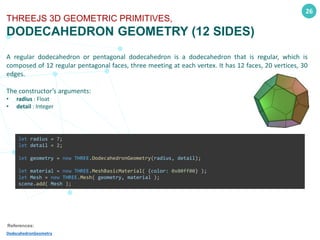
DODECAHEDRON GEOMETRY (12 SIDES)
A regular dodecahedron or pentagonal dodecahedron is a dodecahedron that is regular, which is
composed of 12 regular pentagonal faces, three meeting at each vertex. It has 12 faces, 20 vertices, 30
edges.
The constructor’s arguments:
• radius : Float
• detail : Integer
References:
DodecahedronGeometry
let radius = 7;
let detail = 2;
let geometry = new THREE.DodecahedronGeometry(radius, detail);
let material = new THREE.MeshBasicMaterial( {color: 0x00ff00} );
let Mesh = new THREE.Mesh( geometry, material );
scene.add( Mesh );
27
THREEJS 3D GEOMETRIC PRIMITIVES,
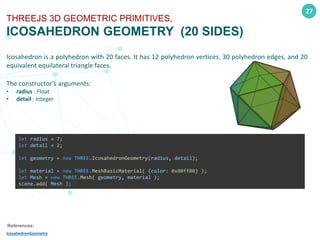
ICOSAHEDRON GEOMETRY (20 SIDES)
Icosahedron is a polyhedron with 20 faces. It has 12 polyhedron vertices, 30 polyhedron edges, and 20
equivalent equilateral triangle faces.
The constructor’s arguments:
• radius : Float
• detail : Integer
References:
IcosahedronGeometry
let radius = 7;
let detail = 2;
let geometry = new THREE.IcosahedronGeometry(radius, detail);
let material = new THREE.MeshBasicMaterial( {color: 0x00ff00} );
let Mesh = new THREE.Mesh( geometry, material );
scene.add( Mesh );
28
THREEJS 3D GEOMETRIC PRIMITIVES,
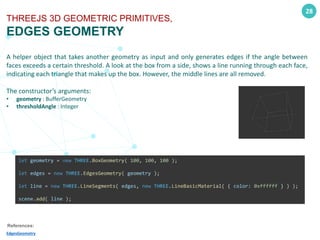
EDGES GEOMETRY
A helper object that takes another geometry as input and only generates edges if the angle between
faces exceeds a certain threshold. A look at the box from a side, shows a line running through each face,
indicating each triangle that makes up the box. However, the middle lines are all removed.
The constructor’s arguments:
• geometry : BufferGeometry
• thresholdAngle : Integer
References:
EdgesGeometry
let geometry = new THREE.BoxGeometry( 100, 100, 100 );
let edges = new THREE.EdgesGeometry( geometry );
let line = new THREE.LineSegments( edges, new THREE.LineBasicMaterial( { color: 0xffffff } ) );
scene.add( line );
29
THREEJS 3D GEOMETRIC PRIMITIVES,
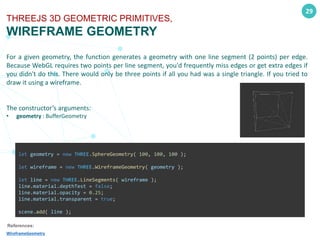
WIREFRAME GEOMETRY
For a given geometry, the function generates a geometry with one line segment (2 points) per edge.
Because WebGL requires two points per line segment, you'd frequently miss edges or get extra edges if
you didn't do this. There would only be three points if all you had was a single triangle. If you tried to
draw it using a wireframe.
The constructor’s arguments:
• geometry : BufferGeometry
References:
WireframeGeometry
let geometry = new THREE.SphereGeometry( 100, 100, 100 );
let wireframe = new THREE.WireframeGeometry( geometry );
let line = new THREE.LineSegments( wireframe );
line.material.depthTest = false;
line.material.opacity = 0.25;
line.material.transparent = true;
scene.add( line );
© 2021 arche1.co.jp | jaist.ac.jp
All rights reserved.
P A G E 30
2D Geometries
Creating 2D Objects
31
THREEJS 2D GEOMETRIC PRIMITIVES,
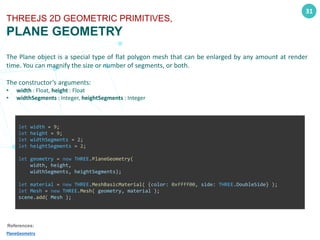
PLANE GEOMETRY
The Plane object is a special type of flat polygon mesh that can be enlarged by any amount at render
time. You can magnify the size or number of segments, or both.
The constructor’s arguments:
• width : Float, height : Float
• widthSegments : Integer, heightSegments : Integer
References:
PlaneGeometry
let width = 9;
let height = 9;
let widthSegments = 2;
let heightSegments = 2;
let geometry = new THREE.PlaneGeometry(
width, height,
widthSegments, heightSegments);
let material = new THREE.MeshBasicMaterial( {color: 0xffff00, side: THREE.DoubleSide} );
let Mesh = new THREE.Mesh( geometry, material );
scene.add( Mesh );
32
THREEJS 2D GEOMETRIC PRIMITIVES,
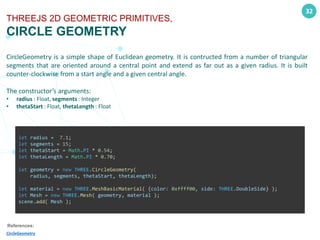
CIRCLE GEOMETRY
CircleGeometry is a simple shape of Euclidean geometry. It is contructed from a number of triangular
segments that are oriented around a central point and extend as far out as a given radius. It is built
counter-clockwise from a start angle and a given central angle.
The constructor’s arguments:
• radius : Float, segments : Integer
• thetaStart : Float, thetaLength : Float
References:
CircleGeometry
let radius = 7.1;
let segments = 15;
let thetaStart = Math.PI * 0.54;
let thetaLength = Math.PI * 0.70;
let geometry = new THREE.CircleGeometry(
radius, segments, thetaStart, thetaLength);
let material = new THREE.MeshBasicMaterial( {color: 0xffff00, side: THREE.DoubleSide} );
let Mesh = new THREE.Mesh( geometry, material );
scene.add( Mesh );
33
THREEJS 2D GEOMETRIC PRIMITIVES,
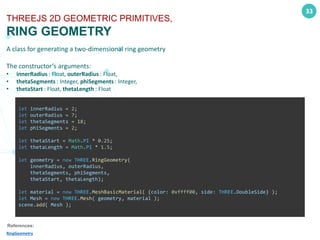
RING GEOMETRY
A class for generating a two-dimensional ring geometry
The constructor’s arguments:
• innerRadius : Float, outerRadius : Float,
• thetaSegments : Integer, phiSegments : Integer,
• thetaStart : Float, thetaLength : Float
References:
RingGeometry
let innerRadius = 2;
let outerRadius = 7;
let thetaSegments = 18;
let phiSegments = 2;
let thetaStart = Math.PI * 0.25;
let thetaLength = Math.PI * 1.5;
let geometry = new THREE.RingGeometry(
innerRadius, outerRadius,
thetaSegments, phiSegments,
thetaStart, thetaLength);
let material = new THREE.MeshBasicMaterial( {color: 0xffff00, side: THREE.DoubleSide} );
let Mesh = new THREE.Mesh( geometry, material );
scene.add( Mesh );
© 2021 arche1.co.jp | jaist.ac.jp
All rights reserved.
P A G E 34
Create Geometry
Creating Custom Objects
35
THREEJS CUSTOM BUFFERGEOMETRY,
UNDERSTANDING THE CONCEPT
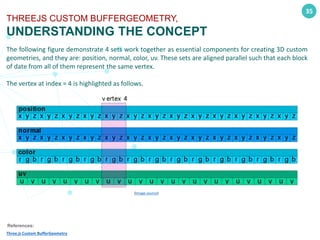
The following figure demonstrate 4 sets work together as essential components for creating 3D custom
geometries, and they are: position, normal, color, uv. These sets are aligned parallel such that each block
of date from all of them represent the same vertex.
The vertex at index = 4 is highlighted as follows.
References:
Three.js Custom BufferGeometry
(Image source)
36
THREEJS CUSTOM BUFFERGEOMETRY,
UNDERSTANDING THE CONCEPT
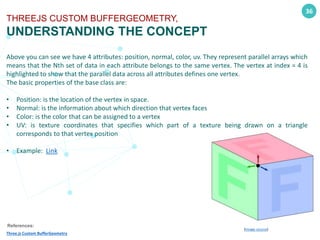
Above you can see we have 4 attributes: position, normal, color, uv. They represent parallel arrays which
means that the Nth set of data in each attribute belongs to the same vertex. The vertex at index = 4 is
highlighted to show that the parallel data across all attributes defines one vertex.
The basic properties of the base class are:
• Position: is the location of the vertex in space.
• Normal: is the information about which direction that vertex faces
• Color: is the color that can be assigned to a vertex
• UV: is texture coordinates that specifies which part of a texture being drawn on a triangle
corresponds to that vertex position
• Example: Link
References:
Three.js Custom BufferGeometry
(Image source)
© 2021 arche1.co.jp | jaist.ac.jp
All rights reserved.
P A G E 37
HOMEWORK
Let's Exercise What We've Learned
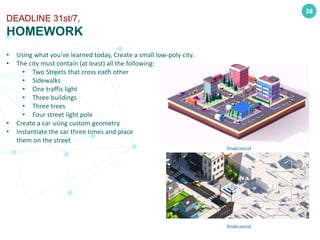
• Using what you’ve learned today, Create a small low-poly city.
• The city must contain (at least) all the following:
• Two Streets that cross each other
• Sidewalks
• One traffic light
• Three buildings
• Three trees
• Four street light pole
• Create a car using custom geometry
• Instantiate the car three times and place
them on the street
38
DEADLINE 31st/7,
HOMEWORK
(Image source)
(Image source)
Algorithms, Computer Graphics, and Mathematics
for Game Developers and Computer Scientists
© 2021 arche1.co.jp | jaist.ac.jp
All rights reserved.
THANKS FOR YOUR
ATTENTION

Class[5][9th jul] [three js-meshes_geometries_and_primitives]

  • 1.
    ALGORITHMS, COMPUTER GRAPHICS,AND MATHEMATICS FOR GAME DEVELOPERS & COMPUTER SCIENTISTS PREPARED AND PRESENTED BY Dr.Saajid Abuluaih, PhD 9th of Jul 2021 Class[5]: Threejs Meshes, Geometries, and Primitives
  • 2.
    Algorithms, Computer Graphics,and Mathematics for Game Developers and Computer Scientists © 2021 arche1.co.jp | jaist.ac.jp All rights reserved. 2 Agenda One-Bite Wisdom Creating Geometries: 3D Creating Geometries: 2D 𝑖 3D Modelling: Tips & Tricks Today’s Algorithm 𝑔 𝑛 “The future is not just unwritten - it is unsearched” -Bruce Sterling Creating Custom Geometries
  • 3.
    © 2021 arche1.co.jp| jaist.ac.jp All rights reserved. P A G E 3 One-Bite Wisdom The Error That is Undefined
  • 4.
    4 THE ERROR THATIS UNDEFINED USS YORKTOWN INCIDENT IN 1998 USS Yorktown is a warship that costs a billion dollar, weighing 10,000 tones, and with 80,000 horsepower. A software glitch leaves one smartest ships that serves the US Navy dead in the see. In 1997, the propulsion system failed and brought to a halt because part of the software tried to divide by zero. the whole system was crushed, and the ship was paralyzed for a couple of hours before the system could restart again. References: Sunk by Windows NT The Yorktown was paralyzed for 2 hours Dividing by zero?
  • 5.
    © 2021 arche1.co.jp| jaist.ac.jp All rights reserved. P A G E 5 Today’s Algorithms Let’s Brush our Coding Skills
  • 6.
    The selection sortalgorithm sorts an array by repeatedly finding the minimum element (considering ascending order) from unsorted part and putting it at the beginning. The algorithm maintains two subarrays in a given array. 6 TODAY’S ALGORITHM, SELECTION SORT function selectionSort(inputArr) { let n = inputArr.length; for(let i = 0; i < n; i++) { // Finding the smallest number in the subarray let min = i; for(let j = i+1; j < n; j++){ if(inputArr[j] < inputArr[min]) { min=j; } } if (min != i) { // Swapping the elements let tmp = inputArr[i]; inputArr[i] = inputArr[min]; inputArr[min] = tmp; } } return inputArr; } References: Selection Sort in JavaScript - Mila Lukic (Image Source)
  • 7.
    © 2021 arche1.co.jp| jaist.ac.jp All rights reserved. P A G E 7 3Ds MAX Let’s design something in 3D
  • 8.
    A Boolean objectcombines two or more objects into a single mesh by performing a Boolean operation on them. 8 3DS MAX: MODELLING, BOOLEAN COMPOUND OBJECT References: Autodesk: Boolean Compound Object (Image Source)
  • 9.
    © 2021 arche1.co.jp| jaist.ac.jp All rights reserved. P A G E 9 Coordinate Systems Understanding 3D environments
  • 10.
    10 COORDINATE SYSTEMS, Dimensions andCartesian Coordinate Systems References: Cartesian coordinate system Three-dimensional space Dimension Geometry There are two distinct mathematical objects that used in computer graphics all the time and they are: • Points: defines a 3D point is a location in space. • Vectors: defines a direction in space. Locations in space has to be defined with respect to something else. For example, a geographical location defined with its latitude, longitude, and altitude (also know as spherical coordinate system). In 3D computer graphics, cartesian coordinate system is commonly used. In this system we have origin (0,0,0), and three direction vectors called: x, y, z (usually associated with the colors: r, g, b) Discussion: what is the difference between a point and a vector? • Point (x,y,z) = (5, 2, 9) • Vector (x,y,z) = (5, 2, 9) (Image Source)
  • 11.
    11 COORDINATE SYSTEMS, Left-Handed vsRight-Handed Coordinate Systems References: Right-hand rule Left- vs. Right-handed coordinate systems 3D CG The problem can be illustrated in the following figure: when the up and forward vectors are oriented in the same way (the forward vector is pointing away from the plane defined by the screen), an appropriate "right" vector can either point to the left or to the right. To differentiate the two conventions, we call the first coordinate system the left-hand coordinate system, and the other, the right-hand coordinate system. The left- and right-hand rule was introduced by physicist John Ambrose Fleming as a way of easily differentiating the two conventions. (image source)
  • 12.
    12 COORDINATE SYSTEMS, Y-Up VSZ-Up References: Y-Up or Z-Up 3D CG The Cartesian coordinate system is only defined by three perpendicular vectors of unit length. As far as the mathematical notation is concerned, this coordinate system does not convey anything about what these three axes actually mean. The developer is the one that decides how these axes should be interpreted. It is thus very important to make a clear distinction between the handedness the coordinate system and the conventions used to label the corresponding axes. Have you noticed that the up direction in Unity is Y while the up direction in unreal engine is Z? (both were designed for entertainment industry)
  • 13.
    © 2021 arche1.co.jp| jaist.ac.jp All rights reserved. P A G E 13 Points, Lines, and Triangles Understanding the principles
  • 14.
    14 BASIC COMPONENTS, POINTS, LINES,AND TRIANGLES References: WebGL Points, Lines, and Triangles A graphics processing unite (GPU) is able to handle three basic components, and they are: • Points • Line segments • triangles Defining these components need at least 2-dimensional system to be represented in. Everything you see is created with triangles (image source) (image source)
  • 15.
    © 2021 arche1.co.jp| jaist.ac.jp All rights reserved. P A G E 15 Threejs3D Geometric Primitives Creating basic 3D objects
  • 16.
    16 THREEJS 3D GEOMETRICPRIMITIVES, GEOMETRIES IN THREEJS A three.js app requires you to create a bunch of objects and connect them together. Here's a diagram that represents a small three.js as we know from previous lectures. • Mesh objects represent drawing a specific Geometry with a specific Material. Both Material objects and Geometry objects can be used by multiple Mesh objects. • Geometry objects represent the vertex data of some piece of geometry like a sphere, cube, plane, dog, cat, human, tree, building, etc... • Material objects represent the surface properties used to draw geometry . References: Three.js Fundamentals (Image source) (Image source)
  • 17.
    17 THREEJS 3D GEOMETRICPRIMITIVES, BOX GEOMETRY BoxGeometry is a geometry class that represents a rectangular cuboid with specified width, height, and depth. The cuboid is created with each edge parallel to one of the axes, with the origin in the center. The constructor’s arguments: • width : Float, height : Float, depth : Float • widthSegments : Integer, heightSegments : Integer, depthSegments : Integer All the arguments has the default value of 1 (which makes them optional). References: BoxGeometry let width = 1, height = 1, depth = 1; let widthSegments = 1, heightSegments = 1, depthSegments =1; let geometry = new THREE.BoxGeometry( width, height, depth, widthSegments, heightSegments, depth Segments); let material = new THREE.MeshBasicMaterial( {color: 0x00ff00} ); let Mesh = new THREE.Mesh( geometry, material ); scene.add( Mesh );
  • 18.
    18 THREEJS 3D GEOMETRICPRIMITIVES, SPHERE GEOMETRY An entire sphere or a horizontal section of a sphere, such as a hemisphere, can be created with sphere. Sphere can also be sliced about its vertical axis. The constructor’s arguments: • radius : Float, • widthSegments: Integer, heightSegments: Integer, • phiStart: Float, phiLength: Float, • thetaStart: Float, thetaLength: Float References: SphereGeometry let radius = 7; let widthSegments = 12; let heightSegments = 8; let phiStart = Math.PI * 0.25; let phiLength = Math.PI * 1.5; let thetaStart = Math.PI * 0.25; let thetaLength = Math.PI * 0.5; let geometry = new THREE.SphereGeometry(radius, widthSegments, heightSegments, phiStart, phiLength, thetaStart, thetaLength); let material = new THREE.MeshBasicMaterial( {color: 0x00ff00} ); let Mesh = new THREE.Mesh( geometry, material ); scene.add( Mesh );
  • 19.
    19 THREEJS 3D GEOMETRICPRIMITIVES, CONE GEOMETRY The Cone function produces round cones: upright, inverted, and truncated The constructor’s arguments: • radius: Float, height : Float, • radialSegments: Integer, heightSegments: Integer, • openEnded: Boolean, • thetaStart: Float, thetaLength: Float References: ConeGeometry let radius = 6; let height = 8; let radialSegments = 16; let heightSegments = 2; let openEnded = true; let thetaStart = Math.PI * 0.25; let thetaLength = Math.PI * 1.5; let geometry = new THREE.ConeGeometry( radius, height, radialSegments, heightSegments, openEnded, thetaStart, thetaLength); let material = new THREE.MeshBasicMaterial( {color: 0x00ff00} ); let Mesh = new THREE.Mesh( geometry, material ); scene.add( Mesh );
  • 20.
    20 THREEJS 3D GEOMETRICPRIMITIVES, CYLINDER GEOMETRY The cylinder function works by defining the radius of a 2d circle that represent the base of the object and the then defining the height of the object to create the desired cylinder. it is noteworthy to mention that, the top base’s radius can be different than the bottom base’s radius. The constructor’s arguments: • radiusTop : Float, radiusBottom : Float, height : Float, radialSegments : Integer, heightSegments : Integer, openEnded : Boolean, thetaStart : Float, thetaLength : Float References: CylinderGeometry let radiusTop = 4, radiusBottom = 4; let height = 8; let radialSegments = 12, heightSegments = 2; let openEnded = false; let thetaStart = Math.PI * 0.25, thetaLength = Math.PI * 1.5; let geometry = new THREE.CylinderGeometry( radiusTop, radiusBottom, height, radialSegments, heightSegments, openEnded, thetaStart, thetaLength); let material = new THREE.MeshBasicMaterial( {color: 0x00ff00} ); let Mesh = new THREE.Mesh( geometry, material ); scene.add( Mesh );
  • 21.
    21 THREEJS 3D GEOMETRICPRIMITIVES, TORUS (DONUT) GEOMETRY Torus function doughnut creates a ring with a circular cross section. To generate intricate variants, three smoothing choices with rotation and twist settings can be combined. The constructor’s arguments: • radiusTop: Float, radiusBottom: Float, height: Float • radialSegments: Integer, heightSegments: Integer • openEnded: Boolean • thetaStart: Float, thetaLength: Float References: TorusGeometry let radius = 5.3; let tubeRadius = 1.0; let radialSegments = 18; let tubularSegments = 76; let geometry = new THREE.TorusGeometry( radius, tubeRadius, radialSegments, tubularSegments); let material = new THREE.MeshBasicMaterial( {color: 0x00ff00} ); let Mesh = new THREE.Mesh( geometry, material ); scene.add( Mesh );
  • 22.
    22 THREEJS 3D GEOMETRICPRIMITIVES, TORUS (KNOT) GEOMETRY This function Creates a torus knot, the particular shape of which is defined by a pair of coprime integers, p and q. If p and q are not coprime, the result will be a torus link. The constructor’s arguments: • radius : Float, tube : Float • tubularSegments : Integer, radialSegments : Integer • p : Integer, q : Integer References: TorusKnotGeometry let radius = 3.5; let tubeRadius = 1.5; let radialSegments = 8; let tubularSegments = 64; let p = 2; let q = 3; let geometry = new THREE.TorusKnotGeometry( radius, tubeRadius, tubularSegments, radialSegments, p, q); let material = new THREE.MeshBasicMaterial( {color: 0x00ff00} ); let Mesh = new THREE.Mesh( geometry, material ); scene.add( Mesh );
  • 23.
    23 THREEJS 3D GEOMETRICPRIMITIVES, TUBE GEOMETRY The Tube function produces a cylinder with a concentric hole. The function creates a tube that extrudes along a 3d curve. The constructor’s arguments: • width : Float, height : Float, depth : Float • widthSegments : Integer, heightSegments : Integer, depthSegments : Integer References: TubeGeometry let path = new CustomSinCurve(4); let tubularSegments = 26; let radius = 2.4; let radialSegments = 19; let closed = false; let geometry = new THREE.TubeGeometry(path, tubularSegments, radius, radialSegments, closed); let material = new THREE.MeshBasicMaterial( {color: 0x00ff00} ); let Mesh = new THREE.Mesh( geometry, material ); scene.add( Mesh );
  • 24.
    24 THREEJS 3D GEOMETRICPRIMITIVES, TETRAHEDRON GEOMETRY (4 SIDES) A tetrahedron is a polyhedron composed of four triangular faces. This functions creates this object. The constructor’s arguments: • radius : Float • detail : Integer References: TetrahedronGeometry let radius = 6.6; let detail = 0; let geometry = new THREE.TetrahedronGeometry(radius, detail); let material = new THREE.MeshBasicMaterial( {color: 0x00ff00} ); let Mesh = new THREE.Mesh( geometry, material ); scene.add( Mesh );
  • 25.
    25 THREEJS 3D GEOMETRICPRIMITIVES, OCTAHEDRON GEOMETRY (8 SIDES) octahedron is a polyhedron with eight faces, twelve edges, and six vertices. The constructor’s arguments: • radius : Float • detail : Integer References: OctahedronGeometry let radius = 7; let detail = 2; let geometry = new THREE.OctahedronGeometry(radius, detail); let material = new THREE.MeshBasicMaterial( {color: 0x00ff00} ); let Mesh = new THREE.Mesh( geometry, material ); scene.add( Mesh );
  • 26.
    26 THREEJS 3D GEOMETRICPRIMITIVES, DODECAHEDRON GEOMETRY (12 SIDES) A regular dodecahedron or pentagonal dodecahedron is a dodecahedron that is regular, which is composed of 12 regular pentagonal faces, three meeting at each vertex. It has 12 faces, 20 vertices, 30 edges. The constructor’s arguments: • radius : Float • detail : Integer References: DodecahedronGeometry let radius = 7; let detail = 2; let geometry = new THREE.DodecahedronGeometry(radius, detail); let material = new THREE.MeshBasicMaterial( {color: 0x00ff00} ); let Mesh = new THREE.Mesh( geometry, material ); scene.add( Mesh );
  • 27.
    27 THREEJS 3D GEOMETRICPRIMITIVES, ICOSAHEDRON GEOMETRY (20 SIDES) Icosahedron is a polyhedron with 20 faces. It has 12 polyhedron vertices, 30 polyhedron edges, and 20 equivalent equilateral triangle faces. The constructor’s arguments: • radius : Float • detail : Integer References: IcosahedronGeometry let radius = 7; let detail = 2; let geometry = new THREE.IcosahedronGeometry(radius, detail); let material = new THREE.MeshBasicMaterial( {color: 0x00ff00} ); let Mesh = new THREE.Mesh( geometry, material ); scene.add( Mesh );
  • 28.
    28 THREEJS 3D GEOMETRICPRIMITIVES, EDGES GEOMETRY A helper object that takes another geometry as input and only generates edges if the angle between faces exceeds a certain threshold. A look at the box from a side, shows a line running through each face, indicating each triangle that makes up the box. However, the middle lines are all removed. The constructor’s arguments: • geometry : BufferGeometry • thresholdAngle : Integer References: EdgesGeometry let geometry = new THREE.BoxGeometry( 100, 100, 100 ); let edges = new THREE.EdgesGeometry( geometry ); let line = new THREE.LineSegments( edges, new THREE.LineBasicMaterial( { color: 0xffffff } ) ); scene.add( line );
  • 29.
    29 THREEJS 3D GEOMETRICPRIMITIVES, WIREFRAME GEOMETRY For a given geometry, the function generates a geometry with one line segment (2 points) per edge. Because WebGL requires two points per line segment, you'd frequently miss edges or get extra edges if you didn't do this. There would only be three points if all you had was a single triangle. If you tried to draw it using a wireframe. The constructor’s arguments: • geometry : BufferGeometry References: WireframeGeometry let geometry = new THREE.SphereGeometry( 100, 100, 100 ); let wireframe = new THREE.WireframeGeometry( geometry ); let line = new THREE.LineSegments( wireframe ); line.material.depthTest = false; line.material.opacity = 0.25; line.material.transparent = true; scene.add( line );
  • 30.
    © 2021 arche1.co.jp| jaist.ac.jp All rights reserved. P A G E 30 2D Geometries Creating 2D Objects
  • 31.
    31 THREEJS 2D GEOMETRICPRIMITIVES, PLANE GEOMETRY The Plane object is a special type of flat polygon mesh that can be enlarged by any amount at render time. You can magnify the size or number of segments, or both. The constructor’s arguments: • width : Float, height : Float • widthSegments : Integer, heightSegments : Integer References: PlaneGeometry let width = 9; let height = 9; let widthSegments = 2; let heightSegments = 2; let geometry = new THREE.PlaneGeometry( width, height, widthSegments, heightSegments); let material = new THREE.MeshBasicMaterial( {color: 0xffff00, side: THREE.DoubleSide} ); let Mesh = new THREE.Mesh( geometry, material ); scene.add( Mesh );
  • 32.
    32 THREEJS 2D GEOMETRICPRIMITIVES, CIRCLE GEOMETRY CircleGeometry is a simple shape of Euclidean geometry. It is contructed from a number of triangular segments that are oriented around a central point and extend as far out as a given radius. It is built counter-clockwise from a start angle and a given central angle. The constructor’s arguments: • radius : Float, segments : Integer • thetaStart : Float, thetaLength : Float References: CircleGeometry let radius = 7.1; let segments = 15; let thetaStart = Math.PI * 0.54; let thetaLength = Math.PI * 0.70; let geometry = new THREE.CircleGeometry( radius, segments, thetaStart, thetaLength); let material = new THREE.MeshBasicMaterial( {color: 0xffff00, side: THREE.DoubleSide} ); let Mesh = new THREE.Mesh( geometry, material ); scene.add( Mesh );
  • 33.
    33 THREEJS 2D GEOMETRICPRIMITIVES, RING GEOMETRY A class for generating a two-dimensional ring geometry The constructor’s arguments: • innerRadius : Float, outerRadius : Float, • thetaSegments : Integer, phiSegments : Integer, • thetaStart : Float, thetaLength : Float References: RingGeometry let innerRadius = 2; let outerRadius = 7; let thetaSegments = 18; let phiSegments = 2; let thetaStart = Math.PI * 0.25; let thetaLength = Math.PI * 1.5; let geometry = new THREE.RingGeometry( innerRadius, outerRadius, thetaSegments, phiSegments, thetaStart, thetaLength); let material = new THREE.MeshBasicMaterial( {color: 0xffff00, side: THREE.DoubleSide} ); let Mesh = new THREE.Mesh( geometry, material ); scene.add( Mesh );
  • 34.
    © 2021 arche1.co.jp| jaist.ac.jp All rights reserved. P A G E 34 Create Geometry Creating Custom Objects
  • 35.
    35 THREEJS CUSTOM BUFFERGEOMETRY, UNDERSTANDINGTHE CONCEPT The following figure demonstrate 4 sets work together as essential components for creating 3D custom geometries, and they are: position, normal, color, uv. These sets are aligned parallel such that each block of date from all of them represent the same vertex. The vertex at index = 4 is highlighted as follows. References: Three.js Custom BufferGeometry (Image source)
  • 36.
    36 THREEJS CUSTOM BUFFERGEOMETRY, UNDERSTANDINGTHE CONCEPT Above you can see we have 4 attributes: position, normal, color, uv. They represent parallel arrays which means that the Nth set of data in each attribute belongs to the same vertex. The vertex at index = 4 is highlighted to show that the parallel data across all attributes defines one vertex. The basic properties of the base class are: • Position: is the location of the vertex in space. • Normal: is the information about which direction that vertex faces • Color: is the color that can be assigned to a vertex • UV: is texture coordinates that specifies which part of a texture being drawn on a triangle corresponds to that vertex position • Example: Link References: Three.js Custom BufferGeometry (Image source)
  • 37.
    © 2021 arche1.co.jp| jaist.ac.jp All rights reserved. P A G E 37 HOMEWORK Let's Exercise What We've Learned
  • 38.
    • Using whatyou’ve learned today, Create a small low-poly city. • The city must contain (at least) all the following: • Two Streets that cross each other • Sidewalks • One traffic light • Three buildings • Three trees • Four street light pole • Create a car using custom geometry • Instantiate the car three times and place them on the street 38 DEADLINE 31st/7, HOMEWORK (Image source) (Image source)
  • 39.
    Algorithms, Computer Graphics,and Mathematics for Game Developers and Computer Scientists © 2021 arche1.co.jp | jaist.ac.jp All rights reserved. THANKS FOR YOUR ATTENTION