Chapter 7
Processes running in different hosts communicate with an  application-layer protocol   Popular application-level protocols: DNS HTTP FTP SMTP / POP3 / IMAP Programming network applications socket API
Programs could refer to hosts, mailboxes and other resources by their network IP.  These Numbers are difficult to remember by people? Also, if moving the servers to different machine? Use names instead of IP numbers.  Ex. ce.sharif.edu, veisi@yahoo.com Need a mechanism to convert names to IP Number Use a file:  hosts.txt  As the number of PCs increase?  Size increase, Conflict of host names Need a central manager:  DNS: Domain Name System
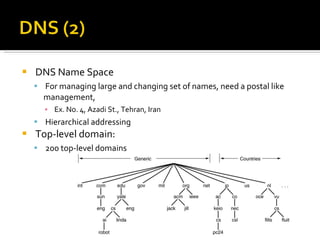
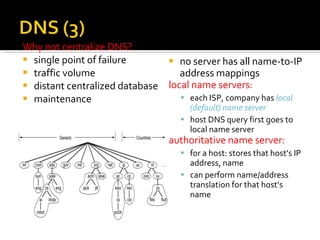
DNS Name Space For managing large and changing set of names, need a postal like management, Ex. No. 4, Azadi St., Tehran, Iran Hierarchical addressing  Top-level domain:  200 top-level domains
no server has all name-to-IP address mappings local name servers: each ISP, company has  local (default) name server host DNS query first goes to local name server authoritative name server: for a host: stores that host’s IP address, name can perform name/address translation for that host’s name  Why not centralize DNS? single point of failure traffic volume distant centralized database maintenance
Example:  host  surf.eurecom.fr  wants IP address of  gaia.cs.umass.edu 1.  contacts its local DNS server,  dns.eurecom.fr 2.   dns.eurecom.fr  contacts root name server, if necessary 3.  root name server contacts authoritative name server,  dns.umass.edu,  if necessary   requesting host surf.eurecom.fr gaia.cs.umass.edu root name server authoritative name server dns.umass.edu 1 2 3 4 5 6 local name server dns.eurecom.fr
Once (any) name server learns mapping, it  caches  mapping cache entries timeout (disappear) after some time  DNS Records format: (name, TTL, value, type) Records types:
Three major components :  user agents  mail servers  simple mail transfer protocol:  SMTP User Agent Sometimes is called:  “ mail reader” composing, editing, reading mail messages e.g., Eudora, Outlook, elm, Netscape Messenger outgoing, incoming messages stored on server user mailbox outgoing  message queue mail server user agent user agent user agent mail server user agent user agent mail server user agent SMTP SMTP SMTP
Mail Servers   mailbox  contains incoming messages for user message   queue  of outgoing (to be sent) mail messages SMTP protocol  between mail servers to send email messages “ client”: sending mail server (sending agent) “ server”: receiving mail server (receiving agent) mail server user agent user agent user agent mail server user agent user agent mail server user agent SMTP SMTP SMTP
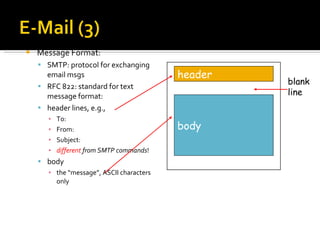
Message Format:  SMTP: protocol for exchanging email msgs RFC 822: standard for text message format: header lines, e.g., To: From: Subject: different   from SMTP commands ! body the “message”, ASCII characters only header body blank line
MIME: Multipurpose Internet Mail Extension   For  multimedia mail extension Text example subtypes:  plain, html Image example subtypes:  jpeg, gif Audio example subtypes:  basic  (8-bit mu-law encoded),  32kadpcm  (32 kbps coding) Video example subtypes:  mpeg, quicktime Application other data that must be processed by reader before “viewable” example subtypes:  msword, octet-stream
SMTP: delivery/storage to receiver’s server Mail access protocol: retrieval from server POP: Post Office Protocol [RFC 1939] authorization (agent <-->server) and download  IMAP: Internet Mail Access Protocol [RFC 1730] more features (more complex) manipulation of stored msgs on server HTTP: Hotmail , Yahoo! Mail, etc. SMTP access protocol receiver’s mail  server user agent sender’s mail  server user agent SMTP
POP3 Previous example uses “download and delete” mode.  “ Download” brings the mail into client computer. “ Delete” removes the mail from the mail server. Mr.X cannot re-read e-mail if he changes client computer. “ Download-and-keep”: leaves the message on the mail server. POP3 is stateless across sessions. IMAP Keep all messages in one place: the server Allows user to organize messages in folders IMAP keeps user state across sessions: names of folders and mappings between message IDs and folder name
transfer file to/from remote host client/server model client:  side that initiates transfer (either to/from remote) server:  remote host ftp: RFC 959 ftp server: port 21 file transfer local file system remote file system user  at host FTP server FTP user interface FTP client
In 1989, CERN:  European Center of Nebular Research , By Berners-Lee.  Accessing linked documents, support Text, Image, Audio, Video, … People think that this is “Internet” ! Hypertext  Browsers:  Mosaic, Netscape, IE, … Use HTML (Hyper-Text Markup Language) as a common language of web.
The DNS Name Space Resource Records Name Servers
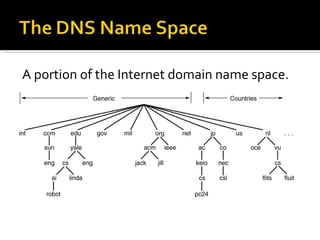
A portion of the Internet domain name space.
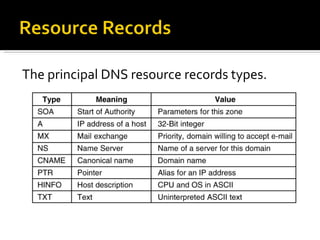
The principal DNS resource records types.
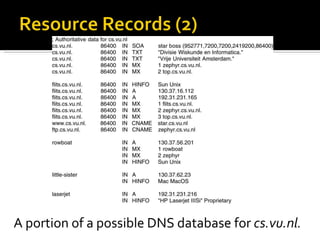
A portion of a possible DNS database for  cs.vu.nl.
Part of the DNS name space showing the division into zones.
How a resolver looks up a remote name in eight steps.
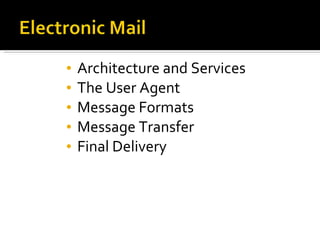
Architecture and Services The User Agent Message Formats Message Transfer Final Delivery
Some smileys.
Basic functions Composition Transfer Reporting Displaying Disposition
Envelopes and messages.  (a)  Paper mail.  (b)  Electronic mail.
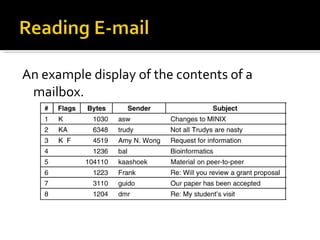
An example display of the contents of a mailbox.
RFC 822 header fields related to message transport.
Some fields used in the RFC 822 message header.
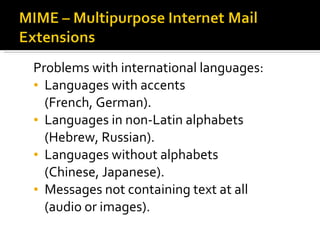
Problems with international languages: Languages with accents  (French, German). Languages in non-Latin alphabets  (Hebrew, Russian). Languages without alphabets  (Chinese, Japanese). Messages not containing text at all  (audio or images).
RFC 822 headers added by MIME.
The MIME types and subtypes defined in RFC 2045.
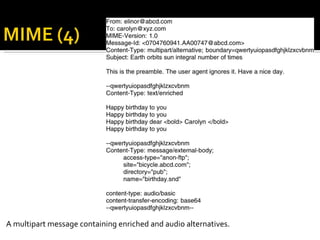
A multipart message containing enriched and audio alternatives.
Transferring a message from  [email_address]  to  carolyn@xyz.com.
(a)  Sending and reading mail when the receiver has a permanent Internet connection and the user agent runs on the same machine as the message transfer agent.  (b)  Reading e-mail when the receiver has a dial-up connection to an ISP.
Using POP3 to fetch three messages .
A comparison of POP3 and IMAP.
Architectural Overview Static Web Documents Dynamic Web Documents HTTP – The HyperText Transfer Protocol Performance Ehnancements The Wireless Web
(a)  A Web page  (b)  The page reached by clicking on  Department of Animal Psychology .
The parts of the Web model.
(a)  A browser plug-in.  (b)  A helper application.
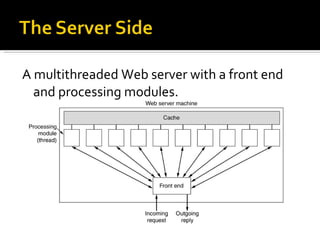
A multithreaded Web server with a front end and processing modules.
A server farm.
(a)  Normal request-reply message sequence. (b)  Sequence when TCP handoff is used.
Some common URLs.
Some examples of cookies.
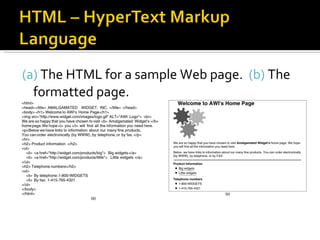
(a)  The HTML for a sample Web page.  (b)  The formatted page. (b)
A selection of common HTML tags.  some can have additional parameters.
(a)  An HTML table.  (b)  A possible rendition of this table.
(a) The HTML for an  order form. (b) The formatted page. (b)
A possible response from the browser to the server with information filled in by the user.
A simple Web page in XML.
A style sheet in XSL.
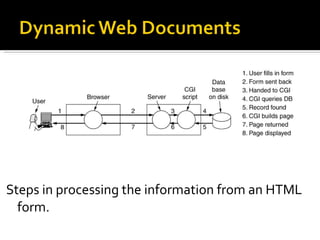
Steps in processing the information from an HTML form.
A sample HTML page with embedded PHP.
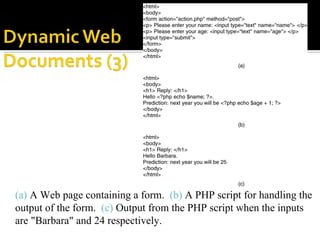
(a)  A Web page containing a form.  (b)  A PHP script for handling the output of the form.  (c)  Output from the PHP script when the inputs are &quot;Barbara&quot; and 24 respectively.
Use of JavaScript for processing a form.
(a)  Server-side scripting with PHP. (b)  Client-side scripting with JavaScript.
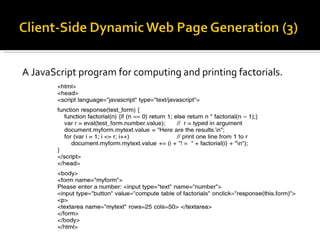
A JavaScript program for computing and printing factorials.
An interactive Web page that responds to mouse movement.
The various ways to generate and display content.
The built-in HTTP request methods.
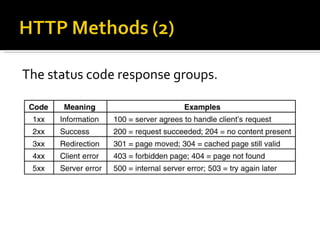
The status code response groups.
Some HTTP message headers.
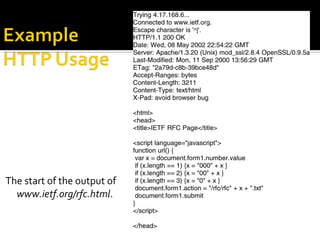
The start of the output of  www.ietf.org/rfc.html .
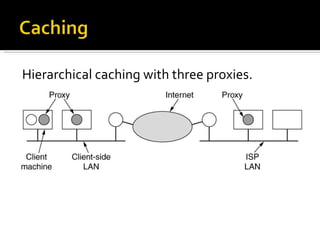
Hierarchical caching with three proxies.
(a)  Original Web page.  (b)   Same page after transformation.
Steps in looking up a URL when a CDN is used.
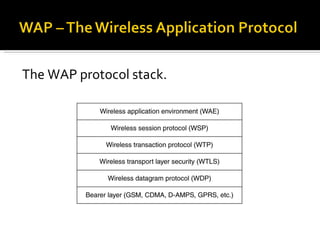
The WAP protocol stack.
The WAP architecture.
Structure of the i-mode data network showing the transport protocols.
Structure of the i-mode software.
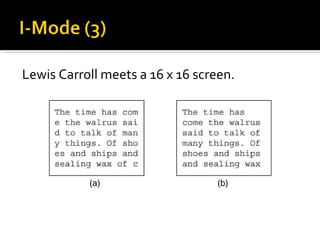
Lewis Carroll meets a 16 x 16 screen.
An example of cHTML file.
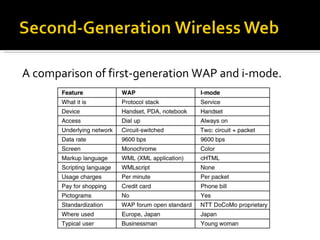
A comparison of first-generation WAP and i-mode.
New features of WAP 2.0. Push model as well as pull model. Support for integrating telephony into apps. Multimedia messaging. Inclusion of 264 pictograms. Interface to a storage device. Support for plug-ins in the browser.
WAP 2.0 supports two protocol stacks.
The XHTML Basic modules and tags.
Introduction to Audio Audio Compression Streaming Audio Internet Radio Voice over IP Introduction to Video Video Compression Video on Demand The MBone – The Multicast Backbone
(a)  A sine wave.  (b)  Sampling the sine wave.  (c)  Quantizing the samples to 4 bits.
(a)  The threshold of audibility as a function of frequency. (b)  The masking effect.
A straightforward way to implement clickable music on a Web page.
When packets carry alternate samples, the loss of a packet reduces the temporal resolution rather than creating a gap in time.
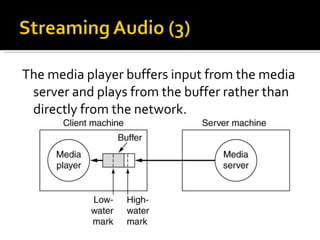
The media player buffers input from the media server and plays from the buffer rather than directly from the network.
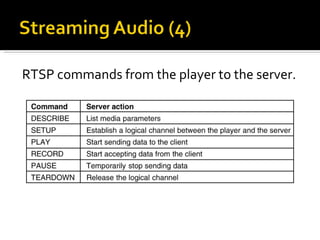
RTSP commands from the player to the server.
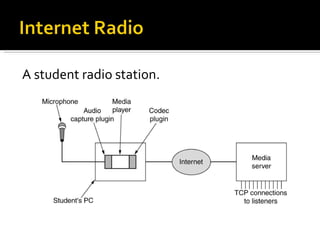
A student radio station.
The H323 architectural model for Internet telephony.
The H323 protocol stack.
Logical channels between the caller and callee during a call.
The SIP methods defined in the core specification.
Use a proxy and redirection servers with SIP.
 
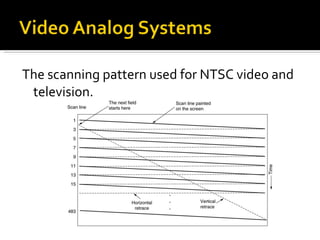
The scanning pattern used for NTSC video and television.
The operation of JPEG in lossy sequential mode.
(a)  RGB input data. (b)  After block preparation.
(a)  One block of the  Y  matrix. (b)  The DTC coefficients. (a) (b)
Computation of the quantized DTC coefficients.
The order in which the quantized values are transmitted.
Synchronization of the audio and video streams in MPEG-1.
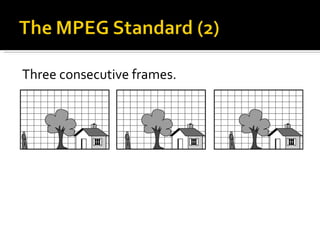
Three consecutive frames.
Overview of a video-on-demand system.
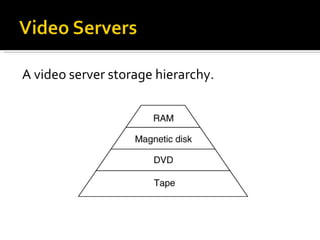
A video server storage hierarchy.
The hardware architecture of a typical video server.
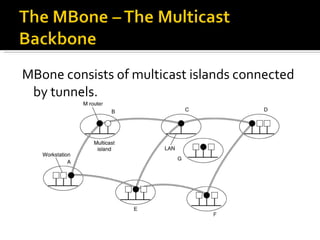
MBone consists of multicast islands connected by tunnels.

Jaimin chp-7 - application layer- 2011 batch

  • 1.
  • 2.
    Processes running indifferent hosts communicate with an application-layer protocol Popular application-level protocols: DNS HTTP FTP SMTP / POP3 / IMAP Programming network applications socket API
  • 3.
    Programs could referto hosts, mailboxes and other resources by their network IP. These Numbers are difficult to remember by people? Also, if moving the servers to different machine? Use names instead of IP numbers. Ex. ce.sharif.edu, veisi@yahoo.com Need a mechanism to convert names to IP Number Use a file: hosts.txt As the number of PCs increase? Size increase, Conflict of host names Need a central manager: DNS: Domain Name System
  • 4.
    DNS Name SpaceFor managing large and changing set of names, need a postal like management, Ex. No. 4, Azadi St., Tehran, Iran Hierarchical addressing Top-level domain: 200 top-level domains
  • 5.
    no server hasall name-to-IP address mappings local name servers: each ISP, company has local (default) name server host DNS query first goes to local name server authoritative name server: for a host: stores that host’s IP address, name can perform name/address translation for that host’s name Why not centralize DNS? single point of failure traffic volume distant centralized database maintenance
  • 6.
    Example: host surf.eurecom.fr wants IP address of gaia.cs.umass.edu 1. contacts its local DNS server, dns.eurecom.fr 2. dns.eurecom.fr contacts root name server, if necessary 3. root name server contacts authoritative name server, dns.umass.edu, if necessary requesting host surf.eurecom.fr gaia.cs.umass.edu root name server authoritative name server dns.umass.edu 1 2 3 4 5 6 local name server dns.eurecom.fr
  • 7.
    Once (any) nameserver learns mapping, it caches mapping cache entries timeout (disappear) after some time DNS Records format: (name, TTL, value, type) Records types:
  • 8.
    Three major components: user agents mail servers simple mail transfer protocol: SMTP User Agent Sometimes is called: “ mail reader” composing, editing, reading mail messages e.g., Eudora, Outlook, elm, Netscape Messenger outgoing, incoming messages stored on server user mailbox outgoing message queue mail server user agent user agent user agent mail server user agent user agent mail server user agent SMTP SMTP SMTP
  • 9.
    Mail Servers mailbox contains incoming messages for user message queue of outgoing (to be sent) mail messages SMTP protocol between mail servers to send email messages “ client”: sending mail server (sending agent) “ server”: receiving mail server (receiving agent) mail server user agent user agent user agent mail server user agent user agent mail server user agent SMTP SMTP SMTP
  • 10.
    Message Format: SMTP: protocol for exchanging email msgs RFC 822: standard for text message format: header lines, e.g., To: From: Subject: different from SMTP commands ! body the “message”, ASCII characters only header body blank line
  • 11.
    MIME: Multipurpose InternetMail Extension For multimedia mail extension Text example subtypes: plain, html Image example subtypes: jpeg, gif Audio example subtypes: basic (8-bit mu-law encoded), 32kadpcm (32 kbps coding) Video example subtypes: mpeg, quicktime Application other data that must be processed by reader before “viewable” example subtypes: msword, octet-stream
  • 12.
    SMTP: delivery/storage toreceiver’s server Mail access protocol: retrieval from server POP: Post Office Protocol [RFC 1939] authorization (agent <-->server) and download IMAP: Internet Mail Access Protocol [RFC 1730] more features (more complex) manipulation of stored msgs on server HTTP: Hotmail , Yahoo! Mail, etc. SMTP access protocol receiver’s mail server user agent sender’s mail server user agent SMTP
  • 13.
    POP3 Previous exampleuses “download and delete” mode. “ Download” brings the mail into client computer. “ Delete” removes the mail from the mail server. Mr.X cannot re-read e-mail if he changes client computer. “ Download-and-keep”: leaves the message on the mail server. POP3 is stateless across sessions. IMAP Keep all messages in one place: the server Allows user to organize messages in folders IMAP keeps user state across sessions: names of folders and mappings between message IDs and folder name
  • 14.
    transfer file to/fromremote host client/server model client: side that initiates transfer (either to/from remote) server: remote host ftp: RFC 959 ftp server: port 21 file transfer local file system remote file system user at host FTP server FTP user interface FTP client
  • 15.
    In 1989, CERN: European Center of Nebular Research , By Berners-Lee. Accessing linked documents, support Text, Image, Audio, Video, … People think that this is “Internet” ! Hypertext Browsers: Mosaic, Netscape, IE, … Use HTML (Hyper-Text Markup Language) as a common language of web.
  • 16.
    The DNS NameSpace Resource Records Name Servers
  • 17.
    A portion ofthe Internet domain name space.
  • 18.
    The principal DNSresource records types.
  • 19.
    A portion ofa possible DNS database for cs.vu.nl.
  • 20.
    Part of theDNS name space showing the division into zones.
  • 21.
    How a resolverlooks up a remote name in eight steps.
  • 22.
    Architecture and ServicesThe User Agent Message Formats Message Transfer Final Delivery
  • 23.
  • 24.
    Basic functions CompositionTransfer Reporting Displaying Disposition
  • 25.
    Envelopes and messages. (a) Paper mail. (b) Electronic mail.
  • 26.
    An example displayof the contents of a mailbox.
  • 27.
    RFC 822 headerfields related to message transport.
  • 28.
    Some fields usedin the RFC 822 message header.
  • 29.
    Problems with internationallanguages: Languages with accents (French, German). Languages in non-Latin alphabets (Hebrew, Russian). Languages without alphabets (Chinese, Japanese). Messages not containing text at all (audio or images).
  • 30.
    RFC 822 headersadded by MIME.
  • 31.
    The MIME typesand subtypes defined in RFC 2045.
  • 32.
    A multipart messagecontaining enriched and audio alternatives.
  • 33.
    Transferring a messagefrom [email_address] to carolyn@xyz.com.
  • 34.
    (a) Sendingand reading mail when the receiver has a permanent Internet connection and the user agent runs on the same machine as the message transfer agent. (b) Reading e-mail when the receiver has a dial-up connection to an ISP.
  • 35.
    Using POP3 tofetch three messages .
  • 36.
    A comparison ofPOP3 and IMAP.
  • 37.
    Architectural Overview StaticWeb Documents Dynamic Web Documents HTTP – The HyperText Transfer Protocol Performance Ehnancements The Wireless Web
  • 38.
    (a) AWeb page (b) The page reached by clicking on Department of Animal Psychology .
  • 39.
    The parts ofthe Web model.
  • 40.
    (a) Abrowser plug-in. (b) A helper application.
  • 41.
    A multithreaded Webserver with a front end and processing modules.
  • 42.
  • 43.
    (a) Normalrequest-reply message sequence. (b) Sequence when TCP handoff is used.
  • 44.
  • 45.
  • 46.
    (a) TheHTML for a sample Web page. (b) The formatted page. (b)
  • 47.
    A selection ofcommon HTML tags. some can have additional parameters.
  • 48.
    (a) AnHTML table. (b) A possible rendition of this table.
  • 49.
    (a) The HTMLfor an order form. (b) The formatted page. (b)
  • 50.
    A possible responsefrom the browser to the server with information filled in by the user.
  • 51.
    A simple Webpage in XML.
  • 52.
  • 53.
    Steps in processingthe information from an HTML form.
  • 54.
    A sample HTMLpage with embedded PHP.
  • 55.
    (a) AWeb page containing a form. (b) A PHP script for handling the output of the form. (c) Output from the PHP script when the inputs are &quot;Barbara&quot; and 24 respectively.
  • 56.
    Use of JavaScriptfor processing a form.
  • 57.
    (a) Server-sidescripting with PHP. (b) Client-side scripting with JavaScript.
  • 58.
    A JavaScript programfor computing and printing factorials.
  • 59.
    An interactive Webpage that responds to mouse movement.
  • 60.
    The various waysto generate and display content.
  • 61.
    The built-in HTTPrequest methods.
  • 62.
    The status coderesponse groups.
  • 63.
  • 64.
    The start ofthe output of www.ietf.org/rfc.html .
  • 65.
  • 66.
    (a) OriginalWeb page. (b) Same page after transformation.
  • 67.
    Steps in lookingup a URL when a CDN is used.
  • 68.
  • 69.
  • 70.
    Structure of thei-mode data network showing the transport protocols.
  • 71.
    Structure of thei-mode software.
  • 72.
    Lewis Carroll meetsa 16 x 16 screen.
  • 73.
    An example ofcHTML file.
  • 74.
    A comparison offirst-generation WAP and i-mode.
  • 75.
    New features ofWAP 2.0. Push model as well as pull model. Support for integrating telephony into apps. Multimedia messaging. Inclusion of 264 pictograms. Interface to a storage device. Support for plug-ins in the browser.
  • 76.
    WAP 2.0 supportstwo protocol stacks.
  • 77.
    The XHTML Basicmodules and tags.
  • 78.
    Introduction to AudioAudio Compression Streaming Audio Internet Radio Voice over IP Introduction to Video Video Compression Video on Demand The MBone – The Multicast Backbone
  • 79.
    (a) Asine wave. (b) Sampling the sine wave. (c) Quantizing the samples to 4 bits.
  • 80.
    (a) Thethreshold of audibility as a function of frequency. (b) The masking effect.
  • 81.
    A straightforward wayto implement clickable music on a Web page.
  • 82.
    When packets carryalternate samples, the loss of a packet reduces the temporal resolution rather than creating a gap in time.
  • 83.
    The media playerbuffers input from the media server and plays from the buffer rather than directly from the network.
  • 84.
    RTSP commands fromthe player to the server.
  • 85.
  • 86.
    The H323 architecturalmodel for Internet telephony.
  • 87.
  • 88.
    Logical channels betweenthe caller and callee during a call.
  • 89.
    The SIP methodsdefined in the core specification.
  • 90.
    Use a proxyand redirection servers with SIP.
  • 91.
  • 92.
    The scanning patternused for NTSC video and television.
  • 93.
    The operation ofJPEG in lossy sequential mode.
  • 94.
    (a) RGBinput data. (b) After block preparation.
  • 95.
    (a) Oneblock of the Y matrix. (b) The DTC coefficients. (a) (b)
  • 96.
    Computation of thequantized DTC coefficients.
  • 97.
    The order inwhich the quantized values are transmitted.
  • 98.
    Synchronization of theaudio and video streams in MPEG-1.
  • 99.
  • 100.
    Overview of avideo-on-demand system.
  • 101.
    A video serverstorage hierarchy.
  • 102.
    The hardware architectureof a typical video server.
  • 103.
    MBone consists ofmulticast islands connected by tunnels.