Ch 3 -  Chapter 3 Application Layer Functionality and Protocols
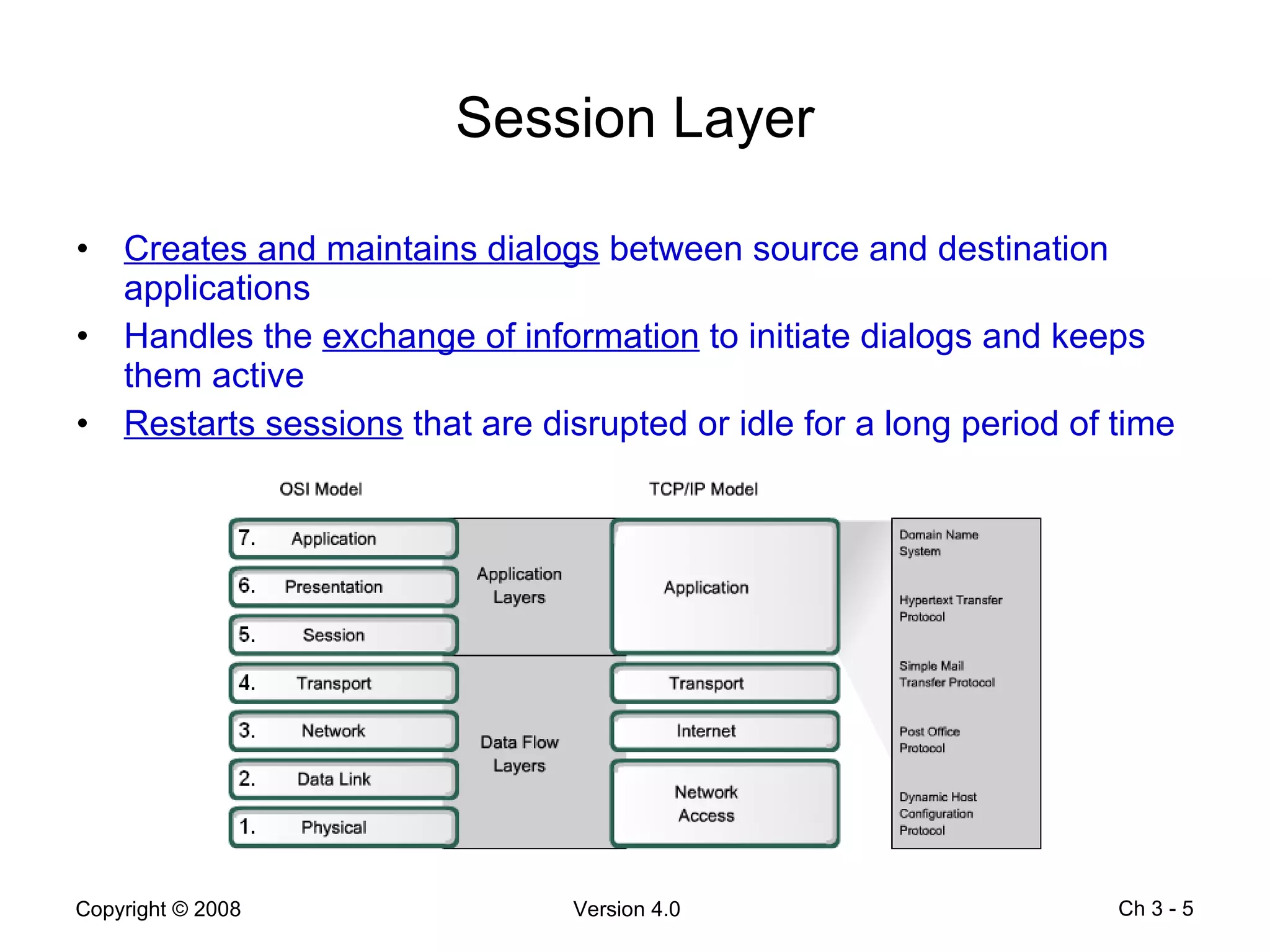
Objectives Describe how the functions of the  three upper OSI model layers  provide network services to end-user applications Describe how the TCP/IP application layer protocols provide the services specified by the upper layers of the OSI model Define how people use the  application layer  to communicate across the information network Describe the functions of the  well-know TCP/IP applications , such as the World Wide Web and e-mail, and other related services (HTTP, DNS, DHCP, SMTP/POP and Telnet) Describe the file sharing processes that use peer-to-peer applications and the Gnutella protocol Explain how protocols ensure that services running on one kind of device can send to and receive from many  different network devices Use  network analysis tools  to examine and explain how common user applications work Ch 3 -
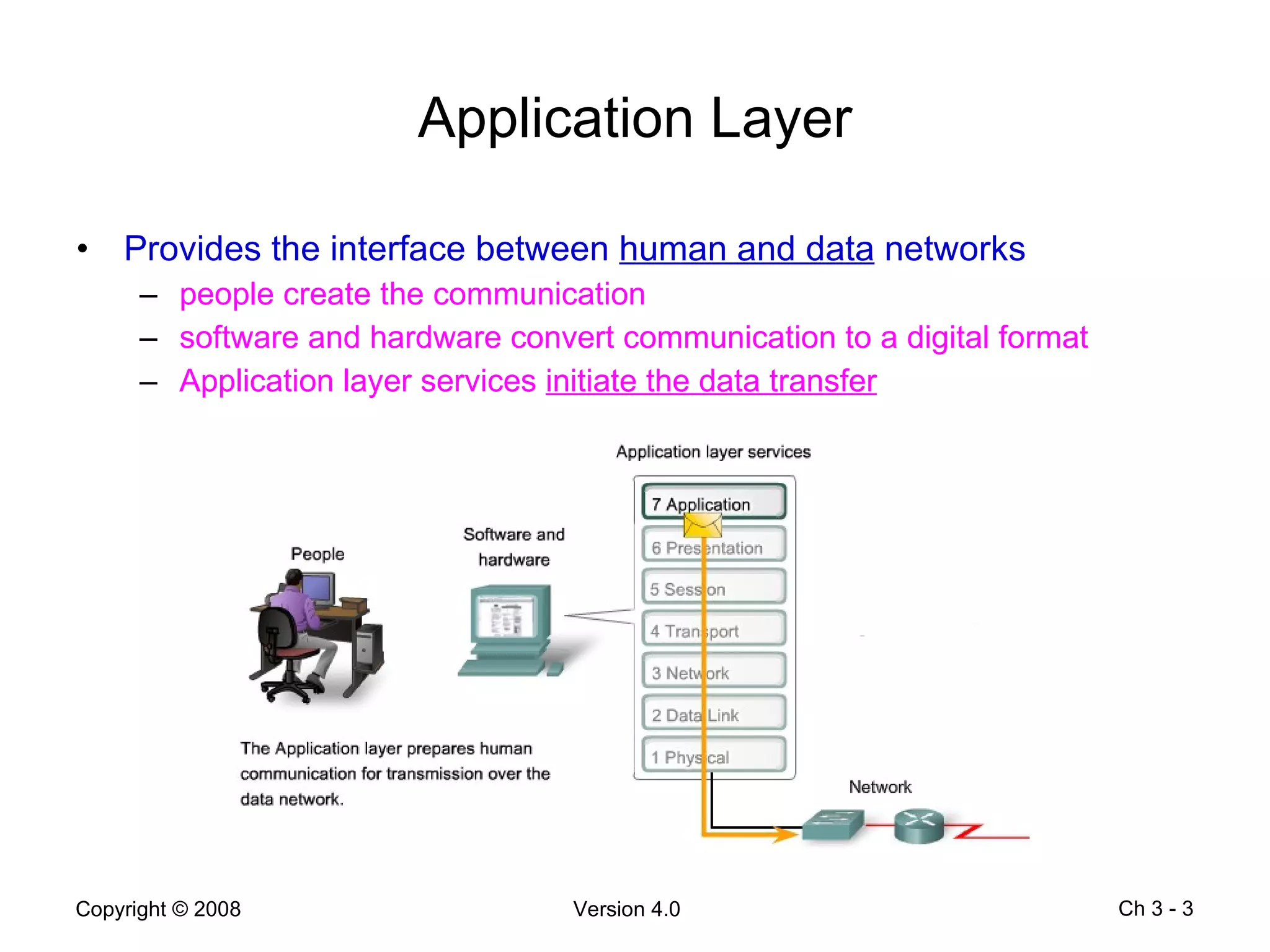
Application Layer Provides the interface between  human and data  networks people create the communication software and hardware convert communication to a digital format Application layer services  initiate the data transfer Ch 3 -
Presentation Layer The Presentation layer has three primary functions coding and conversion of Application layer data  to ensure that data from the source device can be interpreted by the appropriate application on the destination device compression of the data  in a manner that can be decompressed by the destination device  encryption  of the data for transmission and the  decryption  of data upon receipt by the destination Ch 3 -
Session Layer Creates and maintains dialogs  between source and destination applications Handles the  exchange of information  to initiate dialogs and keeps them active Restarts sessions  that are disrupted or idle for a long period of time Ch 3 -
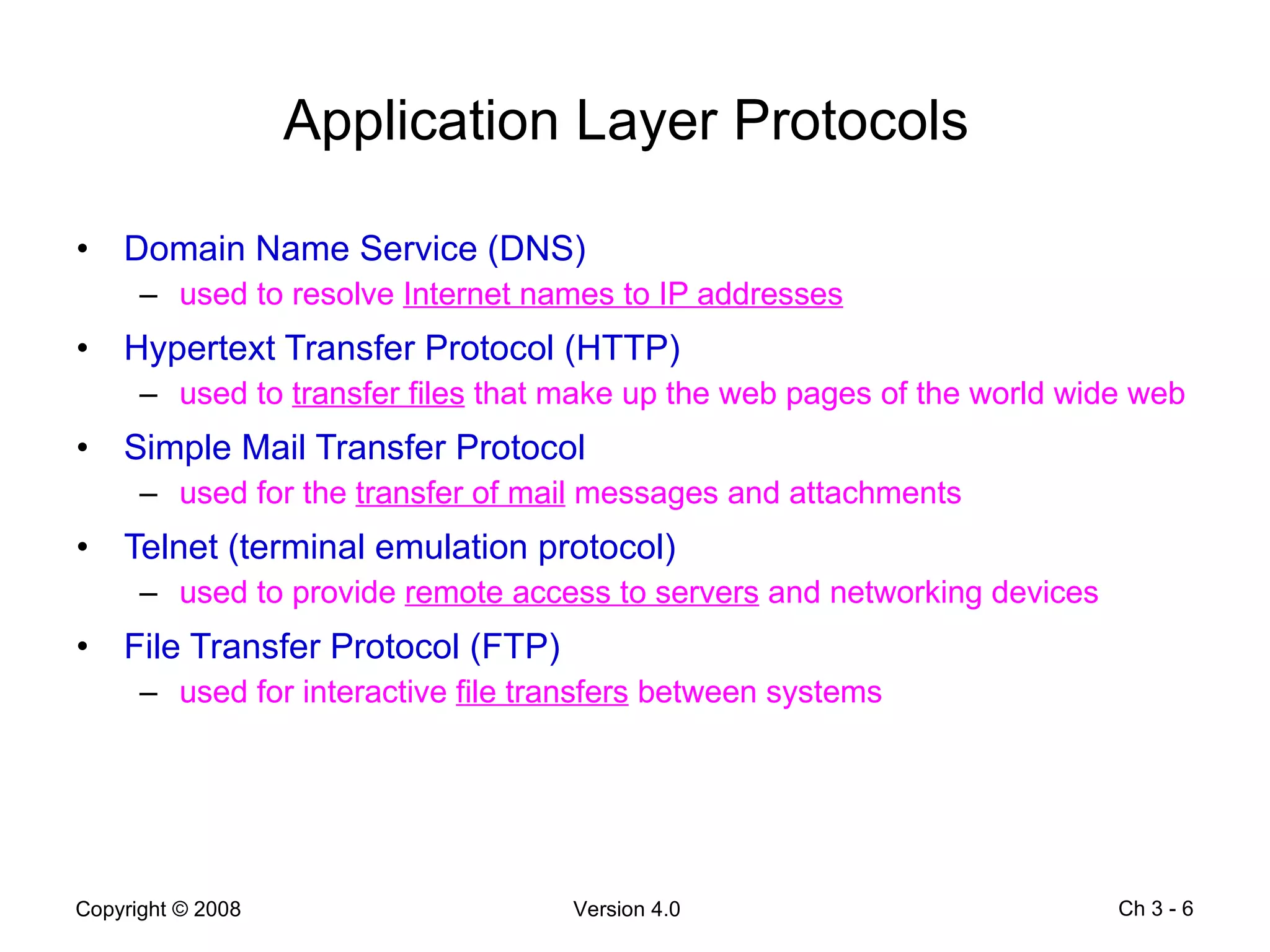
Application Layer Protocols   Domain Name Service (DNS) used to resolve  Internet names to IP addresses Hypertext Transfer Protocol (HTTP) used to  transfer files  that make up the web pages of the world wide web Simple Mail Transfer Protocol used for the  transfer of mail  messages and attachments Telnet (terminal emulation protocol) used to provide  remote access to servers  and networking devices File Transfer Protocol (FTP) used for interactive  file transfers  between systems Ch 3 -
Application Layer Software Network-aware  applications implement  the application layer protocols and are able to  communicate  directly with the  lower layers of the protocol  stack e-mail clients and web browsers Application layer  services are programs that  interface with the network  and  prepare the data  for transfer different types  of data (text, graphics or video) require  different network services  to ensure that it is properly prepared for processing by the functions occurring at the lower layers of the OSI model  Ch 3 -
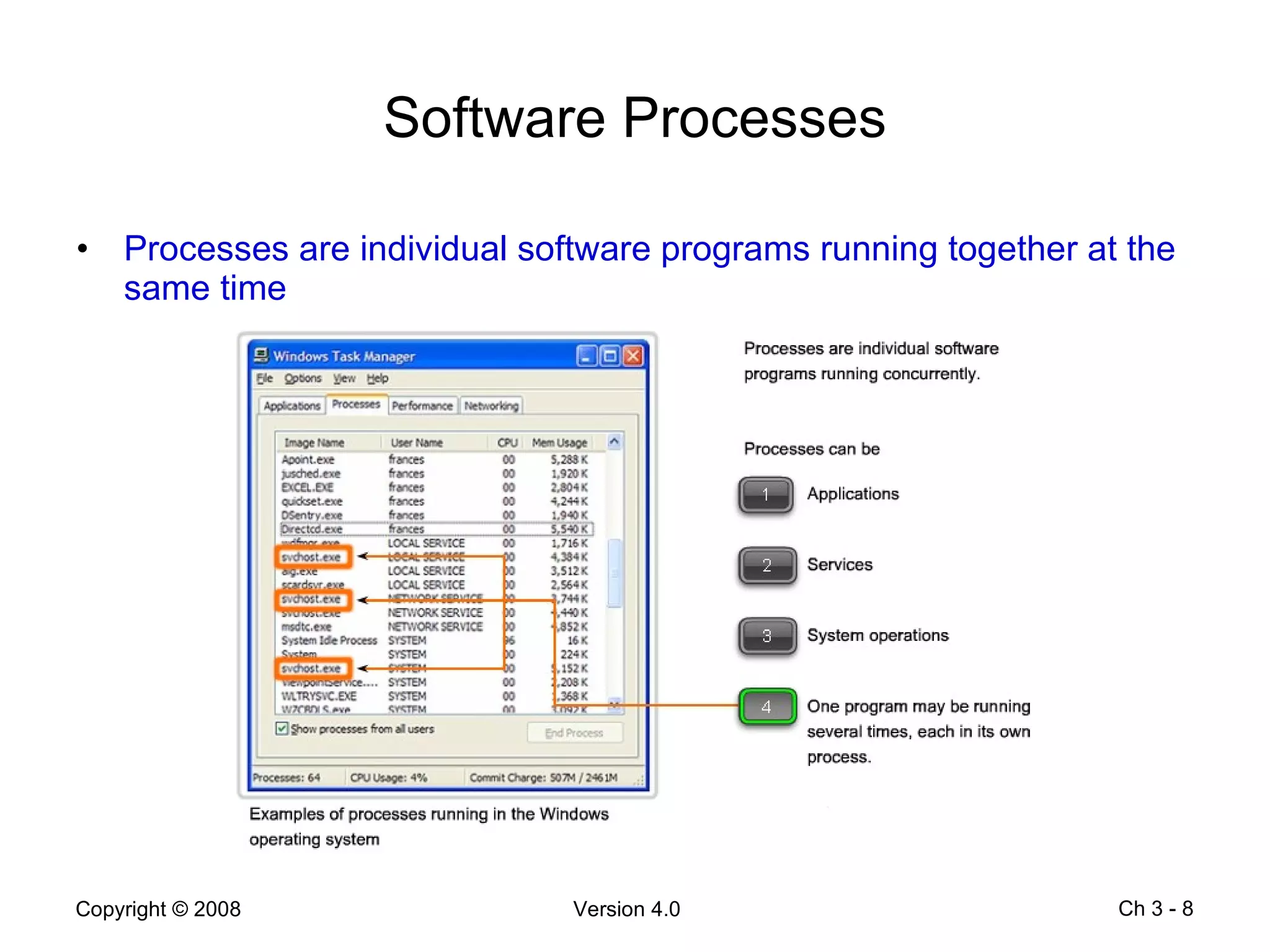
Software Processes Processes are individual software programs running together at the same time Ch 3 -
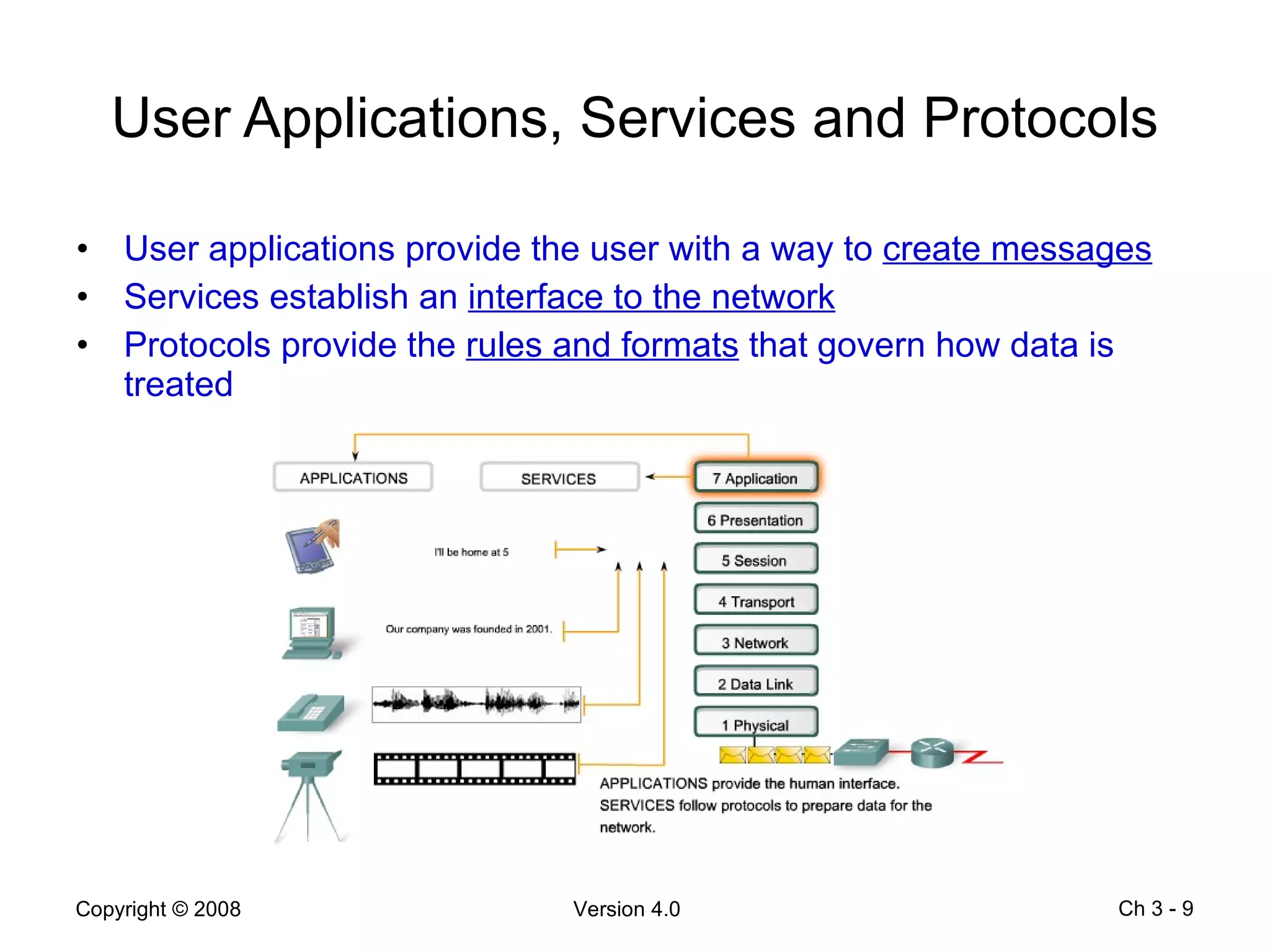
User Applications, Services and Protocols User applications provide the user with a way to  create messages Services establish an  interface to the network Protocols provide the  rules and formats  that govern how data is treated Ch 3 -
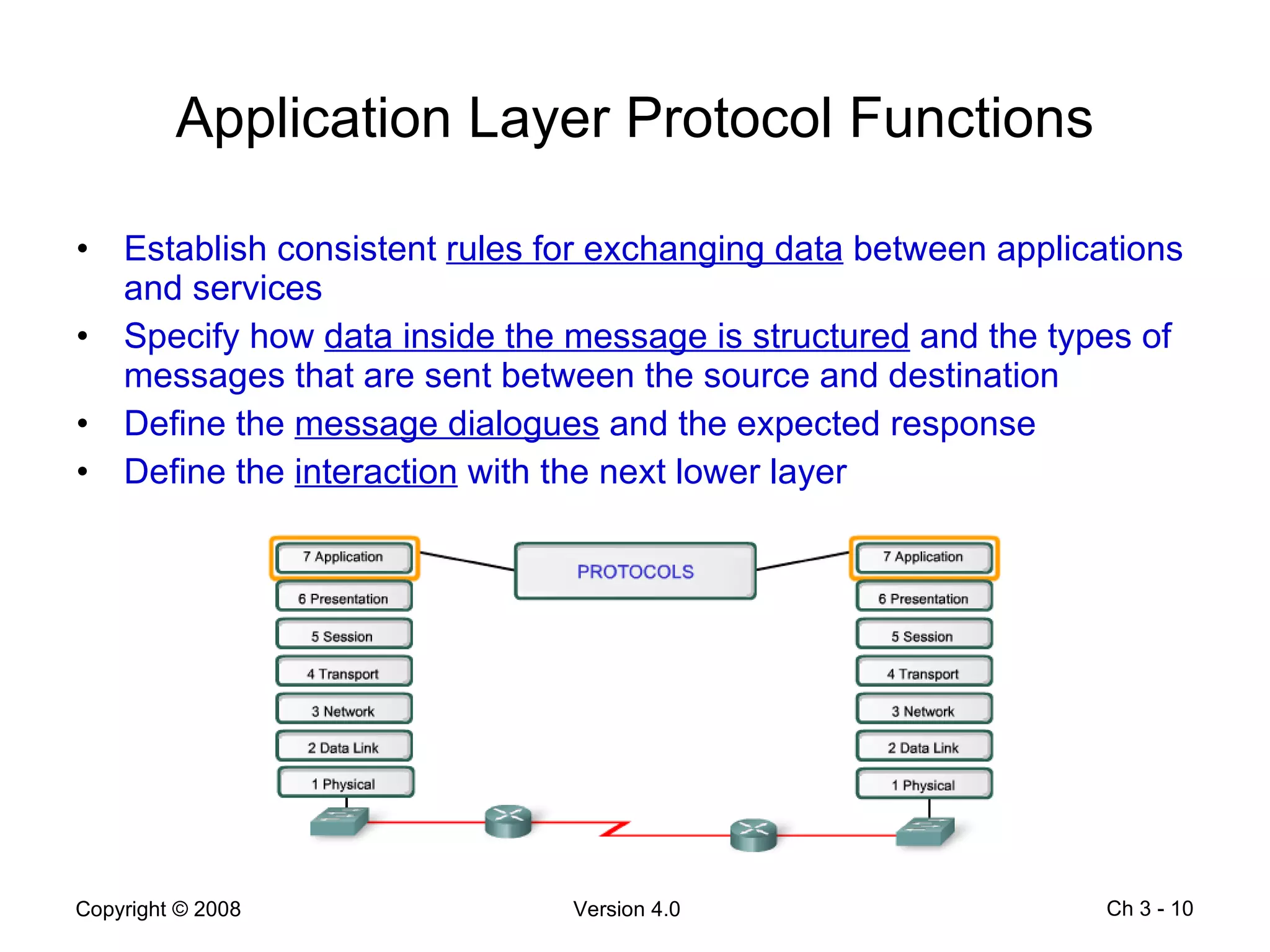
Application Layer Protocol Functions Establish consistent  rules for exchanging data  between applications and services Specify how  data inside the message is structured  and the types of messages that are sent between the source and destination Define the  message dialogues  and the expected response Define the  interaction  with the next lower layer Ch 3 -
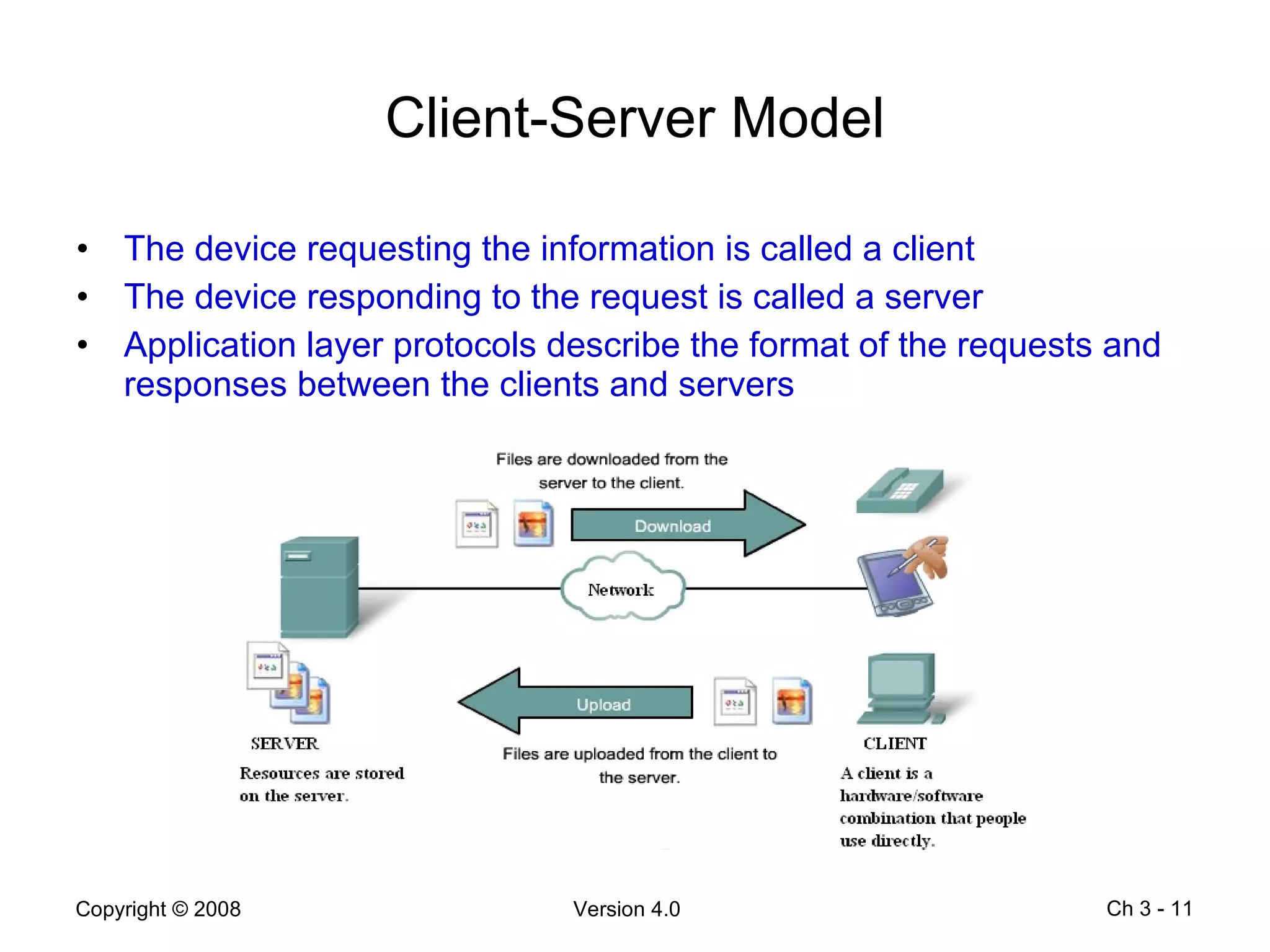
Client-Server Model The device requesting the information is called a client The device responding to the request is called a server Application layer protocols describe the format of the requests and responses between the clients and servers Ch 3 -
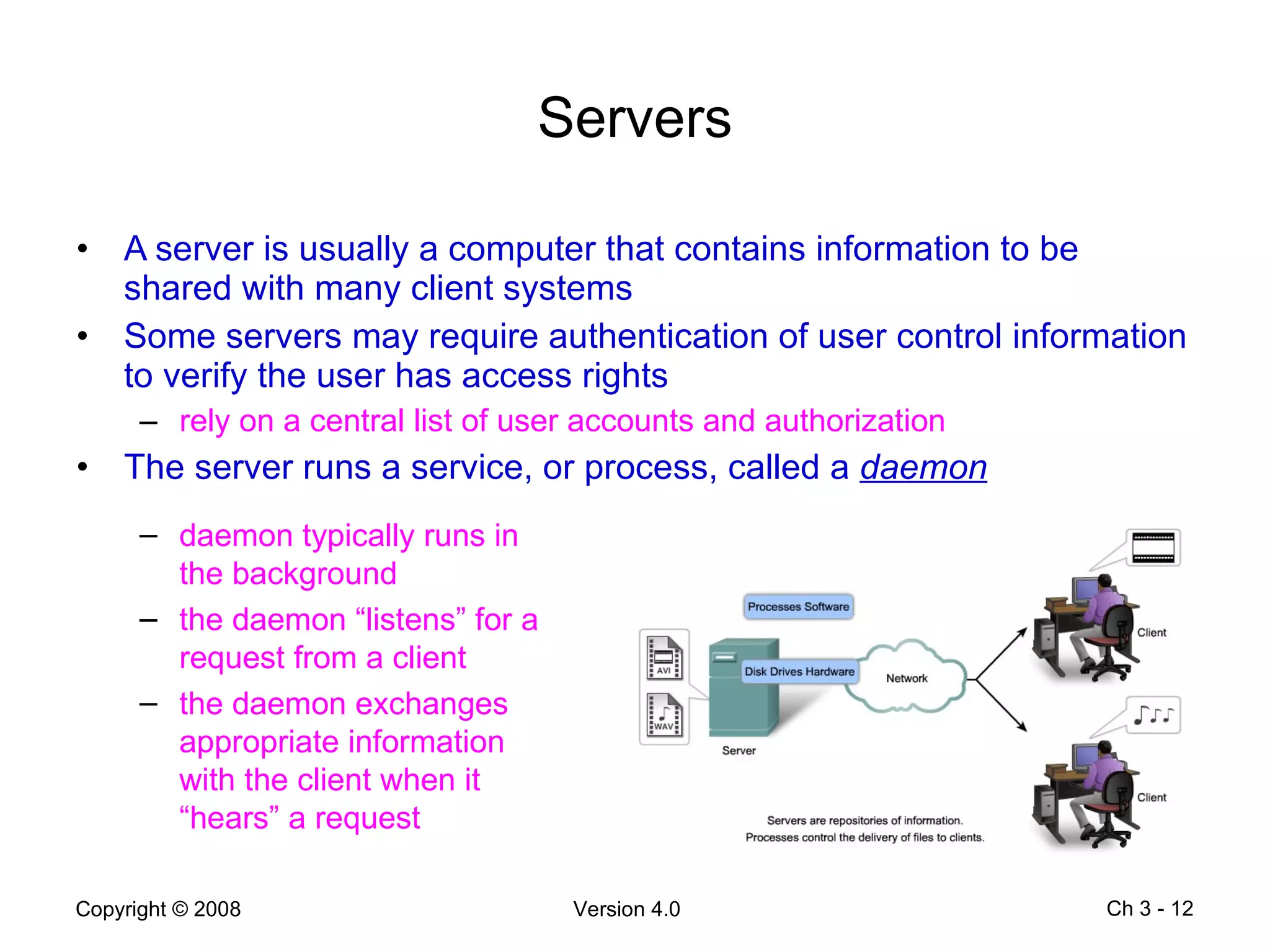
Servers A server is usually a computer that contains information to be shared with many client systems Some servers may require authentication of user control information to verify the user has access rights rely on a central list of user accounts and authorization The server runs a service, or process, called a  daemon Ch 3 -  daemon typically runs in the background  the daemon “listens” for a request from a client the daemon exchanges appropriate information with the client when it “hears” a request
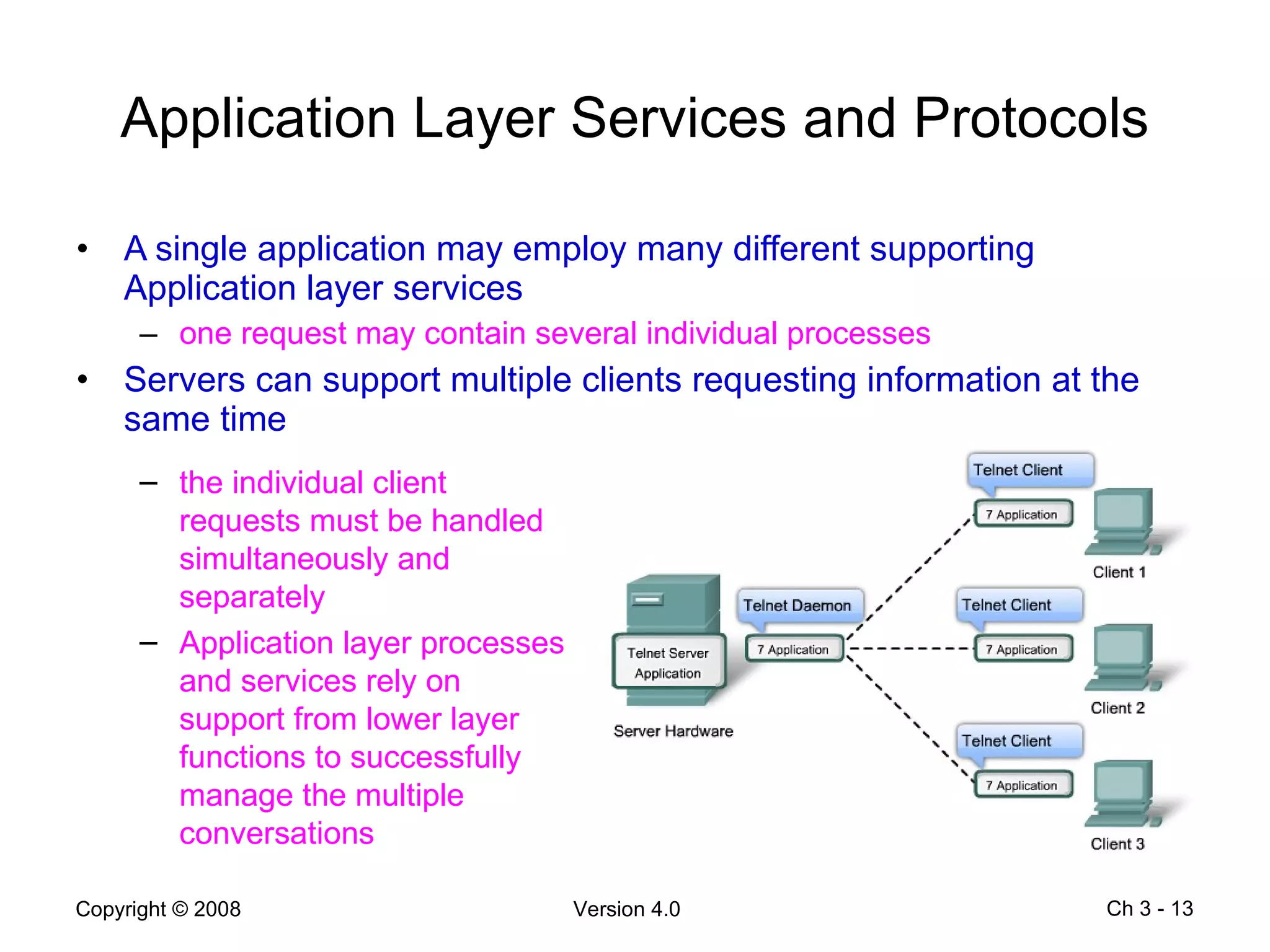
Application Layer Services and Protocols A single application may employ many different supporting Application layer services one request may contain several individual processes Servers can support multiple clients requesting information at the same time Ch 3 -  the individual client requests must be handled simultaneously and separately Application layer processes and services rely on support from lower layer functions to successfully manage the multiple conversations
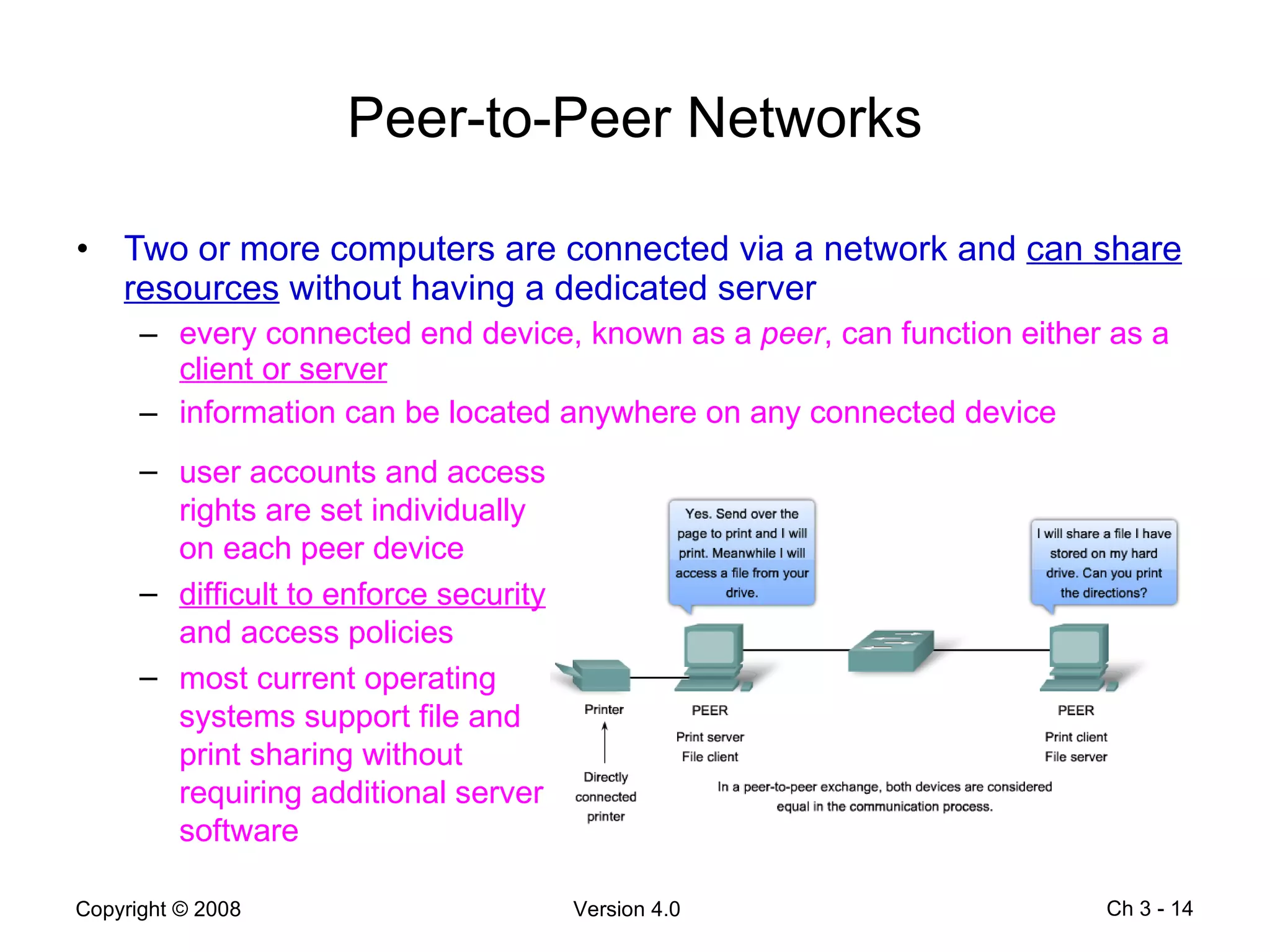
Peer-to-Peer Networks Two or more computers are connected via a network and  can share resources  without having a dedicated server every connected end device, known as a  peer , can function either as a  client or server information can be located anywhere on any connected device Ch 3 -  user accounts and access rights are set individually on each peer device difficult to enforce security  and access policies most current operating systems support file and print sharing without requiring additional server software
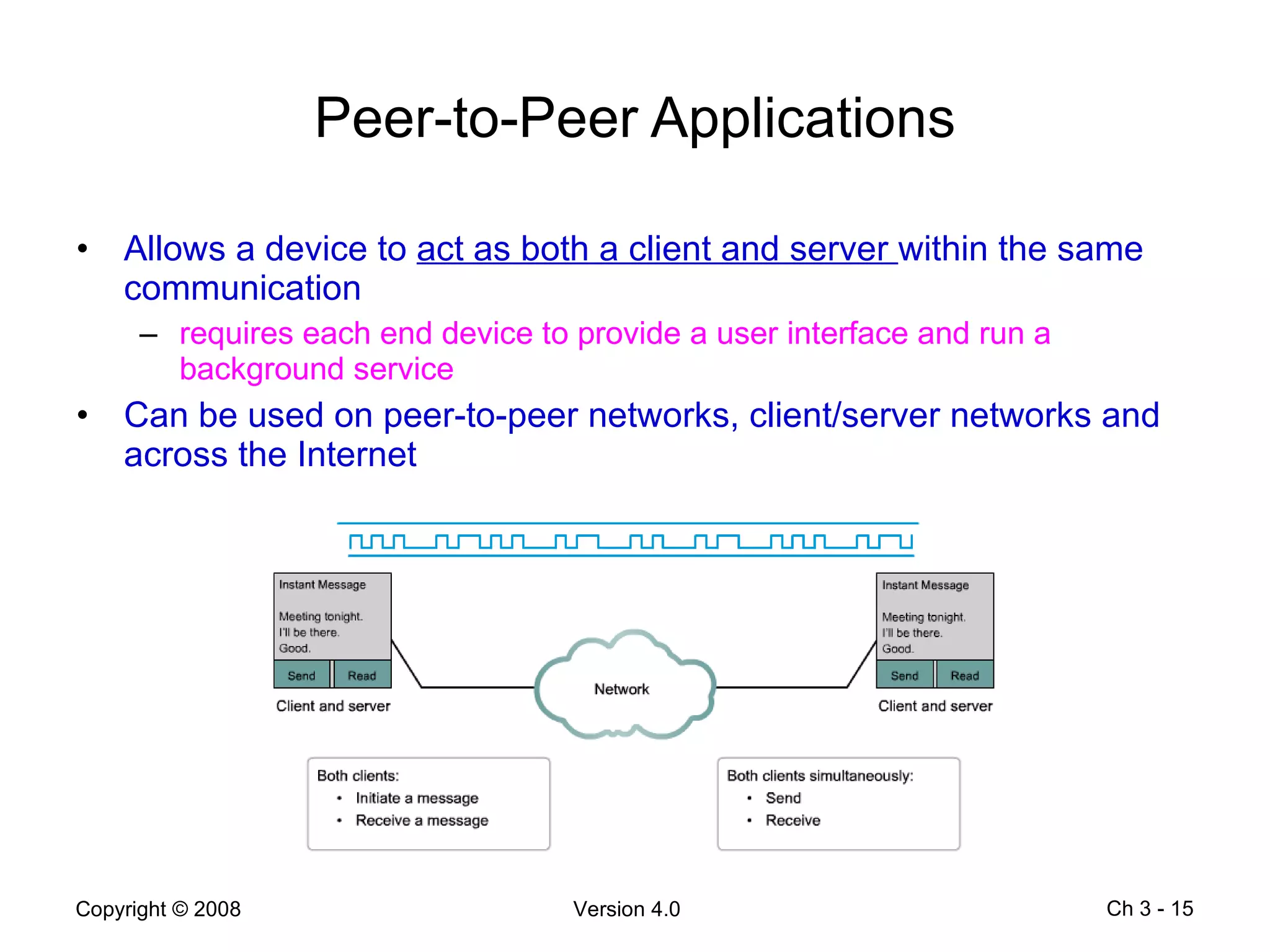
Peer-to-Peer Applications Allows a device to  act as both a client and server  within the same communication requires each end device to provide a user interface and run a background service Can be used on peer-to-peer networks, client/server networks and across the Internet Ch 3 -
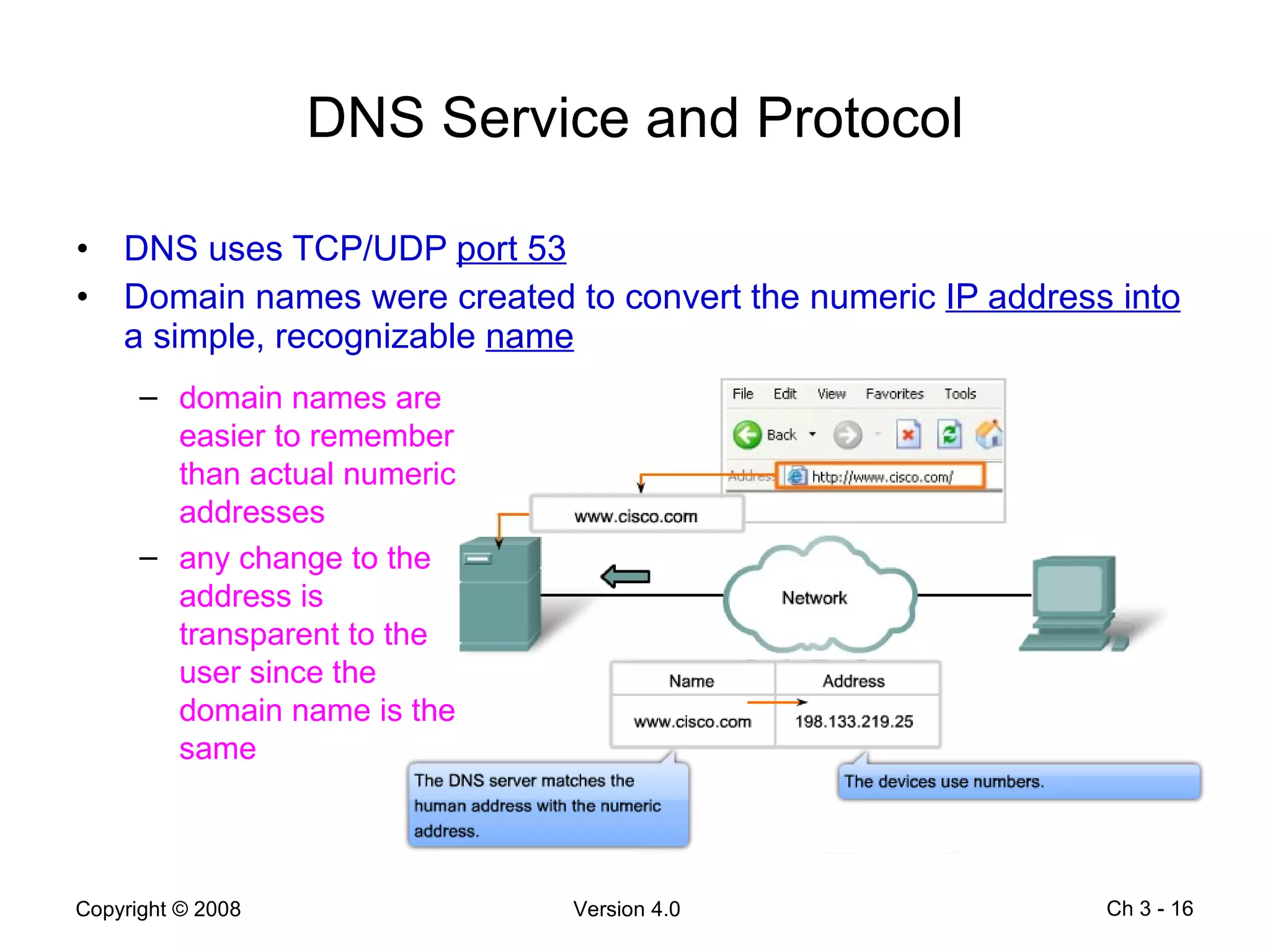
DNS Service and Protocol DNS uses TCP/UDP  port 53 Domain names were created to convert the numeric  IP address into  a simple, recognizable  name   Ch 3 -  domain names are easier to remember than actual numeric addresses any change to the address is transparent to the user since the domain name is the same
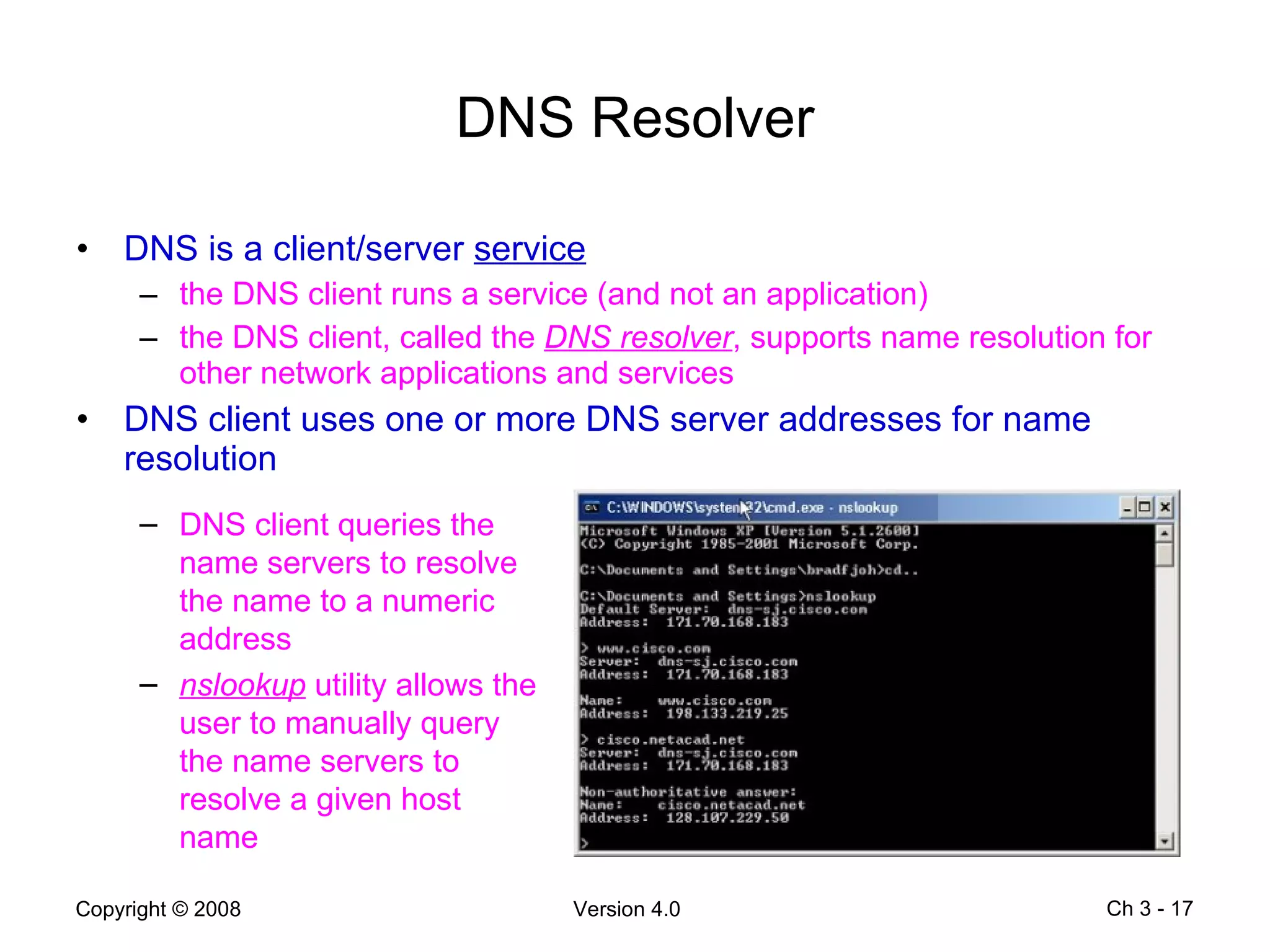
DNS Resolver DNS is a client/server  service the DNS client runs a service (and not an application) the DNS client, called the  DNS resolver , supports name resolution for other network applications and services DNS client uses one or more DNS server addresses for name resolution Ch 3 -  DNS client queries the name servers to resolve the name to a numeric address nslookup  utility allows the user to manually query the name servers to resolve a given host name
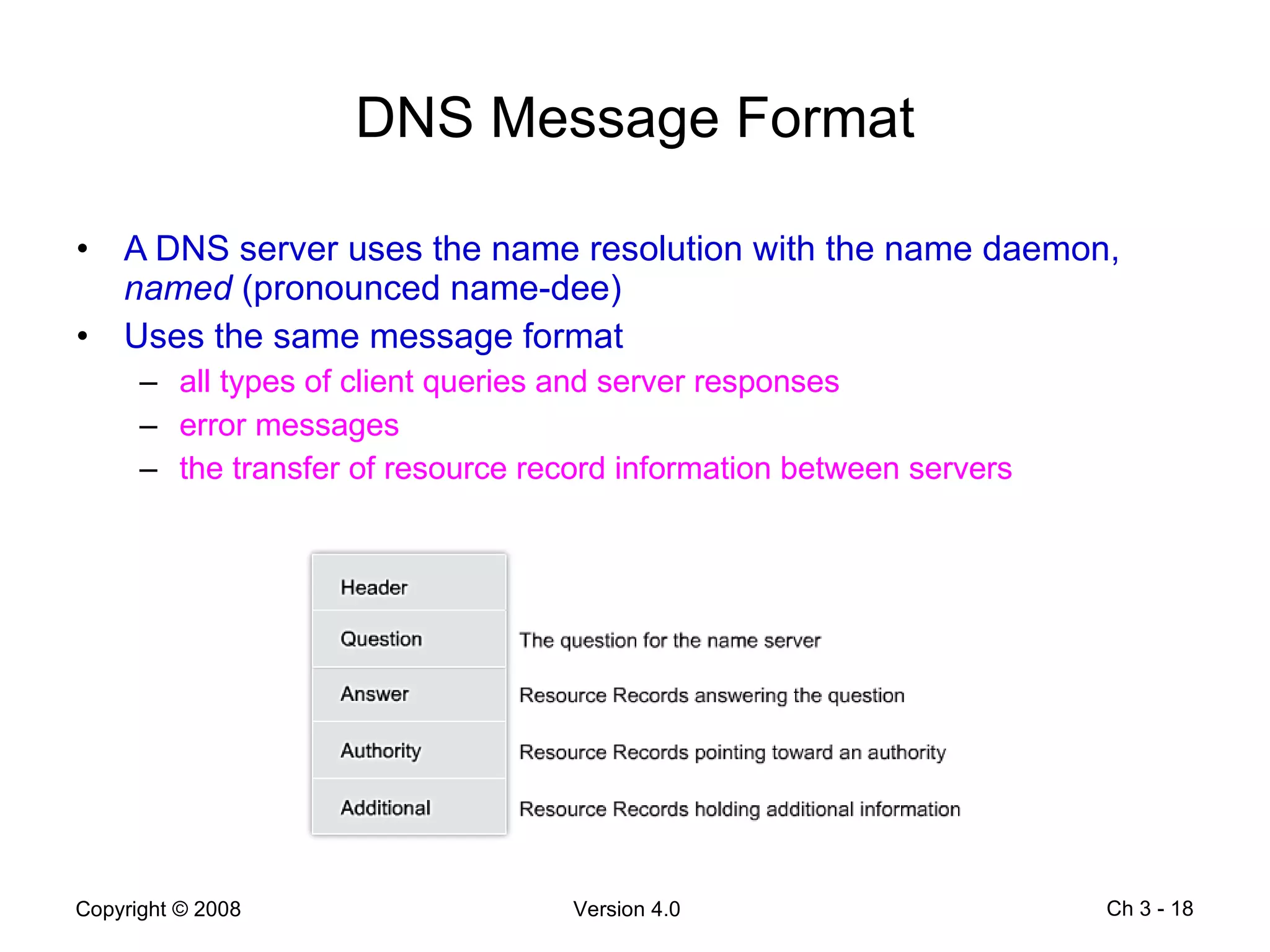
DNS Message Format A DNS server uses the name resolution with the name daemon,  named  (pronounced name-dee) Uses the same message format  all types of client queries and server responses error messages the transfer of resource record information between servers Ch 3 -
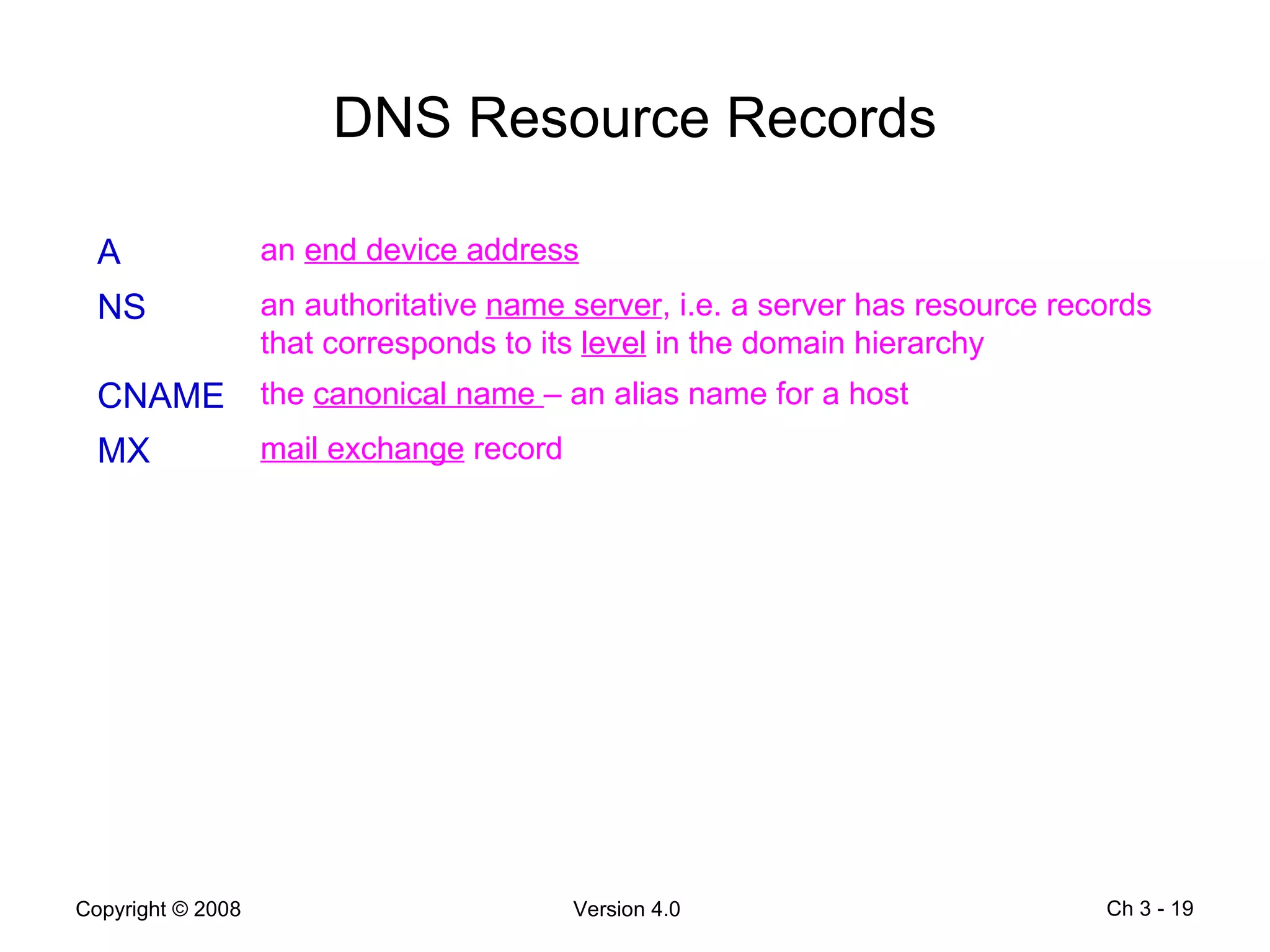
DNS Resource Records Ch 3 -  A an  end device address NS an authoritative  name server , i.e. a server has resource records that corresponds to its  level  in the domain hierarchy CNAME the  canonical name  – an alias name for a host MX mail exchange  record
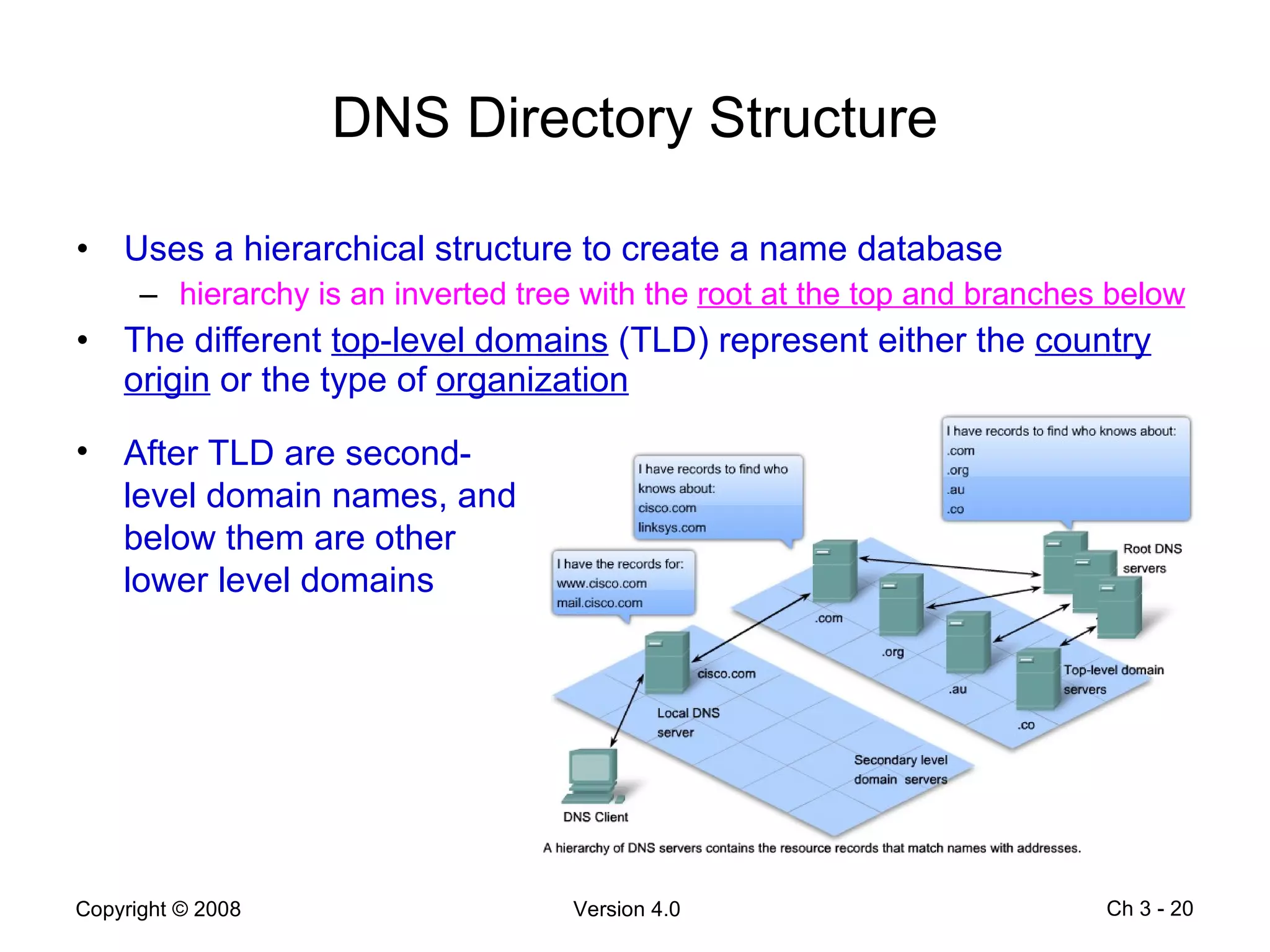
DNS Directory Structure Uses a hierarchical structure to create a name database hierarchy is an inverted tree with the  root at the top and branches below The different  top-level domains  (TLD) represent either the  country origin  or the type of  organization Ch 3 -  After TLD are second-level domain names, and below them are other lower level domains
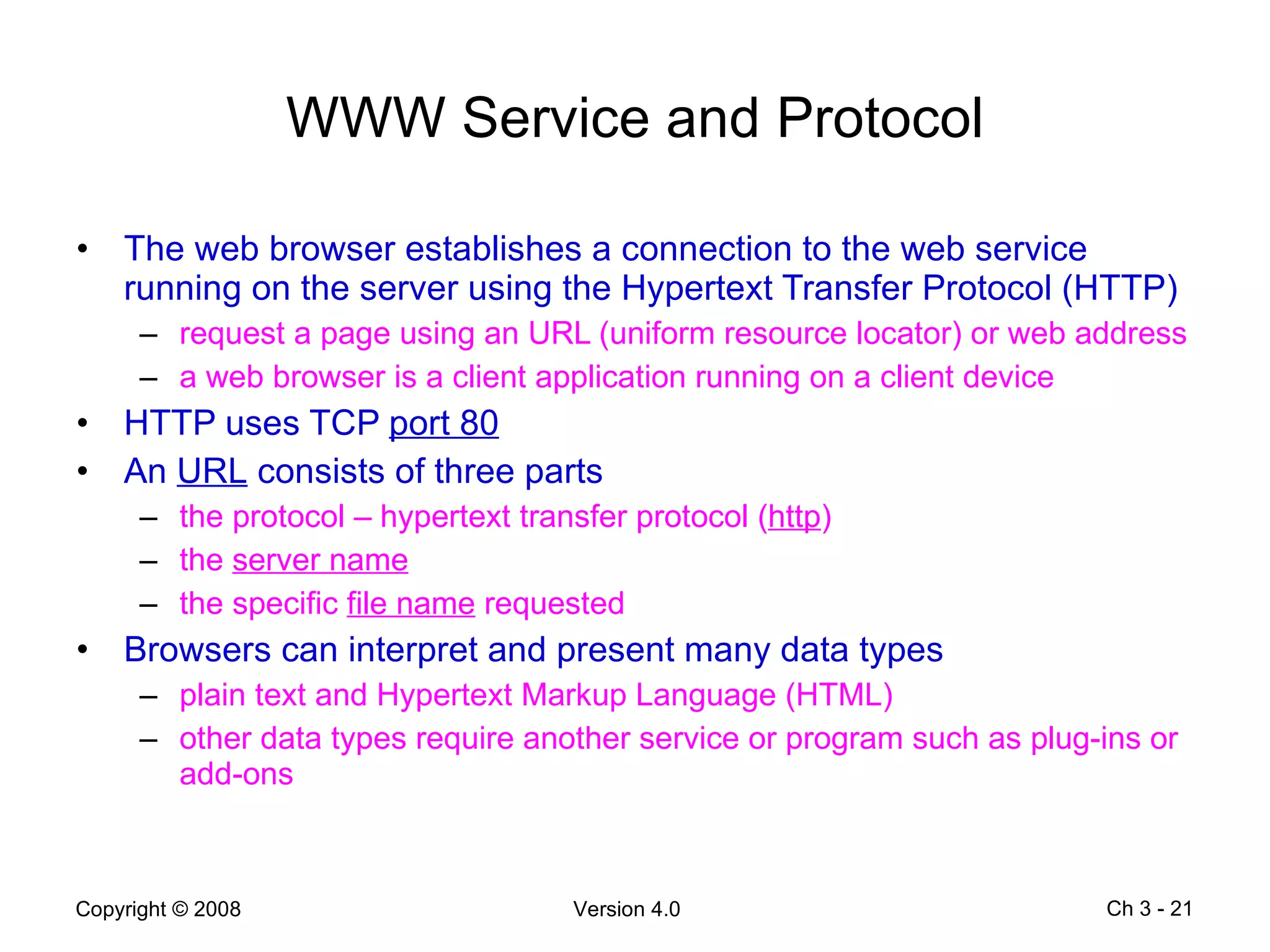
WWW Service and Protocol The web browser establishes a connection to the web service running on the server using the Hypertext Transfer Protocol (HTTP) request a page using an URL (uniform resource locator) or web address a web browser is a client application running on a client device HTTP uses TCP  port 80 An  URL  consists of three parts the protocol – hypertext transfer protocol ( http ) the  server name the specific  file name  requested Browsers can interpret and present many data types plain text and Hypertext Markup Language (HTML) other data types require another service or program such as plug-ins or add-ons Ch 3 -
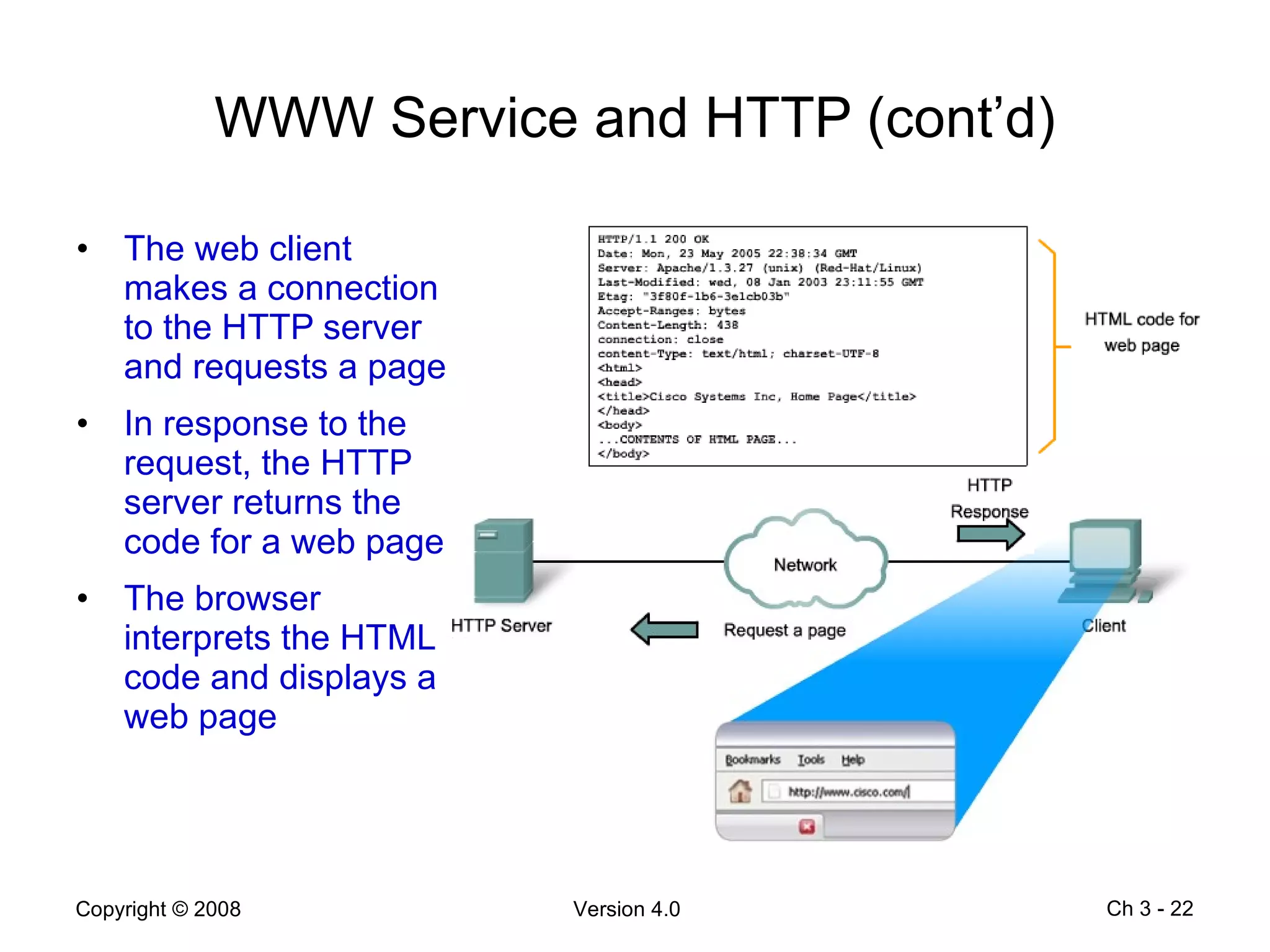
WWW Service and HTTP (cont’d) The web client makes a connection to the HTTP server and requests a page In response to the request, the HTTP server returns the code for a web page The browser interprets the HTML code and displays a web page Ch 3 -
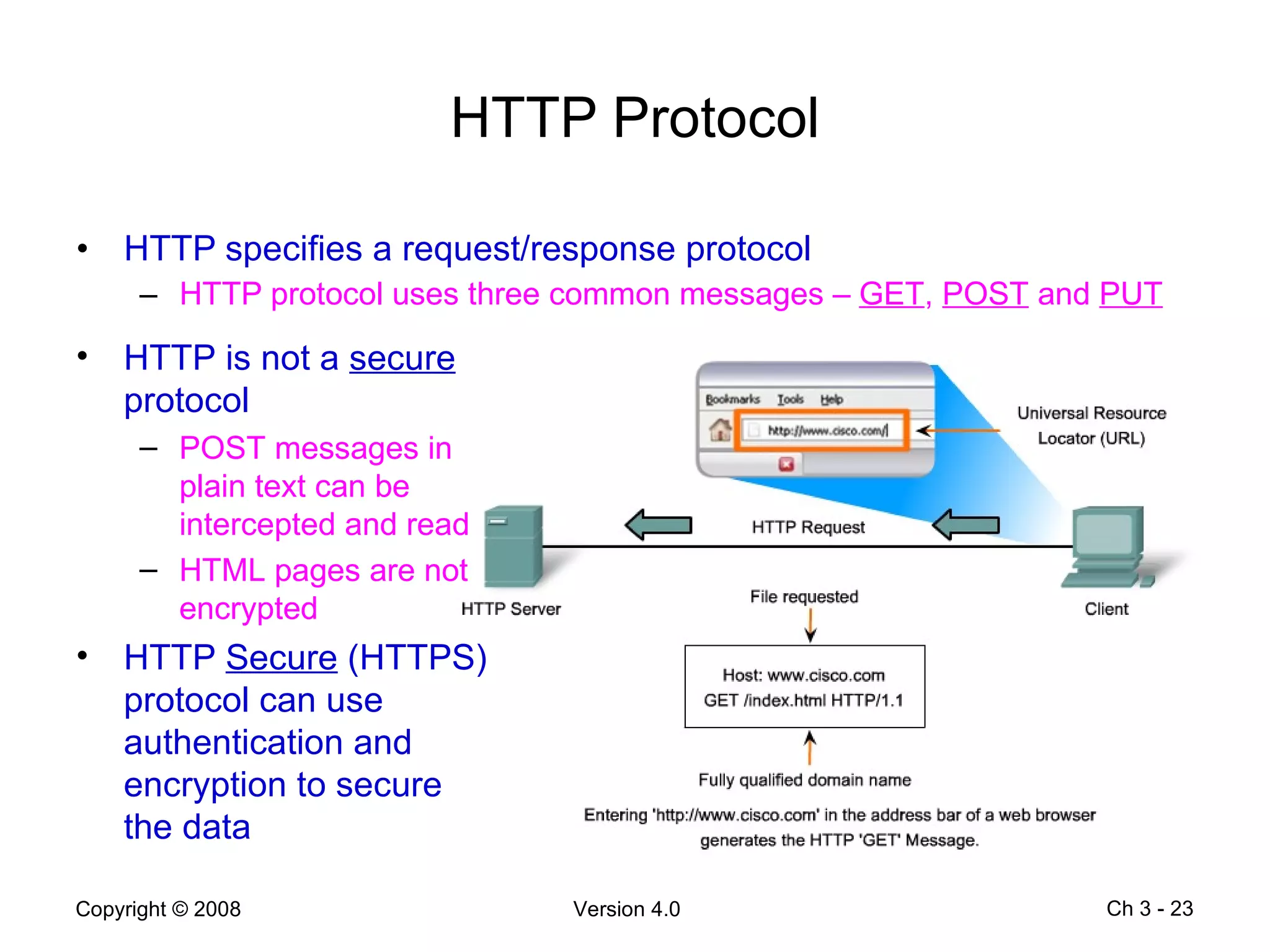
HTTP Protocol HTTP specifies a request/response protocol HTTP protocol uses three common messages –  GET ,  POST  and  PUT Ch 3 -  HTTP is not a  secure  protocol POST messages in plain text can be intercepted and read HTML pages are not encrypted HTTP  Secure  (HTTPS) protocol can use authentication and encryption to secure the data
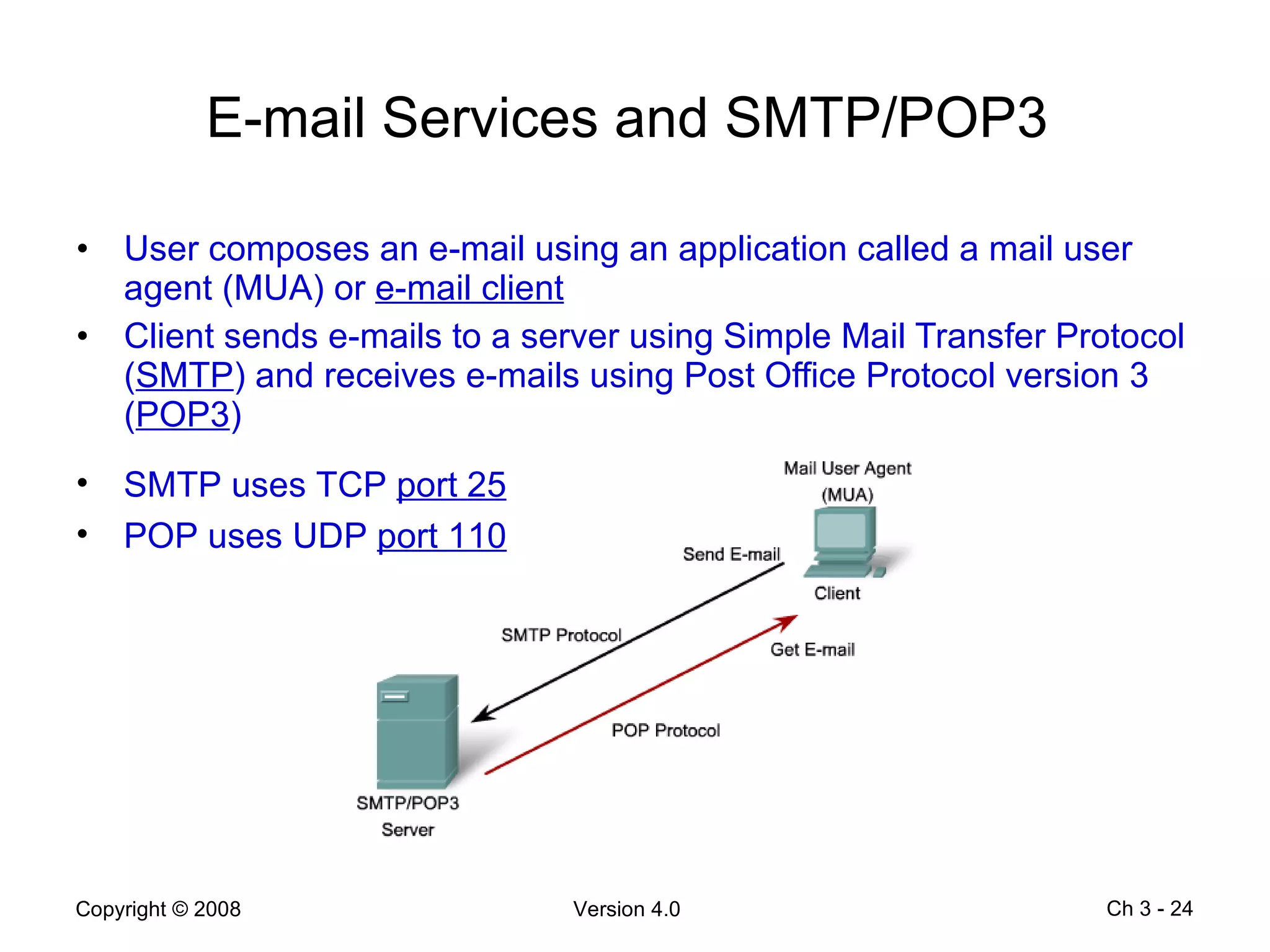
E-mail Services and SMTP/POP3  User composes an e-mail using an application called a mail user agent (MUA) or  e-mail client Client sends e-mails to a server using Simple Mail Transfer Protocol ( SMTP ) and receives e-mails using Post Office Protocol version 3 ( POP3 ) Ch 3 -  SMTP uses TCP  port 25 POP uses UDP  port 110
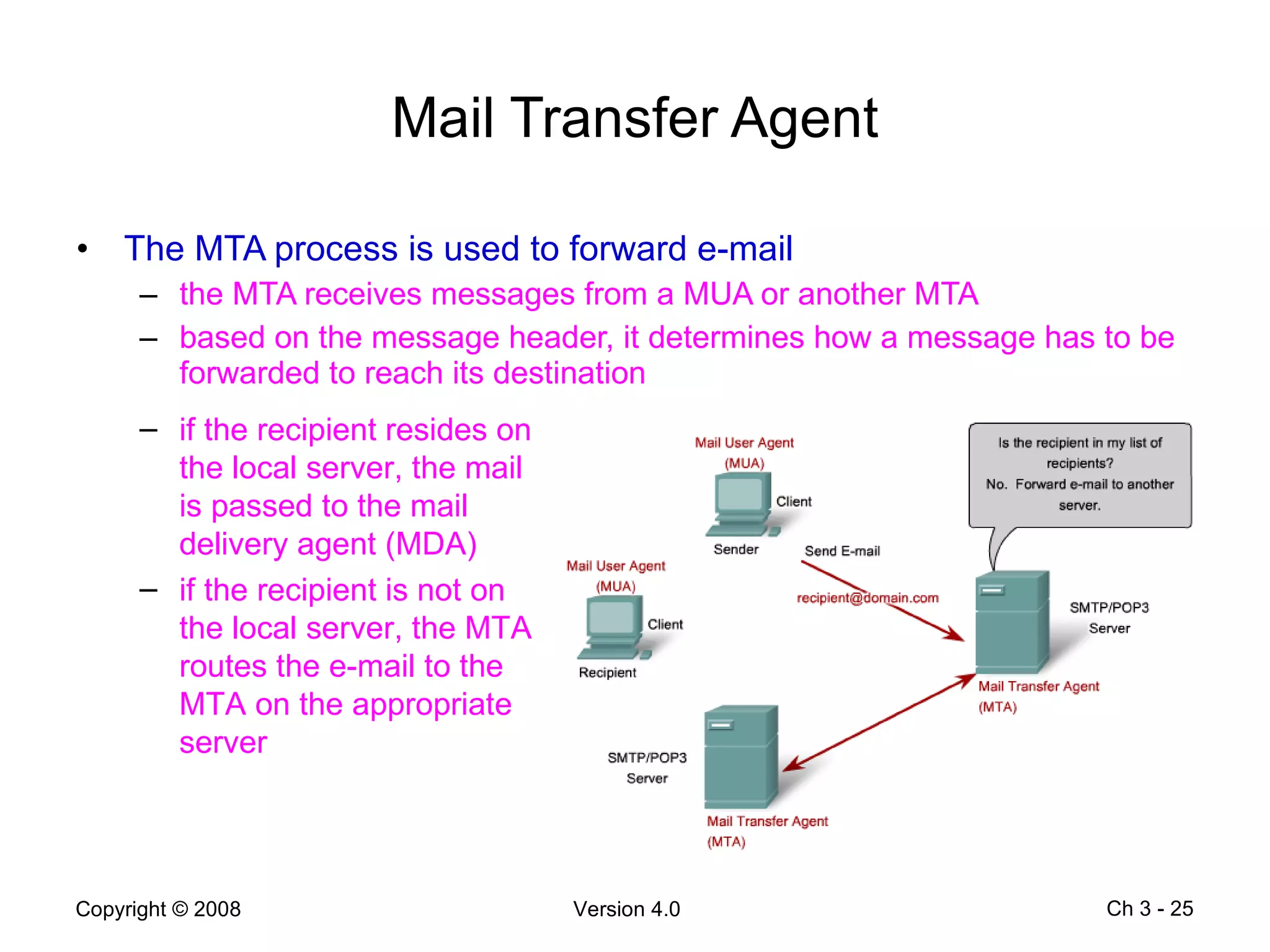
Mail Transfer Agent The MTA process is used to forward e-mail the MTA receives messages from a MUA or another MTA based on the message header, it determines how a message has to be forwarded to reach its destination Ch 3 -  if the recipient resides on the local server, the mail is passed to the mail delivery agent (MDA) if the recipient is not on the local server, the MTA routes the e-mail to the MTA on the appropriate server
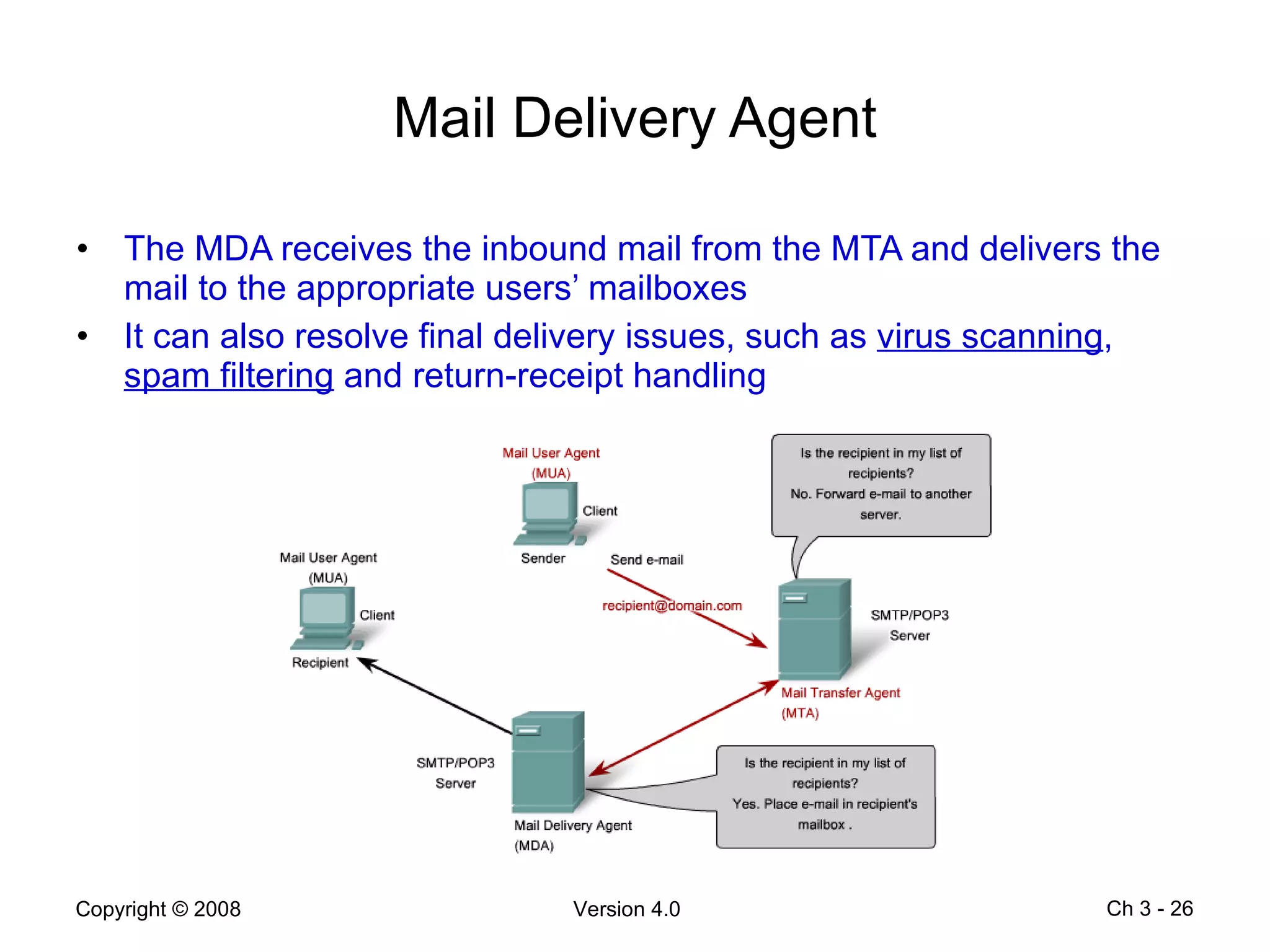
Mail Delivery Agent The MDA receives the inbound mail from the MTA and delivers the mail to the appropriate users’ mailboxes It can also resolve final delivery issues, such as  virus scanning ,  spam filtering  and return-receipt handling Ch 3 -
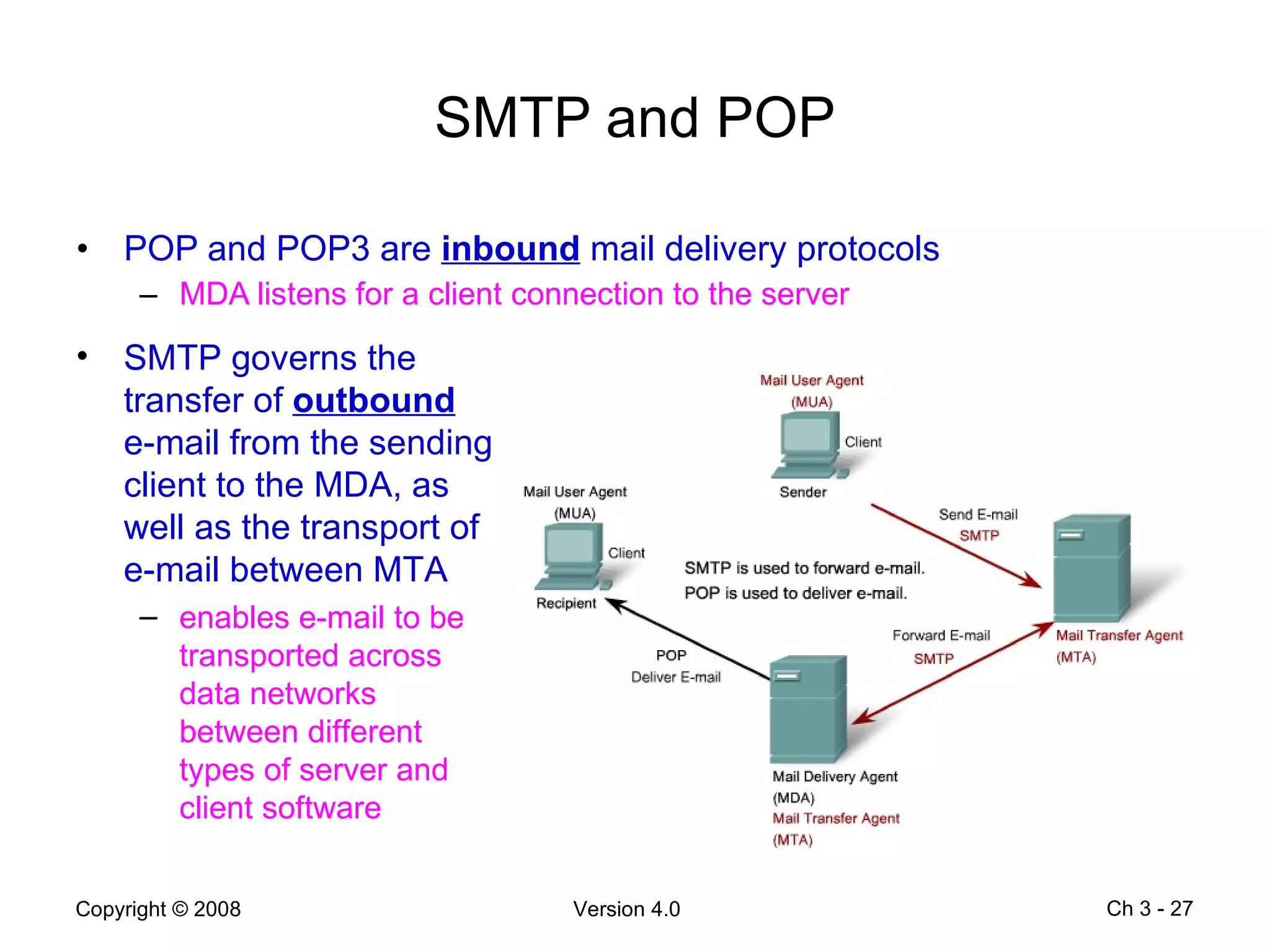
SMTP and POP POP and POP3 are  inbound  mail delivery protocols  MDA listens for a client connection to the server Ch 3 -  SMTP governs the transfer of  outbound  e-mail from the sending client to the MDA, as well as the transport of e-mail between MTA enables e-mail to be transported across data networks between different types of server and client software
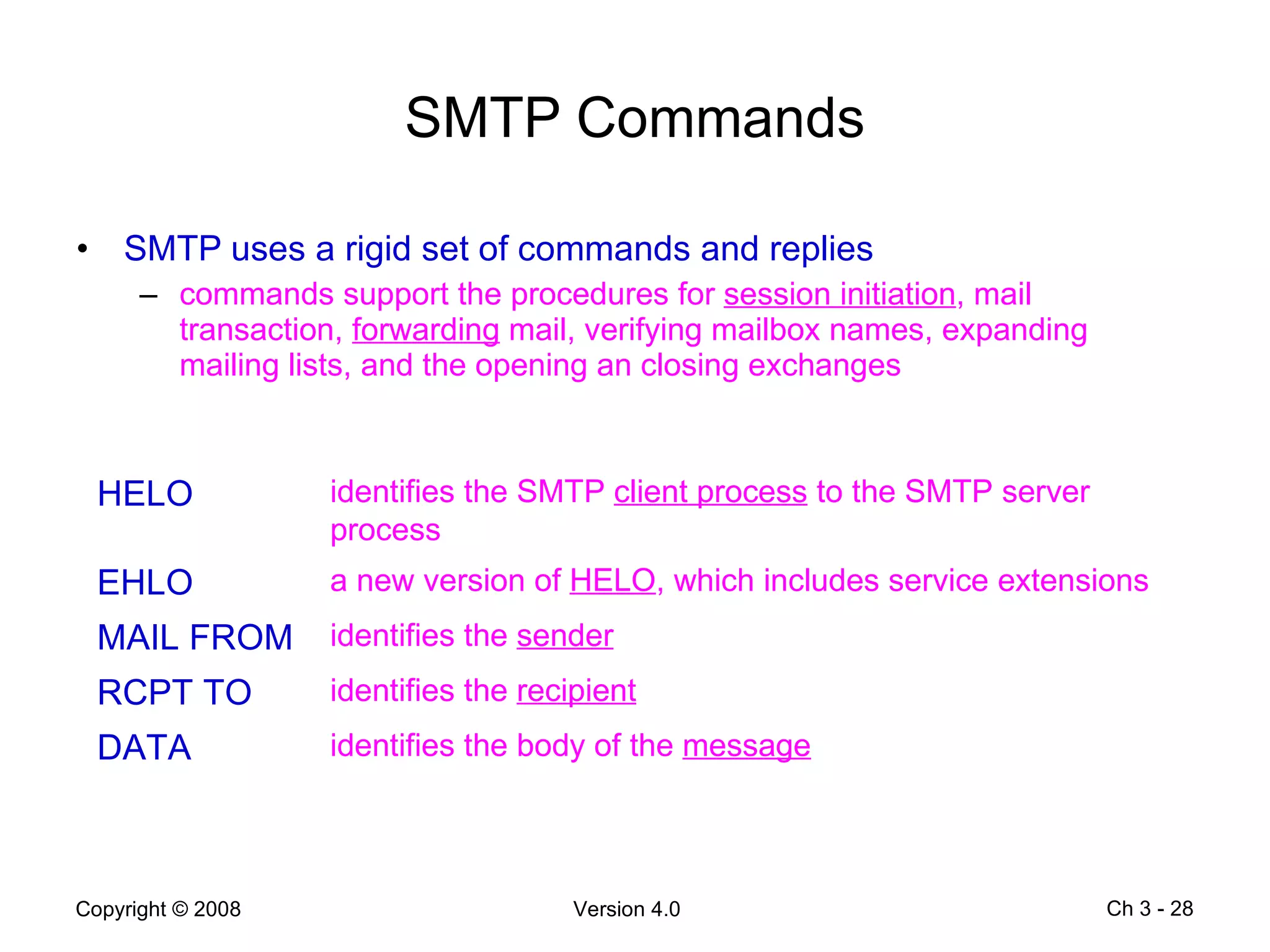
SMTP Commands SMTP uses a rigid set of commands and replies commands support the procedures for  session initiation , mail transaction,  forwarding  mail, verifying mailbox names, expanding mailing lists, and the opening an closing exchanges Ch 3 -  HELO identifies the SMTP  client process  to the SMTP server process EHLO a new version of  HELO , which includes service extensions MAIL FROM identifies the  sender RCPT TO identifies the  recipient DATA identifies the body of the  message
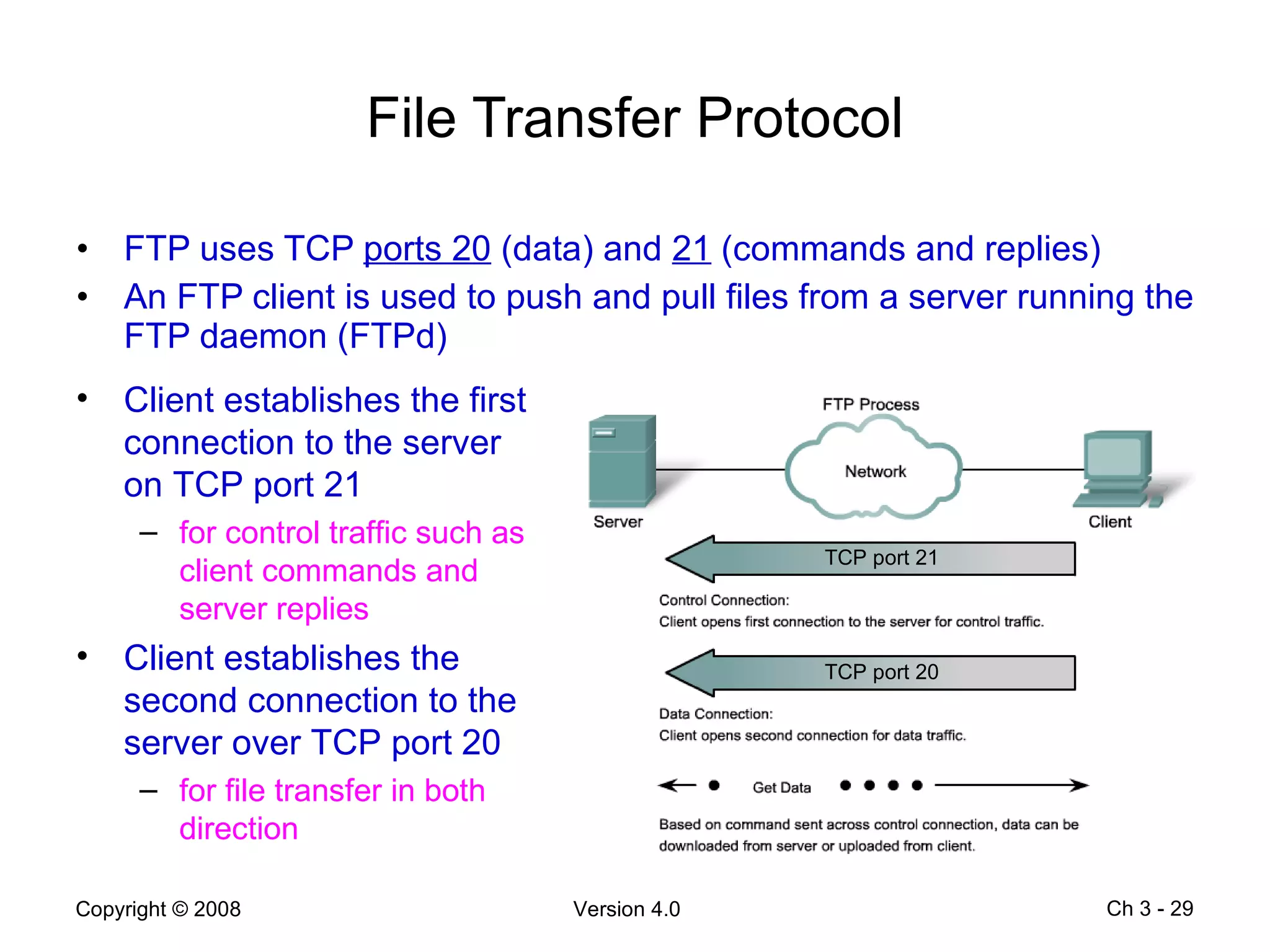
File Transfer Protocol FTP uses TCP  ports 20  (data) and  21  (commands and replies) An FTP client is used to push and pull files from a server running the FTP daemon (FTPd) Ch 3 -  Client establishes the first connection to the server on TCP port 21 for control traffic such as client commands and server replies Client establishes the second connection to the server over TCP port 20 for file transfer in both direction TCP port 21 TCP port 20
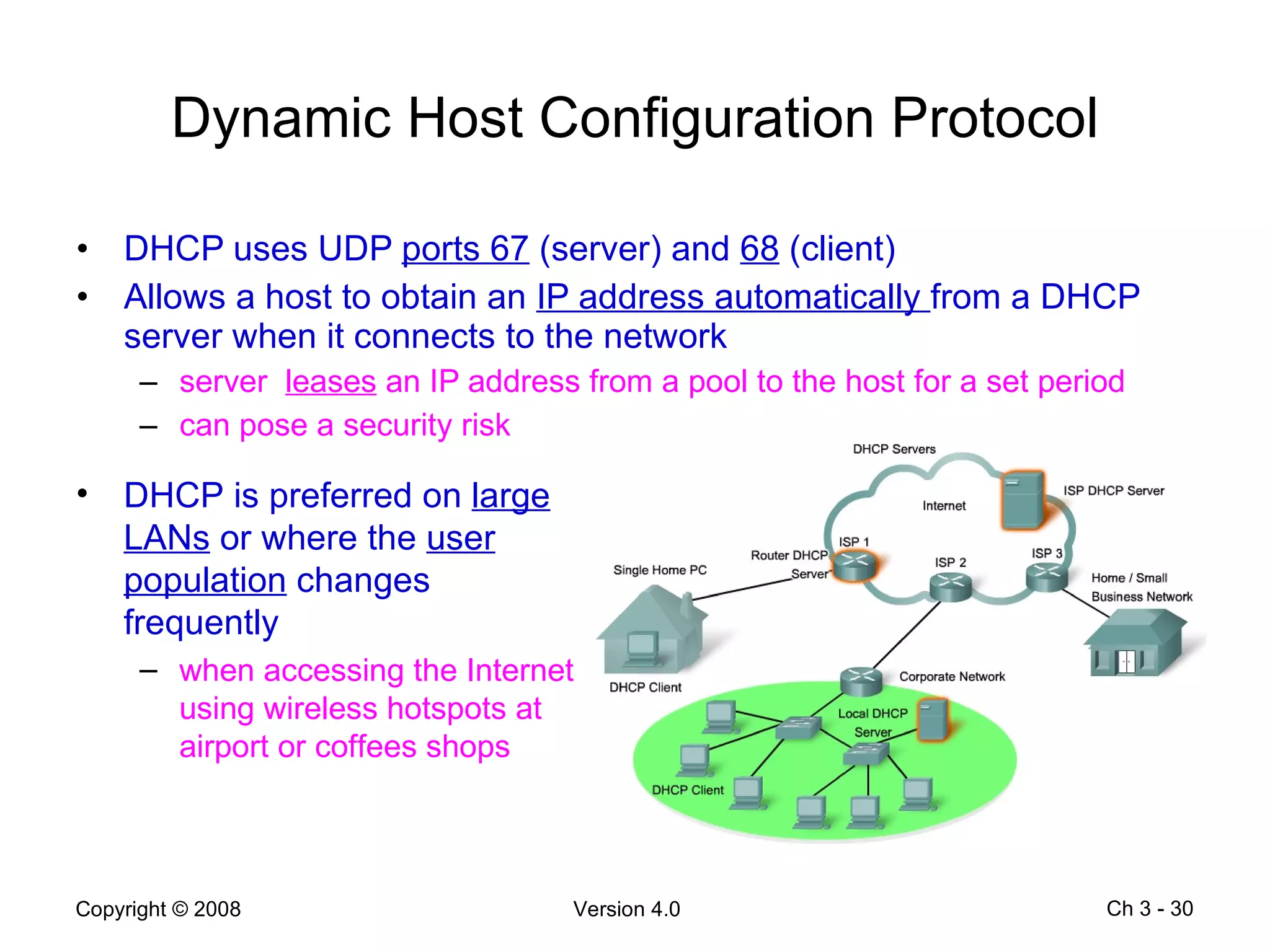
Dynamic Host Configuration Protocol DHCP uses UDP  ports 67  (server) and  68  (client) Allows a host to obtain an  IP address automatically  from a DHCP server when it connects to the network server  leases  an IP address from a pool to the host for a set period can pose a security risk Ch 3 -  DHCP is preferred on  large LANs  or where the  user population  changes frequently when accessing the Internet using wireless hotspots at airport or coffees shops
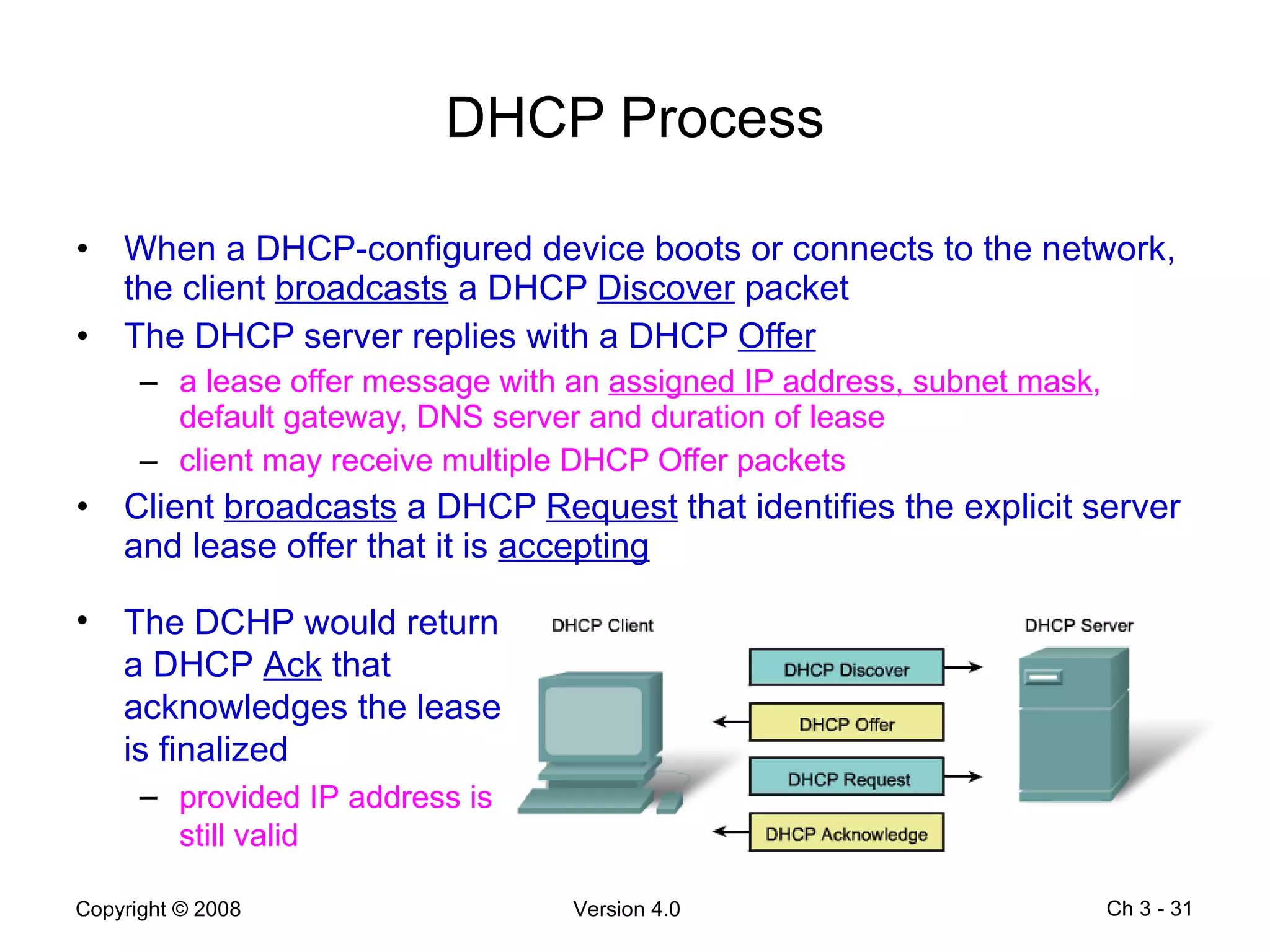
DHCP Process When a DHCP-configured device boots or connects to the network, the client  broadcasts  a DHCP  Discover  packet The DHCP server replies with a DHCP  Offer   a lease offer message with an  assigned IP address, subnet mask , default gateway, DNS server and duration of lease client may receive multiple DHCP Offer packets Client  broadcasts  a DHCP  Request  that identifies the explicit server and lease offer that it is  accepting Ch 3 -  The DCHP would return a DHCP  Ack  that acknowledges the lease is finalized provided IP address is still valid
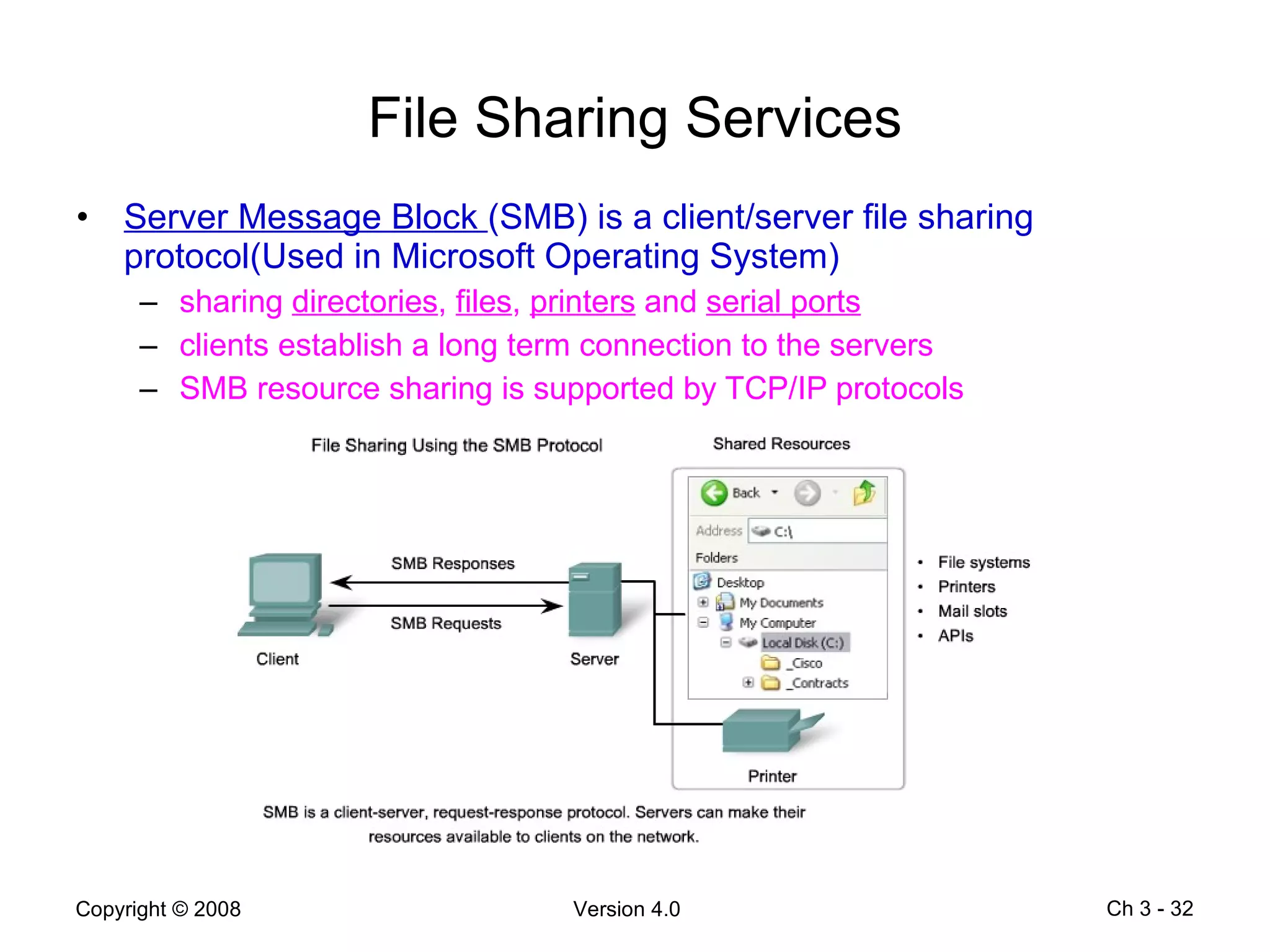
File Sharing Services Server Message Block  (SMB) is a client/server file sharing protocol(Used in Microsoft Operating System) sharing  directories ,  files ,  printers  and  serial ports clients establish a long term connection to the servers   SMB resource sharing is supported by TCP/IP protocols Ch 3 -
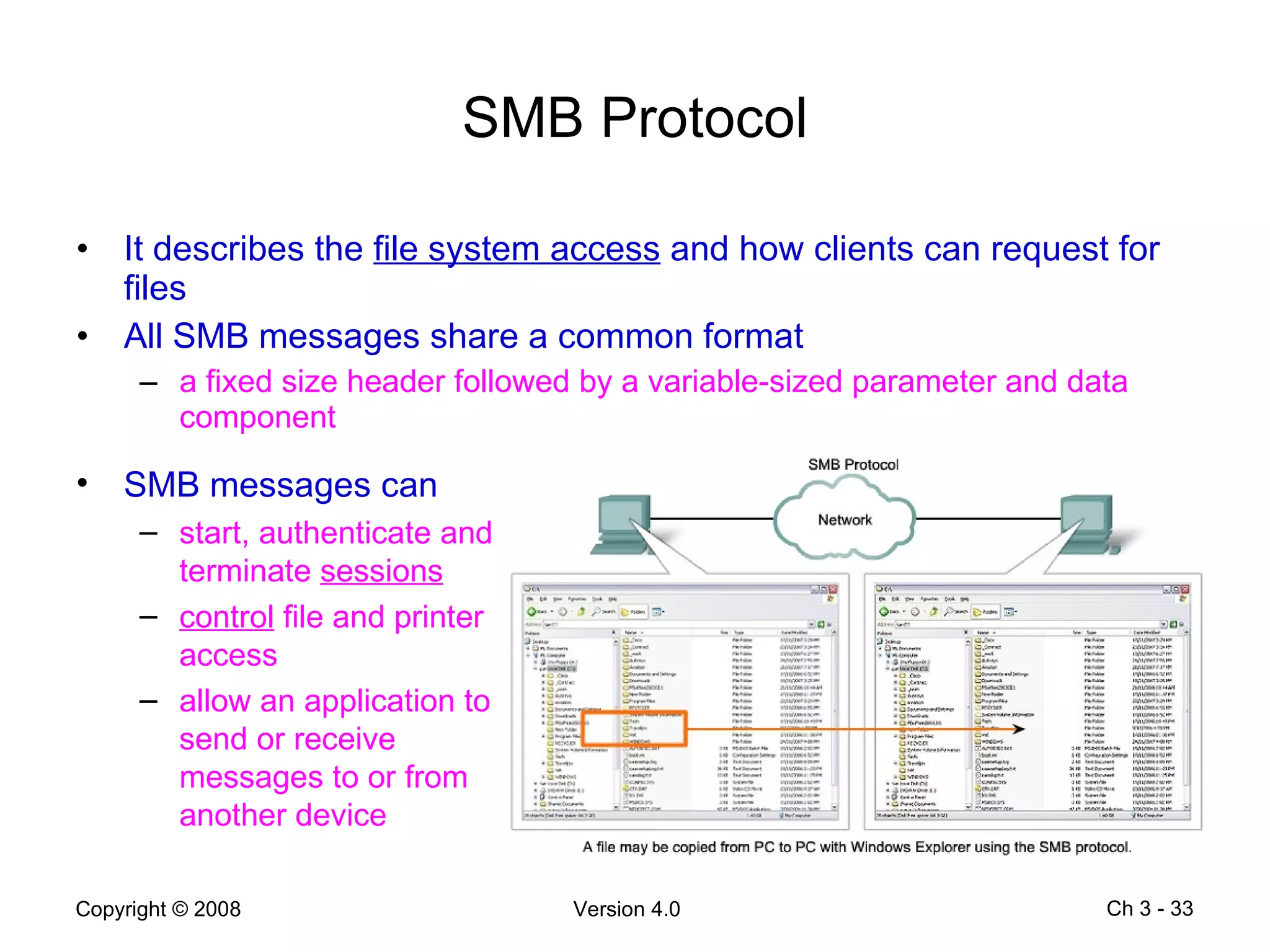
SMB Protocol It describes the  file system access  and how clients can request for files All SMB messages share a common format a fixed size header followed by a variable-sized parameter and data component Ch 3 -  SMB messages can start, authenticate and terminate  sessions control  file and printer access allow an application to send or receive messages to or from another device
Peer-to-Peer (P2P) Services Users can make files on their hard disks available to others for downloading with P2P applications based on the Gnutella protocol Gnutella-compatible client software allows users to connect to Gnutella services over the Internet to locate and access resources shared by other Gnutella peers BearShare, Gnucleus, LimeWire, Morpheus, WinMX and XoloX Gnutella Developer Forum maintains the basic protocol application vendors develop extensions to make their protocol work better on their applications Ch 3 -
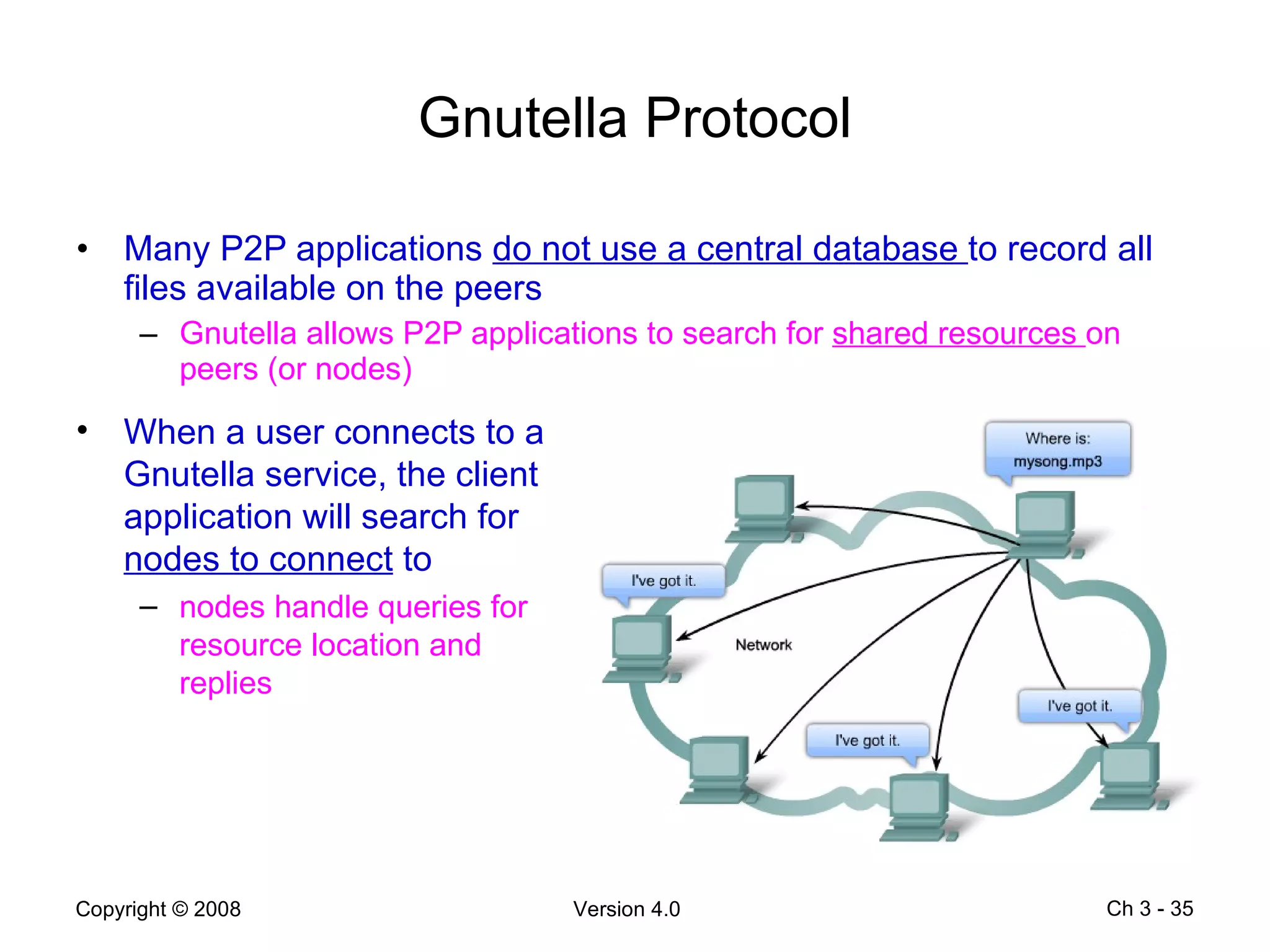
Gnutella Protocol Many P2P applications  do not use a central database  to record all files available on the peers Gnutella allows P2P applications to search for  shared resources  on peers (or nodes)  Ch 3 -  When a user connects to a Gnutella service, the client application will search for  nodes to connect  to nodes handle queries for resource location and replies
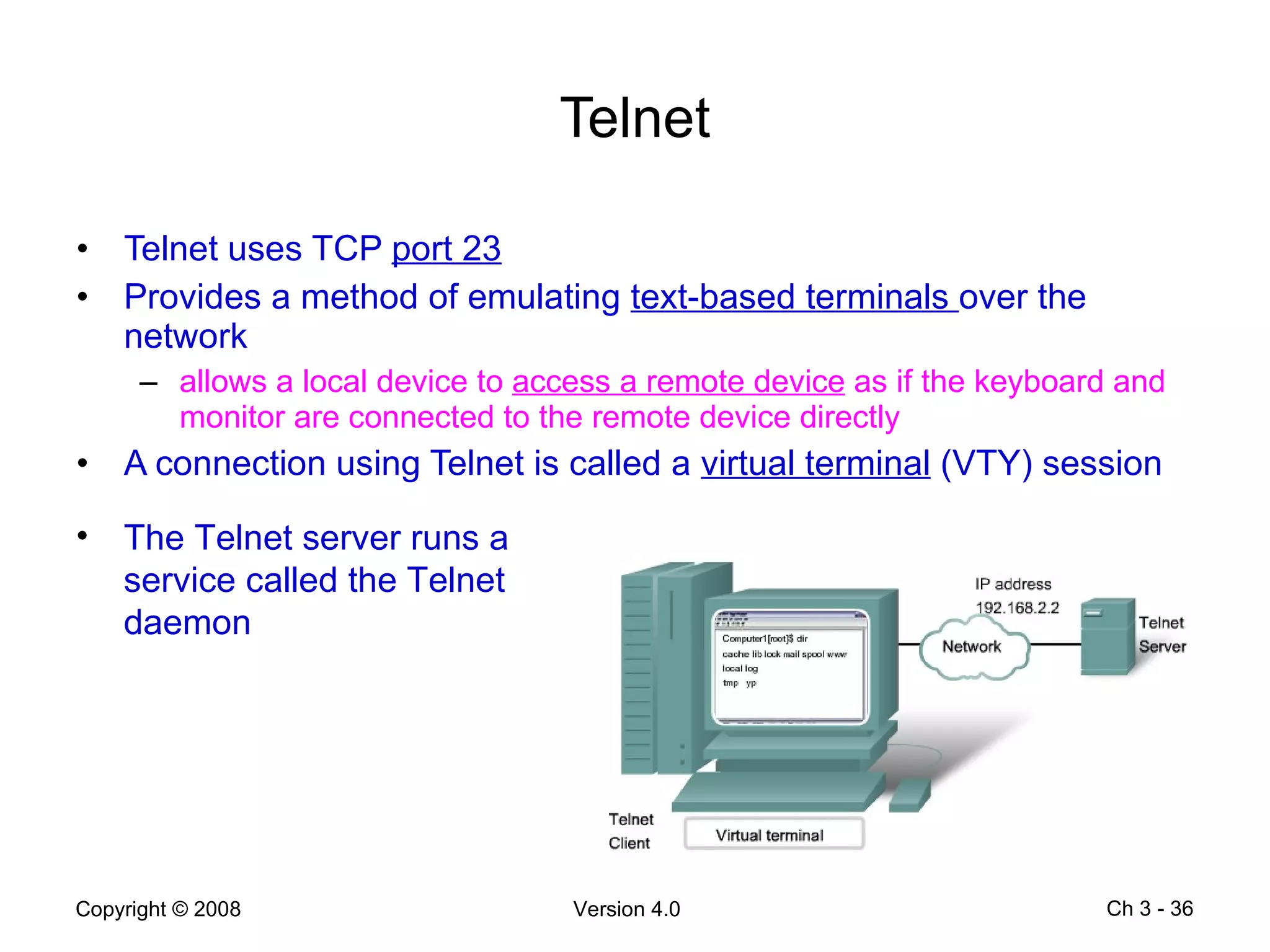
Telnet Telnet uses TCP  port 23 Provides a method of emulating  text-based terminals  over the network allows a local device to  access a remote device  as if the keyboard and monitor are connected to the remote device directly A connection using Telnet is called a  virtual terminal  (VTY) session Ch 3 -  The Telnet server runs a service called the Telnet daemon
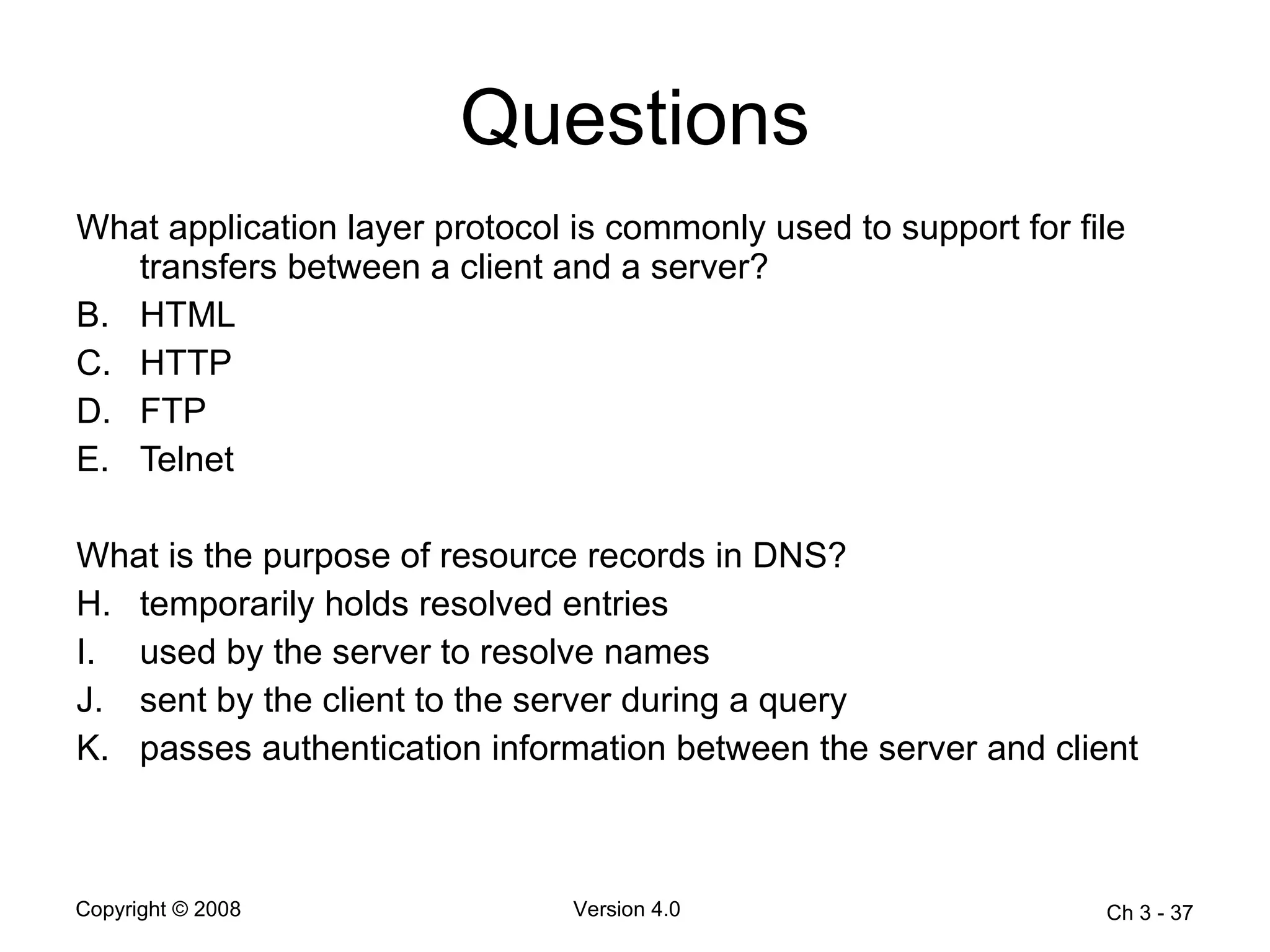
Questions What application layer protocol is commonly used to support for file transfers between a client and a server?  HTML  HTTP  FTP  Telnet  What is the purpose of resource records in DNS? temporarily holds resolved entries  used by the server to resolve names  sent by the client to the server during a query  passes authentication information between the server and client  Ch 3 -
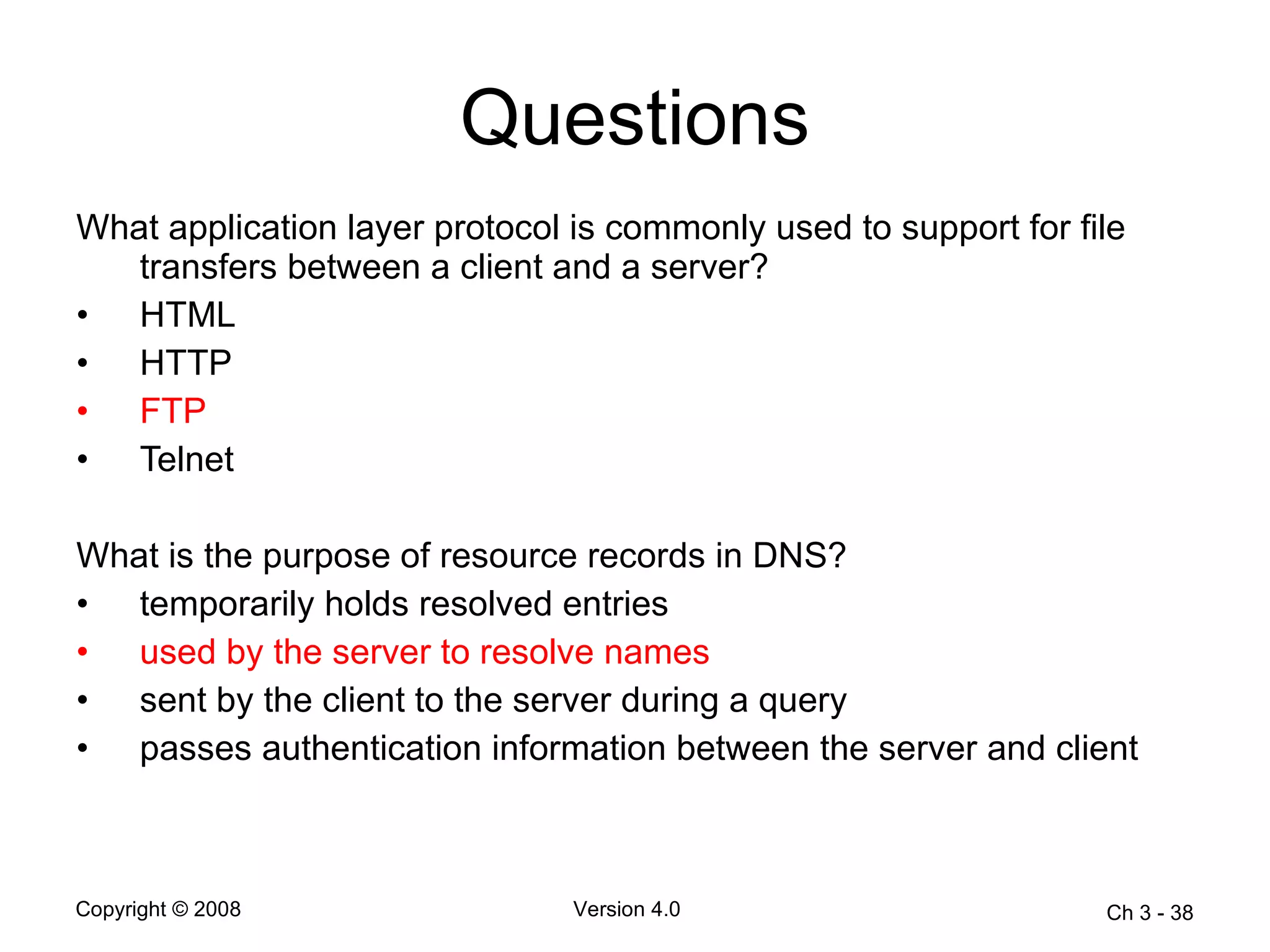
Questions What application layer protocol is commonly used to support for file transfers between a client and a server?  HTML  HTTP  FTP   Telnet  What is the purpose of resource records in DNS? temporarily holds resolved entries  used by the server to resolve names  sent by the client to the server during a query  passes authentication information between the server and client  Ch 3 -
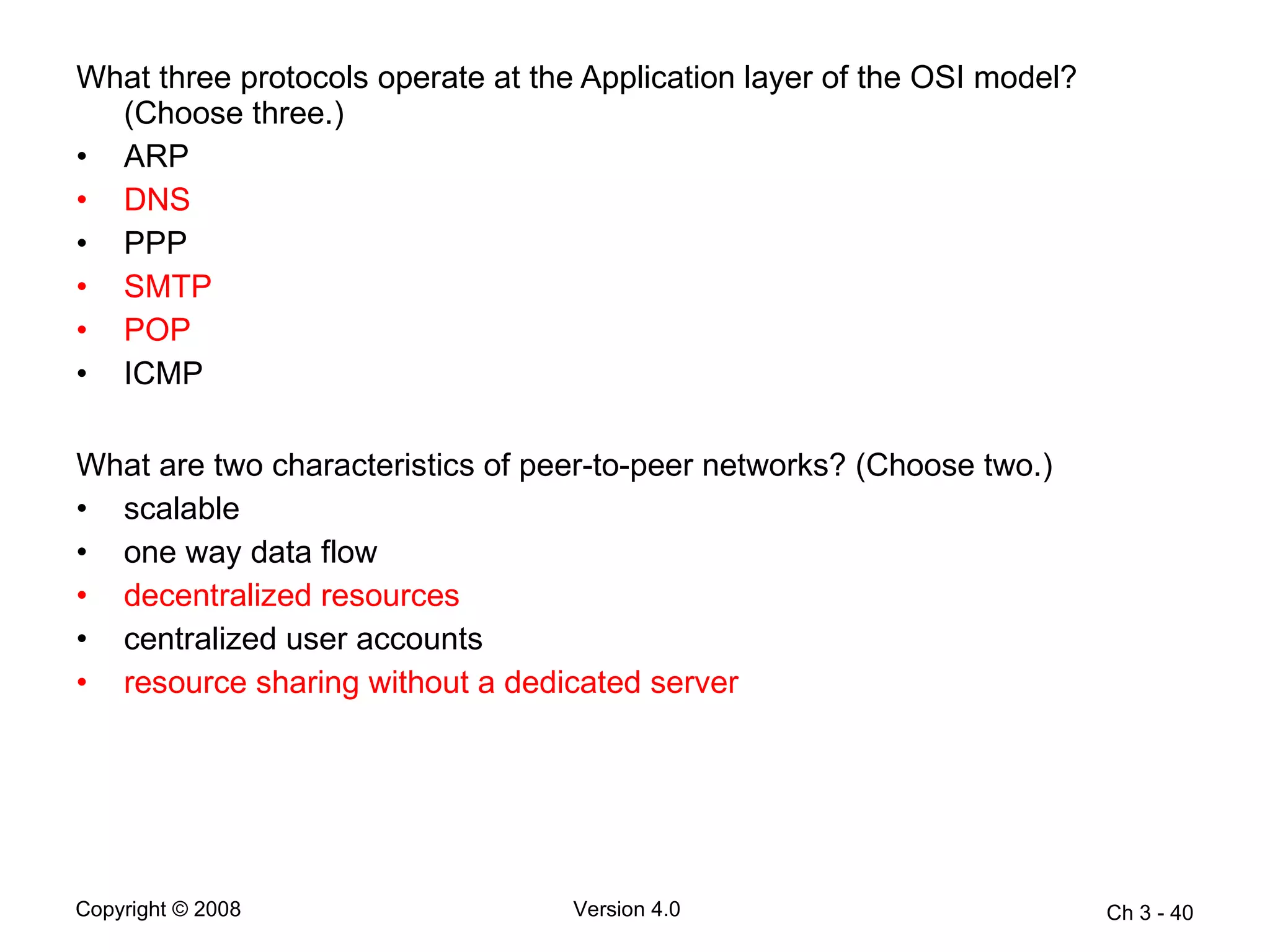
What three protocols operate at the Application layer of the OSI model? (Choose three.) ARP  DNS  PPP  SMTP  POP  ICMP What are two characteristics of peer-to-peer networks? (Choose two.)  scalable  one way data flow  decentralized resources  centralized user accounts  resource sharing without a dedicated server  Ch 3 -
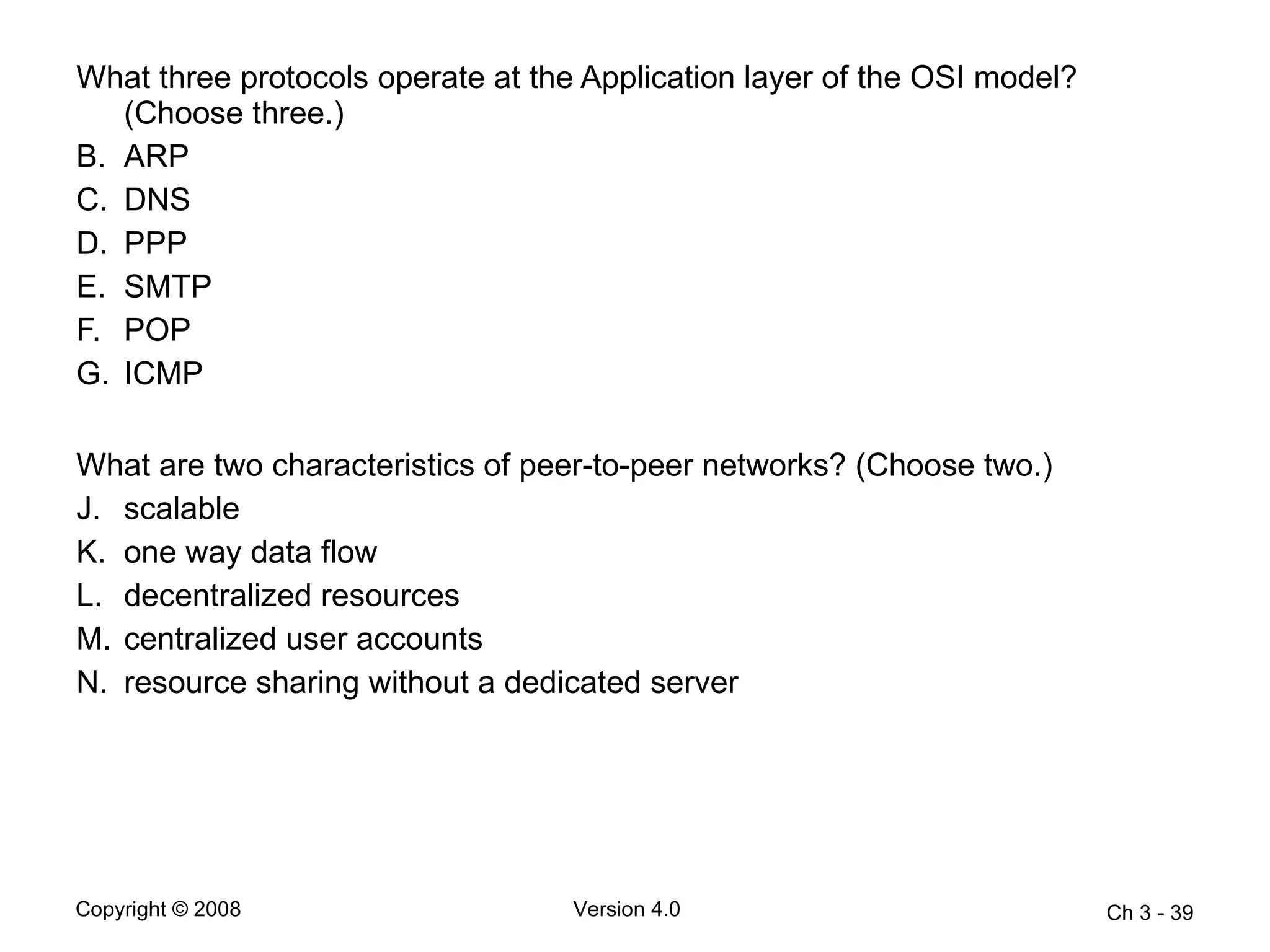
What three protocols operate at the Application layer of the OSI model? (Choose three.) ARP  DNS   PPP  SMTP   POP   ICMP What are two characteristics of peer-to-peer networks? (Choose two.)  scalable  one way data flow  decentralized resources  centralized user accounts  resource sharing without a dedicated server  Ch 3 -

Chapter3

  • 1.
    Ch 3 - Chapter 3 Application Layer Functionality and Protocols
  • 2.
    Objectives Describe howthe functions of the three upper OSI model layers provide network services to end-user applications Describe how the TCP/IP application layer protocols provide the services specified by the upper layers of the OSI model Define how people use the application layer to communicate across the information network Describe the functions of the well-know TCP/IP applications , such as the World Wide Web and e-mail, and other related services (HTTP, DNS, DHCP, SMTP/POP and Telnet) Describe the file sharing processes that use peer-to-peer applications and the Gnutella protocol Explain how protocols ensure that services running on one kind of device can send to and receive from many different network devices Use network analysis tools to examine and explain how common user applications work Ch 3 -
  • 3.
    Application Layer Providesthe interface between human and data networks people create the communication software and hardware convert communication to a digital format Application layer services initiate the data transfer Ch 3 -
  • 4.
    Presentation Layer ThePresentation layer has three primary functions coding and conversion of Application layer data to ensure that data from the source device can be interpreted by the appropriate application on the destination device compression of the data in a manner that can be decompressed by the destination device encryption of the data for transmission and the decryption of data upon receipt by the destination Ch 3 -
  • 5.
    Session Layer Createsand maintains dialogs between source and destination applications Handles the exchange of information to initiate dialogs and keeps them active Restarts sessions that are disrupted or idle for a long period of time Ch 3 -
  • 6.
    Application Layer Protocols Domain Name Service (DNS) used to resolve Internet names to IP addresses Hypertext Transfer Protocol (HTTP) used to transfer files that make up the web pages of the world wide web Simple Mail Transfer Protocol used for the transfer of mail messages and attachments Telnet (terminal emulation protocol) used to provide remote access to servers and networking devices File Transfer Protocol (FTP) used for interactive file transfers between systems Ch 3 -
  • 7.
    Application Layer SoftwareNetwork-aware applications implement the application layer protocols and are able to communicate directly with the lower layers of the protocol stack e-mail clients and web browsers Application layer services are programs that interface with the network and prepare the data for transfer different types of data (text, graphics or video) require different network services to ensure that it is properly prepared for processing by the functions occurring at the lower layers of the OSI model Ch 3 -
  • 8.
    Software Processes Processesare individual software programs running together at the same time Ch 3 -
  • 9.
    User Applications, Servicesand Protocols User applications provide the user with a way to create messages Services establish an interface to the network Protocols provide the rules and formats that govern how data is treated Ch 3 -
  • 10.
    Application Layer ProtocolFunctions Establish consistent rules for exchanging data between applications and services Specify how data inside the message is structured and the types of messages that are sent between the source and destination Define the message dialogues and the expected response Define the interaction with the next lower layer Ch 3 -
  • 11.
    Client-Server Model Thedevice requesting the information is called a client The device responding to the request is called a server Application layer protocols describe the format of the requests and responses between the clients and servers Ch 3 -
  • 12.
    Servers A serveris usually a computer that contains information to be shared with many client systems Some servers may require authentication of user control information to verify the user has access rights rely on a central list of user accounts and authorization The server runs a service, or process, called a daemon Ch 3 - daemon typically runs in the background the daemon “listens” for a request from a client the daemon exchanges appropriate information with the client when it “hears” a request
  • 13.
    Application Layer Servicesand Protocols A single application may employ many different supporting Application layer services one request may contain several individual processes Servers can support multiple clients requesting information at the same time Ch 3 - the individual client requests must be handled simultaneously and separately Application layer processes and services rely on support from lower layer functions to successfully manage the multiple conversations
  • 14.
    Peer-to-Peer Networks Twoor more computers are connected via a network and can share resources without having a dedicated server every connected end device, known as a peer , can function either as a client or server information can be located anywhere on any connected device Ch 3 - user accounts and access rights are set individually on each peer device difficult to enforce security and access policies most current operating systems support file and print sharing without requiring additional server software
  • 15.
    Peer-to-Peer Applications Allowsa device to act as both a client and server within the same communication requires each end device to provide a user interface and run a background service Can be used on peer-to-peer networks, client/server networks and across the Internet Ch 3 -
  • 16.
    DNS Service andProtocol DNS uses TCP/UDP port 53 Domain names were created to convert the numeric IP address into a simple, recognizable name Ch 3 - domain names are easier to remember than actual numeric addresses any change to the address is transparent to the user since the domain name is the same
  • 17.
    DNS Resolver DNSis a client/server service the DNS client runs a service (and not an application) the DNS client, called the DNS resolver , supports name resolution for other network applications and services DNS client uses one or more DNS server addresses for name resolution Ch 3 - DNS client queries the name servers to resolve the name to a numeric address nslookup utility allows the user to manually query the name servers to resolve a given host name
  • 18.
    DNS Message FormatA DNS server uses the name resolution with the name daemon, named (pronounced name-dee) Uses the same message format all types of client queries and server responses error messages the transfer of resource record information between servers Ch 3 -
  • 19.
    DNS Resource RecordsCh 3 - A an end device address NS an authoritative name server , i.e. a server has resource records that corresponds to its level in the domain hierarchy CNAME the canonical name – an alias name for a host MX mail exchange record
  • 20.
    DNS Directory StructureUses a hierarchical structure to create a name database hierarchy is an inverted tree with the root at the top and branches below The different top-level domains (TLD) represent either the country origin or the type of organization Ch 3 - After TLD are second-level domain names, and below them are other lower level domains
  • 21.
    WWW Service andProtocol The web browser establishes a connection to the web service running on the server using the Hypertext Transfer Protocol (HTTP) request a page using an URL (uniform resource locator) or web address a web browser is a client application running on a client device HTTP uses TCP port 80 An URL consists of three parts the protocol – hypertext transfer protocol ( http ) the server name the specific file name requested Browsers can interpret and present many data types plain text and Hypertext Markup Language (HTML) other data types require another service or program such as plug-ins or add-ons Ch 3 -
  • 22.
    WWW Service andHTTP (cont’d) The web client makes a connection to the HTTP server and requests a page In response to the request, the HTTP server returns the code for a web page The browser interprets the HTML code and displays a web page Ch 3 -
  • 23.
    HTTP Protocol HTTPspecifies a request/response protocol HTTP protocol uses three common messages – GET , POST and PUT Ch 3 - HTTP is not a secure protocol POST messages in plain text can be intercepted and read HTML pages are not encrypted HTTP Secure (HTTPS) protocol can use authentication and encryption to secure the data
  • 24.
    E-mail Services andSMTP/POP3 User composes an e-mail using an application called a mail user agent (MUA) or e-mail client Client sends e-mails to a server using Simple Mail Transfer Protocol ( SMTP ) and receives e-mails using Post Office Protocol version 3 ( POP3 ) Ch 3 - SMTP uses TCP port 25 POP uses UDP port 110
  • 25.
    Mail Transfer AgentThe MTA process is used to forward e-mail the MTA receives messages from a MUA or another MTA based on the message header, it determines how a message has to be forwarded to reach its destination Ch 3 - if the recipient resides on the local server, the mail is passed to the mail delivery agent (MDA) if the recipient is not on the local server, the MTA routes the e-mail to the MTA on the appropriate server
  • 26.
    Mail Delivery AgentThe MDA receives the inbound mail from the MTA and delivers the mail to the appropriate users’ mailboxes It can also resolve final delivery issues, such as virus scanning , spam filtering and return-receipt handling Ch 3 -
  • 27.
    SMTP and POPPOP and POP3 are inbound mail delivery protocols MDA listens for a client connection to the server Ch 3 - SMTP governs the transfer of outbound e-mail from the sending client to the MDA, as well as the transport of e-mail between MTA enables e-mail to be transported across data networks between different types of server and client software
  • 28.
    SMTP Commands SMTPuses a rigid set of commands and replies commands support the procedures for session initiation , mail transaction, forwarding mail, verifying mailbox names, expanding mailing lists, and the opening an closing exchanges Ch 3 - HELO identifies the SMTP client process to the SMTP server process EHLO a new version of HELO , which includes service extensions MAIL FROM identifies the sender RCPT TO identifies the recipient DATA identifies the body of the message
  • 29.
    File Transfer ProtocolFTP uses TCP ports 20 (data) and 21 (commands and replies) An FTP client is used to push and pull files from a server running the FTP daemon (FTPd) Ch 3 - Client establishes the first connection to the server on TCP port 21 for control traffic such as client commands and server replies Client establishes the second connection to the server over TCP port 20 for file transfer in both direction TCP port 21 TCP port 20
  • 30.
    Dynamic Host ConfigurationProtocol DHCP uses UDP ports 67 (server) and 68 (client) Allows a host to obtain an IP address automatically from a DHCP server when it connects to the network server leases an IP address from a pool to the host for a set period can pose a security risk Ch 3 - DHCP is preferred on large LANs or where the user population changes frequently when accessing the Internet using wireless hotspots at airport or coffees shops
  • 31.
    DHCP Process Whena DHCP-configured device boots or connects to the network, the client broadcasts a DHCP Discover packet The DHCP server replies with a DHCP Offer a lease offer message with an assigned IP address, subnet mask , default gateway, DNS server and duration of lease client may receive multiple DHCP Offer packets Client broadcasts a DHCP Request that identifies the explicit server and lease offer that it is accepting Ch 3 - The DCHP would return a DHCP Ack that acknowledges the lease is finalized provided IP address is still valid
  • 32.
    File Sharing ServicesServer Message Block (SMB) is a client/server file sharing protocol(Used in Microsoft Operating System) sharing directories , files , printers and serial ports clients establish a long term connection to the servers SMB resource sharing is supported by TCP/IP protocols Ch 3 -
  • 33.
    SMB Protocol Itdescribes the file system access and how clients can request for files All SMB messages share a common format a fixed size header followed by a variable-sized parameter and data component Ch 3 - SMB messages can start, authenticate and terminate sessions control file and printer access allow an application to send or receive messages to or from another device
  • 34.
    Peer-to-Peer (P2P) ServicesUsers can make files on their hard disks available to others for downloading with P2P applications based on the Gnutella protocol Gnutella-compatible client software allows users to connect to Gnutella services over the Internet to locate and access resources shared by other Gnutella peers BearShare, Gnucleus, LimeWire, Morpheus, WinMX and XoloX Gnutella Developer Forum maintains the basic protocol application vendors develop extensions to make their protocol work better on their applications Ch 3 -
  • 35.
    Gnutella Protocol ManyP2P applications do not use a central database to record all files available on the peers Gnutella allows P2P applications to search for shared resources on peers (or nodes) Ch 3 - When a user connects to a Gnutella service, the client application will search for nodes to connect to nodes handle queries for resource location and replies
  • 36.
    Telnet Telnet usesTCP port 23 Provides a method of emulating text-based terminals over the network allows a local device to access a remote device as if the keyboard and monitor are connected to the remote device directly A connection using Telnet is called a virtual terminal (VTY) session Ch 3 - The Telnet server runs a service called the Telnet daemon
  • 37.
    Questions What applicationlayer protocol is commonly used to support for file transfers between a client and a server? HTML HTTP FTP Telnet What is the purpose of resource records in DNS? temporarily holds resolved entries used by the server to resolve names sent by the client to the server during a query passes authentication information between the server and client Ch 3 -
  • 38.
    Questions What applicationlayer protocol is commonly used to support for file transfers between a client and a server? HTML HTTP FTP Telnet What is the purpose of resource records in DNS? temporarily holds resolved entries used by the server to resolve names sent by the client to the server during a query passes authentication information between the server and client Ch 3 -
  • 39.
    What three protocolsoperate at the Application layer of the OSI model? (Choose three.) ARP DNS PPP SMTP POP ICMP What are two characteristics of peer-to-peer networks? (Choose two.) scalable one way data flow decentralized resources centralized user accounts resource sharing without a dedicated server Ch 3 -
  • 40.
    What three protocolsoperate at the Application layer of the OSI model? (Choose three.) ARP DNS PPP SMTP POP ICMP What are two characteristics of peer-to-peer networks? (Choose two.) scalable one way data flow decentralized resources centralized user accounts resource sharing without a dedicated server Ch 3 -

Editor's Notes

  • #2 In this chapter, we will focus on the role of one layer, the Application layer and its components: applications, services, and protocols. We will explore how these three elements make the robust communication across the information network possible.
  • #7 These protocols specify the format and control information necessary for many of the common Internet communication functions.
  • #8 Within the Application layer, there are two forms of software programs or processes that provide access to the network: applications and services .
  • #10 All three components may be used by a single executable program and may even use the same name. For example, when discussing "Telnet" we could be referring to the application, the service, or the protocol.
  • #11 In order for the communications to be successful, the application layer protocols implemented on the source and destination host must match.
  • #12 The client begins the exchange by requesting data from the server, which responds by sending one or more streams of data to the client. One example of a client/server network is a corporate environment where employees use a company e-mail server to send, receive and store e-mail. The e-mail client on an employee computer issues a request to the e-mail server for any unread mail. The server responds by sending the requested e-mail to the client.
  • #15 Peer-to-peer networking involves two distinct forms: peer-to-peer network design and peer-to-peer applications. Both forms have similar features but in practice work very differently.
  • #24 The Hypertext Transfer Protocol (HTTP), one of the protocols in the TCP/IP suite, was originally developed to publish and retrieve HTML pages and is now used for distributed, collaborative information systems.
  • #26 The e-mail server operates two separate processes: Mail Transfer Agent (MTA) Mail Delivery Agent (MDA)
  • #27 The e-mail server operates two separate processes: Mail Transfer Agent (MTA) Mail Delivery Agent (MDA)