Application Layer In Network System
Application Layer
Topic:
What is application layer?
Content
services
Advantages and disadvantages of application layer
Content of the application layer
Domain name service
Electronic mail
World wide web
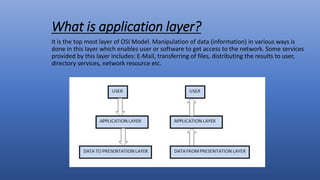
What is application layer?
It is the top most layer of OSI Model. Manipulation of data (information) in various ways is
done in this layer which enables user or software to get access to the network. Some services
provided by this layer includes: E-Mail, transferring of files, distributing the results to user,
directory services, network resource etc.
Domain name service(DNS)
What is DNS?
oDNS is a host name to IP address translation service.
oDNS is-
A distributed database implemented in a hierarchy of name
servers.
An application level protocol for message exchange between
clients and servers.
Why DNS?
• It is easier to remember a host name than it is to remember an IP
address.
• An name has more meaning to a user than a 4 byte number.
• Application such as FTP , HTTP , Email etc.. All require to user to
input a destination.
• The user generally enters a host name.
• The application takes the host name supplied by the user forward
it to DNS for translation to an IP address.
How does it work?
DNS works by exchanging message between client and
server machines.
A client application will pass the destination host name
to the DNS process(in Unix referred to as the get host by
name routine) to get the IP address.
The application then sits and waits for response to
return.
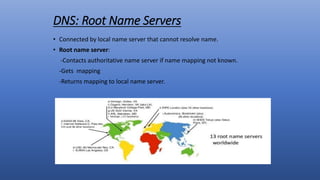
DNS: Root Name Servers
• Connected by local name server that cannot resolve name.
• Root name server:
-Contacts authoritative name server if name mapping not known.
-Gets mapping
-Returns mapping to local name server.
Email
• Electronic mail is among the most widely available
application services . Each users who intends to
participate in email communication , is assigned a
mailbox , where outgoing and incoming message are
buffered , allowing the transferred to take place in the
background.
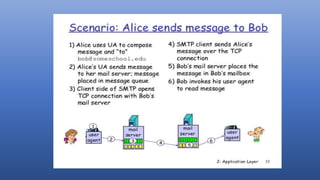
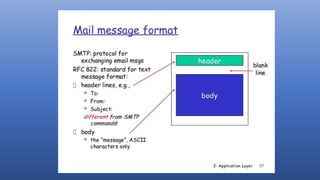
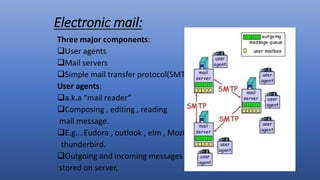
Electronic mail:
Three major components:
User agents
Mail servers
Simple mail transfer protocol(SMTP)
User agents:
a.k.a “mail reader”
Composing , editing , reading
mail message.
E.g.…Eudora , outlook , elm , Mozilla
thunderbird.
Outgoing and incoming messages
stored on server.
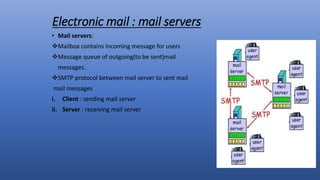
Electronic mail : mail servers
• Mail servers:
Mailbox contains incoming message for users
Message queue of outgoing(to be sent)mail
messages.
SMTP protocol between mail server to sent mail
mail messages
i. Client : sending mail server
ii. Server : receiving mail server
Mail access protocols
• SMTP : delivery /storage to receiver servers
• Mail access protocol : Retrieval from server.
POP : post office protocol[RFC:1939]
• Authorization(agent to server)and downloaded.
IMAP : Internet Mail Access Protocol[RFC:1730]
• More feature(more complex)
• Manipulation of stored message on server
HTTP:Gmail,Hotmail,Yahoo!,mail etc.…
Web and HTTP
First some jargon
Web page consists of objects
Objects can be HTML file,JPEG image , java applet , audio file etc.….
Web page consists of base HTML file which includes several referenced objects.
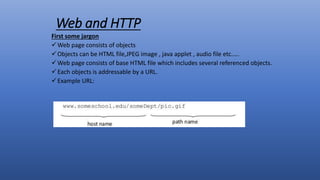
Each objects is addressable by a URL.
Example URL:
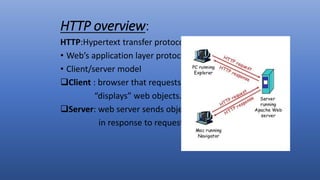
HTTP overview:
HTTP:Hypertext transfer protocol
• Web’s application layer protocol
• Client/server model
Client : browser that requests, receives
“displays” web objects.
Server: web server sends objects
in response to requests.
Some Network Apps:
Email
Web
Instant messaging
Remote login
P2p file sharing
Multi-user network games
Real time video conferencing
Services:
• Mail Services : This layer provides the basis for E-mail forwarding and
storage.
• Network Virtual Terminal : It allows a user to log on to a remote host.
The application creates software emulation of a terminal at the
remote host. User’s computer talks to the software terminal which
in turn talks to the host and vice versa. Then the remote host
believes it is communicating with one of its own terminals and
allows user to log on.
• Directory Services : This layer provides access for global information
about various services.
• File Transfer, Access and Management (FTAM) : It is a standard
mechanism to access files and manages it. Users can access files in a
remote computer and manage it. They can also retrieve files from a
remote computer.
Advantages And Disadvantages Of Application Layer
• Very tight control is possible, due to analyzing the traffic all the way to
the application layer.
• It is more difficult to implement an attack against an end device because
of
the proxy server standing between the attacker and potential victim.
• Can provide very detailed logging.
• May be implemented on common hardware.
• Special client software may be required.
• Is processor intensive because most of the work is done via software on
the proxy server.
THANK YOU

Application layer in network system

  • 1.
    Application Layer InNetwork System
  • 2.
    Application Layer Topic: What isapplication layer? Content services Advantages and disadvantages of application layer
  • 3.
    Content of theapplication layer Domain name service Electronic mail World wide web
  • 4.
    What is applicationlayer? It is the top most layer of OSI Model. Manipulation of data (information) in various ways is done in this layer which enables user or software to get access to the network. Some services provided by this layer includes: E-Mail, transferring of files, distributing the results to user, directory services, network resource etc.
  • 5.
    Domain name service(DNS) Whatis DNS? oDNS is a host name to IP address translation service. oDNS is- A distributed database implemented in a hierarchy of name servers. An application level protocol for message exchange between clients and servers.
  • 6.
    Why DNS? • Itis easier to remember a host name than it is to remember an IP address. • An name has more meaning to a user than a 4 byte number. • Application such as FTP , HTTP , Email etc.. All require to user to input a destination. • The user generally enters a host name. • The application takes the host name supplied by the user forward it to DNS for translation to an IP address.
  • 7.
    How does itwork? DNS works by exchanging message between client and server machines. A client application will pass the destination host name to the DNS process(in Unix referred to as the get host by name routine) to get the IP address. The application then sits and waits for response to return.
  • 8.
    DNS: Root NameServers • Connected by local name server that cannot resolve name. • Root name server: -Contacts authoritative name server if name mapping not known. -Gets mapping -Returns mapping to local name server.
  • 9.
    Email • Electronic mailis among the most widely available application services . Each users who intends to participate in email communication , is assigned a mailbox , where outgoing and incoming message are buffered , allowing the transferred to take place in the background.
  • 10.
    Electronic mail: Three majorcomponents: User agents Mail servers Simple mail transfer protocol(SMTP) User agents: a.k.a “mail reader” Composing , editing , reading mail message. E.g.…Eudora , outlook , elm , Mozilla thunderbird. Outgoing and incoming messages stored on server.
  • 11.
    Electronic mail :mail servers • Mail servers: Mailbox contains incoming message for users Message queue of outgoing(to be sent)mail messages. SMTP protocol between mail server to sent mail mail messages i. Client : sending mail server ii. Server : receiving mail server
  • 12.
    Mail access protocols •SMTP : delivery /storage to receiver servers • Mail access protocol : Retrieval from server. POP : post office protocol[RFC:1939] • Authorization(agent to server)and downloaded. IMAP : Internet Mail Access Protocol[RFC:1730] • More feature(more complex) • Manipulation of stored message on server HTTP:Gmail,Hotmail,Yahoo!,mail etc.…
  • 16.
    Web and HTTP Firstsome jargon Web page consists of objects Objects can be HTML file,JPEG image , java applet , audio file etc.…. Web page consists of base HTML file which includes several referenced objects. Each objects is addressable by a URL. Example URL:
  • 17.
    HTTP overview: HTTP:Hypertext transferprotocol • Web’s application layer protocol • Client/server model Client : browser that requests, receives “displays” web objects. Server: web server sends objects in response to requests.
  • 18.
    Some Network Apps: Email Web Instantmessaging Remote login P2p file sharing Multi-user network games Real time video conferencing
  • 19.
    Services: • Mail Services: This layer provides the basis for E-mail forwarding and storage. • Network Virtual Terminal : It allows a user to log on to a remote host. The application creates software emulation of a terminal at the remote host. User’s computer talks to the software terminal which in turn talks to the host and vice versa. Then the remote host believes it is communicating with one of its own terminals and allows user to log on. • Directory Services : This layer provides access for global information about various services. • File Transfer, Access and Management (FTAM) : It is a standard mechanism to access files and manages it. Users can access files in a remote computer and manage it. They can also retrieve files from a remote computer.
  • 20.
    Advantages And DisadvantagesOf Application Layer • Very tight control is possible, due to analyzing the traffic all the way to the application layer. • It is more difficult to implement an attack against an end device because of the proxy server standing between the attacker and potential victim. • Can provide very detailed logging. • May be implemented on common hardware. • Special client software may be required. • Is processor intensive because most of the work is done via software on the proxy server.
  • 21.