INFO 330 Computer Networking Technology I  Chapter 2 The Application Layer  Glenn Booker INFO 330 Chapter 2
Application Layer The Application Layer is the reason the rest of the network exists – to serve applications Most of the software familiar to end users are applications Email, FTP, newsgroups, chat, the Web, streaming video, video conferencing, IPTV, etc. We focus first on key concepts related to the Application Layer, then discuss some specific applications in detail INFO 330 Chapter 2
Application Layer New applications designed for network implementation need to decide whether  the application is based on  Client-server architecture Peer to peer (P2P) Or some hybrid combination of the two INFO 330 Chapter 2
Client-server Architecture In client-server architecture, the server  Handles requests from many clients, and  Is generally always available Often has a fixed IP address Clients generally don’t communicate with each other, and may be on or off independently of each other and the server Client-server applications include email, FTP,  the Web, remote login INFO 330 Chapter 2
Client-server Architecture Complex  infrastructure intensive  apps might require several types of servers – database, web, etc. Multiple servers may be needed to keep up with the volume of client requests, hence the need for a  server farm  or   data center INFO 330 Chapter 2
P2P Architecture P2P architecture assumes the clients are on or off at will, and all are treated equally as potential servers and/or clients Apps include  Gnutella ,  Morpheus ,  BitTorrent ,  Kazaa  and  more INFO 330 Chapter 2
P2P Architecture P2P architecture is inherently  self-scalable Millions of computers may participate, because each computer adds capacity at  the same time it adds possible workload Managing contents of a P2P application can be difficult Only one computer may have a particular file, and there’s no control over when that computer is available INFO 330 Chapter 2
P2P Architecture Key challenges in a good P2P app include ISP friendly, since most residential connections are designed for far more bandwidth down than up, and P2P doesn’t follow this Security, danger of over-sharing Incentives for people to participate INFO 330 Chapter 2
Hybrid Architecture Client-server and P2P combinations exist Napster  is the best known for file sharing Obtains file location and description information  from a P2P network, but maintains that information  on a central server farm Instant messaging (IM) is also hybrid Chats are all P2P, but logging into the system is centralized Includes  ICQ ,  AOL IM  ,  MSN Messenger , etc. INFO 330 Chapter 2
Process Communication Any network application (no matter which architecture) needs to communicate between hosts using processes In this sense, a process is a program running on a client, server, or peer host Processes may communicate with other processes on the same host; this is controlled by the host’s operating system (OS) We are interested in processes that communicate between hosts INFO 330 Chapter 2
Process Communication Processes exchange  messages The sending or  client process  creates a message and sends it into the network The receiving or  server process  gets the message from the network and might reply Notice that client and server process only relate to their relative roles in sending a message, not the client-server or other    architectures mentioned earlier INFO 330 Chapter 2
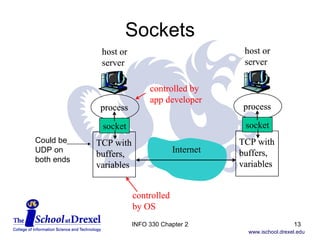
Sockets A  socket  is the doorway through which the process sends a message to the network The message goes through a socket on the client process, passes through the network, then enters the server process through another socket A socket bridges the application and transport layers within each host INFO 330 Chapter 2
Sockets INFO 330 Chapter 2 Could be UDP on both ends
Sockets A socket is the  Application Programming Interface  (API) between application and  the network The API is all the developer sees of the  network connection The developer can choose to use TCP or UDP, and maybe tweak a few transport layer parameters Winsock  is the Microsoft socket API INFO 330 Chapter 2
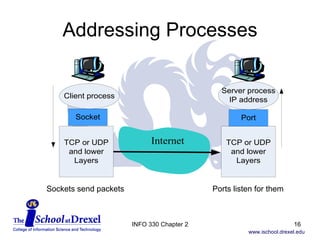
Addressing Processes For the server process to get the message, it has to be addressed correctly The host address and receiving process are the key parts of the address The host address is its  IP address  (the 32-  or 128-bit address of the host’s network interface) The receiving process is identified by its  port number , since many processes can be running at once INFO 330 Chapter 2
Addressing Processes INFO 330 Chapter 2 Sockets send packets Ports listen for them
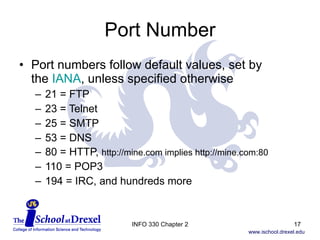
Port Number Port numbers follow default values, set by  the  IANA , unless specified otherwise 21 = FTP 23 = Telnet 25 = SMTP 53 = DNS 80 = HTTP,  http://mine.com implies http://mine.com:80 110 = POP3 194 = IRC, and hundreds more INFO 330 Chapter 2
More Protocols Application-layer protocols define how a particular application’s processes are structured What types of messages are allowed The syntax of those messages The meaning of the fields in the syntax Rules for processing messages – when and  how to send messages, how to reply, etc. INFO 330 Chapter 2
Application vs its protocols A single application often needs to use several application-layer protocols A web browser might use HTTP, but also FTP, telnet, gopher, etc. An email application might use POP3, SMTP, IMAP, etc. Many app protocols are defined in RFCs  But some application-layer protocols are proprietary INFO 330 Chapter 2
RFC Summary For an RFC which lists the current RFC standards, look in the  RFC Index  for  “Internet Official Protocol Standards” The current one is RFC 5000, dated May 2008 INFO 330 Chapter 2
Application Services The transport layer connects the application layer to everything else Have a choice of two protocols, TCP and UDP, unless you want to write your own! Key services include Reliable data transfer – how important is it?  Or is your app loss-tolerant? INFO 330 Chapter 2
Application Services How much bandwidth or throughput does your app need? Does sending rate have to equal receiving rate? Some apps are elastic – can tolerate wide  ranges of available bandwidth How sensitive is your app to timing? Games and telephony tend to be sensitive to  slow or erratic transmission delays How important is security? INFO 330 Chapter 2
TCP Services TCP provides a connection-oriented service, where the sockets of the client and server recognize a connection for the duration of the session Connection is duplex – messages can go both ways at once TCP is highly reliable – the bits leaving one side all get to the other side, and get put back in the original order INFO 330 Chapter 2
TCP Services TCP also provides congestion control, for benefit of the Internet This throttles the sending processes when the connection is congested, and can limit bandwidth TCP does not guarantee any level of transmission rate, or provide delay guarantees So you’ll get your data across, but we  don’t know when INFO 330 Chapter 2
UDP Services UDP is a lightweight protocol – meaning it doesn’t do much! UDP is connectionless UDP is unreliable – data may never get there UDP packets may arrive out of order and not realize it There are no transmission rate guarantees INFO 330 Chapter 2
Services NOT Provided TCP and UDP do not provide guarantees of throughput or timing TCP does nothing for security per se, but SSL can be added on at the transport layer See Chapter 7 for INFO 331 INFO 330 Chapter 2
Application Protocols We’ll examine protocols for Internet-based applications HTTP FTP SMTP POP3 IMAP DNS INFO 330 Chapter 2
The Web and HTTP Through the 1980’s, the Internet was used mostly for remote login, file transfer, newsgroups, and email The World Wide Web changed all that, and made the Internet visible to the public Comparable in significance to inventing movable type, the telephone, radio, or TV Web provides demand-based information, vs. broadcast info on radio and TV INFO 330 Chapter 2
HTTP The HyperText Transfer Protocol ( HTTP )  is the heart of the Web Defined by RFCs 1945 (v1.0) and 2616 (v1.1) Has client and server programs which communicate via HTTP messages Web pages  contain  objects  – files of various sorts, such as a base HTML file, which cites JPG and/or GIF images, etc. App to use HTTP is a  browser INFO 330 Chapter 2
HTTP A  Web server  houses the objects Apache  and Microsoft Internet Information Services ( IIS ) are common Web server apps HTTP defines the messages that pass between client and server Uses TCP for transport protocol HTTP has no memory of previous actions (a  stateless protocol ) – so if you ask for a file 126 times, it will send the file 126 times INFO 330 Chapter 2
HTTP HTTP can use persistent or non-persistent connections – persistent is the default, but non-persistent can be specified A non-persistent connection to get a web page might work like this: Client requests a TCP connection to web server on port 80 Client requests the HTML page Server retrieves the HTML page, and sends it INFO 330 Chapter 2
HTTP Server closes the TCP connection Client closes the TCP connection Client reads the HTML file, and finds 10 JPGs referenced Client repeats steps 1-4 ten times (!) to download each of the JPG images Not very efficient! Browser can determine how many parallel TCP connections are used (typically 5-10) INFO 330 Chapter 2
More Delays! How long does this process take?  The  round-trip time  (RTT) is for a packet to go from client to server and back Includes propagation delays, queuing delays, processing delays TCP handshake involves two messages between client (C) and server (S); C-S, S-C Then request the file (C-S), and get the file from the server (S-C) INFO 330 Chapter 2
RTT Delay So the time for getting one file is two times the RTT, plus the transmission time for uploading the file from the server (Fig. 2.7,  p. 104, 5 th  ed.) In the non-persistent connection example, this is done 11 times for one HTML file and 10 JPGs INFO 330 Chapter 2
Persistent Connection If there’s a persistent connection, the TCP connection stays, so the handshake is done once not only for the web page in the example, but for many HTTP requests Connection is closed after some period of inactivity Persistent connections can be with or  without  pipelining INFO 330 Chapter 2
Persistent Connection Without pipelining , the client requests a new object only after the previous request has been filled With pipelining , the clients requests new objects as needed, and may be waiting for several responses at once This is the default setting for web browsers Could reduce total RTT to one RTT unit for  all parts of a web page, vs. 22 units for a  non-persistent connection! INFO 330 Chapter 2
HTTP vs HTML Don’t confuse HTTP with HTML HTTP is the protocol used to define how files  are requested and transferred between server and clients HTML is the format of web pages So an HTML file might be the structure of  an entity body transferred using HTTP INFO 330 Chapter 2
HTTP Messages HTTP messages are two types,  request  messages (from client) and  response  messages (from server) All HTTP messages are plain ASCII text ‘ Both types of message consist of a start-line, zero or more header fields (also known as "headers"), an empty line (i.e., a line with nothing preceding the CRLF) indicating the end of the header fields, and possibly a message-body.’ [RFC 2616, para 4.1] CRLF is a “carriage return and line feed” INFO 330 Chapter 2
HTTP Messages There are many headers which could appear in requests or responses Cache-Control,  Connection ,  Date , Pragma, Trailer, Transfer-Encoding, Upgrade, Via, and/or Warning [RFC 2616, para 4.5] Disclaimer :  RFC 2616 is 176 pages long – so  we’re just providing a summary of where to  look for info if you’re curious about the details  of these messages INFO 330 Chapter 2
HTTP Requests Request messages have variable number  of lines, depending on the method called  General request syntax is Method Request-URI HTTP-Version   Methods are OPTIONS, GET, HEAD, POST, PUT, DELETE, TRACE, or CONNECT  [RFC 2616, para 5.1.1] Most commonly used is GET Request-URI is the desired Uniform Resource Identifier (URI, commonly called a URL) INFO 330 Chapter 2
HTTP Requests HTTP-Version is what it sounds like, e.g. HTTP/1.1 There are many possible request headers Accept, Accept-Charset, Accept-Encoding, Accept-Language, Authorization, Expect, From,  Host , If-Match, If-Modified-Since, If-None-Match, If-Range, If-Unmodified-Since, Max-Forwards, Proxy-Authorization, Range, Referer, TE (extension transfer-codings), and/or  User-Agent  [RFC 2616, para 5.3] INFO 330 Chapter 2
HTTP Responses HTTP responses go from server to client General syntax starts with  HTTP-Version Status-Code Reason-Phrase [RFC 2616, para 6.1] The  Status-Code  could be dozens of values "200"  OK "403"  Forbidden "404"  Not Found  The  Reason-Phrase  is any text phrase assigned INFO 330 Chapter 2
HTTP Responses Response headers can include Accept-Ranges, Age, ETag, Location,  Proxy-Authenticate, Retry-After,  Server , Vary, and/or WWW-Authenticate [RFC 2616,  para 6.2] Responses usually include entities, unless the HEAD method was used INFO 330 Chapter 2
HTTP Entities An entity is the object sent or returned with an HTTP message Entities can be with requests or responses Entity headers include Allow, Content-Encoding, Content-Language,  Content-Length  (bytes), Content-Location, Content-MD5, Content-Range,  Content-Type , Expires,  Last-Modified , and/or extension-header [RFC 2616, para 7.1] Where extension-header is any allowable  message-header for that kind of message INFO 330 Chapter 2
HTTP So HTTP describes request and response message formats Both types typically have a first line which  tells its purpose (the request or status line) There can be many header lines There might be an entity attached INFO 330 Chapter 2
Cookies! HTTP is stateless But some would like to remember a little information about web site visitors, hence cookies were defined with RFC 2965 Cookies require four parts A cookie header in HTTP responses A cookie header in HTTP requests Cookie files on the user’s computer A database on the web server INFO 330 Chapter 2
Cookies When a user visits a cookied web site the  first time, they are assigned a unique ID number, which is stored in the database A Set-cookie method is used in their response to flag that ID number Set-cookie: 1678 All subsequent HTTP interaction with that site, even years later, will flag that cookie    number and identify the user INFO 330 Chapter 2
Cookies Cookie: 1678 This provides a way for web sites to automate login for repeat customers, and track browsing and spending patterns One-click shopping is only possible with cookies The price for convenience is the lack of privacy Ads on web sites can be targeted to match the user’s preferences INFO 330 Chapter 2
Other HTTP Content So far we assumed the file content for HTTP was HTML files, JPGs, GIFs, etc. Entities can be many other file formats XML  files, which are structured text VoiceXML ,  WML  (web pages for mobile phones), streaming audio and video, and P2P file sharing INFO 330 Chapter 2
Web Caching A Web cache, or proxy server, acts as an intermediate between clients and servers The cache stores recently used files, so they  don’t have to be requested again The cache acts as client and server ISPs typically use web caching to cut down on outgoing web traffic (to the servers) and lower request response time INFO 330 Chapter 2
Web Caching Tends to work well when the client-cache connection is faster than the cache-server connection Often helps avoid upgrading the cache-server connection speed, which saves money Implement by using a  conditional GET  method  in HTTP With the If-Modified-Since request header If the cache is still current, don’t download the file INFO 330 Chapter 2
FTP The File Transfer Protocol is one of the oldest Internet applications (now RFC 959, but started as RFC 114 in 1971)  While HTTP and FTP both send files FTP uses two connections – one for control, one for data (control information is  out-of-band ) User login and commands are on the control connection, files move on the data connection HTTP uses one connection for both purposes (control information is  in-band ) INFO 330 Chapter 2
FTP FTP uses TCP, and usually connects to the server on ports 20 and 21 The client sends user ID and password FTP may be done to some sites with generic ID, known as anonymous FTP Once logged in, the user may navigate and view directories, and upload (STOR or PUT) or download (RETR or GET) files INFO 330 Chapter 2
FTP Commands and replies are very basic Most commands are three or four-letter abbreviations Replies are three-digit codes, followed by text Command connection is based on Telnet, incidentally [RFC 959, para 2.3] Due to its age, FTP has provisions for a huge range of data types (ASCII or EBCDIC) and file, record, and page structures INFO 330 Chapter 2
Electronic Mail E-mail is another ancient Internet application, with origins in RFC 772 in 1980 It provides asynchronous text communication and allows files to be attached to messages Even voice and video messages Main elements are users (sender and recipient), mail servers, and the Simple Mail Transfer Protocol (SMTP, RFC 2821) Careful, there’s also an S N TP for network time INFO 330 Chapter 2
Electronic Mail Email is composed in a client, which sends it to a mail queue in the sender’s mail server  The sending mail server uses SMTP to send the message to the recipient’s mail server If mail can’t be sent successfully, the sender’s mail server will put the message in a queue, and keep trying (typically for 3 days) The recipient is notified that the message is present, which they read with their client INFO 330 Chapter 2
Electronic Mail Each user has a mailbox on the mail server Access to the mailbox is controlled with user name and password SMTP is the main protocol to get email from one mail server to another It uses TCP, not surprisingly Defined in proposed standard RFC 2821 Only uses 7-bit ASCII for message AND body Forces binary files to be converted to ASCII & back INFO 330 Chapter 2
SMTP After the TCP connection is established, SMTP does a handshake with port 25 of  the recipient’s mail server The client then sends the message Multiple messages can be sent if needed, then the connection is closed Client commands include HELO,  MAIL FROM:, RCPT TO:, DATA (then    the message body), and QUIT INFO 330 Chapter 2
SMTP Other commands include ( with comments in italics ) RSET  (abort current transaction) SEND FROM:<reverse-path> SOML FROM:<reverse-path>  (send or mail) SAML FROM:<reverse-path>  (send and mail) VRFY <string>  (verify a user name) EXPN <string>  (expand mailing list) HELP [ <string>] NOOP  (just send an OK reply) TURN  (your turn to be client or server) INFO 330 Chapter 2
SMTP vs HTTP SMTP and HTTP can both move files using persistent TCP connections SMTP  pushes  messages to the recipient’s mail server  HTTP  pulls  contents when desired from a web server SMTP incorporates attachments into the body of the message as one big object HTTP downloads attachments in separate responses SMTP requires messages in 7-bit ASCII text HTTP doesn’t INFO 330 Chapter 2
Mail Message Formats Email contains header information defined  by RFC 822 (Standard for ARPA Internet Text Messages), now RFC 5322 The sender headers can include: FROM, SENDER, REPLY-TO, RESENT-FROM, RESENT-SENDER, and RESENT-REPLY-TO  Receiver headers can be: TO, CC, and BCC Reference headers can be: MESSAGE-ID, IN-REPLY-TO, REFERENCES and KEYWORDS  INFO 330 Chapter 2
Mail Message Formats Other allowable header fields are:  SUBJECT, COMMENTS, ENCRYPTED, and possibly some extension fields or user-defined fields While many of these headers also sound  like SMTP commands, they are part of the email message This works fine for ASCII data For anything outside of that, call a MIME INFO 330 Chapter 2
MIME Multipurpose Internet Mail Extensions (MIME) are used for handling non-ASCII contents in email, e.g. non-Latin character sets, binary files, images, audio, video, etc. MIME (RFC 2045) adds the ability to handle (1) textual message bodies in character sets other than US-ASCII, (2) an extensible set of different formats for non-textual message bodies, (3) multi-part message bodies, and (4) textual header information in character sets other than US-ASCII.  INFO 330 Chapter 2
MIME The key three parts of MIME are defining the version of MIME, the encoding scheme, and the type of content MIME-Version: 1.0  Content-Transfer-Encoding: can be &quot;7bit&quot; / &quot;8bit&quot; / &quot;binary&quot; / &quot;quoted-printable&quot; / &quot;base64“ Content-Type: describes the type and subtype Type is discrete (&quot;text&quot; / &quot;image&quot; / &quot;audio&quot; / &quot;video&quot; / &quot;application&quot;) or composite (&quot;message&quot; / &quot;multipart&quot;) INFO 330 Chapter 2
MIME Subtype is an ietf-token (An extension token defined by a standards-track RFC and registered with IANA) or an X-token (The two characters &quot;X-&quot; or &quot;x-&quot; followed, with no intervening white space, by an ASCII text string) There are many other variations of type and subtype (see RFC 2046), including for Other character sets (Content-type: text/plain; charset=iso-8859-1), or proprietary formats (image/JPEG, application/postscript, etc.) INFO 330 Chapter 2
MIME The received message also includes a  Received:  header added to the top of  the message This is familiar in email if you look at the  full headers INFO 330 Chapter 2
Uuencode and uudecode Historic note: Before MIME,  uuencode  was used to convert non-ASCII files to text Doing so expanded the file in size 35%, because  of the conversion from 7 bit to 8 bit, plus control information Uudecode reversed the operation after the file was received These commands still exist under UNIX INFO 330 Chapter 2
Mail Access Protocols If you log directly into your email server, SMTP is all you need to handle email But if you wish to access email from a local host, you need to use a mail access protocol The biggies at present are  Post Office Protocol version 3 (POP3) and  Internet Mail Access Protocol (IMAP) INFO 330 Chapter 2
POP3 POP3 is defined in RFC 1939 It’s a pretty simple protocol compared to many SMTP sends mail between mail servers,  and from the user agent (email app) to their mail server POP3 transfers mail from your mail server  to your user agent From a user’s view,  SMTP handles outgoing email, and POP3 handles incoming email INFO 330 Chapter 2
POP3 POP3 uses TCP, and connects to port 110 on the mail server POP3 does three things – authorization, transaction, and update Authorization verifies the user identity Transaction retrieves email, marks messages  for deletion, and gets mail statistics Update ends the session, and deletes flagged messages INFO 330 Chapter 2
POP3 POP3 communicates with the mail server by commands, which get a +OK response if it worked, and an –ERR response if it didn’t work Authorization uses commands ‘user’ and ‘pass’ Transaction uses commands  ‘ list’ to see list of messages ‘ dele x’ to delete message number x ‘ retr x’ to retrieve message number x ‘ quit’ ends the session INFO 330 Chapter 2
POP3 POP3 allows two modes, depending on whether you delete the messages after retrieving them If you download-and-delete messages from the server, you only download them to one local host If you download-and-keep the messages on the server, then you can download them to more than one local host (e.g. home and work) Disadvantage is that the volume of mail on the server can be too big INFO 330 Chapter 2
POP3 POP3 maintains a little state information during a session, such as which files have been marked for deletion However after a session is over, all state information is gone This makes a POP3 server a fairly simple beast Users use folders locally (on their email    app) to store and organize messages INFO 330 Chapter 2
IMAP IMAP , defined in RFC 3501, allows folders to be defined on the mail server to organize email there Messages are associated with a folder – first the generic INBOX, then moved by the user Hence state information about the folder for each message must be saved across sessions IMAP also provides search capability    within the mailbox INFO 330 Chapter 2
IMAP Users can also get just the headers of messages, and avoid downloading the  MIME portion Handy when on a low speed connection INFO 330 Chapter 2
Web Email Hotmail  (now owned by Microsoft) introduced web-based email shortly after the Web became popular Mail is accessed by HTTP not POP3 or IMAP But the server-to-server connection is still SMTP Very convenient for accessing mail with limited bandwidth or from many locations Widely imitated ( Gmail ,  Yahoo ,  AOL , etc.) INFO 330 Chapter 2
DNS A key need, once the Internet grew beyond a few thousand hosts, was to automate converting human* readable addresses or  hostnames  (www.microsoft.com) to  IP addresses  (207.46.198.60)  got IP  here That is the purpose of the Domain Name System (DNS) Before DNS, really big lookup tables were used! * Humans who read English, at least! INFO 330 Chapter 2
Host vs Domain Names A  hostname  is the name of a particular host computer, such as banner.drexel.edu May really represent multiple computers, but logically they are all the same host A  domain name  is the top level domain and the specific domain name, like drexel.edu Top level domains   are com, edu, gov, mil, org, net, and the country codes uk, de, fr, etc.  INFO 330 Chapter 2
IP Addresses IP addresses have four groups of bytes, each group from 0 to 255, separated by periods  Why called bytes?  Each value from 0 to 255 corresponds to a value of from 0 to (2 8 -1), and  a byte is eight bits IP addresses are typically static (fixed) for servers and other semi-permanent Internet connections, and dynamic for temporary    connections (e.g. dial-up, wireless) INFO 330 Chapter 2
DNS DNS runs over UDP, port 53  (something uses UDP!) DNS is managed by DNS servers, typically running Berkeley Internet Name Domain  ( BIND ) software DNS is used by other applications (HTTP, SMTP, FTP) to translate host names to IP addresses You can also do a  reverse DNS lookup  (convert 205.188.97.2 to www-vd03.evip.aol.com) INFO 330 Chapter 2
Reverse DNS Lookup So if you try to look up a random IP address like 123.45.67.89,  dnsstuff.com  gives The  reverse DNS entry for an IP is found by reversing the IP, adding it to &quot;in-addr.arpa&quot;, and looking up the PTR record.  So, the reverse DNS entry for 123.45.67.89 is found by looking up the PTR record for 89.67.45.123.in-addr.arpa. “ tinnie.arin.net (an authoritative nameserver for  123.in-addr.arpa., which is in charge of the reverse DNS for 123.45.67.89) says that there are no PTR records for 123.45.67.89.” INFO 330 Chapter 2
DNS DNS also provides other key services Host aliasing  allows the true or  canonical hostname  to have aliases When blah.com works to get to www.blah.com, it’s because blah.com is a host alias of www.blah.com Mail server aliasing  – same concept, but for  mail server names Load distribution  across many servers for the same hostname – so everyone in the world doesn’t use one IP address for microsoft.com INFO 330 Chapter 2
DNS Structure DNS is highly decentralized Improves throughput, speed, redundancy, reliability, security There are three levels of structure – the job of looking up a given address is partitioned among them Root DNS Servers  – are 13 sets of servers around the world that provide top level  delegation of DNS information INFO 330 Chapter 2
DNS Structure Top-Level Domain (TLD) DNS Servers – sets of servers are maintained for each of the top level domains, including country codes Network Solutions Inc  maintains the .COM domain Authoritative DNS Servers – everyone who has publicly visible web or mail servers has to maintain DNS records Drexel, large ISPs, etc. all can maintain DNS servers Local DNS servers – are used to forward to the nearest authoritative DNS server INFO 330 Chapter 2
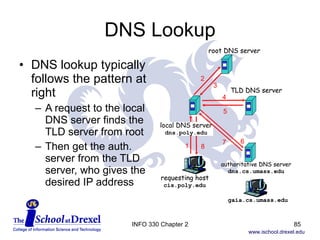
DNS Lookup DNS lookup typically follows the pattern at right A request to the local DNS server finds the TLD server from root Then get the auth. server from the TLD server, who gives the desired IP address INFO 330 Chapter 2
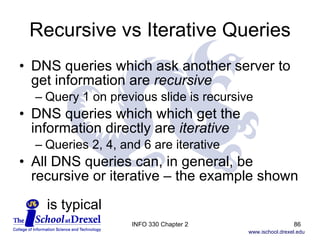
Recursive vs Iterative Queries DNS queries which ask another server to get information are  recursive Query 1 on previous slide is recursive DNS queries which which get the information directly are  iterative Queries 2, 4, and 6 are iterative All DNS queries can, in general, be recursive or iterative – the example shown    is typical INFO 330 Chapter 2
DNS Lookup This would be terribly tedious without caching Common queries are stored on each level of DNS server, so they don’t have to be looked up constantly Cached values are cleared typically every two days or less, in case the data changes INFO 330 Chapter 2
DNS Records Data about a hostname, its aliases, domain, and mail servers are captured in resource records (RR) Each RR is a line with four fields (Name, Value, Type, and TTL) Name is a hostname, domain name, or canonical host or mail server name (depending on the Type) Value is the IP address, mail server, or of the Name Type is the record type TTL is the time the resource should be removed from  cache (in seconds) INFO 330 Chapter 2
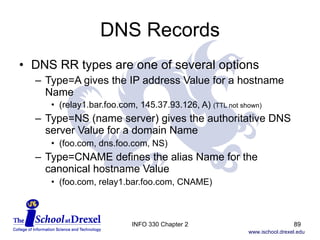
DNS Records DNS RR types are one of several options Type=A gives the IP address Value for a hostname Name (relay1.bar.foo.com, 145.37.93.126, A)  (TTL not shown) Type=NS (name server) gives the authoritative DNS server Value for a domain Name (foo.com, dns.foo.com, NS) Type=CNAME defines the alias Name for the canonical hostname Value (foo.com, relay1.bar.foo.com, CNAME) INFO 330 Chapter 2
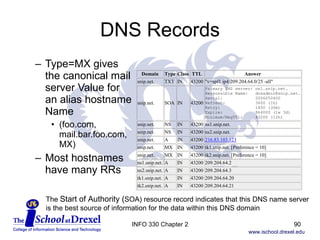
DNS Records Type=MX gives the canonical mail server Value for an alias hostname Name (foo.com, mail.bar.foo.com, MX) Most hostnames have many RRs The  Start of Authority ( SOA) resource record indicates that this DNS name server is the best source of information for the data within this DNS domain INFO 330 Chapter 2
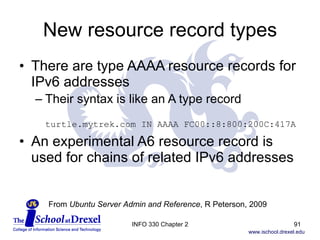
New resource record types There are type AAAA resource records for IPv6 addresses  Their syntax is like an A type record turtle.mytrek.com IN AAAA FC00::8:800:200C:417A An experimental A6 resource record is used for chains of related IPv6 addresses From  Ubuntu Server Admin and Reference , R Peterson, 2009 INFO 330 Chapter 2
DNS Messages The same format DNS messages are used  to both query a DNS server, and receive  the reply The messages have a header section, the question, the answer, a section for other authoritative servers, and possibly  additional information (such as A records  for mail servers) INFO 330 Chapter 2
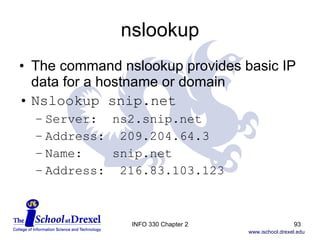
nslookup The command nslookup provides basic IP data for a hostname or domain Nslookup snip.net Server:  ns2.snip.net Address:  209.204.64.3 Name:  snip.net Address:  216.83.103.123 INFO 330 Chapter 2
DNS Changes A registrar makes changes to the DNS database The list of registrars is at  http://www.internic.net/  (the text is full of typos!) Changes to DNS records typically take hours to a couple days to become available – less if lots of people are requesting a new domain Likewise, email won’t find you right away INFO 330 Chapter 2
DNS and security DNS is somewhat vulnerable to distributed denial of service (DDoS) attacks The Root servers were attacked in 2002, but they block incoming ping messages  TLD servers are more vulnerable, but local caching would reduce its impact Another approach is to send many DNS requests to authoritative servers, and    spoof the source as a local DNS server INFO 330 Chapter 2
Peer-to-Peer File Sharing Peer-to-Peer (P2P) file sharing occupies much of the volume of Internet traffic It allows a user to find a file on another user’s computer, and download it directly Everyone can be client and server, even at the same time Napster used a  centralized index , but true P2P just indexes the files you will share Please don’t share your entire hard drive! INFO 330 Chapter 2
P2P File Distribution P2P can be used to distribute a file from one source (e.g. a new Linux kernel) to hundreds of peer servers P2P is inherently scalable Client-server file  distribution time  increases linearly with the number of nodes on the network P2P distribution time levels off asymptotically INFO 330 Chapter 2
BitTorrent Bittorrent.org manages the protocol used by most file sharing (30% of all Internet backbone traffic!)   m Torrent  is a commercial version; see also  Azureus/Vuze ,  BitComet , etc. A  torrent  is the set of peers participating in distribution of a file A  tracker  node keeps track of which nodes are in the torrent INFO 330 Chapter 2
BitTorrent When you join a torrent, you identify up to 50 neighboring peers already in the torrent Then find what chunks of the file each has, and get the  rarest first When responding to requests for file chunks, focus on neighbors with the highest data rate Peers also send chunks to random neighbors In order to get good download rates, must share nicely with others! (no  free-riding !) INFO 330 Chapter 2
Peer-to-Peer File Sharing TCP connections between the computers and FTP make it possible The server computer is a  transient Web server Gnutella  has a proprietary protocol (not everything is an RFC!) A request for a file produces  query flooding  to find that file is neighboring peers, and collects query hits; from those hits, an HTTP GET command downloads the file INFO 330 Chapter 2
Peer-to-Peer File Sharing More refined  limited scope query flooding  is now done to minimize Internet traffic required per user Only looks at nearby peers in decreasing numbers Gnutella also manages how people find peers on the network ( bootstrapping ), and maintain whether they are still online by pinging them KaZaA and Morpheus borrowed from both Napster and Gnutella It searches nearby peers, but not all are equal  Some have higher bandwidth and more to share INFO 330 Chapter 2
Peer-to-Peer File Sharing More powerful peers are group leaders  ( super peers ) for those around them, acting like mini hubs of the network Group leaders connect via TCP, and map out what’s available from their local peers Other tricks include Limiting the number of simultaneous downloads Giving priority to those who upload more than download Download parts of the same file in parallel from multiple sources at once INFO 330 Chapter 2
Skype Skype  is a popular P2P Internet telephony app, which goes beyond file distribution and sharing in the P2P world Nodes in Skype are in a hierarchical overlay (like the super peer concept), which makes it faster to locate a user Skype uses relays to establish calls across NAT-hidden local networks INFO 330 Chapter 2
Peer-to-Peer File Sharing A massive issue for P2P file sharing is the intellectual property rights of the files being shared Music and video industry  lawyers  have claimed enormous losses from file sharing, and have vigorously fought file sharing applications Napster, BearShare, Grokster, Morpheus, iMesh, DVDxCopy, KaZaA, and others are involved in such ongoing disputes INFO 330 Chapter 2

Chapter 2

  • 1.
    INFO 330 ComputerNetworking Technology I Chapter 2 The Application Layer Glenn Booker INFO 330 Chapter 2
  • 2.
    Application Layer TheApplication Layer is the reason the rest of the network exists – to serve applications Most of the software familiar to end users are applications Email, FTP, newsgroups, chat, the Web, streaming video, video conferencing, IPTV, etc. We focus first on key concepts related to the Application Layer, then discuss some specific applications in detail INFO 330 Chapter 2
  • 3.
    Application Layer Newapplications designed for network implementation need to decide whether the application is based on Client-server architecture Peer to peer (P2P) Or some hybrid combination of the two INFO 330 Chapter 2
  • 4.
    Client-server Architecture Inclient-server architecture, the server Handles requests from many clients, and Is generally always available Often has a fixed IP address Clients generally don’t communicate with each other, and may be on or off independently of each other and the server Client-server applications include email, FTP, the Web, remote login INFO 330 Chapter 2
  • 5.
    Client-server Architecture Complex infrastructure intensive apps might require several types of servers – database, web, etc. Multiple servers may be needed to keep up with the volume of client requests, hence the need for a server farm or data center INFO 330 Chapter 2
  • 6.
    P2P Architecture P2Parchitecture assumes the clients are on or off at will, and all are treated equally as potential servers and/or clients Apps include Gnutella , Morpheus , BitTorrent , Kazaa and more INFO 330 Chapter 2
  • 7.
    P2P Architecture P2Parchitecture is inherently self-scalable Millions of computers may participate, because each computer adds capacity at the same time it adds possible workload Managing contents of a P2P application can be difficult Only one computer may have a particular file, and there’s no control over when that computer is available INFO 330 Chapter 2
  • 8.
    P2P Architecture Keychallenges in a good P2P app include ISP friendly, since most residential connections are designed for far more bandwidth down than up, and P2P doesn’t follow this Security, danger of over-sharing Incentives for people to participate INFO 330 Chapter 2
  • 9.
    Hybrid Architecture Client-serverand P2P combinations exist Napster is the best known for file sharing Obtains file location and description information from a P2P network, but maintains that information on a central server farm Instant messaging (IM) is also hybrid Chats are all P2P, but logging into the system is centralized Includes ICQ , AOL IM , MSN Messenger , etc. INFO 330 Chapter 2
  • 10.
    Process Communication Anynetwork application (no matter which architecture) needs to communicate between hosts using processes In this sense, a process is a program running on a client, server, or peer host Processes may communicate with other processes on the same host; this is controlled by the host’s operating system (OS) We are interested in processes that communicate between hosts INFO 330 Chapter 2
  • 11.
    Process Communication Processesexchange messages The sending or client process creates a message and sends it into the network The receiving or server process gets the message from the network and might reply Notice that client and server process only relate to their relative roles in sending a message, not the client-server or other architectures mentioned earlier INFO 330 Chapter 2
  • 12.
    Sockets A socket is the doorway through which the process sends a message to the network The message goes through a socket on the client process, passes through the network, then enters the server process through another socket A socket bridges the application and transport layers within each host INFO 330 Chapter 2
  • 13.
    Sockets INFO 330Chapter 2 Could be UDP on both ends
  • 14.
    Sockets A socketis the Application Programming Interface (API) between application and the network The API is all the developer sees of the network connection The developer can choose to use TCP or UDP, and maybe tweak a few transport layer parameters Winsock is the Microsoft socket API INFO 330 Chapter 2
  • 15.
    Addressing Processes Forthe server process to get the message, it has to be addressed correctly The host address and receiving process are the key parts of the address The host address is its IP address (the 32- or 128-bit address of the host’s network interface) The receiving process is identified by its port number , since many processes can be running at once INFO 330 Chapter 2
  • 16.
    Addressing Processes INFO330 Chapter 2 Sockets send packets Ports listen for them
  • 17.
    Port Number Portnumbers follow default values, set by the IANA , unless specified otherwise 21 = FTP 23 = Telnet 25 = SMTP 53 = DNS 80 = HTTP, http://mine.com implies http://mine.com:80 110 = POP3 194 = IRC, and hundreds more INFO 330 Chapter 2
  • 18.
    More Protocols Application-layerprotocols define how a particular application’s processes are structured What types of messages are allowed The syntax of those messages The meaning of the fields in the syntax Rules for processing messages – when and how to send messages, how to reply, etc. INFO 330 Chapter 2
  • 19.
    Application vs itsprotocols A single application often needs to use several application-layer protocols A web browser might use HTTP, but also FTP, telnet, gopher, etc. An email application might use POP3, SMTP, IMAP, etc. Many app protocols are defined in RFCs But some application-layer protocols are proprietary INFO 330 Chapter 2
  • 20.
    RFC Summary Foran RFC which lists the current RFC standards, look in the RFC Index for “Internet Official Protocol Standards” The current one is RFC 5000, dated May 2008 INFO 330 Chapter 2
  • 21.
    Application Services Thetransport layer connects the application layer to everything else Have a choice of two protocols, TCP and UDP, unless you want to write your own! Key services include Reliable data transfer – how important is it? Or is your app loss-tolerant? INFO 330 Chapter 2
  • 22.
    Application Services Howmuch bandwidth or throughput does your app need? Does sending rate have to equal receiving rate? Some apps are elastic – can tolerate wide ranges of available bandwidth How sensitive is your app to timing? Games and telephony tend to be sensitive to slow or erratic transmission delays How important is security? INFO 330 Chapter 2
  • 23.
    TCP Services TCPprovides a connection-oriented service, where the sockets of the client and server recognize a connection for the duration of the session Connection is duplex – messages can go both ways at once TCP is highly reliable – the bits leaving one side all get to the other side, and get put back in the original order INFO 330 Chapter 2
  • 24.
    TCP Services TCPalso provides congestion control, for benefit of the Internet This throttles the sending processes when the connection is congested, and can limit bandwidth TCP does not guarantee any level of transmission rate, or provide delay guarantees So you’ll get your data across, but we don’t know when INFO 330 Chapter 2
  • 25.
    UDP Services UDPis a lightweight protocol – meaning it doesn’t do much! UDP is connectionless UDP is unreliable – data may never get there UDP packets may arrive out of order and not realize it There are no transmission rate guarantees INFO 330 Chapter 2
  • 26.
    Services NOT ProvidedTCP and UDP do not provide guarantees of throughput or timing TCP does nothing for security per se, but SSL can be added on at the transport layer See Chapter 7 for INFO 331 INFO 330 Chapter 2
  • 27.
    Application Protocols We’llexamine protocols for Internet-based applications HTTP FTP SMTP POP3 IMAP DNS INFO 330 Chapter 2
  • 28.
    The Web andHTTP Through the 1980’s, the Internet was used mostly for remote login, file transfer, newsgroups, and email The World Wide Web changed all that, and made the Internet visible to the public Comparable in significance to inventing movable type, the telephone, radio, or TV Web provides demand-based information, vs. broadcast info on radio and TV INFO 330 Chapter 2
  • 29.
    HTTP The HyperTextTransfer Protocol ( HTTP ) is the heart of the Web Defined by RFCs 1945 (v1.0) and 2616 (v1.1) Has client and server programs which communicate via HTTP messages Web pages contain objects – files of various sorts, such as a base HTML file, which cites JPG and/or GIF images, etc. App to use HTTP is a browser INFO 330 Chapter 2
  • 30.
    HTTP A Web server houses the objects Apache and Microsoft Internet Information Services ( IIS ) are common Web server apps HTTP defines the messages that pass between client and server Uses TCP for transport protocol HTTP has no memory of previous actions (a stateless protocol ) – so if you ask for a file 126 times, it will send the file 126 times INFO 330 Chapter 2
  • 31.
    HTTP HTTP canuse persistent or non-persistent connections – persistent is the default, but non-persistent can be specified A non-persistent connection to get a web page might work like this: Client requests a TCP connection to web server on port 80 Client requests the HTML page Server retrieves the HTML page, and sends it INFO 330 Chapter 2
  • 32.
    HTTP Server closesthe TCP connection Client closes the TCP connection Client reads the HTML file, and finds 10 JPGs referenced Client repeats steps 1-4 ten times (!) to download each of the JPG images Not very efficient! Browser can determine how many parallel TCP connections are used (typically 5-10) INFO 330 Chapter 2
  • 33.
    More Delays! Howlong does this process take? The round-trip time (RTT) is for a packet to go from client to server and back Includes propagation delays, queuing delays, processing delays TCP handshake involves two messages between client (C) and server (S); C-S, S-C Then request the file (C-S), and get the file from the server (S-C) INFO 330 Chapter 2
  • 34.
    RTT Delay Sothe time for getting one file is two times the RTT, plus the transmission time for uploading the file from the server (Fig. 2.7, p. 104, 5 th ed.) In the non-persistent connection example, this is done 11 times for one HTML file and 10 JPGs INFO 330 Chapter 2
  • 35.
    Persistent Connection Ifthere’s a persistent connection, the TCP connection stays, so the handshake is done once not only for the web page in the example, but for many HTTP requests Connection is closed after some period of inactivity Persistent connections can be with or without pipelining INFO 330 Chapter 2
  • 36.
    Persistent Connection Withoutpipelining , the client requests a new object only after the previous request has been filled With pipelining , the clients requests new objects as needed, and may be waiting for several responses at once This is the default setting for web browsers Could reduce total RTT to one RTT unit for all parts of a web page, vs. 22 units for a non-persistent connection! INFO 330 Chapter 2
  • 37.
    HTTP vs HTMLDon’t confuse HTTP with HTML HTTP is the protocol used to define how files are requested and transferred between server and clients HTML is the format of web pages So an HTML file might be the structure of an entity body transferred using HTTP INFO 330 Chapter 2
  • 38.
    HTTP Messages HTTPmessages are two types, request messages (from client) and response messages (from server) All HTTP messages are plain ASCII text ‘ Both types of message consist of a start-line, zero or more header fields (also known as &quot;headers&quot;), an empty line (i.e., a line with nothing preceding the CRLF) indicating the end of the header fields, and possibly a message-body.’ [RFC 2616, para 4.1] CRLF is a “carriage return and line feed” INFO 330 Chapter 2
  • 39.
    HTTP Messages Thereare many headers which could appear in requests or responses Cache-Control, Connection , Date , Pragma, Trailer, Transfer-Encoding, Upgrade, Via, and/or Warning [RFC 2616, para 4.5] Disclaimer : RFC 2616 is 176 pages long – so we’re just providing a summary of where to look for info if you’re curious about the details of these messages INFO 330 Chapter 2
  • 40.
    HTTP Requests Requestmessages have variable number of lines, depending on the method called General request syntax is Method Request-URI HTTP-Version Methods are OPTIONS, GET, HEAD, POST, PUT, DELETE, TRACE, or CONNECT [RFC 2616, para 5.1.1] Most commonly used is GET Request-URI is the desired Uniform Resource Identifier (URI, commonly called a URL) INFO 330 Chapter 2
  • 41.
    HTTP Requests HTTP-Versionis what it sounds like, e.g. HTTP/1.1 There are many possible request headers Accept, Accept-Charset, Accept-Encoding, Accept-Language, Authorization, Expect, From, Host , If-Match, If-Modified-Since, If-None-Match, If-Range, If-Unmodified-Since, Max-Forwards, Proxy-Authorization, Range, Referer, TE (extension transfer-codings), and/or User-Agent [RFC 2616, para 5.3] INFO 330 Chapter 2
  • 42.
    HTTP Responses HTTPresponses go from server to client General syntax starts with HTTP-Version Status-Code Reason-Phrase [RFC 2616, para 6.1] The Status-Code could be dozens of values &quot;200&quot; OK &quot;403&quot; Forbidden &quot;404&quot; Not Found The Reason-Phrase is any text phrase assigned INFO 330 Chapter 2
  • 43.
    HTTP Responses Responseheaders can include Accept-Ranges, Age, ETag, Location, Proxy-Authenticate, Retry-After, Server , Vary, and/or WWW-Authenticate [RFC 2616, para 6.2] Responses usually include entities, unless the HEAD method was used INFO 330 Chapter 2
  • 44.
    HTTP Entities Anentity is the object sent or returned with an HTTP message Entities can be with requests or responses Entity headers include Allow, Content-Encoding, Content-Language, Content-Length (bytes), Content-Location, Content-MD5, Content-Range, Content-Type , Expires, Last-Modified , and/or extension-header [RFC 2616, para 7.1] Where extension-header is any allowable message-header for that kind of message INFO 330 Chapter 2
  • 45.
    HTTP So HTTPdescribes request and response message formats Both types typically have a first line which tells its purpose (the request or status line) There can be many header lines There might be an entity attached INFO 330 Chapter 2
  • 46.
    Cookies! HTTP isstateless But some would like to remember a little information about web site visitors, hence cookies were defined with RFC 2965 Cookies require four parts A cookie header in HTTP responses A cookie header in HTTP requests Cookie files on the user’s computer A database on the web server INFO 330 Chapter 2
  • 47.
    Cookies When auser visits a cookied web site the first time, they are assigned a unique ID number, which is stored in the database A Set-cookie method is used in their response to flag that ID number Set-cookie: 1678 All subsequent HTTP interaction with that site, even years later, will flag that cookie number and identify the user INFO 330 Chapter 2
  • 48.
    Cookies Cookie: 1678This provides a way for web sites to automate login for repeat customers, and track browsing and spending patterns One-click shopping is only possible with cookies The price for convenience is the lack of privacy Ads on web sites can be targeted to match the user’s preferences INFO 330 Chapter 2
  • 49.
    Other HTTP ContentSo far we assumed the file content for HTTP was HTML files, JPGs, GIFs, etc. Entities can be many other file formats XML files, which are structured text VoiceXML , WML (web pages for mobile phones), streaming audio and video, and P2P file sharing INFO 330 Chapter 2
  • 50.
    Web Caching AWeb cache, or proxy server, acts as an intermediate between clients and servers The cache stores recently used files, so they don’t have to be requested again The cache acts as client and server ISPs typically use web caching to cut down on outgoing web traffic (to the servers) and lower request response time INFO 330 Chapter 2
  • 51.
    Web Caching Tendsto work well when the client-cache connection is faster than the cache-server connection Often helps avoid upgrading the cache-server connection speed, which saves money Implement by using a conditional GET method in HTTP With the If-Modified-Since request header If the cache is still current, don’t download the file INFO 330 Chapter 2
  • 52.
    FTP The FileTransfer Protocol is one of the oldest Internet applications (now RFC 959, but started as RFC 114 in 1971) While HTTP and FTP both send files FTP uses two connections – one for control, one for data (control information is out-of-band ) User login and commands are on the control connection, files move on the data connection HTTP uses one connection for both purposes (control information is in-band ) INFO 330 Chapter 2
  • 53.
    FTP FTP usesTCP, and usually connects to the server on ports 20 and 21 The client sends user ID and password FTP may be done to some sites with generic ID, known as anonymous FTP Once logged in, the user may navigate and view directories, and upload (STOR or PUT) or download (RETR or GET) files INFO 330 Chapter 2
  • 54.
    FTP Commands andreplies are very basic Most commands are three or four-letter abbreviations Replies are three-digit codes, followed by text Command connection is based on Telnet, incidentally [RFC 959, para 2.3] Due to its age, FTP has provisions for a huge range of data types (ASCII or EBCDIC) and file, record, and page structures INFO 330 Chapter 2
  • 55.
    Electronic Mail E-mailis another ancient Internet application, with origins in RFC 772 in 1980 It provides asynchronous text communication and allows files to be attached to messages Even voice and video messages Main elements are users (sender and recipient), mail servers, and the Simple Mail Transfer Protocol (SMTP, RFC 2821) Careful, there’s also an S N TP for network time INFO 330 Chapter 2
  • 56.
    Electronic Mail Emailis composed in a client, which sends it to a mail queue in the sender’s mail server The sending mail server uses SMTP to send the message to the recipient’s mail server If mail can’t be sent successfully, the sender’s mail server will put the message in a queue, and keep trying (typically for 3 days) The recipient is notified that the message is present, which they read with their client INFO 330 Chapter 2
  • 57.
    Electronic Mail Eachuser has a mailbox on the mail server Access to the mailbox is controlled with user name and password SMTP is the main protocol to get email from one mail server to another It uses TCP, not surprisingly Defined in proposed standard RFC 2821 Only uses 7-bit ASCII for message AND body Forces binary files to be converted to ASCII & back INFO 330 Chapter 2
  • 58.
    SMTP After theTCP connection is established, SMTP does a handshake with port 25 of the recipient’s mail server The client then sends the message Multiple messages can be sent if needed, then the connection is closed Client commands include HELO, MAIL FROM:, RCPT TO:, DATA (then the message body), and QUIT INFO 330 Chapter 2
  • 59.
    SMTP Other commandsinclude ( with comments in italics ) RSET (abort current transaction) SEND FROM:<reverse-path> SOML FROM:<reverse-path> (send or mail) SAML FROM:<reverse-path> (send and mail) VRFY <string> (verify a user name) EXPN <string> (expand mailing list) HELP [ <string>] NOOP (just send an OK reply) TURN (your turn to be client or server) INFO 330 Chapter 2
  • 60.
    SMTP vs HTTPSMTP and HTTP can both move files using persistent TCP connections SMTP pushes messages to the recipient’s mail server HTTP pulls contents when desired from a web server SMTP incorporates attachments into the body of the message as one big object HTTP downloads attachments in separate responses SMTP requires messages in 7-bit ASCII text HTTP doesn’t INFO 330 Chapter 2
  • 61.
    Mail Message FormatsEmail contains header information defined by RFC 822 (Standard for ARPA Internet Text Messages), now RFC 5322 The sender headers can include: FROM, SENDER, REPLY-TO, RESENT-FROM, RESENT-SENDER, and RESENT-REPLY-TO Receiver headers can be: TO, CC, and BCC Reference headers can be: MESSAGE-ID, IN-REPLY-TO, REFERENCES and KEYWORDS INFO 330 Chapter 2
  • 62.
    Mail Message FormatsOther allowable header fields are: SUBJECT, COMMENTS, ENCRYPTED, and possibly some extension fields or user-defined fields While many of these headers also sound like SMTP commands, they are part of the email message This works fine for ASCII data For anything outside of that, call a MIME INFO 330 Chapter 2
  • 63.
    MIME Multipurpose InternetMail Extensions (MIME) are used for handling non-ASCII contents in email, e.g. non-Latin character sets, binary files, images, audio, video, etc. MIME (RFC 2045) adds the ability to handle (1) textual message bodies in character sets other than US-ASCII, (2) an extensible set of different formats for non-textual message bodies, (3) multi-part message bodies, and (4) textual header information in character sets other than US-ASCII. INFO 330 Chapter 2
  • 64.
    MIME The keythree parts of MIME are defining the version of MIME, the encoding scheme, and the type of content MIME-Version: 1.0 Content-Transfer-Encoding: can be &quot;7bit&quot; / &quot;8bit&quot; / &quot;binary&quot; / &quot;quoted-printable&quot; / &quot;base64“ Content-Type: describes the type and subtype Type is discrete (&quot;text&quot; / &quot;image&quot; / &quot;audio&quot; / &quot;video&quot; / &quot;application&quot;) or composite (&quot;message&quot; / &quot;multipart&quot;) INFO 330 Chapter 2
  • 65.
    MIME Subtype isan ietf-token (An extension token defined by a standards-track RFC and registered with IANA) or an X-token (The two characters &quot;X-&quot; or &quot;x-&quot; followed, with no intervening white space, by an ASCII text string) There are many other variations of type and subtype (see RFC 2046), including for Other character sets (Content-type: text/plain; charset=iso-8859-1), or proprietary formats (image/JPEG, application/postscript, etc.) INFO 330 Chapter 2
  • 66.
    MIME The receivedmessage also includes a Received: header added to the top of the message This is familiar in email if you look at the full headers INFO 330 Chapter 2
  • 67.
    Uuencode and uudecodeHistoric note: Before MIME, uuencode was used to convert non-ASCII files to text Doing so expanded the file in size 35%, because of the conversion from 7 bit to 8 bit, plus control information Uudecode reversed the operation after the file was received These commands still exist under UNIX INFO 330 Chapter 2
  • 68.
    Mail Access ProtocolsIf you log directly into your email server, SMTP is all you need to handle email But if you wish to access email from a local host, you need to use a mail access protocol The biggies at present are Post Office Protocol version 3 (POP3) and Internet Mail Access Protocol (IMAP) INFO 330 Chapter 2
  • 69.
    POP3 POP3 isdefined in RFC 1939 It’s a pretty simple protocol compared to many SMTP sends mail between mail servers, and from the user agent (email app) to their mail server POP3 transfers mail from your mail server to your user agent From a user’s view, SMTP handles outgoing email, and POP3 handles incoming email INFO 330 Chapter 2
  • 70.
    POP3 POP3 usesTCP, and connects to port 110 on the mail server POP3 does three things – authorization, transaction, and update Authorization verifies the user identity Transaction retrieves email, marks messages for deletion, and gets mail statistics Update ends the session, and deletes flagged messages INFO 330 Chapter 2
  • 71.
    POP3 POP3 communicateswith the mail server by commands, which get a +OK response if it worked, and an –ERR response if it didn’t work Authorization uses commands ‘user’ and ‘pass’ Transaction uses commands ‘ list’ to see list of messages ‘ dele x’ to delete message number x ‘ retr x’ to retrieve message number x ‘ quit’ ends the session INFO 330 Chapter 2
  • 72.
    POP3 POP3 allowstwo modes, depending on whether you delete the messages after retrieving them If you download-and-delete messages from the server, you only download them to one local host If you download-and-keep the messages on the server, then you can download them to more than one local host (e.g. home and work) Disadvantage is that the volume of mail on the server can be too big INFO 330 Chapter 2
  • 73.
    POP3 POP3 maintainsa little state information during a session, such as which files have been marked for deletion However after a session is over, all state information is gone This makes a POP3 server a fairly simple beast Users use folders locally (on their email app) to store and organize messages INFO 330 Chapter 2
  • 74.
    IMAP IMAP ,defined in RFC 3501, allows folders to be defined on the mail server to organize email there Messages are associated with a folder – first the generic INBOX, then moved by the user Hence state information about the folder for each message must be saved across sessions IMAP also provides search capability within the mailbox INFO 330 Chapter 2
  • 75.
    IMAP Users canalso get just the headers of messages, and avoid downloading the MIME portion Handy when on a low speed connection INFO 330 Chapter 2
  • 76.
    Web Email Hotmail (now owned by Microsoft) introduced web-based email shortly after the Web became popular Mail is accessed by HTTP not POP3 or IMAP But the server-to-server connection is still SMTP Very convenient for accessing mail with limited bandwidth or from many locations Widely imitated ( Gmail , Yahoo , AOL , etc.) INFO 330 Chapter 2
  • 77.
    DNS A keyneed, once the Internet grew beyond a few thousand hosts, was to automate converting human* readable addresses or hostnames (www.microsoft.com) to IP addresses (207.46.198.60) got IP here That is the purpose of the Domain Name System (DNS) Before DNS, really big lookup tables were used! * Humans who read English, at least! INFO 330 Chapter 2
  • 78.
    Host vs DomainNames A hostname is the name of a particular host computer, such as banner.drexel.edu May really represent multiple computers, but logically they are all the same host A domain name is the top level domain and the specific domain name, like drexel.edu Top level domains are com, edu, gov, mil, org, net, and the country codes uk, de, fr, etc. INFO 330 Chapter 2
  • 79.
    IP Addresses IPaddresses have four groups of bytes, each group from 0 to 255, separated by periods Why called bytes? Each value from 0 to 255 corresponds to a value of from 0 to (2 8 -1), and a byte is eight bits IP addresses are typically static (fixed) for servers and other semi-permanent Internet connections, and dynamic for temporary connections (e.g. dial-up, wireless) INFO 330 Chapter 2
  • 80.
    DNS DNS runsover UDP, port 53 (something uses UDP!) DNS is managed by DNS servers, typically running Berkeley Internet Name Domain ( BIND ) software DNS is used by other applications (HTTP, SMTP, FTP) to translate host names to IP addresses You can also do a reverse DNS lookup (convert 205.188.97.2 to www-vd03.evip.aol.com) INFO 330 Chapter 2
  • 81.
    Reverse DNS LookupSo if you try to look up a random IP address like 123.45.67.89, dnsstuff.com gives The reverse DNS entry for an IP is found by reversing the IP, adding it to &quot;in-addr.arpa&quot;, and looking up the PTR record. So, the reverse DNS entry for 123.45.67.89 is found by looking up the PTR record for 89.67.45.123.in-addr.arpa. “ tinnie.arin.net (an authoritative nameserver for 123.in-addr.arpa., which is in charge of the reverse DNS for 123.45.67.89) says that there are no PTR records for 123.45.67.89.” INFO 330 Chapter 2
  • 82.
    DNS DNS alsoprovides other key services Host aliasing allows the true or canonical hostname to have aliases When blah.com works to get to www.blah.com, it’s because blah.com is a host alias of www.blah.com Mail server aliasing – same concept, but for mail server names Load distribution across many servers for the same hostname – so everyone in the world doesn’t use one IP address for microsoft.com INFO 330 Chapter 2
  • 83.
    DNS Structure DNSis highly decentralized Improves throughput, speed, redundancy, reliability, security There are three levels of structure – the job of looking up a given address is partitioned among them Root DNS Servers – are 13 sets of servers around the world that provide top level delegation of DNS information INFO 330 Chapter 2
  • 84.
    DNS Structure Top-LevelDomain (TLD) DNS Servers – sets of servers are maintained for each of the top level domains, including country codes Network Solutions Inc maintains the .COM domain Authoritative DNS Servers – everyone who has publicly visible web or mail servers has to maintain DNS records Drexel, large ISPs, etc. all can maintain DNS servers Local DNS servers – are used to forward to the nearest authoritative DNS server INFO 330 Chapter 2
  • 85.
    DNS Lookup DNSlookup typically follows the pattern at right A request to the local DNS server finds the TLD server from root Then get the auth. server from the TLD server, who gives the desired IP address INFO 330 Chapter 2
  • 86.
    Recursive vs IterativeQueries DNS queries which ask another server to get information are recursive Query 1 on previous slide is recursive DNS queries which which get the information directly are iterative Queries 2, 4, and 6 are iterative All DNS queries can, in general, be recursive or iterative – the example shown is typical INFO 330 Chapter 2
  • 87.
    DNS Lookup Thiswould be terribly tedious without caching Common queries are stored on each level of DNS server, so they don’t have to be looked up constantly Cached values are cleared typically every two days or less, in case the data changes INFO 330 Chapter 2
  • 88.
    DNS Records Dataabout a hostname, its aliases, domain, and mail servers are captured in resource records (RR) Each RR is a line with four fields (Name, Value, Type, and TTL) Name is a hostname, domain name, or canonical host or mail server name (depending on the Type) Value is the IP address, mail server, or of the Name Type is the record type TTL is the time the resource should be removed from cache (in seconds) INFO 330 Chapter 2
  • 89.
    DNS Records DNSRR types are one of several options Type=A gives the IP address Value for a hostname Name (relay1.bar.foo.com, 145.37.93.126, A) (TTL not shown) Type=NS (name server) gives the authoritative DNS server Value for a domain Name (foo.com, dns.foo.com, NS) Type=CNAME defines the alias Name for the canonical hostname Value (foo.com, relay1.bar.foo.com, CNAME) INFO 330 Chapter 2
  • 90.
    DNS Records Type=MXgives the canonical mail server Value for an alias hostname Name (foo.com, mail.bar.foo.com, MX) Most hostnames have many RRs The Start of Authority ( SOA) resource record indicates that this DNS name server is the best source of information for the data within this DNS domain INFO 330 Chapter 2
  • 91.
    New resource recordtypes There are type AAAA resource records for IPv6 addresses Their syntax is like an A type record turtle.mytrek.com IN AAAA FC00::8:800:200C:417A An experimental A6 resource record is used for chains of related IPv6 addresses From Ubuntu Server Admin and Reference , R Peterson, 2009 INFO 330 Chapter 2
  • 92.
    DNS Messages Thesame format DNS messages are used to both query a DNS server, and receive the reply The messages have a header section, the question, the answer, a section for other authoritative servers, and possibly additional information (such as A records for mail servers) INFO 330 Chapter 2
  • 93.
    nslookup The commandnslookup provides basic IP data for a hostname or domain Nslookup snip.net Server: ns2.snip.net Address: 209.204.64.3 Name: snip.net Address: 216.83.103.123 INFO 330 Chapter 2
  • 94.
    DNS Changes Aregistrar makes changes to the DNS database The list of registrars is at http://www.internic.net/ (the text is full of typos!) Changes to DNS records typically take hours to a couple days to become available – less if lots of people are requesting a new domain Likewise, email won’t find you right away INFO 330 Chapter 2
  • 95.
    DNS and securityDNS is somewhat vulnerable to distributed denial of service (DDoS) attacks The Root servers were attacked in 2002, but they block incoming ping messages TLD servers are more vulnerable, but local caching would reduce its impact Another approach is to send many DNS requests to authoritative servers, and spoof the source as a local DNS server INFO 330 Chapter 2
  • 96.
    Peer-to-Peer File SharingPeer-to-Peer (P2P) file sharing occupies much of the volume of Internet traffic It allows a user to find a file on another user’s computer, and download it directly Everyone can be client and server, even at the same time Napster used a centralized index , but true P2P just indexes the files you will share Please don’t share your entire hard drive! INFO 330 Chapter 2
  • 97.
    P2P File DistributionP2P can be used to distribute a file from one source (e.g. a new Linux kernel) to hundreds of peer servers P2P is inherently scalable Client-server file distribution time increases linearly with the number of nodes on the network P2P distribution time levels off asymptotically INFO 330 Chapter 2
  • 98.
    BitTorrent Bittorrent.org managesthe protocol used by most file sharing (30% of all Internet backbone traffic!) m Torrent is a commercial version; see also Azureus/Vuze , BitComet , etc. A torrent is the set of peers participating in distribution of a file A tracker node keeps track of which nodes are in the torrent INFO 330 Chapter 2
  • 99.
    BitTorrent When youjoin a torrent, you identify up to 50 neighboring peers already in the torrent Then find what chunks of the file each has, and get the rarest first When responding to requests for file chunks, focus on neighbors with the highest data rate Peers also send chunks to random neighbors In order to get good download rates, must share nicely with others! (no free-riding !) INFO 330 Chapter 2
  • 100.
    Peer-to-Peer File SharingTCP connections between the computers and FTP make it possible The server computer is a transient Web server Gnutella has a proprietary protocol (not everything is an RFC!) A request for a file produces query flooding to find that file is neighboring peers, and collects query hits; from those hits, an HTTP GET command downloads the file INFO 330 Chapter 2
  • 101.
    Peer-to-Peer File SharingMore refined limited scope query flooding is now done to minimize Internet traffic required per user Only looks at nearby peers in decreasing numbers Gnutella also manages how people find peers on the network ( bootstrapping ), and maintain whether they are still online by pinging them KaZaA and Morpheus borrowed from both Napster and Gnutella It searches nearby peers, but not all are equal Some have higher bandwidth and more to share INFO 330 Chapter 2
  • 102.
    Peer-to-Peer File SharingMore powerful peers are group leaders ( super peers ) for those around them, acting like mini hubs of the network Group leaders connect via TCP, and map out what’s available from their local peers Other tricks include Limiting the number of simultaneous downloads Giving priority to those who upload more than download Download parts of the same file in parallel from multiple sources at once INFO 330 Chapter 2
  • 103.
    Skype Skype is a popular P2P Internet telephony app, which goes beyond file distribution and sharing in the P2P world Nodes in Skype are in a hierarchical overlay (like the super peer concept), which makes it faster to locate a user Skype uses relays to establish calls across NAT-hidden local networks INFO 330 Chapter 2
  • 104.
    Peer-to-Peer File SharingA massive issue for P2P file sharing is the intellectual property rights of the files being shared Music and video industry lawyers have claimed enormous losses from file sharing, and have vigorously fought file sharing applications Napster, BearShare, Grokster, Morpheus, iMesh, DVDxCopy, KaZaA, and others are involved in such ongoing disputes INFO 330 Chapter 2