DNS – The Domain Name System
• The DNS Name Space
• Resource Records
• Name Servers
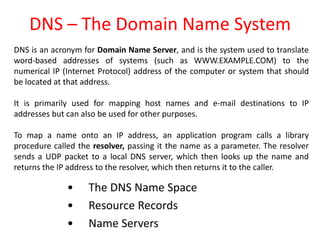
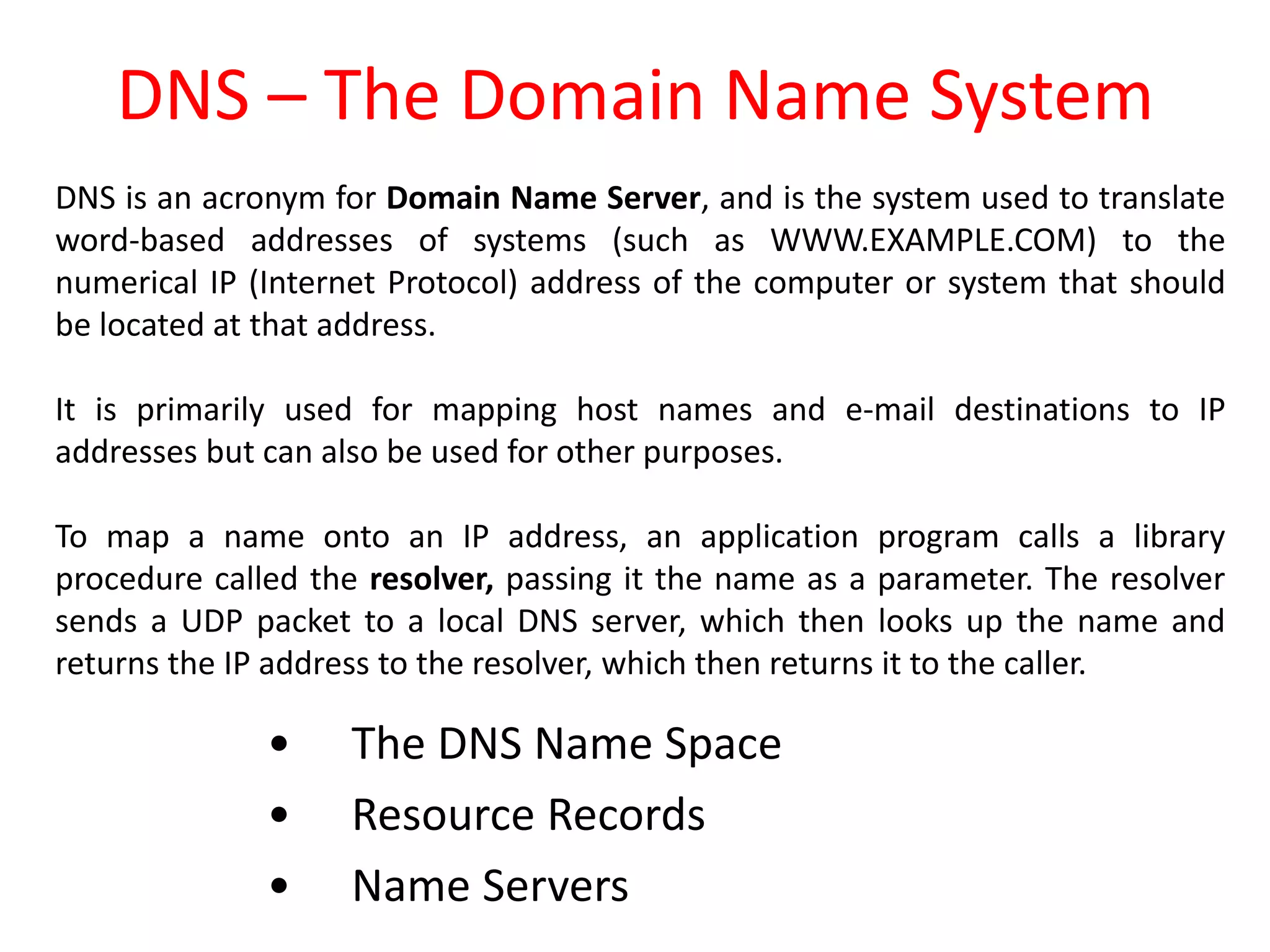
DNS is an acronym for Domain Name Server, and is the system used to translate
word-based addresses of systems (such as WWW.EXAMPLE.COM) to the
numerical IP (Internet Protocol) address of the computer or system that should
be located at that address.
It is primarily used for mapping host names and e-mail destinations to IP
addresses but can also be used for other purposes.
To map a name onto an IP address, an application program calls a library
procedure called the resolver, passing it the name as a parameter. The resolver
sends a UDP packet to a local DNS server, which then looks up the name and
returns the IP address to the resolver, which then returns it to the caller.
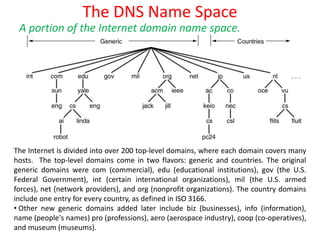
The DNS Name Space
A portion of the Internet domain name space.
The Internet is divided into over 200 top-level domains, where each domain covers many
hosts. The top-level domains come in two flavors: generic and countries. The original
generic domains were com (commercial), edu (educational institutions), gov (the U.S.
Federal Government), int (certain international organizations), mil (the U.S. armed
forces), net (network providers), and org (nonprofit organizations). The country domains
include one entry for every country, as defined in ISO 3166.
• Other new generic domains added later include biz (businesses), info (information),
name (people's names) pro (professions), aero (aerospace industry), coop (co-operatives),
and museum (museums).
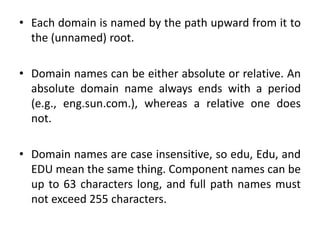
• Each domain is named by the path upward from it to
the (unnamed) root.
• Domain names can be either absolute or relative. An
absolute domain name always ends with a period
(e.g., eng.sun.com.), whereas a relative one does
not.
• Domain names are case insensitive, so edu, Edu, and
EDU mean the same thing. Component names can be
up to 63 characters long, and full path names must
not exceed 255 characters.
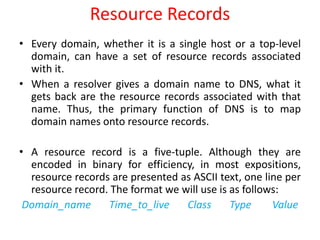
Resource Records
• Every domain, whether it is a single host or a top-level
domain, can have a set of resource records associated
with it.
• When a resolver gives a domain name to DNS, what it
gets back are the resource records associated with that
name. Thus, the primary function of DNS is to map
domain names onto resource records.
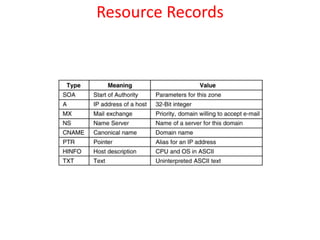
• A resource record is a five-tuple. Although they are
encoded in binary for efficiency, in most expositions,
resource records are presented as ASCII text, one line per
resource record. The format we will use is as follows:
Domain_name Time_to_live Class Type Value
Resource Records
Resource Records
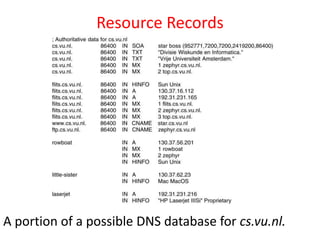
A portion of a possible DNS database for cs.vu.nl.
Name Servers
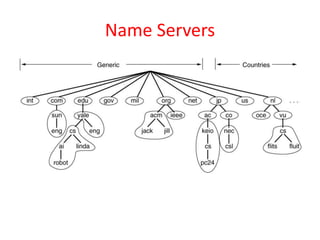
Part of the DNS name space showing the
division into zones.
Name Servers
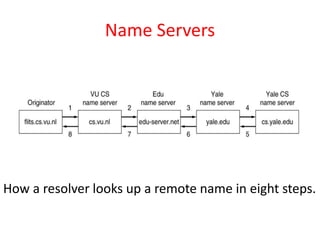
How a resolver looks up a remote name in eight steps.
Electronic Mail
• Architecture and Services
• The User Agent
• Message Formats
• Message Transfer
• Final Delivery
E-mail is short for electronic mail and is used to send &
receive messages over the internet
Architecture and Services
Basic functions
• Composition
• Transfer
• Reporting
• Displaying
• Disposition
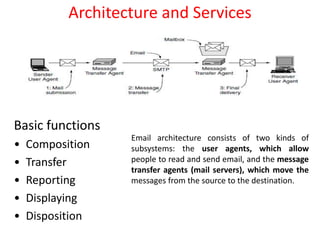
Email architecture consists of two kinds of
subsystems: the user agents, which allow
people to read and send email, and the message
transfer agents (mail servers), which move the
messages from the source to the destination.
• Composition refers to the process of creating messages
and answers.
• Transfer refers to moving messages from the originator
to the recipient
• Reporting has to do with telling the originator what
happened to the message
• Displaying incoming messages is needed so people can
read their e-mail.
• Disposition is the final step and concerns what the
recipient does with the message after receiving it.
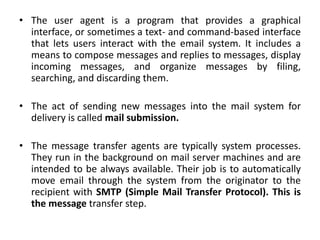
• The user agent is a program that provides a graphical
interface, or sometimes a text- and command-based interface
that lets users interact with the email system. It includes a
means to compose messages and replies to messages, display
incoming messages, and organize messages by filing,
searching, and discarding them.
• The act of sending new messages into the mail system for
delivery is called mail submission.
• The message transfer agents are typically system processes.
They run in the background on mail server machines and are
intended to be always available. Their job is to automatically
move email through the system from the originator to the
recipient with SMTP (Simple Mail Transfer Protocol). This is
the message transfer step.
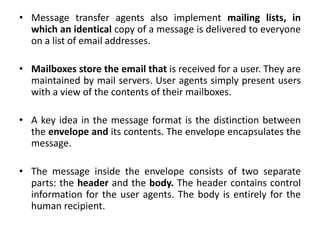
• Message transfer agents also implement mailing lists, in
which an identical copy of a message is delivered to everyone
on a list of email addresses.
• Mailboxes store the email that is received for a user. They are
maintained by mail servers. User agents simply present users
with a view of the contents of their mailboxes.
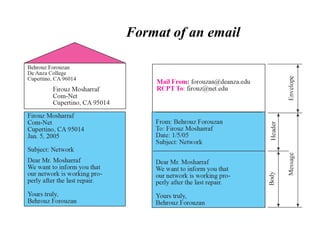
• A key idea in the message format is the distinction between
the envelope and its contents. The envelope encapsulates the
message.
• The message inside the envelope consists of two separate
parts: the header and the body. The header contains control
information for the user agents. The body is entirely for the
human recipient.
Format of an email
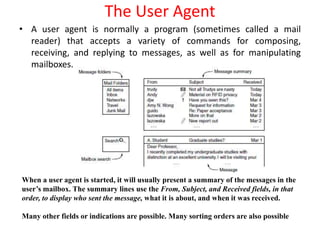
• A user agent is normally a program (sometimes called a mail
reader) that accepts a variety of commands for composing,
receiving, and replying to messages, as well as for manipulating
mailboxes.
The User Agent
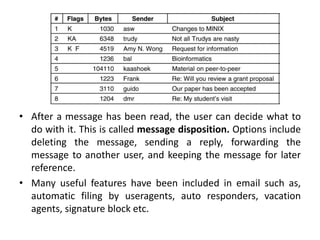
When a user agent is started, it will usually present a summary of the messages in the
user’s mailbox. The summary lines use the From, Subject, and Received fields, in that
order, to display who sent the message, what it is about, and when it was received.
Many other fields or indications are possible. Many sorting orders are also possible
• After a message has been read, the user can decide what to
do with it. This is called message disposition. Options include
deleting the message, sending a reply, forwarding the
message to another user, and keeping the message for later
reference.
• Many useful features have been included in email such as,
automatic filing by useragents, auto responders, vacation
agents, signature block etc.
Message Formats – RFC 822
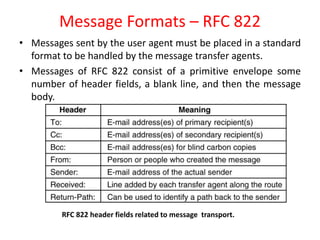
• Messages sent by the user agent must be placed in a standard
format to be handled by the message transfer agents.
• Messages of RFC 822 consist of a primitive envelope some
number of header fields, a blank line, and then the message
body.
RFC 822 header fields related to message transport.
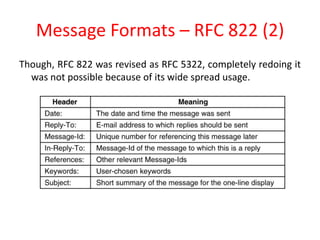
Message Formats – RFC 822 (2)
Though, RFC 822 was revised as RFC 5322, completely redoing it
was not possible because of its wide spread usage.
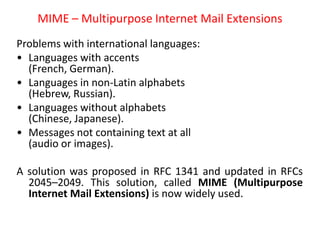
MIME – Multipurpose Internet Mail Extensions
Problems with international languages:
• Languages with accents
(French, German).
• Languages in non-Latin alphabets
(Hebrew, Russian).
• Languages without alphabets
(Chinese, Japanese).
• Messages not containing text at all
(audio or images).
A solution was proposed in RFC 1341 and updated in RFCs
2045–2049. This solution, called MIME (Multipurpose
Internet Mail Extensions) is now widely used.
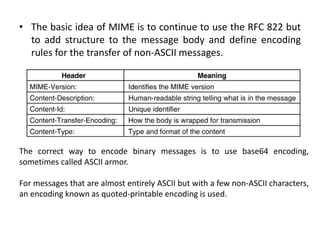
• The basic idea of MIME is to continue to use the RFC 822 but
to add structure to the message body and define encoding
rules for the transfer of non-ASCII messages.
The correct way to encode binary messages is to use base64 encoding,
sometimes called ASCII armor.
For messages that are almost entirely ASCII but with a few non-ASCII characters,
an encoding known as quoted-printable encoding is used.
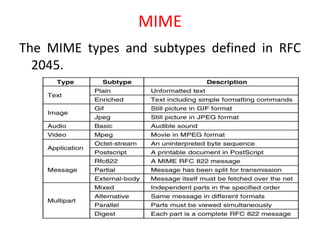
MIME
The MIME types and subtypes defined in RFC
2045.
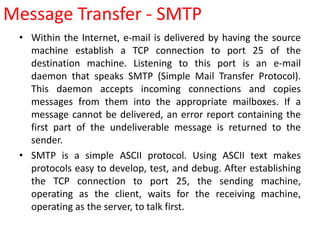
• Within the Internet, e-mail is delivered by having the source
machine establish a TCP connection to port 25 of the
destination machine. Listening to this port is an e-mail
daemon that speaks SMTP (Simple Mail Transfer Protocol).
This daemon accepts incoming connections and copies
messages from them into the appropriate mailboxes. If a
message cannot be delivered, an error report containing the
first part of the undeliverable message is returned to the
sender.
• SMTP is a simple ASCII protocol. Using ASCII text makes
protocols easy to develop, test, and debug. After establishing
the TCP connection to port 25, the sending machine,
operating as the client, waits for the receiving machine,
operating as the server, to talk first.
Message Transfer - SMTP
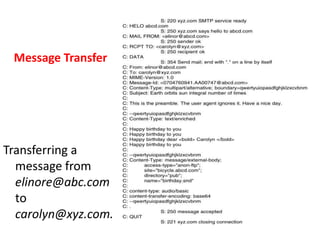
Message Transfer
Transferring a
message from
elinore@abc.com
to
carolyn@xyz.com.
ESMTP
• SMTP has the problems with authentication,
encryption, inefficient usage of bandwidth
incase of non-ASCII transmissions, message
sizes etc.
• SMTP is allowed to have an extended
mechanism, which is mandatory in RFC 5321
standard called Extended SMTP.
• Both the communicating parties may not be online all the
time. One solution is to have a message transfer agent on an
ISP machine accept e-mail for its customers and store it in
their mailboxes on an ISP machine. Since this agent can be on-
line all the time, e-mail can be sent to it 24 hours a day.
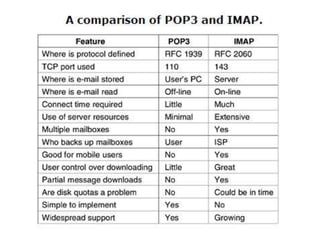
• POP3 (Post Office Protocol Version 3) is a protocol that allows
user transfer agents (on client PCs) to contact the message
transfer agent (on the ISP's machine) and allow e-mail to be
copied from the ISP to the user.
• POP3 begins when the user starts the mail reader. The mail
reader calls up the ISP (unless there is already a connection)
and establishes a TCP connection with the message transfer
agent at port 110.
Final Delivery
Final Delivery
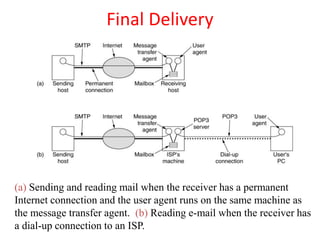
(a) Sending and reading mail when the receiver has a permanent
Internet connection and the user agent runs on the same machine as
the message transfer agent. (b) Reading e-mail when the receiver has
a dial-up connection to an ISP.
• Once the connection has been established, the
POP3 protocol goes through three states in
sequence:
– Authorization.
– Transactions.
– Update.
• The authorization state deals with having the user
log in. The transaction state deals with the user
collecting the e-mails and marking them for
deletion from the mailbox. The update state
actually causes the e-mails to be deleted.
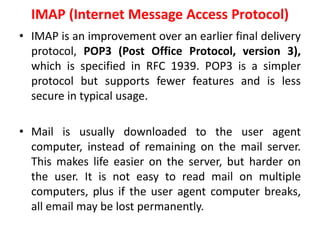
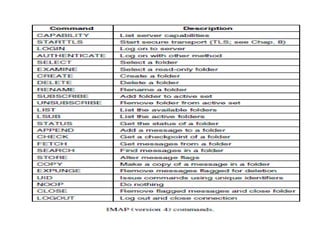
IMAP (Internet Message Access Protocol)
• IMAP is an improvement over an earlier final delivery
protocol, POP3 (Post Office Protocol, version 3),
which is specified in RFC 1939. POP3 is a simpler
protocol but supports fewer features and is less
secure in typical usage.
• Mail is usually downloaded to the user agent
computer, instead of remaining on the mail server.
This makes life easier on the server, but harder on
the user. It is not easy to read mail on multiple
computers, plus if the user agent computer breaks,
all email may be lost permanently.
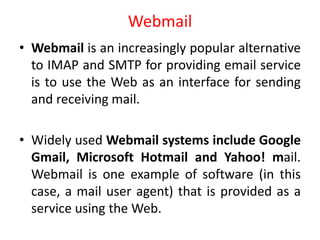
Webmail
• Webmail is an increasingly popular alternative
to IMAP and SMTP for providing email service
is to use the Web as an interface for sending
and receiving mail.
• Widely used Webmail systems include Google
Gmail, Microsoft Hotmail and Yahoo! mail.
Webmail is one example of software (in this
case, a mail user agent) that is provided as a
service using the Web.

Application layer

  • 1.
    DNS – TheDomain Name System • The DNS Name Space • Resource Records • Name Servers DNS is an acronym for Domain Name Server, and is the system used to translate word-based addresses of systems (such as WWW.EXAMPLE.COM) to the numerical IP (Internet Protocol) address of the computer or system that should be located at that address. It is primarily used for mapping host names and e-mail destinations to IP addresses but can also be used for other purposes. To map a name onto an IP address, an application program calls a library procedure called the resolver, passing it the name as a parameter. The resolver sends a UDP packet to a local DNS server, which then looks up the name and returns the IP address to the resolver, which then returns it to the caller.
  • 2.
    The DNS NameSpace A portion of the Internet domain name space. The Internet is divided into over 200 top-level domains, where each domain covers many hosts. The top-level domains come in two flavors: generic and countries. The original generic domains were com (commercial), edu (educational institutions), gov (the U.S. Federal Government), int (certain international organizations), mil (the U.S. armed forces), net (network providers), and org (nonprofit organizations). The country domains include one entry for every country, as defined in ISO 3166. • Other new generic domains added later include biz (businesses), info (information), name (people's names) pro (professions), aero (aerospace industry), coop (co-operatives), and museum (museums).
  • 3.
    • Each domainis named by the path upward from it to the (unnamed) root. • Domain names can be either absolute or relative. An absolute domain name always ends with a period (e.g., eng.sun.com.), whereas a relative one does not. • Domain names are case insensitive, so edu, Edu, and EDU mean the same thing. Component names can be up to 63 characters long, and full path names must not exceed 255 characters.
  • 4.
    Resource Records • Everydomain, whether it is a single host or a top-level domain, can have a set of resource records associated with it. • When a resolver gives a domain name to DNS, what it gets back are the resource records associated with that name. Thus, the primary function of DNS is to map domain names onto resource records. • A resource record is a five-tuple. Although they are encoded in binary for efficiency, in most expositions, resource records are presented as ASCII text, one line per resource record. The format we will use is as follows: Domain_name Time_to_live Class Type Value
  • 5.
  • 6.
    Resource Records A portionof a possible DNS database for cs.vu.nl.
  • 7.
    Name Servers Part ofthe DNS name space showing the division into zones.
  • 8.
    Name Servers How aresolver looks up a remote name in eight steps.
  • 9.
    Electronic Mail • Architectureand Services • The User Agent • Message Formats • Message Transfer • Final Delivery E-mail is short for electronic mail and is used to send & receive messages over the internet
  • 10.
    Architecture and Services Basicfunctions • Composition • Transfer • Reporting • Displaying • Disposition Email architecture consists of two kinds of subsystems: the user agents, which allow people to read and send email, and the message transfer agents (mail servers), which move the messages from the source to the destination.
  • 11.
    • Composition refersto the process of creating messages and answers. • Transfer refers to moving messages from the originator to the recipient • Reporting has to do with telling the originator what happened to the message • Displaying incoming messages is needed so people can read their e-mail. • Disposition is the final step and concerns what the recipient does with the message after receiving it.
  • 12.
    • The useragent is a program that provides a graphical interface, or sometimes a text- and command-based interface that lets users interact with the email system. It includes a means to compose messages and replies to messages, display incoming messages, and organize messages by filing, searching, and discarding them. • The act of sending new messages into the mail system for delivery is called mail submission. • The message transfer agents are typically system processes. They run in the background on mail server machines and are intended to be always available. Their job is to automatically move email through the system from the originator to the recipient with SMTP (Simple Mail Transfer Protocol). This is the message transfer step.
  • 13.
    • Message transferagents also implement mailing lists, in which an identical copy of a message is delivered to everyone on a list of email addresses. • Mailboxes store the email that is received for a user. They are maintained by mail servers. User agents simply present users with a view of the contents of their mailboxes. • A key idea in the message format is the distinction between the envelope and its contents. The envelope encapsulates the message. • The message inside the envelope consists of two separate parts: the header and the body. The header contains control information for the user agents. The body is entirely for the human recipient.
  • 14.
  • 15.
    • A useragent is normally a program (sometimes called a mail reader) that accepts a variety of commands for composing, receiving, and replying to messages, as well as for manipulating mailboxes. The User Agent When a user agent is started, it will usually present a summary of the messages in the user’s mailbox. The summary lines use the From, Subject, and Received fields, in that order, to display who sent the message, what it is about, and when it was received. Many other fields or indications are possible. Many sorting orders are also possible
  • 16.
    • After amessage has been read, the user can decide what to do with it. This is called message disposition. Options include deleting the message, sending a reply, forwarding the message to another user, and keeping the message for later reference. • Many useful features have been included in email such as, automatic filing by useragents, auto responders, vacation agents, signature block etc.
  • 17.
    Message Formats –RFC 822 • Messages sent by the user agent must be placed in a standard format to be handled by the message transfer agents. • Messages of RFC 822 consist of a primitive envelope some number of header fields, a blank line, and then the message body. RFC 822 header fields related to message transport.
  • 18.
    Message Formats –RFC 822 (2) Though, RFC 822 was revised as RFC 5322, completely redoing it was not possible because of its wide spread usage.
  • 19.
    MIME – MultipurposeInternet Mail Extensions Problems with international languages: • Languages with accents (French, German). • Languages in non-Latin alphabets (Hebrew, Russian). • Languages without alphabets (Chinese, Japanese). • Messages not containing text at all (audio or images). A solution was proposed in RFC 1341 and updated in RFCs 2045–2049. This solution, called MIME (Multipurpose Internet Mail Extensions) is now widely used.
  • 20.
    • The basicidea of MIME is to continue to use the RFC 822 but to add structure to the message body and define encoding rules for the transfer of non-ASCII messages. The correct way to encode binary messages is to use base64 encoding, sometimes called ASCII armor. For messages that are almost entirely ASCII but with a few non-ASCII characters, an encoding known as quoted-printable encoding is used.
  • 21.
    MIME The MIME typesand subtypes defined in RFC 2045.
  • 22.
    • Within theInternet, e-mail is delivered by having the source machine establish a TCP connection to port 25 of the destination machine. Listening to this port is an e-mail daemon that speaks SMTP (Simple Mail Transfer Protocol). This daemon accepts incoming connections and copies messages from them into the appropriate mailboxes. If a message cannot be delivered, an error report containing the first part of the undeliverable message is returned to the sender. • SMTP is a simple ASCII protocol. Using ASCII text makes protocols easy to develop, test, and debug. After establishing the TCP connection to port 25, the sending machine, operating as the client, waits for the receiving machine, operating as the server, to talk first. Message Transfer - SMTP
  • 23.
    Message Transfer Transferring a messagefrom elinore@abc.com to carolyn@xyz.com.
  • 24.
    ESMTP • SMTP hasthe problems with authentication, encryption, inefficient usage of bandwidth incase of non-ASCII transmissions, message sizes etc. • SMTP is allowed to have an extended mechanism, which is mandatory in RFC 5321 standard called Extended SMTP.
  • 25.
    • Both thecommunicating parties may not be online all the time. One solution is to have a message transfer agent on an ISP machine accept e-mail for its customers and store it in their mailboxes on an ISP machine. Since this agent can be on- line all the time, e-mail can be sent to it 24 hours a day. • POP3 (Post Office Protocol Version 3) is a protocol that allows user transfer agents (on client PCs) to contact the message transfer agent (on the ISP's machine) and allow e-mail to be copied from the ISP to the user. • POP3 begins when the user starts the mail reader. The mail reader calls up the ISP (unless there is already a connection) and establishes a TCP connection with the message transfer agent at port 110. Final Delivery
  • 26.
    Final Delivery (a) Sendingand reading mail when the receiver has a permanent Internet connection and the user agent runs on the same machine as the message transfer agent. (b) Reading e-mail when the receiver has a dial-up connection to an ISP.
  • 27.
    • Once theconnection has been established, the POP3 protocol goes through three states in sequence: – Authorization. – Transactions. – Update. • The authorization state deals with having the user log in. The transaction state deals with the user collecting the e-mails and marking them for deletion from the mailbox. The update state actually causes the e-mails to be deleted.
  • 28.
    IMAP (Internet MessageAccess Protocol) • IMAP is an improvement over an earlier final delivery protocol, POP3 (Post Office Protocol, version 3), which is specified in RFC 1939. POP3 is a simpler protocol but supports fewer features and is less secure in typical usage. • Mail is usually downloaded to the user agent computer, instead of remaining on the mail server. This makes life easier on the server, but harder on the user. It is not easy to read mail on multiple computers, plus if the user agent computer breaks, all email may be lost permanently.
  • 31.
    Webmail • Webmail isan increasingly popular alternative to IMAP and SMTP for providing email service is to use the Web as an interface for sending and receiving mail. • Widely used Webmail systems include Google Gmail, Microsoft Hotmail and Yahoo! mail. Webmail is one example of software (in this case, a mail user agent) that is provided as a service using the Web.