THE INTERNET
The Internet 
• The Internet: An internet that spans the world 
– Original goal was to develop a means of connecting 
networks that would not be disrupted by local disasters.
The Internet 
• An information system 
• Communication tool 
• A large network of computer systems 
world wide 
• can be explored by using a Web Browser 
• Services available through the Internet: 
• Email (Discussion groups , Chat Rooms, etc.) 
• Information search (including research) 
• Education (Online courses; virtual colleges) 
• Entertainment, News, and more…...
Internet Architecture 
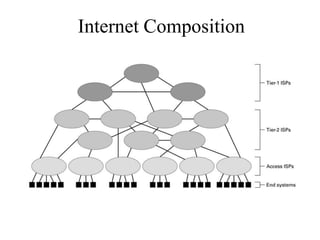
• Internet Service Provider (ISP) 
• Access ISP: Provides connectivity to the Internet 
– Traditional telephone (dial up connection) 
– Cable connections 
– Wireless
Internet Composition
A network protocol 
Is the set of very detailed rules, sequences, message 
formats, and procedures that computer systems use 
and understand when exchanging data with each 
other.
Examples of Protocols 
– Transmission Control Protocol (TCP) 
– User Datagram Protocol(UDP) 
– File Transfer Protocol (FTP) 
– Hypertext Transfer Protocol (HTTP) 
– Simple Mail Transfer Protocol (SMTP)
Transmission Control Protocol (TCP/IP) 
• It is connection oriented. 
• It establish connection before data transfer 
• It divide the whole message in small parts known as 
packets 
• It sends packets in order and it also receive in order 
in destination
User Datagram Protocol(UDP) 
• It is not connection oriented. 
• It does not establish connection before data transfer 
• It divide the whole message in small parts known as 
packets. 
• It sends packets to the available path on that 
particular movement. 
• The packets are not received in order and it required 
a addition mechanism for ordering the packets on 
destination.
File transfer protocol 
• Is a network protocol used for transfer data from one 
computer to another through a network such as 
Internet (is commonly used for copying files to and 
from other computers) 
• FTP is a two-way system - it can be used to copy or 
move files from a server to a client computer as well 
as upload or transfer files from a client to a server 
• FTP systems generally encode and transmit their 
data in binary sets which allow for faster data 
transfer
What is an IP Address? 
• An IP address is a unique global address for a 
network interface 
– An IP address: 
- is a 32 bit long identifier 
- encodes a network number (network 
prefix) and a host number.
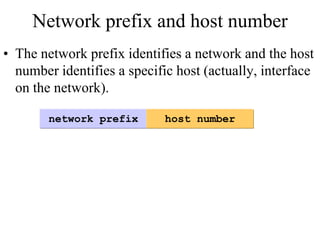
Network prefix and host number 
• The network prefix identifies a network and the host 
number identifies a specific host (actually, interface 
on the network). 
network prefix host number
Dotted Decimal Notation 
• IP addresses are written in a so-called dotted 
decimal notation 
• Each byte is identified by a decimal number in the 
range [0..255] 
• Example: 
10000000 10001111 10001001 10010000 
1st Byte 
= 128 
2nd Byte 
= 143 
3rd Byte 
= 137 
4th Byte 
= 144 
128.143.137.144
IP Addresses (continued) 
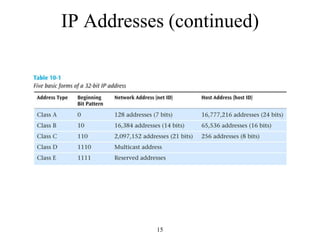
• When IP addresses were originally created, they 
were called classful addresses 
– That is, each IP address fell into particular class 
– A particular class address has a unique network address 
size and a unique host address size 
– There are basically five types of IP addresses: Classes A, 
B, C, D and E 
14
IP Addresses (continued) 
15
IP Addresses (continued) 
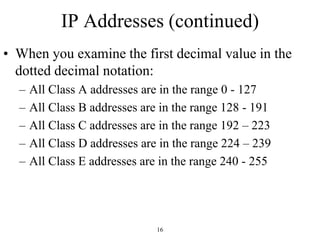
• When you examine the first decimal value in the 
dotted decimal notation: 
– All Class A addresses are in the range 0 - 127 
– All Class B addresses are in the range 128 - 191 
– All Class C addresses are in the range 192 – 223 
– All Class D addresses are in the range 224 – 239 
– All Class E addresses are in the range 240 - 255 
16
Name servers
DNS 
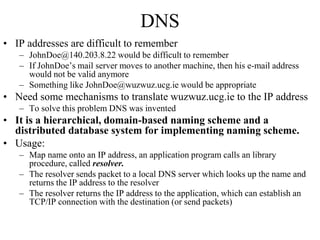
• IP addresses are difficult to remember 
– JohnDoe@140.203.8.22 would be difficult to remember 
– If JohnDoe’s mail server moves to another machine, then his e-mail address 
would not be valid anymore 
– Something like JohnDoe@wuzwuz.ucg.ie would be appropriate 
• Need some mechanisms to translate wuzwuz.ucg.ie to the IP address 
– To solve this problem DNS was invented 
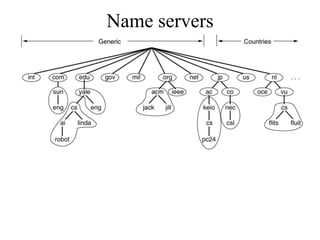
• It is a hierarchical, domain-based naming scheme and a 
distributed database system for implementing naming scheme. 
• Usage: 
– Map name onto an IP address, an application program calls an library 
procedure, called resolver. 
– The resolver sends packet to a local DNS server which looks up the name and 
returns the IP address to the resolver 
– The resolver returns the IP address to the application, which can establish an 
TCP/IP connection with the destination (or send packets)
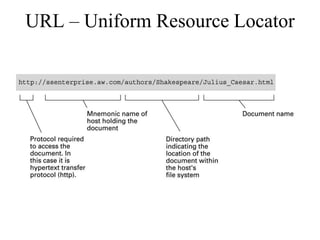
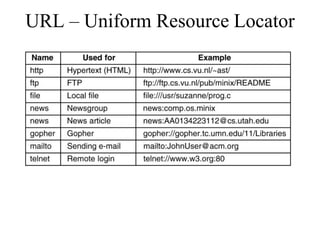
URL – Uniform Resource Locator
Traditional Internet Applications 
• Electronic Mail (email) 
– Domain mail server collects incoming mail and transmits 
outgoing mail 
– Mail server delivers collected incoming mail to clients 
via POP3 or IMAP 
• File Transfer Protocol (FTP) 
• WWW (World Wide Web)
World Wide Web (WWW) 
– a vast collection of information that’s connected like a 
web 
– accessible through the Internet using connections called 
hyperlinks 
– view the WWW resources through a program called a 
Web Browser, such as: 
• Netscape Navigator 
• Internet Explorer 
– Navigate through the WWW by pointing to and clicking on 
hyperlinks (underlined or boldfaced words, phrases, 
icons, or images) 
– Also called Cyberspace or the Information Superhighway
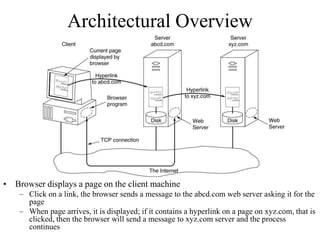
Architectural Overview 
• Browser displays a page on the client machine 
– Click on a link, the browser sends a message to the abcd.com web server asking it for the 
page 
– When page arrives, it is displayed; if it contains a hyperlink on a page on xyz.com, that is 
clicked, then the browser will send a message to xyz.com server and the process 
continues
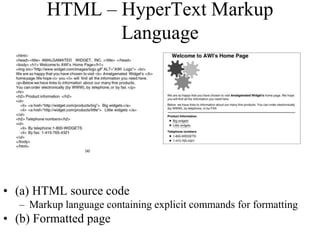
HTML – HyperText Markup 
Language 
• (a) HTML source code 
– Markup language containing explicit commands for formatting 
• (b) Formatted page

Internet new

  • 1.
  • 2.
    The Internet •The Internet: An internet that spans the world – Original goal was to develop a means of connecting networks that would not be disrupted by local disasters.
  • 3.
    The Internet •An information system • Communication tool • A large network of computer systems world wide • can be explored by using a Web Browser • Services available through the Internet: • Email (Discussion groups , Chat Rooms, etc.) • Information search (including research) • Education (Online courses; virtual colleges) • Entertainment, News, and more…...
  • 4.
    Internet Architecture •Internet Service Provider (ISP) • Access ISP: Provides connectivity to the Internet – Traditional telephone (dial up connection) – Cable connections – Wireless
  • 5.
  • 6.
    A network protocol Is the set of very detailed rules, sequences, message formats, and procedures that computer systems use and understand when exchanging data with each other.
  • 7.
    Examples of Protocols – Transmission Control Protocol (TCP) – User Datagram Protocol(UDP) – File Transfer Protocol (FTP) – Hypertext Transfer Protocol (HTTP) – Simple Mail Transfer Protocol (SMTP)
  • 8.
    Transmission Control Protocol(TCP/IP) • It is connection oriented. • It establish connection before data transfer • It divide the whole message in small parts known as packets • It sends packets in order and it also receive in order in destination
  • 9.
    User Datagram Protocol(UDP) • It is not connection oriented. • It does not establish connection before data transfer • It divide the whole message in small parts known as packets. • It sends packets to the available path on that particular movement. • The packets are not received in order and it required a addition mechanism for ordering the packets on destination.
  • 10.
    File transfer protocol • Is a network protocol used for transfer data from one computer to another through a network such as Internet (is commonly used for copying files to and from other computers) • FTP is a two-way system - it can be used to copy or move files from a server to a client computer as well as upload or transfer files from a client to a server • FTP systems generally encode and transmit their data in binary sets which allow for faster data transfer
  • 11.
    What is anIP Address? • An IP address is a unique global address for a network interface – An IP address: - is a 32 bit long identifier - encodes a network number (network prefix) and a host number.
  • 12.
    Network prefix andhost number • The network prefix identifies a network and the host number identifies a specific host (actually, interface on the network). network prefix host number
  • 13.
    Dotted Decimal Notation • IP addresses are written in a so-called dotted decimal notation • Each byte is identified by a decimal number in the range [0..255] • Example: 10000000 10001111 10001001 10010000 1st Byte = 128 2nd Byte = 143 3rd Byte = 137 4th Byte = 144 128.143.137.144
  • 14.
    IP Addresses (continued) • When IP addresses were originally created, they were called classful addresses – That is, each IP address fell into particular class – A particular class address has a unique network address size and a unique host address size – There are basically five types of IP addresses: Classes A, B, C, D and E 14
  • 15.
  • 16.
    IP Addresses (continued) • When you examine the first decimal value in the dotted decimal notation: – All Class A addresses are in the range 0 - 127 – All Class B addresses are in the range 128 - 191 – All Class C addresses are in the range 192 – 223 – All Class D addresses are in the range 224 – 239 – All Class E addresses are in the range 240 - 255 16
  • 17.
  • 18.
    DNS • IPaddresses are difficult to remember – JohnDoe@140.203.8.22 would be difficult to remember – If JohnDoe’s mail server moves to another machine, then his e-mail address would not be valid anymore – Something like JohnDoe@wuzwuz.ucg.ie would be appropriate • Need some mechanisms to translate wuzwuz.ucg.ie to the IP address – To solve this problem DNS was invented • It is a hierarchical, domain-based naming scheme and a distributed database system for implementing naming scheme. • Usage: – Map name onto an IP address, an application program calls an library procedure, called resolver. – The resolver sends packet to a local DNS server which looks up the name and returns the IP address to the resolver – The resolver returns the IP address to the application, which can establish an TCP/IP connection with the destination (or send packets)
  • 19.
    URL – UniformResource Locator
  • 20.
    URL – UniformResource Locator
  • 21.
    Traditional Internet Applications • Electronic Mail (email) – Domain mail server collects incoming mail and transmits outgoing mail – Mail server delivers collected incoming mail to clients via POP3 or IMAP • File Transfer Protocol (FTP) • WWW (World Wide Web)
  • 22.
    World Wide Web(WWW) – a vast collection of information that’s connected like a web – accessible through the Internet using connections called hyperlinks – view the WWW resources through a program called a Web Browser, such as: • Netscape Navigator • Internet Explorer – Navigate through the WWW by pointing to and clicking on hyperlinks (underlined or boldfaced words, phrases, icons, or images) – Also called Cyberspace or the Information Superhighway
  • 23.
    Architectural Overview •Browser displays a page on the client machine – Click on a link, the browser sends a message to the abcd.com web server asking it for the page – When page arrives, it is displayed; if it contains a hyperlink on a page on xyz.com, that is clicked, then the browser will send a message to xyz.com server and the process continues
  • 24.
    HTML – HyperTextMarkup Language • (a) HTML source code – Markup language containing explicit commands for formatting • (b) Formatted page