Application Layer 2-1
Chapter 2
Application Layer
Computer
Networking: A Top
Down Approach
6th
edition
Jim Kurose, Keith Ross
Addison-Wesley
March 2012
A note on the use of these ppt slides:
We’re making these slides freely available to all (faculty, students, readers).
They’re in PowerPoint form so you see the animations; and can add, modify,
and delete slides (including this one) and slide content to suit your needs.
They obviously represent a lot of work on our part. In return for use, we only
ask the following:
 If you use these slides (e.g., in a class) that you mention their source
(after all, we’d like people to use our book!)
 If you post any slides on a www site, that you note that they are adapted
from (or perhaps identical to) our slides, and note our copyright of this
material.
Thanks and enjoy! JFK/KWR
All material copyright 1996-2012
J.F Kurose and K.W. Ross, All Rights Reserved
Application Layer 2-2
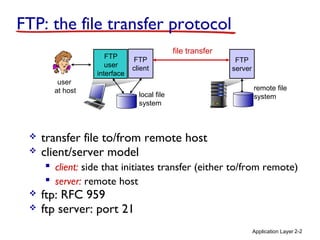
FTP: the file transfer protocol
file transfer
FTP
server
FTP
user
interface
FTP
client
local file
system
remote file
system
user
at host
 transfer file to/from remote host
 client/server model
 client: side that initiates transfer (either to/from remote)
 server: remote host
 ftp: RFC 959
 ftp server: port 21
Application Layer 2-3
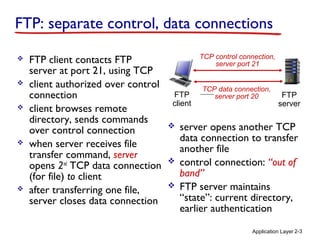
FTP: separate control, data connections
 FTP client contacts FTP
server at port 21, using TCP
 client authorized over control
connection
 client browses remote
directory, sends commands
over control connection
 when server receives file
transfer command, server
opens 2nd
TCP data connection
(for file) to client
 after transferring one file,
server closes data connection
FTP
client
FTP
server
TCP control connection,
server port 21
TCP data connection,
server port 20
 server opens another TCP
data connection to transfer
another file
 control connection: “out of
band”
 FTP server maintains
“state”: current directory,
earlier authentication
Application Layer 2-4
FTP commands, responses
sample commands:
 sent as ASCII text over
control channel
 USER username
 PASS password
 LIST return list of file in
current directory
 RETR filename
retrieves (gets) file
 STOR filename stores
(puts) file onto remote
host
sample return codes
 status code and phrase (as
in HTTP)
 331 Username OK,
password required
 125 data
connection
already open;
transfer starting
 425 Can’t open
data connection
 452 Error writing
file
Application Layer 2-5
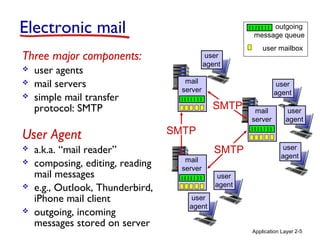
Electronic mail
Three major components:
 user agents
 mail servers
 simple mail transfer
protocol: SMTP
User Agent
 a.k.a. “mail reader”
 composing, editing, reading
mail messages
 e.g., Outlook, Thunderbird,
iPhone mail client
 outgoing, incoming
messages stored on server
user mailbox
outgoing
message queue
mail
server
mail
server
mail
server
SMTP
SMTP
SMTP
user
agent
user
agent
user
agent
user
agent
user
agent
user
agent
Application Layer 2-6
Electronic mail: mail servers
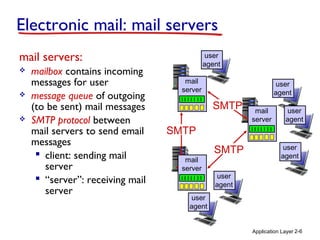
mail servers:
 mailbox contains incoming
messages for user
 message queue of outgoing
(to be sent) mail messages
 SMTP protocol between
mail servers to send email
messages
 client: sending mail
server
 “server”: receiving mail
server
mail
server
mail
server
mail
server
SMTP
SMTP
SMTP
user
agent
user
agent
user
agent
user
agent
user
agent
user
agent
Application Layer 2-7
Electronic Mail: SMTP [RFC 2821]
 uses TCP to reliably transfer email message from
client to server, port 25
 direct transfer: sending server to receiving
server
 three phases of transfer
 handshaking (greeting)
 transfer of messages
 closure
 command/response interaction (like HTTP, FTP)
 commands: ASCII text
 response: status code and phrase
 messages must be in 7-bit ASCI
Application Layer 2-8
user
agent
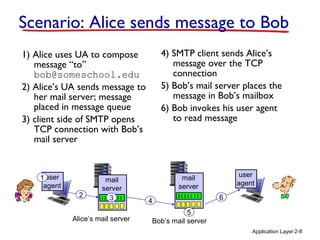
Scenario: Alice sends message to Bob
1) Alice uses UA to compose
message “to”
bob@someschool.edu
2) Alice’s UA sends message to
her mail server; message
placed in message queue
3) client side of SMTP opens
TCP connection with Bob’s
mail server
4) SMTP client sends Alice’s
message over the TCP
connection
5) Bob’s mail server places the
message in Bob’s mailbox
6) Bob invokes his user agent
to read message
mail
server
mail
server
1
2 3 4
5
6
Alice’s mail server Bob’s mail server
user
agent
Application Layer 2-9
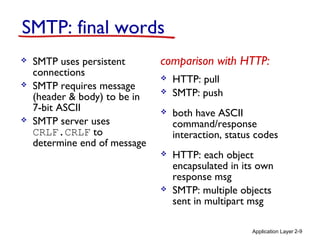
SMTP: final words
 SMTP uses persistent
connections
 SMTP requires message
(header & body) to be in
7-bit ASCII
 SMTP server uses
CRLF.CRLF to
determine end of message
comparison with HTTP:
 HTTP: pull
 SMTP: push
 both have ASCII
command/response
interaction, status codes
 HTTP: each object
encapsulated in its own
response msg
 SMTP: multiple objects
sent in multipart msg
Application Layer 2-10
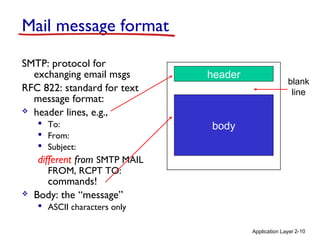
Mail message format
SMTP: protocol for
exchanging email msgs
RFC 822: standard for text
message format:
 header lines, e.g.,
 To:
 From:
 Subject:
different from SMTP MAIL
FROM, RCPT TO:
commands!
 Body: the “message”
 ASCII characters only
header
body
blank
line
Application Layer 2-11
Mail access protocols
 SMTP: delivery/storage to receiver’s server
 mail access protocol: retrieval from server
 POP: Post Office Protocol [RFC 1939]: authorization,
download
 IMAP: Internet Mail Access Protocol [RFC 1730]: more
features, including manipulation of stored msgs on
server
 HTTP: gmail, Hotmail, Yahoo! Mail, etc.
sender’s mail
server
SMTP SMTP
mail access
protocol
receiver’s mail
server
(e.g., POP,
IMAP)
user
agent
user
agent
Application Layer 2-12
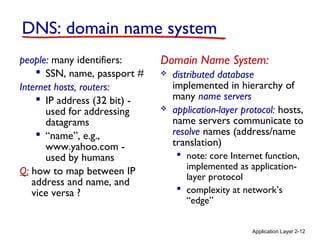
DNS: domain name system
people: many identifiers:
 SSN, name, passport #
Internet hosts, routers:
 IP address (32 bit) -
used for addressing
datagrams
 “name”, e.g.,
www.yahoo.com -
used by humans
Q: how to map between IP
address and name, and
vice versa ?
Domain Name System:
 distributed database
implemented in hierarchy of
many name servers
 application-layer protocol: hosts,
name servers communicate to
resolve names (address/name
translation)
 note: core Internet function,
implemented as application-
layer protocol
 complexity at network’s
“edge”
Application Layer 2-13
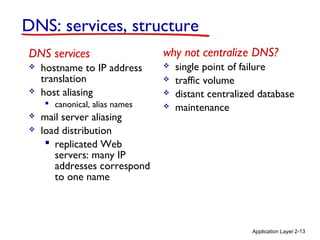
DNS: services, structure
why not centralize DNS?
 single point of failure
 traffic volume
 distant centralized database
 maintenance
DNS services
 hostname to IP address
translation
 host aliasing
 canonical, alias names
 mail server aliasing
 load distribution
 replicated Web
servers: many IP
addresses correspond
to one name
Application Layer 2-14
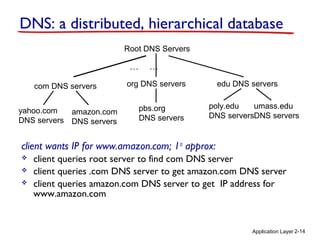
Root DNS Servers
com DNS servers org DNS servers edu DNS servers
poly.edu
DNS servers
umass.edu
DNS servers
yahoo.com
DNS servers
amazon.com
DNS servers
pbs.org
DNS servers
DNS: a distributed, hierarchical database
client wants IP for www.amazon.com; 1st
approx:
 client queries root server to find com DNS server
 client queries .com DNS server to get amazon.com DNS server
 client queries amazon.com DNS server to get IP address for
www.amazon.com
… …
Application Layer 2-15
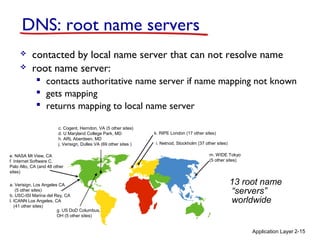
DNS: root name servers
 contacted by local name server that can not resolve name
 root name server:
 contacts authoritative name server if name mapping not known
 gets mapping
 returns mapping to local name server
13 root name
“servers”
worldwide
a. Verisign, Los Angeles CA
(5 other sites)
b. USC-ISI Marina del Rey, CA
l. ICANN Los Angeles, CA
(41 other sites)
e. NASA Mt View, CA
f. Internet Software C.
Palo Alto, CA (and 48 other
sites)
i. Netnod, Stockholm (37 other sites)
k. RIPE London (17 other sites)
m. WIDE Tokyo
(5 other sites)
c. Cogent, Herndon, VA (5 other sites)
d. U Maryland College Park, MD
h. ARL Aberdeen, MD
j. Verisign, Dulles VA (69 other sites )
g. US DoD Columbus,
OH (5 other sites)
Application Layer 2-16
TLD, authoritative servers
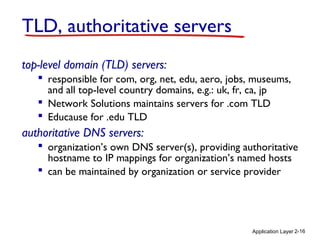
top-level domain (TLD) servers:
 responsible for com, org, net, edu, aero, jobs, museums,
and all top-level country domains, e.g.: uk, fr, ca, jp
 Network Solutions maintains servers for .com TLD
 Educause for .edu TLD
authoritative DNS servers:
 organization’s own DNS server(s), providing authoritative
hostname to IP mappings for organization’s named hosts
 can be maintained by organization or service provider
Application Layer 2-17
Local DNS name server
 does not strictly belong to hierarchy
 each ISP (residential ISP, company, university) has
one
 also called “default name server”
 when host makes DNS query, query is sent to its
local DNS server
 has local cache of recent name-to-address translation
pairs (but may be out of date!)
 acts as proxy, forwards query into hierarchy
Application Layer 2-18
requesting host
cis.poly.edu
gaia.cs.umass.edu
root DNS server
local DNS server
dns.poly.edu
1
2
3
4
5
6
authoritative DNS server
dns.cs.umass.edu
7
8
TLD DNS server
DNS name
resolution example
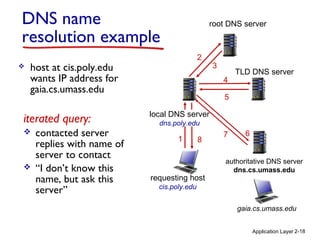
 host at cis.poly.edu
wants IP address for
gaia.cs.umass.edu
iterated query:
 contacted server
replies with name of
server to contact
 “I don’t know this
name, but ask this
server”
Application Layer 2-19
45
6
3
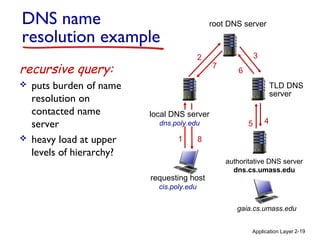
recursive query:
 puts burden of name
resolution on
contacted name
server
 heavy load at upper
levels of hierarchy?
requesting host
cis.poly.edu
gaia.cs.umass.edu
root DNS server
local DNS server
dns.poly.edu
1
2
7
authoritative DNS server
dns.cs.umass.edu
8
DNS name
resolution example
TLD DNS
server
Application Layer 2-20
DNS: caching, updating records
 once (any) name server learns mapping, it caches
mapping
 cache entries timeout (disappear) after some time (TTL)
 TLD servers typically cached in local name servers
• thus root name servers not often visited
 cached entries may be out-of-date (best effort
name-to-address translation!)
 if name host changes IP address, may not be known
Internet-wide until all TTLs expire
 update/notify mechanisms proposed IETF standard
 RFC 2136
Application Layer 2-21
DNS protocol, messages
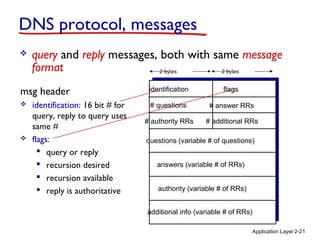
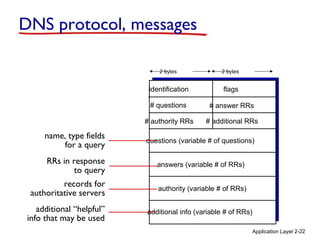
 query and reply messages, both with same message
format
msg header
 identification: 16 bit # for
query, reply to query uses
same #
 flags:
 query or reply
 recursion desired
 recursion available
 reply is authoritative
identification flags
# questions
questions (variable # of questions)
# additional RRs# authority RRs
# answer RRs
answers (variable # of RRs)
authority (variable # of RRs)
additional info (variable # of RRs)
2 bytes 2 bytes
Application Layer 2-22
name, type fields
for a query
RRs in response
to query
records for
authoritative servers
additional “helpful”
info that may be used
identification flags
# questions
questions (variable # of questions)
# additional RRs# authority RRs
# answer RRs
answers (variable # of RRs)
authority (variable # of RRs)
additional info (variable # of RRs)
DNS protocol, messages
2 bytes 2 bytes
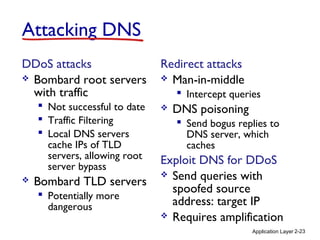
Attacking DNS
DDoS attacks
 Bombard root servers
with traffic
 Not successful to date
 Traffic Filtering
 Local DNS servers
cache IPs of TLD
servers, allowing root
server bypass
 Bombard TLD servers
 Potentially more
dangerous
Redirect attacks
 Man-in-middle
 Intercept queries
 DNS poisoning
 Send bogus replies to
DNS server, which
caches
Exploit DNS for DDoS
 Send queries with
spoofed source
address: target IP
 Requires amplification
Application Layer 2-23

Chapter 2 : Application Layer

  • 1.
    Application Layer 2-1 Chapter2 Application Layer Computer Networking: A Top Down Approach 6th edition Jim Kurose, Keith Ross Addison-Wesley March 2012 A note on the use of these ppt slides: We’re making these slides freely available to all (faculty, students, readers). They’re in PowerPoint form so you see the animations; and can add, modify, and delete slides (including this one) and slide content to suit your needs. They obviously represent a lot of work on our part. In return for use, we only ask the following:  If you use these slides (e.g., in a class) that you mention their source (after all, we’d like people to use our book!)  If you post any slides on a www site, that you note that they are adapted from (or perhaps identical to) our slides, and note our copyright of this material. Thanks and enjoy! JFK/KWR All material copyright 1996-2012 J.F Kurose and K.W. Ross, All Rights Reserved
  • 2.
    Application Layer 2-2 FTP:the file transfer protocol file transfer FTP server FTP user interface FTP client local file system remote file system user at host  transfer file to/from remote host  client/server model  client: side that initiates transfer (either to/from remote)  server: remote host  ftp: RFC 959  ftp server: port 21
  • 3.
    Application Layer 2-3 FTP:separate control, data connections  FTP client contacts FTP server at port 21, using TCP  client authorized over control connection  client browses remote directory, sends commands over control connection  when server receives file transfer command, server opens 2nd TCP data connection (for file) to client  after transferring one file, server closes data connection FTP client FTP server TCP control connection, server port 21 TCP data connection, server port 20  server opens another TCP data connection to transfer another file  control connection: “out of band”  FTP server maintains “state”: current directory, earlier authentication
  • 4.
    Application Layer 2-4 FTPcommands, responses sample commands:  sent as ASCII text over control channel  USER username  PASS password  LIST return list of file in current directory  RETR filename retrieves (gets) file  STOR filename stores (puts) file onto remote host sample return codes  status code and phrase (as in HTTP)  331 Username OK, password required  125 data connection already open; transfer starting  425 Can’t open data connection  452 Error writing file
  • 5.
    Application Layer 2-5 Electronicmail Three major components:  user agents  mail servers  simple mail transfer protocol: SMTP User Agent  a.k.a. “mail reader”  composing, editing, reading mail messages  e.g., Outlook, Thunderbird, iPhone mail client  outgoing, incoming messages stored on server user mailbox outgoing message queue mail server mail server mail server SMTP SMTP SMTP user agent user agent user agent user agent user agent user agent
  • 6.
    Application Layer 2-6 Electronicmail: mail servers mail servers:  mailbox contains incoming messages for user  message queue of outgoing (to be sent) mail messages  SMTP protocol between mail servers to send email messages  client: sending mail server  “server”: receiving mail server mail server mail server mail server SMTP SMTP SMTP user agent user agent user agent user agent user agent user agent
  • 7.
    Application Layer 2-7 ElectronicMail: SMTP [RFC 2821]  uses TCP to reliably transfer email message from client to server, port 25  direct transfer: sending server to receiving server  three phases of transfer  handshaking (greeting)  transfer of messages  closure  command/response interaction (like HTTP, FTP)  commands: ASCII text  response: status code and phrase  messages must be in 7-bit ASCI
  • 8.
    Application Layer 2-8 user agent Scenario:Alice sends message to Bob 1) Alice uses UA to compose message “to” bob@someschool.edu 2) Alice’s UA sends message to her mail server; message placed in message queue 3) client side of SMTP opens TCP connection with Bob’s mail server 4) SMTP client sends Alice’s message over the TCP connection 5) Bob’s mail server places the message in Bob’s mailbox 6) Bob invokes his user agent to read message mail server mail server 1 2 3 4 5 6 Alice’s mail server Bob’s mail server user agent
  • 9.
    Application Layer 2-9 SMTP:final words  SMTP uses persistent connections  SMTP requires message (header & body) to be in 7-bit ASCII  SMTP server uses CRLF.CRLF to determine end of message comparison with HTTP:  HTTP: pull  SMTP: push  both have ASCII command/response interaction, status codes  HTTP: each object encapsulated in its own response msg  SMTP: multiple objects sent in multipart msg
  • 10.
    Application Layer 2-10 Mailmessage format SMTP: protocol for exchanging email msgs RFC 822: standard for text message format:  header lines, e.g.,  To:  From:  Subject: different from SMTP MAIL FROM, RCPT TO: commands!  Body: the “message”  ASCII characters only header body blank line
  • 11.
    Application Layer 2-11 Mailaccess protocols  SMTP: delivery/storage to receiver’s server  mail access protocol: retrieval from server  POP: Post Office Protocol [RFC 1939]: authorization, download  IMAP: Internet Mail Access Protocol [RFC 1730]: more features, including manipulation of stored msgs on server  HTTP: gmail, Hotmail, Yahoo! Mail, etc. sender’s mail server SMTP SMTP mail access protocol receiver’s mail server (e.g., POP, IMAP) user agent user agent
  • 12.
    Application Layer 2-12 DNS:domain name system people: many identifiers:  SSN, name, passport # Internet hosts, routers:  IP address (32 bit) - used for addressing datagrams  “name”, e.g., www.yahoo.com - used by humans Q: how to map between IP address and name, and vice versa ? Domain Name System:  distributed database implemented in hierarchy of many name servers  application-layer protocol: hosts, name servers communicate to resolve names (address/name translation)  note: core Internet function, implemented as application- layer protocol  complexity at network’s “edge”
  • 13.
    Application Layer 2-13 DNS:services, structure why not centralize DNS?  single point of failure  traffic volume  distant centralized database  maintenance DNS services  hostname to IP address translation  host aliasing  canonical, alias names  mail server aliasing  load distribution  replicated Web servers: many IP addresses correspond to one name
  • 14.
    Application Layer 2-14 RootDNS Servers com DNS servers org DNS servers edu DNS servers poly.edu DNS servers umass.edu DNS servers yahoo.com DNS servers amazon.com DNS servers pbs.org DNS servers DNS: a distributed, hierarchical database client wants IP for www.amazon.com; 1st approx:  client queries root server to find com DNS server  client queries .com DNS server to get amazon.com DNS server  client queries amazon.com DNS server to get IP address for www.amazon.com … …
  • 15.
    Application Layer 2-15 DNS:root name servers  contacted by local name server that can not resolve name  root name server:  contacts authoritative name server if name mapping not known  gets mapping  returns mapping to local name server 13 root name “servers” worldwide a. Verisign, Los Angeles CA (5 other sites) b. USC-ISI Marina del Rey, CA l. ICANN Los Angeles, CA (41 other sites) e. NASA Mt View, CA f. Internet Software C. Palo Alto, CA (and 48 other sites) i. Netnod, Stockholm (37 other sites) k. RIPE London (17 other sites) m. WIDE Tokyo (5 other sites) c. Cogent, Herndon, VA (5 other sites) d. U Maryland College Park, MD h. ARL Aberdeen, MD j. Verisign, Dulles VA (69 other sites ) g. US DoD Columbus, OH (5 other sites)
  • 16.
    Application Layer 2-16 TLD,authoritative servers top-level domain (TLD) servers:  responsible for com, org, net, edu, aero, jobs, museums, and all top-level country domains, e.g.: uk, fr, ca, jp  Network Solutions maintains servers for .com TLD  Educause for .edu TLD authoritative DNS servers:  organization’s own DNS server(s), providing authoritative hostname to IP mappings for organization’s named hosts  can be maintained by organization or service provider
  • 17.
    Application Layer 2-17 LocalDNS name server  does not strictly belong to hierarchy  each ISP (residential ISP, company, university) has one  also called “default name server”  when host makes DNS query, query is sent to its local DNS server  has local cache of recent name-to-address translation pairs (but may be out of date!)  acts as proxy, forwards query into hierarchy
  • 18.
    Application Layer 2-18 requestinghost cis.poly.edu gaia.cs.umass.edu root DNS server local DNS server dns.poly.edu 1 2 3 4 5 6 authoritative DNS server dns.cs.umass.edu 7 8 TLD DNS server DNS name resolution example  host at cis.poly.edu wants IP address for gaia.cs.umass.edu iterated query:  contacted server replies with name of server to contact  “I don’t know this name, but ask this server”
  • 19.
    Application Layer 2-19 45 6 3 recursivequery:  puts burden of name resolution on contacted name server  heavy load at upper levels of hierarchy? requesting host cis.poly.edu gaia.cs.umass.edu root DNS server local DNS server dns.poly.edu 1 2 7 authoritative DNS server dns.cs.umass.edu 8 DNS name resolution example TLD DNS server
  • 20.
    Application Layer 2-20 DNS:caching, updating records  once (any) name server learns mapping, it caches mapping  cache entries timeout (disappear) after some time (TTL)  TLD servers typically cached in local name servers • thus root name servers not often visited  cached entries may be out-of-date (best effort name-to-address translation!)  if name host changes IP address, may not be known Internet-wide until all TTLs expire  update/notify mechanisms proposed IETF standard  RFC 2136
  • 21.
    Application Layer 2-21 DNSprotocol, messages  query and reply messages, both with same message format msg header  identification: 16 bit # for query, reply to query uses same #  flags:  query or reply  recursion desired  recursion available  reply is authoritative identification flags # questions questions (variable # of questions) # additional RRs# authority RRs # answer RRs answers (variable # of RRs) authority (variable # of RRs) additional info (variable # of RRs) 2 bytes 2 bytes
  • 22.
    Application Layer 2-22 name,type fields for a query RRs in response to query records for authoritative servers additional “helpful” info that may be used identification flags # questions questions (variable # of questions) # additional RRs# authority RRs # answer RRs answers (variable # of RRs) authority (variable # of RRs) additional info (variable # of RRs) DNS protocol, messages 2 bytes 2 bytes
  • 23.
    Attacking DNS DDoS attacks Bombard root servers with traffic  Not successful to date  Traffic Filtering  Local DNS servers cache IPs of TLD servers, allowing root server bypass  Bombard TLD servers  Potentially more dangerous Redirect attacks  Man-in-middle  Intercept queries  DNS poisoning  Send bogus replies to DNS server, which caches Exploit DNS for DDoS  Send queries with spoofed source address: target IP  Requires amplification Application Layer 2-23