IT Essentials PC Hardware
  and Software 4.1

  Instructional Resource
  Chapter 1: Introduction to the
  Personal Computer


Presentation_ID                    © 2008 Cisco Systems, Inc. All rights reserved.   Cisco Confidential   1
Chapter 1: Objectives
            Chapter Objectives
                  Explain IT industry certifications.
                  Describe a computer system.
                  Identify the names, purposes, and characteristics of cases and power supplies.
                  Identify the names, purposes, and characteristics of internal components.
                  Identify the names, purposes, and characteristics of ports and cables.
                  Identify the names, purposes, and characteristics of input devices.
                  Identify the names, purposes, and characteristics of output devices.
                  Explain system resources and their purposes.


Presentation_ID                                         © 2008 Cisco Systems, Inc. All rights reserved.   Cisco Confidential   2
Chapter 1: Critical Concepts
            What is this chapter about and why is it important?
            Professional certification proves to employers that the certificate holder has gained a level of
             knowledge and experience that is confirmed by a respected third party. For example, the
             successful completion of CompTIA’s A+ exams or EUCIP’s IT Administrator exams
             demonstrates that the certificate holder has sufficient basic knowledge to work effectively in
             many different IT positions.
            A personal computer is designed to run software programs that help people work, play, and
             learn. This chapter discusses the hardware that is required to build a desktop computer. It
             covers the hardware components that are found in most personal computers. It explains the
             unique purpose of each component and how these components work together.
            This chapter is important because it provides the foundational information that is required to
             build, upgrade, and repair personal computers. Successful completion of this course will be
             excellent preparation for the CompTIA A+ Certification exam, the EUCIP IT Administrator
             Certification for Modules 1 and 2, and for on-the-job performance.


Presentation_ID                                              © 2008 Cisco Systems, Inc. All rights reserved.   Cisco Confidential   3
Chapter 1: Activities
            What activities are associated with this chapter?
                   1.1.2 Worksheet: Job Opportunities
                   1.4.7 Worksheet: Research Computer Components
                  Chapter 1 Quiz


Presentation_ID                                         © 2008 Cisco Systems, Inc. All rights reserved.   Cisco Confidential   4
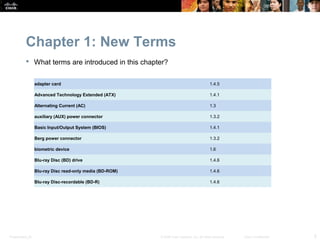
Chapter 1: New Terms
            What terms are introduced in this chapter?


                  adapter card                                                               1.4.5

                  Advanced Technology Extended (ATX)                                         1.4.1

                  Alternating Current (AC)                                                   1.3

                  auxiliary (AUX) power connector                                            1.3.2

                  Basic Input/Output System (BIOS)                                           1.4.1

                  Berg power connector                                                       1.3.2

                  biometric device                                                           1.6

                  Blu-ray Disc (BD) drive                                                    1.4.6

                  Blu-ray Disc read-only media (BD-ROM)                                      1.4.6

                  Blu-ray Disc-recordable (BD-R)                                             1.4.6


Presentation_ID                                           © 2008 Cisco Systems, Inc. All rights reserved.   Cisco Confidential   5
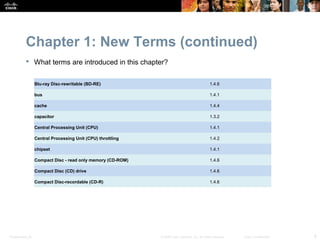
Chapter 1: New Terms (continued)
            What terms are introduced in this chapter?


                  Blu-ray Disc-rewritable (BD-RE)                                               1.4.6

                  bus                                                                           1.4.1

                  cache                                                                         1.4.4

                  capacitor                                                                     1.3.2

                  Central Processing Unit (CPU)                                                 1.4.1

                  Central Processing Unit (CPU) throttling                                      1.4.2

                  chipset                                                                       1.4.1

                  Compact Disc - read only memory (CD-ROM)                                      1.4.6

                  Compact Disc (CD) drive                                                       1.4.6

                  Compact Disc-recordable (CD-R)                                                1.4.6


Presentation_ID                                              © 2008 Cisco Systems, Inc. All rights reserved.   Cisco Confidential   6
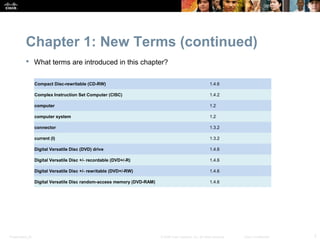
Chapter 1: New Terms (continued)
            What terms are introduced in this chapter?


                  Compact Disc-rewritable (CD-RW)                                                            1.4.6

                  Complex Instruction Set Computer (CISC)                                                    1.4.2

                  computer                                                                                   1.2

                  computer system                                                                            1.2

                  connector                                                                                  1.3.2

                  current (I)                                                                                1.3.2

                  Digital Versatile Disc (DVD) drive                                                         1.4.6

                  Digital Versatile Disc +/- recordable (DVD+/-R)                                            1.4.6

                  Digital Versatile Disc +/- rewritable (DVD+/-RW)                                           1.4.6

                  Digital Versatile Disc random-access memory (DVD-RAM)                                      1.4.6


Presentation_ID                                                           © 2008 Cisco Systems, Inc. All rights reserved.   Cisco Confidential   7
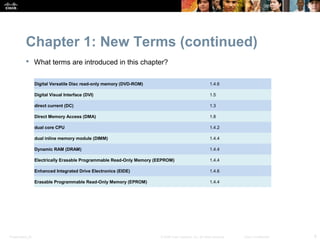
Chapter 1: New Terms (continued)
            What terms are introduced in this chapter?


                  Digital Versatile Disc read-only memory (DVD-ROM)                                        1.4.6

                  Digital Visual Interface (DVI)                                                           1.5

                  direct current (DC)                                                                      1.3

                  Direct Memory Access (DMA)                                                               1.8

                  dual core CPU                                                                            1.4.2

                  dual inline memory module (DIMM)                                                         1.4.4

                  Dynamic RAM (DRAM)                                                                       1.4.4

                  Electrically Erasable Programmable Read-Only Memory (EEPROM)                             1.4.4

                  Enhanced Integrated Drive Electronics (EIDE)                                             1.4.6

                  Erasable Programmable Read-Only Memory (EPROM)                                           1.4.4


Presentation_ID                                                         © 2008 Cisco Systems, Inc. All rights reserved.   Cisco Confidential   8
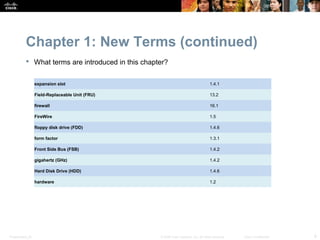
Chapter 1: New Terms (continued)
            What terms are introduced in this chapter?


                  expansion slot                                                       1.4.1

                  Field-Replaceable Unit (FRU)                                         13.2

                  firewall                                                             16.1

                  FireWire                                                             1.5

                  floppy disk drive (FDD)                                              1.4.6

                  form factor                                                          1.3.1

                  Front Side Bus (FSB)                                                 1.4.2

                  gigahertz (GHz)                                                      1.4.2

                  Hard Disk Drive (HDD)                                                1.4.6

                  hardware                                                             1.2


Presentation_ID                                     © 2008 Cisco Systems, Inc. All rights reserved.   Cisco Confidential   9
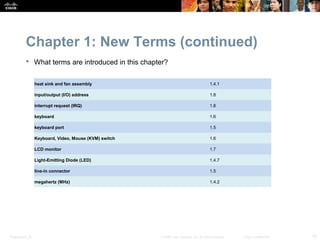
Chapter 1: New Terms (continued)
            What terms are introduced in this chapter?


                  heat sink and fan assembly                                               1.4.1

                  input/output (I/O) address                                               1.8

                  interrupt request (IRQ)                                                  1.8

                  keyboard                                                                 1.6

                  keyboard port                                                            1.5

                  Keyboard, Video, Mouse (KVM) switch                                      1.6

                  LCD monitor                                                              1.7

                  Light-Emitting Diode (LED)                                               1.4.7

                  line-in connector                                                        1.5

                  megahertz (MHz)                                                          1.4.2


Presentation_ID                                         © 2008 Cisco Systems, Inc. All rights reserved.   Cisco Confidential   10
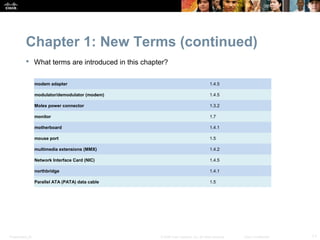
Chapter 1: New Terms (continued)
            What terms are introduced in this chapter?


                  modem adapter                                                        1.4.5

                  modulator/demodulator (modem)                                        1.4.5

                  Molex power connector                                                1.3.2

                  monitor                                                              1.7

                  motherboard                                                          1.4.1

                  mouse port                                                           1.5

                  multimedia extensions (MMX)                                          1.4.2

                  Network Interface Card (NIC)                                         1.4.5

                  northbridge                                                          1.4.1

                  Parallel ATA (PATA) data cable                                       1.5


Presentation_ID                                     © 2008 Cisco Systems, Inc. All rights reserved.   Cisco Confidential   11
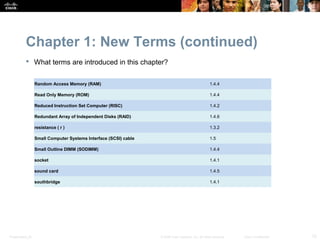
Chapter 1: New Terms (continued)
            What terms are introduced in this chapter?


                  Random Access Memory (RAM)                                                         1.4.4

                  Read Only Memory (ROM)                                                             1.4.4

                  Reduced Instruction Set Computer (RISC)                                            1.4.2

                  Redundant Array of Independent Disks (RAID)                                        1.4.6

                  resistance ( r )                                                                   1.3.2

                  Small Computer Systems Interface (SCSI) cable                                      1.5

                  Small Outline DIMM (SODIMM)                                                        1.4.4

                  socket                                                                             1.4.1

                  sound card                                                                         1.4.5

                  southbridge                                                                        1.4.1


Presentation_ID                                                   © 2008 Cisco Systems, Inc. All rights reserved.   Cisco Confidential   12
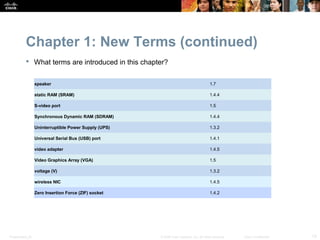
Chapter 1: New Terms (continued)
            What terms are introduced in this chapter?


                  speaker                                                                 1.7

                  static RAM (SRAM)                                                       1.4.4

                  S-video port                                                            1.5

                  Synchronous Dynamic RAM (SDRAM)                                         1.4.4

                  Uninterruptible Power Supply (UPS)                                      1.3.2

                  Universal Serial Bus (USB) port                                         1.4.1

                  video adapter                                                           1.4.5

                  Video Graphics Array (VGA)                                              1.5

                  voltage (V)                                                             1.3.2

                  wireless NIC                                                            1.4.5

                  Zero Insertion Force (ZIF) socket                                       1.4.2


Presentation_ID                                        © 2008 Cisco Systems, Inc. All rights reserved.   Cisco Confidential   13
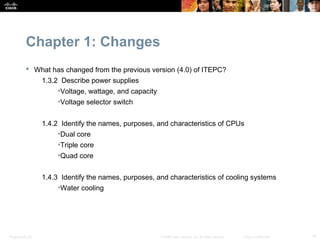
Chapter 1: Changes
            What has changed from the previous version (4.0) of ITEPC?
                  1.3.2 Describe power supplies
                       •Voltage, wattage, and capacity
                       •Voltage selector switch


                  1.4.2 Identify the names, purposes, and characteristics of CPUs
                       •Dual core
                       •Triple core
                       •Quad core


                  1.4.3 Identify the names, purposes, and characteristics of cooling systems
                       •Water cooling


Presentation_ID                                          © 2008 Cisco Systems, Inc. All rights reserved.   Cisco Confidential   14
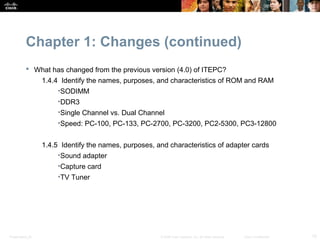
Chapter 1: Changes (continued)
            What has changed from the previous version (4.0) of ITEPC?
                  1.4.4 Identify the names, purposes, and characteristics of ROM and RAM
                       •SODIMM
                       •DDR3
                       •Single Channel vs. Dual Channel
                       •Speed: PC-100, PC-133, PC-2700, PC-3200, PC2-5300, PC3-12800


                  1.4.5 Identify the names, purposes, and characteristics of adapter cards
                       •Sound adapter
                       •Capture card
                       •TV Tuner


Presentation_ID                                        © 2008 Cisco Systems, Inc. All rights reserved.   Cisco Confidential   15
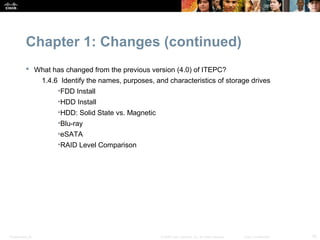
Chapter 1: Changes (continued)
            What has changed from the previous version (4.0) of ITEPC?
                  1.4.6 Identify the names, purposes, and characteristics of storage drives
                       •FDD Install
                       •HDD Install
                       •HDD: Solid State vs. Magnetic
                       •Blu-ray
                       •eSATA
                       •RAID Level Comparison


Presentation_ID                                         © 2008 Cisco Systems, Inc. All rights reserved.   Cisco Confidential   16
Chapter 1: Changes (continued)
            What has changed from the previous version (4.0) of ITEPC?
              1.5 Identify the names, purposes, and characteristics of ports and cables
                   •RJ-45

                  1.6 Identify the names, purposes, and characteristics of input devices
                       •KVM Switch
                       •Fingerprint Scanner

                  1.7 Identify the names, purposes, and characteristics of output devices
                       •Degauss
                       •Display Resolutions
                       •Contrast Ratio
                       •Native Resolution
                       •Multiple monitors


Presentation_ID                                        © 2008 Cisco Systems, Inc. All rights reserved.   Cisco Confidential   17
Chapter 1: Classroom Management
                   The instructor should ensure that students acquire as many hands-on
                    experiences as possible. If possible, have different types of computers and
                    computer parts available for students to view during class. Legacy or non-
                    functioning parts can be handled during class discussions.
                   Bring pictures and articles that deal with basic IT concepts and computers. Use
                    these articles to facilitate class discussions.
                   A tour through a data center or a physical inspection of computer parts that are
                    brought to class is recommended.
                   Assemble a computer in front of the students; it should not take more than 40
                    minutes to complete. Give a short explanation of the role and functionality of
                    each component prior to installation.


Presentation_ID                                         © 2008 Cisco Systems, Inc. All rights reserved.   Cisco Confidential   18
Chapter 1: Classroom Management
           (continued)
                   Write the following terms on the board during discussion: power supply,
                    motherboard, CPU, ROM, RAM, adapter, hard drive, CD/DVD, serial port, USB
                    port, IEEE 1394 (FireWire) port, parallel port, Ethernet port, PS/2 mouse or
                    keyboard port, audio port, video port (VGA and DVI should be shown), and
                    internal modem port. This emphasizes the importance of the term.
                   Demonstrate the basic concepts related to electronics with a lemon, a penny,
                    and a nail. There are several experiments that can be done in class to help the
                    students understand simple circuits, stored energy, and magnetism. Do an
                    Internet search on the following terms: basic electronics lemon.
                   Taking simple voltage readings from the motherboard battery or from an unused
                    Molex power supply connector makes the term voltage more applicable to the
                    chapter.
                   Bring in a couple of diagrams of chipsets to show how they affect the
                    motherboard design. Have the students research the chipset for the
                    motherboard that is used in the classroom computers. Some example chipsets
                    are: Intel G31, Intel G45, AMD 780G.


Presentation_ID                                        © 2008 Cisco Systems, Inc. All rights reserved.   Cisco Confidential   19
Chapter 1: Teaching Analogies
            When teaching the difference between hard drive and RAM memory, compare an
             office space and a computer. The working person is like a CPU, the desk area is
             similar to RAM memory, a file cabinet is similar to the hard drive, and files stored on
             the hard drive compare with printed documents stored in the file cabinet.
                  • The larger the desk area, the greater the number of documents that can be opened on it at
                    the same time. If the desk is not large enough, the person (the CPU) must close a file and
                    properly store it inside the file cabinet before searching and opening a new one. This
                    process takes time.
            The different types of memory that a computer uses, in order of fastest to slowest,
             are as follows:
              • memory inside CPU - L1 cache
              • memory in the processor housing - L2 cache
              • memory on the motherboard – RAM
              • hard drive space that is used as memory – virtual memory
               An analogy is similar to getting a drink of water: (1) Having a glass of water sitting
                on your desk is similar to having L1 cache. (2) Having to go refill the glass from a
                faucet is similar to having L2 cache. (3) Having to get bottled water from a drink
                machine is similar to having RAM. (4) Having to go to a store and buy bottled
                water is similar to having hard drive storage that is used as RAM.


Presentation_ID                                               © 2008 Cisco Systems, Inc. All rights reserved.   Cisco Confidential   20
Chapter 1: Suggested Class Discussions
                     Explain how to register and prepare for certification exams.
                      • CompTIA A+ certification
                      •   Other Cisco certifications (CCNA, CCNP, CCIE, etc.)
                      •   EUCIP certification
                     Computer speed relates to all components; upgrading one component is
                      sometimes like putting a small bandage on a large wound.


Presentation_ID                                         © 2008 Cisco Systems, Inc. All rights reserved.   Cisco Confidential   21
Chapter 1: Best Practices
                     Obtain computers and components from these possible sources for class:
                      • Technicians at school
                      • Computer repair stores
                      • Donations from students, parents, alumni, and advisory committee
                         members
                      • Goodwill
                      • E-mail faculty and staff requesting any extra computers and components


Presentation_ID                                       © 2008 Cisco Systems, Inc. All rights reserved.   Cisco Confidential   22
Chapter 1: Best Practices (continued)
                     Organize computers and components for class:
                      • Use separate bins for good parts and bad parts.
                      • Use separate bins or paper boxes for categories of parts: motherboards,
                         PATA drives, video cards, floppy drives, CD/DVD drives, cables.
                      • Use rolling carts for computer storage and security. This allows flexibility
                         for storage and ease of use in the classroom.
                      • Place a unique number on a computer and corresponding storage bin.
                         When disassembling the computer, place the components in the storage
                         bin with the matching computer number to keep parts organized for that
                         computer. Students and instructors can quickly identify which
                         components belong to which computer.


Presentation_ID                                         © 2008 Cisco Systems, Inc. All rights reserved.   Cisco Confidential   23
Chapter 1: Outside Reading
                  CompTIA Certification Website
                   http://www.comptia.org/certifications
                  Cisco Networking Academy Website
                  NetAcad ITE Forum


                  Microsoft XP Website
                  Microsoft Vista Website
                  Microsoft Compatibility Checker


Presentation_ID                                            © 2008 Cisco Systems, Inc. All rights reserved.   Cisco Confidential   24
Presentation_ID   © 2008 Cisco Systems, Inc. All rights reserved.   Cisco Confidential   25
Presentation_ID   © 2008 Cisco Systems, Inc. All rights reserved.   Cisco Confidential   26

ITE - Chapter 1

  • 1.
    IT Essentials PCHardware and Software 4.1 Instructional Resource Chapter 1: Introduction to the Personal Computer Presentation_ID © 2008 Cisco Systems, Inc. All rights reserved. Cisco Confidential 1
  • 2.
    Chapter 1: Objectives  Chapter Objectives Explain IT industry certifications. Describe a computer system. Identify the names, purposes, and characteristics of cases and power supplies. Identify the names, purposes, and characteristics of internal components. Identify the names, purposes, and characteristics of ports and cables. Identify the names, purposes, and characteristics of input devices. Identify the names, purposes, and characteristics of output devices. Explain system resources and their purposes. Presentation_ID © 2008 Cisco Systems, Inc. All rights reserved. Cisco Confidential 2
  • 3.
    Chapter 1: CriticalConcepts  What is this chapter about and why is it important?  Professional certification proves to employers that the certificate holder has gained a level of knowledge and experience that is confirmed by a respected third party. For example, the successful completion of CompTIA’s A+ exams or EUCIP’s IT Administrator exams demonstrates that the certificate holder has sufficient basic knowledge to work effectively in many different IT positions.  A personal computer is designed to run software programs that help people work, play, and learn. This chapter discusses the hardware that is required to build a desktop computer. It covers the hardware components that are found in most personal computers. It explains the unique purpose of each component and how these components work together.  This chapter is important because it provides the foundational information that is required to build, upgrade, and repair personal computers. Successful completion of this course will be excellent preparation for the CompTIA A+ Certification exam, the EUCIP IT Administrator Certification for Modules 1 and 2, and for on-the-job performance. Presentation_ID © 2008 Cisco Systems, Inc. All rights reserved. Cisco Confidential 3
  • 4.
    Chapter 1: Activities  What activities are associated with this chapter? 1.1.2 Worksheet: Job Opportunities 1.4.7 Worksheet: Research Computer Components Chapter 1 Quiz Presentation_ID © 2008 Cisco Systems, Inc. All rights reserved. Cisco Confidential 4
  • 5.
    Chapter 1: NewTerms  What terms are introduced in this chapter? adapter card 1.4.5 Advanced Technology Extended (ATX) 1.4.1 Alternating Current (AC) 1.3 auxiliary (AUX) power connector 1.3.2 Basic Input/Output System (BIOS) 1.4.1 Berg power connector 1.3.2 biometric device 1.6 Blu-ray Disc (BD) drive 1.4.6 Blu-ray Disc read-only media (BD-ROM) 1.4.6 Blu-ray Disc-recordable (BD-R) 1.4.6 Presentation_ID © 2008 Cisco Systems, Inc. All rights reserved. Cisco Confidential 5
  • 6.
    Chapter 1: NewTerms (continued)  What terms are introduced in this chapter? Blu-ray Disc-rewritable (BD-RE) 1.4.6 bus 1.4.1 cache 1.4.4 capacitor 1.3.2 Central Processing Unit (CPU) 1.4.1 Central Processing Unit (CPU) throttling 1.4.2 chipset 1.4.1 Compact Disc - read only memory (CD-ROM) 1.4.6 Compact Disc (CD) drive 1.4.6 Compact Disc-recordable (CD-R) 1.4.6 Presentation_ID © 2008 Cisco Systems, Inc. All rights reserved. Cisco Confidential 6
  • 7.
    Chapter 1: NewTerms (continued)  What terms are introduced in this chapter? Compact Disc-rewritable (CD-RW) 1.4.6 Complex Instruction Set Computer (CISC) 1.4.2 computer 1.2 computer system 1.2 connector 1.3.2 current (I) 1.3.2 Digital Versatile Disc (DVD) drive 1.4.6 Digital Versatile Disc +/- recordable (DVD+/-R) 1.4.6 Digital Versatile Disc +/- rewritable (DVD+/-RW) 1.4.6 Digital Versatile Disc random-access memory (DVD-RAM) 1.4.6 Presentation_ID © 2008 Cisco Systems, Inc. All rights reserved. Cisco Confidential 7
  • 8.
    Chapter 1: NewTerms (continued)  What terms are introduced in this chapter? Digital Versatile Disc read-only memory (DVD-ROM) 1.4.6 Digital Visual Interface (DVI) 1.5 direct current (DC) 1.3 Direct Memory Access (DMA) 1.8 dual core CPU 1.4.2 dual inline memory module (DIMM) 1.4.4 Dynamic RAM (DRAM) 1.4.4 Electrically Erasable Programmable Read-Only Memory (EEPROM) 1.4.4 Enhanced Integrated Drive Electronics (EIDE) 1.4.6 Erasable Programmable Read-Only Memory (EPROM) 1.4.4 Presentation_ID © 2008 Cisco Systems, Inc. All rights reserved. Cisco Confidential 8
  • 9.
    Chapter 1: NewTerms (continued)  What terms are introduced in this chapter? expansion slot 1.4.1 Field-Replaceable Unit (FRU) 13.2 firewall 16.1 FireWire 1.5 floppy disk drive (FDD) 1.4.6 form factor 1.3.1 Front Side Bus (FSB) 1.4.2 gigahertz (GHz) 1.4.2 Hard Disk Drive (HDD) 1.4.6 hardware 1.2 Presentation_ID © 2008 Cisco Systems, Inc. All rights reserved. Cisco Confidential 9
  • 10.
    Chapter 1: NewTerms (continued)  What terms are introduced in this chapter? heat sink and fan assembly 1.4.1 input/output (I/O) address 1.8 interrupt request (IRQ) 1.8 keyboard 1.6 keyboard port 1.5 Keyboard, Video, Mouse (KVM) switch 1.6 LCD monitor 1.7 Light-Emitting Diode (LED) 1.4.7 line-in connector 1.5 megahertz (MHz) 1.4.2 Presentation_ID © 2008 Cisco Systems, Inc. All rights reserved. Cisco Confidential 10
  • 11.
    Chapter 1: NewTerms (continued)  What terms are introduced in this chapter? modem adapter 1.4.5 modulator/demodulator (modem) 1.4.5 Molex power connector 1.3.2 monitor 1.7 motherboard 1.4.1 mouse port 1.5 multimedia extensions (MMX) 1.4.2 Network Interface Card (NIC) 1.4.5 northbridge 1.4.1 Parallel ATA (PATA) data cable 1.5 Presentation_ID © 2008 Cisco Systems, Inc. All rights reserved. Cisco Confidential 11
  • 12.
    Chapter 1: NewTerms (continued)  What terms are introduced in this chapter? Random Access Memory (RAM) 1.4.4 Read Only Memory (ROM) 1.4.4 Reduced Instruction Set Computer (RISC) 1.4.2 Redundant Array of Independent Disks (RAID) 1.4.6 resistance ( r ) 1.3.2 Small Computer Systems Interface (SCSI) cable 1.5 Small Outline DIMM (SODIMM) 1.4.4 socket 1.4.1 sound card 1.4.5 southbridge 1.4.1 Presentation_ID © 2008 Cisco Systems, Inc. All rights reserved. Cisco Confidential 12
  • 13.
    Chapter 1: NewTerms (continued)  What terms are introduced in this chapter? speaker 1.7 static RAM (SRAM) 1.4.4 S-video port 1.5 Synchronous Dynamic RAM (SDRAM) 1.4.4 Uninterruptible Power Supply (UPS) 1.3.2 Universal Serial Bus (USB) port 1.4.1 video adapter 1.4.5 Video Graphics Array (VGA) 1.5 voltage (V) 1.3.2 wireless NIC 1.4.5 Zero Insertion Force (ZIF) socket 1.4.2 Presentation_ID © 2008 Cisco Systems, Inc. All rights reserved. Cisco Confidential 13
  • 14.
    Chapter 1: Changes  What has changed from the previous version (4.0) of ITEPC? 1.3.2 Describe power supplies •Voltage, wattage, and capacity •Voltage selector switch 1.4.2 Identify the names, purposes, and characteristics of CPUs •Dual core •Triple core •Quad core 1.4.3 Identify the names, purposes, and characteristics of cooling systems •Water cooling Presentation_ID © 2008 Cisco Systems, Inc. All rights reserved. Cisco Confidential 14
  • 15.
    Chapter 1: Changes(continued)  What has changed from the previous version (4.0) of ITEPC? 1.4.4 Identify the names, purposes, and characteristics of ROM and RAM •SODIMM •DDR3 •Single Channel vs. Dual Channel •Speed: PC-100, PC-133, PC-2700, PC-3200, PC2-5300, PC3-12800 1.4.5 Identify the names, purposes, and characteristics of adapter cards •Sound adapter •Capture card •TV Tuner Presentation_ID © 2008 Cisco Systems, Inc. All rights reserved. Cisco Confidential 15
  • 16.
    Chapter 1: Changes(continued)  What has changed from the previous version (4.0) of ITEPC? 1.4.6 Identify the names, purposes, and characteristics of storage drives •FDD Install •HDD Install •HDD: Solid State vs. Magnetic •Blu-ray •eSATA •RAID Level Comparison Presentation_ID © 2008 Cisco Systems, Inc. All rights reserved. Cisco Confidential 16
  • 17.
    Chapter 1: Changes(continued)  What has changed from the previous version (4.0) of ITEPC? 1.5 Identify the names, purposes, and characteristics of ports and cables •RJ-45 1.6 Identify the names, purposes, and characteristics of input devices •KVM Switch •Fingerprint Scanner 1.7 Identify the names, purposes, and characteristics of output devices •Degauss •Display Resolutions •Contrast Ratio •Native Resolution •Multiple monitors Presentation_ID © 2008 Cisco Systems, Inc. All rights reserved. Cisco Confidential 17
  • 18.
    Chapter 1: ClassroomManagement  The instructor should ensure that students acquire as many hands-on experiences as possible. If possible, have different types of computers and computer parts available for students to view during class. Legacy or non- functioning parts can be handled during class discussions.  Bring pictures and articles that deal with basic IT concepts and computers. Use these articles to facilitate class discussions.  A tour through a data center or a physical inspection of computer parts that are brought to class is recommended.  Assemble a computer in front of the students; it should not take more than 40 minutes to complete. Give a short explanation of the role and functionality of each component prior to installation. Presentation_ID © 2008 Cisco Systems, Inc. All rights reserved. Cisco Confidential 18
  • 19.
    Chapter 1: ClassroomManagement (continued)  Write the following terms on the board during discussion: power supply, motherboard, CPU, ROM, RAM, adapter, hard drive, CD/DVD, serial port, USB port, IEEE 1394 (FireWire) port, parallel port, Ethernet port, PS/2 mouse or keyboard port, audio port, video port (VGA and DVI should be shown), and internal modem port. This emphasizes the importance of the term.  Demonstrate the basic concepts related to electronics with a lemon, a penny, and a nail. There are several experiments that can be done in class to help the students understand simple circuits, stored energy, and magnetism. Do an Internet search on the following terms: basic electronics lemon.  Taking simple voltage readings from the motherboard battery or from an unused Molex power supply connector makes the term voltage more applicable to the chapter.  Bring in a couple of diagrams of chipsets to show how they affect the motherboard design. Have the students research the chipset for the motherboard that is used in the classroom computers. Some example chipsets are: Intel G31, Intel G45, AMD 780G. Presentation_ID © 2008 Cisco Systems, Inc. All rights reserved. Cisco Confidential 19
  • 20.
    Chapter 1: TeachingAnalogies  When teaching the difference between hard drive and RAM memory, compare an office space and a computer. The working person is like a CPU, the desk area is similar to RAM memory, a file cabinet is similar to the hard drive, and files stored on the hard drive compare with printed documents stored in the file cabinet. • The larger the desk area, the greater the number of documents that can be opened on it at the same time. If the desk is not large enough, the person (the CPU) must close a file and properly store it inside the file cabinet before searching and opening a new one. This process takes time.  The different types of memory that a computer uses, in order of fastest to slowest, are as follows: • memory inside CPU - L1 cache • memory in the processor housing - L2 cache • memory on the motherboard – RAM • hard drive space that is used as memory – virtual memory  An analogy is similar to getting a drink of water: (1) Having a glass of water sitting on your desk is similar to having L1 cache. (2) Having to go refill the glass from a faucet is similar to having L2 cache. (3) Having to get bottled water from a drink machine is similar to having RAM. (4) Having to go to a store and buy bottled water is similar to having hard drive storage that is used as RAM. Presentation_ID © 2008 Cisco Systems, Inc. All rights reserved. Cisco Confidential 20
  • 21.
    Chapter 1: SuggestedClass Discussions  Explain how to register and prepare for certification exams. • CompTIA A+ certification • Other Cisco certifications (CCNA, CCNP, CCIE, etc.) • EUCIP certification  Computer speed relates to all components; upgrading one component is sometimes like putting a small bandage on a large wound. Presentation_ID © 2008 Cisco Systems, Inc. All rights reserved. Cisco Confidential 21
  • 22.
    Chapter 1: BestPractices  Obtain computers and components from these possible sources for class: • Technicians at school • Computer repair stores • Donations from students, parents, alumni, and advisory committee members • Goodwill • E-mail faculty and staff requesting any extra computers and components Presentation_ID © 2008 Cisco Systems, Inc. All rights reserved. Cisco Confidential 22
  • 23.
    Chapter 1: BestPractices (continued)  Organize computers and components for class: • Use separate bins for good parts and bad parts. • Use separate bins or paper boxes for categories of parts: motherboards, PATA drives, video cards, floppy drives, CD/DVD drives, cables. • Use rolling carts for computer storage and security. This allows flexibility for storage and ease of use in the classroom. • Place a unique number on a computer and corresponding storage bin. When disassembling the computer, place the components in the storage bin with the matching computer number to keep parts organized for that computer. Students and instructors can quickly identify which components belong to which computer. Presentation_ID © 2008 Cisco Systems, Inc. All rights reserved. Cisco Confidential 23
  • 24.
    Chapter 1: OutsideReading CompTIA Certification Website http://www.comptia.org/certifications Cisco Networking Academy Website NetAcad ITE Forum Microsoft XP Website Microsoft Vista Website Microsoft Compatibility Checker Presentation_ID © 2008 Cisco Systems, Inc. All rights reserved. Cisco Confidential 24
  • 25.
    Presentation_ID © 2008 Cisco Systems, Inc. All rights reserved. Cisco Confidential 25
  • 26.
    Presentation_ID © 2008 Cisco Systems, Inc. All rights reserved. Cisco Confidential 26