
Table	
  Views	
  in	
  iOS	
  Apps	
  

         Jussi	
  Pohjolainen	
  
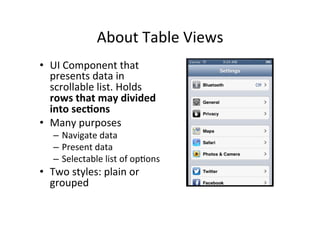
About	
  Table	
  Views	
  
•  UI	
  Component	
  that	
  
   presents	
  data	
  in	
  
   scrollable	
  list.	
  Holds	
  
   rows	
  that	
  may	
  divided	
  
   into	
  sec1ons	
  
•  Many	
  purposes	
  
    –  Navigate	
  data	
  
    –  Present	
  data	
  
    –  Selectable	
  list	
  of	
  opFons	
  
•  Two	
  styles:	
  plain	
  or	
  
   grouped	
  
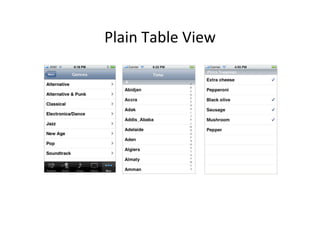
Plain	
  Table	
  View	
  
Cells	
  
•  Table	
  view	
  draws	
  it’s	
  rows	
  using	
  
   UITableViewCell	
  objects	
  
    –  Can	
  contain	
  text,	
  images	
  or	
  other	
  kind	
  of	
  content	
  
    –  Can	
  contain	
  background	
  view	
  for	
  normal	
  and	
  
       selected	
  states	
  
•  Framework	
  defines	
  four	
  cell	
  types,	
  with	
  
   common	
  informa1on	
  
    –  Main	
  label,	
  detail	
  label	
  and	
  image	
  
    –  You	
  can	
  define	
  your	
  own	
  cell	
  type	
  also	
  
Responding	
  to	
  SelecFons	
  
•  As	
  always,	
  UITableView	
  has	
  an	
  delegate	
  
•  Delegate	
  methods	
  are	
  called	
  when	
  user	
  clicks	
  
     a	
  row.	
  Method	
  receives	
  the	
  index	
  of	
  row	
  and	
  
     secFon	


EdiFng	
  Mode	
  
•  Table	
  views	
  can	
  support	
  edi1ng	
  mode	
  
   –  User	
  can	
  insert	
  or	
  delete	
  rows,	
  relocate	
  them	
  in	
  
      the	
  table	
  
•  When	
  ediFng	
  a	
  sequence	
  of	
  messages	
  are	
  
   sent	
  to	
  data	
  source	
  and	
  delegate	
  
IMPLEMENTING	
  TABLE	
  VIEW	
  
Classes	
  Needed	
  
•  Table	
  View	
  
     –  UITableView
     –  Manage	
  selecFons,	
  scroll	
  the	
  table	
  view,	
  insert	
  or	
  delete	
  rows	
  and	
  selecFons	
  
     –  UITableView	
  inherites	
  UIScrollView,	
  defines	
  scrolling	
  as	
  default	
  
•  Table	
  View	
  Controller	
  
     –  UITableViewController
     –  Adds	
  support	
  for	
  many	
  standard	
  table	
  related	
  behaviors.	
  Minimize	
  the	
  
        amount	
  of	
  code	
  you	
  have	
  to	
  write.	
  
     –  Subclass	
  UITableViewController	
  
•  Data	
  Source	
  and	
  Delegate	
  
     –  UITableView	
  must	
  have	
  delegate	
  and	
  data	
  source:	
  UITableViewDataSource	
  
        and	
  UITableViewDelegate
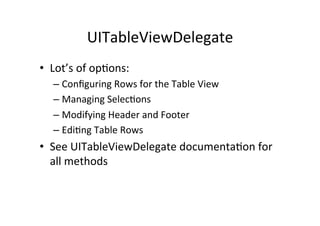
UITableViewDelegate	
  
•  Lot’s	
  of	
  opFons:	
  
    –  Configuring	
  Rows	
  for	
  the	
  Table	
  View 	
  	
  
    –  Managing	
  SelecFons	
  
    –  Modifying	
  Header	
  and	
  Footer	
  
    –  EdiFng	
  Table	
  Rows	
  
•  See	
  UITableViewDelegate	
  documentaFon	
  for	
  
   all	
  methods	
  
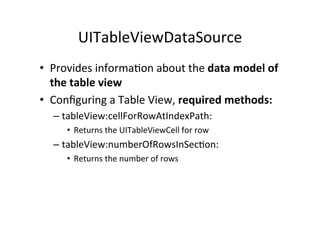
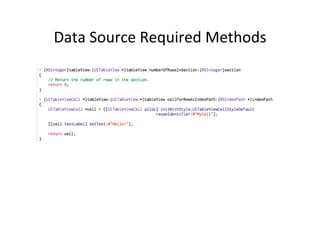
UITableViewDataSource	
  
•  Provides	
  informaFon	
  about	
  the	
  data	
  model	
  of	
  
   the	
  table	
  view	
  
•  Configuring	
  a	
  Table	
  View,	
  required	
  methods:	
  
   –  tableView:cellForRowAtIndexPath:	
  
       •  Returns	
  the	
  UITableViewCell	
  for	
  row	
  
   –  tableView:numberOfRowsInSecFon:	
  	
  
       •  Returns	
  the	
  number	
  of	
  rows	
  
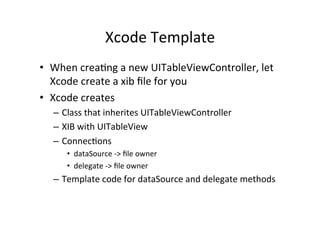
Xcode	
  Template	
  
•  When	
  creaFng	
  a	
  new	
  UITableViewController,	
  let	
  
   Xcode	
  create	
  a	
  xib	
  file	
  for	
  you	
  
•  Xcode	
  creates	
  
   –  Class	
  that	
  inherites	
  UITableViewController	
  
   –  XIB	
  with	
  UITableView	
  
   –  ConnecFons	
  
       •  dataSource	
  -­‐>	
  file	
  owner	
  
       •  delegate	
  -­‐>	
  file	
  owner	
  
   –  Template	
  code	
  for	
  dataSource	
  and	
  delegate	
  methods	


Data	
  Source	
  Required	
  Methods	
  
Reusing	
  UITableViewCells	
  
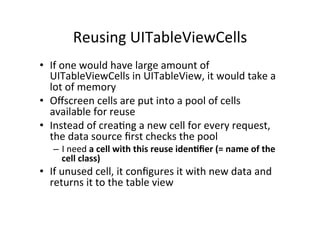
•  If	
  one	
  would	
  have	
  large	
  amount	
  of	
  
   UITableViewCells	
  in	
  UITableView,	
  it	
  would	
  take	
  a	
  
   lot	
  of	
  memory	
  
•  Offscreen	
  cells	
  are	
  put	
  into	
  a	
  pool	
  of	
  cells	
  
   available	
  for	
  reuse	
  
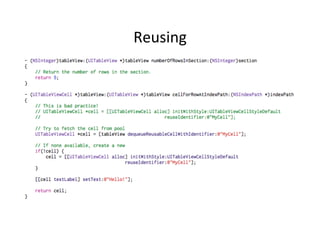
•  Instead	
  of	
  creaFng	
  a	
  new	
  cell	
  for	
  every	
  request,	
  
   the	
  data	
  source	
  first	
  checks	
  the	
  pool	
  
    –  I	
  need	
  a	
  cell	
  with	
  this	
  reuse	
  iden1fier	
  (=	
  name	
  of	
  the	
  
       cell	
  class)	
  
•  If	
  unused	
  cell,	
  it	
  configures	
  it	
  with	
  new	
  data	
  and	
  
   returns	
  it	
  to	
  the	
  table	
  view	
  
Reusing	
  
NSIndexPath
•  The	
  NSIndexPath	
  class	
  represents	
  the	
  path	
  to	
  
   a	
  specific	
  node	
  in	
  a	
  tree	
  of	
  nested	
  array	
  
   collecFons.	
  This	
  path	
  is	
  known	
  as	
  an	
  index	
  
   path.	
  
•  Has	
  two	
  properFes:	
  secFon	
  and	
  row	
  
NavigaFon	
  and	
  Table	
  View	
  
•  Follow	
  paYerns	
  that	
  are	
  common	
  to	
  all	
  
   navigaFon-­‐based	
  apps	
  
    –  Use	
  data	
  model	
  that	
  has	
  hierarchical	
  depth;	
  
       arrays,	
  dicFonary,	
  some	
  collecFon	
  
    –  Array	
  may	
  contain	
  another	
  array	
  and	
  so	
  on..	
  
•  When	
  user	
  taps	
  a	
  row,	
  then	
  
    –  Create	
  new	
  table	
  view	
  controller,	
  set	
  it’s	
  data	
  and	
  
       push	
  it	
  to	
  navigaFon	
  controller	
  
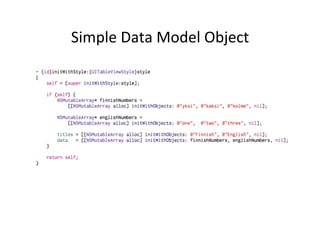
Simple	
  Data	
  Model	
  Object	
  
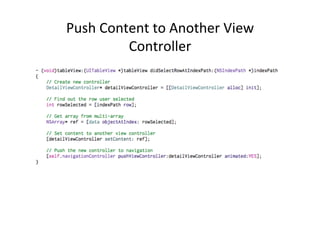
Push	
  Content	
  to	
  Another	
  View	
  
            Controller	
  
EDITABLE	
  TABLE	
  VIEW	
  
Editable	
  Table	
  View	
  
•  User	
  can	
  add,	
  delete	
  or	
  
   move	
  table	
  rows	
  
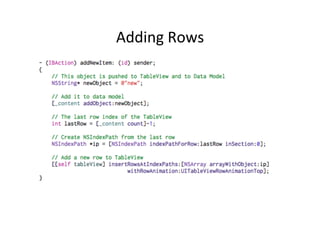
•  Set	
  ediFng	
  property	
  to	
  YES	
  
    –  [[self tableView]
       setEditing:YES];
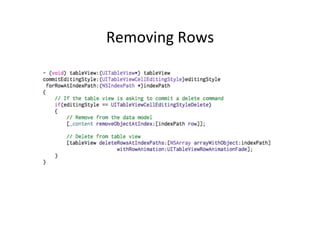
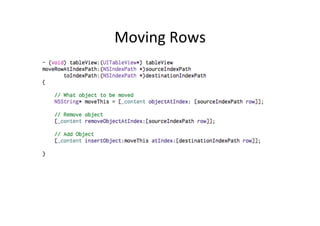
•  And	
  implement	
  delegate	
  
   methods	
  for	
  moving	
  and	
  
   deleFng	
  
Adding	
  Rows	
  
Removing	
  Rows	
  
Moving	
  Rows	
  

iOS: Table Views

  • 1.
    Table  Views  in  iOS  Apps   Jussi  Pohjolainen  
  • 2.
    About  Table  Views   •  UI  Component  that   presents  data  in   scrollable  list.  Holds   rows  that  may  divided   into  sec1ons   •  Many  purposes   –  Navigate  data   –  Present  data   –  Selectable  list  of  opFons   •  Two  styles:  plain  or   grouped  
  • 3.
  • 4.
    Cells   •  Table  view  draws  it’s  rows  using   UITableViewCell  objects   –  Can  contain  text,  images  or  other  kind  of  content   –  Can  contain  background  view  for  normal  and   selected  states   •  Framework  defines  four  cell  types,  with   common  informa1on   –  Main  label,  detail  label  and  image   –  You  can  define  your  own  cell  type  also  
  • 5.
    Responding  to  SelecFons   •  As  always,  UITableView  has  an  delegate   •  Delegate  methods  are  called  when  user  clicks   a  row.  Method  receives  the  index  of  row  and   secFon    
  • 6.
    EdiFng  Mode   • Table  views  can  support  edi1ng  mode   –  User  can  insert  or  delete  rows,  relocate  them  in   the  table   •  When  ediFng  a  sequence  of  messages  are   sent  to  data  source  and  delegate  
  • 7.
  • 8.
    Classes  Needed   • Table  View   –  UITableView –  Manage  selecFons,  scroll  the  table  view,  insert  or  delete  rows  and  selecFons   –  UITableView  inherites  UIScrollView,  defines  scrolling  as  default   •  Table  View  Controller   –  UITableViewController –  Adds  support  for  many  standard  table  related  behaviors.  Minimize  the   amount  of  code  you  have  to  write.   –  Subclass  UITableViewController   •  Data  Source  and  Delegate   –  UITableView  must  have  delegate  and  data  source:  UITableViewDataSource   and  UITableViewDelegate
  • 9.
    UITableViewDelegate   •  Lot’s  of  opFons:   –  Configuring  Rows  for  the  Table  View     –  Managing  SelecFons   –  Modifying  Header  and  Footer   –  EdiFng  Table  Rows   •  See  UITableViewDelegate  documentaFon  for   all  methods  
  • 10.
    UITableViewDataSource   •  Provides  informaFon  about  the  data  model  of   the  table  view   •  Configuring  a  Table  View,  required  methods:   –  tableView:cellForRowAtIndexPath:   •  Returns  the  UITableViewCell  for  row   –  tableView:numberOfRowsInSecFon:     •  Returns  the  number  of  rows  
  • 11.
    Xcode  Template   • When  creaFng  a  new  UITableViewController,  let   Xcode  create  a  xib  file  for  you   •  Xcode  creates   –  Class  that  inherites  UITableViewController   –  XIB  with  UITableView   –  ConnecFons   •  dataSource  -­‐>  file  owner   •  delegate  -­‐>  file  owner   –  Template  code  for  dataSource  and  delegate  methods    
  • 12.
  • 13.
    Reusing  UITableViewCells   • If  one  would  have  large  amount  of   UITableViewCells  in  UITableView,  it  would  take  a   lot  of  memory   •  Offscreen  cells  are  put  into  a  pool  of  cells   available  for  reuse   •  Instead  of  creaFng  a  new  cell  for  every  request,   the  data  source  first  checks  the  pool   –  I  need  a  cell  with  this  reuse  iden1fier  (=  name  of  the   cell  class)   •  If  unused  cell,  it  configures  it  with  new  data  and   returns  it  to  the  table  view  
  • 14.
  • 15.
    NSIndexPath •  The  NSIndexPath  class  represents  the  path  to   a  specific  node  in  a  tree  of  nested  array   collecFons.  This  path  is  known  as  an  index   path.   •  Has  two  properFes:  secFon  and  row  
  • 16.
    NavigaFon  and  Table  View   •  Follow  paYerns  that  are  common  to  all   navigaFon-­‐based  apps   –  Use  data  model  that  has  hierarchical  depth;   arrays,  dicFonary,  some  collecFon   –  Array  may  contain  another  array  and  so  on..   •  When  user  taps  a  row,  then   –  Create  new  table  view  controller,  set  it’s  data  and   push  it  to  navigaFon  controller  
  • 17.
  • 18.
    Push  Content  to  Another  View   Controller  
  • 19.
  • 20.
    Editable  Table  View   •  User  can  add,  delete  or   move  table  rows   •  Set  ediFng  property  to  YES   –  [[self tableView] setEditing:YES]; •  And  implement  delegate   methods  for  moving  and   deleFng  
  • 21.
  • 22.
  • 23.