iOS:	
  View	
  Controllers	
  

            Jussi	
  Pohjolainen	
  
Tampere	
  University	
  of	
  Applied	
  Sciences	
  
Screen,	
  Window,	
  UIView	
  
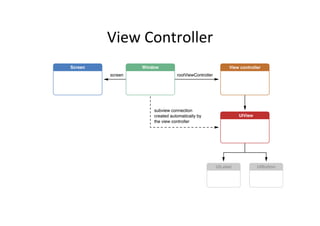
View	
  Controller	
  
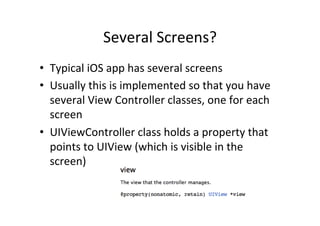
Several	
  Screens?	
  
•  Typical	
  iOS	
  app	
  has	
  several	
  screens	
  
•  Usually	
  this	
  is	
  implemented	
  so	
  that	
  you	
  have	
  
   several	
  View	
  Controller	
  classes,	
  one	
  for	
  each	
  
   screen	
  
•  UIViewController	
  class	
  holds	
  a	
  property	
  that	
  
   points	
  to	
  UIView	
  (which	
  is	
  visible	
  in	
  the	
  
   screen)	
  
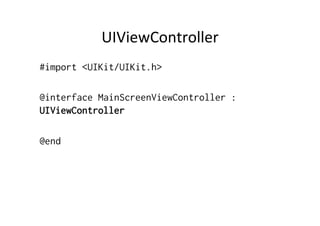
UIViewController	
  
#import <UIKit/UIKit.h>

@interface MainScreenViewController :
UIViewController

@end
Adding	
  a	
  BuIon	
  to	
  the	
  View	
  of	
  
                 ViewController	
  
- (void)viewDidLoad
{
    [super viewDidLoad];

    // Initialize a view, this could be a custom view also..
    UIButton* button =
            [UIButton buttonWithType:UIButtonTypeRoundedRect];
    [button setTitle:@"Main1" forState: UIControlStateNormal];

    // Add the view to the controller
    [self setView: button];
}
Root	
  Controller	
  
- (BOOL)application:(UIApplication *)application didFinishLaunchingWithOptions:
(NSDictionary *)launchOptions
{
    self.window = [[UIWindow alloc] initWithFrame:[[UIScreen mainScreen] bounds]];
    // Override point for customization after application launch.

    MainScreenViewController* mainscreen = [[MainScreenViewController alloc] init];

    [[self window] setRootViewController:mainscreen];


    self.window.backgroundColor = [UIColor whiteColor];
    [self.window makeKeyAndVisible];
    return YES;
}
Root	
  Controller?	
  
•  SeKng	
  a	
  view	
  controller	
  as	
  root	
  controller	
  of	
  a	
  
   window	
  
    –  Add’s	
  view	
  controller’s	
  view	
  to	
  window	
  
    –  AutomaMcally	
  resizes	
  the	
  view	
  to	
  be	
  the	
  same	
  size	
  
       than	
  window	
  
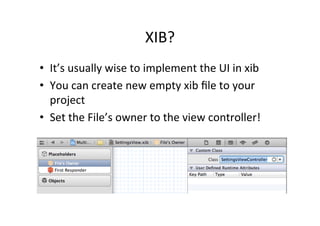
XIB?	
  
•  It’s	
  usually	
  wise	
  to	
  implement	
  the	
  UI	
  in	
  xib	
  
•  You	
  can	
  create	
  new	
  empty	
  xib	
  file	
  to	
  your	
  
   project	
  
•  Set	
  the	
  File’s	
  owner	
  to	
  the	
  view	
  controller!	
  
View	
  Controller	
  and	
  View	
  
•  The	
  View	
  Controller	
  has	
  a	
  property	
  View	
  
•  In	
  XIB,	
  you	
  can	
  add	
  to	
  canvas	
  a	
  UIView	
  and	
  
   connect	
  it	
  as	
  outlet	
  of	
  the	
  view	
  controller’s	
  
   view!	
  
Content	
  View	
  Controller	
  vs	
  
           Container	
  View	
  Controller	
  
•  Content	
  View	
  Controller	
  
   –  Content	
  on	
  the	
  screen	
  using	
  Views	
  
   –  Usually	
  has	
  a	
  .xib	
  
•  Container	
  View	
  Controller	
  
   –  Content	
  owned	
  by	
  other	
  View	
  Controllers	
  
   –  Parent	
  to	
  other	
  controllers	
  
   –  Container	
  manages	
  a	
  API	
  to	
  manage	
  children	
  (change	
  
      screens)	
  
   –  For	
  example:	
  Tab	
  Bar	
  Controller,	
  Naviga<on	
  
      Controller	
  
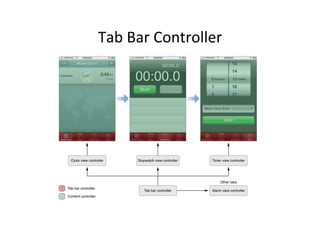
Tab	
  Bar	
  Controller	
  
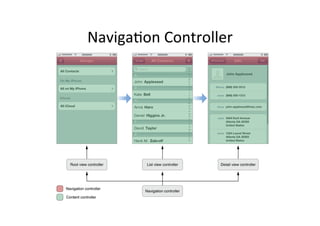
NavigaMon	
  Controller	
  
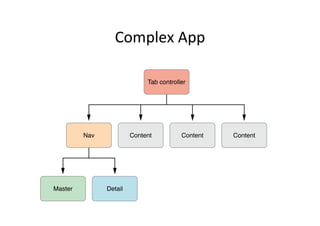
Complex	
  App	
  
UITABVIEWCONTROLLER	
  
UITabController	
  
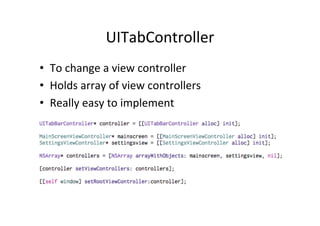
•  To	
  change	
  a	
  view	
  controller	
  
•  Holds	
  array	
  of	
  view	
  controllers	
  
•  Really	
  easy	
  to	
  implement	


UITabController:	
  Add	
  Titles	
  
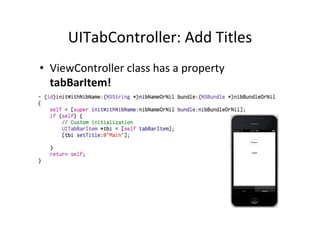
•  ViewController	
  class	
  has	
  a	
  property	
  
   tabBarItem!	
  
Init	
  in	
  more	
  detail	
  
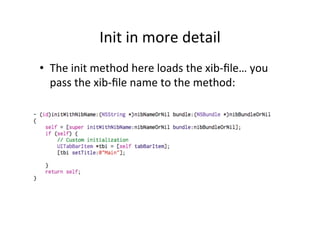
•  The	
  init	
  method	
  here	
  loads	
  the	
  xib-­‐file…	
  you	
  
   pass	
  the	
  xib-­‐file	
  name	
  to	
  the	
  method:	
  
Init	
  in	
  more	
  detail	
  
•  When	
  iniMalizing	
  the	
  controller 	
  	
  
    –  	
  SettingsViewController* settingsview =
       [[SettingsViewController alloc] init];
•  This	
  is	
  equivalent	
  to	
  this!	
  
    –  SettingsViewController* settingsview =
       [[SettingsViewController alloc]
       initWithNibName:nil bundle:nil];
•  What	
  happens	
  if	
  nibname	
  is	
  nil?	
  
    –  Search	
  for	
  a	
  xib	
  file	
  whose	
  name	
  is	
  the	
  same	
  as	
  your	
  
       class	
  and	
  search	
  inside	
  of	
  this	
  app	
  bundle!
UINAVIGATIONCONTROLLER	
  
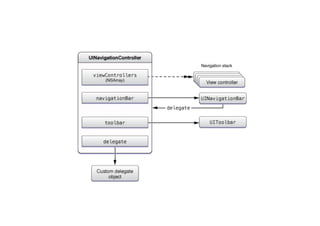
About	
  Nav	
  Controller	
  
•  Presents	
  data	
  organized	
  hierarchically	
  
•  Stack-­‐based	
  collecMon	
  of	
  view	
  controllers	
  
    –  Stack:	
  path	
  taken	
  by	
  the	
  user	
  through	
  the	
  
       hierarchical	
  data	
  
    –  BoIom	
  stack:	
  starMng	
  point,	
  top	
  stack:	
  current	
  
       posiMon	
  
•  Holds	
  
    –  NavigaMon	
  bar,	
  a	
  back	
  buIon	
  and	
  opMonal	
  custom	
  
       views	
  
CreaMng	
  a	
  UINavigaMonController	
  
// Create view controller
SettingsViewController* settingsview = [[SettingsViewController
alloc] init];

// Create navigation controller.
// Initialize it with the first screen
UINavigationController* navController =
     [[UINavigationController alloc]
           initWithRootViewController:settingsview];

// Add navigation controller to window
 [[self window] setRootViewController:navController];
Modifying	
  NavigaMon	
  Stack	
  
•  Add	
  another	
  view	
  to	
  stack	
  
    –  [navController
       pushViewController:otherViewController
       animated:YES];
•  To	
  get	
  pointer	
  to	
  navController	
  in	
  
   ViewController,	
  use	
  
   •  [[self
      navigationController] pushViewController:otherV
      iewController animated:YES];
Passing	
  informaMon	
  
// Get text from UITextField
NSString* myText = [[self someTextField] text];

// Create the view controller
SettingsView1Controller* sv1 = [[SettingsView1Controller alloc] init];

// Pass the text to the view controller
[sv1 setText: myText];

// Push the view controller to nav controller. viewDidLoad is
// called!
[[self navigationController] pushViewController:sv1 animated:YES];
Receiving	
  informaMon	
  
@interface SettingsView1Controller : UIViewController
{
}

// Attribute and set+get methods for text
@property NSString* text;
@property IBOutlet UILabel* label;

* * *

- (void)viewDidLoad
{
    [super viewDidLoad];
    // Do any additional setup after loading the view from its nib.

     // Set the given text to label:
    [[self label] setText: [self text]];
}
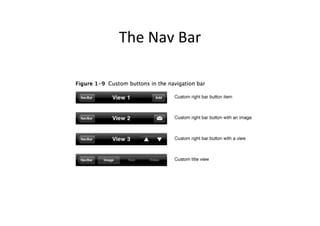
The	
  Nav	
  Bar	
  
The	
  Nav	
  Bar	
  
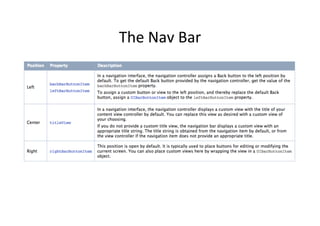
UINavigaMonItem	
  
•  Set	
  a	
  Mtle	
  
     –  UINavigationItem *n = [self navigationItem];
     –  [n setTitle:@"Settings"];

•  Other	
  properMes	
  
     –  MtleView	
  -­‐>	
  Can	
  have	
  any	
  view	
  on	
  navigaMon	
  bar	
  
     –  rightBarBuIonItem	
  -­‐>	
  another	
  buIon	
  to	
  the	
  right	
  
     –  See	
  documentaMon	
  
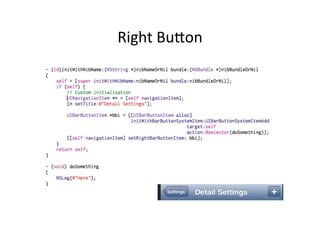
Right	
  BuIon	
  

iOS: View Controllers

  • 1.
    iOS:  View  Controllers   Jussi  Pohjolainen   Tampere  University  of  Applied  Sciences  
  • 2.
  • 3.
  • 4.
    Several  Screens?   • Typical  iOS  app  has  several  screens   •  Usually  this  is  implemented  so  that  you  have   several  View  Controller  classes,  one  for  each   screen   •  UIViewController  class  holds  a  property  that   points  to  UIView  (which  is  visible  in  the   screen)  
  • 5.
    UIViewController   #import <UIKit/UIKit.h> @interfaceMainScreenViewController : UIViewController @end
  • 6.
    Adding  a  BuIon  to  the  View  of   ViewController   - (void)viewDidLoad { [super viewDidLoad]; // Initialize a view, this could be a custom view also.. UIButton* button = [UIButton buttonWithType:UIButtonTypeRoundedRect]; [button setTitle:@"Main1" forState: UIControlStateNormal]; // Add the view to the controller [self setView: button]; }
  • 7.
    Root  Controller   -(BOOL)application:(UIApplication *)application didFinishLaunchingWithOptions: (NSDictionary *)launchOptions { self.window = [[UIWindow alloc] initWithFrame:[[UIScreen mainScreen] bounds]]; // Override point for customization after application launch. MainScreenViewController* mainscreen = [[MainScreenViewController alloc] init]; [[self window] setRootViewController:mainscreen]; self.window.backgroundColor = [UIColor whiteColor]; [self.window makeKeyAndVisible]; return YES; }
  • 8.
    Root  Controller?   • SeKng  a  view  controller  as  root  controller  of  a   window   –  Add’s  view  controller’s  view  to  window   –  AutomaMcally  resizes  the  view  to  be  the  same  size   than  window  
  • 9.
    XIB?   •  It’s  usually  wise  to  implement  the  UI  in  xib   •  You  can  create  new  empty  xib  file  to  your   project   •  Set  the  File’s  owner  to  the  view  controller!  
  • 10.
    View  Controller  and  View   •  The  View  Controller  has  a  property  View   •  In  XIB,  you  can  add  to  canvas  a  UIView  and   connect  it  as  outlet  of  the  view  controller’s   view!  
  • 11.
    Content  View  Controller  vs   Container  View  Controller   •  Content  View  Controller   –  Content  on  the  screen  using  Views   –  Usually  has  a  .xib   •  Container  View  Controller   –  Content  owned  by  other  View  Controllers   –  Parent  to  other  controllers   –  Container  manages  a  API  to  manage  children  (change   screens)   –  For  example:  Tab  Bar  Controller,  Naviga<on   Controller  
  • 12.
  • 13.
  • 14.
  • 15.
  • 16.
    UITabController   •  To  change  a  view  controller   •  Holds  array  of  view  controllers   •  Really  easy  to  implement    
  • 17.
    UITabController:  Add  Titles   •  ViewController  class  has  a  property   tabBarItem!  
  • 18.
    Init  in  more  detail   •  The  init  method  here  loads  the  xib-­‐file…  you   pass  the  xib-­‐file  name  to  the  method:  
  • 19.
    Init  in  more  detail   •  When  iniMalizing  the  controller     –   SettingsViewController* settingsview = [[SettingsViewController alloc] init]; •  This  is  equivalent  to  this!   –  SettingsViewController* settingsview = [[SettingsViewController alloc] initWithNibName:nil bundle:nil]; •  What  happens  if  nibname  is  nil?   –  Search  for  a  xib  file  whose  name  is  the  same  as  your   class  and  search  inside  of  this  app  bundle!
  • 20.
  • 21.
    About  Nav  Controller   •  Presents  data  organized  hierarchically   •  Stack-­‐based  collecMon  of  view  controllers   –  Stack:  path  taken  by  the  user  through  the   hierarchical  data   –  BoIom  stack:  starMng  point,  top  stack:  current   posiMon   •  Holds   –  NavigaMon  bar,  a  back  buIon  and  opMonal  custom   views  
  • 24.
    CreaMng  a  UINavigaMonController   // Create view controller SettingsViewController* settingsview = [[SettingsViewController alloc] init]; // Create navigation controller. // Initialize it with the first screen UINavigationController* navController = [[UINavigationController alloc] initWithRootViewController:settingsview]; // Add navigation controller to window [[self window] setRootViewController:navController];
  • 25.
    Modifying  NavigaMon  Stack   •  Add  another  view  to  stack   –  [navController pushViewController:otherViewController animated:YES]; •  To  get  pointer  to  navController  in   ViewController,  use   •  [[self navigationController] pushViewController:otherV iewController animated:YES];
  • 26.
    Passing  informaMon   //Get text from UITextField NSString* myText = [[self someTextField] text]; // Create the view controller SettingsView1Controller* sv1 = [[SettingsView1Controller alloc] init]; // Pass the text to the view controller [sv1 setText: myText]; // Push the view controller to nav controller. viewDidLoad is // called! [[self navigationController] pushViewController:sv1 animated:YES];
  • 27.
    Receiving  informaMon   @interfaceSettingsView1Controller : UIViewController { } // Attribute and set+get methods for text @property NSString* text; @property IBOutlet UILabel* label; * * * - (void)viewDidLoad { [super viewDidLoad]; // Do any additional setup after loading the view from its nib. // Set the given text to label: [[self label] setText: [self text]]; }
  • 28.
  • 29.
  • 30.
    UINavigaMonItem   •  Set  a  Mtle   –  UINavigationItem *n = [self navigationItem]; –  [n setTitle:@"Settings"]; •  Other  properMes   –  MtleView  -­‐>  Can  have  any  view  on  navigaMon  bar   –  rightBarBuIonItem  -­‐>  another  buIon  to  the  right   –  See  documentaMon  
  • 31.