Intro 
to 
SPA 
framework 
Jussi 
Pohjolainen
Agenda 
• Web 
Development 
and 
SPA 
• Intro 
to 
AngularJS 
• Recap 
of 
JS 
• GeAng 
Started 
with 
AngularJS 
– 
DirecCves, 
Filters 
and 
Data 
Binding 
• View, 
Controllers 
and 
Scope 
• Modules, 
Routes, 
Services 
• Ajax 
and 
RESTful 
Web 
Services 
• AnimaCons 
and 
TesCng
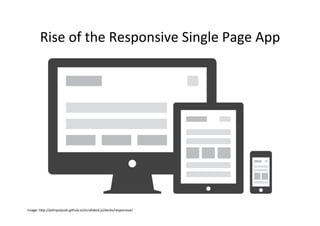
Rise 
of 
the 
Responsive 
Single 
Page 
App 
Image: 
hNp://johnpolacek.github.io/scrolldeck.js/decks/responsive/
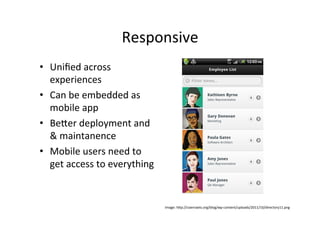
Responsive 
• Unified 
across 
experiences 
• Can 
be 
embedded 
as 
mobile 
app 
• BeNer 
deployment 
and 
& 
maintanence 
• Mobile 
users 
need 
to 
get 
access 
to 
everything 
Image: 
hNp://coenraets.org/blog/wp-­‐content/uploads/2011/10/directory11.png
Single-­‐page 
ApplicaCons 
(SPA) 
• Web 
app 
that 
fits 
on 
a 
single 
web 
page 
– Fluid 
UX, 
like 
desktop 
app 
– Examples 
like 
Gmail, 
Google 
maps 
• Html 
page 
contains 
mini-­‐views 
(HTML 
Fragments) 
that 
can 
be 
loaded 
in 
the 
background 
• No 
reloading 
of 
the 
page, 
be3er 
UX 
• Requires 
handling 
of 
browser 
history, 
naviga:on 
and 
bookmarks
JavaScript 
• SPAs 
are 
implemented 
using 
JavaScript 
and 
HTML 
• ECMAScript 
is 
a 
scripCng 
language, 
standardized 
by 
Ecma 
InternaConal 
• In 
Browsers, 
ECMAScript 
is 
commonly 
called 
JavaScript 
– JavaScript 
= 
Na:ve 
(EcmaScript) 
+ 
Host 
objects 
(browser)
Challenges 
in 
SPA 
• DOM 
Manipula:on 
– How 
to 
manipulate 
the 
view 
efficiently? 
• History 
– What 
happens 
when 
pressing 
back 
buNon? 
• Rou:ng 
– Readable 
URLs? 
• Data 
Binding 
– How 
bind 
data 
from 
model 
to 
view? 
• View 
Loading 
– How 
to 
load 
the 
view? 
• Lot 
of 
coding! 
You 
could 
use 
a 
framework 
instead 
...
ANGULAR_JS
Angular 
JS 
• Single 
Page 
App 
Framework 
for 
JavaScript 
• Implements 
client-­‐side 
MVC 
paNern 
– SeparaCon 
of 
presentaCon 
from 
business 
logic 
and 
presentaCon 
state 
• No 
direct 
DOM 
manipulaCon, 
less 
code 
• Support 
for 
all 
major 
browsers 
• Supported 
by 
Google 
• Large 
and 
fast 
growing 
community
Interest 
in 
AngularJS
AngularJS 
– 
Main 
Concepts 
• Templates 
• DirecCves 
• Expressions 
• Data 
binding 
• Scope 
• Controllers 
• Modules 
• Filters 
• Services 
• RouCng
RECAP 
OF 
JAVASCRIPT
Recommended 
Reading 
• Recommended 
reading 
– JavaScript: 
The 
Good 
Parts 
by 
Douglas 
Crockford 
– JavaScript: 
The 
Definite 
Guide 
by 
David 
Flanagan 
– JavaScript 
Pa3erns: 
Stoyan 
Stefanov
Objects 
• Everything 
(except 
basic 
types) 
are 
objects 
– Including 
func:ons 
and 
arrays 
• Object 
contains 
proper:es 
and 
methods 
– CollecCon 
of 
name-­‐value 
pairs 
– Names 
are 
strings, 
values 
can 
be 
anything 
– ProperCes 
and 
methods 
can 
be 
added 
at 
run:me 
• Objects 
can 
inherit 
other 
objects
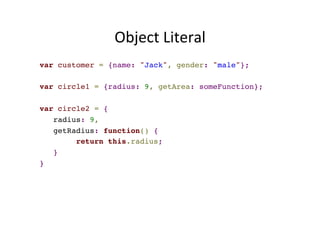
Object 
Literal 
var customer = {name: "Jack", gender: "male"};! 
! 
var circle1 = {radius: 9, getArea: someFunction};! 
! 
var circle2 = {! 
radius: 9,! 
getRadius: function() {! 
return this.radius;! 
}! 
}
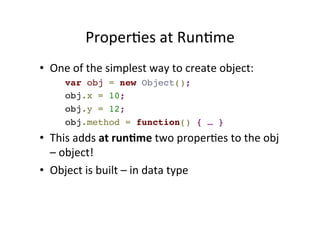
ProperCes 
at 
RunCme 
• One 
of 
the 
simplest 
way 
to 
create 
object: 
var obj = new Object();! 
obj.x = 10;! 
obj.y = 12;! 
obj.method = function() { … } 
• This 
adds 
at 
run:me 
two 
properCes 
to 
the 
obj 
– 
object! 
• Object 
is 
built 
– 
in 
data 
type
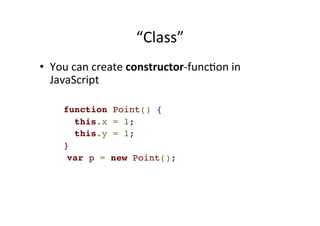
“Class” 
• You 
can 
create 
constructor-­‐funcCon 
in 
JavaScript 
function Point() {! 
this.x = 1;! 
this.y = 1;! 
} 
var p = new Point();!
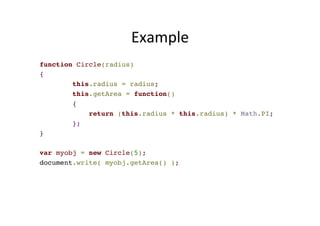
Example 
function Circle(radius) ! 
{! 
this.radius = radius;! 
this.getArea = function()! 
{! 
return (this.radius * this.radius) * Math.PI;! 
}; ! 
}! 
! 
var myobj = new Circle(5);! 
document.write( myobj.getArea() );
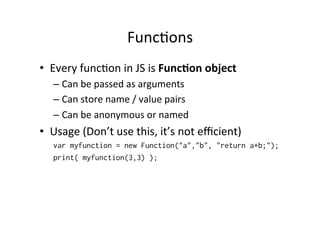
FuncCons 
• Every 
funcCon 
in 
JS 
is 
Func:on 
object 
– Can 
be 
passed 
as 
arguments 
– Can 
store 
name 
/ 
value 
pairs 
– Can 
be 
anonymous 
or 
named 
• Usage 
(Don’t 
use 
this, 
it’s 
not 
efficient) 
var myfunction = new Function("a","b", "return a+b;"); 
print( myfunction(3,3) );
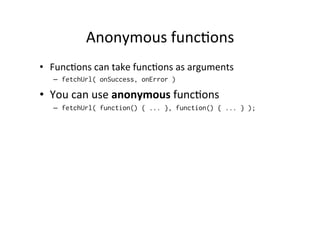
Anonymous 
funcCons 
• FuncCons 
can 
take 
funcCons 
as 
arguments 
– fetchUrl( onSuccess, onError ) 
• You 
can 
use 
anonymous 
funcCons 
– fetchUrl( function() { ... }, function() { ... } );
GETTING 
STARTED 
WITH 
ANGULAR_JS
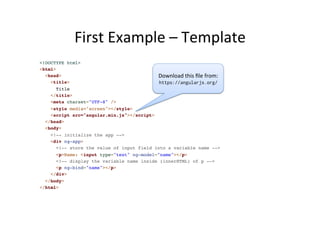
First 
Example 
– 
Template 
<!DOCTYPE html>! 
<html>! 
<head>! 
<title>! 
Title! 
</title>! 
<meta charset="UTF-8" />! 
<style media="screen"></style>! 
<script src="angular.min.js"></script>! 
</head>! 
<body>! 
<!-- initialize the app -->! 
<div ng-app>! 
Download 
this 
file 
from: 
https://angularjs.org/ 
DirecCve DirecCve 
<!-- store the value of input field into a variable name -->! 
<p>Name: <input type="text" ng-model="name"></p>! 
<!-- display the variable name inside (innerHTML) of p -->! 
<p ng-bind="name"></p>! 
</div>! 
</body>! 
</html> 
Template
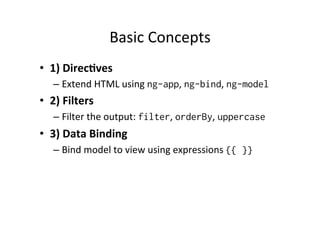
Basic 
Concepts 
• 1) 
Templates 
– HTML 
with 
addiConal 
markup, 
direcCves, 
expressions, 
filters 
... 
• 2) 
Direc:ves 
– Extend 
HTML 
using 
ng-app, 
ng-bind, 
ng-model 
• 3) 
Filters 
– Filter 
the 
output: 
filter, 
orderBy, 
uppercase 
• 4) 
Data 
Binding 
– Bind 
model 
to 
view 
using 
expressions 
{{ }}
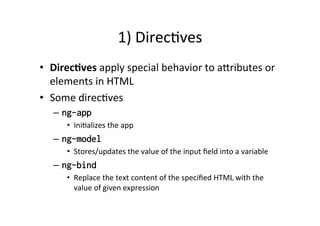
2) 
DirecCves 
• Direc:ves 
apply 
special 
behavior 
to 
aNributes 
or 
elements 
in 
HTML 
– ANach 
behaviour, 
transform 
the 
DOM 
• Some 
direcCves 
– ng-app 
• IniCalizes 
the 
app 
– ng-model 
• Stores/updates 
the 
value 
of 
the 
input 
field 
into 
a 
variable 
– ng-bind 
• Replace 
the 
text 
content 
of 
the 
specified 
HTML 
with 
the 
value 
of 
given 
expression
About 
Naming 
• AngularJS 
HTML 
Compiler 
supports 
mulCple 
formats 
– ng-bind 
• Recommended 
Format 
– data-ng-bind 
• Recommended 
Format 
to 
support 
HTML 
validaCon 
– ng_bind, ng:bind, x-ng-bind 
• Legacy, 
don't 
use
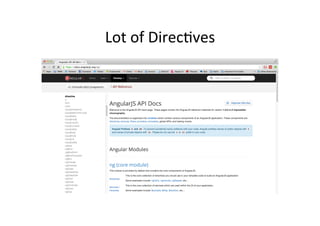
Lot 
of 
Built 
in 
DirecCves 
• ngApp 
• ngClick 
• ngController 
• ngModel 
• ngRepeat 
• ngSubmit 
• ngDblClick 
• ngMouseEnter 
• ngMouseMove 
• ngMouseLeave 
• ngKeyDown 
• ngForm
2) 
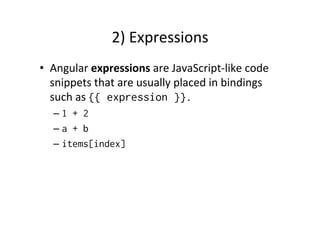
Expressions 
• Angular 
expressions 
are 
JavaScript-­‐like 
code 
snippets 
that 
are 
usually 
placed 
in 
bindings 
– {{ expression }}. 
• Valid 
Expressions 
– {{ 1 + 2 }} 
– {{ a + b }} 
– {{ items[index] }} 
• Control 
flow 
(loops, 
if) 
are 
not 
supported! 
• You 
can 
use 
filters 
to 
format 
or 
filter 
data
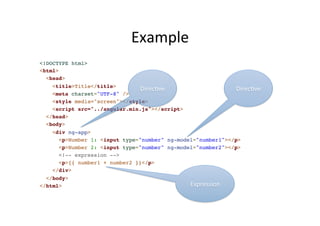
Example 
<!DOCTYPE html>! 
<html>! 
<head>! 
<title>Title</title>! 
<meta charset="UTF-8" />! 
<style media="screen"></style>! 
<script src="../angular.min.js"></script>! 
</head>! 
<body>! 
<div ng-app>! 
DirecCve 
DirecCve 
<p>Number 1: <input type="number" ng-model="number1"></p>! 
<p>Number 2: <input type="number" ng-model="number2"></p>! 
<!-- expression -->! 
<p>{{ number1 + number2 }}</p>! 
</div>! 
</body>! 
</html> 
Expression
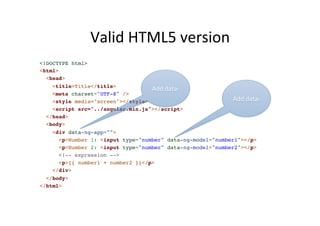
Valid 
HTML5 
version 
<!DOCTYPE html>! 
<html>! 
<head>! 
<title>Title</title>! 
Add 
data-­‐ 
<meta charset="UTF-8" />! 
<style media="screen"></style>! 
<script src="../angular.min.js"></script>! 
</head>! 
<body>! 
<div data-ng-app="">! 
Add 
data-­‐ 
<p>Number 1: <input type="number" data-ng-model="number1"></p>! 
<p>Number 2: <input type="number" data-ng-model="number2"></p>! 
<!-- expression -->! 
<p>{{ number1 + number2 }}</p>! 
</div>! 
</body>! 
</html>
ng-­‐init 
and 
ng-­‐repeat 
direcCves 
<html data-ng-app="">! 
<head>! 
<title>Title</title>! 
<meta charset="UTF-8" />! 
<script src="../angular.min.js" type="text/javascript">! 
</script>! 
</head>! 
!< 
body>! 
<div data-ng-init="names = ['Jack', 'John', 'Tina']">! 
<h1>Cool loop!</h1>! 
<ul>! 
<li data-ng-repeat="name in names">{{ name }}</li>! 
</ul>! 
</div>! 
</body>! 
</html>
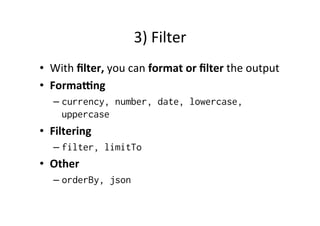
3) 
Filter 
• With 
filter, 
you 
can 
format 
or 
filter 
the 
output 
• Forma`ng 
– currency, number, date, lowercase, 
uppercase 
• Filtering 
– filter, limitTo 
• Other 
– orderBy, json
Using 
Filters 
-­‐ 
Example 
<!DOCTYPE html>! 
<html data-ng-app="">! 
<head>! 
! 
<title>Title</title>! 
<meta charset="UTF-8">! 
<script src="../angular.min.js" type="text/javascript">! 
</script>! 
</head>! 
!< 
body>! 
<div data-ng-init="customers = [{name:'jack'}, {name:'tina'}]">! 
<h1>Cool loop!</h1>! 
<ul>! 
<li data-ng-repeat="customer in customers | orderBy:'name'">! 
{{ customer.name | uppercase }}</li>! 
</ul>! 
</div>! 
</body>! 
</html> 
Filter 
Filter
Using 
Filters 
-­‐ 
Example 
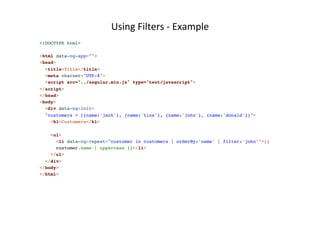
<!DOCTYPE html>! 
!< 
html data-ng-app="">! 
<head>! 
<title>Title</title>! 
<meta charset="UTF-8">! 
<script src="../angular.min.js" type="text/javascript">! 
</script>! 
</head>! 
<body>! 
<div data-ng-init=! 
"customers = [{name:'jack'}, {name:'tina'}, {name:'john'}, {name:'donald'}]">! 
<h1>Customers</h1>! 
! 
<ul>! 
<li data-ng-repeat="customer in customers | orderBy:'name' | filter:'john'">{{! 
customer.name | uppercase }}</li>! 
</ul>! 
</div>! 
</body>! 
</html>
Using 
Filters 
– 
User 
Input 
Filters 
the 
Data 
<!DOCTYPE html>! 
!< 
html data-ng-app="">! 
<head>! 
<title>Title</title>! 
<meta charset="UTF-8">! 
<script src="../angular.min.js" type="text/javascript">! 
</script>! 
</head>! 
<body>! 
<div data-ng-init=! 
"customers = [{name:'jack'}, {name:'tina'}, {name:'john'}, {name:'donald'}]">! 
<h1>Customers</h1>! 
! 
<input type="text" data-ng-model="userInput" />! 
<ul>! 
<li data-ng-repeat="customer in customers | orderBy:'name' | filter:userInput">{{! 
customer.name | uppercase }}</li>! 
</ul>! 
</div>! 
</body>! 
</html>
API 
Reference
EXERCISE 
1 
+ 
2: 
BMI 
AND 
FILTERS
VIEWS, 
CONTROLLERS, 
SCOPE
Model 
– 
View 
-­‐ 
Controllers 
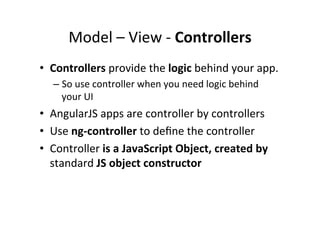
• Controllers 
provide 
the 
logic 
behind 
your 
app. 
– So 
use 
controller 
when 
you 
need 
logic 
behind 
your 
UI 
• AngularJS 
apps 
are 
controller 
by 
controllers 
• Use 
ng-­‐controller 
to 
define 
the 
controller 
• Controller 
is 
a 
JavaScript 
Object, 
created 
by 
standard 
JS 
object 
constructor
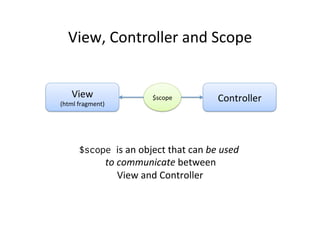
View, 
Controller 
and 
Scope 
View 
(html 
fragment) 
$scope 
Controller 
$scope is 
an 
object 
that 
can 
be 
used 
to 
communicate 
between 
View 
and 
Controller
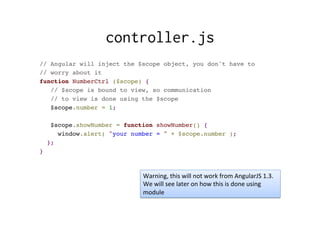
controller.js 
// Angular will inject the $scope object, you don't have to ! 
// worry about it! 
function NumberCtrl ($scope) {! 
// $scope is bound to view, so communication ! 
// to view is done using the $scope! 
$scope.number = 1;! 
! 
$scope.showNumber = function showNumber() {! 
window.alert( "your number = " + $scope.number );! 
};! 
} 
Warning, 
this 
will 
not 
work 
from 
AngularJS 
1.3. 
We 
will 
see 
later 
on 
how 
this 
is 
done 
using 
module
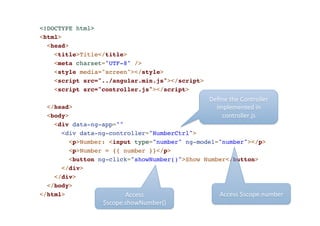
<!DOCTYPE html>! 
<html>! 
<head>! 
<title>Title</title>! 
<meta charset="UTF-8" />! 
<style media="screen"></style>! 
<script src="../angular.min.js"></script>! 
<script src="controller.js"></script>! 
! 
</head>! 
<body>! 
<div data-ng-app="" ! 
<div data-ng-controller="NumberCtrl">! 
Define 
the 
Controller 
implemented 
in 
controller.js 
<p>Number: <input type="number" ng-model="number"></p>! 
<p>Number = {{ number }}</p>! 
<button ng-click="showNumber()">Show Number</button>! 
</div>! 
</div>! 
</body>! 
</html> 
Access 
Access 
$scope.number 
$scope.showNumber()
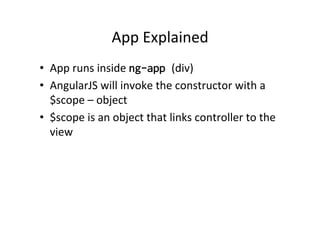
App 
Explained 
• App 
runs 
inside 
ng-app (div) 
• AngularJS 
will 
invoke 
the 
constructor 
with 
a 
$scope 
– 
object 
• $scope 
is 
an 
object 
that 
links 
controller 
to 
the 
view
When 
to 
use 
Controllers 
• Use 
controllers 
– set 
up 
the 
iniCal 
state 
of 
$scope 
object 
– add 
behavior 
to 
the 
$scope 
object 
• Do 
not 
– Manipulate 
DOM 
(use 
databinding, 
direc:ves) 
– Format 
input 
(use 
form 
controls) 
– Filter 
output 
(use 
filters) 
– Share 
code 
or 
state 
(use 
services)
MODULES, 
ROUTES, 
SERVICES
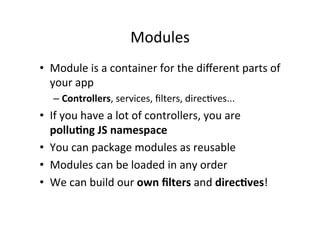
Modules 
• Module 
is 
an 
reusable 
container 
for 
different 
features 
of 
your 
app 
– Controllers, 
services, 
filters, 
direcCves... 
• If 
you 
have 
a 
lot 
of 
controllers, 
you 
are 
pollu:ng 
JS 
namespace 
• Modules 
can 
be 
loaded 
in 
any 
order 
• We 
can 
build 
our 
own 
filters 
and 
direc:ves!
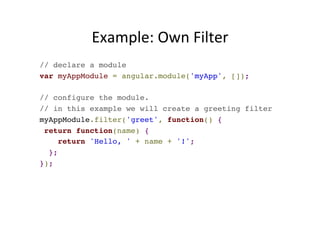
Example: 
Own 
Filter 
// declare a module! 
var myAppModule = angular.module('myApp', []);! 
! 
// configure the module.! 
// in this example we will create a greeting filter! 
myAppModule.filter('greet', function() {! 
return function(name) {! 
return 'Hello, ' + name + '!';! 
};! 
});
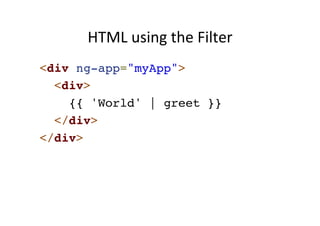
HTML 
using 
the 
Filter 
<div ng-app="myApp">! 
<div>! 
{{ 'World' | greet }}! 
</div>! 
</div>
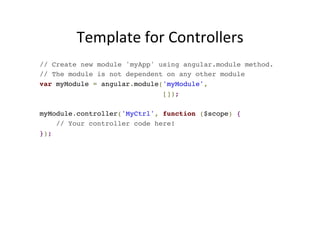
Template 
for 
Controllers 
// Create new module 'myApp' using angular.module method.! 
// The module is not dependent on any other module! 
var myModule = angular.module('myModule', ! 
[]);! 
! 
myModule.controller('MyCtrl', function ($scope) {! 
// Your controller code here!! 
});
CreaCng 
a 
Controller 
in 
Module 
var myModule = angular.module('myModule', ! 
[]);! 
! 
myModule.controller('MyCtrl', function ($scope) {! 
! 
var model = { "firstname": "Jack",! 
"lastname": "Smith" };! 
! 
$scope.model = model;! 
$scope.click = function() { ! 
alert($scope.model.firstname); ! 
};! 
});
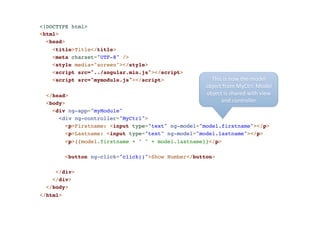
<!DOCTYPE html>! 
<html>! 
<head>! 
<title>Title</title>! 
<meta charset="UTF-8" />! 
<style media="screen"></style>! 
<script src="../angular.min.js"></script>! 
<script src="mymodule.js"></script>! 
! 
</head>! 
<body>! 
<div ng-app="myModule" ! 
<div ng-controller="MyCtrl">! 
<p>Firstname: <input type="text" ng-model="model.firstname"></p>! 
<p>Lastname: <input type="text" ng-model="model.lastname"></p>! 
<p>{{model.firstname + " " + model.lastname}}</p>! 
! 
<button ng-click="click()">Show Number</button>! 
! 
</div>! 
</div>! 
</body>! 
</html> 
This 
is 
now 
the 
model 
object 
from 
MyCtrl. 
Model 
object 
is 
shared 
with 
view 
and 
controller
EXERCISE 
3: 
MODULES
ROUTING
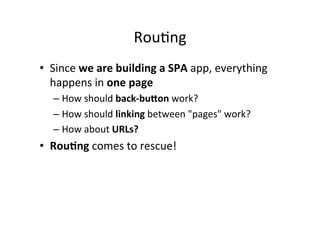
RouCng 
• Since 
we 
are 
building 
a 
SPA 
app, 
everything 
happens 
in 
one 
page 
– How 
should 
back-­‐bu3on 
work? 
– How 
should 
linking 
between 
"pages" 
work? 
– How 
about 
URLs? 
• Rou:ng 
comes 
to 
rescue!
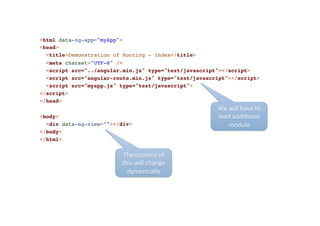
<html data-ng-app="myApp">! 
<head>! 
<title>Demonstration of Routing - index</title>! 
<meta charset="UTF-8" />! 
<script src="../angular.min.js" type="text/javascript"></script>! 
<script src="angular-route.min.js" type="text/javascript"></script>! 
<script src="myapp.js" type="text/javascript">! 
</script>! 
</head>! 
!< 
body>! 
<div data-ng-view=""></div>! 
</body>! 
</html> 
The 
content 
of 
this 
will 
change 
dynamically 
We 
will 
have 
to 
load 
addiConal 
module
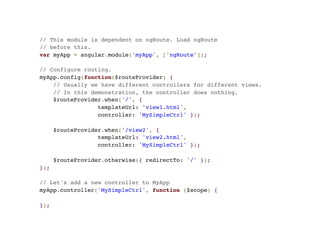
// This module is dependent on ngRoute. Load ngRoute! 
// before this.! 
var myApp = angular.module('myApp', ['ngRoute']);! 
! 
// Configure routing.! 
myApp.config(function($routeProvider) {! 
// Usually we have different controllers for different views.! 
// In this demonstration, the controller does nothing.! 
$routeProvider.when('/', { ! 
templateUrl: 'view1.html', ! 
controller: 'MySimpleCtrl' });! 
! 
$routeProvider.when('/view2', { ! 
templateUrl: 'view2.html', ! 
controller: 'MySimpleCtrl' });! 
! 
$routeProvider.otherwise({ redirectTo: '/' });! 
});! 
! 
// Let's add a new controller to MyApp! 
myApp.controller('MySimpleCtrl', function ($scope) {! 
!} 
);
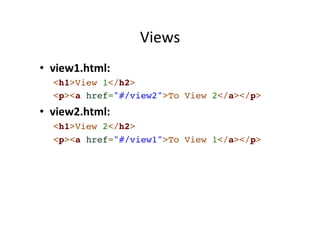
Views 
• view1.html: 
<h1>View 1</h2>! 
<p><a href="#/view2">To View 2</a></p>! 
• view2.html: 
<h1>View 2</h2>! 
<p><a href="#/view1">To View 1</a></p>
Working 
in 
Local 
Environment 
• If 
you 
get 
"cross 
origin 
requests 
are 
only 
supported 
for 
HTTP" 
.. 
• Either 
– 1) 
Disable 
web 
security 
in 
your 
browser 
– 2) 
Use 
some 
web 
server 
and 
access 
files 
hNp://.. 
• To 
disable 
web 
security 
in 
chrome 
– taskkill /F /IM chrome.exe 
– "C:Program Files (x86)GoogleChromeApplication 
chrome.exe" --disable-web-security --allow-file-access-from- 
files
EXERCISE 
4: 
ROUTING
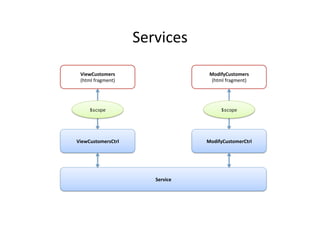
Services 
• View-­‐independent 
business 
logic 
should 
not 
be 
in 
a 
controller 
– Logic 
should 
be 
in 
a 
service 
component 
• Controllers 
are 
view 
specific, 
services 
are 
app-­‐spesific 
– We 
can 
move 
from 
view 
to 
view 
and 
service 
is 
sCll 
alive 
• Controller's 
responsibility 
is 
to 
bind 
model 
to 
view. 
Model 
can 
be 
fetched 
from 
service! 
– Controller 
is 
not 
responsible 
for 
manipulaCng 
(create, 
destroy, 
update) 
the 
data. 
Use 
Services 
instead! 
• AngularJS 
has 
many 
built-­‐in 
services, 
see 
– hNp://docs.angularjs.org/api/ng/service 
– Example: 
$http
Services 
ViewCustomers 
(html 
fragment) 
$scope 
ViewCustomersCtrl 
Service 
ModifyCustomers 
(html 
fragment) 
$scope 
ModifyCustomerCtrl
AngularJS 
Custom 
Services 
using 
Factory 
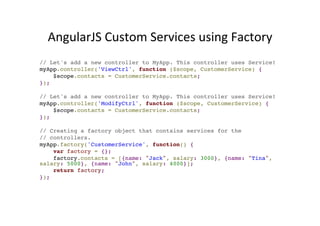
// Let's add a new controller to MyApp. This controller uses Service!! 
myApp.controller('ViewCtrl', function ($scope, CustomerService) {! 
$scope.contacts = CustomerService.contacts;! 
});! 
! 
// Let's add a new controller to MyApp. This controller uses Service!! 
myApp.controller('ModifyCtrl', function ($scope, CustomerService) {! 
$scope.contacts = CustomerService.contacts;! 
});! 
! 
// Creating a factory object that contains services for the! 
// controllers.! 
myApp.factory('CustomerService', function() {! 
var factory = {}; ! 
factory.contacts = [{name: "Jack", salary: 3000}, {name: "Tina", 
salary: 5000}, {name: "John", salary: 4000}];! 
return factory;! 
});
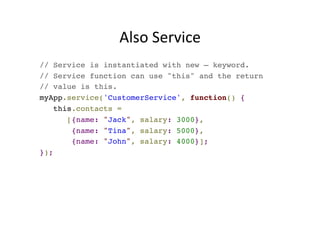
Also 
Service 
// Service is instantiated with new – keyword.! 
// Service function can use "this" and the return! 
// value is this.! 
myApp.service('CustomerService', function() {! 
this.contacts = ! 
[{name: "Jack", salary: 3000}, ! 
{name: "Tina", salary: 5000}, ! 
{name: "John", salary: 4000}];! 
});
EXERCISE 
5: 
SERVICES
AJAX 
+ 
REST
AJAX 
• Asynchronous 
JavaScript 
+ 
XML 
– XML 
not 
needed, 
very 
oden 
JSON 
• Send 
data 
and 
retrieve 
asynchronously 
from 
server 
in 
background 
• Group 
of 
technologies 
– HTML, 
CSS, 
DOM, 
XML/JSON, 
XMLHNpRequest 
object 
and 
JavaScript
$http – 
example 
(AJAX) 
and 
AngularJS 
<script type="text/javascript">! 
var myapp = angular.module("myapp", []);! 
! 
myapp.controller("MyController", function($scope, $http) {! 
$scope.myData = {};! 
$scope.myData.doClick = function(item, event) {! 
var responsePromise = $http.get("text.txt");! 
! 
responsePromise.success(function(data, status, headers, config) {! 
$scope.myData.fromServer = data;! 
});! 
responsePromise.error(function(data, status, headers, config) {! 
alert("AJAX failed!");! 
});! 
}! 
} );! 
</script>!
RESTful 
• Web 
Service 
APIs 
that 
adhere 
to 
REST 
architectural 
constrains 
are 
called 
RESTful 
• Constrains 
– Base 
URI, 
such 
as 
hNp://www.example/resources 
– Internet 
media 
type 
for 
data, 
such 
as 
JSON 
or 
XML 
– Standard 
HTTP 
methods: 
GET, 
POST, 
PUT, 
DELETE 
– Links 
to 
reference 
reference 
state 
and 
related 
resources
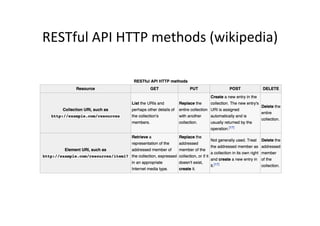
RESTful 
API 
HTTP 
methods 
(wikipedia)
AJAX 
+ 
RESTful 
• The 
web 
app 
can 
fetch 
using 
RESTful 
data 
from 
server 
• Using 
AJAX 
this 
is 
done 
asynchronously 
in 
the 
background 
• AJAX 
makes 
HTTP 
GET 
request 
using 
url 
.. 
– hNp://example.com/resources/item17 
• .. 
and 
receives 
data 
of 
item17 
in 
JSON 
... 
• .. 
which 
can 
be 
displayed 
in 
view 
(web 
page)
Example: 
Weather 
API 
• Weather 
informaCon 
available 
from 
wunderground.com 
– You 
have 
to 
make 
account 
and 
receive 
a 
key 
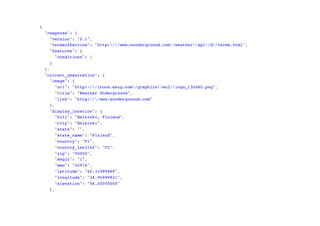
• To 
get 
Helsinki 
weather 
in 
JSON 
– http://api.wunderground.com/api/your-key/ 
conditions/q/Helsinki.json
{! 
"response": {! 
"version": "0.1",! 
"termsofService": "http://www.wunderground.com/weather/api/d/terms.html",! 
"features": {! 
"conditions": 1! 
}! 
},! 
"current_observation": {! 
"image": {! 
"url": "http://icons.wxug.com/graphics/wu2/logo_130x80.png",! 
"title": "Weather Underground",! 
"link": "http://www.wunderground.com"! 
},! 
"display_location": {! 
"full": "Helsinki, Finland",! 
"city": "Helsinki",! 
"state": "",! 
"state_name": "Finland",! 
"country": "FI",! 
"country_iso3166": "FI",! 
"zip": "00000",! 
"magic": "1",! 
"wmo": "02974",! 
"latitude": "60.31999969",! 
"longitude": "24.96999931",! 
"elevation": "56.00000000"! 
},!
<!DOCTYPE html>! 
<html>! 
<head>! 
<script src="../angular.min.js" type="text/javascript"></script>! 
<title></title>! 
</head>! 
! 
<body data-ng-app="myapp">! 
<div data-ng-controller="MyController">! 
<button data-ng-click="myData.doClick(item, $event)">Get Helsinki Weather</button><br />! 
Data from server: {{myData.fromServer}}! 
</div>! 
! 
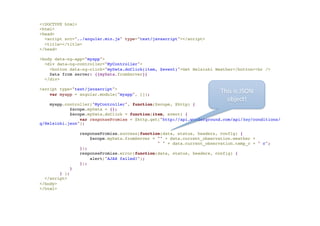
<script type="text/javascript">! 
var myapp = angular.module("myapp", []);! 
! 
myapp.controller("MyController", function($scope, $http) {! 
$scope.myData = {};! 
$scope.myData.doClick = function(item, event) {! 
var responsePromise = $http.get("http://api.wunderground.com/api/key/conditions/ 
q/Helsinki.json");! 
! 
responsePromise.success(function(data, status, headers, config) {! 
$scope.myData.fromServer = "" + data.current_observation.weather + ! 
" " + data.current_observation.temp_c + " c";! 
});! 
responsePromise.error(function(data, status, headers, config) {! 
alert("AJAX failed!");! 
});! 
}! 
} );! 
</script>! 
</body>! 
</html> 
This 
is 
JSON 
object!
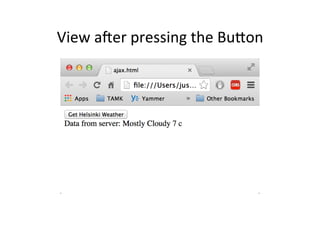
View 
arer 
pressing 
the 
BuNon
$resource 
• Built 
on 
top 
of 
$hNp 
service, 
$resource 
is 
a 
factory 
that 
lets 
you 
interact 
with 
RESTful 
backends 
easily 
• $resource 
does 
not 
come 
bundled 
with 
main 
Angular 
script, 
separately 
download 
– angular-resource.min.js 
• Your 
main 
app 
should 
declare 
dependency 
on 
the 
ngResource 
module 
in 
order 
to 
use 
$resource
GeAng 
Started 
with 
$resource 
• $resource 
expects 
classic 
RESTful 
backend 
– http://en.wikipedia.org/wiki/ 
Representational_state_transfer#Applied_t 
o_web_services 
• You 
can 
create 
the 
backend 
by 
whatever 
technology. 
Even 
JavaScript, 
for 
example 
Node.js 
• We 
are 
not 
concentraCng 
now 
how 
to 
build 
the 
backend.
Using 
$resource 
on 
GET 
// Load ngResource before this! 
var restApp = angular.module('restApp',['ngResource']); ! 
! 
restApp.controller("RestCtrl", function($scope, $resource) {! 
$scope.doClick = function() {! 
var title = $scope.movietitle;! 
var searchString = 'http://api.rottentomatoes.com/api/ 
public/v1.0/movies.json?apikey=key&q=' + title + '&page_limit=5';! 
! 
var result = $resource(searchString);! 
! 
var root = result.get(function() { // {method:'GET'! 
$scope.movies = root.movies;! 
}); ! 
}! 
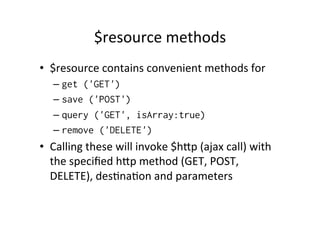
});
$resource 
methods 
• $resource 
contains 
convenient 
methods 
for 
– get ('GET') 
– save ('POST') 
– query ('GET', isArray:true) 
– remove ('DELETE') 
• Calling 
these 
will 
invoke 
$hNp 
(ajax 
call) 
with 
the 
specified 
hNp 
method 
(GET, 
POST, 
DELETE), 
desCnaCon 
and 
parameters
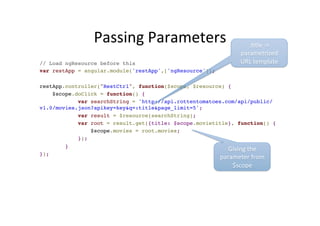
Passing 
Parameters 
// Load ngResource before this! 
var restApp = angular.module('restApp',['ngResource']); ! 
! 
restApp.controller("RestCtrl", function($scope, $resource) {! 
$scope.doClick = function() {! 
var searchString = 'http://api.rottentomatoes.com/api/public/ 
v1.0/movies.json?apikey=key&q=:title&page_limit=5';! 
var result = $resource(searchString);! 
var root = result.get({title: $scope.movietitle}, function() {! 
$scope.movies = root.movies;! 
}); ! 
}! 
}); 
:Ctle 
-­‐> 
parametrized 
URL 
template 
Giving 
the 
parameter 
from 
$scope
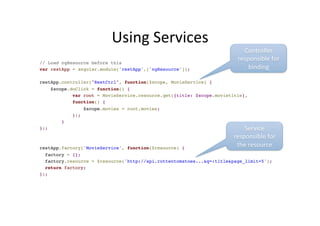
Using 
Services 
// Load ngResource before this! 
var restApp = angular.module('restApp',['ngResource']); ! 
! 
restApp.controller("RestCtrl", function($scope, MovieService) {! 
$scope.doClick = function() {! 
var root = MovieService.resource.get({title: $scope.movietitle}, ! 
function() {! 
$scope.movies = root.movies;! 
}); ! 
}! 
});! 
!! 
restApp.factory('MovieService', function($resource) {! 
factory = {};! 
factory.resource = $resource('http://api.rottentomatoes...&q=:title&page_limit=5');! 
return factory;! 
}); 
Controller 
responsible 
for 
binding 
Service 
responsible 
for 
the 
resource
Simple 
Version 
// Load ngResource before this! 
var restApp = angular.module('restApp',['ngResource']); ! 
! 
restApp.controller("RestCtrl", function($scope, MovieService) {! 
$scope.doClick = function() {! 
var root = MovieService.get({title: $scope.movietitle}, ! 
function() {! 
$scope.movies = root.movies;! 
}); ! 
}! 
});! 
!! 
restApp.factory('MovieService', function($resource) {! 
return $resource('http://api.rottentomatoes...&q=:title&page_limit=5');;! 
}); 
Just 
call 
get 
from 
MovieService 
Returns 
the 
resource
EXERCISE 
6: 
REST
ANIMATIONS 
AND 
UNIT 
TESTING
AngularJS 
AnimaCons 
• Include 
ngAnimate 
module 
as 
dependency 
• Hook 
animaCons 
for 
common 
direcCves 
such 
as 
ngRepeat, 
ngSwitch, 
ngView 
• Based 
on 
CSS 
classes 
– If 
HTML 
element 
has 
class, 
you 
can 
animate 
it 
• AngularJS 
adds 
special 
classes 
to 
your 
html-­‐ 
elements
Example 
Form 
<body ng-controller="AnimateCtrl">! 
<button ng-click="add()">Add</button>! 
<button ng-click="remove()">Remove</button></p>! 
<ul>! 
<li ng-repeat="customer in 
customers">{{customer.name}}</li>! 
</ul>! 
</body> 
Adds 
and 
Removes 
names
AnimaCon 
Classes 
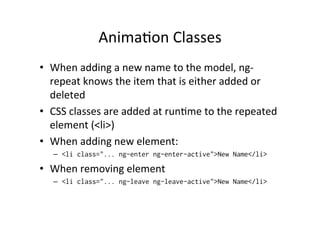
• When 
adding 
a 
new 
name 
to 
the 
model, 
ng-­‐ 
repeat 
knows 
the 
item 
that 
is 
either 
added 
or 
deleted 
• CSS 
classes 
are 
added 
at 
runCme 
to 
the 
repeated 
element 
(<li>) 
• When 
adding 
new 
element: 
– <li class="... ng-enter ng-enter-active">New Name</li> 
• When 
removing 
element 
– <li class="... ng-leave ng-leave-active">New Name</li>
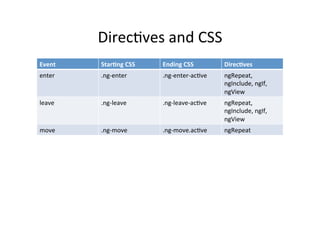
DirecCves 
and 
CSS 
Event 
Star:ng 
CSS 
Ending 
CSS 
Direc:ves 
enter 
.ng-­‐enter 
.ng-­‐enter-­‐acCve 
ngRepeat, 
ngInclude, 
ngIf, 
ngView 
leave 
.ng-­‐leave 
.ng-­‐leave-­‐acCve 
ngRepeat, 
ngInclude, 
ngIf, 
ngView 
move 
.ng-­‐move 
.ng-­‐move.acCve 
ngRepeat
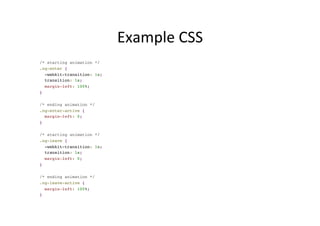
Example 
CSS 
/* starting animation */! 
.ng-enter {! 
-webkit-transition: 1s;! 
transition: 1s;! 
margin-left: 100%;! 
}! 
! 
/* ending animation */! 
.ng-enter-active {! 
margin-left: 0;! 
}! 
! 
/* starting animation */! 
.ng-leave {! 
-webkit-transition: 1s;! 
transition: 1s;! 
margin-left: 0;! 
}! 
! 
/* ending animation */! 
.ng-leave-active {! 
margin-left: 100%;! 
}
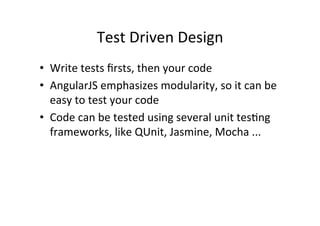
Test 
Driven 
Design 
• Write 
tests 
firsts, 
then 
your 
code 
• AngularJS 
emphasizes 
modularity, 
so 
it 
can 
be 
easy 
to 
test 
your 
code 
• Code 
can 
be 
tested 
using 
several 
unit 
tesCng 
frameworks, 
like 
QUnit, 
Jasmine, 
Mocha 
...
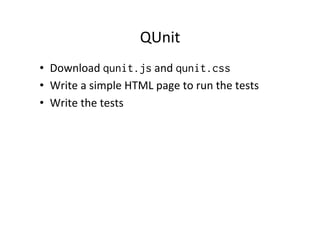
QUnit 
• Download 
qunit.js 
and 
qunit.css 
• Write 
a 
simple 
HTML 
page 
to 
run 
the 
tests 
• Write 
the 
tests
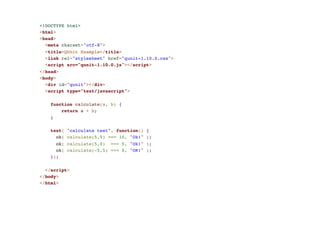
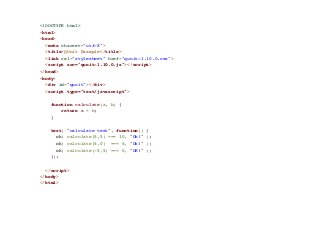
<!DOCTYPE html>! 
<html>! 
<head>! 
<meta charset="utf-8">! 
<title>QUnit Example</title>! 
<link rel="stylesheet" href="qunit-1.10.0.css">! 
<script src="qunit-1.10.0.js"></script>! 
</head>! 
<body>! 
<div id="qunit"></div>! 
<script type="text/javascript">! 
! 
function calculate(a, b) {! 
return a + b;! 
}! 
! 
test( "calculate test", function() {! 
ok( calculate(5,5) === 10, "Ok!" );! 
ok( calculate(5,0) === 5, "Ok!" );! 
ok( calculate(-5,5) === 0, "OK!" );! 
});! 
! 
</script>! 
</body>! 
</html>
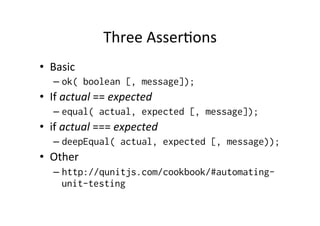
Three 
AsserCons 
• Basic 
– ok( boolean [, message]); 
• If 
actual 
== 
expected 
– equal( actual, expected [, message]); 
• if 
actual 
=== 
expected 
– deepEqual( actual, expected [, message)); 
• Other 
– http://qunitjs.com/cookbook/#automating-unit- 
testing
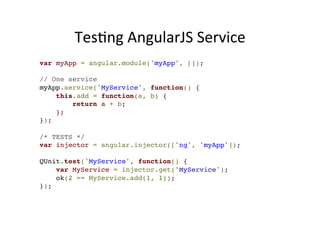
TesCng 
AngularJS 
Service 
var myApp = angular.module('myApp', []);! 
! 
// One service! 
myApp.service('MyService', function() {! 
this.add = function(a, b) {! 
return a + b;! 
};! 
});! 
! 
/* TESTS */! 
var injector = angular.injector(['ng', 'myApp']);! 
! 
QUnit.test('MyService', function() {! 
var MyService = injector.get('MyService');! 
ok(2 == MyService.add(1, 1));! 
});
EXERCISE 
7: 
QUNIT 
AND 
ANGULAR_JS
WRAPPING 
UP
Wrapping 
UP 
• AngularJS 
is 
a 
modular 
JavaScript 
SPA 
framework 
• Lot 
of 
great 
features, 
but 
learning 
curve 
can 
be 
hard 
• Great 
for 
CRUD 
(create, 
read, 
update, 
delete) 
apps, 
but 
not 
suitable 
for 
every 
type 
of 
apps 
• Works 
very 
well 
with 
some 
JS 
libraries 
(JQuery)

Introduction to AngularJS

  • 1.
    Intro to SPA framework Jussi Pohjolainen
  • 2.
    Agenda • Web Development and SPA • Intro to AngularJS • Recap of JS • GeAng Started with AngularJS – DirecCves, Filters and Data Binding • View, Controllers and Scope • Modules, Routes, Services • Ajax and RESTful Web Services • AnimaCons and TesCng
  • 3.
    Rise of the Responsive Single Page App Image: hNp://johnpolacek.github.io/scrolldeck.js/decks/responsive/
  • 4.
    Responsive • Unified across experiences • Can be embedded as mobile app • BeNer deployment and & maintanence • Mobile users need to get access to everything Image: hNp://coenraets.org/blog/wp-­‐content/uploads/2011/10/directory11.png
  • 5.
    Single-­‐page ApplicaCons (SPA) • Web app that fits on a single web page – Fluid UX, like desktop app – Examples like Gmail, Google maps • Html page contains mini-­‐views (HTML Fragments) that can be loaded in the background • No reloading of the page, be3er UX • Requires handling of browser history, naviga:on and bookmarks
  • 6.
    JavaScript • SPAs are implemented using JavaScript and HTML • ECMAScript is a scripCng language, standardized by Ecma InternaConal • In Browsers, ECMAScript is commonly called JavaScript – JavaScript = Na:ve (EcmaScript) + Host objects (browser)
  • 7.
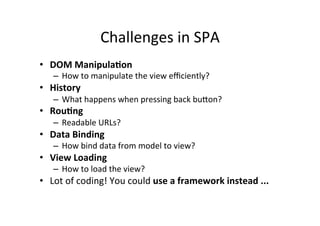
    Challenges in SPA • DOM Manipula:on – How to manipulate the view efficiently? • History – What happens when pressing back buNon? • Rou:ng – Readable URLs? • Data Binding – How bind data from model to view? • View Loading – How to load the view? • Lot of coding! You could use a framework instead ...
  • 8.
  • 9.
    Angular JS •Single Page App Framework for JavaScript • Implements client-­‐side MVC paNern – SeparaCon of presentaCon from business logic and presentaCon state • No direct DOM manipulaCon, less code • Support for all major browsers • Supported by Google • Large and fast growing community
  • 10.
  • 11.
    AngularJS – Main Concepts • Templates • DirecCves • Expressions • Data binding • Scope • Controllers • Modules • Filters • Services • RouCng
  • 12.
  • 13.
    Recommended Reading •Recommended reading – JavaScript: The Good Parts by Douglas Crockford – JavaScript: The Definite Guide by David Flanagan – JavaScript Pa3erns: Stoyan Stefanov
  • 14.
    Objects • Everything (except basic types) are objects – Including func:ons and arrays • Object contains proper:es and methods – CollecCon of name-­‐value pairs – Names are strings, values can be anything – ProperCes and methods can be added at run:me • Objects can inherit other objects
  • 15.
    Object Literal varcustomer = {name: "Jack", gender: "male"};! ! var circle1 = {radius: 9, getArea: someFunction};! ! var circle2 = {! radius: 9,! getRadius: function() {! return this.radius;! }! }
  • 16.
    ProperCes at RunCme • One of the simplest way to create object: var obj = new Object();! obj.x = 10;! obj.y = 12;! obj.method = function() { … } • This adds at run:me two properCes to the obj – object! • Object is built – in data type
  • 17.
    “Class” • You can create constructor-­‐funcCon in JavaScript function Point() {! this.x = 1;! this.y = 1;! } var p = new Point();!
  • 18.
    Example function Circle(radius)! {! this.radius = radius;! this.getArea = function()! {! return (this.radius * this.radius) * Math.PI;! }; ! }! ! var myobj = new Circle(5);! document.write( myobj.getArea() );
  • 19.
    FuncCons • Every funcCon in JS is Func:on object – Can be passed as arguments – Can store name / value pairs – Can be anonymous or named • Usage (Don’t use this, it’s not efficient) var myfunction = new Function("a","b", "return a+b;"); print( myfunction(3,3) );
  • 20.
    Anonymous funcCons •FuncCons can take funcCons as arguments – fetchUrl( onSuccess, onError ) • You can use anonymous funcCons – fetchUrl( function() { ... }, function() { ... } );
  • 21.
  • 22.
    First Example – Template <!DOCTYPE html>! <html>! <head>! <title>! Title! </title>! <meta charset="UTF-8" />! <style media="screen"></style>! <script src="angular.min.js"></script>! </head>! <body>! <!-- initialize the app -->! <div ng-app>! Download this file from: https://angularjs.org/ DirecCve DirecCve <!-- store the value of input field into a variable name -->! <p>Name: <input type="text" ng-model="name"></p>! <!-- display the variable name inside (innerHTML) of p -->! <p ng-bind="name"></p>! </div>! </body>! </html> Template
  • 23.
    Basic Concepts •1) Templates – HTML with addiConal markup, direcCves, expressions, filters ... • 2) Direc:ves – Extend HTML using ng-app, ng-bind, ng-model • 3) Filters – Filter the output: filter, orderBy, uppercase • 4) Data Binding – Bind model to view using expressions {{ }}
  • 24.
    2) DirecCves •Direc:ves apply special behavior to aNributes or elements in HTML – ANach behaviour, transform the DOM • Some direcCves – ng-app • IniCalizes the app – ng-model • Stores/updates the value of the input field into a variable – ng-bind • Replace the text content of the specified HTML with the value of given expression
  • 25.
    About Naming •AngularJS HTML Compiler supports mulCple formats – ng-bind • Recommended Format – data-ng-bind • Recommended Format to support HTML validaCon – ng_bind, ng:bind, x-ng-bind • Legacy, don't use
  • 26.
    Lot of Built in DirecCves • ngApp • ngClick • ngController • ngModel • ngRepeat • ngSubmit • ngDblClick • ngMouseEnter • ngMouseMove • ngMouseLeave • ngKeyDown • ngForm
  • 27.
    2) Expressions •Angular expressions are JavaScript-­‐like code snippets that are usually placed in bindings – {{ expression }}. • Valid Expressions – {{ 1 + 2 }} – {{ a + b }} – {{ items[index] }} • Control flow (loops, if) are not supported! • You can use filters to format or filter data
  • 28.
    Example <!DOCTYPE html>! <html>! <head>! <title>Title</title>! <meta charset="UTF-8" />! <style media="screen"></style>! <script src="../angular.min.js"></script>! </head>! <body>! <div ng-app>! DirecCve DirecCve <p>Number 1: <input type="number" ng-model="number1"></p>! <p>Number 2: <input type="number" ng-model="number2"></p>! <!-- expression -->! <p>{{ number1 + number2 }}</p>! </div>! </body>! </html> Expression
  • 29.
    Valid HTML5 version <!DOCTYPE html>! <html>! <head>! <title>Title</title>! Add data-­‐ <meta charset="UTF-8" />! <style media="screen"></style>! <script src="../angular.min.js"></script>! </head>! <body>! <div data-ng-app="">! Add data-­‐ <p>Number 1: <input type="number" data-ng-model="number1"></p>! <p>Number 2: <input type="number" data-ng-model="number2"></p>! <!-- expression -->! <p>{{ number1 + number2 }}</p>! </div>! </body>! </html>
  • 30.
    ng-­‐init and ng-­‐repeat direcCves <html data-ng-app="">! <head>! <title>Title</title>! <meta charset="UTF-8" />! <script src="../angular.min.js" type="text/javascript">! </script>! </head>! !< body>! <div data-ng-init="names = ['Jack', 'John', 'Tina']">! <h1>Cool loop!</h1>! <ul>! <li data-ng-repeat="name in names">{{ name }}</li>! </ul>! </div>! </body>! </html>
  • 31.
    3) Filter •With filter, you can format or filter the output • Forma`ng – currency, number, date, lowercase, uppercase • Filtering – filter, limitTo • Other – orderBy, json
  • 32.
    Using Filters -­‐ Example <!DOCTYPE html>! <html data-ng-app="">! <head>! ! <title>Title</title>! <meta charset="UTF-8">! <script src="../angular.min.js" type="text/javascript">! </script>! </head>! !< body>! <div data-ng-init="customers = [{name:'jack'}, {name:'tina'}]">! <h1>Cool loop!</h1>! <ul>! <li data-ng-repeat="customer in customers | orderBy:'name'">! {{ customer.name | uppercase }}</li>! </ul>! </div>! </body>! </html> Filter Filter
  • 33.
    Using Filters -­‐ Example <!DOCTYPE html>! !< html data-ng-app="">! <head>! <title>Title</title>! <meta charset="UTF-8">! <script src="../angular.min.js" type="text/javascript">! </script>! </head>! <body>! <div data-ng-init=! "customers = [{name:'jack'}, {name:'tina'}, {name:'john'}, {name:'donald'}]">! <h1>Customers</h1>! ! <ul>! <li data-ng-repeat="customer in customers | orderBy:'name' | filter:'john'">{{! customer.name | uppercase }}</li>! </ul>! </div>! </body>! </html>
  • 34.
    Using Filters – User Input Filters the Data <!DOCTYPE html>! !< html data-ng-app="">! <head>! <title>Title</title>! <meta charset="UTF-8">! <script src="../angular.min.js" type="text/javascript">! </script>! </head>! <body>! <div data-ng-init=! "customers = [{name:'jack'}, {name:'tina'}, {name:'john'}, {name:'donald'}]">! <h1>Customers</h1>! ! <input type="text" data-ng-model="userInput" />! <ul>! <li data-ng-repeat="customer in customers | orderBy:'name' | filter:userInput">{{! customer.name | uppercase }}</li>! </ul>! </div>! </body>! </html>
  • 35.
  • 36.
    EXERCISE 1 + 2: BMI AND FILTERS
  • 37.
  • 38.
    Model – View -­‐ Controllers • Controllers provide the logic behind your app. – So use controller when you need logic behind your UI • AngularJS apps are controller by controllers • Use ng-­‐controller to define the controller • Controller is a JavaScript Object, created by standard JS object constructor
  • 39.
    View, Controller and Scope View (html fragment) $scope Controller $scope is an object that can be used to communicate between View and Controller
  • 40.
    controller.js // Angularwill inject the $scope object, you don't have to ! // worry about it! function NumberCtrl ($scope) {! // $scope is bound to view, so communication ! // to view is done using the $scope! $scope.number = 1;! ! $scope.showNumber = function showNumber() {! window.alert( "your number = " + $scope.number );! };! } Warning, this will not work from AngularJS 1.3. We will see later on how this is done using module
  • 41.
    <!DOCTYPE html>! <html>! <head>! <title>Title</title>! <meta charset="UTF-8" />! <style media="screen"></style>! <script src="../angular.min.js"></script>! <script src="controller.js"></script>! ! </head>! <body>! <div data-ng-app="" ! <div data-ng-controller="NumberCtrl">! Define the Controller implemented in controller.js <p>Number: <input type="number" ng-model="number"></p>! <p>Number = {{ number }}</p>! <button ng-click="showNumber()">Show Number</button>! </div>! </div>! </body>! </html> Access Access $scope.number $scope.showNumber()
  • 42.
    App Explained •App runs inside ng-app (div) • AngularJS will invoke the constructor with a $scope – object • $scope is an object that links controller to the view
  • 43.
    When to use Controllers • Use controllers – set up the iniCal state of $scope object – add behavior to the $scope object • Do not – Manipulate DOM (use databinding, direc:ves) – Format input (use form controls) – Filter output (use filters) – Share code or state (use services)
  • 44.
  • 45.
    Modules • Module is an reusable container for different features of your app – Controllers, services, filters, direcCves... • If you have a lot of controllers, you are pollu:ng JS namespace • Modules can be loaded in any order • We can build our own filters and direc:ves!
  • 46.
    Example: Own Filter // declare a module! var myAppModule = angular.module('myApp', []);! ! // configure the module.! // in this example we will create a greeting filter! myAppModule.filter('greet', function() {! return function(name) {! return 'Hello, ' + name + '!';! };! });
  • 47.
    HTML using the Filter <div ng-app="myApp">! <div>! {{ 'World' | greet }}! </div>! </div>
  • 48.
    Template for Controllers // Create new module 'myApp' using angular.module method.! // The module is not dependent on any other module! var myModule = angular.module('myModule', ! []);! ! myModule.controller('MyCtrl', function ($scope) {! // Your controller code here!! });
  • 49.
    CreaCng a Controller in Module var myModule = angular.module('myModule', ! []);! ! myModule.controller('MyCtrl', function ($scope) {! ! var model = { "firstname": "Jack",! "lastname": "Smith" };! ! $scope.model = model;! $scope.click = function() { ! alert($scope.model.firstname); ! };! });
  • 50.
    <!DOCTYPE html>! <html>! <head>! <title>Title</title>! <meta charset="UTF-8" />! <style media="screen"></style>! <script src="../angular.min.js"></script>! <script src="mymodule.js"></script>! ! </head>! <body>! <div ng-app="myModule" ! <div ng-controller="MyCtrl">! <p>Firstname: <input type="text" ng-model="model.firstname"></p>! <p>Lastname: <input type="text" ng-model="model.lastname"></p>! <p>{{model.firstname + " " + model.lastname}}</p>! ! <button ng-click="click()">Show Number</button>! ! </div>! </div>! </body>! </html> This is now the model object from MyCtrl. Model object is shared with view and controller
  • 51.
  • 52.
  • 53.
    RouCng • Since we are building a SPA app, everything happens in one page – How should back-­‐bu3on work? – How should linking between "pages" work? – How about URLs? • Rou:ng comes to rescue!
  • 54.
    <html data-ng-app="myApp">! <head>! <title>Demonstration of Routing - index</title>! <meta charset="UTF-8" />! <script src="../angular.min.js" type="text/javascript"></script>! <script src="angular-route.min.js" type="text/javascript"></script>! <script src="myapp.js" type="text/javascript">! </script>! </head>! !< body>! <div data-ng-view=""></div>! </body>! </html> The content of this will change dynamically We will have to load addiConal module
  • 55.
    // This moduleis dependent on ngRoute. Load ngRoute! // before this.! var myApp = angular.module('myApp', ['ngRoute']);! ! // Configure routing.! myApp.config(function($routeProvider) {! // Usually we have different controllers for different views.! // In this demonstration, the controller does nothing.! $routeProvider.when('/', { ! templateUrl: 'view1.html', ! controller: 'MySimpleCtrl' });! ! $routeProvider.when('/view2', { ! templateUrl: 'view2.html', ! controller: 'MySimpleCtrl' });! ! $routeProvider.otherwise({ redirectTo: '/' });! });! ! // Let's add a new controller to MyApp! myApp.controller('MySimpleCtrl', function ($scope) {! !} );
  • 56.
    Views • view1.html: <h1>View 1</h2>! <p><a href="#/view2">To View 2</a></p>! • view2.html: <h1>View 2</h2>! <p><a href="#/view1">To View 1</a></p>
  • 57.
    Working in Local Environment • If you get "cross origin requests are only supported for HTTP" .. • Either – 1) Disable web security in your browser – 2) Use some web server and access files hNp://.. • To disable web security in chrome – taskkill /F /IM chrome.exe – "C:Program Files (x86)GoogleChromeApplication chrome.exe" --disable-web-security --allow-file-access-from- files
  • 58.
  • 59.
    Services • View-­‐independent business logic should not be in a controller – Logic should be in a service component • Controllers are view specific, services are app-­‐spesific – We can move from view to view and service is sCll alive • Controller's responsibility is to bind model to view. Model can be fetched from service! – Controller is not responsible for manipulaCng (create, destroy, update) the data. Use Services instead! • AngularJS has many built-­‐in services, see – hNp://docs.angularjs.org/api/ng/service – Example: $http
  • 60.
    Services ViewCustomers (html fragment) $scope ViewCustomersCtrl Service ModifyCustomers (html fragment) $scope ModifyCustomerCtrl
  • 61.
    AngularJS Custom Services using Factory // Let's add a new controller to MyApp. This controller uses Service!! myApp.controller('ViewCtrl', function ($scope, CustomerService) {! $scope.contacts = CustomerService.contacts;! });! ! // Let's add a new controller to MyApp. This controller uses Service!! myApp.controller('ModifyCtrl', function ($scope, CustomerService) {! $scope.contacts = CustomerService.contacts;! });! ! // Creating a factory object that contains services for the! // controllers.! myApp.factory('CustomerService', function() {! var factory = {}; ! factory.contacts = [{name: "Jack", salary: 3000}, {name: "Tina", salary: 5000}, {name: "John", salary: 4000}];! return factory;! });
  • 62.
    Also Service //Service is instantiated with new – keyword.! // Service function can use "this" and the return! // value is this.! myApp.service('CustomerService', function() {! this.contacts = ! [{name: "Jack", salary: 3000}, ! {name: "Tina", salary: 5000}, ! {name: "John", salary: 4000}];! });
  • 63.
  • 64.
  • 65.
    AJAX • Asynchronous JavaScript + XML – XML not needed, very oden JSON • Send data and retrieve asynchronously from server in background • Group of technologies – HTML, CSS, DOM, XML/JSON, XMLHNpRequest object and JavaScript
  • 66.
    $http – example (AJAX) and AngularJS <script type="text/javascript">! var myapp = angular.module("myapp", []);! ! myapp.controller("MyController", function($scope, $http) {! $scope.myData = {};! $scope.myData.doClick = function(item, event) {! var responsePromise = $http.get("text.txt");! ! responsePromise.success(function(data, status, headers, config) {! $scope.myData.fromServer = data;! });! responsePromise.error(function(data, status, headers, config) {! alert("AJAX failed!");! });! }! } );! </script>!
  • 67.
    RESTful • Web Service APIs that adhere to REST architectural constrains are called RESTful • Constrains – Base URI, such as hNp://www.example/resources – Internet media type for data, such as JSON or XML – Standard HTTP methods: GET, POST, PUT, DELETE – Links to reference reference state and related resources
  • 68.
    RESTful API HTTP methods (wikipedia)
  • 69.
    AJAX + RESTful • The web app can fetch using RESTful data from server • Using AJAX this is done asynchronously in the background • AJAX makes HTTP GET request using url .. – hNp://example.com/resources/item17 • .. and receives data of item17 in JSON ... • .. which can be displayed in view (web page)
  • 70.
    Example: Weather API • Weather informaCon available from wunderground.com – You have to make account and receive a key • To get Helsinki weather in JSON – http://api.wunderground.com/api/your-key/ conditions/q/Helsinki.json
  • 71.
    {! "response": {! "version": "0.1",! "termsofService": "http://www.wunderground.com/weather/api/d/terms.html",! "features": {! "conditions": 1! }! },! "current_observation": {! "image": {! "url": "http://icons.wxug.com/graphics/wu2/logo_130x80.png",! "title": "Weather Underground",! "link": "http://www.wunderground.com"! },! "display_location": {! "full": "Helsinki, Finland",! "city": "Helsinki",! "state": "",! "state_name": "Finland",! "country": "FI",! "country_iso3166": "FI",! "zip": "00000",! "magic": "1",! "wmo": "02974",! "latitude": "60.31999969",! "longitude": "24.96999931",! "elevation": "56.00000000"! },!
  • 72.
    <!DOCTYPE html>! <html>! <head>! <script src="../angular.min.js" type="text/javascript"></script>! <title></title>! </head>! ! <body data-ng-app="myapp">! <div data-ng-controller="MyController">! <button data-ng-click="myData.doClick(item, $event)">Get Helsinki Weather</button><br />! Data from server: {{myData.fromServer}}! </div>! ! <script type="text/javascript">! var myapp = angular.module("myapp", []);! ! myapp.controller("MyController", function($scope, $http) {! $scope.myData = {};! $scope.myData.doClick = function(item, event) {! var responsePromise = $http.get("http://api.wunderground.com/api/key/conditions/ q/Helsinki.json");! ! responsePromise.success(function(data, status, headers, config) {! $scope.myData.fromServer = "" + data.current_observation.weather + ! " " + data.current_observation.temp_c + " c";! });! responsePromise.error(function(data, status, headers, config) {! alert("AJAX failed!");! });! }! } );! </script>! </body>! </html> This is JSON object!
  • 73.
  • 74.
    $resource • Built on top of $hNp service, $resource is a factory that lets you interact with RESTful backends easily • $resource does not come bundled with main Angular script, separately download – angular-resource.min.js • Your main app should declare dependency on the ngResource module in order to use $resource
  • 75.
    GeAng Started with $resource • $resource expects classic RESTful backend – http://en.wikipedia.org/wiki/ Representational_state_transfer#Applied_t o_web_services • You can create the backend by whatever technology. Even JavaScript, for example Node.js • We are not concentraCng now how to build the backend.
  • 76.
    Using $resource on GET // Load ngResource before this! var restApp = angular.module('restApp',['ngResource']); ! ! restApp.controller("RestCtrl", function($scope, $resource) {! $scope.doClick = function() {! var title = $scope.movietitle;! var searchString = 'http://api.rottentomatoes.com/api/ public/v1.0/movies.json?apikey=key&q=' + title + '&page_limit=5';! ! var result = $resource(searchString);! ! var root = result.get(function() { // {method:'GET'! $scope.movies = root.movies;! }); ! }! });
  • 77.
    $resource methods •$resource contains convenient methods for – get ('GET') – save ('POST') – query ('GET', isArray:true) – remove ('DELETE') • Calling these will invoke $hNp (ajax call) with the specified hNp method (GET, POST, DELETE), desCnaCon and parameters
  • 78.
    Passing Parameters //Load ngResource before this! var restApp = angular.module('restApp',['ngResource']); ! ! restApp.controller("RestCtrl", function($scope, $resource) {! $scope.doClick = function() {! var searchString = 'http://api.rottentomatoes.com/api/public/ v1.0/movies.json?apikey=key&q=:title&page_limit=5';! var result = $resource(searchString);! var root = result.get({title: $scope.movietitle}, function() {! $scope.movies = root.movies;! }); ! }! }); :Ctle -­‐> parametrized URL template Giving the parameter from $scope
  • 79.
    Using Services //Load ngResource before this! var restApp = angular.module('restApp',['ngResource']); ! ! restApp.controller("RestCtrl", function($scope, MovieService) {! $scope.doClick = function() {! var root = MovieService.resource.get({title: $scope.movietitle}, ! function() {! $scope.movies = root.movies;! }); ! }! });! !! restApp.factory('MovieService', function($resource) {! factory = {};! factory.resource = $resource('http://api.rottentomatoes...&q=:title&page_limit=5');! return factory;! }); Controller responsible for binding Service responsible for the resource
  • 80.
    Simple Version //Load ngResource before this! var restApp = angular.module('restApp',['ngResource']); ! ! restApp.controller("RestCtrl", function($scope, MovieService) {! $scope.doClick = function() {! var root = MovieService.get({title: $scope.movietitle}, ! function() {! $scope.movies = root.movies;! }); ! }! });! !! restApp.factory('MovieService', function($resource) {! return $resource('http://api.rottentomatoes...&q=:title&page_limit=5');;! }); Just call get from MovieService Returns the resource
  • 81.
  • 82.
  • 83.
    AngularJS AnimaCons •Include ngAnimate module as dependency • Hook animaCons for common direcCves such as ngRepeat, ngSwitch, ngView • Based on CSS classes – If HTML element has class, you can animate it • AngularJS adds special classes to your html-­‐ elements
  • 84.
    Example Form <bodyng-controller="AnimateCtrl">! <button ng-click="add()">Add</button>! <button ng-click="remove()">Remove</button></p>! <ul>! <li ng-repeat="customer in customers">{{customer.name}}</li>! </ul>! </body> Adds and Removes names
  • 85.
    AnimaCon Classes •When adding a new name to the model, ng-­‐ repeat knows the item that is either added or deleted • CSS classes are added at runCme to the repeated element (<li>) • When adding new element: – <li class="... ng-enter ng-enter-active">New Name</li> • When removing element – <li class="... ng-leave ng-leave-active">New Name</li>
  • 86.
    DirecCves and CSS Event Star:ng CSS Ending CSS Direc:ves enter .ng-­‐enter .ng-­‐enter-­‐acCve ngRepeat, ngInclude, ngIf, ngView leave .ng-­‐leave .ng-­‐leave-­‐acCve ngRepeat, ngInclude, ngIf, ngView move .ng-­‐move .ng-­‐move.acCve ngRepeat
  • 87.
    Example CSS /*starting animation */! .ng-enter {! -webkit-transition: 1s;! transition: 1s;! margin-left: 100%;! }! ! /* ending animation */! .ng-enter-active {! margin-left: 0;! }! ! /* starting animation */! .ng-leave {! -webkit-transition: 1s;! transition: 1s;! margin-left: 0;! }! ! /* ending animation */! .ng-leave-active {! margin-left: 100%;! }
  • 88.
    Test Driven Design • Write tests firsts, then your code • AngularJS emphasizes modularity, so it can be easy to test your code • Code can be tested using several unit tesCng frameworks, like QUnit, Jasmine, Mocha ...
  • 89.
    QUnit • Download qunit.js and qunit.css • Write a simple HTML page to run the tests • Write the tests
  • 90.
    <!DOCTYPE html>! <html>! <head>! <meta charset="utf-8">! <title>QUnit Example</title>! <link rel="stylesheet" href="qunit-1.10.0.css">! <script src="qunit-1.10.0.js"></script>! </head>! <body>! <div id="qunit"></div>! <script type="text/javascript">! ! function calculate(a, b) {! return a + b;! }! ! test( "calculate test", function() {! ok( calculate(5,5) === 10, "Ok!" );! ok( calculate(5,0) === 5, "Ok!" );! ok( calculate(-5,5) === 0, "OK!" );! });! ! </script>! </body>! </html>
  • 91.
    Three AsserCons •Basic – ok( boolean [, message]); • If actual == expected – equal( actual, expected [, message]); • if actual === expected – deepEqual( actual, expected [, message)); • Other – http://qunitjs.com/cookbook/#automating-unit- testing
  • 92.
    TesCng AngularJS Service var myApp = angular.module('myApp', []);! ! // One service! myApp.service('MyService', function() {! this.add = function(a, b) {! return a + b;! };! });! ! /* TESTS */! var injector = angular.injector(['ng', 'myApp']);! ! QUnit.test('MyService', function() {! var MyService = injector.get('MyService');! ok(2 == MyService.add(1, 1));! });
  • 93.
    EXERCISE 7: QUNIT AND ANGULAR_JS
  • 94.
  • 95.
    Wrapping UP •AngularJS is a modular JavaScript SPA framework • Lot of great features, but learning curve can be hard • Great for CRUD (create, read, update, delete) apps, but not suitable for every type of apps • Works very well with some JS libraries (JQuery)