Introduction to Computers IT Preparatory Course Diploma in Nursing Unity College International
Are you a beginner With computers? This course will helps you learn about computers in an easy, friendly way
Compare a computer To a workshop such as Woodshop Kitchen
Typical workshop features Materials Tools Working Area Storage Measurements (may be English or metric)
Woodshop Materials: Wood Tools: Hammer, saw, drill… Work area: Worktable Storage: Cabinet Measurements Yards, feet, inches, meters, centimeters, millimeters
Kitchen Materials: Food Tools: Stove, mixer, spoon… Work Area: Counter, cutting board, bowl… Storage: Refrigerator, cabinet… Measurements: Cups, tablespoons, teaspoons, ounces pints, grams, liters
Computers How does this apply to computers? You will find materials, tools, work area, storage, and measurements
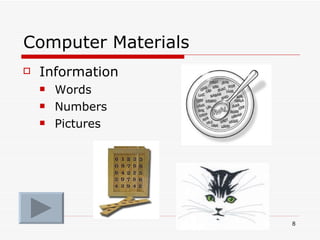
Computer Materials Information Words Numbers Pictures
Computer Tools Two kinds: Hardware Physical parts to computer Software Instructions This slide show for example
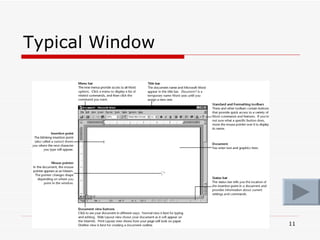
Computer Working Area The work area of a computer is called a window. The next slide shows a typical window.  You will use some windows in the last part of this class and in future classes.
Typical Window
Computer Storage Two main types: Memory Data Storage
Memory Often called RAM (Random Access Memory) Information while you work on it (like food while you eat it) Usually temporary (easily lost)
Data Storage Information stored away for use later on  (like food in the refrigerator) Usually long-term (safer) May be stored on disks, CDs. DVDs, or flash drives
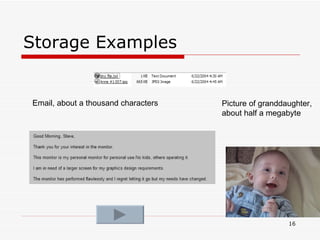
Measuring Information Bytes One character takes up about one  Byte . An email takes up a few (thousand bytes)  Kilobytes  (thousands of bytes) A picture may take up  Megabytes  (millions of bytes) All the  information on a computer may run into  Gigabytes  (billions of bytes)
Storage Examples Email, about a thousand characters Picture of granddaughter, about half a megabyte
Hardware Central Processing Unit (cpu) Brains of a computer
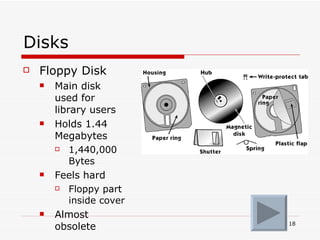
Disks Floppy Disk Main disk used for library users Holds 1.44 Megabytes 1,440,000 Bytes Feels hard Floppy part inside cover Almost obsolete
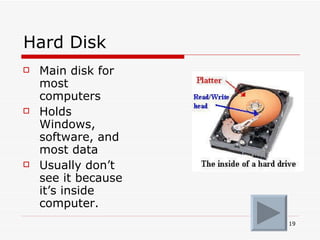
Hard Disk Main disk for most computers Holds Windows, software, and most data Usually don’t see it because it’s inside computer.
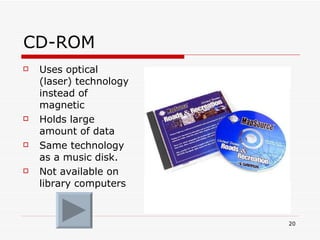
CD-ROM Uses optical (laser) technology instead of magnetic Holds large amount of data Same technology as a music disk. Not available on library computers
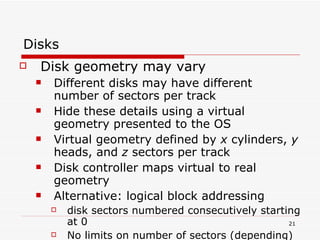
Disks Disk geometry may vary Different disks may have different number of sectors per track Hide these details using a virtual geometry presented to the OS Virtual geometry defined by  x  cylinders,  y  heads, and  z  sectors per track Disk controller maps virtual to real geometry Alternative: logical block addressing disk sectors numbered consecutively starting at 0 No limits on number of sectors (depending)
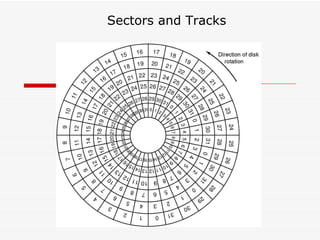
Sectors and Tracks
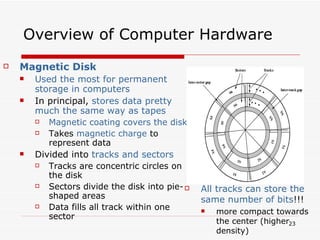
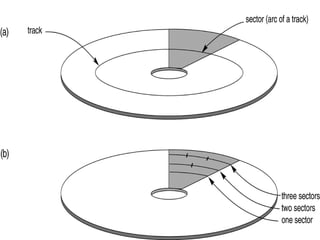
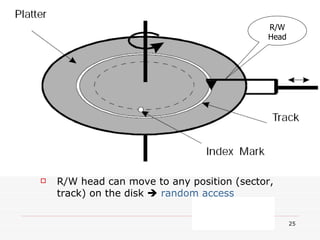
Overview of Computer Hardware Magnetic Disk Used the most for permanent storage in computers In principal,  stores data pretty much the same way as tapes   Magnetic coating covers the disk Takes  magnetic charge  to represent data Divided into  tracks and sectors Tracks are concentric circles on the disk Sectors divide the disk into pie-shaped areas Data fills all track within one sector  All tracks can store the same number of bits !!! more compact towards the center (higher density)
 
R/W Head R/W head can move to any position (sector, track) on the disk     random access
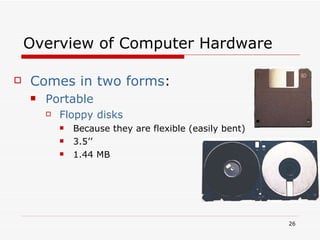
Overview of Computer Hardware Comes in two forms : Portable   Floppy disks Because they are flexible (easily bent) 3.5’’  1.44 MB
Calculations Information Given : A magnetic disk is  labeled M  Able to write on 1 side. 40 sectors 60 tracks 1 cluster = 2 sector track I sector-track=512 byte
Calculate The number of sector-track on one side? 40 x 60 = 2400 sector-track The number of sector-track on both sides? 2400 sector-track because the other side = 0 How much can be stored on one side? 2400 x 512 byte = 1228800 bytes How much can be stored on both sides? 1228800 bytes
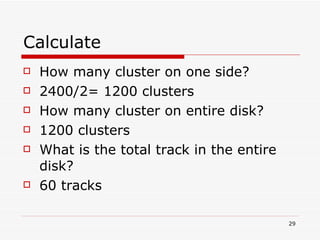
Calculate How many cluster on one side? 2400/2= 1200 clusters How many cluster on entire disk? 1200 clusters What is the total track in the entire disk? 60 tracks
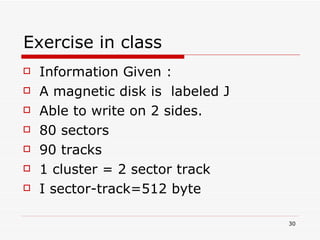
Exercise in class Information Given : A magnetic disk is  labeled J  Able to write on 2 sides. 80 sectors 90 tracks 1 cluster = 2 sector track I sector-track=512 byte
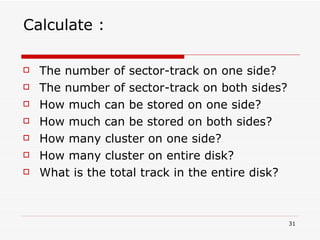
Calculate : The number of sector-track on one side? The number of sector-track on both sides? How much can be stored on one side? How much can be stored on both sides? How many cluster on one side? How many cluster on entire disk? What is the total track in the entire disk?
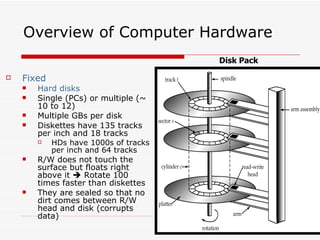
Overview of Computer Hardware Fixed Hard disks Single (PCs) or multiple (~ 10 to 12) Multiple GBs per disk Diskettes have 135 tracks per inch and 18 tracks HDs have 1000s of tracks per inch and 64 tracks R/W does not touch the surface but floats right above it    Rotate 100 times faster than diskettes They are sealed so that no dirt comes between R/W head and disk (corrupts data) Disk Pack
Overview of Computer Hardware Compact Disks (CDs) Optical disk Data stored like magnetic disks (series of dots on tracks) Now we  BURN the dots  (rather than magnetic charges) as pits on the surface A laser detects those pits as 0s Data spans a track of the disk (not sectors) Pits gives the advantage of more density of storage 600 MB to 10 GB Most CDs are  Read-only (because of the burning) Some optical drives do allow for re-burning of surface  after smoothing out the pits
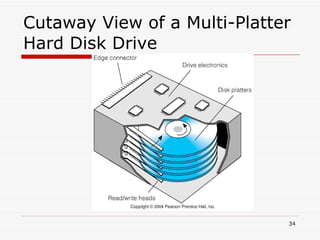
Cutaway View of a Multi-Platter Hard Disk Drive
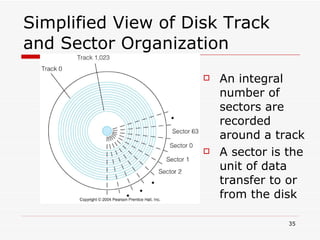
Simplified View of Disk Track and Sector Organization An integral number of sectors are recorded around a track A sector is the unit of data transfer to or from the disk
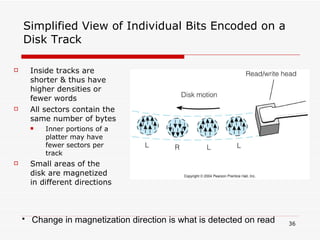
Simplified View of Individual Bits Encoded on a Disk Track Inside tracks are shorter & thus have higher densities or fewer words All sectors contain the same number of bytes Inner portions of a platter may have fewer sectors per track Small areas of the disk are magnetized in different directions Change in magnetization direction is what is detected on read
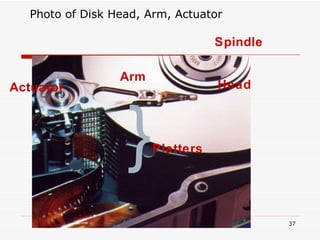
Photo of Disk Head, Arm, Actuator Actuator Arm Head Spindle Platters  {
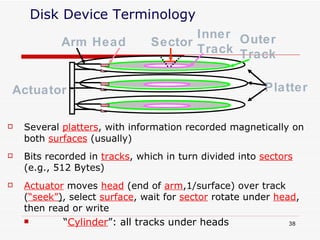
Disk Device Terminology Several  platters , with information recorded magnetically on both  surfaces  (usually) Actuator  moves  head  (end of  arm ,1/surface) over track ( “seek” ) , select  surface , wait for  sector  rotate under  head , then read or write “ Cylinder ”: all tracks under heads  Bits recorded in  tracks , which in turn divided into  sectors  (e.g., 512 Bytes) Platter Outer Track Inner Track Sector Actuator Head Arm
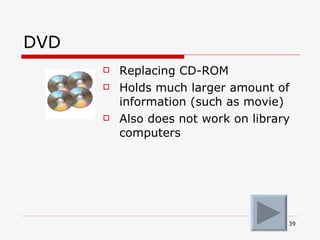
DVD Replacing CD-ROM Holds much larger amount of information (such as movie) Also does not work on library computers
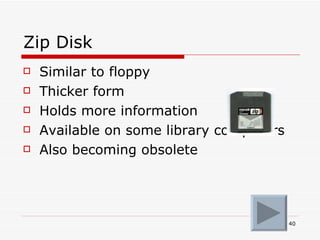
Zip Disk Similar to floppy Thicker form Holds more information Available on some library computers Also becoming obsolete
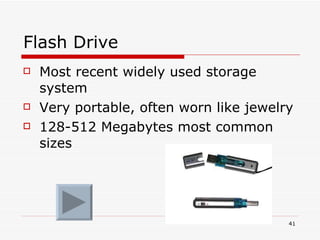
Flash Drive Most recent widely used storage system Very portable, often worn like jewelry 128-512 Megabytes most common sizes
Classes for beginners No particular order in this group Free! Can take more than once Basic Skills Internet Level 1 MS Word Level 1
Time to practice a bit Advance twice to end slide show If time allows you will practice a bit to see what it is like to take our classes
The End Zainudin Johari B Sc (Hons ) Computer Science, UPM M Sc Information Systems, UPM

Intro to computer fundamentals

  • 1.
    Introduction to ComputersIT Preparatory Course Diploma in Nursing Unity College International
  • 2.
    Are you abeginner With computers? This course will helps you learn about computers in an easy, friendly way
  • 3.
    Compare a computerTo a workshop such as Woodshop Kitchen
  • 4.
    Typical workshop featuresMaterials Tools Working Area Storage Measurements (may be English or metric)
  • 5.
    Woodshop Materials: WoodTools: Hammer, saw, drill… Work area: Worktable Storage: Cabinet Measurements Yards, feet, inches, meters, centimeters, millimeters
  • 6.
    Kitchen Materials: FoodTools: Stove, mixer, spoon… Work Area: Counter, cutting board, bowl… Storage: Refrigerator, cabinet… Measurements: Cups, tablespoons, teaspoons, ounces pints, grams, liters
  • 7.
    Computers How doesthis apply to computers? You will find materials, tools, work area, storage, and measurements
  • 8.
    Computer Materials InformationWords Numbers Pictures
  • 9.
    Computer Tools Twokinds: Hardware Physical parts to computer Software Instructions This slide show for example
  • 10.
    Computer Working AreaThe work area of a computer is called a window. The next slide shows a typical window. You will use some windows in the last part of this class and in future classes.
  • 11.
  • 12.
    Computer Storage Twomain types: Memory Data Storage
  • 13.
    Memory Often calledRAM (Random Access Memory) Information while you work on it (like food while you eat it) Usually temporary (easily lost)
  • 14.
    Data Storage Informationstored away for use later on (like food in the refrigerator) Usually long-term (safer) May be stored on disks, CDs. DVDs, or flash drives
  • 15.
    Measuring Information BytesOne character takes up about one Byte . An email takes up a few (thousand bytes) Kilobytes (thousands of bytes) A picture may take up Megabytes (millions of bytes) All the information on a computer may run into Gigabytes (billions of bytes)
  • 16.
    Storage Examples Email,about a thousand characters Picture of granddaughter, about half a megabyte
  • 17.
    Hardware Central ProcessingUnit (cpu) Brains of a computer
  • 18.
    Disks Floppy DiskMain disk used for library users Holds 1.44 Megabytes 1,440,000 Bytes Feels hard Floppy part inside cover Almost obsolete
  • 19.
    Hard Disk Maindisk for most computers Holds Windows, software, and most data Usually don’t see it because it’s inside computer.
  • 20.
    CD-ROM Uses optical(laser) technology instead of magnetic Holds large amount of data Same technology as a music disk. Not available on library computers
  • 21.
    Disks Disk geometrymay vary Different disks may have different number of sectors per track Hide these details using a virtual geometry presented to the OS Virtual geometry defined by x cylinders, y heads, and z sectors per track Disk controller maps virtual to real geometry Alternative: logical block addressing disk sectors numbered consecutively starting at 0 No limits on number of sectors (depending)
  • 22.
  • 23.
    Overview of ComputerHardware Magnetic Disk Used the most for permanent storage in computers In principal, stores data pretty much the same way as tapes Magnetic coating covers the disk Takes magnetic charge to represent data Divided into tracks and sectors Tracks are concentric circles on the disk Sectors divide the disk into pie-shaped areas Data fills all track within one sector All tracks can store the same number of bits !!! more compact towards the center (higher density)
  • 24.
  • 25.
    R/W Head R/Whead can move to any position (sector, track) on the disk  random access
  • 26.
    Overview of ComputerHardware Comes in two forms : Portable Floppy disks Because they are flexible (easily bent) 3.5’’ 1.44 MB
  • 27.
    Calculations Information Given: A magnetic disk is labeled M Able to write on 1 side. 40 sectors 60 tracks 1 cluster = 2 sector track I sector-track=512 byte
  • 28.
    Calculate The numberof sector-track on one side? 40 x 60 = 2400 sector-track The number of sector-track on both sides? 2400 sector-track because the other side = 0 How much can be stored on one side? 2400 x 512 byte = 1228800 bytes How much can be stored on both sides? 1228800 bytes
  • 29.
    Calculate How manycluster on one side? 2400/2= 1200 clusters How many cluster on entire disk? 1200 clusters What is the total track in the entire disk? 60 tracks
  • 30.
    Exercise in classInformation Given : A magnetic disk is labeled J Able to write on 2 sides. 80 sectors 90 tracks 1 cluster = 2 sector track I sector-track=512 byte
  • 31.
    Calculate : Thenumber of sector-track on one side? The number of sector-track on both sides? How much can be stored on one side? How much can be stored on both sides? How many cluster on one side? How many cluster on entire disk? What is the total track in the entire disk?
  • 32.
    Overview of ComputerHardware Fixed Hard disks Single (PCs) or multiple (~ 10 to 12) Multiple GBs per disk Diskettes have 135 tracks per inch and 18 tracks HDs have 1000s of tracks per inch and 64 tracks R/W does not touch the surface but floats right above it  Rotate 100 times faster than diskettes They are sealed so that no dirt comes between R/W head and disk (corrupts data) Disk Pack
  • 33.
    Overview of ComputerHardware Compact Disks (CDs) Optical disk Data stored like magnetic disks (series of dots on tracks) Now we BURN the dots (rather than magnetic charges) as pits on the surface A laser detects those pits as 0s Data spans a track of the disk (not sectors) Pits gives the advantage of more density of storage 600 MB to 10 GB Most CDs are Read-only (because of the burning) Some optical drives do allow for re-burning of surface after smoothing out the pits
  • 34.
    Cutaway View ofa Multi-Platter Hard Disk Drive
  • 35.
    Simplified View ofDisk Track and Sector Organization An integral number of sectors are recorded around a track A sector is the unit of data transfer to or from the disk
  • 36.
    Simplified View ofIndividual Bits Encoded on a Disk Track Inside tracks are shorter & thus have higher densities or fewer words All sectors contain the same number of bytes Inner portions of a platter may have fewer sectors per track Small areas of the disk are magnetized in different directions Change in magnetization direction is what is detected on read
  • 37.
    Photo of DiskHead, Arm, Actuator Actuator Arm Head Spindle Platters {
  • 38.
    Disk Device TerminologySeveral platters , with information recorded magnetically on both surfaces (usually) Actuator moves head (end of arm ,1/surface) over track ( “seek” ) , select surface , wait for sector rotate under head , then read or write “ Cylinder ”: all tracks under heads Bits recorded in tracks , which in turn divided into sectors (e.g., 512 Bytes) Platter Outer Track Inner Track Sector Actuator Head Arm
  • 39.
    DVD Replacing CD-ROMHolds much larger amount of information (such as movie) Also does not work on library computers
  • 40.
    Zip Disk Similarto floppy Thicker form Holds more information Available on some library computers Also becoming obsolete
  • 41.
    Flash Drive Mostrecent widely used storage system Very portable, often worn like jewelry 128-512 Megabytes most common sizes
  • 42.
    Classes for beginnersNo particular order in this group Free! Can take more than once Basic Skills Internet Level 1 MS Word Level 1
  • 43.
    Time to practicea bit Advance twice to end slide show If time allows you will practice a bit to see what it is like to take our classes
  • 44.
    The End ZainudinJohari B Sc (Hons ) Computer Science, UPM M Sc Information Systems, UPM