I.T. for Management


     Chapter 4
  Secondary Storage Devices
Secondary Storage Devices


• Most business information and particularly
  transactions require semi permanent
  storage
• The primary storage is Volatile in nature
• I.e all information is lost when power is
  switched off
• Hence the need of secondary devices
Secondary Storage Devices


• Some of commonly used secondary
  devices
  – Floppy Disks & drive
  – Hard disks
  – CD/DVD Drive
  – Pen drive
  – Magnetic tapes
Secondary Storage Devices


                    Floppy Disks
The first floppy diskettes were introduced in the
 year 1971
The floppy disk is packaged in a 8 inch square
 soft plastic envelope
 They had a capacity of 1 M.B
Later in 1976 5.25 inch diskettes were
 introduced
                                 ………Cont.
Secondary Storage Devices

                   Floppy Disks
Basically, a floppy disk drive reads and
  writes data to a small, circular piece of
  metal-coated plastic similar to audio
  cassette tape.
 In this article, you will learn more about
  what is inside a floppy disk drive and how
  it works.
You will also find out some cool facts about
  FDD’ s.
                                      …. cont
Secondary Storage Devices


                   Floppy Disks
    Parts of a Floppy Disk Drive
               Floppy Disk Drive Terminology
•       Floppy disk - Also called diskette. The common
    size is 3.5 inches.
•       Floppy disk drive - The electromechanical
    device that reads and writes floppy disks.
•       Track - Concentric ring of data on a side of a
    disk.
•       Sector - A subset of a track, similar to wedge or a
    slice of pie.
    The Disk
    floppy disk is a lot like a cassette tape:
•
Secondary Storage Devices

                     Floppy Disks
    Parts of a Floppy Disk Drive

•  Both use a thin plastic base material coated with iron
 oxide. This oxide is a ferromagnetic material, meaning
 that if you expose it to a magnetic field it is permanently
 magnetized by the field.
• Both can record information instantly.
• Both can be erased and reused many times.
• Both are very inexpensive and easy to use.
Secondary Storage Devices
                                                Floppy Disks

             Parts of a Floppy Disk Drive
If you have ever used an audio cassette, you know that it
    has one big disadvantage -- it is a sequential device.
The tape has a beginning and an end, and to move the
    tape to another song later in the sequence of songs on
    the tape you have to use the fast forward and rewind
    buttons to find the start of the song, since the tape heads
    are stationary.
For a long audio cassette tape it can take a minute or two
    to rewind the whole tape, making it hard to find a song in
    the middle of the tape.

•
Secondary Storage Devices

                           Floppy Disks
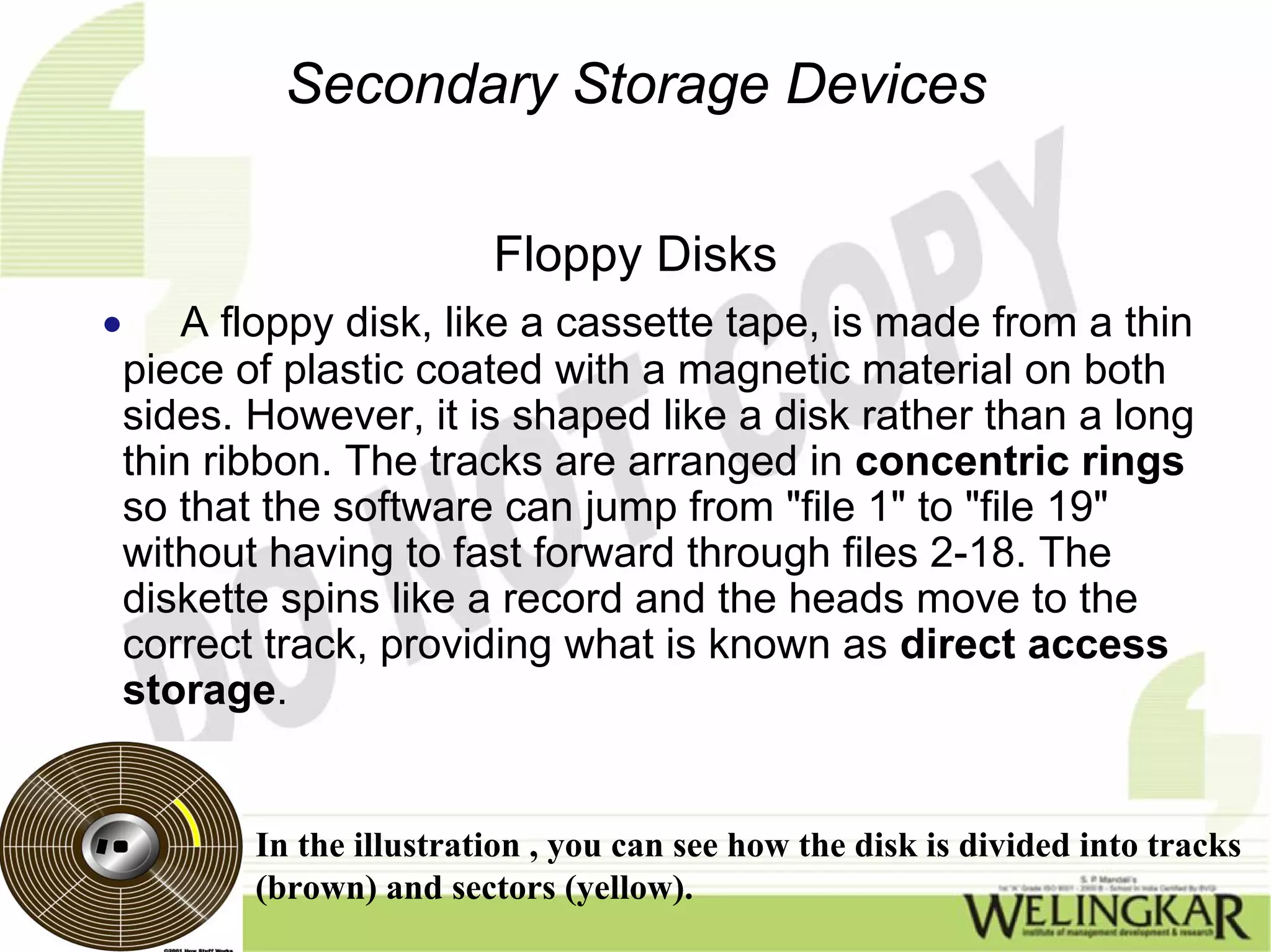
•       A floppy disk, like a cassette tape, is made from a thin
    piece of plastic coated with a magnetic material on both
    sides. However, it is shaped like a disk rather than a long
    thin ribbon. The tracks are arranged in concentric rings
    so that the software can jump from "file 1" to "file 19"
    without having to fast forward through files 2-18. The
    diskette spins like a record and the heads move to the
    correct track, providing what is known as direct access
    storage.


           In the illustration , you can see how the disk is divided into tracks
           (brown) and sectors (yellow).
Secondary Storage Devices
                                  Floppy Drive

• The Drive
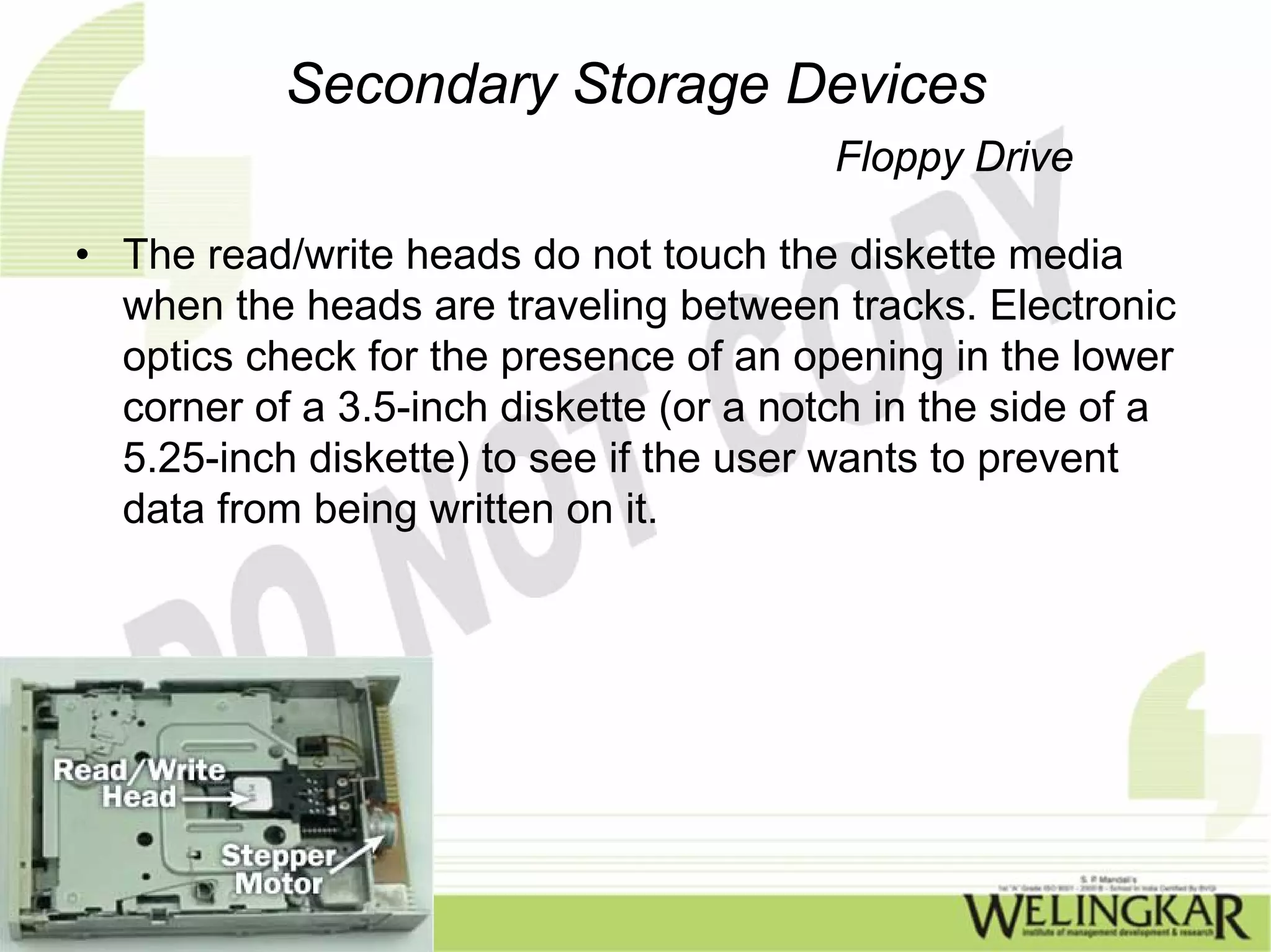
  The major parts of a FDD include: Read/Write
  Heads: Located on both sides of a diskette, they
  move together on the same assembly. The
  heads are not directly opposite each other in an
  effort to prevent interaction between write
  operations on each of the two media surfaces.
  The same head is used for reading and writing,
  while a second, wider head is used for erasing a
  track just prior to it being written.
Secondary Storage Devices
                                    Floppy Drive

• This allows the data to be written on a wider
  "clean slate," without interfering with the analog
  data on an adjacent track.
• Drive Motor: A very small spindle motor
  engages the metal hub at the center of the
  diskette, spinning it at either 300 or 360 rotations
  per minute (RPM).
• Stepper Motor: This motor makes a precise
  number of stepped revolutions to move the
  read/write head assembly to the proper track
  position. The read/write head assembly is
  fastened to the stepper motor shaft.
Secondary Storage Devices
                                      Floppy Drive

• Mechanical Frame: A system of levers that opens the
little protective window on the diskette to allow the
read/write heads to touch the dual-sided diskette media.
An external button allows the diskette to be ejected, at
which point the spring-loaded protective window on the
diskette closes.
• Circuit Board: Contains all of the electronics to handle
the data read from or written to the diskette. It also
controls the stepper-motor control circuits used to move
the read/write heads to each track, as well as the
movement of the read/write heads toward the diskette
surface.
Secondary Storage Devices
                                         Floppy Drive

• The read/write heads do not touch the diskette media
  when the heads are traveling between tracks. Electronic
  optics check for the presence of an opening in the lower
  corner of a 3.5-inch diskette (or a notch in the side of a
  5.25-inch diskette) to see if the user wants to prevent
  data from being written on it.
Secondary Storage Devices
                                  Floppy Drive


Merits:
•In a floppy disk the files can be arranged Sequentially
• or in a random manner
The floppies being Removable makes it very easy to
transport
Requests for information can be answered quickly and at
random
De Merits :
The Floppy disks tend to get corrupted very easily because
of which of these factors
Floppy have lesser storage space
They are sources of virus
Secondary Storage Devices
                          Hard Disk Drive
• IBM developed the idea of the Winchester or the
  hard disk
 The hard disks are enclosed in a hermetically
  enclosed container
 Capacities of the order of 20 GB,40 GB,80 GB
  are typical
Secondary Storage Devices
                            Hard Disk Drive
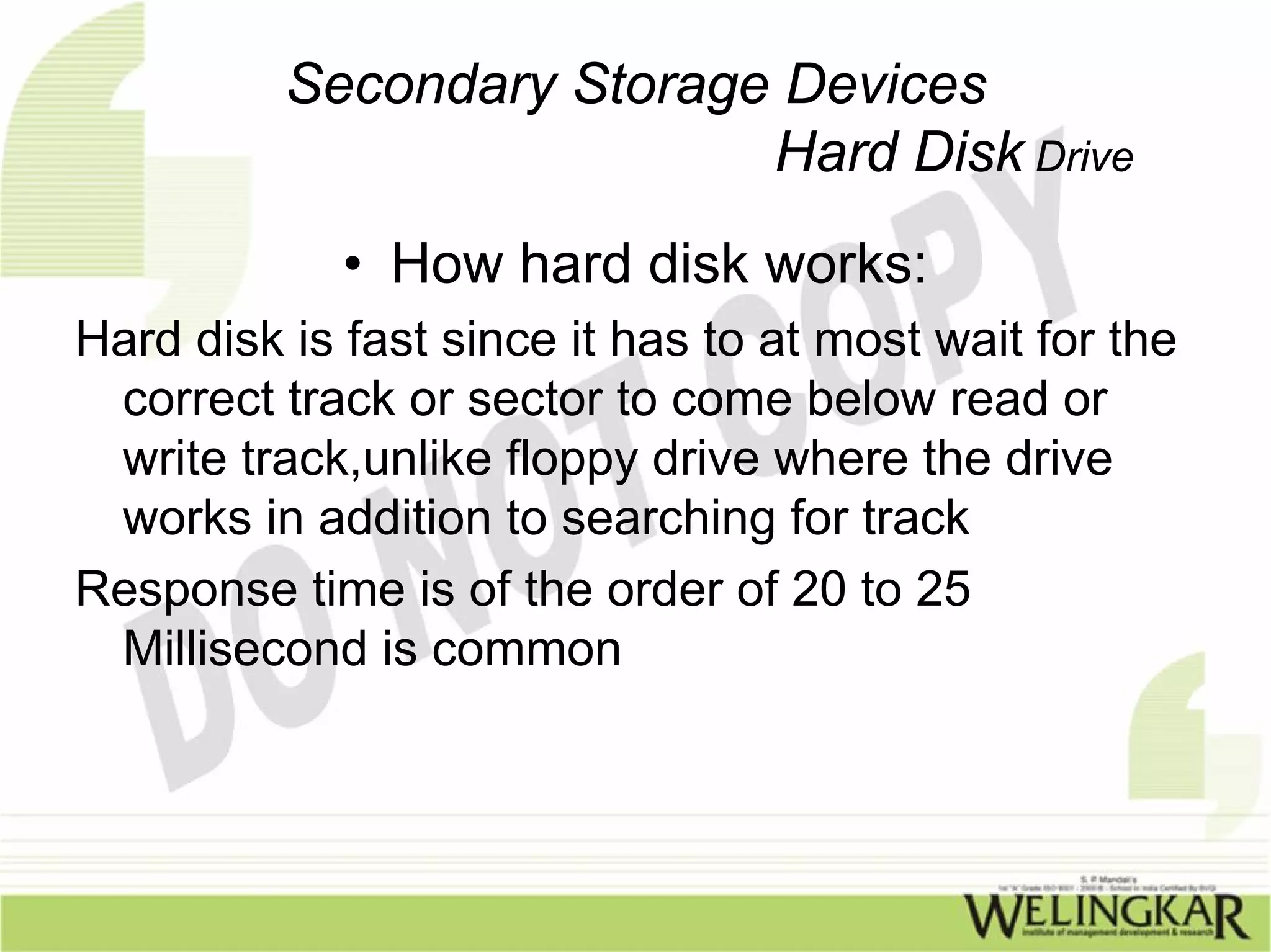
                • How hard disk works:
A hard disk works on the same principle of Floppy drive
   The entire assembly is permanently installed in the pc
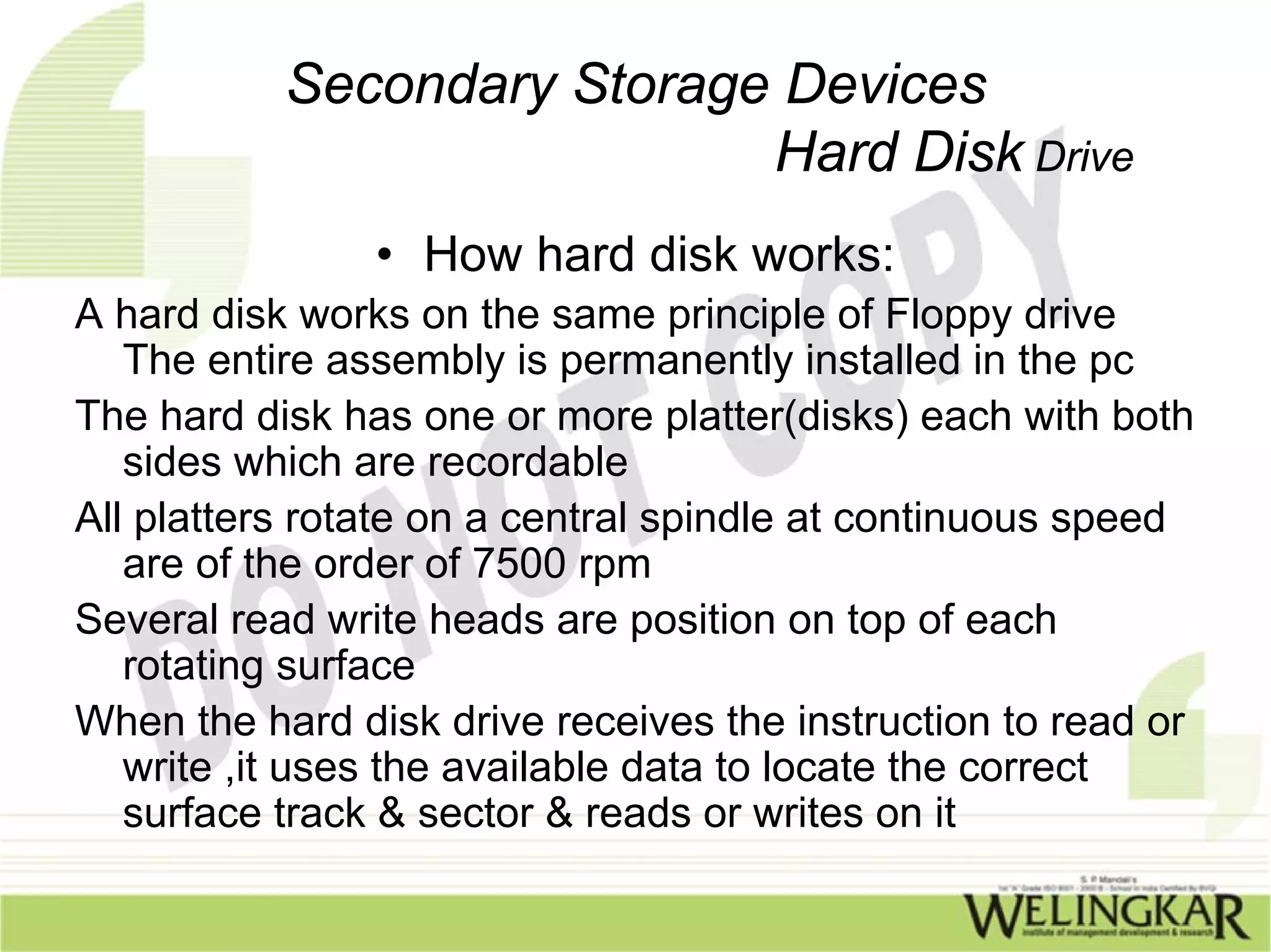
The hard disk has one or more platter(disks) each with both
   sides which are recordable
All platters rotate on a central spindle at continuous speed
   are of the order of 7500 rpm
Several read write heads are position on top of each
   rotating surface
When the hard disk drive receives the instruction to read or
   write ,it uses the available data to locate the correct
   surface track & sector & reads or writes on it
Secondary Storage Devices
                           Hard Disk Drive
             • How hard disk works:
Hard disk is fast since it has to at most wait for the
 correct track or sector to come below read or
 write track,unlike floppy drive where the drive
 works in addition to searching for track
Response time is of the order of 20 to 25
 Millisecond is common
Secondary Storage Devices
                            Hard Disk Drive
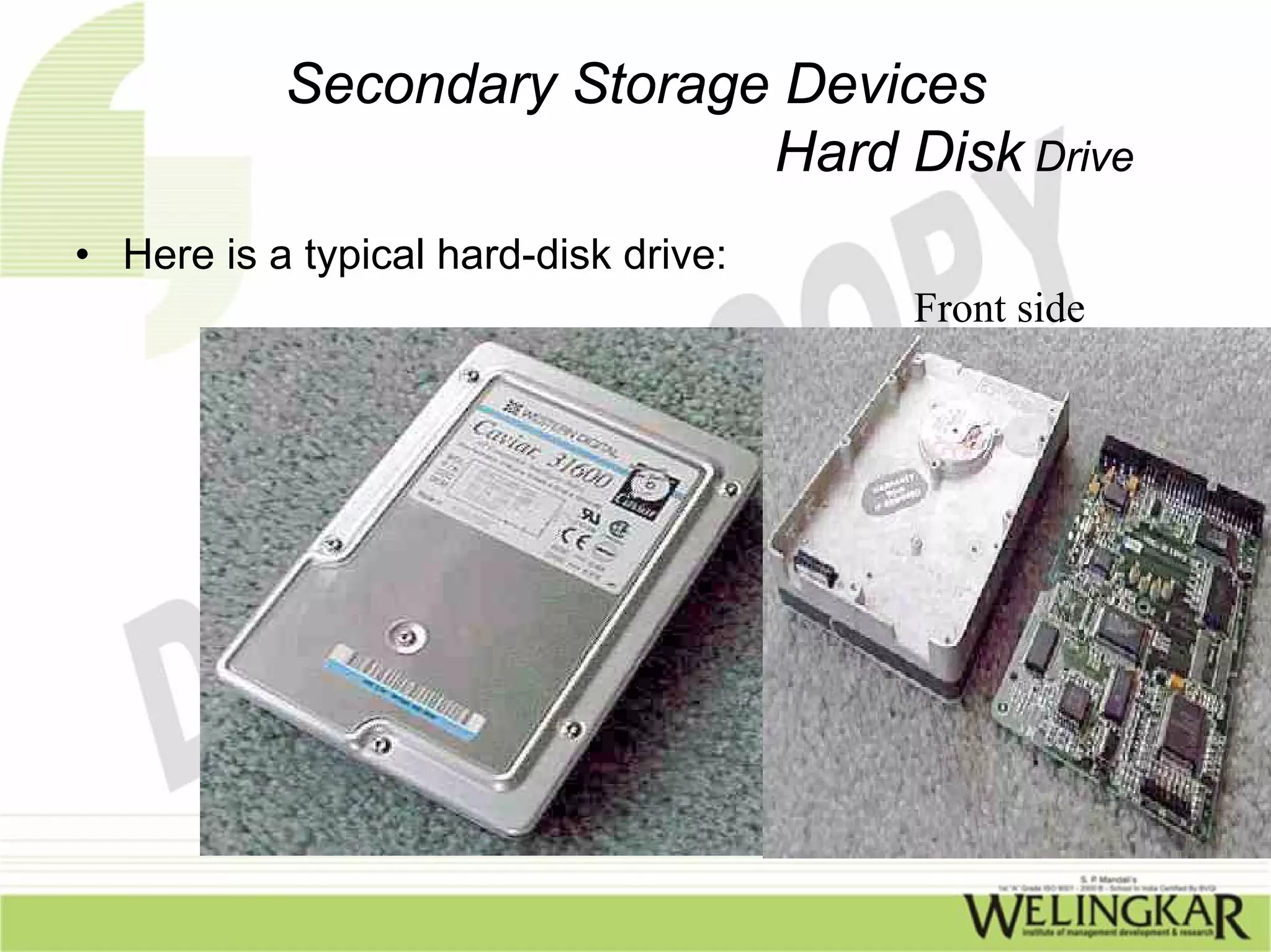
• Here is a typical hard-disk drive:
                                       Front side
Secondary Storage Devices
                            Hard Disk Drive
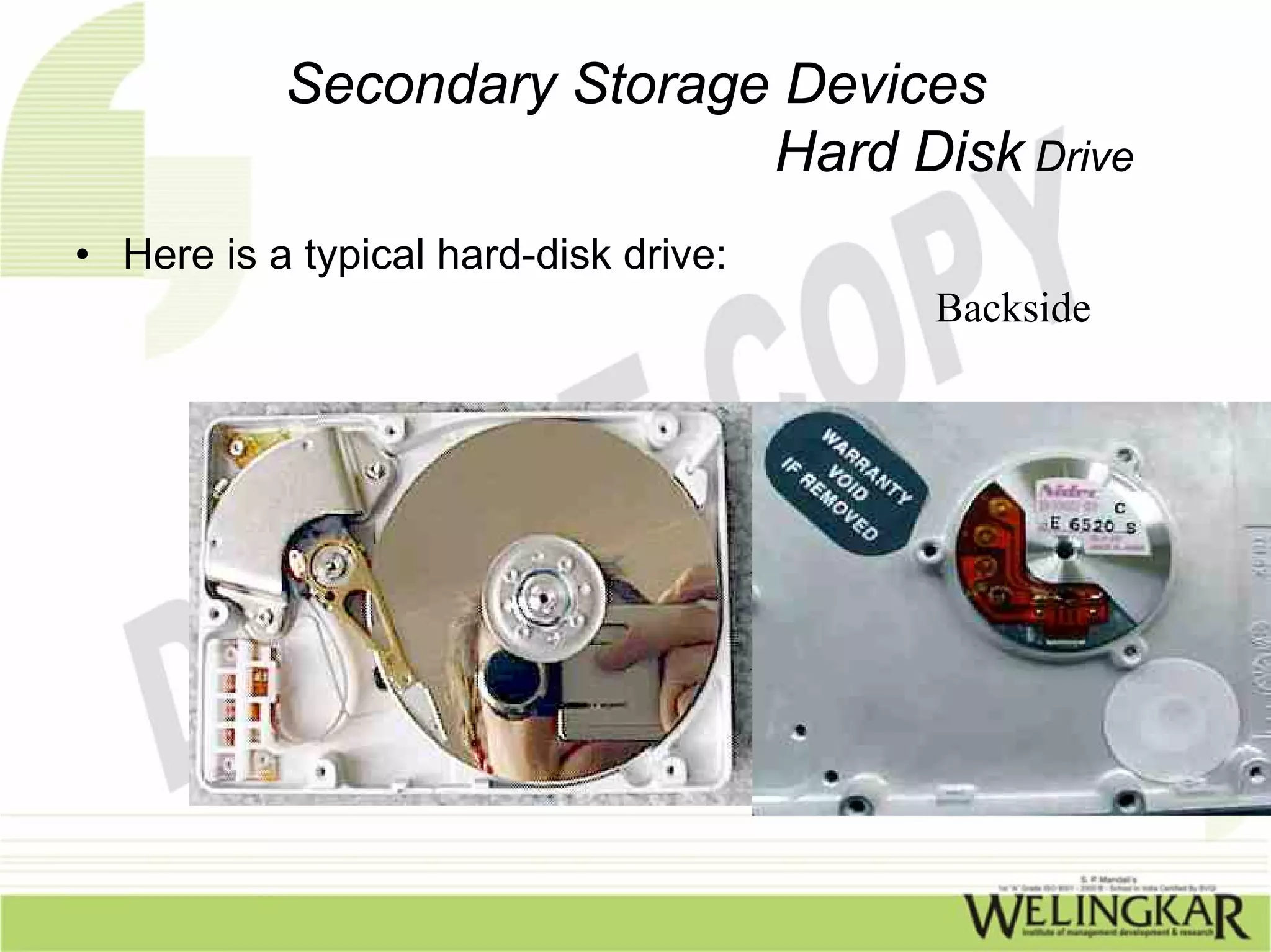
• Here is a typical hard-disk drive:
                                       Backside
Secondary Storage Devices
                     Hard Disk Drive

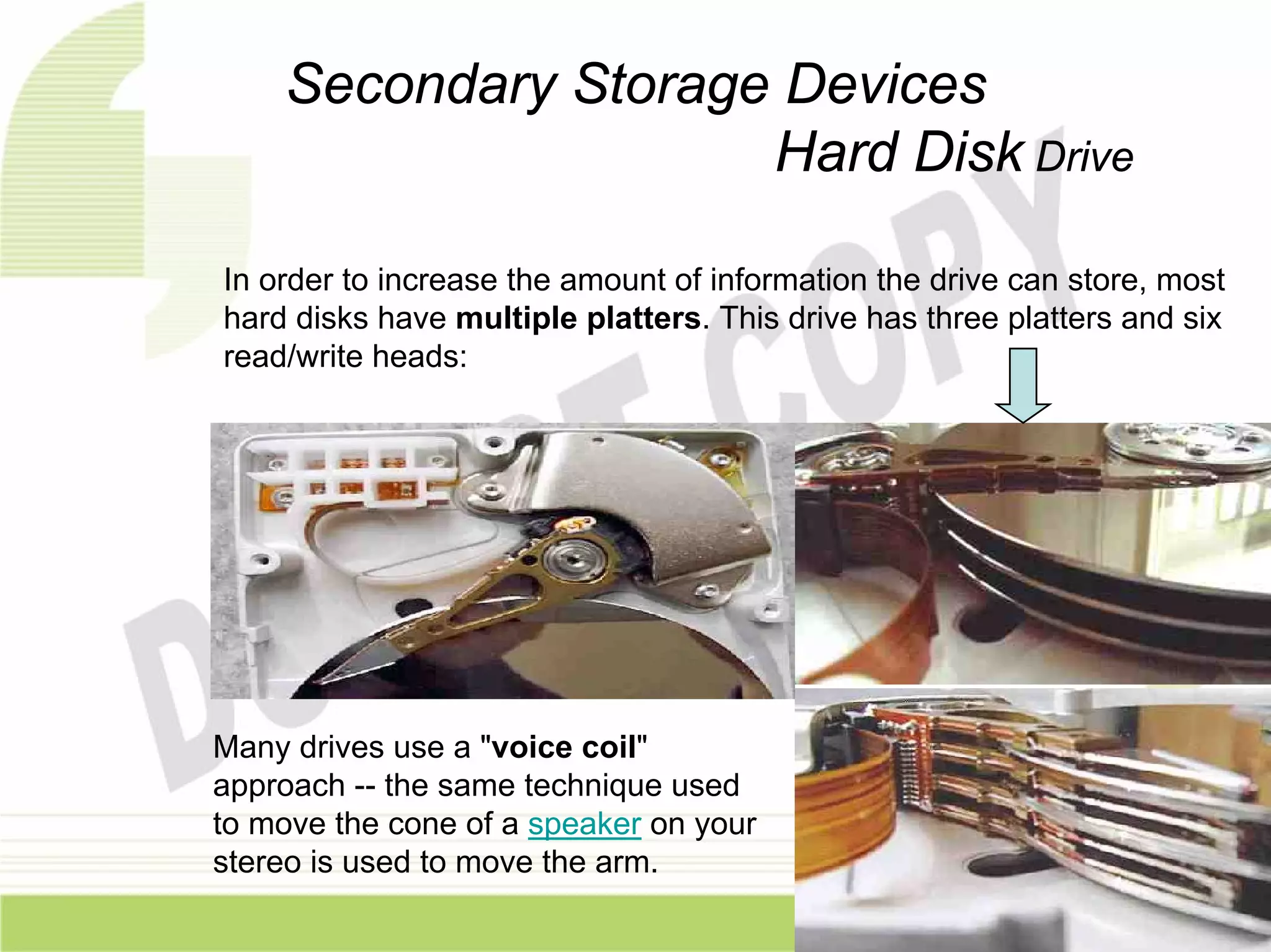
In order to increase the amount of information the drive can store, most
hard disks have multiple platters. This drive has three platters and six
read/write heads:


Many drives use a "voice coil"
approach -- the same technique used
to move the cone of a speaker on your
stereo is used to move the arm.
Secondary Storage Devices
                         Hard Disk Drive
• Merits:
  – Hard drive provides on line information & very
    fast.
  – Data access randomly & not sequentially
  – Extra hard disk can be added increasing
    storage capacity
  – Hard disks are hermetically sealed reducing
    chances of damage
Secondary Storage Devices
                           Pen Drive
                     What is pen drive
A pen drive is a small removable Flash memory drive
   usually connected to the USB port
It provides storage ranging from 16 MB to several Giga
   bytes
Data can be stored as long as it is needed
It is plug & play device
OS Xp automatically senses pen drive when inserted to
   USB port
Typical dimensions are 77*25*9 mm
Secondary Storage Devices
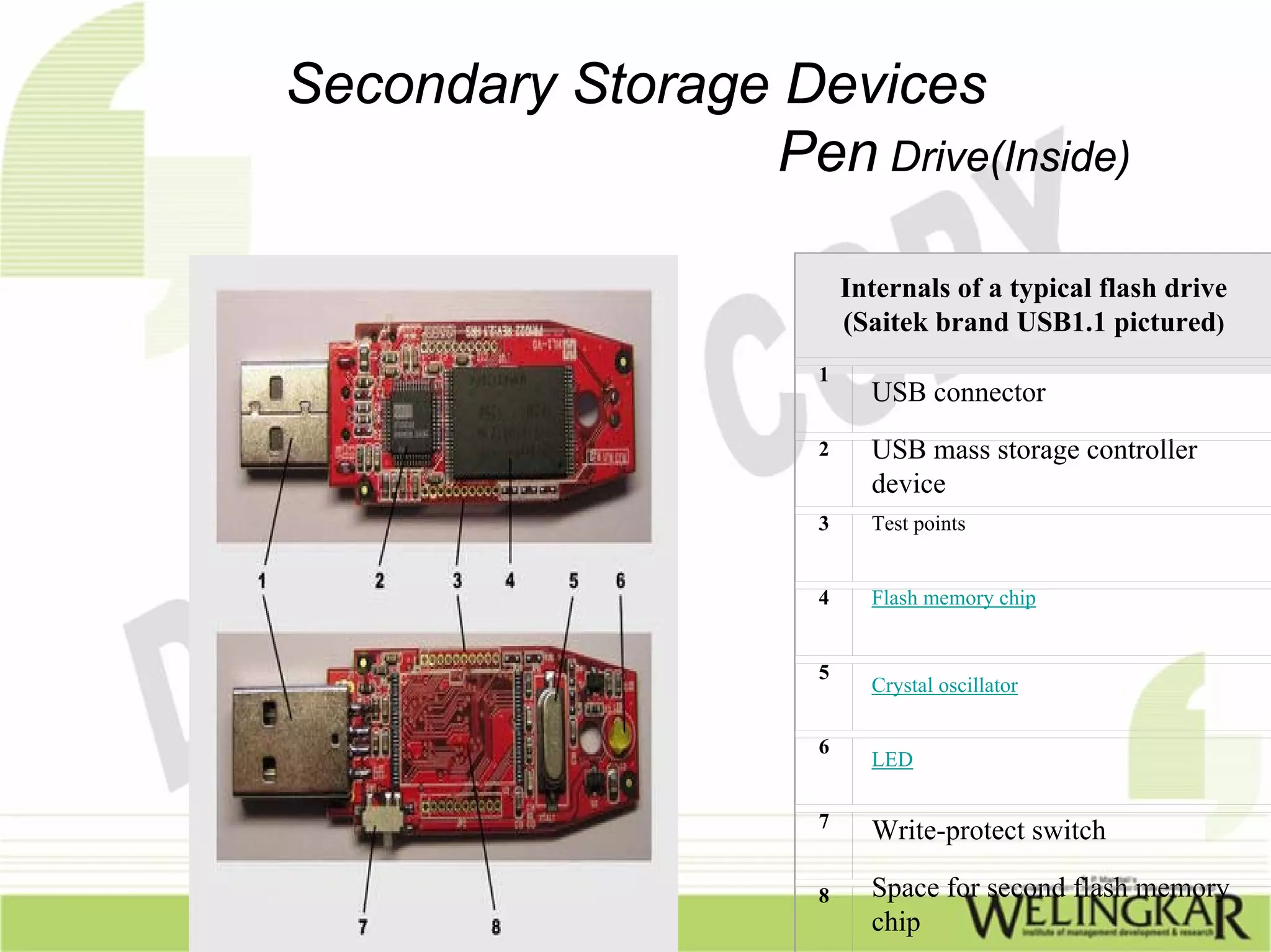
                  Pen Drive(Inside)

                          Internals of a typical flash drive
                          (Saitek brand USB1.1 pictured)
                      1
                            USB connector
                      2     USB mass storage controller
                            device
                      3     Test points


                      4     Flash memory chip


                      5
                            Crystal oscillator

                      6
                            LED

                      7
                            Write-protect switch

                      8     Space for second flash memory
                            chip
Secondary Storage Devices
                                Pen Drive
• Merits:
  – Massive storage capacity
  – Portable & compact
  – Solid state(no moving parts) hence less chance of
    corruption
  – USB compliant making easy to connect externally
  – Does not require external power source
  – Low cost (Rs 800-1000)
Secondary Storage Devices
                         DVD

• DVDs are of the same diameter and thickness as
  CDs, and they are made using some of the same
  materials and manufacturing methods. Like a CD,
  the data on a DVD is encoded in the form of small
  pits and bumps in the track of the disc.
• A DVD is composed of several layers of plastic,
  totaling about 1.2 millimeters thick. Each layer is
  created by injection molding polycarbonate plastic.
  This process forms a disc that has microscopic
  bumps arranged as a single, continuous and
  extremely long spiral track of data.
Secondary Storage Devices
                                 DVD
• Once the clear pieces of polycarbonate are formed, a
  thin reflective layer is sputtered onto the disc, covering
  the bumps. Aluminum is used behind the inner layers,
  but a semi-reflective gold layer is used for the outer
  layers, allowing the laser to focus through the outer and
  onto the inner layers.
• After all of the layers are made, each one is coated with
  lacquer, squeezed together and cured under infrared
  light. For single-sided discs, the label is silk-screened
  onto the non readable side. Double-sided discs are
  printed only on the non readable area near the hole in
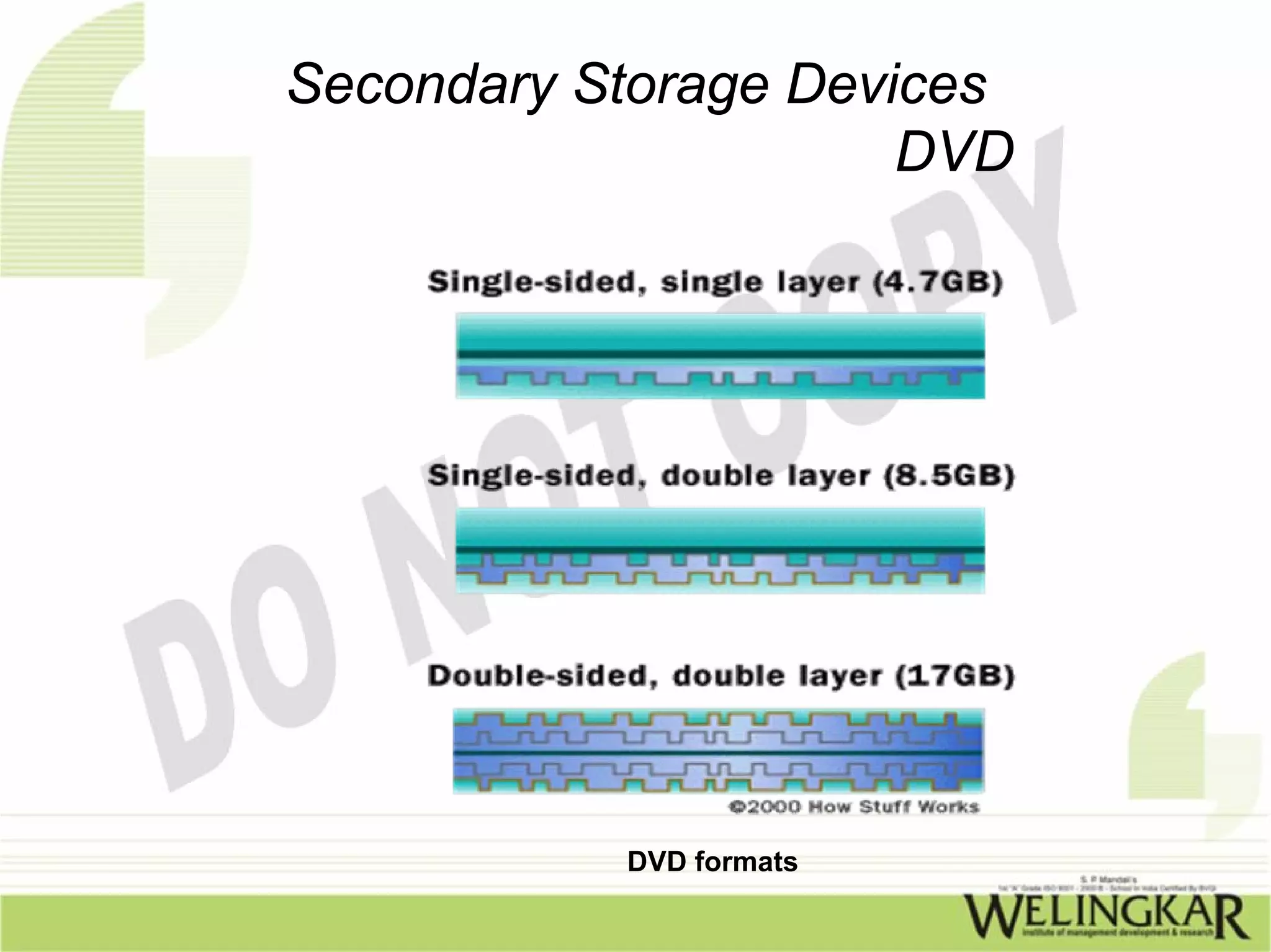
  the middle. Cross sections of the various types of
  completed DVDs (not to scale) look like this:
Secondary Storage Devices
                      DVD


           DVD formats
Secondary Storage Devices
                   How DVD works

•   Each writable layer of a DVD has a spiral
    track of data. On single-layer DVD's, the
    track always circles from the inside of the
    disc to the outside. That the spiral track
    starts at the center means that a single-
    layer DVD can be smaller than 12
    centimeters if desired.
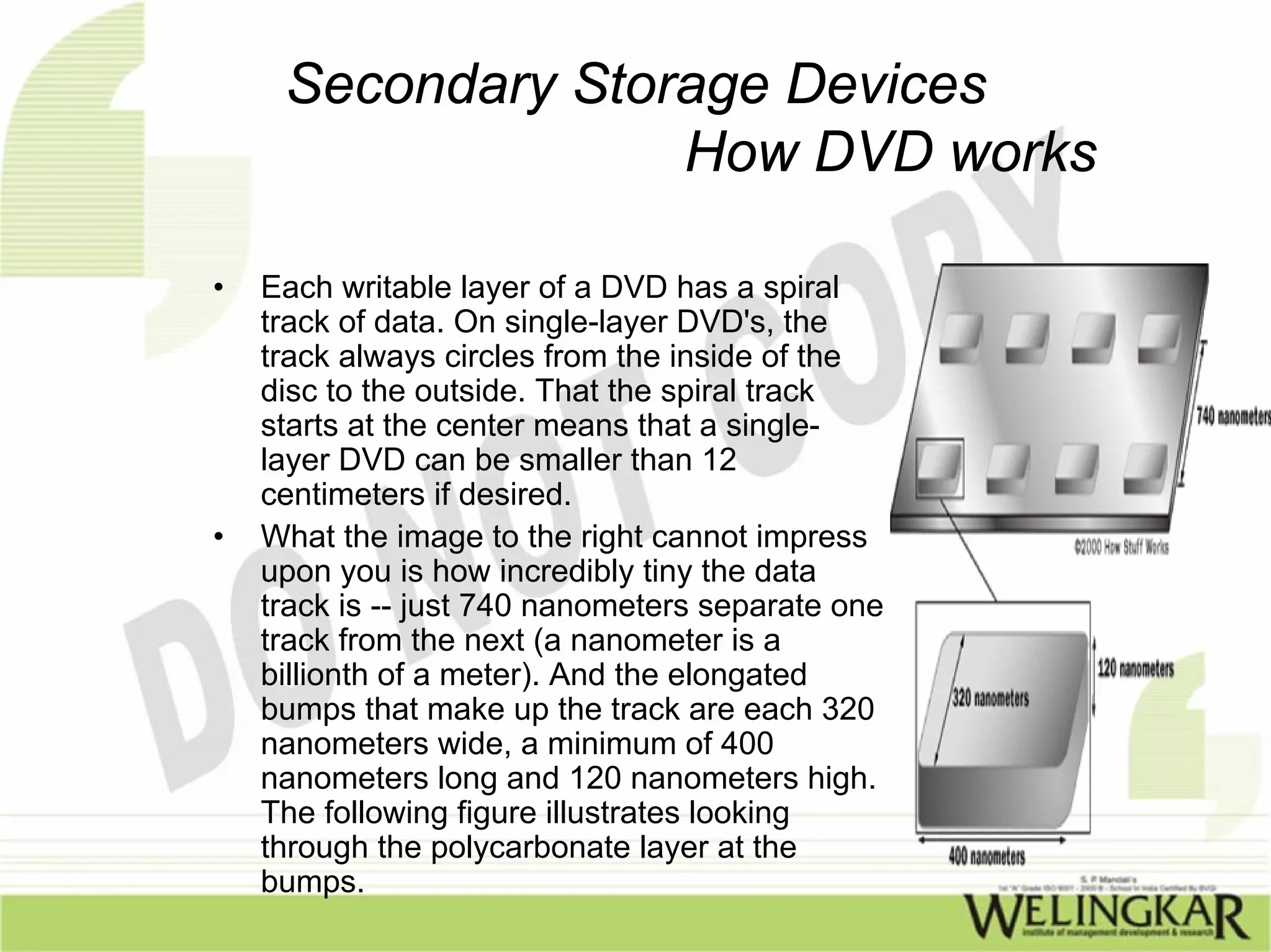
•   What the image to the right cannot impress
    upon you is how incredibly tiny the data
    track is -- just 740 nanometers separate one
    track from the next (a nanometer is a
    billionth of a meter). And the elongated
    bumps that make up the track are each 320
    nanometers wide, a minimum of 400
    nanometers long and 120 nanometers high.
    The following figure illustrates looking
    through the polycarbonate layer at the
    bumps.
Secondary Storage Devices
              Data storage DVD/CD

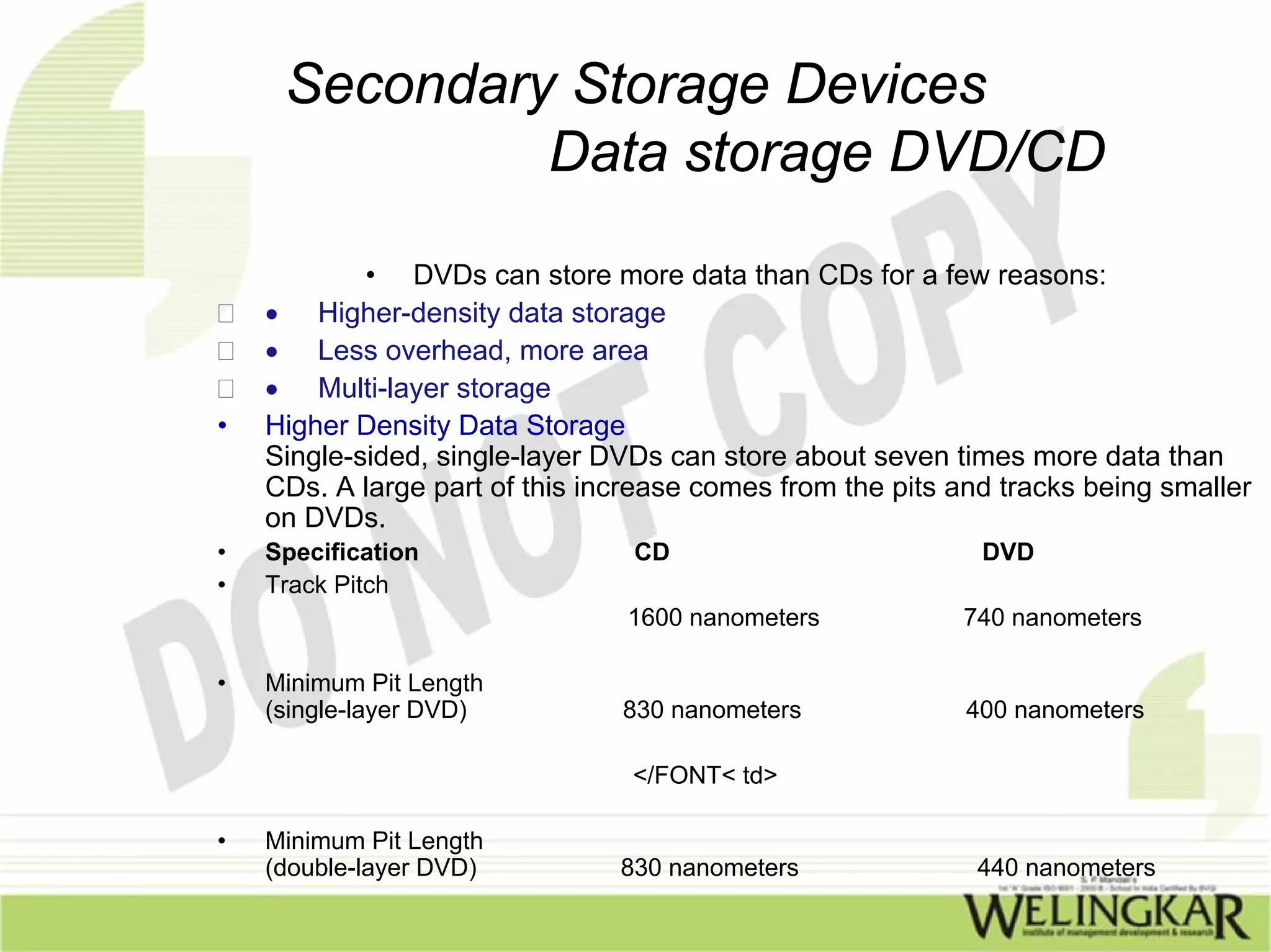
            • DVDs can store more data than CDs for a few reasons:
    • Higher-density data storage
    • Less overhead, more area
    • Multi-layer storage
•   Higher Density Data Storage
    Single-sided, single-layer DVDs can store about seven times more data than
    CDs. A large part of this increase comes from the pits and tracks being smaller
    on DVDs.
•   Specification                CD                          DVD
•   Track Pitch
                                 1600 nanometers           740 nanometers

•   Minimum Pit Length
    (single-layer DVD)          830 nanometers              400 nanometers

                                 </FONT< td>

•   Minimum Pit Length
    (double-layer DVD)          830 nanometers               440 nanometers
Secondary Storage Devices
                       DVD

                   • Merits
• Superior quality
• Interactivity
• Flexibility
• Durability
• Low cost
• Compatibility
• Can handle all kinds of data including sound
  & multimedia files
• Many drives allow read/write of both CDS &
  DVD
I.T. for Management


 End of Chapter 4

Secondary Storage Devices

  • 1.
    I.T. for Management Chapter 4 Secondary Storage Devices
  • 2.
    Secondary Storage Devices •Most business information and particularly transactions require semi permanent storage • The primary storage is Volatile in nature • I.e all information is lost when power is switched off • Hence the need of secondary devices
  • 3.
    Secondary Storage Devices •Some of commonly used secondary devices – Floppy Disks & drive – Hard disks – CD/DVD Drive – Pen drive – Magnetic tapes
  • 4.
    Secondary Storage Devices Floppy Disks The first floppy diskettes were introduced in the year 1971 The floppy disk is packaged in a 8 inch square soft plastic envelope They had a capacity of 1 M.B Later in 1976 5.25 inch diskettes were introduced ………Cont.
  • 5.
    Secondary Storage Devices Floppy Disks Basically, a floppy disk drive reads and writes data to a small, circular piece of metal-coated plastic similar to audio cassette tape. In this article, you will learn more about what is inside a floppy disk drive and how it works. You will also find out some cool facts about FDD’ s. …. cont
  • 6.
    Secondary Storage Devices Floppy Disks Parts of a Floppy Disk Drive Floppy Disk Drive Terminology • Floppy disk - Also called diskette. The common size is 3.5 inches. • Floppy disk drive - The electromechanical device that reads and writes floppy disks. • Track - Concentric ring of data on a side of a disk. • Sector - A subset of a track, similar to wedge or a slice of pie. The Disk floppy disk is a lot like a cassette tape: •
  • 7.
    Secondary Storage Devices Floppy Disks Parts of a Floppy Disk Drive • Both use a thin plastic base material coated with iron oxide. This oxide is a ferromagnetic material, meaning that if you expose it to a magnetic field it is permanently magnetized by the field. • Both can record information instantly. • Both can be erased and reused many times. • Both are very inexpensive and easy to use.
  • 8.
    Secondary Storage Devices Floppy Disks Parts of a Floppy Disk Drive If you have ever used an audio cassette, you know that it has one big disadvantage -- it is a sequential device. The tape has a beginning and an end, and to move the tape to another song later in the sequence of songs on the tape you have to use the fast forward and rewind buttons to find the start of the song, since the tape heads are stationary. For a long audio cassette tape it can take a minute or two to rewind the whole tape, making it hard to find a song in the middle of the tape. •
  • 9.
    Secondary Storage Devices Floppy Disks • A floppy disk, like a cassette tape, is made from a thin piece of plastic coated with a magnetic material on both sides. However, it is shaped like a disk rather than a long thin ribbon. The tracks are arranged in concentric rings so that the software can jump from "file 1" to "file 19" without having to fast forward through files 2-18. The diskette spins like a record and the heads move to the correct track, providing what is known as direct access storage. In the illustration , you can see how the disk is divided into tracks (brown) and sectors (yellow).
  • 10.
    Secondary Storage Devices Floppy Drive • The Drive The major parts of a FDD include: Read/Write Heads: Located on both sides of a diskette, they move together on the same assembly. The heads are not directly opposite each other in an effort to prevent interaction between write operations on each of the two media surfaces. The same head is used for reading and writing, while a second, wider head is used for erasing a track just prior to it being written.
  • 11.
    Secondary Storage Devices Floppy Drive • This allows the data to be written on a wider "clean slate," without interfering with the analog data on an adjacent track. • Drive Motor: A very small spindle motor engages the metal hub at the center of the diskette, spinning it at either 300 or 360 rotations per minute (RPM). • Stepper Motor: This motor makes a precise number of stepped revolutions to move the read/write head assembly to the proper track position. The read/write head assembly is fastened to the stepper motor shaft.
  • 12.
    Secondary Storage Devices Floppy Drive • Mechanical Frame: A system of levers that opens the little protective window on the diskette to allow the read/write heads to touch the dual-sided diskette media. An external button allows the diskette to be ejected, at which point the spring-loaded protective window on the diskette closes. • Circuit Board: Contains all of the electronics to handle the data read from or written to the diskette. It also controls the stepper-motor control circuits used to move the read/write heads to each track, as well as the movement of the read/write heads toward the diskette surface.
  • 13.
    Secondary Storage Devices Floppy Drive • The read/write heads do not touch the diskette media when the heads are traveling between tracks. Electronic optics check for the presence of an opening in the lower corner of a 3.5-inch diskette (or a notch in the side of a 5.25-inch diskette) to see if the user wants to prevent data from being written on it.
  • 14.
    Secondary Storage Devices Floppy Drive Merits: •In a floppy disk the files can be arranged Sequentially • or in a random manner The floppies being Removable makes it very easy to transport Requests for information can be answered quickly and at random De Merits : The Floppy disks tend to get corrupted very easily because of which of these factors Floppy have lesser storage space They are sources of virus
  • 15.
    Secondary Storage Devices Hard Disk Drive • IBM developed the idea of the Winchester or the hard disk The hard disks are enclosed in a hermetically enclosed container Capacities of the order of 20 GB,40 GB,80 GB are typical
  • 16.
    Secondary Storage Devices Hard Disk Drive • How hard disk works: A hard disk works on the same principle of Floppy drive The entire assembly is permanently installed in the pc The hard disk has one or more platter(disks) each with both sides which are recordable All platters rotate on a central spindle at continuous speed are of the order of 7500 rpm Several read write heads are position on top of each rotating surface When the hard disk drive receives the instruction to read or write ,it uses the available data to locate the correct surface track & sector & reads or writes on it
  • 17.
    Secondary Storage Devices Hard Disk Drive • How hard disk works: Hard disk is fast since it has to at most wait for the correct track or sector to come below read or write track,unlike floppy drive where the drive works in addition to searching for track Response time is of the order of 20 to 25 Millisecond is common
  • 18.
    Secondary Storage Devices Hard Disk Drive • Here is a typical hard-disk drive: Front side
  • 19.
    Secondary Storage Devices Hard Disk Drive • Here is a typical hard-disk drive: Backside
  • 20.
    Secondary Storage Devices Hard Disk Drive In order to increase the amount of information the drive can store, most hard disks have multiple platters. This drive has three platters and six read/write heads: Many drives use a "voice coil" approach -- the same technique used to move the cone of a speaker on your stereo is used to move the arm.
  • 21.
    Secondary Storage Devices Hard Disk Drive • Merits: – Hard drive provides on line information & very fast. – Data access randomly & not sequentially – Extra hard disk can be added increasing storage capacity – Hard disks are hermetically sealed reducing chances of damage
  • 22.
    Secondary Storage Devices Pen Drive What is pen drive A pen drive is a small removable Flash memory drive usually connected to the USB port It provides storage ranging from 16 MB to several Giga bytes Data can be stored as long as it is needed It is plug & play device OS Xp automatically senses pen drive when inserted to USB port Typical dimensions are 77*25*9 mm
  • 23.
    Secondary Storage Devices Pen Drive(Inside) Internals of a typical flash drive (Saitek brand USB1.1 pictured) 1 USB connector 2 USB mass storage controller device 3 Test points 4 Flash memory chip 5 Crystal oscillator 6 LED 7 Write-protect switch 8 Space for second flash memory chip
  • 24.
    Secondary Storage Devices Pen Drive • Merits: – Massive storage capacity – Portable & compact – Solid state(no moving parts) hence less chance of corruption – USB compliant making easy to connect externally – Does not require external power source – Low cost (Rs 800-1000)
  • 25.
    Secondary Storage Devices DVD • DVDs are of the same diameter and thickness as CDs, and they are made using some of the same materials and manufacturing methods. Like a CD, the data on a DVD is encoded in the form of small pits and bumps in the track of the disc. • A DVD is composed of several layers of plastic, totaling about 1.2 millimeters thick. Each layer is created by injection molding polycarbonate plastic. This process forms a disc that has microscopic bumps arranged as a single, continuous and extremely long spiral track of data.
  • 26.
    Secondary Storage Devices DVD • Once the clear pieces of polycarbonate are formed, a thin reflective layer is sputtered onto the disc, covering the bumps. Aluminum is used behind the inner layers, but a semi-reflective gold layer is used for the outer layers, allowing the laser to focus through the outer and onto the inner layers. • After all of the layers are made, each one is coated with lacquer, squeezed together and cured under infrared light. For single-sided discs, the label is silk-screened onto the non readable side. Double-sided discs are printed only on the non readable area near the hole in the middle. Cross sections of the various types of completed DVDs (not to scale) look like this:
  • 27.
  • 28.
    Secondary Storage Devices How DVD works • Each writable layer of a DVD has a spiral track of data. On single-layer DVD's, the track always circles from the inside of the disc to the outside. That the spiral track starts at the center means that a single- layer DVD can be smaller than 12 centimeters if desired. • What the image to the right cannot impress upon you is how incredibly tiny the data track is -- just 740 nanometers separate one track from the next (a nanometer is a billionth of a meter). And the elongated bumps that make up the track are each 320 nanometers wide, a minimum of 400 nanometers long and 120 nanometers high. The following figure illustrates looking through the polycarbonate layer at the bumps.
  • 29.
    Secondary Storage Devices Data storage DVD/CD • DVDs can store more data than CDs for a few reasons: • Higher-density data storage • Less overhead, more area • Multi-layer storage • Higher Density Data Storage Single-sided, single-layer DVDs can store about seven times more data than CDs. A large part of this increase comes from the pits and tracks being smaller on DVDs. • Specification CD DVD • Track Pitch 1600 nanometers 740 nanometers • Minimum Pit Length (single-layer DVD) 830 nanometers 400 nanometers </FONT< td> • Minimum Pit Length (double-layer DVD) 830 nanometers 440 nanometers
  • 30.
    Secondary Storage Devices DVD • Merits • Superior quality • Interactivity • Flexibility • Durability • Low cost • Compatibility • Can handle all kinds of data including sound & multimedia files • Many drives allow read/write of both CDS & DVD
  • 31.
    I.T. for Management End of Chapter 4