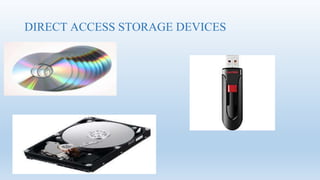
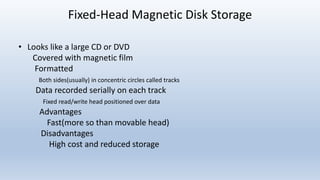
DIRECT ACCESS STORAGE DEVICES
what are direct storage devices?
• are devices that can directly read or write to a specific place. DASDs
can be grouped into three categories:
magnetic disks,
 optical storage devices
flash memory.
Magnetic Disks
Fixed-Head Magnetic Disk Storage
• Looks like a large CD or DVD
Covered with magnetic film
Formatted
Both sides(usually) in concentric circles called tracks
Data recorded serially on each track
Fixed read/write head positioned over data
Advantages
Fast(more so than movable head)
Disadvantages
High cost and reduced storage
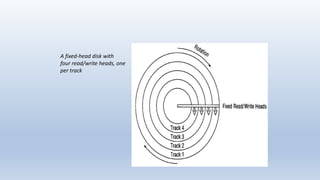
A fixed-head disk with
four read/write heads, one
per track
Movable-Head Magnetic Disk Storage
• Have one read/write head that floats over each surface of
disk.
-Example: computer hard drive
• Disks can be a single platter, or part of a disk pack:
-A stack of magnetic platters.
• Disk Pack Platter
-Each Platter has two recording surfaces
.Exception: top and bottom platters
-Each surface is formatted with a specific number
concentric tracks where the data is recorded.
-The number of tracks varies from manufacture to
manufacture
.Typically there are 1000+ on a high-capacity hard disk.
Movable-Head Magnetic Disk Storage
(cont’d.)
• Disk pack platter(cont’d.)
-Each track on each surface is numbered
.Track zero: identifies the outermost concentric circle on each surface.
.The highest-numbered tracks in the center.
-Arm moves two read/write heads between each pair of surfaces.
.One for the surface above it and one for the surface below.
.The arm moves all of the heads in unison. They’re all positioned on
the same track but on their respective surfaces creating a virtual cylinder.
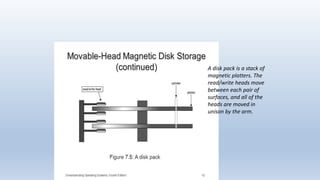
A disk pack is a stack of
magnetic platters. The
read/write heads move
between each pair of
surfaces, and all of the
heads are moved in
unison by the arm.
Movable-Head Magnetic Disk Storage
(cont’d.)
• Disk pack platter (cont’d.)
- It’s slower to fill a disk pack surface-by-surface than it is to
fill it up track-by-track.
- If we fill Track 0 of all the surfaces, we’ve got a virtual
cylinder of data.
- There are as many cylinders as there are tracks, and the
cylinders are as tall as the disk pack.
Movable-Head Magnetic Disk Storage
(cont’d.)
• Disk pack platter (cont’d.)
-To access any given record, the system needs three things:
.Its cylinder number, so the arm can move the read/write
heads to it;
.Its surface number, so the proper read/write head is
activated.
. Its sector number, so the read/read head knows the
instant when it should begin reading and writing .
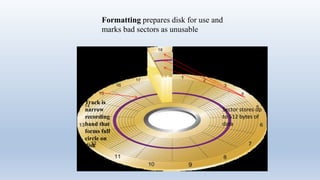
Sector stores up
to 512 bytes of
data
Track is
narrow
recording
band that
forms full
circle on
disk
Formatting prepares disk for use and
marks bad sectors as unusable
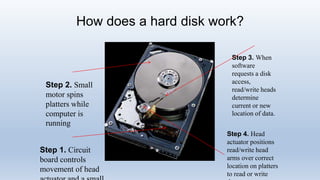
How does a hard disk work?
Step 1. Circuit
board controls
movement of head
Step 2. Small
motor spins
platters while
computer is
running
Step 3. When
software
requests a disk
access,
read/write heads
determine
current or new
location of data.
Step 4. Head
actuator positions
read/write head
arms over correct
location on platters
to read or write
OPTICAL STORAGE DEVICES
• A plastic-coated disk on which data, such as text, music, or video, is
digitally stored as microscopic regions of varying reflectivity and is
read by scanning the surface with a laser. Also called laser disc.
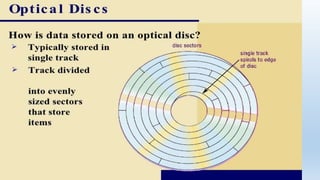
• an optical disc consists of a single spiraling track of same-sized sectors
running from the center to the rim of the disk.
• Atrack has sectors, but all sectors are the same size regardless of
their locations on the disc. This design allows many more sectors, and
much more data, to fit on an optical disc compared to a magnetic disk
of the same size.
cont
TYPES OF OPTICAL-DISC SYSTEMS
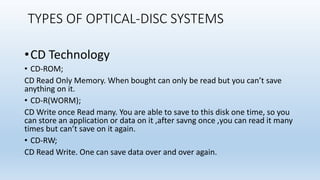
•CD Technology
• CD-ROM;
CD Read Only Memory. When bought can only be read but you can’t save
anything on it.
• CD-R(WORM);
CD Write once Read many. You are able to save to this disk one time, so you
can store an application or data on it ,after savng once ,you can read it many
times but can’t save on it again.
• CD-RW;
CD Read Write. One can save data over and over again.
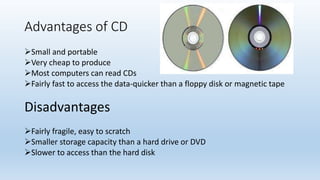
Advantages of CD
Small and portable
Very cheap to produce
Most computers can read CDs
Fairly fast to access the data-quicker than a floppy disk or magnetic tape
Disadvantages
Fairly fragile, easy to scratch
Smaller storage capacity than a hard drive or DVD
Slower to access than the hard disk
DVD TECHONOLOGY
• Although DVDs use the same design and are the same size and shape
as CDs, they can store much more data. A dual-layer, single-sided DVD
can hold the equivalent of 13 CDs; its red laser, with a shorter
wavelength than the CD’s red laser, makes smaller pits and allows the
spiral to be wound tighter.
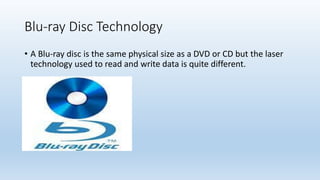
Blu-ray Disc Technology
• A Blu-ray disc is the same physical size as a DVD or CD but the laser
technology used to read and write data is quite different.
Blue ray disc
• The pits on a Blu-ray disc are much smaller and the tracks are
wound much tighter than they are on a DVD or CD.
• The disc’s format was created to further the commercial
prospects for high-definition video, and to store large amounts
of data, particularly for games and interactive applications via
the Java programming language
STORAGE DEVICES 20
FLASH MEMORY
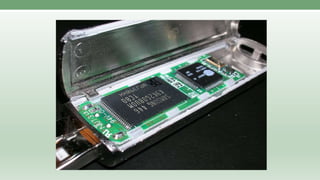
•Flash memory is a type of nonvolatile memory that
erases data in units called blocks. A block stored on
a flash memory chip must be erased before data
can be written, or programmed, to the microchip.
Flash memory retains data for an extended period
of time whether a flash-equipped device is powered
on or off
How flash memory works
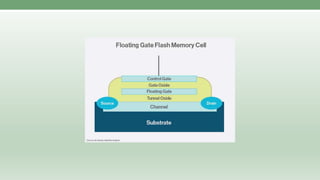
A basic flash memory cell consists of a storage transistor
with a control gate and a floating gate, which is insulated
from the rest of the transistor by a thin dielectric material or
oxide layer. The floating gate stores the electrical charge and
controls the flow of the electrical current.
Flash memory evolved from erasable programmable read-only memory
(EPROM) and electrically erasable programmable read-only memory
(EEPROM). Devices using flash memory erase data at the block level and
rewrite data at the byte level (NOR flash) or multiple-byte page level (NAND
flash). Flash memory is widely used for storage and data transfer in consumer
devices, enterprise systems and industrial applications.
A process called Fowler-Nordheim tunneling removes electrons from the
floating gate. Either Fowler-Nordheim tunneling or a phenomenon known as
channel hot-electron injection traps the electrons in the floating gate.
When erasing through Fowler-Nordheim tunneling, a strong negative charge
on the control gate forces electrons off the floating gate and into the channel,
where a strong positive charge exists. The reverse happens when using
Fowler-Nordheim tunneling to trap electrons in the floating gate. Electrons are
able to forge through the thin oxide layer to the floating gate in the presence of
a high electric field, with a strong negative charge on the cell’s source and the
drain and a strong positive charge on the control gate.
FLASH MEMORY
ADVANTAGES
• Faster read and write compared to
traditional hard disk drives.
• Smaller size.
• Less prone to damage.
• Cheaper than traditional drives in
small storage capacities.
• Uses less power than traditional
hard disk drives.
DISADVANTAGES
• Flash memory cells have a limited number
of write and erase cycles before failing.
• Most flash drives do not have have a
write-protection mechanism
• Smaller size devices, such as flash
drives make them easier to lose
• Currently costs a lot more per gigabyte
than traditional hard drives for large
storage capacities.
• May require a special version of a
program to run on a flash-based drive to
protect from prematurely wearing out the
drive.
References
• Understanding Operating Systems 6th Edition by Ann
McHoes, Ida M. Flynn
• Google Images

DIRECT ACCESS STORAGE DEVICES

  • 1.
  • 2.
    what are directstorage devices? • are devices that can directly read or write to a specific place. DASDs can be grouped into three categories: magnetic disks,  optical storage devices flash memory.
  • 3.
  • 4.
    Fixed-Head Magnetic DiskStorage • Looks like a large CD or DVD Covered with magnetic film Formatted Both sides(usually) in concentric circles called tracks Data recorded serially on each track Fixed read/write head positioned over data Advantages Fast(more so than movable head) Disadvantages High cost and reduced storage
  • 5.
    A fixed-head diskwith four read/write heads, one per track
  • 6.
    Movable-Head Magnetic DiskStorage • Have one read/write head that floats over each surface of disk. -Example: computer hard drive • Disks can be a single platter, or part of a disk pack: -A stack of magnetic platters. • Disk Pack Platter -Each Platter has two recording surfaces .Exception: top and bottom platters -Each surface is formatted with a specific number concentric tracks where the data is recorded. -The number of tracks varies from manufacture to manufacture .Typically there are 1000+ on a high-capacity hard disk.
  • 7.
    Movable-Head Magnetic DiskStorage (cont’d.) • Disk pack platter(cont’d.) -Each track on each surface is numbered .Track zero: identifies the outermost concentric circle on each surface. .The highest-numbered tracks in the center. -Arm moves two read/write heads between each pair of surfaces. .One for the surface above it and one for the surface below. .The arm moves all of the heads in unison. They’re all positioned on the same track but on their respective surfaces creating a virtual cylinder.
  • 8.
    A disk packis a stack of magnetic platters. The read/write heads move between each pair of surfaces, and all of the heads are moved in unison by the arm.
  • 9.
    Movable-Head Magnetic DiskStorage (cont’d.) • Disk pack platter (cont’d.) - It’s slower to fill a disk pack surface-by-surface than it is to fill it up track-by-track. - If we fill Track 0 of all the surfaces, we’ve got a virtual cylinder of data. - There are as many cylinders as there are tracks, and the cylinders are as tall as the disk pack.
  • 10.
    Movable-Head Magnetic DiskStorage (cont’d.) • Disk pack platter (cont’d.) -To access any given record, the system needs three things: .Its cylinder number, so the arm can move the read/write heads to it; .Its surface number, so the proper read/write head is activated. . Its sector number, so the read/read head knows the instant when it should begin reading and writing .
  • 11.
    Sector stores up to512 bytes of data Track is narrow recording band that forms full circle on disk Formatting prepares disk for use and marks bad sectors as unusable
  • 12.
    How does ahard disk work? Step 1. Circuit board controls movement of head Step 2. Small motor spins platters while computer is running Step 3. When software requests a disk access, read/write heads determine current or new location of data. Step 4. Head actuator positions read/write head arms over correct location on platters to read or write
  • 13.
    OPTICAL STORAGE DEVICES •A plastic-coated disk on which data, such as text, music, or video, is digitally stored as microscopic regions of varying reflectivity and is read by scanning the surface with a laser. Also called laser disc. • an optical disc consists of a single spiraling track of same-sized sectors running from the center to the rim of the disk. • Atrack has sectors, but all sectors are the same size regardless of their locations on the disc. This design allows many more sectors, and much more data, to fit on an optical disc compared to a magnetic disk of the same size.
  • 14.
  • 15.
    TYPES OF OPTICAL-DISCSYSTEMS •CD Technology • CD-ROM; CD Read Only Memory. When bought can only be read but you can’t save anything on it. • CD-R(WORM); CD Write once Read many. You are able to save to this disk one time, so you can store an application or data on it ,after savng once ,you can read it many times but can’t save on it again. • CD-RW; CD Read Write. One can save data over and over again.
  • 16.
    Advantages of CD Smalland portable Very cheap to produce Most computers can read CDs Fairly fast to access the data-quicker than a floppy disk or magnetic tape Disadvantages Fairly fragile, easy to scratch Smaller storage capacity than a hard drive or DVD Slower to access than the hard disk
  • 17.
    DVD TECHONOLOGY • AlthoughDVDs use the same design and are the same size and shape as CDs, they can store much more data. A dual-layer, single-sided DVD can hold the equivalent of 13 CDs; its red laser, with a shorter wavelength than the CD’s red laser, makes smaller pits and allows the spiral to be wound tighter.
  • 18.
    Blu-ray Disc Technology •A Blu-ray disc is the same physical size as a DVD or CD but the laser technology used to read and write data is quite different.
  • 19.
    Blue ray disc •The pits on a Blu-ray disc are much smaller and the tracks are wound much tighter than they are on a DVD or CD. • The disc’s format was created to further the commercial prospects for high-definition video, and to store large amounts of data, particularly for games and interactive applications via the Java programming language
  • 20.
  • 21.
    •Flash memory isa type of nonvolatile memory that erases data in units called blocks. A block stored on a flash memory chip must be erased before data can be written, or programmed, to the microchip. Flash memory retains data for an extended period of time whether a flash-equipped device is powered on or off
  • 22.
    How flash memoryworks A basic flash memory cell consists of a storage transistor with a control gate and a floating gate, which is insulated from the rest of the transistor by a thin dielectric material or oxide layer. The floating gate stores the electrical charge and controls the flow of the electrical current.
  • 24.
    Flash memory evolvedfrom erasable programmable read-only memory (EPROM) and electrically erasable programmable read-only memory (EEPROM). Devices using flash memory erase data at the block level and rewrite data at the byte level (NOR flash) or multiple-byte page level (NAND flash). Flash memory is widely used for storage and data transfer in consumer devices, enterprise systems and industrial applications.
  • 26.
    A process calledFowler-Nordheim tunneling removes electrons from the floating gate. Either Fowler-Nordheim tunneling or a phenomenon known as channel hot-electron injection traps the electrons in the floating gate. When erasing through Fowler-Nordheim tunneling, a strong negative charge on the control gate forces electrons off the floating gate and into the channel, where a strong positive charge exists. The reverse happens when using Fowler-Nordheim tunneling to trap electrons in the floating gate. Electrons are able to forge through the thin oxide layer to the floating gate in the presence of a high electric field, with a strong negative charge on the cell’s source and the drain and a strong positive charge on the control gate.
  • 27.
    FLASH MEMORY ADVANTAGES • Fasterread and write compared to traditional hard disk drives. • Smaller size. • Less prone to damage. • Cheaper than traditional drives in small storage capacities. • Uses less power than traditional hard disk drives. DISADVANTAGES • Flash memory cells have a limited number of write and erase cycles before failing. • Most flash drives do not have have a write-protection mechanism • Smaller size devices, such as flash drives make them easier to lose • Currently costs a lot more per gigabyte than traditional hard drives for large storage capacities. • May require a special version of a program to run on a flash-based drive to protect from prematurely wearing out the drive.
  • 28.
    References • Understanding OperatingSystems 6th Edition by Ann McHoes, Ida M. Flynn • Google Images