MS DOS MICROSOFT -DISK OPERATING SYSTEM
HISTORY MS-DOS was a renamed form of 86-DOS — informally known as the Quick-and-dirty  Operating System or Q-DOS  owned by Seattle Computer Products, written by Tim Paterson. 8086 but it had Microsoft needed an operating system for the then-new Intel one available, so it licensed 86-DOS and released a version of it as MS-DOS 1.0. Development started in 1981, and MS-DOS 1.0 was released with the IBM PC in 1982. Tim Paterson is considered the original author of DOS and he is called "The Father of DOS Worried by possible legal problems, in June 1981 Microsoft made an offer to Rod Brock, the owner of Seattle Computer, to buy the rights for 86-DOS. An agreement to release all rights to the software was signed in June 1981. The total cost was $75,000
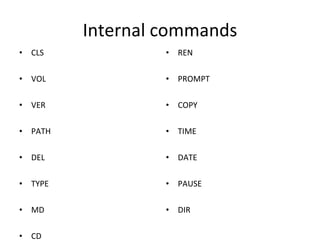
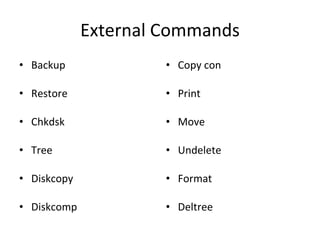
Types of commands There are two types of commands  Internal commands  These are the commands which reside in the portion of computer’s memory and are loaded along with the operating system in to the memory. These commands  are always available for execution. External commands these are the commands which have to be loaded from the disk into the memory of the computer before we want to execute
Internal commands CLS VOL VER PATH DEL TYPE MD CD REN PROMPT COPY TIME DATE PAUSE DIR
External Commands Backup Restore Chkdsk Tree Diskcopy Diskcomp Copy con Print Move Undelete Format Deltree
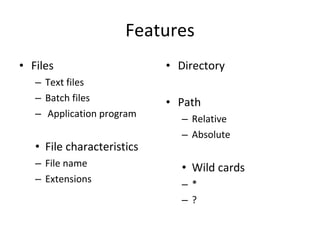
Features Files Text files Batch files Application program  File characteristics File name Extensions Directory Path Relative Absolute Wild cards * ?
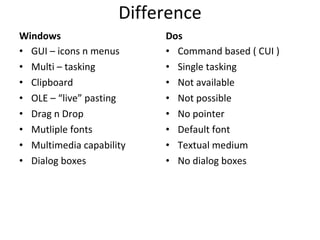
Difference Windows GUI – icons n menus Multi – tasking Clipboard OLE – “live” pasting Drag n Drop Mutliple fonts Multimedia capability Dialog boxes Dos Command based ( CUI ) Single tasking Not available Not possible No pointer Default font Textual medium No dialog boxes
Windows Paint Display properties Mouse settings
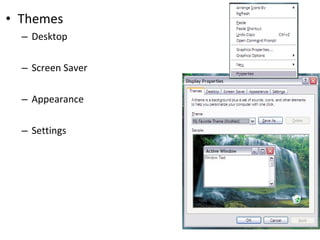
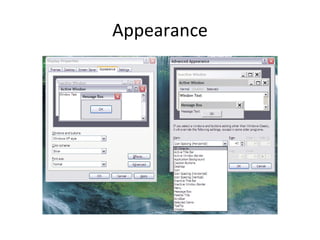
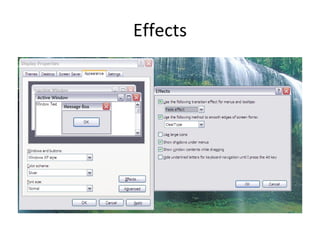
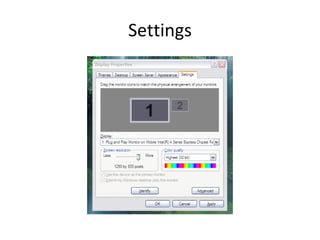
Themes Desktop Screen Saver Appearance Settings
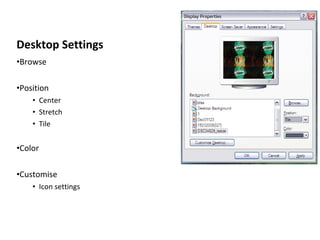
Desktop Settings Browse Position Center Stretch Tile Color Customise Icon settings
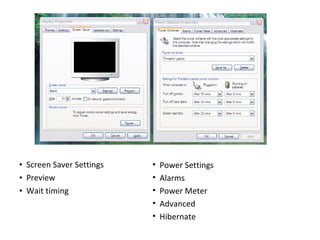
Screen Saver Settings Preview Wait timing Power Settings Alarms Power Meter Advanced Hibernate
Appearance
Effects
Settings

MS DOS

  • 1.
    MS DOS MICROSOFT-DISK OPERATING SYSTEM
  • 2.
    HISTORY MS-DOS wasa renamed form of 86-DOS — informally known as the Quick-and-dirty Operating System or Q-DOS owned by Seattle Computer Products, written by Tim Paterson. 8086 but it had Microsoft needed an operating system for the then-new Intel one available, so it licensed 86-DOS and released a version of it as MS-DOS 1.0. Development started in 1981, and MS-DOS 1.0 was released with the IBM PC in 1982. Tim Paterson is considered the original author of DOS and he is called "The Father of DOS Worried by possible legal problems, in June 1981 Microsoft made an offer to Rod Brock, the owner of Seattle Computer, to buy the rights for 86-DOS. An agreement to release all rights to the software was signed in June 1981. The total cost was $75,000
  • 3.
    Types of commandsThere are two types of commands Internal commands These are the commands which reside in the portion of computer’s memory and are loaded along with the operating system in to the memory. These commands are always available for execution. External commands these are the commands which have to be loaded from the disk into the memory of the computer before we want to execute
  • 4.
    Internal commands CLSVOL VER PATH DEL TYPE MD CD REN PROMPT COPY TIME DATE PAUSE DIR
  • 5.
    External Commands BackupRestore Chkdsk Tree Diskcopy Diskcomp Copy con Print Move Undelete Format Deltree
  • 6.
    Features Files Textfiles Batch files Application program File characteristics File name Extensions Directory Path Relative Absolute Wild cards * ?
  • 7.
    Difference Windows GUI– icons n menus Multi – tasking Clipboard OLE – “live” pasting Drag n Drop Mutliple fonts Multimedia capability Dialog boxes Dos Command based ( CUI ) Single tasking Not available Not possible No pointer Default font Textual medium No dialog boxes
  • 8.
    Windows Paint Displayproperties Mouse settings
  • 9.
    Themes Desktop ScreenSaver Appearance Settings
  • 10.
    Desktop Settings BrowsePosition Center Stretch Tile Color Customise Icon settings
  • 11.
    Screen Saver SettingsPreview Wait timing Power Settings Alarms Power Meter Advanced Hibernate
  • 12.
  • 13.
  • 14.