
How do you know if your
information is secure?
Justin Denton
• justindenton@mac.com
• http://www.libchalk.com
• Linkedin:
• https://www.linkedin.com/in/j
ustindenton1
• Twitter: @cyberdenton
What we’re covering today…
• What HTTPS is.
• How HTTPS functions.
• Where to get a SSL certificates?
• Why HTTPS?
• How to enable HTTPS.
• Where should HTTPS be implemented?
• Communication and Training
• Best Practices & Tips.
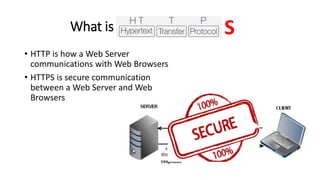
What is
• HTTP is how a Web Server
communications with Web Browsers
• HTTPS is secure communication
between a Web Server and Web
Browsers
S
Founded
• Netscape Communications created HTTPS in 1994 for its Netscape
Navigator web browser.[40] Originally, HTTPS was used with the SSL
protocol. As SSL evolved into Transport Layer Security (TLS), the
current version of HTTPS was formally specified by RFC 2818 in May
2000.
What type of sites have you been
to that use HTTPS?
What does HTTPS Do?
• HTTPS verifies the identity of a website and encrypts nearly all
information sent between the website and the user.
• Protected information includes cookies, user agent details, URL paths,
form submissions, and query string parameters.
• HTTPS is a combination of HTTP and Transport Layer Security (TLS).
• Browsers and other HTTPS clients are configured to trust a set
of certificate authorities that can issue cryptographically signed
certificates on behalf of web service owners.
What Doesn’t HTTPS Do?
• HTTPS has several important limitations.
• IP addresses and destination domain names are not encrypted.
• Even encrypted traffic can reveal some information indirectly, such as time
spent on site, or the size of requested resources or submitted information.
• HTTPS only guarantees the integrity of the connection between two systems,
not the systems themselves.
• It is not designed to protect a web server from being hacked.
• If a user’s system is compromised by an attacker, that system can be altered
so that its future HTTPS connections are under the attacker’s control.
Using HTTPS…
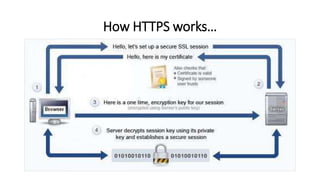
• The computers agree on a "code" between them, and then they
scramble the messages using that "code" so that no one in between
can read them. This keeps your information safe from hackers.
• They use the "code" on a Secure Sockets Layer (SSL), sometimes
called Transport Layer Security (TLS) to send the information back and
forth.
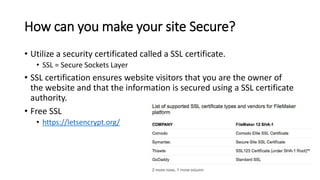
How can you make your site Secure?
• Utilize a security certificated called a SSL certificate.
• SSL = Secure Sockets Layer
• SSL certification ensures website visitors that you are the owner of
the website and that the information is secured using a SSL certificate
authority.
• Free SSL
• https://letsencrypt.org/
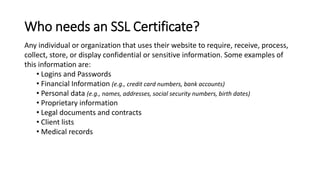
Any individual or organization that uses their website to require, receive, process,
collect, store, or display confidential or sensitive information. Some examples of
this information are:
• Logins and Passwords
• Financial Information (e.g., credit card numbers, bank accounts)
• Personal data (e.g., names, addresses, social security numbers, birth dates)
• Proprietary information
• Legal documents and contracts
• Client lists
• Medical records
Who needs an SSL Certificate?
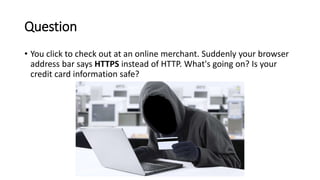
Question
• You click to check out at an online merchant. Suddenly your browser
address bar says HTTPS instead of HTTP. What's going on? Is your
credit card information safe?
Answer
• Good news. Your information is safe. The
website you are working with has made
attempts to ensure that no one can steal
your information.
How HTTPS works…
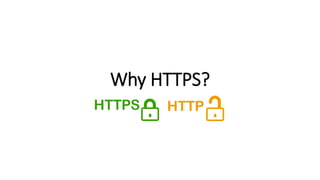
Why HTTPS?
Has anyone ever been a Victim?
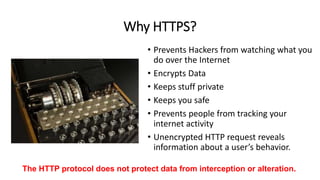
Why HTTPS?
• Prevents Hackers from watching what you
do over the Internet
• Encrypts Data
• Keeps stuff private
• Keeps you safe
• Prevents people from tracking your
internet activity
• Unencrypted HTTP request reveals
information about a user’s behavior.
The HTTP protocol does not protect data from interception or alteration.
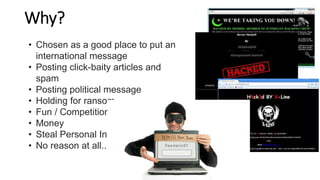
Why?
• Chosen as a good place to put an
international message
• Posting click-baity articles and
spam
• Posting political message
• Holding for ransom
• Fun / Competition
• Money
• Steal Personal Info
• No reason at all..
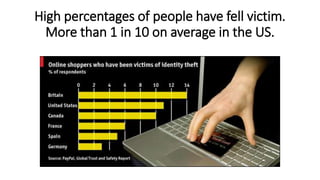
High percentages of people have fell victim.
More than 1 in 10 on average in the US.
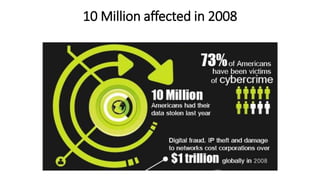
10 Million affected in 2008
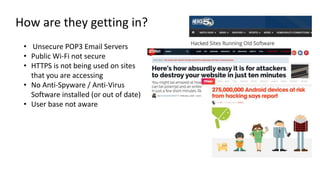
How are they getting in?
• Unsecure POP3 Email Servers
• Public Wi-Fi not secure
• HTTPS is not being used on sites
that you are accessing
• No Anti-Spyware / Anti-Virus
Software installed (or out of date)
• User base not aware
Does HTTPS Solve all my worries?
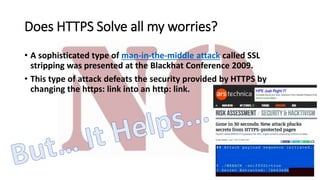
• A sophisticated type of man-in-the-middle attack called SSL
stripping was presented at the Blackhat Conference 2009.
• This type of attack defeats the security provided by HTTPS by
changing the https: link into an http: link.
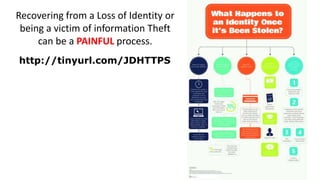
http://tinyurl.com/JDHTTPS
Recovering from a Loss of Identity or
being a victim of information Theft
can be a PAINFUL process.
Enabling HTTPS…
• Things you need to do…
• Enable HTTPS on your Web Server
• Easy for Public Hosting companies such as GoDaddy
• Harder if you run your own. (Recommend engaging
IT Expert.)
• Hosted sites are Click and Pay.
• Some configuration may be needed.
• Hosting providers will have specific documentation
on how to configure.
• Provider Dependant
• Test your site after implementing
• Look for the Browser Locks
What’s your responsibility?
• Provide a safe and secure environment for
your customers
• Implement & test Internet security measures
• Register and maintain an SSL Certificate
• Educate your customers
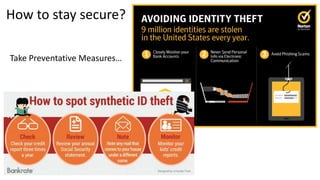
How to stay secure?
Take Preventative Measures…
Does anyone in attendance do
anything to protect themselves
while online?
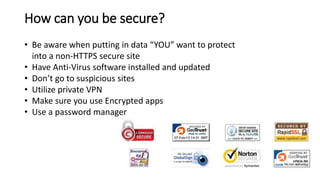
How can you be secure?
• Be aware when putting in data “YOU” want to protect
into a non-HTTPS secure site
• Have Anti-Virus software installed and updated
• Don’t go to suspicious sites
• Utilize private VPN
• Make sure you use Encrypted apps
• Use a password manager
How can you be secure? Cont’d…
• Remember to be on the “CORRECT” Site..
HTTPS doesn’t mean that the site is Secure
from Hackers.. Just means that the data you
enter onto the site is encrypted and protected
form others that could potentially see it.
• If you go to a Hacker Site with HTTPS, your data
is secure, but only secure between you and the
hacker
How is the Government handling this?
• The HTTPS-Only Standard
• A memorandum M-15-13, “A Policy to Require Secure Connections across
Federal Websites and Web Services”
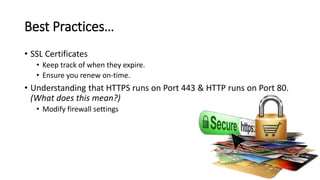
Best Practices…
• SSL Certificates
• Keep track of when they expire.
• Ensure you renew on-time.
• Understanding that HTTPS runs on Port 443 & HTTP runs on Port 80.
(What does this mean?)
• Modify firewall settings
Communication & Training
• Building strategies for communication &
training to consumers
• Continue to inform
• Have security awareness programs for
employees and consumers
• Have a Cyber-Safety Month
• Other ideas?
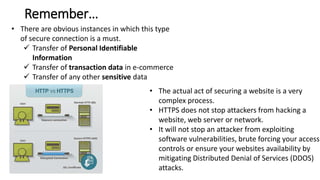
What should you remember?
• There are obvious instances in which this type
of secure connection is a must.
 Transfer of Personal Identifiable
Information
 Transfer of transaction data in e-commerce
 Transfer of any other sensitive data
• The actual act of securing a website is a very
complex process.
• HTTPS does not stop attackers from hacking a
website, web server or network.
• It will not stop an attacker from exploiting
software vulnerabilities, brute forcing your access
controls or ensure your websites availability by
mitigating Distributed Denial of Services (DDOS)
attacks.
Remember…
HTTPS

HTTPS

  • 1.
    How do youknow if your information is secure?
  • 3.
    Justin Denton • justindenton@mac.com •http://www.libchalk.com • Linkedin: • https://www.linkedin.com/in/j ustindenton1 • Twitter: @cyberdenton
  • 4.
    What we’re coveringtoday… • What HTTPS is. • How HTTPS functions. • Where to get a SSL certificates? • Why HTTPS? • How to enable HTTPS. • Where should HTTPS be implemented? • Communication and Training • Best Practices & Tips.
  • 5.
    What is • HTTPis how a Web Server communications with Web Browsers • HTTPS is secure communication between a Web Server and Web Browsers S
  • 6.
    Founded • Netscape Communicationscreated HTTPS in 1994 for its Netscape Navigator web browser.[40] Originally, HTTPS was used with the SSL protocol. As SSL evolved into Transport Layer Security (TLS), the current version of HTTPS was formally specified by RFC 2818 in May 2000.
  • 7.
    What type ofsites have you been to that use HTTPS?
  • 8.
    What does HTTPSDo? • HTTPS verifies the identity of a website and encrypts nearly all information sent between the website and the user. • Protected information includes cookies, user agent details, URL paths, form submissions, and query string parameters. • HTTPS is a combination of HTTP and Transport Layer Security (TLS). • Browsers and other HTTPS clients are configured to trust a set of certificate authorities that can issue cryptographically signed certificates on behalf of web service owners.
  • 9.
    What Doesn’t HTTPSDo? • HTTPS has several important limitations. • IP addresses and destination domain names are not encrypted. • Even encrypted traffic can reveal some information indirectly, such as time spent on site, or the size of requested resources or submitted information. • HTTPS only guarantees the integrity of the connection between two systems, not the systems themselves. • It is not designed to protect a web server from being hacked. • If a user’s system is compromised by an attacker, that system can be altered so that its future HTTPS connections are under the attacker’s control.
  • 10.
    Using HTTPS… • Thecomputers agree on a "code" between them, and then they scramble the messages using that "code" so that no one in between can read them. This keeps your information safe from hackers. • They use the "code" on a Secure Sockets Layer (SSL), sometimes called Transport Layer Security (TLS) to send the information back and forth.
  • 11.
    How can youmake your site Secure? • Utilize a security certificated called a SSL certificate. • SSL = Secure Sockets Layer • SSL certification ensures website visitors that you are the owner of the website and that the information is secured using a SSL certificate authority. • Free SSL • https://letsencrypt.org/
  • 12.
    Any individual ororganization that uses their website to require, receive, process, collect, store, or display confidential or sensitive information. Some examples of this information are: • Logins and Passwords • Financial Information (e.g., credit card numbers, bank accounts) • Personal data (e.g., names, addresses, social security numbers, birth dates) • Proprietary information • Legal documents and contracts • Client lists • Medical records Who needs an SSL Certificate?
  • 13.
    Question • You clickto check out at an online merchant. Suddenly your browser address bar says HTTPS instead of HTTP. What's going on? Is your credit card information safe?
  • 14.
    Answer • Good news.Your information is safe. The website you are working with has made attempts to ensure that no one can steal your information.
  • 15.
  • 16.
  • 17.
    Has anyone everbeen a Victim?
  • 18.
    Why HTTPS? • PreventsHackers from watching what you do over the Internet • Encrypts Data • Keeps stuff private • Keeps you safe • Prevents people from tracking your internet activity • Unencrypted HTTP request reveals information about a user’s behavior. The HTTP protocol does not protect data from interception or alteration.
  • 20.
    Why? • Chosen asa good place to put an international message • Posting click-baity articles and spam • Posting political message • Holding for ransom • Fun / Competition • Money • Steal Personal Info • No reason at all..
  • 21.
    High percentages ofpeople have fell victim. More than 1 in 10 on average in the US.
  • 22.
  • 23.
    How are theygetting in? • Unsecure POP3 Email Servers • Public Wi-Fi not secure • HTTPS is not being used on sites that you are accessing • No Anti-Spyware / Anti-Virus Software installed (or out of date) • User base not aware
  • 24.
    Does HTTPS Solveall my worries? • A sophisticated type of man-in-the-middle attack called SSL stripping was presented at the Blackhat Conference 2009. • This type of attack defeats the security provided by HTTPS by changing the https: link into an http: link.
  • 25.
    http://tinyurl.com/JDHTTPS Recovering from aLoss of Identity or being a victim of information Theft can be a PAINFUL process.
  • 26.
    Enabling HTTPS… • Thingsyou need to do… • Enable HTTPS on your Web Server • Easy for Public Hosting companies such as GoDaddy • Harder if you run your own. (Recommend engaging IT Expert.) • Hosted sites are Click and Pay. • Some configuration may be needed. • Hosting providers will have specific documentation on how to configure. • Provider Dependant • Test your site after implementing • Look for the Browser Locks
  • 27.
    What’s your responsibility? •Provide a safe and secure environment for your customers • Implement & test Internet security measures • Register and maintain an SSL Certificate • Educate your customers
  • 28.
    How to staysecure? Take Preventative Measures…
  • 29.
    Does anyone inattendance do anything to protect themselves while online?
  • 30.
    How can yoube secure? • Be aware when putting in data “YOU” want to protect into a non-HTTPS secure site • Have Anti-Virus software installed and updated • Don’t go to suspicious sites • Utilize private VPN • Make sure you use Encrypted apps • Use a password manager
  • 31.
    How can yoube secure? Cont’d… • Remember to be on the “CORRECT” Site.. HTTPS doesn’t mean that the site is Secure from Hackers.. Just means that the data you enter onto the site is encrypted and protected form others that could potentially see it. • If you go to a Hacker Site with HTTPS, your data is secure, but only secure between you and the hacker
  • 32.
    How is theGovernment handling this? • The HTTPS-Only Standard • A memorandum M-15-13, “A Policy to Require Secure Connections across Federal Websites and Web Services”
  • 33.
    Best Practices… • SSLCertificates • Keep track of when they expire. • Ensure you renew on-time. • Understanding that HTTPS runs on Port 443 & HTTP runs on Port 80. (What does this mean?) • Modify firewall settings
  • 34.
    Communication & Training •Building strategies for communication & training to consumers • Continue to inform • Have security awareness programs for employees and consumers • Have a Cyber-Safety Month • Other ideas?
  • 35.
    What should youremember?
  • 36.
    • There areobvious instances in which this type of secure connection is a must.  Transfer of Personal Identifiable Information  Transfer of transaction data in e-commerce  Transfer of any other sensitive data • The actual act of securing a website is a very complex process. • HTTPS does not stop attackers from hacking a website, web server or network. • It will not stop an attacker from exploiting software vulnerabilities, brute forcing your access controls or ensure your websites availability by mitigating Distributed Denial of Services (DDOS) attacks. Remember…

Editor's Notes

  • #9 HTTPS verifies the identity of a website or web service for a connecting client, and encrypts nearly all information sent between the website or service and the user. Protected information includes cookies, user agent details, URL paths, form submissions, and query string parameters. HTTPS is designed to prevent this information from being read or changed while in transit. HTTPS is a combination of HTTP and Transport Layer Security (TLS). TLS is a network protocol that establishes an encrypted connection to an authenticated peer over an untrusted network. Browsers and other HTTPS clients are configured to trust a set of certificate authorities [2] that can issue cryptographically signed certificates on behalf of web service owners. These certificates communicate to the client that the web service host demonstrated ownership of the domain to the certificate authority at the time of certificate issuance. This prevents unknown or untrusted websites from masquerading as a Federal website or service.
  • #10 What HTTPS Doesn’t Do HTTPS has several important limitations. IP addresses and destination domain names are not encrypted during communication. Even encrypted traffic can reveal some information indirectly, such as time spent on site, or the size of requested resources or submitted information. HTTPS only guarantees the integrity of the connection between two systems, not the systems themselves. It is not designed to protect a web server from being hacked or compromised, or to prevent the web service from exposing user information during its normal operation. Similarly, if a user’s system is compromised by an attacker, that system can be altered so that its future HTTPS connections are under the attacker’s control. The guarantees of HTTPS may also be weakened or eliminated by compromised or malicious certificate authorities.
  • #19 Data sent over HTTP is susceptible to interception, manipulation, and impersonation. This data can include browser identity, website content, search terms, and other user-submitted information.
  • #20 Not only websites are being targeted.. Even Facebook, twitter, Pintrest, etc.. Anything that is popular and drives awareness.. Smaller sites that are hacked are usually people that are playing around testing there skills.. Large sites hacked are to distribute a message.
  • #21 American Library Association’s Facebook page and posted an endless stream of clickbaity articles and spam.
  • #25 Taking advantage of the fact that few Internet users actually type "https" into their browser interface: they get to a secure site by clicking on a link, and thus are fooled into thinking that they are using HTTPS when in fact they are using HTTP. The attacker then communicates in clear with the client.[38] This prompted the development of a countermeasure in HTTP called HTTP Strict Transport Security.
  • #26 https://www.idology.com/wp-content/uploads/2014/07/infographic_stolen_ID_Identity_Theft.jpg
  • #33 It provides guidance to agencies for making the transition to HTTPS and a deadline by which agencies must be in compliance.