Privacy and Security
• Security and Privacy is an important part of
our online lives
• So we should know how to handle it and keep
the web healthy
Why should you care?
• Two words..
DATA PERMANENCE
Data Permanence
• Offline consequences of online behavior
• Views on sensitive issues might impact in
personal life
• No expiration date and no “erase” button
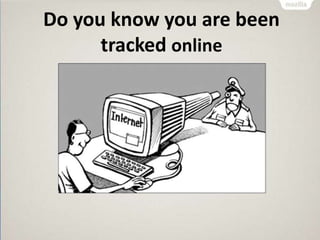
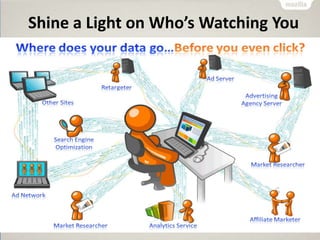
Do you know you are been
tracked online
Shine a Light on Who’s Watching You
Watching You
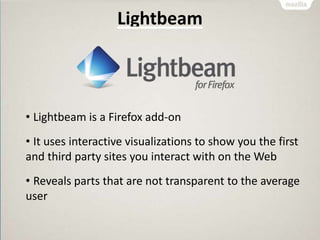
Lightbeam
• Lightbeam is a Firefox add-on
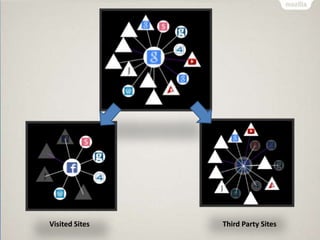
• It uses interactive visualizations to show you the first
and third party sites you interact with on the Web
• Reveals parts that are not transparent to the average
user
Visited Sites Third Party Sites
Lightbeam Demo
Permissions Manager
• Using which you can give certain websites the
ability to store passwords, set cookies and
more
• The Permissions Manager now collects various
website permissions all in one place
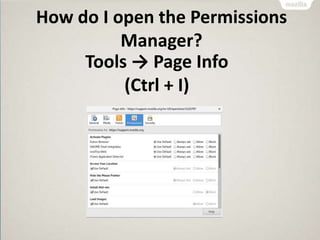
How do I open the Permissions
Manager?
Tools → Page Info
(Ctrl + I)
Permissions Demo
Private Browsing
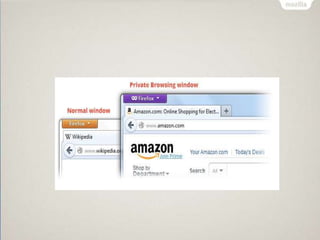
• Private Browsing allows you to browse the
Internet without saving any information
• Information about which sites and pages
you’ve visited
• Many a times you need the browser not to
store the information (history)
What does Private Browsing not
save?
• Visited pages
• Form and Search Bar entries
• Passwords
• Download List entries
• Cookies
• Cached Web Content
• Offline Web Content
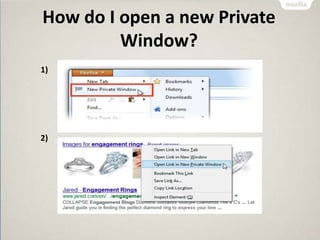
How do I open a new Private
Window?
1)
2)
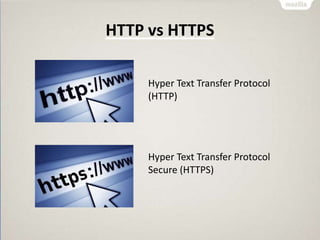
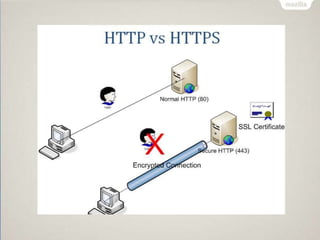
HTTP vs HTTPS
Hyper Text Transfer Protocol
(HTTP)
Hyper Text Transfer Protocol
Secure (HTTPS)
Why do we need extra “S”?
• That extra "S" in the URL means your
connection is secure
• It is much harder for anyone else to see what
you're doing
• it's primarily used by sites that handle money
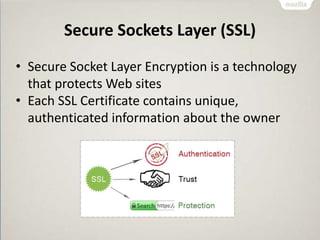
Secure Sockets Layer (SSL)
• Secure Socket Layer Encryption is a technology
that protects Web sites
• Each SSL Certificate contains unique,
authenticated information about the owner
What are Internet Cookies?
• A cookie is a type of message that is given to a
browser by a Web server
• A cookie is information stored on your
computer by a website you visit
• Cookies store your settings for a website, such
as preferred language or location
• This allows the site to present you with
information you needs
Can Cookies be malicious?
• Cookies that watch your online activity are
called malicious or tracking cookies
• These types of cookies can be used to store
and track your activity online
• Many antivirus today will flag suspicious
cookies when scanning your system for viruses
Mozilla India & Privacy Day
• Every year, the month of January is celebrated
as “Privacy Month”
• 28 January is celebrated internationally as
Data Privacy Day
• Share your privacy makes with #PrivacyMonth
and #Advocate4Privacy
Thank you !
Abhiram R
Twitter: @abhi12ravi
Facebook: www.facebook.com/abhi12ravi
Email: abhi12ravi@gmail.com

Privacy & Security on the Web - Tools on Mozilla Firefox

  • 1.
  • 2.
    Privacy and Security •Security and Privacy is an important part of our online lives • So we should know how to handle it and keep the web healthy
  • 3.
    Why should youcare? • Two words.. DATA PERMANENCE
  • 4.
    Data Permanence • Offlineconsequences of online behavior • Views on sensitive issues might impact in personal life • No expiration date and no “erase” button
  • 5.
    Do you knowyou are been tracked online
  • 6.
    Shine a Lighton Who’s Watching You Watching You
  • 7.
    Lightbeam • Lightbeam isa Firefox add-on • It uses interactive visualizations to show you the first and third party sites you interact with on the Web • Reveals parts that are not transparent to the average user
  • 8.
  • 9.
  • 10.
    Permissions Manager • Usingwhich you can give certain websites the ability to store passwords, set cookies and more • The Permissions Manager now collects various website permissions all in one place
  • 11.
    How do Iopen the Permissions Manager? Tools → Page Info (Ctrl + I)
  • 12.
  • 13.
    Private Browsing • PrivateBrowsing allows you to browse the Internet without saving any information • Information about which sites and pages you’ve visited • Many a times you need the browser not to store the information (history)
  • 14.
    What does PrivateBrowsing not save? • Visited pages • Form and Search Bar entries • Passwords • Download List entries • Cookies • Cached Web Content • Offline Web Content
  • 15.
    How do Iopen a new Private Window? 1) 2)
  • 17.
    HTTP vs HTTPS HyperText Transfer Protocol (HTTP) Hyper Text Transfer Protocol Secure (HTTPS)
  • 18.
    Why do weneed extra “S”? • That extra "S" in the URL means your connection is secure • It is much harder for anyone else to see what you're doing • it's primarily used by sites that handle money
  • 20.
    Secure Sockets Layer(SSL) • Secure Socket Layer Encryption is a technology that protects Web sites • Each SSL Certificate contains unique, authenticated information about the owner
  • 21.
    What are InternetCookies? • A cookie is a type of message that is given to a browser by a Web server • A cookie is information stored on your computer by a website you visit • Cookies store your settings for a website, such as preferred language or location • This allows the site to present you with information you needs
  • 22.
    Can Cookies bemalicious? • Cookies that watch your online activity are called malicious or tracking cookies • These types of cookies can be used to store and track your activity online • Many antivirus today will flag suspicious cookies when scanning your system for viruses
  • 23.
    Mozilla India &Privacy Day • Every year, the month of January is celebrated as “Privacy Month” • 28 January is celebrated internationally as Data Privacy Day • Share your privacy makes with #PrivacyMonth and #Advocate4Privacy
  • 24.
    Thank you ! AbhiramR Twitter: @abhi12ravi Facebook: www.facebook.com/abhi12ravi Email: abhi12ravi@gmail.com