Graphical Password 
Authentication 
PRESENTED BY: 
DHVANI SHAH
OUTLINE 
Summary: 
1.Introduction 
-Password 
-Authentication 
-Methods of Authentication 
2. Text-based password 
-Drawbacks of text-based passwords 
3.Problem Definition 
4.Graphical Password 
5.Existing Model 
6.Proposed Model 
7.Conclusion
INTRODUCTION 
What is PASSWORD?
PASSWORD 
PASSWORD is a secret word or string of characters that 
is used for user authentication to prove his/her identity 
and going to access resources 
Used for? 
Logging into accounts 
Retrieving emails 
Accessing applications 
Used In? 
 Networks. 
 Websites 
 Databases
What is AUTHENTICATION? 
Conformation of a person’s identity
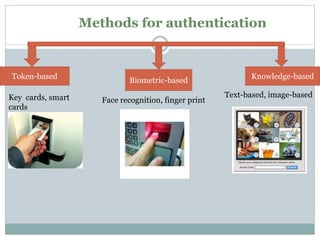
Methods for authentication 
Token-based 
Biometric-based 
Knowledge-based 
Key cards, smart 
cards 
Face recognition, finger print 
Text-based, image-based
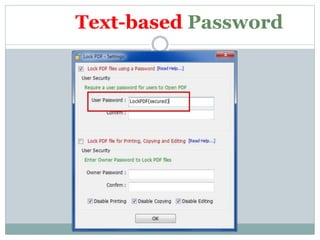
Text-based Password
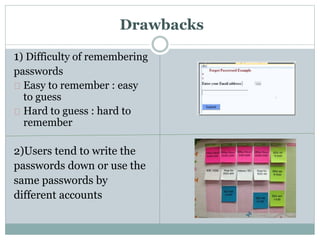
Drawbacks 
1) Difficulty of remembering 
passwords 
Easy to remember : easy 
to guess 
Hard to guess : hard to 
remember 
2)Users tend to write the 
passwords down or use the 
same passwords by 
different accounts
Drawbacks 
3)Brute force attack 
4) Dictionary attack
PROBLEM DEFINITION 
Alpha-numeric passwords have various 
disadvantages and to overcome this disadvantages 
GRAPHICAL PASSWORD AUTHENTICATION 
model has been proposed.
User Authentication : Graphical Password 
Use graphics (images) instead of alphanumerical 
passwords 
Why? 
 A picture is worth a thousand words 
Humans remember pictures better than words 
More resistant to brute-force attacks (search space is 
practically infinite).
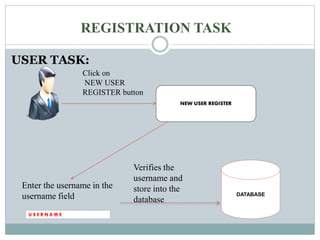
REGISTRATION TASK 
USER TASK: 
U S E R N A M E 
NEW USER REGISTER 
DATABASE 
Click on 
NEW USER 
REGISTER button 
Enter the username in the 
username field 
Verifies the 
username and 
store into the 
database
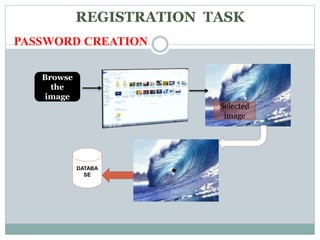
REGISTRATION TASK 
PASSWORD CREATION 
Browse 
the 
image 
Selected 
image 
DATABA 
SE
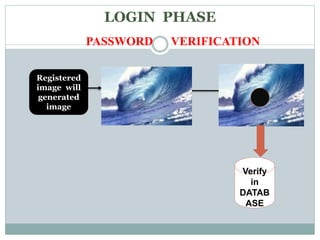
LOGIN PHASE 
PASSWORD VERIFICATION 
Registered 
image will 
generated 
image 
Verify 
in 
DATAB 
ASE
Example 
MOM 
LI
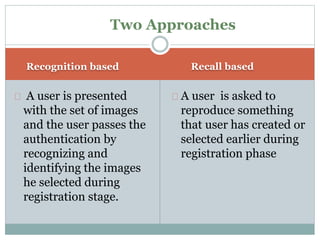
Two Approaches 
Recognition based Recall based 
A user is presented 
with the set of images 
and the user passes the 
authentication by 
recognizing and 
identifying the images 
he selected during 
registration stage. 
A user is asked to 
reproduce something 
that user has created or 
selected earlier during 
registration phase
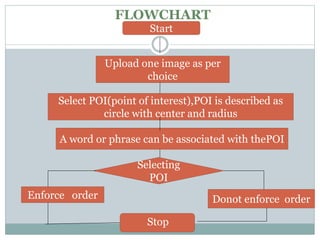
FLOWCHART 
Start 
Upload one image as per 
choice 
Select POI(point of interest),POI is described as 
circle with center and radius 
A word or phrase can be associated with thePOI 
Selecting 
POI 
Enforce order Donot enforce order 
Stop
Advantages 
Easy to remember and hard to guess for 
others. 
Here the security of the system is very 
high. 
Provide a way of making more human-friendly 
passwords . 
 Dictionary attacks are infeasible.
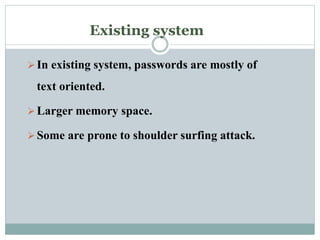
Existing system 
 In existing system, passwords are mostly of 
text oriented. 
 Larger memory space. 
 Some are prone to shoulder surfing attack.
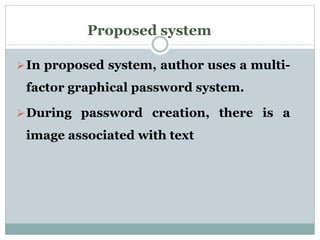
Proposed system 
In proposed system, author uses a multi-factor 
graphical password system. 
During password creation, there is a 
image associated with text
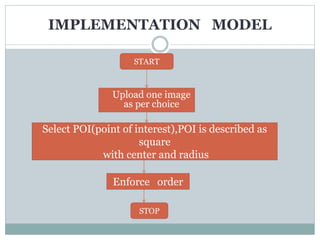
IMPLEMENTATION MODEL 
START 
Upload one image 
as per choice 
Select POI(point of interest),POI is described as 
square 
with center and radius 
Enforce order 
STOP
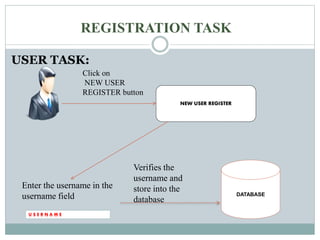
REGISTRATION TASK 
USER TASK: 
U S E R N A M E 
NEW USER REGISTER 
DATABASE 
Click on 
NEW USER 
REGISTER button 
Enter the username in the 
username field 
Verifies the 
username and 
store into the 
database
REGISTRATION TASK 
PASSWORD CREATION 
Browse 
the 
image 
Selected 
image 
DATABA 
SE
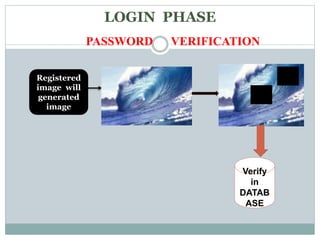
LOGIN PHASE 
PASSWORD VERIFICATION 
Registered 
image will 
generated 
image 
Verify 
in 
DATAB 
ASE
Conclusion 
Search space (system parameters): 
-picture 
-POIs (number and order) 
-words associated with POIs 
Together, the above parameters define a 
very large password space (infinite) 
Multi-factor authentication (graphical, text, 
POI-order, POI-number)in a friendly 
intuitive system
REFERENCES 
A Graphical Password Authentication System 
- Ahmad Almulhem : Computer Engineering Department 
 Graphical Passwords: A Concept Survey 
- Ibrahim Bumin KARA 
William Stallings and Lawrie Brown. Computer Security 
- Principle and Practices. 
Daniel V. Klein. Foiling the Cracker: 
- A Survey of and Improvements to, Password Security.
THANK YOU

Graphical Password Authentication

  • 1.
    Graphical Password Authentication PRESENTED BY: DHVANI SHAH
  • 2.
    OUTLINE Summary: 1.Introduction -Password -Authentication -Methods of Authentication 2. Text-based password -Drawbacks of text-based passwords 3.Problem Definition 4.Graphical Password 5.Existing Model 6.Proposed Model 7.Conclusion
  • 3.
  • 4.
    PASSWORD PASSWORD isa secret word or string of characters that is used for user authentication to prove his/her identity and going to access resources Used for? Logging into accounts Retrieving emails Accessing applications Used In?  Networks.  Websites  Databases
  • 5.
    What is AUTHENTICATION? Conformation of a person’s identity
  • 6.
    Methods for authentication Token-based Biometric-based Knowledge-based Key cards, smart cards Face recognition, finger print Text-based, image-based
  • 7.
  • 8.
    Drawbacks 1) Difficultyof remembering passwords Easy to remember : easy to guess Hard to guess : hard to remember 2)Users tend to write the passwords down or use the same passwords by different accounts
  • 9.
    Drawbacks 3)Brute forceattack 4) Dictionary attack
  • 10.
    PROBLEM DEFINITION Alpha-numericpasswords have various disadvantages and to overcome this disadvantages GRAPHICAL PASSWORD AUTHENTICATION model has been proposed.
  • 11.
    User Authentication :Graphical Password Use graphics (images) instead of alphanumerical passwords Why?  A picture is worth a thousand words Humans remember pictures better than words More resistant to brute-force attacks (search space is practically infinite).
  • 12.
    REGISTRATION TASK USERTASK: U S E R N A M E NEW USER REGISTER DATABASE Click on NEW USER REGISTER button Enter the username in the username field Verifies the username and store into the database
  • 13.
    REGISTRATION TASK PASSWORDCREATION Browse the image Selected image DATABA SE
  • 14.
    LOGIN PHASE PASSWORDVERIFICATION Registered image will generated image Verify in DATAB ASE
  • 15.
  • 16.
    Two Approaches Recognitionbased Recall based A user is presented with the set of images and the user passes the authentication by recognizing and identifying the images he selected during registration stage. A user is asked to reproduce something that user has created or selected earlier during registration phase
  • 17.
    FLOWCHART Start Uploadone image as per choice Select POI(point of interest),POI is described as circle with center and radius A word or phrase can be associated with thePOI Selecting POI Enforce order Donot enforce order Stop
  • 18.
    Advantages Easy toremember and hard to guess for others. Here the security of the system is very high. Provide a way of making more human-friendly passwords .  Dictionary attacks are infeasible.
  • 19.
    Existing system In existing system, passwords are mostly of text oriented.  Larger memory space.  Some are prone to shoulder surfing attack.
  • 20.
    Proposed system Inproposed system, author uses a multi-factor graphical password system. During password creation, there is a image associated with text
  • 21.
    IMPLEMENTATION MODEL START Upload one image as per choice Select POI(point of interest),POI is described as square with center and radius Enforce order STOP
  • 22.
    REGISTRATION TASK USERTASK: U S E R N A M E NEW USER REGISTER DATABASE Click on NEW USER REGISTER button Enter the username in the username field Verifies the username and store into the database
  • 23.
    REGISTRATION TASK PASSWORDCREATION Browse the image Selected image DATABA SE
  • 24.
    LOGIN PHASE PASSWORDVERIFICATION Registered image will generated image Verify in DATAB ASE
  • 25.
    Conclusion Search space(system parameters): -picture -POIs (number and order) -words associated with POIs Together, the above parameters define a very large password space (infinite) Multi-factor authentication (graphical, text, POI-order, POI-number)in a friendly intuitive system
  • 26.
    REFERENCES A GraphicalPassword Authentication System - Ahmad Almulhem : Computer Engineering Department  Graphical Passwords: A Concept Survey - Ibrahim Bumin KARA William Stallings and Lawrie Brown. Computer Security - Principle and Practices. Daniel V. Klein. Foiling the Cracker: - A Survey of and Improvements to, Password Security.
  • 27.