Nimisha Goel
Rollno:9910103481
Student at JIIT-128
Computer Science
Project 2013-14
 Graphical password is an authentication system that
works by having the user select from images in specific
order, presented in a graphical user interface.
 This approach sometimes called graphical user
authentication.
Token-based
 Based on “Something you possess”. It allows user to enter the username
and password in order to obtain the token. Once the token has been
obtained user can access the resource.
 Example-Smart card, University ID.
Biometric-based
 It means life measure. This implies it is a system which recognizes human-
based one or more physical and behavioural traits.
 Example-Finger Print scan
Knowledge based
 Based on “Something you know”. It is authentication scheme in which user
is asked to answer at least one secret question.
 Example PIN(personal identification number).
Recognition based
 Identifying whether user has seen one image before.
Pure recall based
 User has to reproduce something that he or she created
or selected earlier during the registration stage.
Cued recall based
 A user is provided with a hint so that he or she can
recall his his/her password
Hybrid Systems
 Combination of two or more schemes.
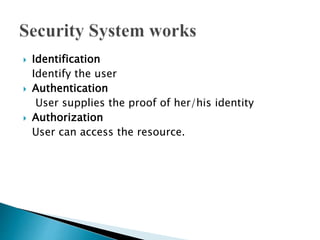
 Identification
Identify the user
 Authentication
User supplies the proof of her/his identity
 Authorization
User can access the resource.
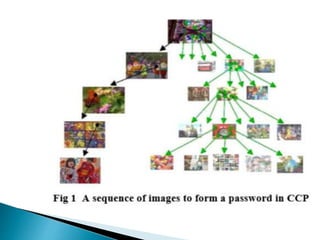
 Originated by Blonder
 User select one point per image for five images. The
interface displays only one image at a time; the image
is replaced by the next image as soon as a user selects a
click point. The system determines the next image to
display based on the user’s click-point on the current
image.
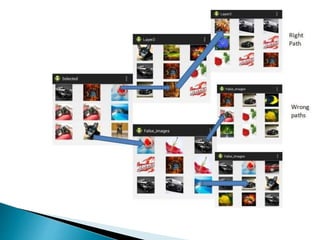
 User select five images in sequence order and
during login phase user has to select the
selected images one by one in sequence
order from random positions of images in
grid view.
 If user selects wrong image then the selected
images will not display in the grid view. User
get to know user is going in wrong path.
 It is combination of pure recall and cued
recall system.
 Android SDK
 Eclipse Kepler
 It is graphical password application to unlock
the folder of private or public files.
 Android is the world's most widely used
Smartphone platform.
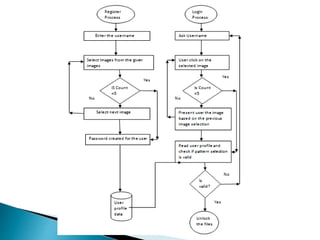
 Steps basically same as cued click points but
there is one difference i.e. Random function
which changes the position of images in grid
view and user has to select the selected from
them.
 Guessing Attack
 It includes Brute-force attack and dictionary
attack.
 Capture Attack
 directly obtain passwords by intercepting user-
entered data, or tricking users
 It includes Shoulder-surfing attack.
 users enter login information, an attacker may
gain knowledge about their credentials by direct
observation or external recording devices such as
video cameras.
 Many Graphical based algorithms provide better
security and usability than textual passwords.
 GPAS is more vulnerable to shoulder-surfing and
password capture attacks.
 It is hard to manage the balance between a
system which is user-oriented and also safe from
the hackers.
 Guess attack can be removed by increasing the
load of number of images on system.
 Android has captured a very good market and
used by more than 60% people. It is best to serve
the purpose of the project.
 The advantage of the approach is increasing
security by providing password of higher
security.
 The goal of GPAS is to reduce the probability of
security attacks like guessing attack as well as
encouraging users to select more random, and
difficult password to guess.
 It also increases the workload for the attackers
and system’s flexibility to increase the number of
images by selecting them at random that allows
arbitrarily increases this workload.
 It is effective to reduce the effect of hotspots
analysis.

Graphical password authentication system ppts

  • 1.
    Nimisha Goel Rollno:9910103481 Student atJIIT-128 Computer Science Project 2013-14
  • 2.
     Graphical passwordis an authentication system that works by having the user select from images in specific order, presented in a graphical user interface.  This approach sometimes called graphical user authentication.
  • 3.
    Token-based  Based on“Something you possess”. It allows user to enter the username and password in order to obtain the token. Once the token has been obtained user can access the resource.  Example-Smart card, University ID. Biometric-based  It means life measure. This implies it is a system which recognizes human- based one or more physical and behavioural traits.  Example-Finger Print scan Knowledge based  Based on “Something you know”. It is authentication scheme in which user is asked to answer at least one secret question.  Example PIN(personal identification number).
  • 4.
    Recognition based  Identifyingwhether user has seen one image before. Pure recall based  User has to reproduce something that he or she created or selected earlier during the registration stage. Cued recall based  A user is provided with a hint so that he or she can recall his his/her password Hybrid Systems  Combination of two or more schemes.
  • 5.
     Identification Identify theuser  Authentication User supplies the proof of her/his identity  Authorization User can access the resource.
  • 6.
     Originated byBlonder  User select one point per image for five images. The interface displays only one image at a time; the image is replaced by the next image as soon as a user selects a click point. The system determines the next image to display based on the user’s click-point on the current image.
  • 8.
     User selectfive images in sequence order and during login phase user has to select the selected images one by one in sequence order from random positions of images in grid view.  If user selects wrong image then the selected images will not display in the grid view. User get to know user is going in wrong path.  It is combination of pure recall and cued recall system.
  • 10.
     Android SDK Eclipse Kepler
  • 11.
     It isgraphical password application to unlock the folder of private or public files.  Android is the world's most widely used Smartphone platform.  Steps basically same as cued click points but there is one difference i.e. Random function which changes the position of images in grid view and user has to select the selected from them.
  • 13.
     Guessing Attack It includes Brute-force attack and dictionary attack.  Capture Attack  directly obtain passwords by intercepting user- entered data, or tricking users  It includes Shoulder-surfing attack.  users enter login information, an attacker may gain knowledge about their credentials by direct observation or external recording devices such as video cameras.
  • 14.
     Many Graphicalbased algorithms provide better security and usability than textual passwords.  GPAS is more vulnerable to shoulder-surfing and password capture attacks.  It is hard to manage the balance between a system which is user-oriented and also safe from the hackers.  Guess attack can be removed by increasing the load of number of images on system.  Android has captured a very good market and used by more than 60% people. It is best to serve the purpose of the project.
  • 15.
     The advantageof the approach is increasing security by providing password of higher security.  The goal of GPAS is to reduce the probability of security attacks like guessing attack as well as encouraging users to select more random, and difficult password to guess.  It also increases the workload for the attackers and system’s flexibility to increase the number of images by selecting them at random that allows arbitrarily increases this workload.  It is effective to reduce the effect of hotspots analysis.