Passwords
Presented by:
Lakshmi.V
Arpana Shree.A
Outline
GPA
Introduction
Overview of the Authentication Methods
The survey
 Recognition Based Techniques
 Recall Based Techniques
Discusssion
 Security
 Usability
Conclusion
05/05/14
2
Passwords
Introduction
How about text-based passwords ?
 Difficulty of remembering passwords
 easy to remember -> easy to guess
 hard to guess -> hard to remember
 Users tend to write passwords down or use the same
passwords for different accounts
An alternative: Graphical Passwords
 Psychological studies: Human can remember pictures better
than text
05/05/14
3
Passwords
Graphical Password Scheme
If the number of possible pictures is sufficiently large, the
possible password space may exceed that of text-based
schemes, thus offer better resistance to dictionary attacks.
can be used to:
 workstation
 web log-in application
 ATM machines
 mobile devices
05/05/14
4
Passwords
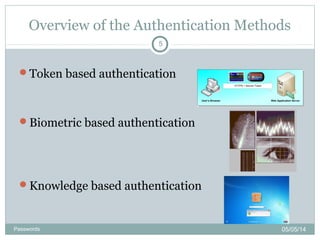
Overview of the Authentication Methods
Token based authentication
Biometric based authentication
Knowledge based authentication
05/05/14
5
Passwords
Recognition Based Techniques
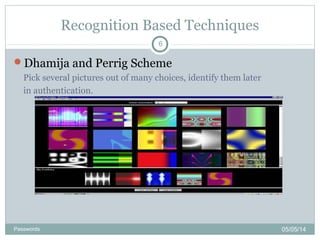
Dhamija and Perrig Scheme
Pick several pictures out of many choices, identify them later
in authentication.
05/05/14
6
Passwords
Recall Based Techniques
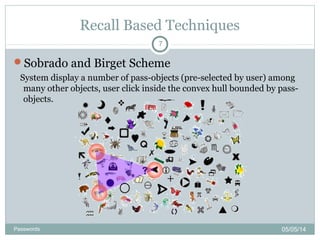
Sobrado and Birget Scheme
System display a number of pass-objects (pre-selected by user) among
many other objects, user click inside the convex hull bounded by pass-
objects.
05/05/14
7
Passwords
Recognition Based Techniques
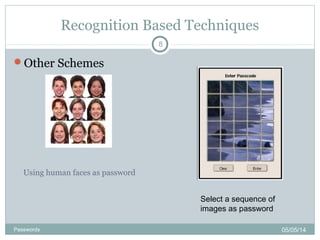
Other Schemes
Using human faces as password
Select a sequence of
images as password
05/05/14
8
Passwords
Recall Based Techniques
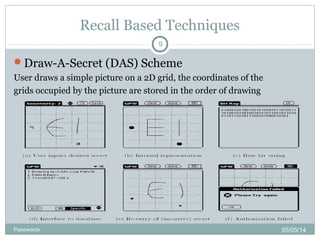
Draw-A-Secret (DAS) Scheme
User draws a simple picture on a 2D grid, the coordinates of the
grids occupied by the picture are stored in the order of drawing
05/05/14
9
Passwords
Recall Based Techniques
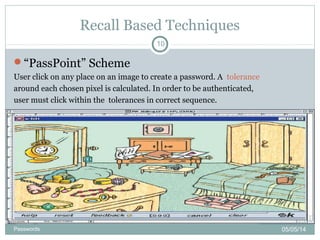
“PassPoint” Scheme
User click on any place on an image to create a password. A tolerance
around each chosen pixel is calculated. In order to be authenticated,
user must click within the tolerances in correct sequence.
05/05/14
10
Passwords
Recall Based Techniques
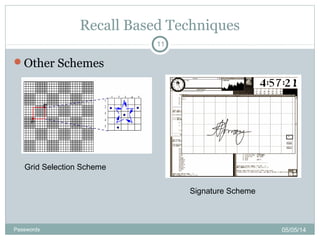
Other Schemes
Grid Selection Scheme
Signature Scheme
05/05/14
11
Passwords
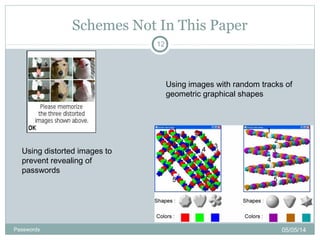
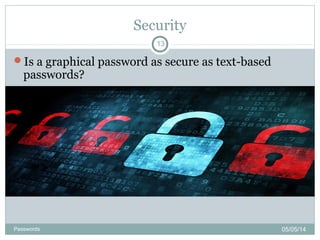
Schemes Not In This Paper
Using distorted images to
prevent revealing of
passwords
Using images with random tracks of
geometric graphical shapes
05/05/14
12
Passwords
Security
Is a graphical password as secure as text-based
passwords?
05/05/14
13
Passwords
Usability
Pictures are easier to remember than text strings
Password registration and log-in process take too
long
Require much more storage space than text based
passwords
05/05/14
14
Passwords
Conclusion
main argument for graphical passwords:
people are better at memorizing graphical passwords than text-based
passwords
It is more difficult to break graphical passwords using the
traditional attack methods such as:burte force search,
dictionary attack or spyware.
Not yet widely used, current graphical password techniques
are still immature
05/05/14
15
Passwords
HMAC-OTP
05/05/14
16
Passwords
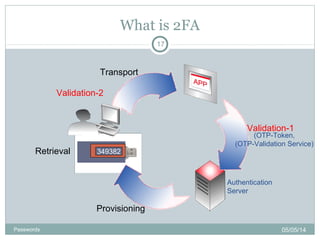
What is 2FA
Authentication
Server
Provisioning
Retrieval
Validation-1
Transport
(OTP-Token,
(OTP-Validation Service)
349382
Validation-2
05/05/14
17
Passwords
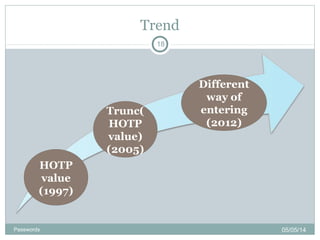
Trend
HOTP
value
(1997)
Trunc(
HOTP
value)
(2005)
Different
way of
entering
(2012)
05/05/14
18
Passwords
Definition
HOTP- HMAC based one time password algorithm
Definition:
Let k-secrete key
c-counter
HMAC(K,C) = SHA1(K 0x5c5c… SHA1(⊕ ∥ K ⊕
0x3636… ))
Then HOTP(K,C) is mathematically defined by
HOTP(K,C) = Truncate(HMAC(K,C)) &
0x7FFFFFFF
05/05/14
19
Passwords
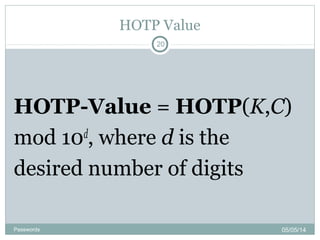
HOTP Value
HOTP-Value = HOTP(K,C)
mod 10d
, where d is the
desired number of digits
05/05/14
20
Passwords
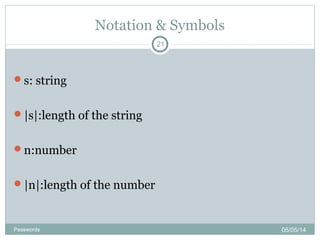
Notation & Symbols
s: string
|s|:length of the string
n:number
|n|:length of the number
05/05/14
21
Passwords
Contd..
s[i]:string at ith
bit
stToNum: function that as i/p a string s returns the
number whose binary representation is s
 Example:
stToNum(110)=6
05/05/14
22
Passwords
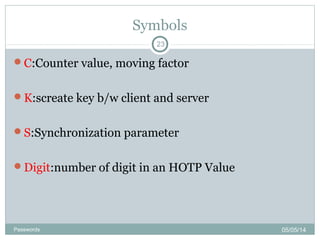
Symbols
C:Counter value, moving factor
K:screate key b/w client and server
S:Synchronization parameter
Digit:number of digit in an HOTP Value
05/05/14
23
Passwords
Generation of HOTP Value
Step-1
Generate HMAC Value(HMAC-SHA-1)
Let HS=HMAC-SHA-1(k,c) [ HS=20 bytes (say)]
Step-2
Generate 4byte string(DT)
sbits=DT(HS) [returns 32-bit string]
Step-3
Compute HOTP Value
Let Snum=stToNum(sbits)
return D=Snum mod 10^Digit
05/05/14
24
Passwords
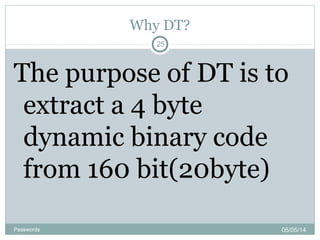
Why DT?
The purpose of DT is to
extract a 4 byte
dynamic binary code
from 160 bit(20byte)
05/05/14
25
Passwords
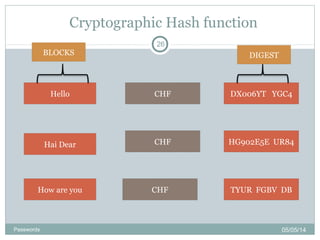
Cryptographic Hash function
Hello
Hai Dear
How are you
CHF
CHF
CHF
DX006YT YGC4
HG902E5E UR84
TYUR FGBV DB
BLOCKS DIGEST
05/05/14
26
Passwords
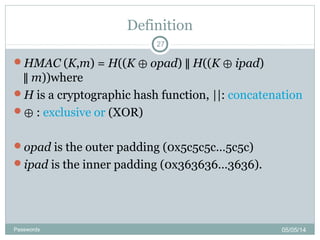
Definition
HMAC (K,m) = H((K ⊕ opad) ∥ H((K ⊕ ipad)
∥ m))where
H is a cryptographic hash function, ||: concatenation
⊕ : exclusive or (XOR)
opad is the outer padding (0x5c5c5c…5c5c)
ipad is the inner padding (0x363636…3636).
05/05/14
27
Passwords
Implementation
function hmac (key, message)
{
if (length(key) > blocksize)
then key = hash(key)
end if
if (length(key) < blocksize)
then key = key [0x00 * (blocksize - length(key))∥
end if
o_key_pad = [0x5c * blocksize] key⊕
i_key_pad = [0x36 * blocksize] key⊕
return hash(o_key_pad hash(i_key_pad message))∥ ∥
End of function
05/05/14
28
Passwords
THANK YOU
05/05/14
29
Passwords

Graphical Password authentication using Hmac

  • 1.
  • 2.
    Outline GPA Introduction Overview of theAuthentication Methods The survey  Recognition Based Techniques  Recall Based Techniques Discusssion  Security  Usability Conclusion 05/05/14 2 Passwords
  • 3.
    Introduction How about text-basedpasswords ?  Difficulty of remembering passwords  easy to remember -> easy to guess  hard to guess -> hard to remember  Users tend to write passwords down or use the same passwords for different accounts An alternative: Graphical Passwords  Psychological studies: Human can remember pictures better than text 05/05/14 3 Passwords
  • 4.
    Graphical Password Scheme Ifthe number of possible pictures is sufficiently large, the possible password space may exceed that of text-based schemes, thus offer better resistance to dictionary attacks. can be used to:  workstation  web log-in application  ATM machines  mobile devices 05/05/14 4 Passwords
  • 5.
    Overview of theAuthentication Methods Token based authentication Biometric based authentication Knowledge based authentication 05/05/14 5 Passwords
  • 6.
    Recognition Based Techniques Dhamijaand Perrig Scheme Pick several pictures out of many choices, identify them later in authentication. 05/05/14 6 Passwords
  • 7.
    Recall Based Techniques Sobradoand Birget Scheme System display a number of pass-objects (pre-selected by user) among many other objects, user click inside the convex hull bounded by pass- objects. 05/05/14 7 Passwords
  • 8.
    Recognition Based Techniques OtherSchemes Using human faces as password Select a sequence of images as password 05/05/14 8 Passwords
  • 9.
    Recall Based Techniques Draw-A-Secret(DAS) Scheme User draws a simple picture on a 2D grid, the coordinates of the grids occupied by the picture are stored in the order of drawing 05/05/14 9 Passwords
  • 10.
    Recall Based Techniques “PassPoint”Scheme User click on any place on an image to create a password. A tolerance around each chosen pixel is calculated. In order to be authenticated, user must click within the tolerances in correct sequence. 05/05/14 10 Passwords
  • 11.
    Recall Based Techniques OtherSchemes Grid Selection Scheme Signature Scheme 05/05/14 11 Passwords
  • 12.
    Schemes Not InThis Paper Using distorted images to prevent revealing of passwords Using images with random tracks of geometric graphical shapes 05/05/14 12 Passwords
  • 13.
    Security Is a graphicalpassword as secure as text-based passwords? 05/05/14 13 Passwords
  • 14.
    Usability Pictures are easierto remember than text strings Password registration and log-in process take too long Require much more storage space than text based passwords 05/05/14 14 Passwords
  • 15.
    Conclusion main argument forgraphical passwords: people are better at memorizing graphical passwords than text-based passwords It is more difficult to break graphical passwords using the traditional attack methods such as:burte force search, dictionary attack or spyware. Not yet widely used, current graphical password techniques are still immature 05/05/14 15 Passwords
  • 16.
  • 17.
  • 18.
  • 19.
    Definition HOTP- HMAC basedone time password algorithm Definition: Let k-secrete key c-counter HMAC(K,C) = SHA1(K 0x5c5c… SHA1(⊕ ∥ K ⊕ 0x3636… )) Then HOTP(K,C) is mathematically defined by HOTP(K,C) = Truncate(HMAC(K,C)) & 0x7FFFFFFF 05/05/14 19 Passwords
  • 20.
    HOTP Value HOTP-Value =HOTP(K,C) mod 10d , where d is the desired number of digits 05/05/14 20 Passwords
  • 21.
    Notation & Symbols s:string |s|:length of the string n:number |n|:length of the number 05/05/14 21 Passwords
  • 22.
    Contd.. s[i]:string at ith bit stToNum:function that as i/p a string s returns the number whose binary representation is s  Example: stToNum(110)=6 05/05/14 22 Passwords
  • 23.
    Symbols C:Counter value, movingfactor K:screate key b/w client and server S:Synchronization parameter Digit:number of digit in an HOTP Value 05/05/14 23 Passwords
  • 24.
    Generation of HOTPValue Step-1 Generate HMAC Value(HMAC-SHA-1) Let HS=HMAC-SHA-1(k,c) [ HS=20 bytes (say)] Step-2 Generate 4byte string(DT) sbits=DT(HS) [returns 32-bit string] Step-3 Compute HOTP Value Let Snum=stToNum(sbits) return D=Snum mod 10^Digit 05/05/14 24 Passwords
  • 25.
    Why DT? The purposeof DT is to extract a 4 byte dynamic binary code from 160 bit(20byte) 05/05/14 25 Passwords
  • 26.
    Cryptographic Hash function Hello HaiDear How are you CHF CHF CHF DX006YT YGC4 HG902E5E UR84 TYUR FGBV DB BLOCKS DIGEST 05/05/14 26 Passwords
  • 27.
    Definition HMAC (K,m) =H((K ⊕ opad) ∥ H((K ⊕ ipad) ∥ m))where H is a cryptographic hash function, ||: concatenation ⊕ : exclusive or (XOR) opad is the outer padding (0x5c5c5c…5c5c) ipad is the inner padding (0x363636…3636). 05/05/14 27 Passwords
  • 28.
    Implementation function hmac (key,message) { if (length(key) > blocksize) then key = hash(key) end if if (length(key) < blocksize) then key = key [0x00 * (blocksize - length(key))∥ end if o_key_pad = [0x5c * blocksize] key⊕ i_key_pad = [0x36 * blocksize] key⊕ return hash(o_key_pad hash(i_key_pad message))∥ ∥ End of function 05/05/14 28 Passwords
  • 29.

Editor's Notes

  • #6 key cards, band cards, smart card, … Fingerprints, iris scan, facial recognition, text-based passwords, picture-based passwords, … most widely used authentication techeniques
  • #7 using Hash Visualization, which, given a seed, automatically generate a set of pictures take longer to create graphical passwords password space: N!/K! (N-K)! ( N-total number of pictures; K-number of pictures selected as passwords)
  • #8 authors suggeated using 1000 objects, which makes the display very crowed and the objects almost indistinguishable. password space: N!/K! (N-K)! ( N-total number of picture objects; K-number of pre-registered objects)
  • #10 redrawing has to touch the same grids in the same sequence in authentication user studies showed the drawing sequences is hard to Remember
  • #11 can be hard to remember the sequences Password Space: N^K ( N -the number of pixels or smallest units of a picture, K - the number of Point to be clicked on )
  • #14 text-based passwords have a password space of 94^N (94 – number of printable characters, N- length of passwords). Some graphical password techniques can compete: Draw-A-Secret Scheme, PassPoint Scheme. Brute force search / Dictionary attacks The attack programs need to automatically generate accurate mouse motion to imitate human input, which is more difficult compared to text passwords. Guessing Social engineering …