GRAPHICAL PASSWORD
AUTHENTICATION
ABSTRACT
The most common computer authentication method is to use alphanumerical
usernames and password. This method has been shown to have significant
drawbacks. For example, users tend to pick passwords that can be easily guessed.
On the other hand, if a password is hard to guess, then it is often hard to
remember In this , we conduct a comprehensive survey of the existing graphical
password techniques. We classify these techniques into two categories:
recognition-based and recall-based approaches. We discuss the strengths and
limitations of each method and point out the future research directions in this
area. In this paper , we are conducting a comprehensive survey of existing
graphical image password authentication techniques.
INTRODUCTION
• A GRAPHICAL PASSWORD is an authentication system that works
by having the user select from images, in a specific order, presented
in a graphical user interface (GUI). For this reason, the graphical-
password approach is sometimes called graphical user authentication
(GUA).
• It can be used in:
– web log-in application
– ATM machines
– mobile devices
EXISITING
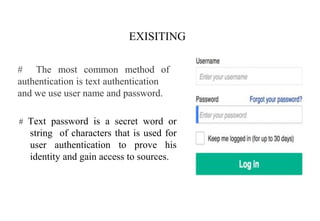
# Text password is a secret word or
string of characters that is used for
user authentication to prove his
identity and gain access to sources.
# The most common method of
authentication is text authentication
and we use user name and password.
DISADVANTAGES
• The most commonly used form of user authentication.
• The weakest links of computer security systems
• password that are easy to remember are easy to guess
• That are hard to guess are hard to remember
• Many ignore the above requirment and lead to weak
passwords
A graphical password is an authentication system that works by
having the user select from images, in a specific order, presented in a
graphical user interface (GUI).
For this reason, the graphical-password approach is sometimes
called graphical user authentication (GUA).
An example of a graphical password uses an image on the screen and
lets the user choose a few click points; these click points are the
"password", and the user has to click closely to these points again in
order to log in.
Graphical Password:
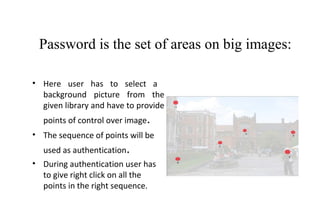
Password is the set of areas on big images:
• Here user has to select a
background picture from the
given library and have to provide
points of control over image.
• The sequence of points will be
used as authentication.
• During authentication user has
to give right click on all the
points in the right sequence.
The survey : Two categories
• Recognition Based Techniques
– a user is presented with a set of images and the user passes the
authentication by recognizing and identifying the images he selected
during the registration stage
• Recall Based Techniques
– A user is asked to reproduce something that he created or selected
earlier during the registration stage
Recognition Based Techniques
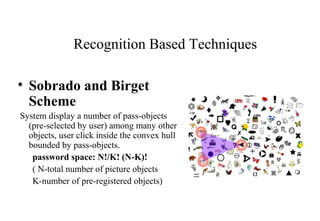
• Sobrado and Birget
Scheme
System display a number of pass-objects
(pre-selected by user) among many other
objects, user click inside the convex hull
bounded by pass-objects.
password space: N!/K! (N-K)!
( N-total number of picture objects
K-number of pre-registered objects)
Pass face scheme:
• In this human faces are used as
passwords
• Select sequence of images as
passwords
Recall Based Techniques
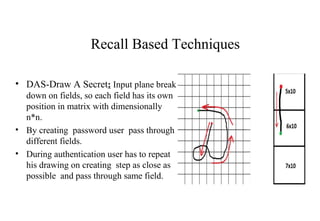
• DAS-Draw A Secret: Input plane break
down on fields, so each field has its own
position in matrix with dimensionally
n*n.
• By creating password user pass through
different fields.
• During authentication user has to repeat
his drawing on creating step as close as
possible and pass through same field.
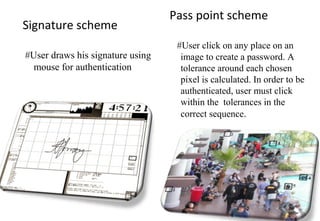
Pass point scheme
#User click on any place on an
image to create a password. A
tolerance around each chosen
pixel is calculated. In order to be
authenticated, user must click
within the tolerances in the
correct sequence.
Signature scheme
#User draws his signature using
mouse for authentication
COMPARISION BETWEEN ALPHA-NUMERIC &
GRAPHICAL PASSWORDS:
Commonly used guidelines for alpha-numeric passwords are:
• The password should be at least 8 characters long.
• The password should not be easy to relate to the user (e.g., last name,
birth date).
• Ideally, the user should combine upper and lower case letters and
digits.
Graphical passwords
 The password consists of some actions that the user performs on an
image.
 Such passwords are easier to remember & hard to guess.
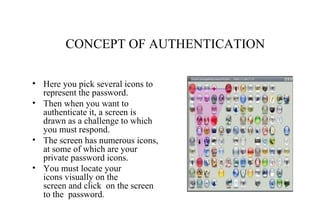
CONCEPT OF AUTHENTICATION
• Here you pick several icons to
represent the password.
• Then when you want to
authenticate it, a screen is
drawn as a challenge to which
you must respond.
• The screen has numerous icons,
at some of which are your
private password icons.
• You must locate your
icons visually on the
screen and click on the screen
to the password.
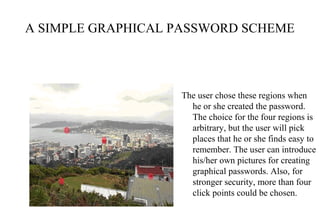
A SIMPLE GRAPHICAL PASSWORD SCHEME
The user chose these regions when
he or she created the password.
The choice for the four regions is
arbitrary, but the user will pick
places that he or she finds easy to
remember. The user can introduce
his/her own pictures for creating
graphical passwords. Also, for
stronger security, more than four
click points could be chosen.
ADVANTAGES
• Graphical password schemes provide a way of making more human-
friendly passwords .
• Here the security of the system is very high.
• Here we use a series of selectable images on successive screen pages.
• Dictionary attacks are infeasible.
DRAWBACKS
• Password registration and log-in process take too long.
• Require much more storage space than text based passwords.
• Shoulder Surfing
It means watching over people's shoulders as they process information.
Examples include observing the keyboard as a person types his or her
password, enters a PIN number, or views personal information.
Because of their graphic nature, nearly all graphical password schemes are
quite vulnerable to shoulder surfing.
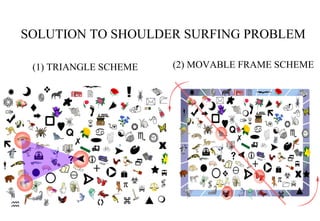
SOLUTION TO SHOULDER SURFING PROBLEM
(1) TRIANGLE SCHEME (2) MOVABLE FRAME SCHEME
CONCLUSION
• Graphical passwords are an alternative to textual alphanumeric
password. It satisfies both conflicting requirements i.e. it is easy to
remember & it is hard to guess. By the solution of the shoulder
surfing problem, it becomes more secure & easier password scheme.
By implementing other special geometric configurations like triangle
& movable frame, one can achieve more security.
THANKING YOU
ANY QUERIES
?

Graphical password authentication

  • 1.
  • 2.
    ABSTRACT The most commoncomputer authentication method is to use alphanumerical usernames and password. This method has been shown to have significant drawbacks. For example, users tend to pick passwords that can be easily guessed. On the other hand, if a password is hard to guess, then it is often hard to remember In this , we conduct a comprehensive survey of the existing graphical password techniques. We classify these techniques into two categories: recognition-based and recall-based approaches. We discuss the strengths and limitations of each method and point out the future research directions in this area. In this paper , we are conducting a comprehensive survey of existing graphical image password authentication techniques.
  • 3.
    INTRODUCTION • A GRAPHICALPASSWORD is an authentication system that works by having the user select from images, in a specific order, presented in a graphical user interface (GUI). For this reason, the graphical- password approach is sometimes called graphical user authentication (GUA). • It can be used in: – web log-in application – ATM machines – mobile devices
  • 4.
    EXISITING # Text passwordis a secret word or string of characters that is used for user authentication to prove his identity and gain access to sources. # The most common method of authentication is text authentication and we use user name and password.
  • 5.
    DISADVANTAGES • The mostcommonly used form of user authentication. • The weakest links of computer security systems • password that are easy to remember are easy to guess • That are hard to guess are hard to remember • Many ignore the above requirment and lead to weak passwords
  • 6.
    A graphical passwordis an authentication system that works by having the user select from images, in a specific order, presented in a graphical user interface (GUI). For this reason, the graphical-password approach is sometimes called graphical user authentication (GUA). An example of a graphical password uses an image on the screen and lets the user choose a few click points; these click points are the "password", and the user has to click closely to these points again in order to log in. Graphical Password:
  • 7.
    Password is theset of areas on big images: • Here user has to select a background picture from the given library and have to provide points of control over image. • The sequence of points will be used as authentication. • During authentication user has to give right click on all the points in the right sequence.
  • 8.
    The survey :Two categories • Recognition Based Techniques – a user is presented with a set of images and the user passes the authentication by recognizing and identifying the images he selected during the registration stage • Recall Based Techniques – A user is asked to reproduce something that he created or selected earlier during the registration stage
  • 9.
    Recognition Based Techniques •Sobrado and Birget Scheme System display a number of pass-objects (pre-selected by user) among many other objects, user click inside the convex hull bounded by pass-objects. password space: N!/K! (N-K)! ( N-total number of picture objects K-number of pre-registered objects)
  • 10.
    Pass face scheme: •In this human faces are used as passwords • Select sequence of images as passwords
  • 11.
    Recall Based Techniques •DAS-Draw A Secret: Input plane break down on fields, so each field has its own position in matrix with dimensionally n*n. • By creating password user pass through different fields. • During authentication user has to repeat his drawing on creating step as close as possible and pass through same field.
  • 12.
    Pass point scheme #Userclick on any place on an image to create a password. A tolerance around each chosen pixel is calculated. In order to be authenticated, user must click within the tolerances in the correct sequence. Signature scheme #User draws his signature using mouse for authentication
  • 13.
    COMPARISION BETWEEN ALPHA-NUMERIC& GRAPHICAL PASSWORDS: Commonly used guidelines for alpha-numeric passwords are: • The password should be at least 8 characters long. • The password should not be easy to relate to the user (e.g., last name, birth date). • Ideally, the user should combine upper and lower case letters and digits. Graphical passwords  The password consists of some actions that the user performs on an image.  Such passwords are easier to remember & hard to guess.
  • 14.
    CONCEPT OF AUTHENTICATION •Here you pick several icons to represent the password. • Then when you want to authenticate it, a screen is drawn as a challenge to which you must respond. • The screen has numerous icons, at some of which are your private password icons. • You must locate your icons visually on the screen and click on the screen to the password.
  • 15.
    A SIMPLE GRAPHICALPASSWORD SCHEME The user chose these regions when he or she created the password. The choice for the four regions is arbitrary, but the user will pick places that he or she finds easy to remember. The user can introduce his/her own pictures for creating graphical passwords. Also, for stronger security, more than four click points could be chosen.
  • 16.
    ADVANTAGES • Graphical passwordschemes provide a way of making more human- friendly passwords . • Here the security of the system is very high. • Here we use a series of selectable images on successive screen pages. • Dictionary attacks are infeasible.
  • 17.
    DRAWBACKS • Password registrationand log-in process take too long. • Require much more storage space than text based passwords. • Shoulder Surfing It means watching over people's shoulders as they process information. Examples include observing the keyboard as a person types his or her password, enters a PIN number, or views personal information. Because of their graphic nature, nearly all graphical password schemes are quite vulnerable to shoulder surfing.
  • 18.
    SOLUTION TO SHOULDERSURFING PROBLEM (1) TRIANGLE SCHEME (2) MOVABLE FRAME SCHEME
  • 19.
    CONCLUSION • Graphical passwordsare an alternative to textual alphanumeric password. It satisfies both conflicting requirements i.e. it is easy to remember & it is hard to guess. By the solution of the shoulder surfing problem, it becomes more secure & easier password scheme. By implementing other special geometric configurations like triangle & movable frame, one can achieve more security.
  • 20.