UNIT-2
Parallel and Distributed Databases
Parallel Vs Distributed
• A parallel database system is one that seeks to improve
performance through parallel implementation of various operations
such as loading data, building indexes, and evaluating queries.
• In a distributed database system , data is physically stored across
several sites, and each site is typically managed by a DBMS that is
capable of running independently of the other sites.
Parallel DBMS
• A DBMS running across multiple processors and disks designed to
execute operations in parallel whenever possible, to improve
performance.
• Based on premise that single processor systems can no longer meet
requirements for cost-effective scalability, reliability, and performance.
• Parallel DBMSs link multiple, smaller machines to achieve same
throughput as single, larger machine with greater scalability and
reliability.
PARALLEL DBMSs
WHY DO WE NEED THEM?
• More and More Data!
We have databases that hold a high amount of
data, in the order of 1012
bytes:
10,000,000,000,000 bytes!
• Faster and Faster Access!
We have data applications that need to process
data at very high speeds:
10,000s transactions per second!
PARALLEL DBMSs
BENEFITS OF A PARALLEL DBMS
• Improves Response Time.
INTERQUERY PARALLELISM
It is possible to process a number of transactions in
parallel with each other.
• Improves Throughput.
INTRAQUERY PARALLELISM
It is possible to process ‘sub-tasks’ of a transaction in
parallel with each other.
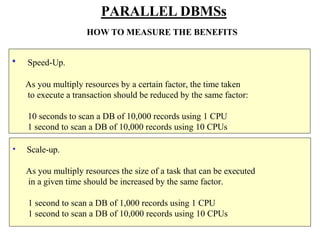
• Scale-up.
As you multiply resources the size of a task that can be executed
in a given time should be increased by the same factor.
1 second to scan a DB of 1,000 records using 1 CPU
1 second to scan a DB of 10,000 records using 10 CPUs
PARALLEL DBMSs
HOW TO MEASURE THE BENEFITS
• Speed-Up.
As you multiply resources by a certain factor, the time taken
to execute a transaction should be reduced by the same factor:
10 seconds to scan a DB of 10,000 records using 1 CPU
1 second to scan a DB of 10,000 records using 10 CPUs
Parallel DBMS
PARALLEL DBMSs
• Main architectures for parallel DBMSs are:
– a: Shared memory.
– b: Shared disk.
– c: Shared nothing.
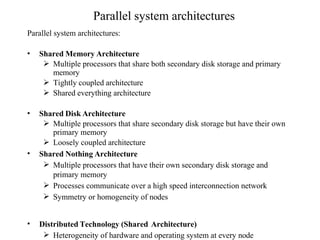
Parallel system architectures
Parallel system architectures:
• Shared Memory Architecture
 Multiple processors that share both secondary disk storage and primary
memory
 Tightly coupled architecture
 Shared everything architecture
• Shared Disk Architecture
 Multiple processors that share secondary disk storage but have their own
primary memory
 Loosely coupled architecture
• Shared Nothing Architecture
 Multiple processors that have their own secondary disk storage and
primary memory
 Processes communicate over a high speed interconnection network
 Symmetry or homogeneity of nodes
• Distributed Technology (Shared Architecture)
 Heterogeneity of hardware and operating system at every node
CPU
CPU
CPU
CPU
CPU
CPU MEMORY
Shared Memory – Parallel Database Architecture
M CPU
M CPU
M CPU
M CPU
M CPU
M CPU
Shared Disk – Parallel Database Architecture
Shared Nothing – Parallel Database Architecture
M CPU
CPU M
M CPU
CPU M
M CPU
PARALLEL QUERY EVALUATION
• Parallelizing Sequential Operator Evaluation Code:
• Input data streams are divided into parallel data streams. The output of these
streams are merged as needed to provide as inputs for a relational operator,
and the output may again be split as needed to parallelize subsequent
processing.
PARALLELIZING INDIVIDUAL OPERATIONS
• Various operations can be implemented in parallel in a sharednothing
architecture.
• Bulk Loading and Scanning:
• Pages can be read in parallel while scanning a relation and the retrieved tuples
can then be merged, if the relation is partitioned across several disks.
• If a relation has associated indexes, any sorting of data entries required for
building the indexes during bulk loading can also be done in parallel.
• Sorting:
• Sorting could be done by redistributing all tuples in the relation using range
partitioning.
• Ex. Sorting a collection of employee tuples by salary whose values are in a
certain range.
• For N processors each processor gets the tuples which lie in range assigned to
it. Like processor 1 contains all tuples in range 10 to 20 and so on.
• Each processor has a sorted version of the tuples which can then be combined
by traversing and collecting the tuples in the order on the processors
(according to the range assigned)
• The problem with range partitioning is data skew which limits the scalability
of the parallel sort. One good approach to range partitioning is to obtain a
sample of the entire relation by taking samples at each processor that initially
contains part of the relation. The (relatively small) sample is sorted and used
to identify ranges with equal numbers of tuples. This set of range values,
called a splitting vector, is then distributed to all processors and used to range
partition the entire relation.
• Joins:
• Here we consider how the join operation can be parallelized
• Consider 2 relations A and B to be joined using the age attribute. A and B are
initially distributed across several disks in a way that is not useful for join
operation
• So we have to decompose the join into a collection of k smaller joins by
partitioning both A and B into a collection of k logical partitions.
• If same partitioning function is used for both A and B then the union of k
smaller joins will compute to the join of A and B.
Types of Parallelism
• Inter-query parallelism refers to the ability of multiple applications to
query a database at the same time. Each query will execute
independently of the others, but DB2 UDB will execute them at the
same time.
• Intra-query parallelism refers to the ability to break a single query into
a number of pieces and replicate them at the same time using either
intra-partition parallelism or inter-partition parallelism, or both.
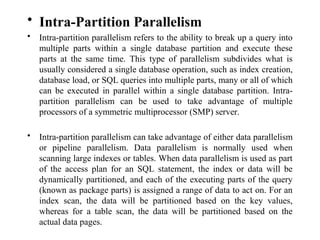
• Intra-Partition Parallelism
• Intra-partition parallelism refers to the ability to break up a query into
multiple parts within a single database partition and execute these
parts at the same time. This type of parallelism subdivides what is
usually considered a single database operation, such as index creation,
database load, or SQL queries into multiple parts, many or all of which
can be executed in parallel within a single database partition. Intra-
partition parallelism can be used to take advantage of multiple
processors of a symmetric multiprocessor (SMP) server.
• Intra-partition parallelism can take advantage of either data parallelism
or pipeline parallelism. Data parallelism is normally used when
scanning large indexes or tables. When data parallelism is used as part
of the access plan for an SQL statement, the index or data will be
dynamically partitioned, and each of the executing parts of the query
(known as package parts) is assigned a range of data to act on. For an
index scan, the data will be partitioned based on the key values,
whereas for a table scan, the data will be partitioned based on the
actual data pages.
• Pipeline parallelism is normally used when distinct operations on the
data can be executed in parallel. For example, a table is being scanned
and the scan is immediately feeding into a sort operation that is
executing in parallel to sort the data as it is being scanned.
• Figure 2.2 shows a query that is broken into four pieces that can be
executed in parallel, each working with a subset of the data. When this
happens, the results can be returned more quickly than if the query
was run serially. To utilize intra-partition parallelism, the database
must be configured appropriately.
• Inter-Partition Parallelism
• Inter-partition parallelism refers to the ability to break up a query into multiple
parts across multiple partitions of a partitioned database on a single server or
between multiple servers. The query will be executed in parallel on all of the
database partitions. Inter-partition parallelism can be used to take advantage of
multiple processors of an SMP server or multiple processors spread across a
number of servers.
• Figure 2.7 shows a query that is broken into four pieces that can be executed
in parallel, with the results returned more quickly than if the query was run in
a serial fashion in a single partition. In this case, the degree of parallelism for
the query is limited by the number of database partitions.
Types of Parallelism
MAINFRAME DATABASE SYSTEM
PRESENTATION LOGIC
A PPLICATION LOGIC
DATA LOGIC
DUMB
DUMB
DUMB
TERMINALS
MAINFRAME COMPUTER
SPECIALISED
NETWORK
CONNECTION
CLIENT/SERVER DATABASE SYSTEM
CLIENT/SERVER DBMS
CLIENT PROCESS
□ Manages user interface
□ Accepts user data
□ Processes application/business logic
□ Generates database requests (SQL)
□ Transmits database requests to server
□ Receives results from server
□ Formats results according to application logic
□ Present results to the user
CLIENT/SERVER DBMS
SERVER PROCESS
□ Accepts database requests
□ Processes database requests
 Performs integrity checks
 Handles concurrent access
 Optimises queries
 Performs security checks
 Enacts recovery routines
□ Transmits result of database request to client
CLIENT 
#1
CLIENT/SERVER
DBMS ARCHITECTURE
CLIENT 
#2
CLIENT 
#3
SERVER
 D/BASE



DATA LOGIC
PRESENTATION LOGIC
BUSINESS LOGIC
(FAT CLIENT)
 Data Request
 Data Response
PL/SQL
CLIENT 
#1
CLIENT/SERVER
DBMS ARCHITECTURE
CLIENT 
#2
CLIENT 
#3
SERVER
 D/BASE



BUSINESS LOGIC
DATA LOGIC
PRESENTATION LOGIC
(THIN CLIENT)  Data Request
 Data Response
WIDE
AREA
NETWOR
K
DISTRIBUTED PROCESSING ARCHITECTURE
CLIENT
CLIENT
CLIENT
CLIENT
LAN
CLIENT
CLIENT
CLIENT
CLIENT
LAN
Stratford Leyton
CLIENT CLIENT
LAN
CLIENT CLIENT
LAN
CLIENT CLIENT
CLIENT CLIENT
Barking Leytonstone
DBMS
DISTRIBUTED DATABASE SYSTEM
DISTRIBUTED DATABASE
 Distributed Computing System
Consists of a number of processing elements
interconnected by a computer network that cooperate in
processing certain tasks
 Distributed Database
Collection of logically interrelated databases over a
computer network
 Distributed DBMS
Software system that manages a distributed DB
DISTRIBUTED DATABASES
 A distributed database system is a collection of logically
related databases that co-operate in a transparent manner.
 Transparent implies that each user within the system may
access all of the data within all of the databases as if they were
a single database
 There should be ‘location independence’ i.e.- as the user is
unaware of where the data is located it is possible to move the
data from one physical location to another without affecting
the user.
DISTRIBUTED DATABASES
DISTRIBUTED DATABASE ARCHITECTURE
CLIENT CLIENT CLIENT CLIENT
LAN
CLIENT CLIENT CLIENT CLIENT
Stratford Leyton
CLIENT CLIENT CLIENT CLIENT
LAN
CLIENT CLIENT CLIENT CLIENT
Barking Leytonstone
DBMS
DBMS
NETWORK
WIDE
AREA
DBMS
DBMS
D/BASE
M:N CLIENT/SERVER DBMS ARCHITECTURE
SERVER #1
CLIENT
#1
CLIENT
#2
SERVER #2
CLIENT
#3
NOT TRANSPARENT!
D/BASE
LDBMS
DDBMS
DC
COMPONENTS OF A DDBMS
Site 1
GSC
Computer
Network
GSC
DB
Site 2
DC
DDBMS
LDBMS = Local DBMS
DC = Data Communications
GSC = Global Systems Catalog
DDBMS = Distributed DBMS
Architecture of DDBs :
• There are 3 architectures: -
• Client-Server:
• A Client-Server system has one or more client processes and one or more
server processes, and a client process can send a query to any one server
process. Clients are responsible for user-interface issues, and servers manage
data and execute transactions.
• Thus, a client process could run on a personal computer and send queries to a
server running on a mainframe.
• Advantages: -
• 1. Simple to implement because of the centralized server and separation of
functionality.
• 2. Expensive server machines are not underutilized with simple user
interactions which are now pushed on to inexpensive client machines.
• 3. The users can have a familiar and friendly client side user interface rather
than unfamiliar and unfriendly server interface
client server
Client-Server Architecture Types
• Two-tier model (classic)
• Three-tier (when the server, becomes a client)
Server/client server
• Multi-tier (cascade model) server
client Server/client Server/client
server
client
• Collaborating Server:
• In the client sever architecture a single query cannot be split and executed across
multiple servers because the client process would have to be quite complex and
intelligent enough to break a query into sub queries to be executed at different sites and
then place their results together making the client capabilities overlap with the server.
This makes it hard to distinguish between the client and server
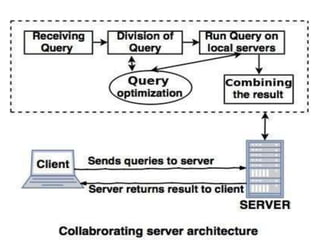
• In Collaborating Server system, we can have collection of database servers, each
capable of running transactions against local data, which cooperatively execute
transactions spanning multiple servers.
• When a server receives a query that requires access to data at other servers, it generates
appropriate sub queries to be executed by other servers and puts the results together to
compute answers to the original query.
• Middleware:
• Middleware system is as special server, a layer of software that coordinates
the execution of queries and transactions across one or more independent
database servers.
• The Middleware architecture is designed to allow a single query to span
multiple servers, without requiring all database servers to be capable of
managing such multi site execution strategies. It is especially attractive when
trying to integrate several legacy systems, whose basic capabilities cannot be
extended.
• We need just one database server that is capable of managing queries and
transactions spanning multiple servers; the remaining servers only need to
handle local queries and transactions.
ADVANTAGE OF DISTRIBUTED DATABASES
 Management of distributed data with different levels of transparency
(This refers to the physical placement of data (files, relations, etc.)
which is not known to the user (distribution transparency).
 Distribution or network transparency- Users do not have to worry
about operational details of the network.
 Location transparency (refers to freedom of issuing command
from any location without affecting its working).
 Naming transparency (allows access to any names object
(files, relations, etc.) from any location).
 Replication transparency- allows to store copies of a data at
multiple sites. This is done to minimize access time to the
required data.
 User is unaware of the existence of multiple copies
 Fragmentation transparency-Allows to fragment a relation
horizontally (create a subset of tuples of a relation) or vertically
(create a subset of columns of a relation).
 Horizontal fragmentation
 Vertical fragmentation
ADVANTAGE OF DISTRIBUTED DATABASES
 Increased Reliability and Availability
 Reliability – Probability that a system is running at a given time.
 Availability – Probability that a system is continuously available
during a time interval .When the data and the DBMS software are
distributed over several sites ,one site may fail other sites continue
to operate. Only the data and the software that exist at the failed
site cannot be accessed. This improves both reliability and
availability.
 Improved Performance
 Data Localization – A Distributed database management system
fragments the database by keeping the data closer to where it is
needed. Data Localization reduces the contention for CPU and I/O
services and simultaneously reduces access delays involved in
wide area networks.
 Easier Expansion- In a Distributed environment , expansion of the
system in terms of adding more data, increasing the database sizes or
adding more processors is much more easier.
1. Architectural complexity.
2. Cost.
3. Security.
4. Integrity control more difficult.
5. Lack of standards.
6. Lack of experience.
7. Database design more complex.
DISADVANTAGES OF DDBMSs
FUNCTIONS OF DDBs
 Keeping track of data
 Ability to keep track of data distribution
 Distributed query processing
 Ability to access remote sites and transmit queries
 Distributed transaction management
 Ability to devise execution strategies for queries and transactions that
access data from more than one site
 Synchronize access to distributed data
 Maintain integrity of the overall database
 Replicated data management
 Ability to decide which copy of the replicated data item to access
 Maintain the consistency of copies of a replicated data item
 Distributed database recovery
 Ability to recover from individual site crashes and failure of
communication links
ADDITIONAL FUNCTIONS OF DDBs
 Security
 Proper management of security of the data
 Proper authorization/access privileges of users
 Distributed directory (catalog) management
 Directory contains information about data in the database
 Directory may be global for the entire DDB or local for each site
DDBMS vs. CENTRALIZED SYSTEM
 Multiple computers called sites and nodes
 Sites connected by some type of communication network
to transmit data and commands
 Sites located in physical proximity connected via LANs
 Sites geographically distributed over large distances
connected via WANs
Storing data in DDBMS
Database Systems: Levels of Data and Process
Distribution
Distributed Databases 63
Single-Site Processing,
Single-Site Data (SPSD)
• All processing is done on single CPU or host computer
(mainframe, midrange, or PC)
• All data are stored on host computer’s local disk
• Processing cannot be done on end user’s side of the system
• Typical of most mainframe and midrange computer DBMSs
• DBMS is located on the host computer, which is accessed
by dumb terminals connected to it
• Also typical of the first generation of single-user
microcomputer databases
Distributed Databases 64
Single-Site Processing, Single-Site Data
(Centralized)
Distributed Databases 65
Distributed Databases 66
Multiple-Site Processing,
Single-Site Data (MPSD)
• Multiple processes run on different
computers sharing a single data repository
• MPSD scenario requires a network file
server running conventional applications
that are accessed through a LAN
• Many multi-user accounting applications,
running under a personal computer
network, fit such a description
Multiple-Site Processing,
Single-Site Data (MPSD)
• TP at each workstation acts only as a redirector to route all network
data requests to the file server
• All record and file locking activity occurs at the end-user location
• All data selection, search and update functions takes place at the
workstation. This requires entire files to travel through the network
for processing at the workstation. This increases network traffic,
slows response time and increases communication costs
– To perform SELECT that results in 50 rows, a 10,000 row table must travel over
the network to the end-user
Distributed Databases 67
Multiple-Site Processing,
Single-Site Data (MPSD)
• In a variation of MPSD known as client/server architecture, all
processing occurs at the server site, reducing the network traffic
• The processing is distributed; data can be located at multiple
sites
Distributed Databases 68
Distributed Database Design
DATA FRAGMENTATION, REPLICATION, AND ALLOCATION
TECHNIQUES FOR DISTRIBUTED DATABASE DESIGN
• Fragmentation
– Relation may be divided into a number of sub-relations,
which are then distributed.
• Allocation
– Each fragment is stored at site with "optimal"
distribution.
• Replication
– Copy of fragment may be maintained at several sites.
WHY FRAGMENT DATA?
□ Usage
Applications are usually interested in ‘views’ not whole relations.
□ Efficiency
It’s more efficient if data is close to where it is frequently used.
□ Parallelism
It is possible to run several ‘sub-queries’ in random.
□ Security
If data not required by local applications, is not stored at the local
site.
DATA FRAGMENTATION
 Breaking up the database into logical units called
fragments and assigned for storage at various sites.
 Types of Fragmentation
Horizontal Fragmentation
Vertical Fragmentation
Mixed (Hybrid) Fragmentation
 Fragmentation Schema
A set of fragments that include all attributes and tuples
in the database
The whole database can be reconstructed from the
fragments
Horizontal fragmentation:
It is a horizontal subset of a relation which contain those tuples which
satisfy selection conditions.
Consider the Employee relation with selection condition (DNO = 5). All
tuples satisfy this condition will create a subset which will be a horizontal
fragment of Employee relation.
Horizontal fragmentation divides a relation horizontally by grouping rows
to create subsets of tuples where each subset has a certain logical meaning.
Horizontal fragment is a subset of tuples in that relation
Tuples are specified by a condition on one or more attributes of the
relation
Divides a relation horizontally by grouping rows to create subset of
tuples
Derived Horizontal Fragmentation – partitioning a primary relation into
secondary relations related to primary through a foreign key
e.g., branch = ‘Stratford’ Account)
DISTRIBUTED DATABASES
HORIZONTAL DATA FRAGMENTATION
Horizontal Fragmentation: Consists of a Restriction on a Relation.
ACCOUNT CUSTOMER BRANCH BALANCE
200 JONES STRATFORD 1000.00
324 GRAY BARKING 200.00
345 SMITH STRATFORD 23.17
350 GREEN BARKING 340.14
400 ONO BARKING 500.00
456 KHAN STRATFORD 333.00
DISTRIBUTED DATABASES
HORIZONTAL DATA FRAGMENTATION
STRATFORD BRANCH
BARKING BRANCH
ACCT NO. CUSTOMER BRANCH BALANCE
324 GRAY BARKING 200.00
350 GREEN BARKING 340.14
400 ONO BARKING 500.00
ACCT NO. CUSTOMER BRANCH BALANCE
200 JONES STRATFORD 1000.00
345 SMITH STRATFORD 23.17
456 KHAN STRATFORD 333.00
Vertical Fragmentation
It is a subset of a relation which is created by a subset of columns. Thus a
vertical fragment of a relation will contain values of selected columns.
There is no selection condition used in vertical fragmentation.
Consider the Employee relation. A vertical fragment can be created by
keeping the values of Name, Bdate, Sex, and Address.
Because there is no condition for creating a vertical fragment, each fragment
must include the primary key attribute of the parent relation Employee. In
this way all vertical fragments of a relation are connected.
A vertical fragment keeps only certain attributes of that relation
Divides a relation vertically by columns
It is necessary to include primary key or some candidate key attribute
The full relation can be reconstructed from the fragments
e.g., (∏ S#, NAME, SITE, PHONE NO Student)
DISTRIBUTED DATABASES
VERTICAL DATA FRAGMENTATION
S# NAME SITE PHONE NO LOGIN PASSWORD
200 JONES STRATFORD 0208-500-9000 JON200T XXYY22
324 GRAY BARKING 0208-545-7528 GRA324S ZZEE56
456 KHAN STRATFORD 0208-500-5821 KHA456T KJTR78
Vertical Fragmentation: Consists of a Projection on a Relation.
DISTRIBUTED DATABASES
VERTICAL DATA FRAGMENTATION
STUDENT ADMINISTRATION
NETWORK ADMINISTRATION
S# LOGIN-ID PASSWORD
200 JON200T XXYY22
324 GRA324S ZZEE56
456 KHA456T KJTR78
S# NAME SITE PHONE NO.
200 JONES STRATFORD 0208-500-9000
324 GRAY BARKING 0208-545-7528
456 KHAN STRATFORD 0208-500-5821
MIXED FRAGMENTATION
 Intermixing the two types of fragmentation
 Original relation can be reconstructed by applying UNION
and OUTER JOIN operations in the appropriate order
DATAALLOCATION
 Each fragment or each copy of the fragment must be assigned to a
particular site
 Also called Data Distribution
 Choice of sites and degree of replication depend on
 Performance of the system
 Availability goals of the system
 Types of transactions
 Frequencies of transactions submitted at any site
 Allocation Schema
 Describes the allocation of fragments to sites of the DDBs
DATA REPLICATION
 Process of storing data in more than one site
 Replication Schema
 Description of the replication of fragments
 Fully replicated distributed database
 Replicating the whole database at every site
 Improves availability
 Improves performance of retrieval
 Can slow down update operations drastically
 Expensive concurrency control and recovery techniques
 No replication distributed database
 Each fragment is stored exactly at one site
 All fragments must be disjoint except primary keys
 Also called Non-redundant allocation
 Partial Replication
 Some fragments may be replicated while others may not
 Number of copies range from one to total number of sites in a
distributed system
• Advantages:-
• 1. Increased availability of data: If a site that contains a replica goes down, we
can find the same data at other sites. Similarly, if local copies of remote
relations are available, we are less vulnerable to failure of communication
links.
• 2. Faster query evaluation: Queries can execute faster by using a local copy of
a relation instead of going to a remote site.
Data Replication
• Advantages:
– Reliability
– Fast response
– May avoid complicated distributed transaction integrity
routines (if replicated data is refreshed at scheduled
intervals)
– Decouples nodes (transactions proceed even if some
nodes are down)
– Reduced network traffic at prime time (if updates can
be delayed)
82
Data Replication (cont.)
• Disadvantages:
– Additional requirements for storage space
– Additional time for update operations
– Complexity and cost of updating
– Integrity exposure of getting incorrect data if
replicated data is not updated simultaneously
Therefore, better when used for non-volatile
(read-only) data
83
Site 1
TYPES OF DISTRIBUTED DATABASE
SYSTEM
Homogeneous: All sites of the
database system have identical
setup, i.e., same database system
Window
Site 5
Oracle
Unix
Oracle
software. The underlying
operating system may be
different. For example, all sites
run Oracle or DB2, or Sybase or
Window
Site 4
Oracle
Communications
neteork
some other database system. The
underlying operating systems can
be a mixture of Linux, Window,
Unix, etc. The clients thus have
to use identical client software.
Site 3
Linux Oracle
Site 2
Linux Oracle
Site 1
TYPES OF DISTRIBUTED DATABASE SYSTEM
Heterogeneous:: Each site may
run different database system
but the data access is
Object
Oriented
Window
Unix
Site 5
Relational
Unix
Hierarchical
managed through a single
conceptual schema. This
implies that the degree of
Site 4
Object
Communications
network
Network
DBMS
local autonomy is minimum.
Each site must adhere to a
centralized access policy.
There may be a global
schema.
Oriented Site 3
Linux
Site 2
Linux
Relational
A distributed system looks exactly like
a non-distributed system to the user!
DISTRIBUTED DATABASES
DATE’S TWELVE RULES FOR A DDBMS
1. Local autonomy
2. No reliance on a central site
3. Continuous operation
4. Location independence
5. Fragmentation independence
6. Replication independence
7. Distributed query independence
8. Distributed transaction processing
9. Hardware independence
10. Operating system independence
11. Network independence
12. Database independence
What is Multimedia?
• Multimedia means that computer information can be
represented through audio, video, and animation in
addition to traditional media (i.e., text, graphics/drawings,
images).
OR
• Multimedia is the field concerned with the computer
controlled integration of text, graphics, drawings, still
and moving images (Video), animation, audio, and any
other media where every type of information can be
represented, stored, transmitted and processed digitally.
Characteristics of a Multimedia System
A Multimedia system has four basic characteristics:
• Multimedia systems must be computer controlled.
• Multimedia systems are integrated.
• The information they handle must be represented
digitally.
• The interface to the final presentation of media is usually
interactive.
Quality of Service(QOS)
Management
Challenges for Multimedia Systems
• Distributed Networks
• Temporal relationship between data – Render different
data at same time — continuously.
• – Sequencing within the media playing frames in
correct order/time frame in video
• – Synchronisation — inter-media scheduling E.g. Video
and Audio — Lip synchronisation is clearly important
for humans to watch playback of video and audio and even
animation and audio
Desirable Features for a Multimedia System
• Given the above challenges the following feature a desirable (if not a
prerequisite) for a Multimedia System:
• Very High Processing Power — needed to deal with large data
processing and real time delivery of media.
• Multimedia Capable File System —needed to deliver real-time
media — e.g. Video/Audio Streaming.
• Special Hardware/Software needed – e.g. RAID ( Redundant Array
of Independent Disks) technology.
• Data Representations — File Formats that support multimedia
should be easy to handle yet allow for compression/decompression
in real-time
Desirable Features for a Multimedia System
• Efficient and High I/O —input and output to the file subsystem
needs to be efficient and fast. Needs to allow for real-time
recording as well as playback of data. e.g. Direct to Disk recording
systems.
• Special Operating System —to allow access to file system and
process data efficiently and quickly. Needs to support direct
transfers to disk, real-time scheduling, fast interrupt processing, I/O
streaming etc.
• Storage and Memory — large storage units (of the order of
hundreds of Tb if not more) and large memory (several Gb or more).
Large Caches also required and high speed buses for efficient
management.
• Network Support — Client-server systems common as distributed
systems common.
• Software Tools — user friendly tools needed to handle media,
design and develop applications, deliver media.
Components of a Multimedia System
• Now let us consider the Components (Hardware and Software)
required for a multimedia system:
• Capture devices — Video Camera, Video Recorder, Audio
Microphone, Keyboards, mice, graphics tablets, 3D input devices,
tactile sensors, VR devices. Digitising Hardware Storage Devices —
Hard disks, CD-ROMs, DVD-ROM, etc
• Communication Networks — Local Networks, Intranets, Internet,
Multimedia or other special high speed networks.
• Computer Systems — Multimedia Desktop machines,
Workstations, MPEG/VIDEO/DSP (Digital Signal Processor)
Hardware
• Display Devices — CD-quality speakers, HDTV,SVGA, Hi-Res
monitors, Colour printers etc.
Multimedia Applications
Examples of Multimedia Applications include:
• World Wide Web
• Multimedia Authoring, e.g. Adobe/Macromedia Director
• Hypermedia courseware ( includes graphics, audio, video,
plain text and hyperlinks)
• Video-on-demand
• Interactive TV
• Computer Games
• Virtual reality
• Digital video editing and production systems
• Multimedia Database systems
Internet multimedia: streaming approach
 browser GETs metafile (Metafiles contain the addresses of RealAudio (.ra),
RealVideo (.rm) and RealFlash (.swf) files. These addresses are in the form of URLs. The URLs used
to establish a direct connection between a RealPlayer and your RealServer begin with "pnm://"
(RealNetworks Metafile).
 browser launches player, passing metafile
 player contacts server
 server streams audio/video to player

Parallel and Distributed Databases NOTES.pdf

  • 1.
  • 5.
    Parallel Vs Distributed •A parallel database system is one that seeks to improve performance through parallel implementation of various operations such as loading data, building indexes, and evaluating queries. • In a distributed database system , data is physically stored across several sites, and each site is typically managed by a DBMS that is capable of running independently of the other sites.
  • 6.
    Parallel DBMS • ADBMS running across multiple processors and disks designed to execute operations in parallel whenever possible, to improve performance. • Based on premise that single processor systems can no longer meet requirements for cost-effective scalability, reliability, and performance. • Parallel DBMSs link multiple, smaller machines to achieve same throughput as single, larger machine with greater scalability and reliability.
  • 9.
    PARALLEL DBMSs WHY DOWE NEED THEM? • More and More Data! We have databases that hold a high amount of data, in the order of 1012 bytes: 10,000,000,000,000 bytes! • Faster and Faster Access! We have data applications that need to process data at very high speeds: 10,000s transactions per second!
  • 10.
    PARALLEL DBMSs BENEFITS OFA PARALLEL DBMS • Improves Response Time. INTERQUERY PARALLELISM It is possible to process a number of transactions in parallel with each other. • Improves Throughput. INTRAQUERY PARALLELISM It is possible to process ‘sub-tasks’ of a transaction in parallel with each other.
  • 11.
    • Scale-up. As youmultiply resources the size of a task that can be executed in a given time should be increased by the same factor. 1 second to scan a DB of 1,000 records using 1 CPU 1 second to scan a DB of 10,000 records using 10 CPUs PARALLEL DBMSs HOW TO MEASURE THE BENEFITS • Speed-Up. As you multiply resources by a certain factor, the time taken to execute a transaction should be reduced by the same factor: 10 seconds to scan a DB of 10,000 records using 1 CPU 1 second to scan a DB of 10,000 records using 10 CPUs
  • 12.
  • 13.
    PARALLEL DBMSs • Mainarchitectures for parallel DBMSs are: – a: Shared memory. – b: Shared disk. – c: Shared nothing.
  • 15.
    Parallel system architectures Parallelsystem architectures: • Shared Memory Architecture  Multiple processors that share both secondary disk storage and primary memory  Tightly coupled architecture  Shared everything architecture • Shared Disk Architecture  Multiple processors that share secondary disk storage but have their own primary memory  Loosely coupled architecture • Shared Nothing Architecture  Multiple processors that have their own secondary disk storage and primary memory  Processes communicate over a high speed interconnection network  Symmetry or homogeneity of nodes • Distributed Technology (Shared Architecture)  Heterogeneity of hardware and operating system at every node
  • 16.
    CPU CPU CPU CPU CPU CPU MEMORY Shared Memory– Parallel Database Architecture
  • 17.
    M CPU M CPU MCPU M CPU M CPU M CPU Shared Disk – Parallel Database Architecture
  • 18.
    Shared Nothing –Parallel Database Architecture M CPU CPU M M CPU CPU M M CPU
  • 19.
  • 21.
    • Parallelizing SequentialOperator Evaluation Code: • Input data streams are divided into parallel data streams. The output of these streams are merged as needed to provide as inputs for a relational operator, and the output may again be split as needed to parallelize subsequent processing.
  • 22.
    PARALLELIZING INDIVIDUAL OPERATIONS •Various operations can be implemented in parallel in a sharednothing architecture. • Bulk Loading and Scanning: • Pages can be read in parallel while scanning a relation and the retrieved tuples can then be merged, if the relation is partitioned across several disks. • If a relation has associated indexes, any sorting of data entries required for building the indexes during bulk loading can also be done in parallel. • Sorting: • Sorting could be done by redistributing all tuples in the relation using range partitioning. • Ex. Sorting a collection of employee tuples by salary whose values are in a certain range. • For N processors each processor gets the tuples which lie in range assigned to it. Like processor 1 contains all tuples in range 10 to 20 and so on. • Each processor has a sorted version of the tuples which can then be combined by traversing and collecting the tuples in the order on the processors (according to the range assigned)
  • 23.
    • The problemwith range partitioning is data skew which limits the scalability of the parallel sort. One good approach to range partitioning is to obtain a sample of the entire relation by taking samples at each processor that initially contains part of the relation. The (relatively small) sample is sorted and used to identify ranges with equal numbers of tuples. This set of range values, called a splitting vector, is then distributed to all processors and used to range partition the entire relation. • Joins: • Here we consider how the join operation can be parallelized • Consider 2 relations A and B to be joined using the age attribute. A and B are initially distributed across several disks in a way that is not useful for join operation • So we have to decompose the join into a collection of k smaller joins by partitioning both A and B into a collection of k logical partitions. • If same partitioning function is used for both A and B then the union of k smaller joins will compute to the join of A and B.
  • 24.
    Types of Parallelism •Inter-query parallelism refers to the ability of multiple applications to query a database at the same time. Each query will execute independently of the others, but DB2 UDB will execute them at the same time. • Intra-query parallelism refers to the ability to break a single query into a number of pieces and replicate them at the same time using either intra-partition parallelism or inter-partition parallelism, or both.
  • 25.
    • Intra-Partition Parallelism •Intra-partition parallelism refers to the ability to break up a query into multiple parts within a single database partition and execute these parts at the same time. This type of parallelism subdivides what is usually considered a single database operation, such as index creation, database load, or SQL queries into multiple parts, many or all of which can be executed in parallel within a single database partition. Intra- partition parallelism can be used to take advantage of multiple processors of a symmetric multiprocessor (SMP) server. • Intra-partition parallelism can take advantage of either data parallelism or pipeline parallelism. Data parallelism is normally used when scanning large indexes or tables. When data parallelism is used as part of the access plan for an SQL statement, the index or data will be dynamically partitioned, and each of the executing parts of the query (known as package parts) is assigned a range of data to act on. For an index scan, the data will be partitioned based on the key values, whereas for a table scan, the data will be partitioned based on the actual data pages.
  • 26.
    • Pipeline parallelismis normally used when distinct operations on the data can be executed in parallel. For example, a table is being scanned and the scan is immediately feeding into a sort operation that is executing in parallel to sort the data as it is being scanned. • Figure 2.2 shows a query that is broken into four pieces that can be executed in parallel, each working with a subset of the data. When this happens, the results can be returned more quickly than if the query was run serially. To utilize intra-partition parallelism, the database must be configured appropriately.
  • 27.
    • Inter-Partition Parallelism •Inter-partition parallelism refers to the ability to break up a query into multiple parts across multiple partitions of a partitioned database on a single server or between multiple servers. The query will be executed in parallel on all of the database partitions. Inter-partition parallelism can be used to take advantage of multiple processors of an SMP server or multiple processors spread across a number of servers. • Figure 2.7 shows a query that is broken into four pieces that can be executed in parallel, with the results returned more quickly than if the query was run in a serial fashion in a single partition. In this case, the degree of parallelism for the query is limited by the number of database partitions.
  • 29.
  • 32.
  • 33.
    PRESENTATION LOGIC A PPLICATIONLOGIC DATA LOGIC DUMB DUMB DUMB TERMINALS MAINFRAME COMPUTER SPECIALISED NETWORK CONNECTION
  • 34.
  • 35.
    CLIENT/SERVER DBMS CLIENT PROCESS □Manages user interface □ Accepts user data □ Processes application/business logic □ Generates database requests (SQL) □ Transmits database requests to server □ Receives results from server □ Formats results according to application logic □ Present results to the user
  • 36.
    CLIENT/SERVER DBMS SERVER PROCESS □Accepts database requests □ Processes database requests  Performs integrity checks  Handles concurrent access  Optimises queries  Performs security checks  Enacts recovery routines □ Transmits result of database request to client
  • 37.
    CLIENT  #1 CLIENT/SERVER DBMS ARCHITECTURE CLIENT #2 CLIENT  #3 SERVER  D/BASE    DATA LOGIC PRESENTATION LOGIC BUSINESS LOGIC (FAT CLIENT)  Data Request  Data Response
  • 38.
    PL/SQL CLIENT  #1 CLIENT/SERVER DBMS ARCHITECTURE CLIENT #2 CLIENT  #3 SERVER  D/BASE    BUSINESS LOGIC DATA LOGIC PRESENTATION LOGIC (THIN CLIENT)  Data Request  Data Response
  • 39.
    WIDE AREA NETWOR K DISTRIBUTED PROCESSING ARCHITECTURE CLIENT CLIENT CLIENT CLIENT LAN CLIENT CLIENT CLIENT CLIENT LAN StratfordLeyton CLIENT CLIENT LAN CLIENT CLIENT LAN CLIENT CLIENT CLIENT CLIENT Barking Leytonstone DBMS
  • 40.
  • 41.
    DISTRIBUTED DATABASE  DistributedComputing System Consists of a number of processing elements interconnected by a computer network that cooperate in processing certain tasks  Distributed Database Collection of logically interrelated databases over a computer network  Distributed DBMS Software system that manages a distributed DB
  • 42.
    DISTRIBUTED DATABASES  Adistributed database system is a collection of logically related databases that co-operate in a transparent manner.  Transparent implies that each user within the system may access all of the data within all of the databases as if they were a single database  There should be ‘location independence’ i.e.- as the user is unaware of where the data is located it is possible to move the data from one physical location to another without affecting the user.
  • 43.
  • 46.
    DISTRIBUTED DATABASE ARCHITECTURE CLIENTCLIENT CLIENT CLIENT LAN CLIENT CLIENT CLIENT CLIENT Stratford Leyton CLIENT CLIENT CLIENT CLIENT LAN CLIENT CLIENT CLIENT CLIENT Barking Leytonstone DBMS DBMS NETWORK WIDE AREA DBMS DBMS
  • 47.
    D/BASE M:N CLIENT/SERVER DBMSARCHITECTURE SERVER #1 CLIENT #1 CLIENT #2 SERVER #2 CLIENT #3 NOT TRANSPARENT! D/BASE
  • 48.
    LDBMS DDBMS DC COMPONENTS OF ADDBMS Site 1 GSC Computer Network GSC DB Site 2 DC DDBMS LDBMS = Local DBMS DC = Data Communications GSC = Global Systems Catalog DDBMS = Distributed DBMS
  • 49.
    Architecture of DDBs: • There are 3 architectures: - • Client-Server: • A Client-Server system has one or more client processes and one or more server processes, and a client process can send a query to any one server process. Clients are responsible for user-interface issues, and servers manage data and execute transactions. • Thus, a client process could run on a personal computer and send queries to a server running on a mainframe. • Advantages: - • 1. Simple to implement because of the centralized server and separation of functionality. • 2. Expensive server machines are not underutilized with simple user interactions which are now pushed on to inexpensive client machines. • 3. The users can have a familiar and friendly client side user interface rather than unfamiliar and unfriendly server interface
  • 50.
    client server Client-Server ArchitectureTypes • Two-tier model (classic) • Three-tier (when the server, becomes a client) Server/client server • Multi-tier (cascade model) server client Server/client Server/client server client
  • 52.
    • Collaborating Server: •In the client sever architecture a single query cannot be split and executed across multiple servers because the client process would have to be quite complex and intelligent enough to break a query into sub queries to be executed at different sites and then place their results together making the client capabilities overlap with the server. This makes it hard to distinguish between the client and server • In Collaborating Server system, we can have collection of database servers, each capable of running transactions against local data, which cooperatively execute transactions spanning multiple servers. • When a server receives a query that requires access to data at other servers, it generates appropriate sub queries to be executed by other servers and puts the results together to compute answers to the original query.
  • 54.
    • Middleware: • Middlewaresystem is as special server, a layer of software that coordinates the execution of queries and transactions across one or more independent database servers. • The Middleware architecture is designed to allow a single query to span multiple servers, without requiring all database servers to be capable of managing such multi site execution strategies. It is especially attractive when trying to integrate several legacy systems, whose basic capabilities cannot be extended. • We need just one database server that is capable of managing queries and transactions spanning multiple servers; the remaining servers only need to handle local queries and transactions.
  • 56.
    ADVANTAGE OF DISTRIBUTEDDATABASES  Management of distributed data with different levels of transparency (This refers to the physical placement of data (files, relations, etc.) which is not known to the user (distribution transparency).  Distribution or network transparency- Users do not have to worry about operational details of the network.  Location transparency (refers to freedom of issuing command from any location without affecting its working).  Naming transparency (allows access to any names object (files, relations, etc.) from any location).  Replication transparency- allows to store copies of a data at multiple sites. This is done to minimize access time to the required data.  User is unaware of the existence of multiple copies  Fragmentation transparency-Allows to fragment a relation horizontally (create a subset of tuples of a relation) or vertically (create a subset of columns of a relation).  Horizontal fragmentation  Vertical fragmentation
  • 57.
    ADVANTAGE OF DISTRIBUTEDDATABASES  Increased Reliability and Availability  Reliability – Probability that a system is running at a given time.  Availability – Probability that a system is continuously available during a time interval .When the data and the DBMS software are distributed over several sites ,one site may fail other sites continue to operate. Only the data and the software that exist at the failed site cannot be accessed. This improves both reliability and availability.  Improved Performance  Data Localization – A Distributed database management system fragments the database by keeping the data closer to where it is needed. Data Localization reduces the contention for CPU and I/O services and simultaneously reduces access delays involved in wide area networks.  Easier Expansion- In a Distributed environment , expansion of the system in terms of adding more data, increasing the database sizes or adding more processors is much more easier.
  • 58.
    1. Architectural complexity. 2.Cost. 3. Security. 4. Integrity control more difficult. 5. Lack of standards. 6. Lack of experience. 7. Database design more complex. DISADVANTAGES OF DDBMSs
  • 59.
    FUNCTIONS OF DDBs Keeping track of data  Ability to keep track of data distribution  Distributed query processing  Ability to access remote sites and transmit queries  Distributed transaction management  Ability to devise execution strategies for queries and transactions that access data from more than one site  Synchronize access to distributed data  Maintain integrity of the overall database  Replicated data management  Ability to decide which copy of the replicated data item to access  Maintain the consistency of copies of a replicated data item  Distributed database recovery  Ability to recover from individual site crashes and failure of communication links
  • 60.
    ADDITIONAL FUNCTIONS OFDDBs  Security  Proper management of security of the data  Proper authorization/access privileges of users  Distributed directory (catalog) management  Directory contains information about data in the database  Directory may be global for the entire DDB or local for each site
  • 61.
    DDBMS vs. CENTRALIZEDSYSTEM  Multiple computers called sites and nodes  Sites connected by some type of communication network to transmit data and commands  Sites located in physical proximity connected via LANs  Sites geographically distributed over large distances connected via WANs
  • 62.
  • 63.
    Database Systems: Levelsof Data and Process Distribution Distributed Databases 63
  • 64.
    Single-Site Processing, Single-Site Data(SPSD) • All processing is done on single CPU or host computer (mainframe, midrange, or PC) • All data are stored on host computer’s local disk • Processing cannot be done on end user’s side of the system • Typical of most mainframe and midrange computer DBMSs • DBMS is located on the host computer, which is accessed by dumb terminals connected to it • Also typical of the first generation of single-user microcomputer databases Distributed Databases 64
  • 65.
    Single-Site Processing, Single-SiteData (Centralized) Distributed Databases 65
  • 66.
    Distributed Databases 66 Multiple-SiteProcessing, Single-Site Data (MPSD) • Multiple processes run on different computers sharing a single data repository • MPSD scenario requires a network file server running conventional applications that are accessed through a LAN • Many multi-user accounting applications, running under a personal computer network, fit such a description
  • 67.
    Multiple-Site Processing, Single-Site Data(MPSD) • TP at each workstation acts only as a redirector to route all network data requests to the file server • All record and file locking activity occurs at the end-user location • All data selection, search and update functions takes place at the workstation. This requires entire files to travel through the network for processing at the workstation. This increases network traffic, slows response time and increases communication costs – To perform SELECT that results in 50 rows, a 10,000 row table must travel over the network to the end-user Distributed Databases 67
  • 68.
    Multiple-Site Processing, Single-Site Data(MPSD) • In a variation of MPSD known as client/server architecture, all processing occurs at the server site, reducing the network traffic • The processing is distributed; data can be located at multiple sites Distributed Databases 68
  • 69.
    Distributed Database Design DATAFRAGMENTATION, REPLICATION, AND ALLOCATION TECHNIQUES FOR DISTRIBUTED DATABASE DESIGN • Fragmentation – Relation may be divided into a number of sub-relations, which are then distributed. • Allocation – Each fragment is stored at site with "optimal" distribution. • Replication – Copy of fragment may be maintained at several sites.
  • 70.
    WHY FRAGMENT DATA? □Usage Applications are usually interested in ‘views’ not whole relations. □ Efficiency It’s more efficient if data is close to where it is frequently used. □ Parallelism It is possible to run several ‘sub-queries’ in random. □ Security If data not required by local applications, is not stored at the local site.
  • 71.
    DATA FRAGMENTATION  Breakingup the database into logical units called fragments and assigned for storage at various sites.  Types of Fragmentation Horizontal Fragmentation Vertical Fragmentation Mixed (Hybrid) Fragmentation  Fragmentation Schema A set of fragments that include all attributes and tuples in the database The whole database can be reconstructed from the fragments
  • 72.
    Horizontal fragmentation: It isa horizontal subset of a relation which contain those tuples which satisfy selection conditions. Consider the Employee relation with selection condition (DNO = 5). All tuples satisfy this condition will create a subset which will be a horizontal fragment of Employee relation. Horizontal fragmentation divides a relation horizontally by grouping rows to create subsets of tuples where each subset has a certain logical meaning. Horizontal fragment is a subset of tuples in that relation Tuples are specified by a condition on one or more attributes of the relation Divides a relation horizontally by grouping rows to create subset of tuples Derived Horizontal Fragmentation – partitioning a primary relation into secondary relations related to primary through a foreign key
  • 73.
    e.g., branch =‘Stratford’ Account) DISTRIBUTED DATABASES HORIZONTAL DATA FRAGMENTATION Horizontal Fragmentation: Consists of a Restriction on a Relation. ACCOUNT CUSTOMER BRANCH BALANCE 200 JONES STRATFORD 1000.00 324 GRAY BARKING 200.00 345 SMITH STRATFORD 23.17 350 GREEN BARKING 340.14 400 ONO BARKING 500.00 456 KHAN STRATFORD 333.00
  • 74.
    DISTRIBUTED DATABASES HORIZONTAL DATAFRAGMENTATION STRATFORD BRANCH BARKING BRANCH ACCT NO. CUSTOMER BRANCH BALANCE 324 GRAY BARKING 200.00 350 GREEN BARKING 340.14 400 ONO BARKING 500.00 ACCT NO. CUSTOMER BRANCH BALANCE 200 JONES STRATFORD 1000.00 345 SMITH STRATFORD 23.17 456 KHAN STRATFORD 333.00
  • 75.
    Vertical Fragmentation It isa subset of a relation which is created by a subset of columns. Thus a vertical fragment of a relation will contain values of selected columns. There is no selection condition used in vertical fragmentation. Consider the Employee relation. A vertical fragment can be created by keeping the values of Name, Bdate, Sex, and Address. Because there is no condition for creating a vertical fragment, each fragment must include the primary key attribute of the parent relation Employee. In this way all vertical fragments of a relation are connected. A vertical fragment keeps only certain attributes of that relation Divides a relation vertically by columns It is necessary to include primary key or some candidate key attribute The full relation can be reconstructed from the fragments
  • 76.
    e.g., (∏ S#,NAME, SITE, PHONE NO Student) DISTRIBUTED DATABASES VERTICAL DATA FRAGMENTATION S# NAME SITE PHONE NO LOGIN PASSWORD 200 JONES STRATFORD 0208-500-9000 JON200T XXYY22 324 GRAY BARKING 0208-545-7528 GRA324S ZZEE56 456 KHAN STRATFORD 0208-500-5821 KHA456T KJTR78 Vertical Fragmentation: Consists of a Projection on a Relation.
  • 77.
    DISTRIBUTED DATABASES VERTICAL DATAFRAGMENTATION STUDENT ADMINISTRATION NETWORK ADMINISTRATION S# LOGIN-ID PASSWORD 200 JON200T XXYY22 324 GRA324S ZZEE56 456 KHA456T KJTR78 S# NAME SITE PHONE NO. 200 JONES STRATFORD 0208-500-9000 324 GRAY BARKING 0208-545-7528 456 KHAN STRATFORD 0208-500-5821
  • 78.
    MIXED FRAGMENTATION  Intermixingthe two types of fragmentation  Original relation can be reconstructed by applying UNION and OUTER JOIN operations in the appropriate order
  • 79.
    DATAALLOCATION  Each fragmentor each copy of the fragment must be assigned to a particular site  Also called Data Distribution  Choice of sites and degree of replication depend on  Performance of the system  Availability goals of the system  Types of transactions  Frequencies of transactions submitted at any site  Allocation Schema  Describes the allocation of fragments to sites of the DDBs
  • 80.
    DATA REPLICATION  Processof storing data in more than one site  Replication Schema  Description of the replication of fragments  Fully replicated distributed database  Replicating the whole database at every site  Improves availability  Improves performance of retrieval  Can slow down update operations drastically  Expensive concurrency control and recovery techniques  No replication distributed database  Each fragment is stored exactly at one site  All fragments must be disjoint except primary keys  Also called Non-redundant allocation  Partial Replication  Some fragments may be replicated while others may not  Number of copies range from one to total number of sites in a distributed system
  • 81.
    • Advantages:- • 1.Increased availability of data: If a site that contains a replica goes down, we can find the same data at other sites. Similarly, if local copies of remote relations are available, we are less vulnerable to failure of communication links. • 2. Faster query evaluation: Queries can execute faster by using a local copy of a relation instead of going to a remote site.
  • 82.
    Data Replication • Advantages: –Reliability – Fast response – May avoid complicated distributed transaction integrity routines (if replicated data is refreshed at scheduled intervals) – Decouples nodes (transactions proceed even if some nodes are down) – Reduced network traffic at prime time (if updates can be delayed) 82
  • 83.
    Data Replication (cont.) •Disadvantages: – Additional requirements for storage space – Additional time for update operations – Complexity and cost of updating – Integrity exposure of getting incorrect data if replicated data is not updated simultaneously Therefore, better when used for non-volatile (read-only) data 83
  • 84.
    Site 1 TYPES OFDISTRIBUTED DATABASE SYSTEM Homogeneous: All sites of the database system have identical setup, i.e., same database system Window Site 5 Oracle Unix Oracle software. The underlying operating system may be different. For example, all sites run Oracle or DB2, or Sybase or Window Site 4 Oracle Communications neteork some other database system. The underlying operating systems can be a mixture of Linux, Window, Unix, etc. The clients thus have to use identical client software. Site 3 Linux Oracle Site 2 Linux Oracle
  • 85.
    Site 1 TYPES OFDISTRIBUTED DATABASE SYSTEM Heterogeneous:: Each site may run different database system but the data access is Object Oriented Window Unix Site 5 Relational Unix Hierarchical managed through a single conceptual schema. This implies that the degree of Site 4 Object Communications network Network DBMS local autonomy is minimum. Each site must adhere to a centralized access policy. There may be a global schema. Oriented Site 3 Linux Site 2 Linux Relational
  • 86.
    A distributed systemlooks exactly like a non-distributed system to the user! DISTRIBUTED DATABASES DATE’S TWELVE RULES FOR A DDBMS 1. Local autonomy 2. No reliance on a central site 3. Continuous operation 4. Location independence 5. Fragmentation independence 6. Replication independence 7. Distributed query independence 8. Distributed transaction processing 9. Hardware independence 10. Operating system independence 11. Network independence 12. Database independence
  • 88.
    What is Multimedia? •Multimedia means that computer information can be represented through audio, video, and animation in addition to traditional media (i.e., text, graphics/drawings, images). OR • Multimedia is the field concerned with the computer controlled integration of text, graphics, drawings, still and moving images (Video), animation, audio, and any other media where every type of information can be represented, stored, transmitted and processed digitally.
  • 90.
    Characteristics of aMultimedia System A Multimedia system has four basic characteristics: • Multimedia systems must be computer controlled. • Multimedia systems are integrated. • The information they handle must be represented digitally. • The interface to the final presentation of media is usually interactive.
  • 92.
  • 93.
    Challenges for MultimediaSystems • Distributed Networks • Temporal relationship between data – Render different data at same time — continuously. • – Sequencing within the media playing frames in correct order/time frame in video • – Synchronisation — inter-media scheduling E.g. Video and Audio — Lip synchronisation is clearly important for humans to watch playback of video and audio and even animation and audio
  • 94.
    Desirable Features fora Multimedia System • Given the above challenges the following feature a desirable (if not a prerequisite) for a Multimedia System: • Very High Processing Power — needed to deal with large data processing and real time delivery of media. • Multimedia Capable File System —needed to deliver real-time media — e.g. Video/Audio Streaming. • Special Hardware/Software needed – e.g. RAID ( Redundant Array of Independent Disks) technology. • Data Representations — File Formats that support multimedia should be easy to handle yet allow for compression/decompression in real-time
  • 95.
    Desirable Features fora Multimedia System • Efficient and High I/O —input and output to the file subsystem needs to be efficient and fast. Needs to allow for real-time recording as well as playback of data. e.g. Direct to Disk recording systems. • Special Operating System —to allow access to file system and process data efficiently and quickly. Needs to support direct transfers to disk, real-time scheduling, fast interrupt processing, I/O streaming etc. • Storage and Memory — large storage units (of the order of hundreds of Tb if not more) and large memory (several Gb or more). Large Caches also required and high speed buses for efficient management. • Network Support — Client-server systems common as distributed systems common. • Software Tools — user friendly tools needed to handle media, design and develop applications, deliver media.
  • 96.
    Components of aMultimedia System • Now let us consider the Components (Hardware and Software) required for a multimedia system: • Capture devices — Video Camera, Video Recorder, Audio Microphone, Keyboards, mice, graphics tablets, 3D input devices, tactile sensors, VR devices. Digitising Hardware Storage Devices — Hard disks, CD-ROMs, DVD-ROM, etc • Communication Networks — Local Networks, Intranets, Internet, Multimedia or other special high speed networks. • Computer Systems — Multimedia Desktop machines, Workstations, MPEG/VIDEO/DSP (Digital Signal Processor) Hardware • Display Devices — CD-quality speakers, HDTV,SVGA, Hi-Res monitors, Colour printers etc.
  • 97.
    Multimedia Applications Examples ofMultimedia Applications include: • World Wide Web • Multimedia Authoring, e.g. Adobe/Macromedia Director • Hypermedia courseware ( includes graphics, audio, video, plain text and hyperlinks) • Video-on-demand • Interactive TV • Computer Games • Virtual reality • Digital video editing and production systems • Multimedia Database systems
  • 98.
    Internet multimedia: streamingapproach  browser GETs metafile (Metafiles contain the addresses of RealAudio (.ra), RealVideo (.rm) and RealFlash (.swf) files. These addresses are in the form of URLs. The URLs used to establish a direct connection between a RealPlayer and your RealServer begin with "pnm://" (RealNetworks Metafile).  browser launches player, passing metafile  player contacts server  server streams audio/video to player