Google Analytics 101
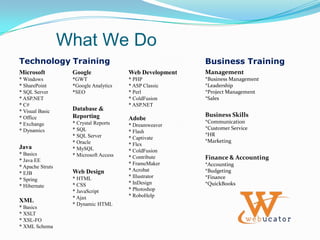
What We DoTechnologyTrainingBusiness TrainingMicrosoft* Windows* SharePoint* SQL Server* ASP.NET* C#* Visual Basic* Office* Exchange* DynamicsJava* Basics* Java EE* Apache Struts* EJB* Spring* HibernateXML* Basics* XSLT* XSL-FO* XML SchemaGoogle*GWT*Google Analytics*SEODatabase & Reporting* Crystal Reports* SQL* SQL Server* Oracle* MySQL* Microsoft AccessWeb Design* HTML* CSS* JavaScript* Ajax* Dynamic HTMLWeb Development* PHP* ASP Classic* Perl* ColdFusion* ASP.NETAdobe* Dreamweaver* Flash* Captivate* Flex* ColdFusion* Contribute* FrameMaker* Acrobat* Illustrator* InDesign* Photoshop* RoboHelpManagement*Business Management*Leadership*Project Management*SalesBusiness Skills*Communication*Customer Service*HR*MarketingFinance & Accounting*Accounting*Budgeting*Finance*QuickBooks
Follow Ushttp://twitter.com/webucatorhttp://facebook.com/webucator
Take a look!http://blogs.webucator.com
Why Webucator?Instructor-Led Online Training:Classes are hands-onNo travelNever cancelled for low enrollment!Risk free
OurSocial Media ClassesGoogle AnalyticsGoogle AdwordsWordPressIntroduction to Social Mediaand more!www.webucator.com/socialmedia
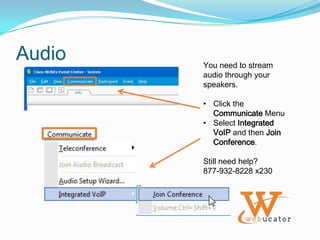
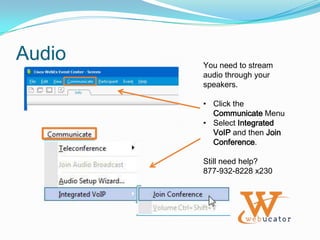
AudioYou need to stream audio through your speakers.Click the Communicate Menu
Select Integrated VoIP and then Join Conference.Still need help? 877-932-8228 x230
ConnectAdditional classes or Onsite training: sales@webucator.com877-932-8228Technical questionssupport@webucator.com877-932-8228 x230
Google Analytics 101
AudioYou need to stream audio through your speakers.Click the Communicate Menu
Select Integrated VoIP and then Join Conference.Still need help? 877-932-8228 x230
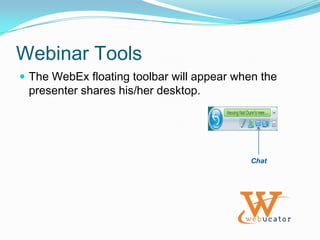
Webinar ToolsThe WebEx floating toolbar will appear when the presenter shares his/her desktop.Chat
Google Analytics 101
GoalsLearn the basics of web analyticsLearn how to set up an account in Google AnalyticsLearn the basic reporting capabilities in Google Analytics
AgendaOverviewWeb metrics vs. web analyticsWhat web analytics can do for your businessIntroductionHow Google Analytics worksKey features and capabilitiesSetting up an accountActivating Google Analytics trackingReportingNavigating the reports interfaceUsing the dashboardExporting dataAnalyzing reportsSneak peek at new Google Analytics
Web MetricsWeb Metrics are measurable parameters which reflect different activities occurring on your website. Some examples:The number of pages served.The number of unique IP addresses that have accessed the site.The amount of time a visitor stayed on a particular page.The number of times a particular file was accessed.
Web AnalyticsBruce Clay, an SEO specialist, attributes this definition of Web Analytics to the Web Analytics Association (WAA):Web Analytics is the objective tracking, collection, measurement, reporting and analysis of quantitative web metrics data to optimize websites and web marketing initiatives.
Web AnalyticsJust after the birth of the Internet, IT technicians started maintaining server logs. The server log files store information about parameters such as:The IP address of the visitorThe browser identifier.The operating system identifier.The referrer (website from which the request originated).People began developing scripts to extract relevant data from the server log files in order to compile useful information. In this way, web analytics came to life.
Why Analytics?Web Analytics provides insight into the online behavior of your visitors. The visitor data can be used to optimize your website to best meet the requirements of your audience.Web Analytics can provide business intelligence in the context of:Customer segmentation.Trend identification.Product development.Targeted marketing.Web Analytics can be used to track a wide variety of metrics to measure the overall success of your website.
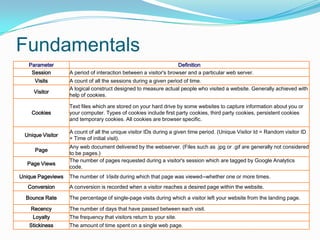
Fundamentals
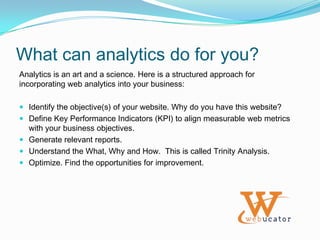
What can analytics do for you?Analytics is an art and a science. Here is a structured approach for incorporating web analytics into your business:Identify the objective(s) of your website. Why do you have this website?Define Key Performance Indicators (KPI) to align measurable web metrics with your business objectives.Generate relevant reports.Understand the What, Why and How.  This is called Trinity Analysis.Optimize. Find the opportunities for improvement.
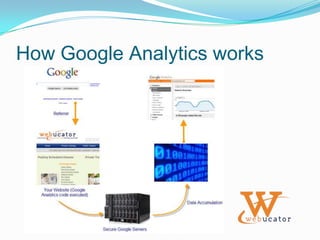
How Google Analytics works
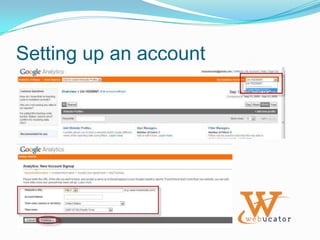
Setting up an account
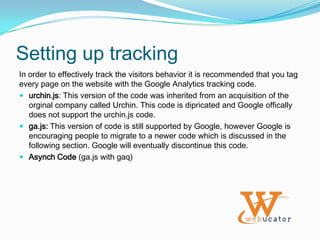
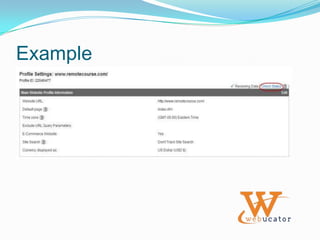
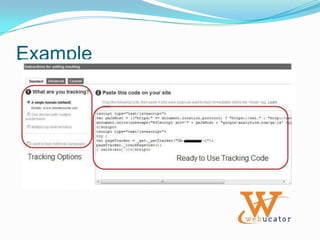
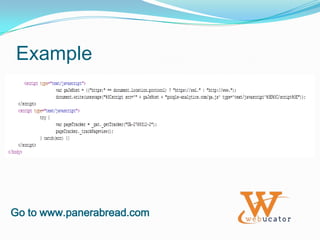
Setting up trackingIn order to effectively track the visitors behavior it is recommended that you tag every page on the website with the Google Analytics tracking code. urchin.js: This version of the code was inherited from an acquisition of the orginal company called Urchin. This code is dipricated and Google offically does not support the urchin.js code.ga.js: This version of code is still supported by Google, however Google is encouraging people to migrate to a newer code which is discussed in the following section. Google will eventually discontinue this code.Asynch Code (ga.js with gaq)
Example
Example
ExampleGo to www.panerabread.com

Google Analytics 101 Webinar

  • 1.
  • 2.
    What We DoTechnologyTrainingBusinessTrainingMicrosoft* Windows* SharePoint* SQL Server* ASP.NET* C#* Visual Basic* Office* Exchange* DynamicsJava* Basics* Java EE* Apache Struts* EJB* Spring* HibernateXML* Basics* XSLT* XSL-FO* XML SchemaGoogle*GWT*Google Analytics*SEODatabase & Reporting* Crystal Reports* SQL* SQL Server* Oracle* MySQL* Microsoft AccessWeb Design* HTML* CSS* JavaScript* Ajax* Dynamic HTMLWeb Development* PHP* ASP Classic* Perl* ColdFusion* ASP.NETAdobe* Dreamweaver* Flash* Captivate* Flex* ColdFusion* Contribute* FrameMaker* Acrobat* Illustrator* InDesign* Photoshop* RoboHelpManagement*Business Management*Leadership*Project Management*SalesBusiness Skills*Communication*Customer Service*HR*MarketingFinance & Accounting*Accounting*Budgeting*Finance*QuickBooks
  • 3.
  • 5.
  • 7.
    Why Webucator?Instructor-Led OnlineTraining:Classes are hands-onNo travelNever cancelled for low enrollment!Risk free
  • 8.
    OurSocial Media ClassesGoogleAnalyticsGoogle AdwordsWordPressIntroduction to Social Mediaand more!www.webucator.com/socialmedia
  • 9.
    AudioYou need tostream audio through your speakers.Click the Communicate Menu
  • 10.
    Select Integrated VoIPand then Join Conference.Still need help? 877-932-8228 x230
  • 11.
    ConnectAdditional classes orOnsite training: sales@webucator.com877-932-8228Technical questionssupport@webucator.com877-932-8228 x230
  • 12.
  • 13.
    AudioYou need tostream audio through your speakers.Click the Communicate Menu
  • 14.
    Select Integrated VoIPand then Join Conference.Still need help? 877-932-8228 x230
  • 15.
    Webinar ToolsThe WebExfloating toolbar will appear when the presenter shares his/her desktop.Chat
  • 16.
  • 17.
    GoalsLearn the basicsof web analyticsLearn how to set up an account in Google AnalyticsLearn the basic reporting capabilities in Google Analytics
  • 18.
    AgendaOverviewWeb metrics vs.web analyticsWhat web analytics can do for your businessIntroductionHow Google Analytics worksKey features and capabilitiesSetting up an accountActivating Google Analytics trackingReportingNavigating the reports interfaceUsing the dashboardExporting dataAnalyzing reportsSneak peek at new Google Analytics
  • 19.
    Web MetricsWeb Metricsare measurable parameters which reflect different activities occurring on your website. Some examples:The number of pages served.The number of unique IP addresses that have accessed the site.The amount of time a visitor stayed on a particular page.The number of times a particular file was accessed.
  • 20.
    Web AnalyticsBruce Clay,an SEO specialist, attributes this definition of Web Analytics to the Web Analytics Association (WAA):Web Analytics is the objective tracking, collection, measurement, reporting and analysis of quantitative web metrics data to optimize websites and web marketing initiatives.
  • 21.
    Web AnalyticsJust afterthe birth of the Internet, IT technicians started maintaining server logs. The server log files store information about parameters such as:The IP address of the visitorThe browser identifier.The operating system identifier.The referrer (website from which the request originated).People began developing scripts to extract relevant data from the server log files in order to compile useful information. In this way, web analytics came to life.
  • 22.
    Why Analytics?Web Analyticsprovides insight into the online behavior of your visitors. The visitor data can be used to optimize your website to best meet the requirements of your audience.Web Analytics can provide business intelligence in the context of:Customer segmentation.Trend identification.Product development.Targeted marketing.Web Analytics can be used to track a wide variety of metrics to measure the overall success of your website.
  • 23.
  • 24.
    What can analyticsdo for you?Analytics is an art and a science. Here is a structured approach for incorporating web analytics into your business:Identify the objective(s) of your website. Why do you have this website?Define Key Performance Indicators (KPI) to align measurable web metrics with your business objectives.Generate relevant reports.Understand the What, Why and How. This is called Trinity Analysis.Optimize. Find the opportunities for improvement.
  • 25.
  • 26.
  • 27.
    Setting up trackingInorder to effectively track the visitors behavior it is recommended that you tag every page on the website with the Google Analytics tracking code. urchin.js: This version of the code was inherited from an acquisition of the orginal company called Urchin. This code is dipricated and Google offically does not support the urchin.js code.ga.js: This version of code is still supported by Google, however Google is encouraging people to migrate to a newer code which is discussed in the following section. Google will eventually discontinue this code.Asynch Code (ga.js with gaq)
  • 28.
  • 29.
  • 30.