ICMB 485 Digital Marketing
Aj.Sascha Funk
Members
Chanokphan Sivapiriyawong 5580653
Wutthiphat Pattanalertrattanachai 5580996
Suroj Tangsumpun 5780017
Phatcharaphon Piphopthanas 5780743
Piyaporn Jarunghonphiphat 5780748
What is Google analytics?
Google Analytics is a free Web analytics service that provides
statistics and basic analytical tools for search engine
optimization (SEO) and marketing purposes.
Google bought Urchin Software Corporation in April 2005.
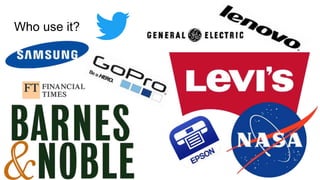
Who use it?
Small and medium-sized retail websites
A business owner or marketer
People who are selling product online
People who are running a blog
Who use it?
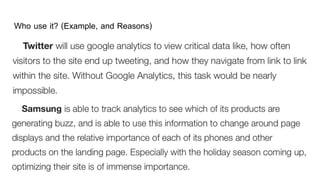
Who use it? (Example, and Reasons)
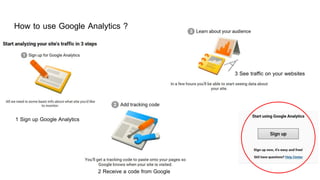
How to use Google Analytics ?
3 See traffic on your websites
2 Receive a code from Google
1 Sign up Google Analytics
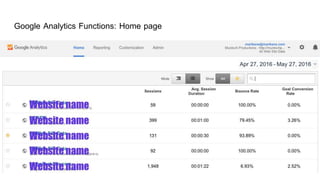
Google Analytics Functions: Home page
Sorting Date: Home page (PIC)
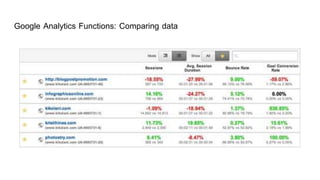
In Home page, it shows number of
sessions, average session
duration, bounce rate and goal
conversion rate
Selecting rage (pic.)
Comparing data (Pic.)
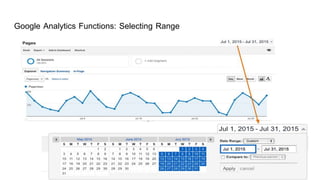
Google Analytics Functions: Selecting Range
Google Analytics Functions: Comparing data
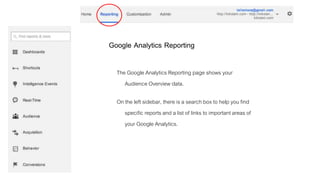
Google Analytics Reporting
The Google Analytics Reporting page shows your
Audience Overview data.
On the left sidebar, there is a search box to help you find
specific reports and a list of links to important areas of
your Google Analytics.
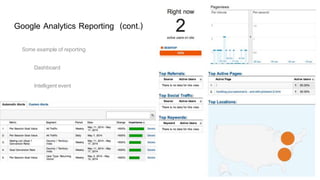
Google Analytics Reporting (cont.)
Some example of reporting
Dashboard
Intelligent event
Real time: How many people visit our website?
Why Google Analytics is important to your website?
Where your visitors are coming from
How your visitors found your website
Web browsers used by the visitors
Which keywords were used by visitors in the SEO to get to
your website
In business and marketing perspectives, it helps you plan how
to grow your website
and how to increase traffic and get a higher rank
Google Analytics Issues ...
Some security experts have raised concerns
about privacy issues in Google Analytics.
Through the Google Analytics Dashboard,
users can collect information on people
whose websites link to social networking
sites such as Facebook and Twitter.
Conclusion
Google analytics is a powerful tool for monitoring and analysing traffic on
your website. It gives you an enormous amount of information about who
are your visitors, what they are looking for and how they are to your
website. This suits one who wants to expand business and grow their
business on the internet . They should definitely be using Google analytics.
Google Analytics

Google Analytics

  • 1.
    ICMB 485 DigitalMarketing Aj.Sascha Funk Members Chanokphan Sivapiriyawong 5580653 Wutthiphat Pattanalertrattanachai 5580996 Suroj Tangsumpun 5780017 Phatcharaphon Piphopthanas 5780743 Piyaporn Jarunghonphiphat 5780748
  • 2.
    What is Googleanalytics? Google Analytics is a free Web analytics service that provides statistics and basic analytical tools for search engine optimization (SEO) and marketing purposes. Google bought Urchin Software Corporation in April 2005.
  • 3.
    Who use it? Smalland medium-sized retail websites A business owner or marketer People who are selling product online People who are running a blog
  • 4.
  • 5.
    Who use it?(Example, and Reasons)
  • 6.
    How to useGoogle Analytics ? 3 See traffic on your websites 2 Receive a code from Google 1 Sign up Google Analytics
  • 7.
    Google Analytics Functions:Home page Sorting Date: Home page (PIC) In Home page, it shows number of sessions, average session duration, bounce rate and goal conversion rate Selecting rage (pic.) Comparing data (Pic.)
  • 8.
  • 9.
  • 10.
    Google Analytics Reporting TheGoogle Analytics Reporting page shows your Audience Overview data. On the left sidebar, there is a search box to help you find specific reports and a list of links to important areas of your Google Analytics.
  • 11.
    Google Analytics Reporting(cont.) Some example of reporting Dashboard Intelligent event Real time: How many people visit our website?
  • 12.
    Why Google Analyticsis important to your website? Where your visitors are coming from How your visitors found your website Web browsers used by the visitors Which keywords were used by visitors in the SEO to get to your website In business and marketing perspectives, it helps you plan how to grow your website and how to increase traffic and get a higher rank
  • 14.
    Google Analytics Issues... Some security experts have raised concerns about privacy issues in Google Analytics. Through the Google Analytics Dashboard, users can collect information on people whose websites link to social networking sites such as Facebook and Twitter.
  • 15.
    Conclusion Google analytics isa powerful tool for monitoring and analysing traffic on your website. It gives you an enormous amount of information about who are your visitors, what they are looking for and how they are to your website. This suits one who wants to expand business and grow their business on the internet . They should definitely be using Google analytics.

Editor's Notes

  • #4 Google Analytics is geared toward small and medium-sized retail websites. The service has limitations that make it less suited to more complex websites and larger enterprises.
  • #6 http://www.gillsolutions.com/blog/top-ten-companies-that-use-google-analytics/ https://www.google.com/analytics/success-stories/#?modal_active=none
  • #8 PICTURE >>>> (http://www.socialmediaexaminer.com/google-analytics-basics/) When you log into Google Analytics, you end up on the Home page where you can see a list of all of the websites you have set up in your account. This list shows you some basic data right off the bat such as your number of sessions, average session duration, bounce rate and goal conversion rate.
  • #11 รูปภาพประกอบ (http://www.socialmediaexaminer.com/google-analytics-basics/)
  • #12 รูปภาพประกอบ (http://www.socialmediaexaminer.com/google-analytics-basics/)
  • #13 Where your visitors are coming from – very important if you’re targeting a specific audience. How your visitors found your website – this is very important for determining which of your efforts are paying off. It shows if visitors found your site directly, through a referral from another website (ex: Twitter, Facebook), or from search engines. Web browsers used by your visitors – knowing which web browsers your visitors use allows you to know which browsers you should be focusing on. What keywords were used by visitors in the search engines to get to your website – this is very crucial for SEO. Knowing which keywords people are searching for to get to your site determines if you are on the right track.