


Git Workflows
RUI RODRIGUES • ATLASSIAN EXPERT • XPAND IT • @RODRIGUESRMB
Git Workflows are
simply guidelines and
not a set of strict rules.
Feature Branch Workflow
Git Workflows
Gitflow Workflow
Forking Workflow
Basic/Centralized Workflow
Basic/ Centralized Workflow
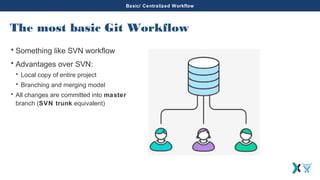
The most basic Git Workflow
• Something like SVN workflow
• Advantages over SVN:
• Local copy of entire project
• Branching and merging model
• All changes are committed into master
branch (SVN trunk equivalent)
Basic/Centralized Workflow
Git Workflows
Gitflow Workflow
Forking Workflow
Feature Branch Workflow
Branch by feature
• Master branch represents the code base (final solution)
• Each developer works on its own feature
• This workflow avoid broken code
• Share feature with other developer without change master branch
• Code Review is the major advantage of using pull requests
• Join feature into master branch
• Discuss changes between developers
Feature Branch Workflow
Git Workflows
Basic/Centralized Workflow
Forking Workflow
Gitflow Workflow
Gitflow Workflow
Gitflow
• Proposes
• Managing feature development
• Release preparation
• Maintenance
• More complex than Feature Branch Workflow
• Main branches:
• master – stores the official release history
• develop – serves as an integration branch for features
• Feature branches
• Each feature branch should reside on its branch
• The feature branch isn’t merged into master directly, it should be
merged on develop branch
Gitflow Workflow
Gitflow
• Release Branches
• When develop branch has enough features for a release it’s time to
create a new branch from develop – Release Branch
• This action starts a new release cycle
• New feature can’t be added
• Only can be added bug fixes, documentation and tasks
related with the release process
• When the release is ready to deliver, the release branch should be
merged into master and develop and a new tag should be created.
Gitflow Workflow
Gitflow
• Maintenance Branches
• Also known as a hotfix branch
• Unique branch that should be created from master branch
• When the fix is complete, the branch should be merged into master
and develop or the current release branch
• Master branch should be tagged with the current version
Feature Branch Workflow
Git Wokflows
Gitflow Workflow
Basic/Centralized Workflow
Forking Workflow
Forking Workflow
Forking Workflow
• It’s different from other workflows already presented here
• There is no central repository
• Each developer has a server-side repository (public) and a local repository
(private)
• Developers push to their own server-side repositories
• Only the project maintainer can push to the official repository
• In this way, project maintainer accept commits from any developer without
giving them access to the official codebase
• Bitbucket and Github are examples of using this workflow.
Thank you!
RUI RODRIGUES • ATLASSIAN EXPERT • XPAND IT • @RODRIGUESRMB

Git workflows

  • 1.
    Git Workflows RUI RODRIGUES• ATLASSIAN EXPERT • XPAND IT • @RODRIGUESRMB
  • 2.
    Git Workflows are simplyguidelines and not a set of strict rules.
  • 3.
    Feature Branch Workflow GitWorkflows Gitflow Workflow Forking Workflow Basic/Centralized Workflow
  • 4.
    Basic/ Centralized Workflow Themost basic Git Workflow • Something like SVN workflow • Advantages over SVN: • Local copy of entire project • Branching and merging model • All changes are committed into master branch (SVN trunk equivalent)
  • 5.
    Basic/Centralized Workflow Git Workflows GitflowWorkflow Forking Workflow Feature Branch Workflow
  • 6.
    Feature Branch Workflow Branchby feature • Master branch represents the code base (final solution) • Each developer works on its own feature • This workflow avoid broken code • Share feature with other developer without change master branch • Code Review is the major advantage of using pull requests • Join feature into master branch • Discuss changes between developers
  • 7.
    Feature Branch Workflow GitWorkflows Basic/Centralized Workflow Forking Workflow Gitflow Workflow
  • 8.
    Gitflow Workflow Gitflow • Proposes •Managing feature development • Release preparation • Maintenance • More complex than Feature Branch Workflow • Main branches: • master – stores the official release history • develop – serves as an integration branch for features • Feature branches • Each feature branch should reside on its branch • The feature branch isn’t merged into master directly, it should be merged on develop branch
  • 9.
    Gitflow Workflow Gitflow • ReleaseBranches • When develop branch has enough features for a release it’s time to create a new branch from develop – Release Branch • This action starts a new release cycle • New feature can’t be added • Only can be added bug fixes, documentation and tasks related with the release process • When the release is ready to deliver, the release branch should be merged into master and develop and a new tag should be created.
  • 10.
    Gitflow Workflow Gitflow • MaintenanceBranches • Also known as a hotfix branch • Unique branch that should be created from master branch • When the fix is complete, the branch should be merged into master and develop or the current release branch • Master branch should be tagged with the current version
  • 11.
    Feature Branch Workflow GitWokflows Gitflow Workflow Basic/Centralized Workflow Forking Workflow
  • 12.
    Forking Workflow Forking Workflow •It’s different from other workflows already presented here • There is no central repository • Each developer has a server-side repository (public) and a local repository (private) • Developers push to their own server-side repositories • Only the project maintainer can push to the official repository • In this way, project maintainer accept commits from any developer without giving them access to the official codebase • Bitbucket and Github are examples of using this workflow.
  • 13.
    Thank you! RUI RODRIGUES• ATLASSIAN EXPERT • XPAND IT • @RODRIGUESRMB