Git workflows
What’s a Git
workflow? 🤔
After pulling from main branch:
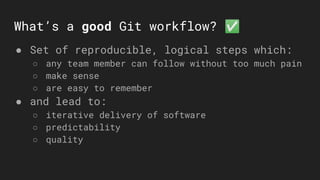
What’s a good Git workflow? ✅
● Set of reproducible, logical steps which:
○ any team member can follow without too much pain
○ make sense
○ are easy to remember
● and lead to:
○ iterative delivery of software
○ predictability
○ quality
What if no Git workflow is used? 🤔
● complete mess in the repository, including:
○ lots of pointless branches
○ pointless commits
○ pointless merges
○ lost commits/branches/merges ⚠
● lack of structure and predictability
● frustration, anxiety, office wars 😡
● alcohol/drug abuse and depression ending
with suicide 😭
What knowledge do I need? 📚
● Know what Git is 🤓
● Have Git knowledge about:
○ basic commands (commit, push, pull, tag)
○ branching
○ rebasing and merging
○ pull requests
● Some automation skills (for some flows)
● The need to have structure and control in a repository ☯
Strategy #1:
Centralized workflow
(all on main)
Steps to follow 🧐
1. Pull latest version of main branch
2. Make changes, commit and push
3. If you’re behind main, rebase your commit
on top of main*
* watch out for binary files - they will be
overwritten!⚠
Centralized flow example 🕵
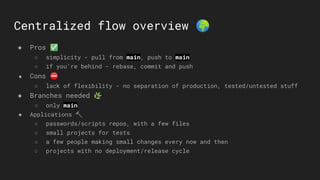
Centralized flow overview 🌍
● Pros ✅
○ simplicity - pull from main, push to main
○ if you’re behind - rebase, commit and push
● Cons ⛔
○ lack of flexibility - no separation of production, tested/untested stuff
● Branches needed 🌿
○ only main
● Applications 🔨
○ passwords/scripts repos, with a few files
○ small projects for tests
○ a few people making small changes every now and then
○ projects with no deployment/release cycle
Strategy #2:
Feature branches
workflow
(main + feature/bugfix branches)
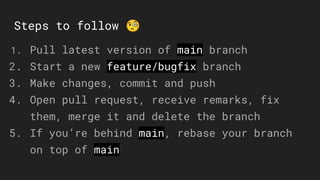
Steps to follow 🧐
1. Pull latest version of main branch
2. Start a new feature/bugfix branch
3. Make changes, commit and push
4. Open pull request, receive remarks, fix
them, merge it and delete the branch
5. If you’re behind main, rebase your branch
on top of main
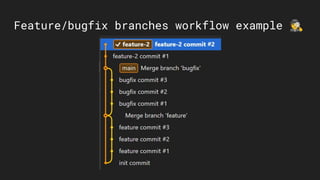
Feature/bugfix branches workflow example 🕵
Feature branches overview 🌍
● Pros ✅
○ simplicity - main + feature/bugfix branches
○ flexibility - work with isolated feature/bugfix branches
○ separates features from production
● Cons ⛔
○ increased complexity - PRs, rebases of branches
○ can’t decouple what goes to production from
what’s already tested and ready for next release
● Branches needed 🌿
○ main + feature/bugfix branches
● Applications 🔨
○ applications with simple/no deployment and release cycle
Strategy #3:
Feature branches +
release commits workflow
(main + feature/bugfix branches)
Steps to follow 🧐
1. Pull latest version of main branch
2. Start a new feature/bugfix branch
3. Make changes, commit and push
4. Open pull request, receive remarks, fix them and
merge it and delete the branch.
5. Once merged, trigger new release commits on main
6. If you’re behind main, rebase your branch on top
of main
branches + release commits workflow example 🕵
Feature branches + release commits overview 🌍
● Pros ✅
○ simplicity - main + bugfix/feature branches
○ flexibility - work with isolated bugfix/feature branches
○ separates new features from production
○ release after every merge in main
● Cons ⛔
○ increased complexity - PRs, rebases of branches, tagging
○ can’t decouple what goes to production from what’s already tested are
ready for next release
● Branches needed 🌿
○ main + bugfix/feature branches
● Applications 🔨
○ applications with simple deployment and release cycle, which happens often
Strategy #4:
Simplified gitflow
(main + develop + feature/bugfix branches)
Steps to follow 🧐
1. Pull latest version of develop
2. Start a new feature/bugfix branch
3. Make changes, commit and push
4. Open pull request, receive remarks, fix them
and merge in develop and delete your branch.
5. When releasing, merge/rebase develop into main
and add a new tag
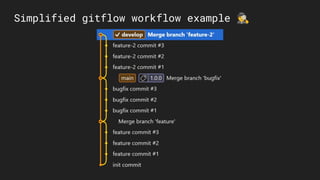
Simplified gitflow workflow example 🕵
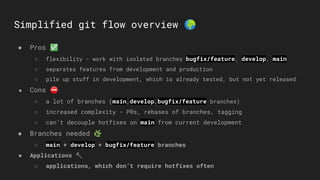
Simplified git flow overview 🌍
● Pros ✅
○ flexibility - work with isolated branches bugfix/feature, develop, main
○ separates features from development and production
○ pile up stuff in development, which is already tested, but not yet released
● Cons ⛔
○ a lot of branches (main,develop,bugfix/feature branches)
○ increased complexity - PRs, rebases of branches, tagging
○ can’t decouple hotfixes on main from current development
● Branches needed 🌿
○ main + develop + bugfix/feature branches
● Applications 🔨
○ applications, which don’t require hotfixes often
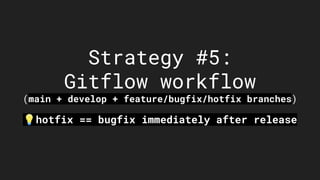
Strategy #5:
Gitflow workflow
(main + develop + feature/bugfix/hotfix branches)
💡hotfix == bugfix immediately after release
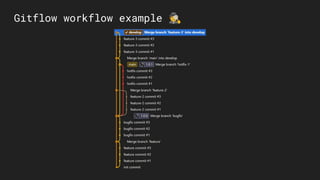
Steps to follow 🧐
1. Pull latest version of develop
2. Start a new feature/bugfix branch
3. Make changes, commit and push
4. Open pull request, receive remarks, fix them and merge in
develop and delete your branch.
5. When releasing, merge/rebase develop into main and add a new
tag.
If regressions pop-up, add hotfix branch from main and then
merge it into main and then merge main into develop.💡
Gitflow workflow example 🕵
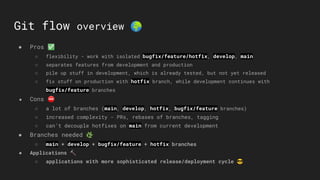
Git flow overview 🌍
● Pros ✅
○ flexibility - work with isolated bugfix/feature/hotfix, develop, main
○ separates features from development and production
○ pile up stuff in development, which is already tested, but not yet released
○ fix stuff on production with hotfix branch, while development continues with
bugfix/feature branches
● Cons ⛔
○ a lot of branches (main, develop, hotfix, bugfix/feature branches)
○ increased complexity - PRs, rebases of branches, tagging
○ can’t decouple hotfixes on main from current development
● Branches needed 🌿
○ main + develop + bugfix/feature + hotfix branches
● Applications 🔨
○ applications with more sophisticated release/deployment cycle 😎
Other Git workflows:
(forking flow, custom
flow etc…)
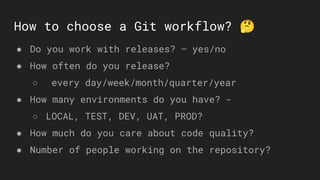
How to choose a Git workflow? 🤔
● Do you work with releases? – yes/no
● How often do you release?
○ every day/week/month/quarter/year
● How many environments do you have? -
○ LOCAL, TEST, DEV, UAT, PROD?
● How much do you care about code quality?
● Number of people working on the repository?
Useful references 📌
● Tools 🔨
○ Fork (Mac/Windows UI client)
○ KDiff3 (File comparison tool)
● Theory 📚
○ Git book
○ Comparing git workflows
Thank you for your
attention.🙏
Questions?🤔

Git workflows

  • 1.
  • 2.
  • 3.
    After pulling frommain branch:
  • 5.
    What’s a goodGit workflow? ✅ ● Set of reproducible, logical steps which: ○ any team member can follow without too much pain ○ make sense ○ are easy to remember ● and lead to: ○ iterative delivery of software ○ predictability ○ quality
  • 6.
    What if noGit workflow is used? 🤔 ● complete mess in the repository, including: ○ lots of pointless branches ○ pointless commits ○ pointless merges ○ lost commits/branches/merges ⚠ ● lack of structure and predictability ● frustration, anxiety, office wars 😡 ● alcohol/drug abuse and depression ending with suicide 😭
  • 8.
    What knowledge doI need? 📚 ● Know what Git is 🤓 ● Have Git knowledge about: ○ basic commands (commit, push, pull, tag) ○ branching ○ rebasing and merging ○ pull requests ● Some automation skills (for some flows) ● The need to have structure and control in a repository ☯
  • 9.
  • 10.
    Steps to follow🧐 1. Pull latest version of main branch 2. Make changes, commit and push 3. If you’re behind main, rebase your commit on top of main* * watch out for binary files - they will be overwritten!⚠
  • 11.
  • 12.
    Centralized flow overview🌍 ● Pros ✅ ○ simplicity - pull from main, push to main ○ if you’re behind - rebase, commit and push ● Cons ⛔ ○ lack of flexibility - no separation of production, tested/untested stuff ● Branches needed 🌿 ○ only main ● Applications 🔨 ○ passwords/scripts repos, with a few files ○ small projects for tests ○ a few people making small changes every now and then ○ projects with no deployment/release cycle
  • 13.
  • 14.
    Steps to follow🧐 1. Pull latest version of main branch 2. Start a new feature/bugfix branch 3. Make changes, commit and push 4. Open pull request, receive remarks, fix them, merge it and delete the branch 5. If you’re behind main, rebase your branch on top of main
  • 15.
  • 16.
    Feature branches overview🌍 ● Pros ✅ ○ simplicity - main + feature/bugfix branches ○ flexibility - work with isolated feature/bugfix branches ○ separates features from production ● Cons ⛔ ○ increased complexity - PRs, rebases of branches ○ can’t decouple what goes to production from what’s already tested and ready for next release ● Branches needed 🌿 ○ main + feature/bugfix branches ● Applications 🔨 ○ applications with simple/no deployment and release cycle
  • 17.
    Strategy #3: Feature branches+ release commits workflow (main + feature/bugfix branches)
  • 18.
    Steps to follow🧐 1. Pull latest version of main branch 2. Start a new feature/bugfix branch 3. Make changes, commit and push 4. Open pull request, receive remarks, fix them and merge it and delete the branch. 5. Once merged, trigger new release commits on main 6. If you’re behind main, rebase your branch on top of main
  • 19.
    branches + releasecommits workflow example 🕵
  • 20.
    Feature branches +release commits overview 🌍 ● Pros ✅ ○ simplicity - main + bugfix/feature branches ○ flexibility - work with isolated bugfix/feature branches ○ separates new features from production ○ release after every merge in main ● Cons ⛔ ○ increased complexity - PRs, rebases of branches, tagging ○ can’t decouple what goes to production from what’s already tested are ready for next release ● Branches needed 🌿 ○ main + bugfix/feature branches ● Applications 🔨 ○ applications with simple deployment and release cycle, which happens often
  • 21.
    Strategy #4: Simplified gitflow (main+ develop + feature/bugfix branches)
  • 22.
    Steps to follow🧐 1. Pull latest version of develop 2. Start a new feature/bugfix branch 3. Make changes, commit and push 4. Open pull request, receive remarks, fix them and merge in develop and delete your branch. 5. When releasing, merge/rebase develop into main and add a new tag
  • 23.
  • 24.
    Simplified git flowoverview 🌍 ● Pros ✅ ○ flexibility - work with isolated branches bugfix/feature, develop, main ○ separates features from development and production ○ pile up stuff in development, which is already tested, but not yet released ● Cons ⛔ ○ a lot of branches (main,develop,bugfix/feature branches) ○ increased complexity - PRs, rebases of branches, tagging ○ can’t decouple hotfixes on main from current development ● Branches needed 🌿 ○ main + develop + bugfix/feature branches ● Applications 🔨 ○ applications, which don’t require hotfixes often
  • 25.
    Strategy #5: Gitflow workflow (main+ develop + feature/bugfix/hotfix branches) 💡hotfix == bugfix immediately after release
  • 26.
    Steps to follow🧐 1. Pull latest version of develop 2. Start a new feature/bugfix branch 3. Make changes, commit and push 4. Open pull request, receive remarks, fix them and merge in develop and delete your branch. 5. When releasing, merge/rebase develop into main and add a new tag. If regressions pop-up, add hotfix branch from main and then merge it into main and then merge main into develop.💡
  • 27.
  • 28.
    Git flow overview🌍 ● Pros ✅ ○ flexibility - work with isolated bugfix/feature/hotfix, develop, main ○ separates features from development and production ○ pile up stuff in development, which is already tested, but not yet released ○ fix stuff on production with hotfix branch, while development continues with bugfix/feature branches ● Cons ⛔ ○ a lot of branches (main, develop, hotfix, bugfix/feature branches) ○ increased complexity - PRs, rebases of branches, tagging ○ can’t decouple hotfixes on main from current development ● Branches needed 🌿 ○ main + develop + bugfix/feature + hotfix branches ● Applications 🔨 ○ applications with more sophisticated release/deployment cycle 😎
  • 29.
    Other Git workflows: (forkingflow, custom flow etc…)
  • 30.
    How to choosea Git workflow? 🤔 ● Do you work with releases? – yes/no ● How often do you release? ○ every day/week/month/quarter/year ● How many environments do you have? - ○ LOCAL, TEST, DEV, UAT, PROD? ● How much do you care about code quality? ● Number of people working on the repository?
  • 31.
    Useful references 📌 ●Tools 🔨 ○ Fork (Mac/Windows UI client) ○ KDiff3 (File comparison tool) ● Theory 📚 ○ Git book ○ Comparing git workflows
  • 34.
    Thank you foryour attention.🙏 Questions?🤔