Gitflow Workflow
Getting Started
An abstract idea of a Git workflow.
It dictates what kind of branches to set up and how to merge them together.
Develop and Master Branches
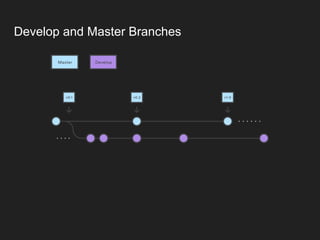
Instead of a single master branch, this workflow uses two branches to record the
history of the project.
Master branch stores the official release history.
Develop branch serves as an integration branch for features.
Develop and Master Branches
Feature Branches
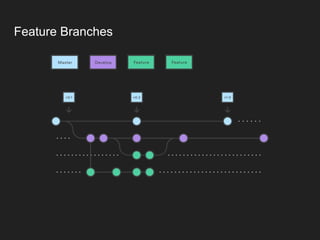
Each new feature should reside in its own branch, which can be pushed to the
central repository for backup/collaboration.
Feature branches use develop as their parent branch.
When a feature is complete, it gets merged back into develop.
Features should never interact directly with master.
Feature Branches
Release Branches
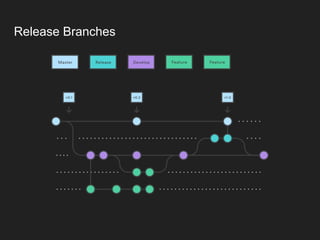
Once develop has acquired enough features for a release, you fork a release
branch off of develop.
No new features can be added after this point; only bug fixes, documentation
generation, and other release-oriented tasks should go in this branch.
Once it's ready to ship, the release branch gets merged into master and tagged
with a version number.
In addition, it should be merged back into develop, which may have progressed
since the release was initiated.
Release Branches
Hotfix Branches
Hotfix branches are used to quickly patch production releases.
Hotfix branches are a lot like release branches and feature branches except
they're based on master instead of develop.
This is the only branch that should fork directly off of master.
As soon as the fix is complete, it should be merged into both master and develop
(or the current release branch), and master should be tagged with an updated
version number.
Hotfix Branches
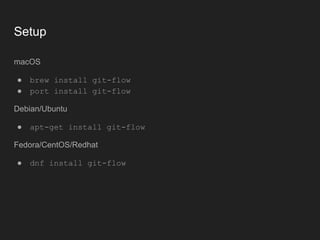
Setup
macOS
● brew install git-flow
● port install git-flow
Debian/Ubuntu
● apt-get install git-flow
Fedora/CentOS/Redhat
● dnf install git-flow
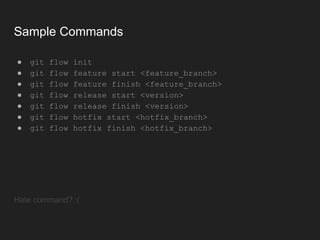
Sample Commands
● git flow init
● git flow feature start <feature_branch>
● git flow feature finish <feature_branch>
● git flow release start <version>
● git flow release finish <version>
● git flow hotfix start <hotfix_branch>
● git flow hotfix finish <hotfix_branch>
Hate command? :(
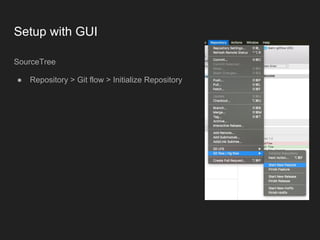
Setup with GUI
SourceTree
● Repository > Git flow > Initialize Repository
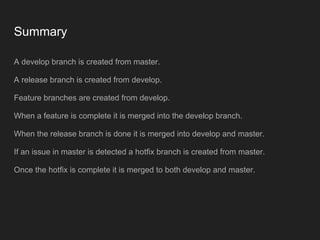
Summary
A develop branch is created from master.
A release branch is created from develop.
Feature branches are created from develop.
When a feature is complete it is merged into the develop branch.
When the release branch is done it is merged into develop and master.
If an issue in master is detected a hotfix branch is created from master.
Once the hotfix is complete it is merged to both develop and master.
Question? Try it!

Gitflow Workflow

  • 1.
  • 2.
    Getting Started An abstractidea of a Git workflow. It dictates what kind of branches to set up and how to merge them together.
  • 3.
    Develop and MasterBranches Instead of a single master branch, this workflow uses two branches to record the history of the project. Master branch stores the official release history. Develop branch serves as an integration branch for features.
  • 4.
  • 5.
    Feature Branches Each newfeature should reside in its own branch, which can be pushed to the central repository for backup/collaboration. Feature branches use develop as their parent branch. When a feature is complete, it gets merged back into develop. Features should never interact directly with master.
  • 6.
  • 7.
    Release Branches Once develophas acquired enough features for a release, you fork a release branch off of develop. No new features can be added after this point; only bug fixes, documentation generation, and other release-oriented tasks should go in this branch. Once it's ready to ship, the release branch gets merged into master and tagged with a version number. In addition, it should be merged back into develop, which may have progressed since the release was initiated.
  • 8.
  • 9.
    Hotfix Branches Hotfix branchesare used to quickly patch production releases. Hotfix branches are a lot like release branches and feature branches except they're based on master instead of develop. This is the only branch that should fork directly off of master. As soon as the fix is complete, it should be merged into both master and develop (or the current release branch), and master should be tagged with an updated version number.
  • 10.
  • 11.
    Setup macOS ● brew installgit-flow ● port install git-flow Debian/Ubuntu ● apt-get install git-flow Fedora/CentOS/Redhat ● dnf install git-flow
  • 12.
    Sample Commands ● gitflow init ● git flow feature start <feature_branch> ● git flow feature finish <feature_branch> ● git flow release start <version> ● git flow release finish <version> ● git flow hotfix start <hotfix_branch> ● git flow hotfix finish <hotfix_branch> Hate command? :(
  • 13.
    Setup with GUI SourceTree ●Repository > Git flow > Initialize Repository
  • 14.
    Summary A develop branchis created from master. A release branch is created from develop. Feature branches are created from develop. When a feature is complete it is merged into the develop branch. When the release branch is done it is merged into develop and master. If an issue in master is detected a hotfix branch is created from master. Once the hotfix is complete it is merged to both develop and master.
  • 15.