
eleks.comeleks.com
Git and branching models
by Pavlo Hodysh
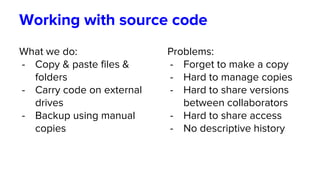
Working with source code
What we do:
- Copy & paste files &
folders
- Carry code on external
drives
- Backup using manual
copies
Problems:
- Forget to make a copy
- Hard to manage copies
- Hard to share versions
between collaborators
- Hard to share access
- No descriptive history
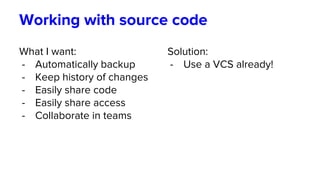
Working with source code
What I want:
- Automatically backup
- Keep history of changes
- Easily share code
- Easily share access
- Collaborate in teams
Solution:
- Use a VCS already!
What is version control?
A component of software configuration management,
version control (revision control, source control), is the
management of changes to documents, computer
programs, large web sites, and other collections of
information (from Wikipedia)
What problems does it solve?
Pros.
- Work in teams
- Automatic backup
- Revision history
- Automatic builds on CI
Cons.
- You need to learn it
- You need to install it
… yeah, like it’s hard
Version Control Systems
Generation 0 - The stone age (Ctrl + C -> Ctrl + V)
Generation 1 - Local (RCS, SCCS)
Generation 2 - Centralized (CVS, Subversion, Team
Foundation)
Generation 3 - Distributed (Git, Mercurial)
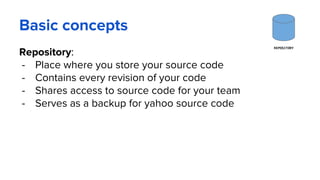
Basic concepts
Repository:
- Place where you store your source code
- Contains every revision of your code
- Shares access to source code for your team
- Serves as a backup for yahoo source code
REPOSITORY
Basic concepts
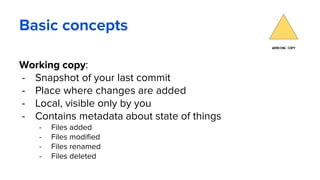
Working copy:
- Snapshot of your last commit
- Place where changes are added
- Local, visible only by you
- Contains metadata about state of things
- Files added
- Files modified
- Files renamed
- Files deleted
WORKING COPY
Basic concepts
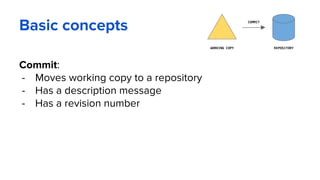
Commit:
- Moves working copy to a repository
- Has a description message
- Has a revision number
REPOSITORYWORKING COPY
COMMIT
Basic concepts
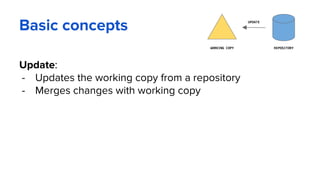
Update:
- Updates the working copy from a repository
- Merges changes with working copy
REPOSITORYWORKING COPY
UPDATE
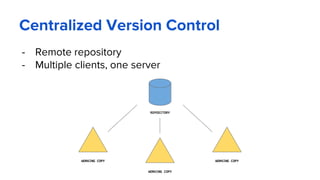
Centralized Version Control
- Remote repository
- Multiple clients, one server
REPOSITORY
WORKING COPY
WORKING COPY
WORKING COPY
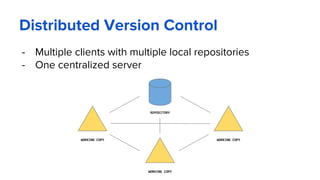
Distributed Version Control
- Multiple clients with multiple local repositories
- One centralized server
REPOSITORY
WORKING COPY
WORKING COPY
WORKING COPY
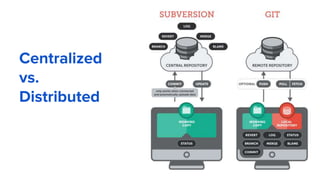
Centralized
vs.
Distributed
Basic concepts
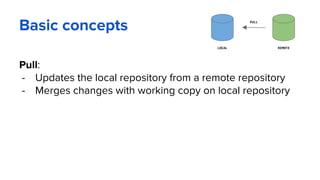
Pull:
- Updates the local repository from a remote repository
- Merges changes with working copy on local repository
LOCAL REMOTE
PULL
Basic concepts
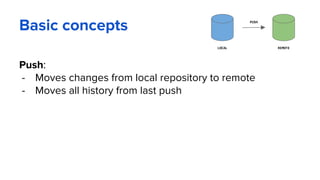
Push:
- Moves changes from local repository to remote
- Moves all history from last push
LOCAL REMOTE
PUSH
Getting started with Git
Standard installations
- http://git-scm.com/downloads
Available for all the platform
Git Graphical Applications
- http://git-scm.com/downloads/guis
- https://www.sourcetreeapp.com/
- https://www.gitkraken.com/
GitFlow branching model
Key Benefits
- Stable versions ready for production via master branch
- Staging area via develop branch
- Collaboration via feature branches
- Releases area via release branches
- Support for emergency fixes via hotfix branch
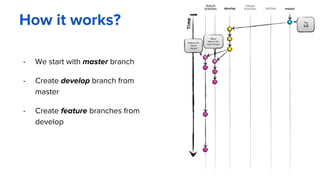
How it works?
- We start with master branch
- Create develop branch from
master
- Create feature branches from
develop
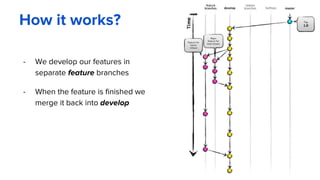
How it works?
- We develop our features in
separate feature branches
- When the feature is finished we
merge it back into develop
How it works?
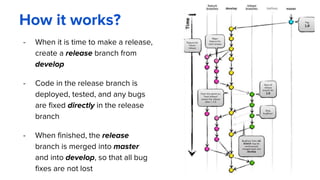
- When it is time to make a release,
create a release branch from
develop
- Code in the release branch is
deployed, tested, and any bugs
are fixed directly in the release
branch
- When finished, the release
branch is merged into master
and into develop, so that all bug
fixes are not lost
How it works?
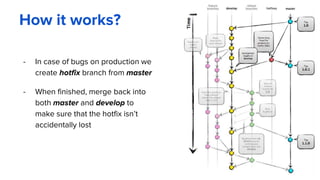
- In case of bugs on production we
create hotfix branch from master
- When finished, merge back into
both master and develop to
make sure that the hotfix isn’t
accidentally lost
Merge vs. Rebase
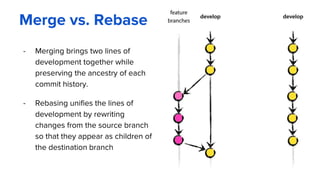
- Merging brings two lines of
development together while
preserving the ancestry of each
commit history.
- Rebasing unifies the lines of
development by rewriting
changes from the source branch
so that they appear as children of
the destination branch
Golden rule of rebasing
NEVER EVER
rebase a branch that you pushed,
or that you pulled from another person
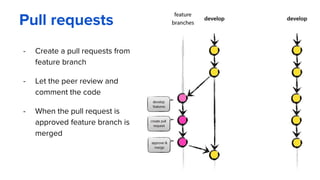
Pull requests
- Create a pull requests from
feature branch
- Let the peer review and
comment the code
- When the pull request is
approved feature branch is
merged
Useful links
GitFlow by Vincent Driessen
http://nvie.com/posts/a-successful-git-branching-model/
GitFlow Cheatsheet
http://danielkummer.github.io/git-flow-cheatsheet/
Git workflow by Atlassian
https://www.atlassian.com/git/tutorials/comparing-workflows/feature-branch-
workflow
GitFlow step-by-step
https://datasift.github.io/gitflow/IntroducingGitFlow.html
eleks.com
Inspired by Technology.
Driven by Value.

Git and GitFlow branching model

  • 1.
  • 2.
    Working with sourcecode What we do: - Copy & paste files & folders - Carry code on external drives - Backup using manual copies Problems: - Forget to make a copy - Hard to manage copies - Hard to share versions between collaborators - Hard to share access - No descriptive history
  • 3.
    Working with sourcecode What I want: - Automatically backup - Keep history of changes - Easily share code - Easily share access - Collaborate in teams Solution: - Use a VCS already!
  • 4.
    What is versioncontrol? A component of software configuration management, version control (revision control, source control), is the management of changes to documents, computer programs, large web sites, and other collections of information (from Wikipedia)
  • 5.
    What problems doesit solve? Pros. - Work in teams - Automatic backup - Revision history - Automatic builds on CI Cons. - You need to learn it - You need to install it … yeah, like it’s hard
  • 6.
    Version Control Systems Generation0 - The stone age (Ctrl + C -> Ctrl + V) Generation 1 - Local (RCS, SCCS) Generation 2 - Centralized (CVS, Subversion, Team Foundation) Generation 3 - Distributed (Git, Mercurial)
  • 7.
    Basic concepts Repository: - Placewhere you store your source code - Contains every revision of your code - Shares access to source code for your team - Serves as a backup for yahoo source code REPOSITORY
  • 8.
    Basic concepts Working copy: -Snapshot of your last commit - Place where changes are added - Local, visible only by you - Contains metadata about state of things - Files added - Files modified - Files renamed - Files deleted WORKING COPY
  • 9.
    Basic concepts Commit: - Movesworking copy to a repository - Has a description message - Has a revision number REPOSITORYWORKING COPY COMMIT
  • 10.
    Basic concepts Update: - Updatesthe working copy from a repository - Merges changes with working copy REPOSITORYWORKING COPY UPDATE
  • 11.
    Centralized Version Control -Remote repository - Multiple clients, one server REPOSITORY WORKING COPY WORKING COPY WORKING COPY
  • 12.
    Distributed Version Control -Multiple clients with multiple local repositories - One centralized server REPOSITORY WORKING COPY WORKING COPY WORKING COPY
  • 13.
  • 14.
    Basic concepts Pull: - Updatesthe local repository from a remote repository - Merges changes with working copy on local repository LOCAL REMOTE PULL
  • 15.
    Basic concepts Push: - Moveschanges from local repository to remote - Moves all history from last push LOCAL REMOTE PUSH
  • 16.
    Getting started withGit Standard installations - http://git-scm.com/downloads Available for all the platform Git Graphical Applications - http://git-scm.com/downloads/guis - https://www.sourcetreeapp.com/ - https://www.gitkraken.com/
  • 17.
    GitFlow branching model KeyBenefits - Stable versions ready for production via master branch - Staging area via develop branch - Collaboration via feature branches - Releases area via release branches - Support for emergency fixes via hotfix branch
  • 18.
    How it works? -We start with master branch - Create develop branch from master - Create feature branches from develop
  • 19.
    How it works? -We develop our features in separate feature branches - When the feature is finished we merge it back into develop
  • 20.
    How it works? -When it is time to make a release, create a release branch from develop - Code in the release branch is deployed, tested, and any bugs are fixed directly in the release branch - When finished, the release branch is merged into master and into develop, so that all bug fixes are not lost
  • 21.
    How it works? -In case of bugs on production we create hotfix branch from master - When finished, merge back into both master and develop to make sure that the hotfix isn’t accidentally lost
  • 22.
    Merge vs. Rebase -Merging brings two lines of development together while preserving the ancestry of each commit history. - Rebasing unifies the lines of development by rewriting changes from the source branch so that they appear as children of the destination branch
  • 23.
    Golden rule ofrebasing NEVER EVER rebase a branch that you pushed, or that you pulled from another person
  • 24.
    Pull requests - Createa pull requests from feature branch - Let the peer review and comment the code - When the pull request is approved feature branch is merged
  • 25.
    Useful links GitFlow byVincent Driessen http://nvie.com/posts/a-successful-git-branching-model/ GitFlow Cheatsheet http://danielkummer.github.io/git-flow-cheatsheet/ Git workflow by Atlassian https://www.atlassian.com/git/tutorials/comparing-workflows/feature-branch- workflow GitFlow step-by-step https://datasift.github.io/gitflow/IntroducingGitFlow.html
  • 26.