Git Flow Introduction
David Paluy
August 2012
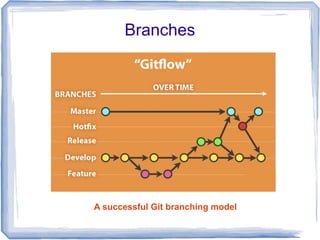
Branches


A successful Git branching model
Master Branch

origin/master to be the main branch where
the source code of HEAD always reflects a
production-ready state.


All of the changes should be merged back into
master somehow and then tagged with a
release number.
Develop Branch

origin/develop to be the main branch where
the source code of HEAD always reflects a
state with the latest delivered development
changes for the next release. Some would call
this the “integration branch”. This is where any
automatic nightly builds are built from.


Each time when changes are merged back
into master, this is a new production release
by definition.
Supporting branches

●   Feature branches
●   Release branches
●   Hotfix branches
Feature branches

●   May branch off from: develop
●   Must merge back into: develop
●   Branch naming convention: anything except
    master, develop, release-*, or hotfix-*
●   Used to develop new features for the
    upcoming or a distant future release
Release branches

●   May branch off from: develop
●   Must merge back into: develop and master
●   Branch naming convention: release-*
●   Release branches support preparation of a
    new production release. They allow for minor
    bug fixes and preparing meta-data for a
    release (version number, build dates, etc.)
●   By doing all of this work on a release branch,
    the develop branch is cleared to receive
    features for the next big release.
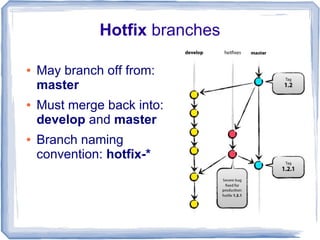
Hotfix branches

●   May branch off from:
    master
●   Must merge back into:
    develop and master
●   Branch naming
    convention: hotfix-*
Gitflow

A collection of Git extensions to provide high-
level repository operations
https://github.com/nvie/gitflow
Initialize basic branch structure

git flow init [-d]


The -d flag will accept all defaults.
List / Start / Finish feature branches

  git flow feature
  git flow feature start <name>
  git flow feature finish <name>

Push / Pull feature branches
  git flow feature publish <name>
  git flow feature pull <remote> <name>
List / Start / Finish release branches

 git flow release
 git flow release start <release>
 git flow release finish <release>
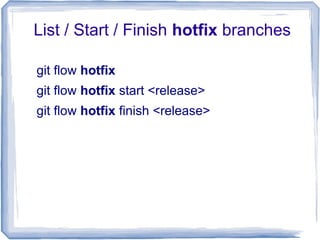
List / Start / Finish hotfix branches

git flow hotfix
git flow hotfix start <release>
git flow hotfix finish <release>
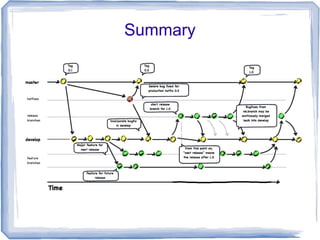
Summary
Summary

It forms an elegant mental model that is easy
to comprehend and allows team members
to develop a shared understanding of the
branching and releasing processes.

Git flow Introduction

  • 1.
    Git Flow Introduction DavidPaluy August 2012
  • 2.
  • 3.
    Master Branch origin/master tobe the main branch where the source code of HEAD always reflects a production-ready state. All of the changes should be merged back into master somehow and then tagged with a release number.
  • 4.
    Develop Branch origin/develop tobe the main branch where the source code of HEAD always reflects a state with the latest delivered development changes for the next release. Some would call this the “integration branch”. This is where any automatic nightly builds are built from. Each time when changes are merged back into master, this is a new production release by definition.
  • 5.
    Supporting branches ● Feature branches ● Release branches ● Hotfix branches
  • 6.
    Feature branches ● May branch off from: develop ● Must merge back into: develop ● Branch naming convention: anything except master, develop, release-*, or hotfix-* ● Used to develop new features for the upcoming or a distant future release
  • 7.
    Release branches ● May branch off from: develop ● Must merge back into: develop and master ● Branch naming convention: release-* ● Release branches support preparation of a new production release. They allow for minor bug fixes and preparing meta-data for a release (version number, build dates, etc.) ● By doing all of this work on a release branch, the develop branch is cleared to receive features for the next big release.
  • 8.
    Hotfix branches ● May branch off from: master ● Must merge back into: develop and master ● Branch naming convention: hotfix-*
  • 9.
    Gitflow A collection ofGit extensions to provide high- level repository operations https://github.com/nvie/gitflow
  • 10.
    Initialize basic branchstructure git flow init [-d] The -d flag will accept all defaults.
  • 11.
    List / Start/ Finish feature branches git flow feature git flow feature start <name> git flow feature finish <name> Push / Pull feature branches git flow feature publish <name> git flow feature pull <remote> <name>
  • 12.
    List / Start/ Finish release branches git flow release git flow release start <release> git flow release finish <release>
  • 13.
    List / Start/ Finish hotfix branches git flow hotfix git flow hotfix start <release> git flow hotfix finish <release>
  • 14.
  • 15.
    Summary It forms anelegant mental model that is easy to comprehend and allows team members to develop a shared understanding of the branching and releasing processes.