Git Workflows 
Noam Kfir | Sela Group | 2014
Workflows 
 Centralized 
 Feature Branch 
 Gitflow 
 Forking 
 Pull Requests 
Adapted from Atlassian, experience and other sources
Centralized – Overview 
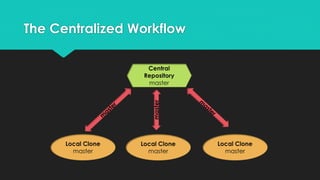
 Centralized by convention 
 One shared branch  master 
 Central history is never rewritten! 
 Central repository is usually bare 
 Emulates a central VCS like TFS or Subversion 
 Local master tracks remote master 
 Local rebase often preferable to merge 
 Local repository is never bare
The Centralized Workflow 
master
Centralized – Typical Sequence 
 git clone remote // copy the central repository to a local repository 
 // iterative edit/stage/commit process 
 git pull [--rebase] origin master // merge or rebase the latest central version 
 git push [origin master] // share your work with the central repository
Centralized – Ramifications 
 Suitable for small teams 
 Supports multiple atomic commits before sharing with the team 
 Risk losing local history if changes are not pushed often enough 
 Larger teams working on more concurrent features are more difficult to manage 
 Higher chance of merge conflicts 
 Harder to keep the central master history linear 
 Has limited support for communication
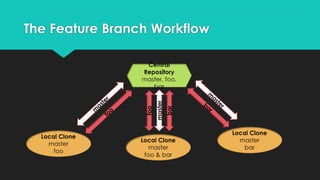
The Feature Branch Workflow 
master 
foo 
bar
Feature Branch – Overview 
 Dedicated feature branches 
 Often combined with Centralized 
Workflow 
 Feature branches are pushed to the 
central repository 
 Devs never work on the master branch 
 Individual features built on dedicated 
feature branches 
 Backup for feature branches too 
 Multiple devs work on the same feature
Feature Branch – Typical Sequence 
 git clone remote // copy the central repository to a local repository 
 git checkout -b new-feature // create a new local feature branch 
 // iterative edit/stage/commit process 
 git push [-u origin new-feature] // share the branch [and track it]
Feature Branch – Merge Into master 
 git checkout master 
 git pull [--rebase] origin new-feature // merge [or rebase] the latest central version 
 git push origin master // send the final version to the central master
Feature Branch – Ramifications 
 Suitable for larger teams working on multiple concurrent features 
 The central repository contains both master and feature branches 
 The master branch is easier to control and safeguard 
 Very flexible workflow but relies on responsible programmers 
 Supports: 
 pull requests 
 isolated experiments 
 efficient collaboration
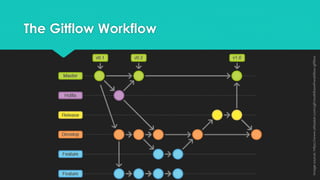
The Gitflow Workflow 
image source: https://www.atlassian.com/git/workflows#!workflow-gitflow
Gitflow – Overview 
 Focused on project release cycle 
 Similar to the Feature Branch Workflow 
 Uses a strict branching model 
 Uses a central repository 
• Feature branches 
• Individual branches 
 Each branch has a specific role 
 Strict rules on when branches can interact
Gitflow - Branches 
master 
hotfix 
release 
develop 
feature 
• official releases, tagged 
• patches, bug fixes [ master] 
• release targets [ master] 
• feature integration branch [ release] 
• dedicated feature branches [ develop]
Gitflow – The master Branch 
 The central authority 
 Sacred 
 Every commit represents a version 
 Every commit has a version tag 
 Branch from master: only hotfix and develop 
 Push to master: only hotfix and release
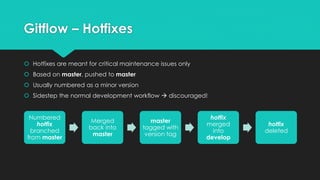
Gitflow – Hotfixes 
 Hotfixes are meant for critical maintenance issues only 
 Based on master, pushed to master 
 Usually numbered as a minor version 
 Sidestep the normal development workflow  discouraged! 
Numbered 
hotfix 
branched 
from master 
Merged 
back into 
master 
master 
tagged with 
version tag 
hotfix 
merged 
into 
develop 
hotfix 
deleted
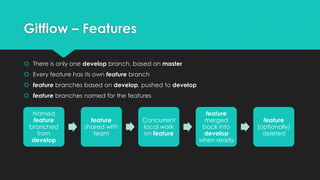
Gitflow – Features 
 There is only one develop branch, based on master 
 Every feature has its own feature branch 
 feature branches based on develop, pushed to develop 
 feature branches named for the features 
Named 
feature 
branched 
from 
develop 
feature 
shared with 
team 
Concurrent 
local work 
on feature 
feature 
merged 
back into 
develop 
when ready 
feature 
(optionally) 
deleted
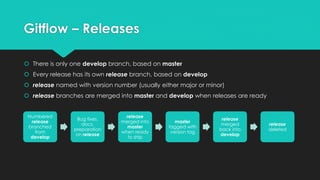
Gitflow – Releases 
 There is only one develop branch, based on master 
 Every release has its own release branch, based on develop 
 release named with version number (usually either major or minor) 
 release branches are merged into master and develop when releases are ready 
Numbered 
release 
branched 
from 
develop 
Bug fixes, 
docs, 
preparation 
on release 
release 
merged into 
master 
when ready 
to ship 
master 
tagged with 
version tag 
release 
merged 
back into 
develop 
release 
deleted
Gitflow – Ramifications 
 Intended for large projects 
 Feature teams can continue working while the current release is being prepared 
 Same advantages as Feature Branch Workflow: 
 pull requests 
 isolated experiments 
 efficient collaboration 
 Branch structure mirrors release process: 
 visually identifiable 
 easy to communicate
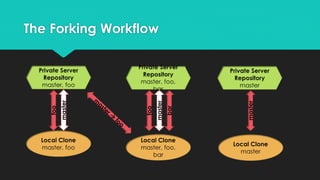
The Forking Workflow 
foo 
master 
foo 
master 
bar 
master
The Forking Workflow 
 A distributed workflow 
 Every dev forks the official repository 
 Official maintainer has ultimate control, 
but only by agreement 
 Unrelated to the Centralized Workflow 
 Forks are private server copies 
 No shared centralized repositories 
 Central authority is arbitrary 
and determined by policy or consensus
Forking – Branches 
 Multiple repositories: 
 “Official” public server repository 
 Forked server repositories 
 Cloned local repositories 
 Forking is different from cloning – forking creates a bare server copy, cloning creates a full local copy 
 Each developer has exclusive write access only to their own repositories 
 To integrate back into the official repository, developers push to theirs and then issue a pull request 
 Local clones of forked repositories usually define two remotes: 
 origin – points to the forked repository 
 upstream – points to the official public repository
Forking – Ramifications 
 Designed for large organic teams, including open source projects and distributed teams 
 Every dev can do their own private Feature Branch workflow with their own server 
 Official maintainer is very common in open source projects 
 Companies give write access to official repository/branch to responsible “maintainer” 
 Extremely effective with pull requests
Understanding Pull Requests 
 Safety net 
 Distributed communication mechanism 
 Effective code review platform 
 Not actually part of git! 
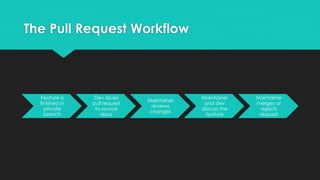
 When a feature is complete, it is not merged into master 
 The feature developer issues a pull request to the maintainer of the master branch 
 The maintainer reviews the changes and then merges them or rejects them 
 The pull request is a forum for discussion about the feature 
 Pull requests facilitate better communication and code reviews
The Pull Request Workflow 
Feature is 
finished in 
private 
branch 
Dev issues 
pull request 
to source 
repo 
Maintainer 
reviews 
changes 
Maintainer 
and dev 
discuss the 
feature 
Maintainer 
merges or 
rejects 
request
Summary 
 Git is a very rich distributed version control system 
 Its design supports many different types of workflows, 
including centralized and distributed workflows 
and is suitable for: 
 individual programmers 
 small co-located teams 
 massive distributed teams 
 anything from open source projects to corporations 
 Its workflows have evolved over the years to popular, mature and proven guidelines
Thank You!

Git Workflows

  • 1.
    Git Workflows NoamKfir | Sela Group | 2014
  • 2.
    Workflows  Centralized  Feature Branch  Gitflow  Forking  Pull Requests Adapted from Atlassian, experience and other sources
  • 3.
    Centralized – Overview  Centralized by convention  One shared branch  master  Central history is never rewritten!  Central repository is usually bare  Emulates a central VCS like TFS or Subversion  Local master tracks remote master  Local rebase often preferable to merge  Local repository is never bare
  • 4.
  • 5.
    Centralized – TypicalSequence  git clone remote // copy the central repository to a local repository  // iterative edit/stage/commit process  git pull [--rebase] origin master // merge or rebase the latest central version  git push [origin master] // share your work with the central repository
  • 6.
    Centralized – Ramifications  Suitable for small teams  Supports multiple atomic commits before sharing with the team  Risk losing local history if changes are not pushed often enough  Larger teams working on more concurrent features are more difficult to manage  Higher chance of merge conflicts  Harder to keep the central master history linear  Has limited support for communication
  • 7.
    The Feature BranchWorkflow master foo bar
  • 8.
    Feature Branch –Overview  Dedicated feature branches  Often combined with Centralized Workflow  Feature branches are pushed to the central repository  Devs never work on the master branch  Individual features built on dedicated feature branches  Backup for feature branches too  Multiple devs work on the same feature
  • 9.
    Feature Branch –Typical Sequence  git clone remote // copy the central repository to a local repository  git checkout -b new-feature // create a new local feature branch  // iterative edit/stage/commit process  git push [-u origin new-feature] // share the branch [and track it]
  • 10.
    Feature Branch –Merge Into master  git checkout master  git pull [--rebase] origin new-feature // merge [or rebase] the latest central version  git push origin master // send the final version to the central master
  • 11.
    Feature Branch –Ramifications  Suitable for larger teams working on multiple concurrent features  The central repository contains both master and feature branches  The master branch is easier to control and safeguard  Very flexible workflow but relies on responsible programmers  Supports:  pull requests  isolated experiments  efficient collaboration
  • 12.
    The Gitflow Workflow image source: https://www.atlassian.com/git/workflows#!workflow-gitflow
  • 13.
    Gitflow – Overview  Focused on project release cycle  Similar to the Feature Branch Workflow  Uses a strict branching model  Uses a central repository • Feature branches • Individual branches  Each branch has a specific role  Strict rules on when branches can interact
  • 14.
    Gitflow - Branches master hotfix release develop feature • official releases, tagged • patches, bug fixes [ master] • release targets [ master] • feature integration branch [ release] • dedicated feature branches [ develop]
  • 15.
    Gitflow – Themaster Branch  The central authority  Sacred  Every commit represents a version  Every commit has a version tag  Branch from master: only hotfix and develop  Push to master: only hotfix and release
  • 16.
    Gitflow – Hotfixes  Hotfixes are meant for critical maintenance issues only  Based on master, pushed to master  Usually numbered as a minor version  Sidestep the normal development workflow  discouraged! Numbered hotfix branched from master Merged back into master master tagged with version tag hotfix merged into develop hotfix deleted
  • 17.
    Gitflow – Features  There is only one develop branch, based on master  Every feature has its own feature branch  feature branches based on develop, pushed to develop  feature branches named for the features Named feature branched from develop feature shared with team Concurrent local work on feature feature merged back into develop when ready feature (optionally) deleted
  • 18.
    Gitflow – Releases  There is only one develop branch, based on master  Every release has its own release branch, based on develop  release named with version number (usually either major or minor)  release branches are merged into master and develop when releases are ready Numbered release branched from develop Bug fixes, docs, preparation on release release merged into master when ready to ship master tagged with version tag release merged back into develop release deleted
  • 19.
    Gitflow – Ramifications  Intended for large projects  Feature teams can continue working while the current release is being prepared  Same advantages as Feature Branch Workflow:  pull requests  isolated experiments  efficient collaboration  Branch structure mirrors release process:  visually identifiable  easy to communicate
  • 20.
    The Forking Workflow foo master foo master bar master
  • 21.
    The Forking Workflow  A distributed workflow  Every dev forks the official repository  Official maintainer has ultimate control, but only by agreement  Unrelated to the Centralized Workflow  Forks are private server copies  No shared centralized repositories  Central authority is arbitrary and determined by policy or consensus
  • 22.
    Forking – Branches  Multiple repositories:  “Official” public server repository  Forked server repositories  Cloned local repositories  Forking is different from cloning – forking creates a bare server copy, cloning creates a full local copy  Each developer has exclusive write access only to their own repositories  To integrate back into the official repository, developers push to theirs and then issue a pull request  Local clones of forked repositories usually define two remotes:  origin – points to the forked repository  upstream – points to the official public repository
  • 23.
    Forking – Ramifications  Designed for large organic teams, including open source projects and distributed teams  Every dev can do their own private Feature Branch workflow with their own server  Official maintainer is very common in open source projects  Companies give write access to official repository/branch to responsible “maintainer”  Extremely effective with pull requests
  • 24.
    Understanding Pull Requests  Safety net  Distributed communication mechanism  Effective code review platform  Not actually part of git!  When a feature is complete, it is not merged into master  The feature developer issues a pull request to the maintainer of the master branch  The maintainer reviews the changes and then merges them or rejects them  The pull request is a forum for discussion about the feature  Pull requests facilitate better communication and code reviews
  • 25.
    The Pull RequestWorkflow Feature is finished in private branch Dev issues pull request to source repo Maintainer reviews changes Maintainer and dev discuss the feature Maintainer merges or rejects request
  • 26.
    Summary  Gitis a very rich distributed version control system  Its design supports many different types of workflows, including centralized and distributed workflows and is suitable for:  individual programmers  small co-located teams  massive distributed teams  anything from open source projects to corporations  Its workflows have evolved over the years to popular, mature and proven guidelines
  • 27.