Introduction to Git Administration
For New Administrators
Shawn Doyle
ReleaseTEAM Inc
sdoyle@releaseteam.com
www.linkedin.com/in/releaseteam/
http://twitter.com/ReleaseTEAMInc
Premium SCM Consulting firm since 1999
Focus on Software Configuration Management
On site and remote consulting services
– Build Automation
– CM tool administration, customization, upgrades, migrations
Classroom training / hands-on mentoring
R
e
l
e
a
s
e
T
E
ClearCase ClearQuest Jenkins
Git RTC Build Forge
SVN Jira Electric Commander
Shawn Doyle - ReleaseTEAM
 For the administrator new to Git
 An overview of Git
 Workflows
 Common admin tasks
 Access control
 Triggers
 Stories from the trenches
Subversion & Git Presentation
Agenda
Slide 4
So you now are a Git Admin
Git has sprung up in many organizations. Spreading like
a wild fire from the development groups.
– Developers want less restrictions to their productivity
– SCM is always seen as a restriction and rarely a necessary one
SCM admins are finding they need to support Git
regardless of existing corporate standards.
SCM admins need to find a way to control the chaos.
Most commercial SCM tools now support Git as a client.
Don’t panic Git is fun, powerful and it is the future.
Subversion & Git Presentation
Wait.. What? how did this happen
Slide 6
DVCS
– Learn the difference
Users
– Training
– Indulging the Git promoter(s)
Many solutions to common problems
– Authentication
– Workflows
– Multiple available UIs
Cleaning up after user mistakes
Subversion & Git Presentation
What am I in for?
Slide 7
1. RTFM http://git-scm.com/book
2. Now that you read the Git book, go thru these tutorials
3. Watch these videos - Google Tech Talks
Linus Torvalds on git
Randal Schwartz on Git
4. RTFW
https://git.wiki.kernel.org/index.php/Main_Page
5. Create a repo and start playing!
Subversion & Git Presentation
How I learned Git
Slide 8
Tutorials
http://try.github.io/levels/1/challenges/1 Code School
https://www.atlassian.com/git/tutorial/git-basics Atlassian's Git tutorial
http://gitready.com/ Git Ready
https://www.kernel.org/pub/software/scm/git/docs/everyday.html
Everyday GIT With 20 Commands Or So
Videos - Google Tech Talks
http://www.youtube.com/watch?v=4XpnKHJAok8 Linus Torvalds
http://www.youtube.com/watch?v=8dhZ9BXQgc4 Randal Schwartz
Wiki
https://git.wiki.kernel.org/index.php/GitCommunity|Git Community Wiki
Subversion & Git Presentation
Resources
Slide 9
Git Overview
Subversion & Git Presentation Slide 10
When coming from another SCM system to Git you need
to shift how you think about how version control works.
In a more classic SCM you think of it as a system that
versions files in a tree or directory structure.
Git is better thought of as a system that versions trees of
files.
Biggest Obstacle
Stores whole copies of the repo
– No file deltas
– Entire tree is captured at each commit not just the files that
changed, a snapshot of the repo
Branches and tags
– Are pointers to commits
– Very fast and light weight
Subversion & Git Presentation
How Git Works
Slide 12
Git is:
– Powerful
– Complex
– Fast (local)
– worthy contender to replace many commercial tools
– the solution you are looking for
Object Storage
– Blobs
– SHA1s or hashes
– Trees
Perl like syntax
– ^ $ ~ …
Subversion & Git Presentation
Not Scared yet?
Slide 13
Workflows
Centralized
– Central repository
Feature Branch
– Central repository + branching per features
Gitflow
– Branches per features, releases and bug fixes
Forking
– Distributed workflow
Workflows
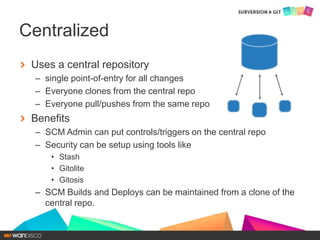
Uses a central repository
– single point-of-entry for all changes
– Everyone clones from the central repo
– Everyone pull/pushes from the same repo
Benefits
– SCM Admin can put controls/triggers on the central repo
– Security can be setup using tools like
• Stash
• Gitolite
• Gitosis
– SCM Builds and Deploys can be maintained from a clone of the
central repo.
Centralized
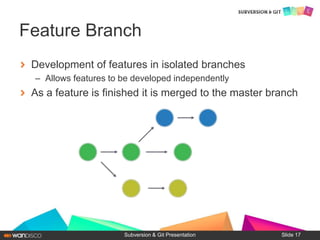
Development of features in isolated branches
– Allows features to be developed independently
As a feature is finished it is merged to the master branch
Subversion & Git Presentation
Feature Branch
Slide 17
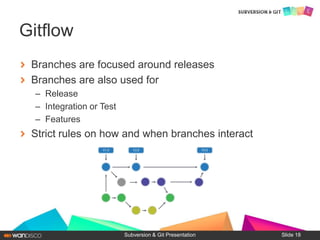
Branches are focused around releases
Branches are also used for
– Release
– Integration or Test
– Features
Strict rules on how and when branches interact
Subversion & Git Presentation
Gitflow
Slide 18
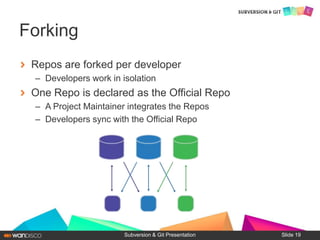
Repos are forked per developer
– Developers work in isolation
One Repo is declared as the Official Repo
– A Project Maintainer integrates the Repos
– Developers sync with the Official Repo
Subversion & Git Presentation
Forking
Slide 19
Common Admin Tasks
What to Migrate? Snapshot in time or all history?
– Push for converting a snapshot in time
– If that fails, then try for a few key slices
– Arguments
• Why burden the new repo with all the history
• Populating new workspaces will take longer
• Leave old SCM system in a locked down state for reference
– Refactoring
• Always a good time to refactor when switching SCM system
• Can cause headaches if under deadlines
– Builds
• How dependent were you on the old SCM for builds
– Paths
– Build tools (e.g. clearmake)
– APIs, Libs
Migration Considerations
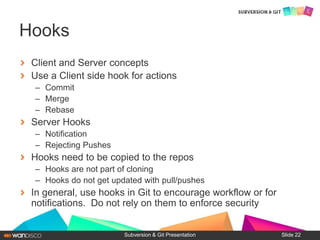
Client and Server concepts
Use a Client side hook for actions
– Commit
– Merge
– Rebase
Server Hooks
– Notification
– Rejecting Pushes
Hooks need to be copied to the repos
– Hooks are not part of cloning
– Hooks do not get updated with pull/pushes
In general, use hooks in Git to encourage workflow or for
notifications. Do not rely on them to enforce security
Subversion & Git Presentation
Hooks
Slide 22
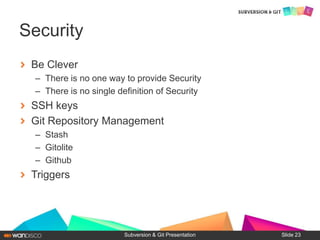
Be Clever
– There is no one way to provide Security
– There is no single definition of Security
SSH keys
Git Repository Management
– Stash
– Gitolite
– Github
Triggers
Subversion & Git Presentation
Security
Slide 23
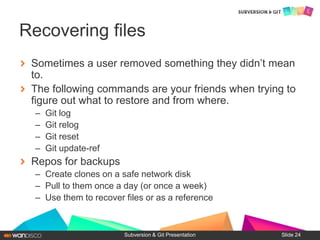
Sometimes a user removed something they didn’t mean
to.
The following commands are your friends when trying to
figure out what to restore and from where.
– Git log
– Git relog
– Git reset
– Git update-ref
Repos for backups
– Create clones on a safe network disk
– Pull to them once a day (or once a week)
– Use them to recover files or as a reference
Subversion & Git Presentation
Recovering files
Slide 24
Stories from the trenches
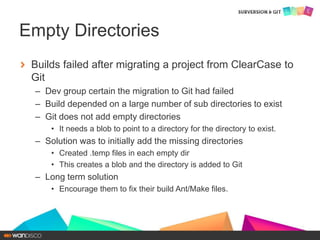
Builds failed after migrating a project from ClearCase to
Git
– Dev group certain the migration to Git had failed
– Build depended on a large number of sub directories to exist
– Git does not add empty directories
• It needs a blob to point to a directory for the directory to exist.
– Solution was to initially add the missing directories
• Created .temp files in each empty dir
• This creates a blob and the directory is added to Git
– Long term solution
• Encourage them to fix their build Ant/Make files.
Empty Directories
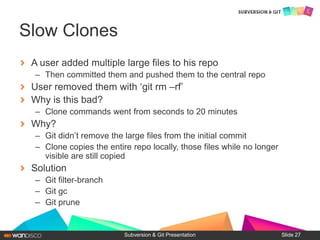
A user added multiple large files to his repo
– Then committed them and pushed them to the central repo
User removed them with ‘git rm –rf’
Why is this bad?
– Clone commands went from seconds to 20 minutes
Why?
– Git didn’t remove the large files from the initial commit
– Clone copies the entire repo locally, those files while no longer
visible are still copied
Solution
– Git filter-branch
– Git gc
– Git prune
Subversion & Git Presentation
Slow Clones
Slide 27
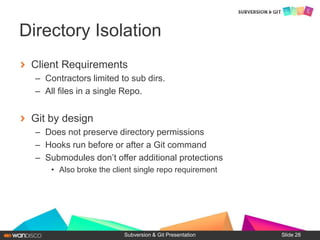
Client Requirements
– Contractors limited to sub dirs.
– All files in a single Repo.
Git by design
– Does not preserve directory permissions
– Hooks run before or after a Git command
– Submodules don’t offer additional protections
• Also broke the client single repo requirement
Subversion & Git Presentation
Directory Isolation
Slide 28
Client workflow depended on Tags
Git Tags are not shared by default
– Tags need to be explicitly;
• Pushed to the remote
• Pulled locally
Solutions
– Reevaluate Workflow
– Share pull command with Tag name
– Share Hash
Subversion & Git Presentation
Universal Tags
Slide 29
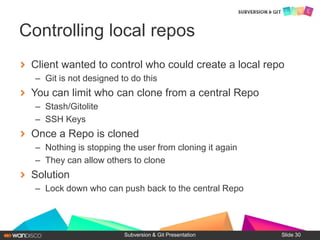
Client wanted to control who could create a local repo
– Git is not designed to do this
You can limit who can clone from a central Repo
– Stash/Gitolite
– SSH Keys
Once a Repo is cloned
– Nothing is stopping the user from cloning it again
– They can allow others to clone
Solution
– Lock down who can push back to the central Repo
Subversion & Git Presentation
Controlling local repos
Slide 30
Client wants to Clone one subdir of a Repo
– Build requires entire Repo
– Deploy requires one sub dir
– Build happens weeks before the deploy
– Deploy wants a fresh Repo
• Just build results and deployment script
Solution
– Submodules
Subversion & Git Presentation
Partial Clone
Slide 31
Questions
Shawn Doyle
ReleaseTEAM Inc
sdoyle@releaseteam.com
www.linkedin.com/in/releaseteam/
http://twitter.com/ReleaseTEAMInc

Introduction to git administration

  • 1.
    Introduction to GitAdministration For New Administrators Shawn Doyle ReleaseTEAM Inc sdoyle@releaseteam.com www.linkedin.com/in/releaseteam/ http://twitter.com/ReleaseTEAMInc
  • 2.
    Premium SCM Consultingfirm since 1999 Focus on Software Configuration Management On site and remote consulting services – Build Automation – CM tool administration, customization, upgrades, migrations Classroom training / hands-on mentoring R e l e a s e T E ClearCase ClearQuest Jenkins Git RTC Build Forge SVN Jira Electric Commander Shawn Doyle - ReleaseTEAM
  • 4.
     For theadministrator new to Git  An overview of Git  Workflows  Common admin tasks  Access control  Triggers  Stories from the trenches Subversion & Git Presentation Agenda Slide 4
  • 5.
    So you noware a Git Admin
  • 6.
    Git has sprungup in many organizations. Spreading like a wild fire from the development groups. – Developers want less restrictions to their productivity – SCM is always seen as a restriction and rarely a necessary one SCM admins are finding they need to support Git regardless of existing corporate standards. SCM admins need to find a way to control the chaos. Most commercial SCM tools now support Git as a client. Don’t panic Git is fun, powerful and it is the future. Subversion & Git Presentation Wait.. What? how did this happen Slide 6
  • 7.
    DVCS – Learn thedifference Users – Training – Indulging the Git promoter(s) Many solutions to common problems – Authentication – Workflows – Multiple available UIs Cleaning up after user mistakes Subversion & Git Presentation What am I in for? Slide 7
  • 8.
    1. RTFM http://git-scm.com/book 2.Now that you read the Git book, go thru these tutorials 3. Watch these videos - Google Tech Talks Linus Torvalds on git Randal Schwartz on Git 4. RTFW https://git.wiki.kernel.org/index.php/Main_Page 5. Create a repo and start playing! Subversion & Git Presentation How I learned Git Slide 8
  • 9.
    Tutorials http://try.github.io/levels/1/challenges/1 Code School https://www.atlassian.com/git/tutorial/git-basicsAtlassian's Git tutorial http://gitready.com/ Git Ready https://www.kernel.org/pub/software/scm/git/docs/everyday.html Everyday GIT With 20 Commands Or So Videos - Google Tech Talks http://www.youtube.com/watch?v=4XpnKHJAok8 Linus Torvalds http://www.youtube.com/watch?v=8dhZ9BXQgc4 Randal Schwartz Wiki https://git.wiki.kernel.org/index.php/GitCommunity|Git Community Wiki Subversion & Git Presentation Resources Slide 9
  • 10.
    Git Overview Subversion &Git Presentation Slide 10
  • 11.
    When coming fromanother SCM system to Git you need to shift how you think about how version control works. In a more classic SCM you think of it as a system that versions files in a tree or directory structure. Git is better thought of as a system that versions trees of files. Biggest Obstacle
  • 12.
    Stores whole copiesof the repo – No file deltas – Entire tree is captured at each commit not just the files that changed, a snapshot of the repo Branches and tags – Are pointers to commits – Very fast and light weight Subversion & Git Presentation How Git Works Slide 12
  • 13.
    Git is: – Powerful –Complex – Fast (local) – worthy contender to replace many commercial tools – the solution you are looking for Object Storage – Blobs – SHA1s or hashes – Trees Perl like syntax – ^ $ ~ … Subversion & Git Presentation Not Scared yet? Slide 13
  • 14.
  • 15.
    Centralized – Central repository FeatureBranch – Central repository + branching per features Gitflow – Branches per features, releases and bug fixes Forking – Distributed workflow Workflows
  • 16.
    Uses a centralrepository – single point-of-entry for all changes – Everyone clones from the central repo – Everyone pull/pushes from the same repo Benefits – SCM Admin can put controls/triggers on the central repo – Security can be setup using tools like • Stash • Gitolite • Gitosis – SCM Builds and Deploys can be maintained from a clone of the central repo. Centralized
  • 17.
    Development of featuresin isolated branches – Allows features to be developed independently As a feature is finished it is merged to the master branch Subversion & Git Presentation Feature Branch Slide 17
  • 18.
    Branches are focusedaround releases Branches are also used for – Release – Integration or Test – Features Strict rules on how and when branches interact Subversion & Git Presentation Gitflow Slide 18
  • 19.
    Repos are forkedper developer – Developers work in isolation One Repo is declared as the Official Repo – A Project Maintainer integrates the Repos – Developers sync with the Official Repo Subversion & Git Presentation Forking Slide 19
  • 20.
  • 21.
    What to Migrate?Snapshot in time or all history? – Push for converting a snapshot in time – If that fails, then try for a few key slices – Arguments • Why burden the new repo with all the history • Populating new workspaces will take longer • Leave old SCM system in a locked down state for reference – Refactoring • Always a good time to refactor when switching SCM system • Can cause headaches if under deadlines – Builds • How dependent were you on the old SCM for builds – Paths – Build tools (e.g. clearmake) – APIs, Libs Migration Considerations
  • 22.
    Client and Serverconcepts Use a Client side hook for actions – Commit – Merge – Rebase Server Hooks – Notification – Rejecting Pushes Hooks need to be copied to the repos – Hooks are not part of cloning – Hooks do not get updated with pull/pushes In general, use hooks in Git to encourage workflow or for notifications. Do not rely on them to enforce security Subversion & Git Presentation Hooks Slide 22
  • 23.
    Be Clever – Thereis no one way to provide Security – There is no single definition of Security SSH keys Git Repository Management – Stash – Gitolite – Github Triggers Subversion & Git Presentation Security Slide 23
  • 24.
    Sometimes a userremoved something they didn’t mean to. The following commands are your friends when trying to figure out what to restore and from where. – Git log – Git relog – Git reset – Git update-ref Repos for backups – Create clones on a safe network disk – Pull to them once a day (or once a week) – Use them to recover files or as a reference Subversion & Git Presentation Recovering files Slide 24
  • 25.
  • 26.
    Builds failed aftermigrating a project from ClearCase to Git – Dev group certain the migration to Git had failed – Build depended on a large number of sub directories to exist – Git does not add empty directories • It needs a blob to point to a directory for the directory to exist. – Solution was to initially add the missing directories • Created .temp files in each empty dir • This creates a blob and the directory is added to Git – Long term solution • Encourage them to fix their build Ant/Make files. Empty Directories
  • 27.
    A user addedmultiple large files to his repo – Then committed them and pushed them to the central repo User removed them with ‘git rm –rf’ Why is this bad? – Clone commands went from seconds to 20 minutes Why? – Git didn’t remove the large files from the initial commit – Clone copies the entire repo locally, those files while no longer visible are still copied Solution – Git filter-branch – Git gc – Git prune Subversion & Git Presentation Slow Clones Slide 27
  • 28.
    Client Requirements – Contractorslimited to sub dirs. – All files in a single Repo. Git by design – Does not preserve directory permissions – Hooks run before or after a Git command – Submodules don’t offer additional protections • Also broke the client single repo requirement Subversion & Git Presentation Directory Isolation Slide 28
  • 29.
    Client workflow dependedon Tags Git Tags are not shared by default – Tags need to be explicitly; • Pushed to the remote • Pulled locally Solutions – Reevaluate Workflow – Share pull command with Tag name – Share Hash Subversion & Git Presentation Universal Tags Slide 29
  • 30.
    Client wanted tocontrol who could create a local repo – Git is not designed to do this You can limit who can clone from a central Repo – Stash/Gitolite – SSH Keys Once a Repo is cloned – Nothing is stopping the user from cloning it again – They can allow others to clone Solution – Lock down who can push back to the central Repo Subversion & Git Presentation Controlling local repos Slide 30
  • 31.
    Client wants toClone one subdir of a Repo – Build requires entire Repo – Deploy requires one sub dir – Build happens weeks before the deploy – Deploy wants a fresh Repo • Just build results and deployment script Solution – Submodules Subversion & Git Presentation Partial Clone Slide 31
  • 32.